Live wallpapers are not a new thing. In fact we have had a lot of live wallpapers to choose from on Linux 10 years ago. Today? Not so much. In fact, be it GNOME or KDE, most desktops today are far less customizable than it used to be. Komorebi wallpaper manager for Ubuntu is kind of a way back machine in that sense.

ubuntu live wallpaper

Install Gorgeous Live Wallpapers in Ubuntu 18.10/18.04 using Komorebi

Komorebi Wallpaper Manager comes with a pretty neat collection of live wallpapers and even video wallpapers. The package also contains a simple tool to create your own live wallpapers.


Komorebi comes packaged in a convenient 64-bit DEB package, making it super easy to install in Ubuntu and most Debian based distros (latest version dropped 32-bit support though).  
ubuntu 18.10 live wallpaper

That's it! Komorebi is installed and ready to go! Now launch Komorebi from app launcher.

ubuntu komorebi live wallpaper

And finally, to uninstall Komorebi and revert all the changes you made, do this in Terminal (CTRL+ALT+T).

sudo apt remove komorebi

Komorebi works great on Ubuntu 18.10, and 18.04 LTS. A few more screenshots.

komorebi live wallpaper ubuntu

As you can see, live wallpapers obviously consume more resources than a regular wallpaper, especially when you switch on Komorebi's fancy video wallpapers. But it is definitely not a resource hog as I feared it would be.

ubuntu wallpaper live time and date

Like what you see here? Go ahead and give Komorebi Wallpaper Manager a spin. Does it turn out to be not as resource-friendly in your PC? Let us know your opinion in the comments. 

ubuntu live wallpapers

A video wallpaper example. To see them in action, watch this demo.
Nintendo's Mario needs no introduction. This game defined our childhoods. Now you can install and have fun with an unofficial version of the famed Mario platformer in Ubuntu 18.10 via this Snap package.

install Mario on Ubuntu

Play Nintendo's Mario Unofficially on Ubuntu 18.10

"Mari0 is a Mario + Portal platformer game." It is not an official release and hence the slight name change (Mari0 instead of Mario). Mari0 is still in testing, and might not work as intended. It doesn't work fullscreen for example, but everything else seems to be working great in my PC.

But please be aware that this app is still in testing, and a lot of things can go wrong. Mari0 also comes with joystick support. Here's how you install unofficial Mari0 snap package. Do this in Terminal (CTRL+ALT+T)

sudo snap install mari0

To enable joystick support:

sudo snap connect mari0:joystick

nintendo mario ubuntu

Please find time to provide valuable feedback to the developer post testing, especially if something went wrong. You can also leave your feedback in the comments below.
Apellix is a Florida based startup that specialises in aerial robotics. They intend to create safer work environments by replacing workers with its task-specific drones to complete high-risk jobs at dangerous/elevated work sites.

ubuntu robotics

Robotics with an Ubuntu Twist

Ubuntu is expanding its reach into robotics and IoT in a big way. A few years ago at the TechCrunch Disrupt event, UAVIA unveiled a new generation of its one hundred percent remotely operable drones (an industry first, they claimed), which were built with Ubuntu under the hood. Then there were other like Erle Robotics (recently renamed to Acutronic Robotics) which made big strides in drone technology using Ubuntu at its core.


Apellix is the only aerial robotics company with drones "capable of making contact with structures through fully computer-controlled flight", claims Robert Dahlstrom, Founder and CEO of Apellix.

"At height, a human pilot cannot accurately gauge distance. At 45m off the ground, they can’t tell if they are 8cm or 80cm away from the structure. With our solutions, an engineer simply positions the drone near the inspection site, then the on-board computer takes over and automates the delicate docking process." He adds.


Apellix considered many popular Linux distributions before zeroing in on Ubuntu for its stability, reliability, and large developer ecosystem. Ubuntu's versatility also enabled Apellix to use the same underlying OS platform and software packages across development and production.

The team is currently developing on Ubuntu Server with the intent to migrate to Ubuntu Core. The company is also making extensive use of Ubuntu Server, both on-board its robotic systems and its cloud operations, according to a case study by Ubuntu's parent company, Canonical Foundation. 

apellix ubuntu drones

"With our aircraft, an error of 2.5 cm could be the difference between a successful flight and a crash," comments Dahlstrom. "Software is core to avoiding those errors and allowing us to do what we do - so we knew that placing the right OS at the heart of our solutions was essential." 
Openpilot is an opensource driving agent which at the moment can perform industry-standard functions such as Adaptive Cruise Control and Lane Keeping Assist System for a select few auto manufacturers.

opensource autopilot system

Meet Project Openpilot

Opensource isn't a misnomer in the world of autonomous cars. Even as far back as in 2013, Ubuntu was spotted in Mercedes-Benz driverless cars, and it is also a well-known fact that Google is using a 'lightly customized Ubuntu' at the core of its push towards building fully autonomous cars. 

Openpilot though is unique in its own way. It's an opensource driving agent that already works (as is claimed) in a number of models from manufacturers such as Toyota, Kia, Honda, Chevrolet, Hyundai, Jeep, etc.


Above image: An Openpilot user getting a distracted alert. Apart from Adaptive Cruise Control (ACC) and Lane Keeping Assist System functions, Openpilot developers claims that their technology currently is "about on par with Tesla Autopilot and GM Super Cruise, and better than all other manufacturers."

If Tesla's Autopilot was iOS, Openpilot developers would like their product to become the "Android for cars", the ubiquitous software of choice when autonomous systems on cars goes universal.


The Openpilot-endorsed, officially supported list of cars keeps growing. It now includes some 40 odd models from manufacturers ranging from Toyota to Hyundai. And they are actively testing Openpilot on newer cars from VW, Subaru etc. according to their Twitter feed.

Even a lower variant of Tesla Model S which came without Tesla Autopilot system was upgraded with comma.ai's Openpilot solution which then mimicked a number of features from Tesla Autopilot, including automatic steering in highways according to this article. (comma.ai is the startup behind Openpilot)

Related read: Udacity's attempts to build a fully opensource self-driving car, and Linux Foundation's Automotive Grade Linux (AGL) infotainment system project which Toyota intends to use in its future cars.
OK, that might be an overstatement. But Oranchelo is good, really good.

Oranchelo Icons Theme for Ubuntu 18.10

Oranchelo is a flat-design icon theme originally designed for XFCE4 desktop. Though it works great on GNOME as well. I especially like the distinct take on Firefox and Chromium icons, as you can see in the screenshot.


Here's how you install Oranchelo icons theme on Ubuntu 18.10 using Oranchelo PPA. Just copy-paste the following three commands to Terminal (CTRL+ALT+T).

sudo add-apt-repository ppa:oranchelo/oranchelo-icon-theme
sudo apt update
sudo apt install oranchelo-icon-theme

Now run GNOME Tweaks, Appearance > Icons > Oranchelo.


Meet the artist behind Oranchelo icons theme at his deviantart page. So, how do you like the new icons? Let us know your opinion in the comments below.


Have been using "Cosmic Cuttlefish" since its first beta. It is perhaps one of the most visually pleasing Ubuntu releases ever. But more on that later. Now let's discuss what can be done to improve the overall user-experience by diving deep into the nitty gritties of Canonical's brand new flagship OS.

1. Enable MP3/MP4/AVI Playback, Adobe Flash etc.

This has been perhaps the standard 'first-thing-to-do' ever since the Ubuntu age dawned on us. You do have an option to install most of the 'restricted-extras' while installing the OS itself now, but if you are not-sure you've ticked all the right boxes, just run the following command in Terminal.

sudo apt install ubuntu-restricted-extras

OR

You can install it straight from the Ubuntu Software Center by CLICKING HERE.

2. Get GNOME Tweaks

GNOME Tweaks is non-negotiable.

things to do after installing ubuntu 18.10

GNOME Tweaks is an app the lets you tweak little things in GNOME based OSes that are otherwise hidden behind menus. If you are on Ubuntu 18.10, Tweaks is a must. Honestly, I don't remember if it was installed as a default. But here you install it anyway, Apt-URL will prompt you if the app already exists.


Search for Gnome Tweaks in Ubuntu Software Center. OR simply CLICK HERE to go straight to the app in Software Center. OR even better, copy-paste this command in Terminal (keyboard shortcut: CTRL+ALT+T).

sudo apt install gnome-tweaks

3. Displaying Date/Battery Percentage on Top Panel  

The screenshot, I hope, is self explanatory.

things to do after installing ubuntu 18.10

If you have GNOME Tweaks installed, this is easily done. Open GNOME tweaks, goto 'Top Bar' sidemenu and enable/disable what you need.

4. Enable 'Click to Minimize' on Ubuntu Dock

Honestly, I don't have a clue why this is disabled by default. You intuitively expect the apps shortcuts on Ubuntu dock to 'minimize' when you click on it (at least I do).

In fact, the feature is already there, all you need to do is to switch it ON. Do this is Terminal.

gsettings set org.gnome.shell.extensions.dash-to-dock click-action 'minimize'

That's it. Now if you didn't find the 'click to minimize' feature useful, you can always revert Dock settings back to its original state, by copy-pasting the following command in Terminal app.

gsettings reset org.gnome.shell.extensions.dash-to-dock click-action

5. Pin/Unpin Useful Stuff from Launcher

There are a bunch of apps that are pinned to your Ubuntu launcher by default.

things to do after ubuntu 18.10
 
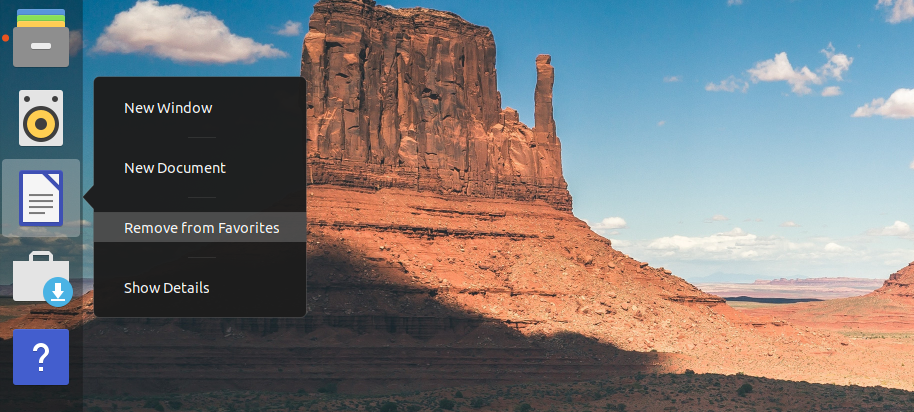
For example, I almost never use the 'Help' app or the 'Amazon' shortcut preloaded on launcher. But I would prefer a shortcut to Terminal app instead. Right-click on your preferred app on the launcher, and add-to/remove-from favorites as you please.

6. Enable/Disable Two Finger Scrolling

As you must've noticed, two-finger scrolling is a system default now. 

things to do after installing ubuntu cosmic
 
One of my laptops act strangely when two-finger scrolling is on. You can easily disable two-finger scrolling and enable old school edge-scrolling in 'Settings'.  Settings > Mouse and Touchpad

Quicktip: You can go straight to submenus by simply searching for it in GNOME's universal search bar.

ubuntu 18.10 cosmic

Take for example the screenshot above, where I triggered the GNOME menu by hitting Super(Windows) key, and simply searched for 'mouse' settings. The first result will take me directly to the 'Settings' submenu for 'Mouse and Touchpad' that we saw earlier. Easy right? More examples will follow.

7. Nightlight Mode ON

When you're glued to your laptop/PC screen for a large amount of time everyday, it is advisable that you enable the automatic nightlight mode for the sake of your eyes. Be it the laptop or my phone, this has become an essential feature. The sight of a LED display without nightlight ON during lowlight conditions immediately gives me a headache these days. Easily one of my favourite in-built features on GNOME.


Settings > Devices > Display > Night Light ON/OFF

things to do after installing ubuntu 18.10

OR as before, Hit superkey > search for 'night light'. It will take you straight to the submenu under Devices > Display. Guess you wouldn't need anymore examples on that.

things to do after installing ubuntu 18.10

8. Safe Eyes App for Ubuntu

A popup that will fill the entire screen and forces you to take your eyes off it.

apps for ubuntu 18.10

Apart from enabling the nighlight mode, Safe Eyes is another app I strongly recommend to those who stare at their laptops for long periods of time. This nifty little app forces you to take your eyes off the computer screen and do some standard eye-exercises at regular intervals (which you can change).

things to do after installing ubuntu 18.10

Installation is pretty straight forward. Just these 3 commands on your Terminal.

sudo add-apt-repository ppa:slgobinath/safeeyes
sudo apt update 
sudo apt install safeeyes 

9. Privacy on Ubuntu 18.10

Guess I don't need to lecture you on the importance of privacy in the post-PRISM era.

ubuntu 18.10 privacy

Ubuntu remembers your usage & history to recommend you frequently used apps and such. And this is never shared over the network. But if you're not comfortable with this, you can always disable and delete your usage history on Ubuntu. Settings > Privacy > Usage & History 

10. Perhaps a New Look & Feel?

As you might have noticed, I'm not using the default Ubuntu theme here.

themes ubuntu 18.10

Right now I'm using System 76's Pop OS GTK theme and icon sets. They look pretty neat I think. Just three commands to install it in your Ubuntu 18.10.

sudo add-apt-repository ppa:system76/pop
sudo apt-get update 
sudo apt install pop-icon-theme pop-gtk-theme pop-gnome-shell-theme 
sudo apt install pop-wallpapers 

Execute last command if you want Pop OS wallpapers as well. To enable the newly installed theme and icon sets, launch GNOME Tweaks > Appearance (see screenshot). I will be making separate posts on themes, icon sets and GNOME shell extensions. So stay subscribed. 

11. Disable Error Reporting

If you find the "application closed unexpectedly" popups annoying, and would like to disable error reporting altogether, this is what you need to do.

sudo gedit /etc/default/apport

This will open up a text editor window which has only one entry: "enabled=1". Change the value to '0' (zero) and you have Apport error reporting completely disabled.


Follow us on Facebook, and Twitter. 
"RIOT powers the Internet of Things like Linux powers the Internet." RIOT is a small, free and opensource operating system for the memory constrained, low power wireless IoT devices.


RIOT OS: A tiny OS for embedded systems

Initially developed by Freie Universität Berlin (FU Berlin), INRIA institute and HAW Hamburg, Riot OS has evolved over the years into a very competent alternative to TinyOS, Contiki etc. and now supports application programming with programming languages such as C and C++, and provides full multithreading and real-time capabilities. RIOT can run on 8-bit, 16-bit and 32-bit ARM Cortex processors.


RIOT is opensource, has its source code published on GitHub, and is based on a microkernel architecture (the bare minimum software required to implement an operating system). RIOT OS vs competition:

riot os for IoT

More information on RIOT OS can be found here. RIOT summits are held annually in major cities of Europe, if you are interested pin this up. Thank you for reading.
The $34 billion all cash deal to purchase opensource pioneer Red Hat is IBM's biggest ever acquisition by far. The deal will give IBM a major foothold in fast-growing cloud computing market and the combined entity could give stiff competition to Amazon's cloud computing platform, AWS. But what about Red Hat and its future?

ibm-redhat

Another Oracle - Sun Micorsystems deal in the making? 
The alarmists among us might be quick to compare the IBM - Red Hat deal with the decade old deal between Oracle Corporation and Sun Microsystems, which was then a major player in opensource software scene.

But fear not. Unlike Oracle (which killed off Sun's OpenSolaris OS almost immediately after acquisition and even started a patent war against Android using Sun's Java patents), IBM is already a major contributor to opensource software including the mighty Linux Kernel. In fact, IBM was the 6th biggest contributor to Linux kernel in 2017.

What's in it for IBM?
With the acquisition of Red Hat, IBM becomes the world's #1 hybrid cloud provider, "offering companies the only open cloud solution that will unlock the full value of the cloud for their businesses", according to Ginni Rometty, IBM Chairman, President and CEO. She adds:

“Most companies today are only 20 percent along their cloud journey, renting compute power to cut costs. The next 80 percent is about unlocking real business value and driving growth. This is the next chapter of the cloud. It requires shifting business applications to hybrid cloud, extracting more data and optimizing every part of the business, from supply chains to sales.”

The Future of Red Hat
The Red Hat story is almost as old as Linux itself. Founded in 1993, RedHat's growth was phenomenal. Over the next two decades Red Hat went on to establish itself as the premier Linux company, and Red Hat OS was the enterprise Linux operating system of choice. It set the benchmark for others like Ubuntu, openSUSE and CentOS to follow. Red Hat is currently the second largest corporate contributor to the Linux kernel after Intel (Intel really stepped-up its Linux Kernel contributions post-2013).

Regular users might be more familiar with Fedora Project, a more user-friendly operating system maintained by Red Hat that competes with mainstream, non-enterprise operating systems like Ubuntu, elementary OS, Linux Mint or even Windows 10 for that matter. Will Red Hat be able to stay independent post acquisition?

According to the official press release, "IBM will remain committed to Red Hat’s open governance, open source contributions, participation in the open source community and development model, and fostering its widespread developer ecosystem. In addition, IBM and Red Hat will remain committed to the continued freedom of open source, via such efforts as Patent Promise, GPL Cooperation Commitment, the Open Invention Network and the LOT Network." Well, that's a huge relief.

In fact, IBM and Red Hat has been partnering each other for over 20 years, with IBM serving as an early supporter of Linux, collaborating with Red Hat to help develop and grow enterprise-grade Linux. And as IBM CEO mentioned, the acquisition is more of an evolution of the long-standing partnership between the two companies.
"Open source is the default choice for modern IT solutions, and I’m incredibly proud of the role Red Hat has played in making that a reality in the enterprise,” said Jim Whitehurst, President and CEO, Red Hat. “Joining forces with IBM will provide us with a greater level of scale, resources and capabilities to accelerate the impact of open source as the basis for digital transformation and bring Red Hat to an even wider audience – all while preserving our unique culture and unwavering commitment to open source innovation."
Predicting the future can be tricky. A lot of things can go wrong. But one thing is sure, the acquisition of Red Hat by IBM is nothing like the Oracle - Sun deal. Between them, IBM and Red Hat must have contributed more to the open source community than any other organization.
One day left before the final release of Ubuntu 18.10 codenamed "Cosmic Cuttlefish". This is how you make the upgrade from Ubuntu 18.04 to 18.10.

Upgrade to Ubuntu 18.10 from 18.04

Ubuntu 18.10 has a brand new look!
As you can see from the screenshot, a lot has changed. Ubuntu 18.10 arrives with a major theme overhaul. After almost a decade, the default Ubuntu GTK theme ("Ambiance") is being replaced with a brand new one called "Yaru". The new theme is based heavily on GNOME's default "Adwaita" GTK theme. More on that later.

Upgrade from Ubuntu 18.04 LTS to 18.10
If you're on Ubuntu 18.04 LTS, upgrading to 18.10 "cosmic" is a pretty straight forward affair. Since 18.04 is a long-term support (LTS) release (meaning the OS will get official updates for about 5 years), it may not prompt you with an upgrade option when 18.10 finally arrives. 

So here's how it's done. Disclaimer: back up your critical data before going forward. And better don't try this on mission critical machines. You're on LTS anyway.
  • An up-to-date Ubuntu 18.04 LTS is the first step. Do the following in Terminal.
$ sudo apt update && sudo apt dist-upgrade
$ sudo apt autoremove
  • The first command will check for updates and then proceed with upgrading your Ubuntu 18.04 LTS with the latest updates. The "autoremove" command will clean up any and all dependencies that were installed with applications, and are no longer required.
  • Now the slightly tricky part. You need to edit the /etc/update-manager/release-upgrades file and change the Prompt=never entry to Prompt=normal  or else it will give a "no release found" error message. 
  • I used Vim to make the edit. But for the sake of simplicity, let's use gedit. 
$ sudo gedit /etc/update-manager/release-upgrades
  • Make the edit and save the changes. Now you are ready to go ahead with the upgrade. Make sure your laptop is plugged-in, this will take time. 
  • To be on the safer side, please make sure that there's at least 5GB of disk space left in your home partition (it will prompt you and exit if you don't have enough space required for the upgrade). 
$ sudo do-release-upgrade -d
  • That's it. Wait for a few hours and let it do its magic. 
My upgrade to Ubuntu 18.10 was uneventful. Nothing broke and it all worked like a charm. After the upgrade is done, you're probably still stuck with your old theme. Fire up "Gnome Tweaks" app (get it from App Store if you already haven't), and change the theme and the icons to "Yaru". 
A real private mode in Firefox? A Tor integrated Firefox could just be that. Tor Project is currently working with Mozilla to integrate Tor into Firefox.


Over the years, and more so since Cambridge Analytica scandal, Mozilla has taken a progressively tougher stance on user privacy. Firefox's Facebook Container extension, for example, makes it much harder for Facebook to  collect data from your browsing activities (yep, that's a thing. Facebook is tracking your every move on the web). The extension now includes Facebook Messenger and Instagram as well.

Firefox with Tor Integration

For starters, Tor is a free software and an open network for anonymous communication over the web. "Tor protects you by bouncing your communications around a distributed network of relays run by volunteers all around the world: it prevents somebody watching your Internet connection from learning what sites you visit, and it prevents the sites you visit from learning your physical location."

And don't confuse this project with Tor Browser, which is web browser with Tor's elements built on top of Firefox stable builds. Tor Browser in its current form has many limitations. Since it is based on Firefox ESR, it takes a lot of time and effort to rebase the browser with new features from Firefox's stable builds every year or so.

Enter 'Project Fusion'

Now that Mozilla has officially taken over the works of integrating Tor into Firefox through Project Fusion, things could change for the better. With the intention of creating a 'super-private' mode in Firefox that supports First Party Isolation (which prevents cookies from tracking you across domains), Fingerprinting Resistance (which blocks user tracking through canvas elements), and Tor proxy, 'Project Fusion' is aiming big. To put it together, the goals of 'Project Fusion' can be condescend into four points.
  • Implementing fingerprinting resistance, make more user friendly and reduce web breakage.
  • Implement proxy bypass framework.
  • Figure out the best way to integrate Tor proxy into Firefox.
  • Real private browsing mode in Firefox, with First Party Isolation, Fingerprinting Resistance, and Tor proxy.
As good as it sounds, Project Fusion could still be years away or may not happen at all given the complexity of the work. According to a Tor Project Developer at Mozilla:
"Our ultimate goal is a long way away because of the amount of work to do and the necessity to match the safety of Tor Browser in Firefox when providing a Tor mode. There's no guarantee this will happen, but I hope it will and we will keep working towards it."
As If you want to help, Firefox bugs tagged 'fingerprinting' in the whiteboard are a good place to start. Further reading at TOR 'Project Fusion' page.
In another major win in a span of weeks for the proponents of open source solutions in EU, Bern, the capital of Switzerland, is pushing ahead with its plans to adopt open source tools as its software of choice for all its public schools. If all goes well, some 10,000 students in Switzerland schools could soon start getting their training using an IT infrastructure that is largely open source.

Switzerland's Largest Open Source deal

Over 10,000 Students to Benefit

Switzerland's largest open-source deal introduces a brand new IT infrastructure for the public schools of its capital city. The package includes Colabora Cloud Office, an online version of LibreOffice which is to be hosted in the City of Bern's data center, as its core component. Nextcloud, Kolab, Moodle, and Mahara are the other prominent open source tools included in the package. The contract is worth CHF 13.7 million over 6 years.

In an interview given to 'Der Bund', one of Switzerland's oldest news publications, open-source advocate Matthias Stürmer, EPP city council and IT expert, told that this is probably the largest ever open-source deal in Switzerland.

Many European countries are clamoring to adopt open source solutions for their cities and schools. From the recent German Federal Information Technology Centre's (ITZBund) selection of Nexcloud as their cloud solutions partner, to city of Turin's adoption of Ubuntu, to Italian Military's LibreOffice migration, Europe's recognition of open source solutions as a legitimate alternative is gaining ground.

Ironically enough, most of these software will run on proprietary iOS platform, as the clients given to students will be all Apple iPads. But hey, it had to start somewhere. When Europe's richest countries adopt open source, others will surely take notice. Stay tuned for updates. [via inside-channels.ch]
Germany's Federal Information Technology Centre (ITZBund) opts for an on-premise cloud solution which unlike those fancy Public cloud solutions, is completely private and under its direct control.

Germany's Open Source Migration

Given the recent privacy mishaps at some of biggest public cloud solution providers on the planet, it is only natural that government agencies across the world are opting for solutions that could provide users with more privacy and security. If the recent Facebook - Cambridge Analytica debacle is any indication, data vulnerability has become a serious national security concern for all countries. 

In light of these developments, government of Germany's IT service provider, ITZBund, has chosen Nextcloud as their cloud solutions partner. Nextcloud is a free and open source cloud solutions company based out of Europe that lets you to install and run its software on your private server. ITZBund has been running a pilot since 2016 with some 5000 users on Nextcloud's platform.
"Nextcloud is pleased to announce that the German Federal Information Technology Center (ITZBund) has chosen Nextcloud as their solution for efficient and secure file sharing and collaboration in a public tender. Nextcloud is operated by the ITZBund, the central IT service provider of the federal government, and made available to around 300,000 users. ITZBund uses a Nextcloud Enterprise Subscription to gain access to operational, scaling and security expertise of Nextcloud GmbH as well as long-term support of the software."
ITZBund employs about 2,700 people that include IT specialists, engineers and network and security professionals. After the successful completion of the pilot, a public tender was floated by ITZBund which eventually selected Nextcloud as their preferred partner. Nextcloud scored high on security requirements and scalability, which it addressed through its unique Apps concept.
Not many might remember HP's capable webOS. The open source webOS operating system was HP's answer to Android and iOS platforms. It was slick and very user-friendly from the start, some even considered it a better alternative to Android for Tablets at the time. But like many other smaller players, HP's webOS just couldn't find enough takers, and the project was abruptly ended and sold off of to LG.


The Open Source LG webOS

Under the 2013 agreement with HP Inc., LG Electronics had unlimited access to all webOS related documentation and source code. When LG took the project underground, webOS was still an open-source project.

After many years of development, webOS is now LG's platform of choice for its Smart TV division. It is generally considered as one of the better sorted Smart TV user interfaces. LG is now ready to take the platform beyond Smart TVs. LG has developed an open source version of its platform, called webOS Open Source Edition, now available to the public at webosose.org.

Dr. I.P. Park, CTO at LG Electronics had this to say, "webOS has come a long way since then and is now a mature and stable platform ready to move beyond TVs to join the very exclusive group of operating systems that have been successfully commercialization at such a mass level. As we move from an app-based environment to a web-based one, we believe the true potential of webOS has yet to be seen."

By open sourcing webOS, it looks like LG is gunning for Samsung's Tizen OS, which is also open source and built on top of Linux. In our opinion, device manufacturers preferring open platforms (like Automotive Grade Linux), over Android or iOS is a welcome development for the long-term health of the industry in general.
Remember Automotive Grade Linux that we discussed earlier in detail? Well, Amazon.com is trying to make sure its speech-recognition/voice-assistant tech, Alexa, is compatible with AGL.


Amazon wants its Alexa Voice Assistant Compatible with AGL
Automotive Grade Linux (AGL) is a project hosted by Linux foundation which aims to build a truly open, Linux based platform and framework for automotive applications. Currently, the market is utterly dominated by Android Auto and Apple Car Play. AGL, when it debuts in 2018 Toyota Camry, will be a more neutral, open, and inter-operable alternative to Android Auto and iOS CarPlay.

Amazon on the other hand is working with Nuance Communications Inc. and Voicebox Technologies Corp. to write code that makes AGL's in-vehicle apps compatible with several voice-assistant technologies (and not just Amazon's Alexa), eliminating the need for developers to make multiple versions. Given the fact that most automakers are also trying to diversify away from Google and Apple's restrictive eco-systems, this could eventually turn into a major win for all parties involved, including consumers.

Currently, Automotive Grade Linux has wide backing from major tech companies and auto giants such as Jaguar Land Rover, Nissan, Honda, Toyota, Suzuki, Mercedes-Benz, Mazda, Subaru and the likes. Toyota is a platinum sponsor and has already unveiled solid plans for using Automotive Grade Linux's platform in its cars starting with hugely popular Toyota Camry model in 2018. 

"With Alexa integrated into AGL, the process of building voice experiences is dramatically simplified for developers," John Scumniotales, director of products at Amazon Alexa Automotive, said in an email to Bloomberg. "This would ultimately speed the rollout of voice services into cars. AGL has an opportunity to scale voice experiences across the automotive industry." Read more on this here.