1;!function(){try { var e="undefined"!=typeof globalThis?globalThis:"undefined"!=typeof global?global:"undefined"!=typeof window?window:"undefined"!=typeof self?self:{},n=(new e.Error).stack;n&&((e._debugIds|| (e._debugIds={}))[n]="ca7a8cdf-fb23-afd1-3be2-210be472a154")}catch(e){}}();
2(globalThis.TURBOPACK||(globalThis.TURBOPACK=[])).push(["object"==typeof document?document.currentScript:void 0,719262,e=>{"use strict";var t=e.i(318008),s=e.i(35203);e.s(["Anchor",0,e=>{let o,n=(0,s.c)(2),{id:i}=e;return n[0]!==i?(o=(0,t.jsx)("span",{id:i}),n[0]=i,n[1]=o):o=n[1],o}])},217263,e=>{e.v({"callout-card":"callout-card-module__W7FBdq__callout-card",dark:"callout-card-module__W7FBdq__dark"})},615378,127531,104302,395251,126680,e=>{"use strict";var t=e.i(318008),s=e.i(35203),o=e.i(159428),n=e.i(687652),i=e.i(293737);let a=()=>{let e=(0,n.useContext)(i.DocPageProjectContext);if(!e)throw Error("useDocPageProjectContext() must be used within a <DocPage> component");return e};e.s(["useDocPageProjectContext",0,a],127531),e.s(["ApiToken",0,()=>{let e,n,i=(0,s.c)(5),{project:r}=a(),l=null==r||(0,o.hasReadableApiToken)(r.apiToken)?void 0:o.API_TOKEN_OWNER_ONLY_MESSAGE,c=r?.apiToken;return i[0]!==c?(e=(0,o.apiTokenOrPlaceholder)(c),i[0]=c,i[1]=e):e=i[1],i[2]!==l||i[3]!==e?(n=(0,t.jsx)("code",{title:l,children:e}),i[2]=l,i[3]=e,i[4]=n):n=i[4],n}],615378);var r=e.i(944967);e.s(["Article",0,e=>{let o,n,i=(0,s.c)(3),{children:a}=e;return i[0]===Symbol.for("react.memo_cache_sentinel")?(o=(0,r.default)("py-2","w-full","min-w-0","max-w-full"),i[0]=o):o=i[0],i[1]!==a?(n=(0,t.jsx)("article",{className:o,children:a}),i[1]=a,i[2]=n):n=i[2],n}],104302),e.s(["Blockquote",0,e=>{let o,n,i=(0,s.c)(3),{children:a}=e;return i[0]===Symbol.for("react.memo_cache_sentinel")?(o=(0,r.default)("my-6","border-l-2","border-indigo-400","pl-4","text-zinc-600","dark:text-zinc-300","[&>p]:my-0","[&>p+p]:mt-3"),i[0]=o):o=i[0],i[1]!==a?(n=(0,t.jsx)("blockquote",{className:o,children:a}),i[1]=a,i[2]=n):n=i[2],n}],395251);var l=e.i(296961),c=e.i(270289),u=e.i(609828),d=e.i(932986),h=e.i(217263);let p={info:{bg:"bg-indigo-50/50 dark:bg-indigo-500/10",border:"border-indigo-200 dark:border-indigo-500/25",icon:"text-indigo-500 dark:text-indigo-400"},warning:{bg:"bg-amber-50/50 dark:bg-amber-500/10",border:"border-amber-200 dark:border-amber-500/25",icon:"text-amber-600 dark:text-amber-500"},success:{bg:"bg-green-50/50 dark:bg-green-500/10",border:"border-green-200 dark:border-green-500/25",icon:"text-green-600 dark:text-green-500"},error:{bg:"bg-red-50/50 dark:bg-red-500/10",border:"border-red-200 dark:border-red-500/25",icon:"text-red-600 dark:text-red-500"}},m={info:d.InformationCircleIcon,warning:u.ExclamationTriangleIcon,success:l.CheckCircleIcon,error:c.ExclamationCircleIcon};e.s(["CalloutCard",0,e=>{let o,n,i,a,l,c,u,d,f,g,y=(0,s.c)(23),{title:w,children:b,showIcon:v,variant:k}=e,S=void 0===v||v,T=void 0===k?"info":k,_=m[T],I=p[T];return y[0]!==I.bg||y[1]!==I.border?(o=(0,r.default)("my-6","rounded-lg","border","px-4","py-4",I.bg,I.border,h.default["callout-card"]),y[0]=I.bg,y[1]=I.border,y[2]=o):o=y[2],y[3]===Symbol.for("react.memo_cache_sentinel")?(n=(0,r.default)("flex","gap-3"),y[3]=n):n=y[3],y[4]!==_||y[5]!==S||y[6]!==I.icon?(i=S&&(0,t.jsx)("div",{className:(0,r.default)("shrink-0"),children:(0,t.jsx)(_,{className:(0,r.default)("h-6","w-6",I.icon),"aria-hidden":"true"})}),y[4]=_,y[5]=S,y[6]=I.icon,y[7]=i):i=y[7],y[8]===Symbol.for("react.memo_cache_sentinel")?(a=(0,r.default)("flex-1","min-w-0"),y[8]=a):a=y[8],y[9]!==w?(l=w&&(0,t.jsx)("h3",{className:(0,r.default)("font-semibold","text-zinc-900","dark:text-zinc-100","mb-2"),children:w}),y[9]=w,y[10]=l):l=y[10],y[11]===Symbol.for("react.memo_cache_sentinel")?(c=(0,r.default)("text-zinc-800","dark:text-zinc-200"),y[11]=c):c=y[11],y[12]!==b?(u=(0,t.jsx)("div",{className:c,children:b}),y[12]=b,y[13]=u):u=y[13],y[14]!==l||y[15]!==u?(d=(0,t.jsxs)("div",{className:a,children:[l,u]}),y[14]=l,y[15]=u,y[16]=d):d=y[16],y[17]!==d||y[18]!==i?(f=(0,t.jsxs)("div",{className:n,children:[i,d]}),y[17]=d,y[18]=i,y[19]=f):f=y[19],y[20]!==f||y[21]!==o?(g=(0,t.jsx)("div",{className:o,children:f}),y[20]=f,y[21]=o,y[22]=g):g=y[22],g}],126680)},96827,35692,810311,677136,e=>{"use strict";var t=e.i(719262),s=e.i(615378),o=e.i(104302),n=e.i(395251),i=e.i(126680),a=e.i(655176),r=e.i(318008),l=e.i(35203),c=e.i(458636),u=e.i(830616);e.i(496524);var d=e.i(412699),h=e.i(314681),p=e.i(668987),m=e.i(944967),f=e.i(727197),g=e.i(317677),y=e.i(760687),w=e.i(628144),b=e.i(147060);e.i(88865);var v=e.i(127531),k=e.i(159428);RegExp(String.raw`\{%\s*(${"code_with_project_selector|command_card_block|command_card|callout_card|callout|expand|tab|tabs|project_link|footnote|code"})\b([^%]*)%\}((?:(?!\{%)[\s\S])*?)\{%\s*/\1\s*%\}`,"g");let S=e=>"/docs"===e?"/docs.md":`${e}.md`;e.s(["docsUrlToMarkdownPath",0,S],35692);let T=e=>{let t,s,o,n,i,a=(0,l.c)(15),{idleLabel:c,activeLabel:u,isActive:d}=e;a[0]!==d?(t=(0,m.default)("col-start-1","row-start-1",{invisible:d}),a[0]=d,a[1]=t):t=a[1],a[2]!==c||a[3]!==d||a[4]!==t?(s=(0,r.jsx)("span",{className:t,"aria-hidden":d,children:c}),a[2]=c,a[3]=d,a[4]=t,a[5]=s):s=a[5];let h=!d;a[6]!==h?(o=(0,m.default)("col-start-1","row-start-1",{invisible:h}),a[6]=h,a[7]=o):o=a[7];let p=!d;return a[8]!==u||a[9]!==o||a[10]!==p?(n=(0,r.jsx)("span",{className:o,"aria-hidden":p,children:u}),a[8]=u,a[9]=o,a[10]=p,a[11]=n):n=a[11],a[12]!==s||a[13]!==n?(i=(0,r.jsxs)("span",{className:"grid",children:[s,n]}),a[12]=s,a[13]=n,a[14]=i):i=a[14],i},_=e=>{let t,s,o,n,i,a,c=(0,l.c)(12);c[0]!==e?({children:t,className:s,type:n,...o}=e,c[0]=e,c[1]=t,c[2]=s,c[3]=o,c[4]=n):(t=c[1],s=c[2],o=c[3],n=c[4]);let u=void 0===n?"button":n;return c[5]!==s?(i=(0,m.default)("inline-flex","h-7","max-w-full","shrink-0","items-center","gap-1.5","whitespace-nowrap","rounded-lg","border","border-zinc-200","bg-white","px-2.5","text-[13px]","font-medium","text-zinc-700","transition","hover:border-zinc-300","hover:bg-zinc-50","hover:text-zinc-900","dark:border-zinc-700","dark:bg-zinc-900","dark:text-zinc-300","dark:hover:border-zinc-600","dark:hover:bg-zinc-800","dark:hover:text-zinc-100",s),c[5]=s,c[6]=i):i=c[6],c[7]!==t||c[8]!==o||c[9]!==i||c[10]!==u?(a=(0,r.jsx)("button",{type:u,className:i,...o,children:t}),c[7]=t,c[8]=o,c[9]=i,c[10]=u,c[11]=a):a=c[11],a},I=()=>{let e,t,s,o,n,i=(0,l.c)(11),a=(0,w.useRouter)(),{copied:c,copyToClipboard:u}=(0,b.useCopyToClipboard)();i[0]!==a.pathname?(e=S(a.pathname),i[0]=a.pathname,i[1]=e):e=i[1];let d=e;return i[2]!==u||i[3]!==d?(t=()=>u(`${window.location.origin}${d}`),i[2]=u,i[3]=d,i[4]=t):t=i[4],i[5]===Symbol.for("react.memo_cache_sentinel")?(s=(0,r.jsx)(y.LinkIcon,{className:"h-3.5 w-3.5 shrink-0 text-zinc-400","aria-hidden":!0}),i[5]=s):s=i[5],i[6]!==c?(o=(0,r.jsx)(T,{idleLabel:"Copy .md URL",activeLabel:"Copied!",isActive:c}),i[6]=c,i[7]=o):o=i[7],i[8]!==t||i[9]!==o?(n=(0,r.jsxs)(_,{onClick:t,children:[s,o]}),i[8]=t,i[9]=o,i[10]=n):n=i[10],n};var R=e.i(183151),C=e.i(687652);let x=(0,C.createContext)(null),A=()=>(0,C.useContext)(x);e.s(["DocsPageMarkdownProvider",0,e=>{let t,s=(0,l.c)(3),{markdownSource:o,children:n}=e;return s[0]!==n||s[1]!==o?(t=(0,r.jsx)(x.Provider,{value:o,children:n}),s[0]=n,s[1]=o,s[2]=t):t=s[2],t},"useDocsPageMarkdownSource",0,A],810311);let M=()=>{let e,t,s,o,n=(0,l.c)(9),i=A(),{copied:a,copyToClipboard:c}=(0,b.useCopyToClipboard)();return i?(n[0]!==c||n[1]!==i?(e=()=>c(i),n[0]=c,n[1]=i,n[2]=e):e=n[2],n[3]===Symbol.for("react.memo_cache_sentinel")?(t=(0,r.jsx)(R.ClipboardDocumentIcon,{className:"h-3.5 w-3.5 shrink-0 text-zinc-400","aria-hidden":!0}),n[3]=t):t=n[3],n[4]!==a?(s=(0,r.jsx)(T,{idleLabel:"Copy page",activeLabel:"Copied!",isActive:a}),n[4]=a,n[5]=s):s=n[5],n[6]!==e||n[7]!==s?(o=(0,r.jsxs)(_,{onClick:e,children:[t,s]}),n[6]=e,n[7]=s,n[8]=o):o=n[8],o):null},E=e=>{let t,s,o,n,i,a=(0,l.c)(8),{children:c,id:u}=e;a[0]===Symbol.for("react.memo_cache_sentinel")?(t=(0,m.default)("group","relative","min-w-0"),a[0]=t):t=a[0];let d=`#${u}`;return a[1]===Symbol.for("react.memo_cache_sentinel")?(s=(0,m.default)("absolute","-left-6","top-1/2","-translate-y-1/2","pr-2","opacity-0","group-hover:opacity-100","transition-opacity","text-zinc-400","hover:text-indigo-500","dark:hover:text-indigo-400","hidden","sm:block"),a[1]=s):s=a[1],a[2]===Symbol.for("react.memo_cache_sentinel")?(o=(0,r.jsx)(p.LinkIcon,{className:(0,m.default)("h-4","w-4")}),a[2]=o):o=a[2],a[3]!==d?(n=(0,r.jsx)("a",{href:d,className:s,"aria-label":"Link to this section",children:o}),a[3]=d,a[4]=n):n=a[4],a[5]!==c||a[6]!==n?(i=(0,r.jsxs)("div",{className:t,children:[n,c]}),a[5]=c,a[6]=n,a[7]=i):i=a[7],i},U=e=>{let t,s,o,n,i,a,c=(0,l.c)(11),{children:u,id:d}=e;return c[0]===Symbol.for("react.memo_cache_sentinel")?(t=(0,m.default)("flex","flex-col-reverse","items-stretch","gap-0","py-8","first:pt-0","sm:flex-row","sm:items-start","sm:justify-between","sm:gap-4"),c[0]=t):t=c[0],c[1]===Symbol.for("react.memo_cache_sentinel")?(s=(0,m.default)(g.DOCS_HEADER_SCROLL_MARGIN_CLASS,"pt-4","text-2xl","font-bold","leading-tight","text-indigo-900","dark:text-zinc-100","wrap-break-word","sm:pt-0","sm:text-[2rem]","tracking-tight"),c[1]=s):s=c[1],c[2]!==u||c[3]!==d?(o=(0,r.jsx)(f.H1,{id:d,className:s,children:u}),c[2]=u,c[3]=d,c[4]=o):o=c[4],c[5]!==d||c[6]!==o?(n=(0,r.jsx)(E,{id:d,children:o}),c[5]=d,c[6]=o,c[7]=n):n=c[7],c[8]===Symbol.for("react.memo_cache_sentinel")?(i=(0,r.jsxs)("div",{className:"flex max-w-full shrink-0 flex-wrap items-center justify-start gap-2 sm:justify-end sm:pt-1.5",children:[(0,r.jsx)(M,{}),(0,r.jsx)(I,{})]}),c[8]=i):i=c[8],c[9]!==n?(a=(0,r.jsxs)("div",{className:t,children:[n,i]}),c[9]=n,c[10]=a):a=c[10],a},L=e=>{let t,s,o,n,i=(0,l.c)(8),{children:a,id:c}=e;return i[0]===Symbol.for("react.memo_cache_sentinel")?(t=(0,m.default)("mt-12","mb-6","first:mt-0"),i[0]=t):t=i[0],i[1]===Symbol.for("react.memo_cache_sentinel")?(s=(0,m.default)(g.DOCS_HEADER_SCROLL_MARGIN_CLASS,"text-xl","leading-8","font-semibold","text-indigo-900","dark:text-zinc-100","sm:text-[1.375rem]","tracking-tight"),i[1]=s):s=i[1],i[2]!==a||i[3]!==c?(o=(0,r.jsx)(f.H2,{id:c,className:s,children:a}),i[2]=a,i[3]=c,i[4]=o):o=i[4],i[5]!==c||i[6]!==o?(n=(0,r.jsx)("div",{className:t,children:(0,r.jsx)(E,{id:c,children:o})}),i[5]=c,i[6]=o,i[7]=n):n=i[7],n},P=e=>{let t,s,o,n,i=(0,l.c)(8),{children:a,id:c}=e;return i[0]===Symbol.for("react.memo_cache_sentinel")?(t=(0,m.default)("mt-8","mb-4"),i[0]=t):t=i[0],i[1]===Symbol.for("react.memo_cache_sentinel")?(s=(0,m.default)(g.DOCS_HEADER_SCROLL_MARGIN_CLASS,"text-lg","leading-7","font-semibold","text-indigo-900","dark:text-zinc-100","sm:text-xl"),i[1]=s):s=i[1],i[2]!==a||i[3]!==c?(o=(0,r.jsx)(f.H3,{id:c,className:s,children:a}),i[2]=a,i[3]=c,i[4]=o):o=i[4],i[5]!==c||i[6]!==o?(n=(0,r.jsx)("div",{className:t,children:(0,r.jsx)(E,{id:c,children:o})}),i[5]=c,i[6]=o,i[7]=n):n=i[7],n}
2,O=e=>{let t=(0,l.c)(13),{level:s,children:o,id:n}=e;switch(s){case 1:{let e;return t[0]!==o||t[1]!==n?(e=(0,r.jsx)(U,{id:n,children:o}),t[0]=o,t[1]=n,t[2]=e):e=t[2],e}case 2:{let e;return t[3]!==o||t[4]!==n?(e=(0,r.jsx)(L,{id:n,children:o}),t[3]=o,t[4]=n,t[5]=e):e=t[5],e}case 3:{let e;return t[6]!==o||t[7]!==n?(e=(0,r.jsx)(P,{id:n,children:o}),t[6]=o,t[7]=n,t[8]=e):e=t[8],e}default:{let e,i=4===s?"h4":5===s?"h5":"h6";return t[9]!==i||t[10]!==o||t[11]!==n?(e=(0,r.jsx)(i,{id:n,className:g.DOCS_HEADER_SCROLL_MARGIN_CLASS,children:o}),t[9]=i,t[10]=o,t[11]=n,t[12]=e):e=t[12],e}}};function N(){return(0,d.toast)({title:"Agent instructions copied"})}function D(){window.navigator.clipboard.writeText((0,c.buildAgentInstructionsBody)()).then(N).catch(h.handleError)}let j=e=>{let t,s,o=(0,l.c)(5),{children:n,className:i}=e;return o[0]!==i?(t=(0,m.default)("card","bg-black","overflow-hidden","text-white","text-base","font-normal","dark",i),o[0]=i,o[1]=t):t=o[1],o[2]!==n||o[3]!==t?(s=(0,r.jsx)("div",{className:t,children:n}),o[2]=n,o[3]=t,o[4]=s):s=o[4],s},F=e=>{let t,s=(0,l.c)(3),{children:o,action:n}=e;return s[0]!==n||s[1]!==o?(t=n?(0,r.jsxs)("div",{className:"flex items-baseline justify-between pr-4",children:[(0,r.jsx)("h3",{className:(0,m.default)("card-title","mb-0!"),children:o}),n]}):(0,r.jsx)("h3",{className:(0,m.default)("card-title"),children:o}),s[0]=n,s[1]=o,s[2]=t):t=s[2],t};var H=e.i(24777),$=e.i(244142),q=e.i(582238),B=e.i(305655),G=e.i(44167),W=e.i(664396);let z=()=>{let e,t,s,o=(0,l.c)(9),{data:n}=(0,G.useUserContext)(),i=!n?.authInfo?.isSignedIn;o[0]!==i?(e={skip:i},o[0]=i,o[1]=e):e=o[1];let{data:a}=(0,W.useProjects)(e),{project:c,setProject:u}=(0,v.useDocPageProjectContext)();o[2]!==a||o[3]!==u?(t=e=>{u(a?.find(t=>t.id===e.id)??null)},o[2]=a,o[3]=u,o[4]=t):t=o[4];let d=t;return o[5]!==d||o[6]!==a||o[7]!==c?(s=(0,r.jsx)(V,{projects:a,selectedProject:c,setProject:d}),o[5]=d,o[6]=a,o[7]=c,o[8]=s):s=o[8],s},V=e=>{let t,s,o,n=(0,l.c)(8),{projects:i,selectedProject:a,setProject:c}=e;if(!i||!a)return null;let u=`${a.organization.name} / ${a.name}`;return n[0]===Symbol.for("react.memo_cache_sentinel")?(t=(0,m.default)("px-4","py-1","sm:px-6","sm:flex","sm:flex-row","sm:justify-start","sm:items-baseline"),n[0]=t):t=n[0],n[1]!==u||n[2]!==i?(s=e=>{let{open:t}=e;return(0,r.jsxs)(r.Fragment,{children:[(0,r.jsx)(H.Listbox.Label,{className:(0,m.default)("block","text-sm","font-medium","text-zinc-800","dark:text-zinc-100","mr-2"),children:"Project"}),(0,r.jsxs)("div",{className:(0,m.default)("mt-1","relative","sm:ml-2","sm:flex-1"),children:[(0,r.jsxs)(B.StyledListboxButton,{children:[(0,r.jsx)("span",{className:(0,m.default)("block","truncate"),children:u}
2),(0,r.jsx)("span",{className:(0,m.default)("absolute","inset-y-0","right-0","flex","items-center","pr-2","pointer-events-none"),children:(0,r.jsx)(q.ChevronUpDownIcon,{className:(0,m.default)("h-5","w-5","text-zinc-800","dark:text-zinc-100"),"aria-hidden":"true"})})]}),(0,r.jsx)($.Transition,{show:t,as:C.Fragment,leave:(0,m.default)("transition","ease-in","duration-100"),leaveFrom:(0,m.default)("opacity-100"),leaveTo:(0,m.default)("opacity-0"),children:(0,r.jsx)(B.StyledListboxOptions,{children:i.map(K)})})]})]})},n[1]=u,n[2]=i,n[3]=s):s=n[3],n[4]!==a||n[5]!==c||n[6]!==s?(o=(0,r.jsx)("div",{className:t,children:(0,r.jsx)(H.Listbox,{value:a,onChange:c,children:s})}),n[4]=a,n[5]=c,n[6]=s,n[7]=o):o=n[7],o};function K(e){return(0,r.jsx)(B.StyledListboxOption,{value:e,children:`${e.organization.name} / ${e.name}`},e.id)}var Y=e.i(551481),J=e.i(919414);e.i(395774);let X=(0,C.createContext)(null);var Q=e.i(989571),Z=e.i(444717);let ee=e=>{let t,s,o=(0,l.c)(9),{title:n,children:i,buttonClassName:a,panelClassName:c,icon:u,defaultOpen:d}=e,h=void 0!==d&&d;return o[0]!==a||o[1]!==i||o[2]!==u||o[3]!==c||o[4]!==n?(t=e=>{let{open:t}=e;return(0,r.jsxs)(r.Fragment,{children:[(0,r.jsxs)(Q.Disclosure.Button,{className:(0,m.default)("mt-6 mb-4 flex items-center gap-1 text-sm font-medium text-zinc-700 hover:text-zinc-900 dark:text-zinc-300 dark:hover:text-zinc-100 transition-colors",a),children:[(0,r.jsx)(Z.ChevronRightIcon,{className:(0,m.default)("h-4 w-4 transition-transform duration-200",t&&"rotate-90")}),u&&(0,r.jsx)("span",{className:"h-4 w-4 mr-1 text-zinc-400 shrink-0",children:u}),(0,r.jsx)("span",{children:n})]}),(0,r.jsx)(Q.Disclosure.Panel,{className:(0,m.default)("mb-6","overflow-hidden","rounded-md","p-6",c),children:i})]})},o[0]=a,o[1]=i,o[2]=u,o[3]=c,o[4]=n,o[5]=t):t=o[5],o[6]!==h||o[7]!==t?(s=(0,r.jsx)(Q.Disclosure,{defaultOpen:h,children:t}),o[6]=h,o[7]=t,o[8]=s):s=o[8],s};var et=e.i(549877);let es=e=>{let t,s,o,n=(0,l.c)(5),{src:i,alt:a}=e;return n[0]===Symbol.for("react.memo_cache_sentinel")?(t=(0,m.default)("w-full"),n[0]=t):t=n[0],n[1]===Symbol.for("react.memo_cache_sentinel")?(s=(0,m.default)("w-full","h-auto","object-contain","rounded-md"),n[1]=s):s=n[1],n[2]!==a||n[3]!==i?(o=(0,r.jsx)("span",{className:t,children:(0,r.jsx)("img",{src:i,alt:a,className:s})}),n[2]=a,n[3]=i,n[4]=o):o=n[4],o};e.s(["Image",0,es],677136);var eo=e.i(39786),en=e.i(372222),ei=e.i(845722);let ea={Anchor:t.Anchor,ApiToken:s.ApiToken,StandaloneApiToken:()=>{let e,t,s,o,n,i=(0,l.c)(10),{project:a}=(0,v.useDocPageProjectContext)(),c=(0,k.apiTokenOrPlaceholder)(a?.apiToken),u=(0,C.useRef)(null),d=c.trim();return i[0]!==d?(e=(0,r.jsx)("pre",{ref:u,className:"overflow-x-auto p-4 text-sm text-zinc-800 dark:text-stone-100",children:(0,r.jsx)("code",{children:d})}),i[0]=d,i[1]=e):e=i[1],i[2]===Symbol.for("react.memo_cache_sentinel")?(t=(0,r.jsx)(b.TransientCopyButton,{code:u}),i[2]=t):t=i[2],i[3]!==e?(s=(0,r.jsx)("div",{className:"card bg-black overflow-hidden text-white text-base font-normal dark my-4",children:(0,r.jsx)("div",{className:"group",children:(0,r.jsxs)("div",{className:"relative",children:[e,t]})})}),i[3]=e,i[4]=s):s=i[4],i[5]!==a?(o=null!=a&&!(0,k.hasReadableApiToken)(a.apiToken)&&(0,r.jsx)("p",{className:"text-sm text-zinc-400 -mt-2 mb-4",children:k.API_TOKEN_OWNER_ONLY_MESSAGE}),i[5]=a,i[6]=o):o=i[6],i[7]!==s||i[8]!==o?(n=(0,r.jsxs)(r.Fragment,{children:[s,o]}),i[7]=s,i[8]=o,i[9]=n):n=i[9],n},Article:o.Article,Blockquote:n.Blockquote,CalloutCard:i.CalloutCard,Code:a.Code,AgentInstructionsHeading:()=>{let e,t,s=(0,l.c)(2);return s[0]===Symbol.for("react.memo_cache_sentinel")?(e=(0,r.jsx)(O,{level:2,id:"instructions",children:"Instructions"}),s[0]=e):e=s[0],s[1]===Symbol.for("react.memo_cache_sentinel")?(t=(0,r.jsxs)("div",{className:"mt-12 mb-6 flex items-center justify-between gap-4 [&>div]:my-0",children:[e,(0,r.jsxs)("button",{type:"button",onClick:D,className:"inline-flex shrink-0 items-center gap-1.5 rounded-sm border border-zinc-300 bg-white px-2.5 py-1.5 text-sm text-zinc-700 transition-colors hover:bg-zinc-50 hover:text-zinc-900 dark:border-zinc-600 dark:bg-zinc-900 dark:text-zinc-300 dark:hover:bg-zinc-800 dark:hover:text-zinc-100",children:[(0,r.jsx)(u.ClipboardIcon,{className:"h-4 w-4","aria-hidden":"true"}),"Copy"]})]}),s[1]=t):t=s[1],t},CodeWithProjectSelectorCard:e=>{let t,s,o,n,i=(0,l.c)(5),{children:a}=e;return i[0]===Symbol.for("react.memo_cache_sentinel")?(t=(0,m.default)("my-4","py-2","flex","flex-col","gap-4"),s=(0,r.jsx)(z,{}),i[0]=t,i[1]=s):(t=i[0],s=i[1]),i[2]===Symbol.for("react.memo_cache_sentinel")?(o=(0,m.default)("card-body"),i[2]=o):o=i[2],i[3]!==a?(n=(0,r.jsxs)("div",{className:t,children:[s,(0,r.jsx)(j,{children:(0,r.jsx)("div",{className:o,children:a})})]}),i[3]=a,i[4]=n):n=i[4],n},DocsTabs:e=>{let t,s,o,n,i,a,c,u,d,p,f,g=(0,l.c)(36),{labels:y,children:b,direction:v,noTabSelectedByDefault:k,defaultSelectedTabLabel:S,tabNameSpace:T}=e,_=T??"tab",[I,R]=(0,C.useState)(k?null:S??y[0]);g[0]!==I||g[1]!==y?(t=I?y.indexOf(I):-1,g[0]=I,g[1]=y,g[2]=t):t=g[2];let x=t,A=window.location.search;g[3]!==y||g[4]!==_?(s=()=>{let e=new URLSearchParams(A||"").get(_),t=y.find(t=>t===e);t&&R(t)},o=[A,y,_],g[3]=y,g[4]=_,g[5]=s,g[6]=o):(s=g[5],o=g[6]),(0,C.useEffect)(s,o);let M=(0,w.useRouter)();g[7]!==y||g[8]!==_||g[9]!==M?(n=e=>{let t=y[e];M.push({pathname:M.pathname,query:{...M.query,[_]:t}},void 0,{shallow:!0,scroll:!1}
2).catch(h.handleError)},g[7]=y,g[8]=_,g[9]=M,g[10]=n):n=g[10];let E=n;if(g[11]!==v?(i=(0,m.default)("mb-8","min-w-0","max-w-full","grid"===v?"grid grid-cols-1 gap-2 sm:grid-cols-2":(0,m.default)("flex border-b border-zinc-200 dark:border-zinc-800",(!v||"horizontal"===v)&&"flex-row overflow-x-auto scrollbar-hide gap-0","vertical"===v&&"flex-col")),g[11]=v,g[12]=i):i=g[12],g[13]!==I||g[14]!==v||g[15]!==y){let e;g[17]!==I||g[18]!==v?(e=e=>(0,r.jsx)(J.Tab,{onClick:()=>R(e),className:(0,m.default)("text-sm font-medium transition-colors duration-200 focus:outline-hidden","grid"===v?(0,m.default)("min-w-0 max-w-full py-2.5 px-3 sm:px-4 rounded-md border text-center whitespace-normal wrap-break-word",e===I?"border-indigo-500 bg-indigo-500/10 text-indigo-500 dark:text-indigo-400":"border-zinc-200 text-zinc-600 hover:border-zinc-300 hover:bg-zinc-50 dark:border-zinc-700 dark:text-zinc-400 dark:hover:border-zinc-600 dark:hover:bg-zinc-800"):(0,m.default)("whitespace-nowrap py-2 px-4 border-b-2 -mb-px",e===I?"border-indigo-500 text-indigo-500 dark:text-indigo-400":"border-transparent text-zinc-500 hover:text-zinc-700 dark:text-zinc-400 dark:hover:text-zinc-200")),children:e},e),g[17]=I,g[18]=v,g[19]=e):e=g[19],a=y.map(e),g[13]=I,g[14]=v,g[15]=y,g[16]=a}else a=g[16];return g[20]!==i||g[21]!==a?(c=(0,r.jsx)(J.Tab.List,{className:i,children:a}),g[20]=i,g[21]=a,g[22]=c):c=g[22],g[23]!==I||g[24]!==_?(u={currentTab:I,nameSpace:_},g[23]=I,g[24]=_,g[25]=u):u=g[25],g[26]!==b?(d=(0,r.jsx)(J.Tab.Panels,{children:b}),g[26]=b,g[27]=d):d=g[27],g[28]!==u||g[29]!==d?(p=(0,r.jsx)(X.Provider,{value:u,children:d}),g[28]=u,g[29]=d,g[30]=p):p=g[30],g[31]!==E||g[32]!==x||g[33]!==p||g[34]!==c?(f=(0,r.jsxs)(J.Tab.Group,{onChange:E,defaultIndex:x,children:[c,p]}),g[31]=E,g[32]=x,g[33]=p,g[34]=c,g[35]=f):f=g[35],f},DocsTab:e=>{let t,s=(0,l.c)(3),{label:o,children:n}=e,i=(0,C.useContext)(X);if(!i||o!==i.currentTab){let e;return s[0]===Symbol.for("react.memo_cache_sentinel")?(e=(0,r.jsx)(r.Fragment,{}),s[0]=e):e=s[0],e}return s[1]!==n?(t=(0,r.jsx)(r.Fragment,{children:n}),s[1]=n,s[2]=t):t=s[2],t},DocsExpand:e=>{let t,s,o=(0,l.c)(5);return o[0]!==e.panelClassName?(t=(0,m.default)("bg-zinc-50 border border-zinc-200 dark:bg-zinc-800/50 dark:border-zinc-800",e.panelClassName),o[0]=e.panelClassName,o[1]=t):t=o[1],o[2]!==e||o[3]!==t?(s=(0,r.jsx)(ee,{...e,panelClassName:t}),o[2]=e,o[3]=t,o[4]=s):s=o[4],s},Expand:ee,CommandCard:e=>{let t,s,o,n,i,a,c,u=(0,l.c)(14),{title:d,hideProjectSelector:h,children:p}=e;return u[0]===Symbol.for("react.memo_cache_sentinel")?(t=(0,m.default)("my-4","py-2","flex","flex-col","gap-2"),u[0]=t):t=u[0],u[1]!==h?(s=!h&&(0,r.jsx)(z,{}),u[1]=h,u[2]=s):s=u[2],u[3]!==d?(o=d&&(0,r.jsx)(F,{children:d}),u[3]=d,u[4]=o):o=u[4],u[5]===Symbol.for("react.memo_cache_sentinel")?(n=(0,m.default)("card-body"),u[5]=n):n=u[5],u[6]!==p?(i=(0,r.jsx)("div",{className:n,children:p}),u[6]=p,u[7]=i):i=u[7],u[8]!==o||u[9]!==i?(a=(0,r.jsxs)(j,{children:[o,i]}),u[8]=o,u[9]=i,u[10]=a):a=u[10],u[11]!==s||u[12]!==a?(c=(0,r.jsxs)("div",{className:t,children:[s,a]}),u[11]=s,u[12]=a,u[13]=c):c=u[13],c},CommandCardBlock:e=>{let t,s,o=(0,l.c)(5),{title:n,children:i}=e;return o[0]!==n?(t=n&&(0,r.jsx)("h4",{className:(0,m.default)("py-2","font-code","font-medium"),children:n}),o[0]=n,o[1]=t):t=o[1],o[2]!==i||o[3]!==t?(s=(0,r.jsxs)("div",{className:Y.REDACTION_CLASSES,children:[t,i]}),o[2]=i,o[3]=t,o[4]=s):s=o[4],s},Fence:e=>{let t,s=(0,l.c)(4),{language:o,label:n,children:i}=e;return s[0]!==i||s[1]!==n||s[2]!==o?(t=(0,r.jsx)(j,{className:"my-6",children:(0,r.jsx)(et.CodeBlock,{language:o,label:n,children:i})}),s[0]=i,s[1]=n,s[2]=o,s[3]=t):t=s[3],t},Footnote:e=>{let t,s,o=(0,l.c)(3),{children:n}=e;return o[0]===Symbol.for("react.memo_cache_sentinel")?(t=(0,m.default)("[&_p]:text-sm","[&_p]:leading-6","[&_p]:text-zinc-500","dark:[&_p]:text-zinc-400"),o[0]=t):t=o[0],o[1]!==n?(s=(0,r.jsx)("div",{className:t,children:n}),o[1]=n,o[2]=s):s=o[2],s},Heading:O,Image:es,Link:e=>{let t,s,o,n=(0,l.c)(7),{href:i,children:a}=e;n[0]!==i?(t=(0,eo.isInternalDocLink)(i),n[0]=i,n[1]=t):t=n[1];let c=t;n[2]===Symbol.for("react.memo_cache_sentinel")?(s=(0,m.default)("link","dark:text-indigo-400","break-all","sm:break-normal"),n[2]=s):s=n[2];let u=!c;return n[3]!==a||n[4]!==i||n[5]!==u?(o=(0,r.jsx)(en.Link,{className:s,href:i,external:u,children:a}),n[3]=a,n[4]=i,n[5]=u,n[6]=o):o=n[6],o},List:e=>{let t,s,o=(0,l.c)(6),{ordered:n,children:i}=e,a=n?"ol":"ul",c=n?"list-decimal":"list-disc";return o[0]!==c?(t=(0,m.default)(c,"list-outside","ml-8","my-4","space-y-2","text-zinc-700","dark:text-zinc-300","leading-6","[&_ul]:mt-2","[&_ul]:mb-0","[&_ol]:mt-2","[&_ol]:mb-0"),o[0]=c,o[1]=t):t=o[1],o[2]!==a||o[3]!==i||o[4]!==t?(s=(0,r.jsx)(a,{className:t,children:i}),o[2]=a,o[3]=i,o[4]=t,o[5]=s):s=o[5],s},Paragraph:e=>{let t,s,o=(0,l.c)(3),{children:n}=e;return o[0]===Symbol.for("react.memo_cache_sentinel")?(t=(0,m.default)("my-4","leading-7","text-zinc-600","dark:text-zinc-300","wrap-break-word","wrap-anywhere"),o[0]=t):t=o[0],o[1]!==n?(s=(0,r.jsx)("p",{className:t,children:n}),o[1]=n,o[2]=s):s=o[2],s},ProjectLink:e=>{let t,s,o,n=(0,l.c)(10),{children:i}=e,{project:a}=(0,v.useDocPageProjectContext)();if(!a){let e,t;return n[0]===Symbol.for("react.memo_cache_sentinel")?(e=(0,m.default)("link"),n[0]=e):e=n[0],n[1]!==i?(t=(0,r.jsx)(en.Link,{className:e,href:"/",external:!0,children:i}),n[1]=i,n[2]=t):t=n[2],t}n[3]!==a.name||n[4]!==a.organization.name?(t=(0,ei.getProjectUrl)({organizationName:a.organization.name,projectName:a.name}),n[3]=a.name,n[4]=a.organization.name,n[5]=t):t=n[5];let c=t;return n[6]===Symbol.for("react.memo_cache_sentinel")?(s=(0,m.default)("link"),n[6]=s):s=n[6],n[7]!==i||n[8]!==c?(o=(0,r.jsx)(en.Link,{className:s,href:c,external:!0,children:i}),n[7]=i,n[8]=c,n[9]=o):o=n[9],o},ProjectName:()=>{let e,t=(0,l.c)(2),{project:s}=(0,v.useDocPageProjectContext)(),o=s?.name||"<your-project-name>";return t[0]!==o?(e=(0,r.jsx)("code",{children:o}),t[0]=o,t[1]=e):e=t[1],e},ProjectRecordingToken:()=>{let e,t=(0,l.c)(2),{project:s}=(0,v.useDocPageProjectContext)(),o=s?.recordingToken||"<RECORDING_TOKEN>";return t[0]!==o?(e=(0,r.jsx)("code",{children:o}),t[0]=o,t[1]=e):e=t[1],e},ProjectSlug:()=>{let e,t=(0,l.c)(2),{project:s}=(0,v.useDocPageProjectContext)(),o=s?`${s.organization.name}/${s.name}`:"<ORGANIZATION>/<PROJECT>";return t[0]!==o?(e=(0,r.jsx)(r.Fragment,{children:o}),t[0]=o,t[1]=e):e=t[1],e},Table:e=>{let t,s,o,n=(0,l.c)(4),{children:i}=e;return n[0]===Symbol.for("react.memo_cache_sentinel")?(t=(0,m.default)("my-6","w-full","overflow-x-auto","rounded-lg","border","border-zinc-200","dark:border-zinc-800"),s=(0,m.default)("w-full","border-collapse","text-left","text-sm","text-zinc-700","dark:text-zinc-300","[&_th]:border-b [&_th]:border-r [&_th]:border-zinc-200 [&_th]:bg-zinc-50 [&_th]:px-3.5 [&_th]:py-2 [&_th]:text-left [&_th]:font-semibold [&_th]:text-zinc-900 [&_th]:align-bottom [&_th:last-child]:border-r-0","dark:[&_th]:border-zinc-800 dark:[&_th]:bg-zinc-800/60 dark:[&_th]:text-zinc-100","[&_td]:border-b [&_td]:border-r [&_td]:border-zinc-200 [&_td]:px-3.5 [&_td]:py-2 [&_td]:align-top [&_td:last-child]:border-r-0","dark:[&_td]:border-zinc-800","[&_tbody_tr:nth-child(even)]:bg-zinc-50/60","dark:[&_tbody_tr:nth-child(even)]:bg-zinc-800/30","[&_tbody_tr:last-child_td]:border-b-0","[&_td_code]:whitespace-nowrap [&_th_code]:whitespace-nowrap"),n[0]=t,n[1]=s):(t=n[0],s=n[1]),n[2]!==i?(o=(0,r.jsx)("div",{className:t,children:(0,r.jsx)("table",{className:s,children:i})}),n[2]=i,n[3]=o):o=n[3],o}};e.s(["components",0,ea],96827)},293737,e=>{"use strict";var t=e.i(318008),s=e.i(35203),o=e.i(687652),n=e.i(44167),i=e.i(664396);let a=(0,o.createContext)(null);e.s(["DocPageProjectContext",0,a,"DocPageProjectContextProvider",0,e=>{let r,l,c,u,d,h=(0,s.c)(11),{children:p}=e,{data:m}=(0,n.useUserContext)(),f=!m?.authInfo?.isSignedIn;h[0]!==f?(r={skip:f},h[0]=f,h[1]=r):r=h[1];let{data:g}=(0,i.useProjects)(r),[y,w]=(0,o.useState)(null);h[2]!==y?(l={project:y,setProject:w},h[2]=y,h[3]=l):l=h[3];let b=l;return h[4]!==y||h[5]!==g?(c=()=>{!y&&g?.length&&w(g[0])},u=[y,g],h[4]=y,h[5]=g,h[6]=c,h[7]=u):(c=h[6],u=h[7]),(0,o.useEffect)(c,u),h[8]!==p||h[9]!==b?(d=(0,t.jsx)(a.Provider,{value:b,children:p}),h[8]=p,h[9]=b,h[10]=d):d=h[10],d}])},317677,e=>{"use strict";e.s(["DOCS_CHROME_CLASS",0,"docs-chrome font-sans text-[15px] antialiased text-zinc-700 bg-white dark:text-zinc-300 dark:bg-zinc-900","DOCS_HEADER_MAIN_MIN_HEIGHT_CLASS",0,"min-h-[calc(100vh-5.25rem)]","DOCS_HEADER_SCROLL_MARGIN_CLASS",0,"scroll-mt-12 lg:scroll-mt-21","DOCS_HEADER_SIDEBAR_HEIGHT_CLASS",0,"lg:h-[c
2alc(100vh-5.25rem)]","DOCS_HEADER_TOP_OFFSET_CLASS",0,"lg:top-21","DOCS_TOP_BAR_HEIGHT_CLASS",0,"h-12","DOCS_TOP_BAR_HEIGHT_PX",0,48,"DOCS_TOP_BAR_ONLY_MAIN_MIN_HEIGHT_CLASS",0,"min-h-[calc(100vh-3rem)]","DOCS_TOP_BAR_ONLY_SIDEBAR_HEIGHT_CLASS",0,"lg:h-[calc(100vh-3rem)]","DOCS_TOP_BAR_ONLY_TOP_OFFSET_CLASS",0,"lg:top-12"])},715524,326659,368054,e=>{"use strict";var t=e.i(318008),s=e.i(35203),o=e.i(13158),n=e.i(627194),i=e.i(707740),a=e.i(944967),r=e.i(398145),l=e.i(628144),c=e.i(122047),u=e.i(724677),d=e.i(552099),h=e.i(828220),p=e.i(452290),m=e.i(727685),f=e.i(317677),g=e.i(39786);let y=(e,t)=>e===t||e.startsWith(`${t}/`),w=[{name:"Start building",isSectionLabel:!0,childItems:[{name:"Introduction",href:g.DOCS_URL},{name:"Connect & set up",href:g.ONBOARDING_GUIDE_URL},{name:"Install the Recorder",defaultExpanded:!1,childItems:[{name:"Overview",href:g.INSTALL_RECORDER_URL},{name:"Via a Script Tag",href:g.INSTALL_RECORDER_AS_SCRIPT_TAG_URL},{name:"Via an NPM Package",href:g.INSTALL_RECORDER_AS_NPM_DEPENDENCY_URL}]},{name:"Setup Tests to Run In CI",defaultExpanded:!1,childItems:[{name:"Overview",href:g.CI_SETUP_URL},{name:"Via your CI Pipeline",href:g.GITHUB_ACTIONS_SETUP_URL},{name:"Via Vercel, Netlify or Other Preview URLs",href:g.CLOUD_REPLAY_URL}]}]},{name:"Overview",isSectionLabel:!0,childItems:[{name:"Architecture Overview",href:g.ARCHITECTURE_OVERVIEW_URL},{name:"Network Recording & Patching",href:g.NETWORK_RECORDING_AND_PATCHING_URL},{name:"Glossary",href:g.GLOSSARY_URL},{name:"Recording",defaultExpanded:!1,childItems:[{name:"Manually Record a Test",href:g.RECORD_A_TEST_MANUALLY_URL},{name:"Recorder Developer Tools",href:g.RECORDER_DEVELOPER_TOOLS_URL},{name:"Ingest Existing Tests",href:g.INGEST_EXISTING_TESTS_URL},{name:"Control What Data is Recorded",href:g.CONTROLLING_DATA_RECORDED_URL},{name:"Control When Recording Starts and Stops",href:g.CONTROLLING_WHEN_RECORDING_STARTS_AND_STOPS_URL},{name:"Redaction",href:g.REDACTION_URL},{name:"Record Custom Values",href:g.RECORD_CUSTOM_VALUES_URL},{name:"Record the Context of a User Session",href:g.RECORD_SESSION_CONTEXT_URL},{name:"Using the Custom Event API",href:g.USE_CUSTOM_EVENT_API_URL},{name:"Handle File Uploads",href:g.HANDLE_FILE_UPLOADS_URL}]},{name:"Test Execution & CI",defaultExpanded:!1,childItems:[{name:"Select Which Sessions to Run",href:g.TESTING_POOL_URL},{name:"Manually Creating Deployments on GitHub",href:g.CREATE_DEPLOYMENTS_ON_GITHUB_URL},{name:"Ensure Base Test Runs are Available",href:g.PREPARE_FOR_TESTS_URL},{name:"Block Merging PRs with Unacknowledged Diffs",href:g.MAKE_CHECK_BLOCKING_URL},{name:"Retry a Test Run",href:g.RETRY_TEST_RUN_URL},{name:"Detect Diffs Locally",href:g.DETECT_DIFFS_LOCALLY_URL},{name:"Enable Source Coverage",href:g.ENABLE_SOURCE_COVERAGE_URL},{name:"Configure Ignore Patterns",href:g.CONFIGURE_IGNORE_PATTERNS_URL},{name:"Blocking Requests During Replay",href:g.BLOCKED_REQUESTS_URL},{name:"Advanced",defaultExpanded:!1,childItems:[{name:"Incremental Asset Upload",href:g.INCREMENTAL_ASSET_UPLOAD_URL},{name:"Filter Sessions by Start URL",href:g.FILTER_SESSIONS_BY_START_URL_URL},{name:"Companion Assets",href:g.COMPANION_ASSETS_ADVANCED_URL}]}]},{name:"Framework & App Configuration",defaultExpanded:!1,childItems:[{name:"Next.js App Router",href:g.NEXTJS_APP_ROUTER_ADDITIONAL_SETUP_URL},{name:"Next.js Pages Router",href:g.NEXTJS_PAGES_ROUTER_URL},{name:"React with Vite",href:g.REACT_VITE_URL},{name:"React with Create React App",href:g.REACT_CRA_URL},{name:"Vue with Vite",href:g.VUE_VITE_URL},{name:"Angular CLI",href:g.ANGULAR_CLI_URL},{name:"Test Multiple Apps or App Variants",href:g.TESTING_MULTIPLE_APPS_URL},{name:"Testing Feature Flags",href:g.TESTING_FEATURE_FLAGS},{name:"Detect If Running as a Meticulous Test",href:g.METICULOUS_WINDOW_OBJECT_URL},{name:"Record and Simulate on Different Environments",href:g.RECORD_AND_REPLAY_ON_DIFFERENT_ENVIRONMENTS_URL}]}]},{name:"Troubleshooting",isSectionLabel:!0,childItems:[{name:"Recorder",defaultExpanded:!1,childItems:[{name:"Troubleshoot Recorder",href:g.TROUBLESHOOT_RECORDER_URL},{name:"Required CSP Exceptions for Recorder",href:g.RECORDER_CSP_EXCEPTIONS_URL},{name:"Ensure Recorder Captures All Requests",href:g.ENSURE_RECORDER_CAPTURES_ALL_REQUESTS_URL}]},{name:"Simulations & Diffs",defaultExpanded:!1,childItems:[{name:"Troubleshoot Failed Simulations",href:g.TROUBLESHOOTING_FAILED_SIMULATIONS_URL},{name:"Fix False Positive Diffs, or Ignore Elements",href:g.FIX_FALSE_POSITIVES_URL},{name:"Inaccurate Simulation Warnings",href:g.TROUBLESHOOT_REPLAY_ACCURACY_URL}]},{name:"Authentication",defaultExpanded:!1,childItems:[{name:"Troubleshoot Authentication and Authorisation",href:g.TROUBLESHOOT_AUTH_URL},{name:"Simulating Auth",href:g.AUTH_ENABLING_FULL_AUTH_URL},{name:"Bypassing Auth",href:g.AUTH_BYPASSING_AUTH_URL}]},{name:"Warnings in Meticulous UI",defaultExpanded:!1,childItems:[{name:"Inaccurate Simulation Warnings",href:g.TROUBLESHOOT_REPLAY_ACCURACY_URL}]}]},{name:"Reference",isSectionLabel:!0,childItems:[{name:"CLI Commands",href:g.CLI_COMMANDS_URL},{name:"Environment Variables",href:g.ENVIRONMENT_VARIABLES_URL},{name:"Performance API",href:g.PERFORMANCE_API_URL}]}],b=[{name:"What's new",href:g.AGENTS_WHATS_NEW_URL},{name:"Setup",href:g.AGENTS_SETUP_URL},{name:"CLI Commands",href:g.AGENTS_CLI_COMMANDS_URL},{name:"MCP Server",href:g.AGENTS_MCP_SERVER_URL},{name:"Skills & Use cases",href:g.AGENTS_SKILLS_URL},{name:"Agent swarm (Beta)",href:g.AGENT_SWARM_DOCS_URL}],v=[{name:"Built-in checks",isSectionLabel:!0,childItems:[{name:"Overview",href:g.BUILT_IN_CHECKS_URL}
2,{name:"Accessibility",href:g.BUILT_IN_CHECKS_ACCESSIBILITY_URL},{name:"Network requests",href:g.BUILT_IN_CHECKS_NETWORK_REQUESTS_URL},{name:"React component renders",href:g.BUILT_IN_CHECKS_REACT_COMPONENT_RENDERS_URL}]},{name:"Custom checks",isSectionLabel:!0,childItems:[{name:"Overview",href:g.CUSTOM_CHECKS_URL},{name:"Writing a custom check",href:g.CUSTOM_CHECKS_WRITING_A_CUSTOM_CHECK_URL},{name:"Recording custom snapshots",href:g.CUSTOM_CHECKS_RECORDING_CUSTOM_DATA_URL},{name:"Best practices",href:g.CUSTOM_CHECKS_BEST_PRACTICES_URL},{name:"Built-in snapshot types",href:g.CUSTOM_CHECKS_BUILT_IN_SNAPSHOT_TYPES_URL}]}],k=[{id:"get-started",name:"Get started",href:g.DOCS_URL,matches:e=>e===g.DOCS_URL||!(!y(e,"/docs")||y(e,"/docs/agents")||y(e,"/docs/custom-checks")||y(e,"/docs/built-in-checks")||y(e,g.FAQ_AND_TROUBLESHOOTING_URL)),sidebarItems:w},{id:"ai-agents",name:"AI agents",href:g.AGENTS_SETUP_URL,matches:e=>y(e,"/docs/agents"),sidebarItems:b},{id:"non-visual-checks",name:"Non-visual checks",href:g.BUILT_IN_CHECKS_URL,matches:e=>y(e,g.BUILT_IN_CHECKS_URL)||y(e,g.CUSTOM_CHECKS_URL),sidebarItems:v},{id:"faq",name:"FAQ",href:g.FAQ_AND_TROUBLESHOOTING_URL,matches:e=>y(e,g.FAQ_AND_TROUBLESHOOTING_URL),sidebarItems:[{name:"FAQ",href:g.FAQ_AND_TROUBLESHOOTING_URL}]}],S=[{id:"docs",name:"Docs",href:g.DOCS_URL},{id:"changelog",name:"Changelog",href:g.CHANGELOG_URL}],T=e=>y(e,g.CHANGELOG_URL),_=e=>k.find(t=>t.matches(e))??k[0];e.s(["DOCS_NAV_SECTIONS",0,k,"DOCS_PRODUCT_AREAS",0,S,"getActiveDocsSection",0,_,"isDocsChangelogPath",0,T],326659);let I=()=>{let e,n,i,r,l,c=(0,s.c)(8),{openSearch:u}=(0,h.useSearch)(),d=(0,p.useCommandModifierLabel)();return c[0]===Symbol.for("react.memo_cache_sentinel")?(e=(0,a.default)("group","flex","h-8","w-64","max-w-full","items-center","gap-x-2","rounded-lg","border","border-zinc-200","bg-white","px-2.5","text-[13px]","text-zinc-500","transition","hover:border-zinc-300","hover:bg-zinc-50","focus:outline-hidden","focus:ring-2","focus:ring-indigo-500/40","dark:border-zinc-700","dark:bg-zinc-900","dark:text-zinc-400","dark:hover:border-zinc-600","dark:hover:bg-zinc-800"),n=(0,t.jsx)(o.MagnifyingGlassIcon,{className:"h-3.5 w-3.5 shrink-0 text-zinc-400","aria-hidden":"true"}),i=(0,t.jsx)("span",{className:"flex-1 text-left",children:"Search..."}),c[0]=e,c[1]=n,c[2]=i):(e=c[0],n=c[1],i=c[2]),c[3]!==d?(r=null!=d?(0,t.jsxs)("kbd",{className:"inline-flex items-center gap-1 rounded-sm border border-zinc-200 bg-zinc-50 px-1 text-[11px] font-medium leading-4 text-zinc-400 dark:border-zinc-700 dark:bg-zinc-800 dark:text-zinc-500",children:[(0,t.jsx)("span",{className:"text-[12px] leading-none",children:d}),(0,t.jsx)("span",{children:"K"})]}):null,c[3]=d,c[4]=r):r=c[4],c[5]!==u||c[6]!==r?(l=(0,t.jsxs)("button",{type:"button",onClick:u,className:e,children:[n,i,r]}),c[5]=u,c[6]=r,c[7]=l):l=c[7],l},R=()=>{let e,n,i,r=(0,s.c)(4),{openSearch:l}=(0,h.useSearch)();return r[0]===Symbol.for("react.memo_cache_sentinel")?(e=(0,a.default)("inline-flex","items-center","justify-center","rounded-md","p-2","text-zinc-500","hover:bg-zinc-200/60","hover:text-zinc-900","dark:text-zinc-400","dark:hover:bg-zinc-800","dark:hover:text-zinc-100","lg:hidden"),r[0]=e):e=r[0],r[1]===Symbol.for("react.memo_cache_sentinel")?(n=(0,t.jsx)(o.MagnifyingGlassIcon,{className:"h-5 w-5","aria-hidden":"true"}),r[1]=n):n=r[1],r[2]!==l?(i=(0,t.jsx)("button",{type:"button",onClick:l,className:e,"aria-label":"Search docs",children:n}),r[2]=l,r[3]=i):i=r[3],i},C=()=>{let e,o,n,r,l=(0,s.c)(6),{onOpen:c}=(0,d.useSidebarContext)();return l[0]!==c?(e=()=>{c?.()},l[0]=c,l[1]=e):e=l[1],l[2]===Symbol.for("react.memo_cache_sentinel")?(o=(0,a.default)("inline-flex","items-center","justify-center","rounded-md","p-2","text-zinc-500","hover:bg-zinc-200/60","hover:text-zinc-900","dark:text-zinc-400","dark:hover:bg-zinc-800","dark:hover:text-zinc-100","lg:hidden"),l[2]=o):o=l[2],l[3]===Symbol.for("react.memo_cache_sentinel")?(n=(0,t.jsx)(i.Bars3Icon,{className:"h-5 w-5","aria-hidden":"true"}),l[3]=n):n=l[3],l[4]!==e?(r=(0,t.jsx)("button",{type:"button",onClick:e,className:o,"aria-label":"Open docs menu",children:n}),l[4]=e,l[5]=r):r=l[5],r},x=()=>{let e,o,n,i=(0,s.c)(6),c=(0,l.useRouter)();i[0]!==c.pathname?(e=T(c.pathname),i[0]=c.pathname,i[1]=e):e=i[1];let u=e;return i[2]!==u?(o=S.map(e=>{let s="changelog"===e.id?u:!u;return(0,t.jsxs)(r.default,{href:e.href,"aria-current":s?"page":void 0,className:(0,a.default)("relative","flex","h-full","items-center","px-3","text-[11px]","font-medium","tracking-[0.08em]","uppercase","transition-colors",s?"text-zinc-900 dark:text-zinc-100":"text-zinc-500 hover:text-zinc-800 dark:text-zinc-400 dark:hover:text-zinc-200"),children:[e.name,s?(0,t.jsx)("span",{className:"absolute inset-x-2 bottom-0 h-0.5 bg-indigo-500","aria-hidden":"true"}):null]},e.id)}),i[2]=u,i[3]=o):o=i[3],i[4]!==o?(n=(0,t.jsx)("nav",{"aria-label":"Product areas",className:"hidden h-full items-stretch lg:flex",children:o}),i[4]=o,i[5]=n):n=i[5],n};e.s(["DocsHeader",0,()=>{let e,o,i,d,h,p,g,y,w,b,v,S,A,M,E=(0,s.c)(19),U=(0,l.useRouter)();E[0]!==U.pathname?(e=T(U.pathname),E[0]=U.pathname,E[1]=e):e=E[1];let L=e;E[2]!==U.pathname?(o=_(U.pathname),E[2]=U.pathname,E[3]=o):o=E[3];let P=o;return E[4]===Symbol.for("react.memo_cache_sentinel")?(i=(0,a.default)("sticky","top-0","z-30","p-0"),d=(0,a.default)("relative","flex",f.DOCS_TOP_BAR_HEIGHT_CLASS,"items-center","gap-2","border-b","border-zinc-200","bg-zinc-100","dark:border-zinc-800","dark:bg-zinc-950","px-3","sm:gap-3"),E[4]=i,E[5]=d):(i=E[4],d=E[5]),E[6]===Symbol.for("react.memo_cache_sentinel")?(h=(0,t.jsx)(C,{}
2),E[6]=h):h=E[6],E[7]===Symbol.for("react.memo_cache_sentinel")?(p=(0,t.jsx)(c.Image,{src:"/meticulous-wordmark-dark.svg",alt:"Meticulous",width:120,height:17,className:"h-[17px] w-auto dark:hidden",style:{width:"auto"}}),E[7]=p):p=E[7],E[8]===Symbol.for("react.memo_cache_sentinel")?(g=(0,t.jsxs)("div",{className:"flex h-full min-w-0 items-stretch gap-2 sm:gap-3",children:[h,(0,t.jsx)("div",{className:"flex shrink-0 items-center rounded-sm py-2 px-2.5",children:(0,t.jsxs)(r.default,{href:"/",className:"flex shrink-0 items-center","aria-label":"Go to Meticulous app",children:[p,(0,t.jsx)(c.Image,{src:"/meticulous-wordmark.svg",alt:"Meticulous",width:120,height:17,className:"hidden h-[17px] w-auto dark:block",style:{width:"auto"}})]})}),(0,t.jsx)(x,{})]}),E[8]=g):g=E[8],E[9]===Symbol.for("react.memo_cache_sentinel")?(y=(0,t.jsx)("div",{className:"pointer-events-none absolute inset-y-0 left-1/2 hidden -translate-x-1/2 items-center lg:flex",children:(0,t.jsx)("div",{className:"pointer-events-auto",children:(0,t.jsx)(I,{})})}),E[9]=y):y=E[9],E[10]===Symbol.for("react.memo_cache_sentinel")?(w=(0,t.jsx)(R,{}),b=(0,t.jsx)(m.DocsThemeToggle,{}),E[10]=w,E[11]=b):(w=E[10],b=E[11]),E[12]===Symbol.for("react.memo_cache_sentinel")?(v=(0,a.default)("group","hidden","items-center","gap-0.5","rounded-sm","px-1.5","py-1","text-xs","font-normal","text-zinc-500","transition-colors","hover:bg-zinc-200/70","hover:text-zinc-900","dark:text-zinc-400","dark:hover:bg-zinc-800","dark:hover:text-zinc-100","sm:inline-flex"),E[12]=v):v=E[12],E[13]===Symbol.for("react.memo_cache_sentinel")?(S=(0,t.jsxs)("div",{className:d,children:[g,y,(0,t.jsxs)("div",{className:"ml-auto flex shrink-0 flex-row items-center gap-x-2",children:[w,b,(0,t.jsxs)(r.default,{href:"/",className:v,children:["Go to app",(0,t.jsx)(n.ArrowUpRightIcon,{className:"h-4 w-4 shrink-0 text-zinc-400 opacity-0 transition-opacity group-hover:opacity-100","aria-hidden":!0})]}),(0,t.jsx)(u.AccountButton,{variant:"light"})]})]}),E[13]=S):S=E[13],E[14]!==P||E[15]!==L?(A=L?null:(0,t.jsx)("nav",{"aria-label":"Docs sections",className:(0,a.default)("hidden","h-9","items-stretch","gap-1","border-b","border-zinc-200","bg-white","dark:border-zinc-800","dark:bg-zinc-900","px-2","lg:flex","sm:px-4"),children:(0,t.jsx)("div",{className:"flex min-w-0 flex-1 items-stretch gap-1 overflow-x-auto scrollbar-hide",children:k.map(e=>{let s=P.id===e.id;return(0,t.jsxs)(r.default,{href:e.href,"aria-current":s?"page":void 0,className:(0,a.default)("relative","flex","shrink-0","items-center","px-3","text-[13px]","whitespace-nowrap","transition-colors","font-normal",s?"text-indigo-500 dark:text-indigo-400":"text-zinc-600 hover:text-indigo-900 dark:text-zinc-400 dark:hover:text-zinc-100"),children:[e.name,s?(0,t.jsx)("span",{className:"absolute inset-x-2 -bottom-px h-0.5 bg-indigo-500","aria-hidden":"true"}):null]},e.id)})})}),E[14]=P,E[15]=L,E[16]=A):A=E[16],E[17]!==A?(M=(0,t.jsxs)("header",{className:i,children:[S,A]}),E[17]=A,E[18]=M):M=E[18],M}],715524);var A=e.i(983888),M=e.i(244142),E=e.i(33468),U=e.i(687652);function L(e){return Math.max(e-1,0)}function P(e,s){if(!s.trim())return e;try{let o=RegExp(`(${s})`,"gi");return e.split(o).map((e,s)=>o.test(e)?(0,t.jsx)("mark",{className:"rounded-xs bg-indigo-500/15 text-indigo-500 dark:text-indigo-400",children:e},s):(0,t.jsx)("span",{children:e},s))}catch{return e}}e.s(["DocsSearch",0,()=>{let e,n,i,l,c,u,d,p,m,f,g,y,w,b,v,k,S,T,_,I,R,C,x=(0,s.c)(50),{query:O,results:N,isOpen:D,search:j,closeSearch:F}=(0,h.useSearch)(),[H,$]=(0,U.useState)(0),q=(0,U.useRef)(null);x[0]===Symbol.for("react.memo_cache_sentinel")?(e=[],x[0]=e):e=x[0];let B=(0,U.useRef)(e);x[1]!==D?(n=()=>{D&&(setTimeout(()=>{q.current?.focus()},50),$(0))},i=[D],x[1]=D,x[2]=n,x[3]=i):(n=x[2],i=x[3]),(0,U.useEffect)(n,i),x[4]!==F||x[5]!==D||x[6]!==N||x[7]!==H?(l=()=>{let e=e=>{D&&("ArrowDown"===e.key?(e.preventDefault(),$(e=>Math.min(e+1,N.length-1))):"ArrowUp"===e.key?(e.preventDefault(),$(L)):"Enter"===e.key&&N[H]&&(e.preventDefault(),window.location.href=N[H].url,F()))};return document.addEventListener("keydown",e),()=>document.removeEventListener("keydown",e)},c=[D,N,H,F],x[4]=F,x[5]=D,x[6]=N,x[7]=H,x[8]=l,x[9]=c):(l=x[8],c=x[9]),(0,U.useEffect)(l,c),x[10]===Symbol.for("react.memo_cache_sentinel")?(u=()=>{$(0)},x[10]=u):u=x[10],x[11]!==N?(d=[N],x[11]=N,x[12]=d):d=x[12],(0,U.useEffect)(u,d),x[13]!==H?(p=()=>{B.current[H]&&B.current[H]?.scrollIntoView({behavior:"smooth",block:"nearest"})}
2,m=[H],x[13]=H,x[14]=p,x[15]=m):(p=x[14],m=x[15]),(0,U.useEffect)(p,m),x[16]!==j?(f=e=>{j(e.target.value)},x[16]=j,x[17]=f):f=x[17];let G=f;return x[18]===Symbol.for("react.memo_cache_sentinel")?(g=(0,t.jsx)(M.Transition.Child,{as:U.Fragment,enter:"ease-out duration-300",enterFrom:"opacity-0",enterTo:"opacity-100",leave:"ease-in duration-200",leaveFrom:"opacity-100",leaveTo:"opacity-0",children:(0,t.jsx)("div",{className:"fixed inset-0 bg-zinc-900/40 transition-opacity dark:bg-zinc-950/60"})}),x[18]=g):g=x[18],x[19]===Symbol.for("react.memo_cache_sentinel")?(y=(0,t.jsx)(o.MagnifyingGlassIcon,{className:"pointer-events-none absolute left-4 top-3.5 h-5 w-5 text-zinc-400","aria-hidden":"true"}),x[19]=y):y=x[19],x[20]!==G||x[21]!==O?(w=(0,t.jsx)("input",{ref:q,type:"text",className:"h-12 w-full border-0 bg-transparent pl-11 pr-4 text-zinc-900 placeholder:text-zinc-400 focus:ring-0 sm:text-sm dark:text-zinc-100 dark:placeholder:text-zinc-500",placeholder:"Search documentation...",value:O,onChange:G}),x[20]=G,x[21]=O,x[22]=w):w=x[22],x[23]===Symbol.for("react.memo_cache_sentinel")?(b=(0,t.jsx)(E.XMarkIcon,{className:"h-5 w-5","aria-hidden":"true"}),x[23]=b):b=x[23],x[24]!==F?(v=(0,t.jsx)("button",{type:"button",className:"absolute right-4 top-3.5 text-zinc-400 hover:text-zinc-600 dark:hover:text-zinc-300","aria-label":"Close search",onClick:F,children:b}),x[24]=F,x[25]=v):v=x[25],x[26]!==w||x[27]!==v?(k=(0,t.jsxs)("div",{className:"relative",children:[y,w,v]}),x[26]=w,x[27]=v,x[28]=k):k=x[28],x[29]!==F||x[30]!==O||x[31]!==N||x[32]!==H?(S=N.length>0&&(0,t.jsxs)(t.Fragment,{children:[(0,t.jsx)("div",{className:"border-b border-zinc-200 px-4 py-2 dark:border-zinc-800",children:(0,t.jsxs)("p",{className:"text-xs text-zinc-500",children:[N.length," ",1===N.length?"result":"results"," found"]})}),(0,t.jsx)("ul",{className:"max-h-128 scroll-py-3 overflow-y-auto p-3",children:N.map((e,s)=>(0,t.jsx)("li",{ref:e=>{B.current[s]=e},children:(0,t.jsx)(r.default,{href:e.url,className:(0,a.default)("group flex cursor-pointer select-none rounded-md p-3",s===H?"bg-zinc-100 dark:bg-zinc-800":"hover:bg-zinc-50 dark:hover:bg-zinc-800/60"),onClick:F,onMouseEnter:()=>$(s),children:(0,t.jsxs)("div",{className:"flex-auto",children:[(0,t.jsx)("p",{className:"text-sm font-medium text-zinc-900 dark:text-zinc-100",children:P(e.title,O)}),(0,t.jsx)("p",{className:"mt-1 text-xs text-zinc-500",children:P(e.excerpt,O)})]})})},e.id))})]}),x[29]=F,x[30]=O,x[31]=N,x[32]=H,x[33]=S):S=x[33],x[34]!==O||x[35]!==N.length?(T=O&&0===N.length&&(0,t.jsxs)("div",{className:"px-6 py-14 text-center text-sm sm:px-14",children:[(0,t.jsxs)("p",{className:"text-zinc-500",children:["No results found for â",O,"â"]}),(0,t.jsx)("p",{className:"mt-2 text-zinc-400",children:"Try searching with different keywords"})]}),x[34]=O,x[35]=N.length,x[36]=T):T=x[36],x[37]!==O?(_=!O&&(0,t.jsxs)("div",{className:"px-6 py-14 text-center text-sm sm:px-14",children:[(0,t.jsx)(o.MagnifyingGlassIcon,{className:"mx-auto h-6 w-6 text-zinc-400","aria-hidden":"true"}),(0,t.jsx)("p",{className:"mt-4 text-zinc-500",children:"Search for documentation, guides, and troubleshooting tips"}),(0,t.jsxs)("p",{className:"mt-2 text-xs text-zinc-400",children:["Press"," ",(0,t.jsx)("kbd",{className:"rounded-sm border border-zinc-200 bg-zinc-50 px-1.5 py-0.5 text-zinc-500 dark:border-zinc-700 dark:bg-zinc-800 dark:text-zinc-400",children:"Esc"})," ","to close"]})]}),x[37]=O,x[38]=_):_=x[38],x[39]!==k||x[40]!==S||x[41]!==T||x[42]!==_?(I=(0,t.jsx)("div",{className:"fixed inset-0 z-10 overflow-y-auto p-4 sm:p-6 md:p-20",children:(0,t.jsx)(M.Transition.Child,{as:U.Fragment,enter:"ease-out duration-300",enterFrom:"opacity-0 scale-95",enterTo:"opacity-100 scale-100",leave:"ease-in duration-200",leaveFrom:"opacity-100 scale-100",leaveTo:"opacity-0 scale-95",children:(0,t.jsxs)(A.Dialog.Panel,{className:"mx-auto max-w-3xl transform divide-y divide-zinc-200 overflow-hidden rounded-xl bg-white shadow-2xl ring-1 ring-zinc-200 transition-all dark:divide-zinc-800 dark:bg-zinc-900 dark:ring-zinc-700",children:[k,S,T,_]})})}),x[39]=k,x[40]=S,x[41]=T,x[42]=_,x[43]=I):I=x[43],x[44]!==F||x[45]!==I?(R=(0,t.jsxs)(A.Dialog,{as:"div",className:"relative z-50","aria-label":"Search docs",onClose:F,children:[g,I]}),x[44]=F,x[45]=I,x[46]=R):R=x[46],x[47]!==D||x[48]!==R?(C=(0,t.jsx)(M.Transition.Root,{show:D,as:U.Fragment,children:R}),x[47]=D,x[48]=R,x[49]=C):C=x[49],C}],368054)},190923,831288,e=>{"use strict";let t=new Map,s=new Map;e.s(["docsSidebarExpandKey",0,(e,t)=>`${e}:${t}`,"getDocsSidebarScrollTop",0,e=>s.get(e)??0,"getDocsSidebarSectionExpanded",0,e=>t.get(e),"setDocsSidebarScrollTop",0,(e,t)=>{s.set(e,t)},"setDocsSidebarSectionExpanded",0,(e,s)=>{t.set(e,s)}],190923);var o=e.i(318008),n=e.i(35203),i=e.i(398145),a=e.i(628144),r=e.i(944967),l=e.i(326659);e.s(["DocsMobileProductNav",0,()=>{let e,t,s,c=(0,n.c)(6),u=(0,a.useRouter)();c[0]!==u.pathname?(e=(0,l.isDocsChangelogPath)(u.pathname),c[0]=u.pathname,c[1]=e):e=c[1];let d=e;return c[2]!==d?(t=l.DOCS_PRODUCT_AREAS.map(e=>{let t="changelog"===e.id?d:!d;return(0,o.jsx)("li",{children:(0,o.jsx)(i.default,{href:e.href,"aria-current":t?"page":void 0,className:(0,r.default)("block","rounded-md","px-3","py-1","text-[13px]","leading-5","font-normal",t?"text-indigo-500 dark:text-indigo-400":"text-zinc-600 hover:text-black dark:text-zinc-400 dark:hover:text-white"),children:e.name})},e.id)}),c[2]=d,c[3]=t):t=c[3],c[4]!==t?(s=(0,o.jsx)("ul",{role:"list",className:"space-y-0.5 px-2 lg:hidden",children:t}),c[4]=t,c[5]=s):s=c[5],s}],831288)},435919,552099,707740,73253,761947,917910,e=>{"use strict";let t,s,o,n,i;var a,r=e.i(318008),l=e.i(35203),c=e.i(687652);let u=(0,c.createContext)(null),d=e=>{let t,s,o,n,i,a,c=(0,l.c)(12);return c[0]!==e?({isOpen:t,onOpen:o,onClose:s,...n}=e,c[0]=e,c[1]=t,c[2]=s,c[3]=o,c[4]=n):(t=c[1],s=c[2],o=c[3],n=c[4]),c[5]!==t||c[6]!==s||c[7]!==o?(i={isOpen:t,onOpen:o,onClose:s}
2,c[5]=t,c[6]=s,c[7]=o,c[8]=i):i=c[8],c[9]!==n||c[10]!==i?(a=(0,r.jsx)(u.Provider,{value:i,...n}),c[9]=n,c[10]=i,c[11]=a):a=c[11],a},h=()=>{let e=(0,c.useContext)(u);if(!e)throw Error("useSidebarContext() must be used within a <SidebarLayout> component");return e};e.s(["SidebarContextProvider",0,d,"useSidebarContext",0,h],552099),e.s(["SidebarLayout",0,e=>{let t,s,o,n,i=(0,l.c)(6),{children:a}=e;i[0]===Symbol.for("react.memo_cache_sentinel")?(t={isOpen:!1},i[0]=t):t=i[0];let[u,h]=(0,c.useState)(t),{isOpen:p}=u;i[1]===Symbol.for("react.memo_cache_sentinel")?(s=()=>{h({isOpen:!0})},i[1]=s):s=i[1];let m=s;i[2]===Symbol.for("react.memo_cache_sentinel")?(o=()=>{h({isOpen:!1})},i[2]=o):o=i[2];let f=o;return i[3]!==a||i[4]!==p?(n=(0,r.jsx)(d,{isOpen:p,onOpen:m,onClose:f,children:a}),i[3]=a,i[4]=p,i[5]=n):n=i[5],n}],435919);let p=c.forwardRef(function({title:e,titleId:t,...s},o){return c.createElement("svg",Object.assign({xmlns:"http://www.w3.org/2000/svg",fill:"none",viewBox:"0 0 24 24",strokeWidth:1.5,stroke:"currentColor","aria-hidden":"true","data-slot":"icon",ref:o,"aria-labelledby":t},s),e?c.createElement("title",{id:t},e):null,c.createElement("path",{strokeLinecap:"round",strokeLinejoin:"round",d:"M3.75 6.75h16.5M3.75 12h16.5m-16.5 5.25h16.5"}))});e.s(["Bars3Icon",0,p],707740);var m=e.i(944967);e.s(["SidebarMain",0,e=>{let t,s,o,n,i=(0,l.c)(15),{children:a,className:c,desktopPaddingClassName:u,mobileHeaderStartContent:d,mobileHeaderEndContent:f,mobileHeaderPaddingRightClassName:g,hideMobileHeader:y}=e,w=void 0===u?"md:pl-64":u,b=void 0===g?"pr-1 sm:pr-3":g,v=void 0!==y&&y,{onOpen:k}=h();i[0]!==k?(t=()=>{k?.()},i[0]=k,i[1]=t):t=i[1];let S=t;return i[2]!==c||i[3]!==w?(s=(0,m.default)(w,"flex","flex-col","flex-1","h-full",c),i[2]=c,i[3]=w,i[4]=s):s=i[4],i[5]!==S||i[6]!==v||i[7]!==f||i[8]!==b||i[9]!==d?(o=v?null:(0,r.jsxs)("div",{className:(0,m.default)("sticky","top-0","z-10","md:hidden","flex","items-center","bg-white","border-b-[0.5px]","border-zinc-200","pl-1","pt-1","sm:pl-3","sm:pt-3",b),children:[(0,r.jsxs)("button",{type:"button",className:(0,m.default)("-ml-0.5","-mt-0.5","h-12","w-12","inline-flex","items-center","justify-center","rounded-md","text-zinc-700","hover:text-zinc-500","focus:outline-hidden","focus:ring-2","focus:ring-inset","focus:ring-indigo-500"),onClick:S,children:[(0,r.jsx)("span",{className:"sr-only",children:"Open sidebar"}),(0,r.jsx)(p,{className:(0,m.default)("h-6","w-6"),"aria-hidden":"true"})]}),d,(0,r.jsx)("div",{className:(0,m.default)("flex-1")}),f]}),i[5]=S,i[6]=v,i[7]=f,i[8]=b,i[9]=d,i[10]=o):o=i[10],i[11]!==a||i[12]!==s||i[13]!==o?(n=(0,r.jsxs)("div",{className:s,children:[o,a]}),i[11]=a,i[12]=s,i[13]=o,i[14]=n):n=i[14],n}],73253);var f={get url(){return e.F("node_modules/.pnpm/[email protected]/node_modules/flexsearch/dist/flexsearch.bundle.module.min.mjs")},env:{DEV:!1,PROD:!0,MODE:"production",BASE_URL:"/",SSR:!1}};function g(e,t,s){let o=typeof s,n=typeof e;if("undefined"!==o){if("undefined"!==n){if(s){if("function"===n&&o===n)return function(t){return e(s(t))};if((t=e.constructor)===s.constructor){if(t===Array)return s.concat(e);if(t===Map){var i=new Map(s);for(var a of e)i.set(a[0],a[1]);return i}
2if(t===Set){for(i of(a=new Set(s),e.values()))a.add(i);return a}}}return e}return s}return"undefined"===n?t:e}function y(e,t){return void 0===e?t:e}function w(){return Object.create(null)}function b(e){return"string"==typeof e}function v(e){return"object"==typeof e}function k(e,t){if(b(t))e=e[t];else for(let s=0;e&&s<t.length;s++)e=e[t[s]];return e}let S=/[^\p{L}\p{N}]+/u,T=/(\d{3})/g,_=/(\D)(\d{3})/g,I=/(\d{3})(\D)/g,R=/[\u0300-\u036f]/g;function C(e={}){if(!this||this.constructor!==C)return new C(...arguments);if(arguments.length)for(e=0;e<arguments.length;e++)this.assign(arguments[e]);else this.assign(e)}function x(e){e.F=null,e.B.clear(),e.D.clear()}function A(e,t,s){s||(t||"object"!=typeof e?"object"==typeof t&&(s=t,t=0):s=e),s&&(e=s.query||e,t=s.limit||t);let o=""+(t||0);s&&(o+=(s.offset||0)+!!s.context+!!s.suggest+(!1!==s.resolve)+(s.resolution||this.resolution)+(s.boost||0)),e=(""+e).toLowerCase(),this.cache||(this.cache=new M);let n=this.cache.get(e+o);if(!n){let i=s&&s.cache;i&&(s.cache=!1),n=this.search(e,t,s),i&&(s.cache=i),this.cache.set(e+o,n)}return n}function M(e){this.limit=e&&!0!==e?e:1e3,this.cache=new Map,this.h=""}(a=C.prototype).assign=function(e){this.normalize=g(e.normalize,!0,this.normalize);let t=e.include,s=t||e.exclude||e.split,o;if(s||""===s){if("object"==typeof s&&s.constructor!==RegExp){let e="";o=!t,t||(e+="\\p{Z}"),s.letter&&(e+="\\p{L}"),s.number&&(e+="\\p{N}",o=!!t),s.symbol&&(e+="\\p{S}"),s.punctuation&&(e+="\\p{P}
2"),s.control&&(e+="\\p{C}"),(s=s.char)&&(e+="object"==typeof s?s.join(""):s);try{this.split=RegExp("["+(t?"^":"")+e+"]+","u")}catch(e){this.split=/\s+/}}else this.split=s,o=!1===s||"a1a".split(s).length<2;this.numeric=g(e.numeric,o)}else{try{this.split=g(this.split,S)}catch(e){this.split=/\s+/}this.numeric=g(e.numeric,g(this.numeric,!0))}if(this.prepare=g(e.prepare,null,this.prepare),this.finalize=g(e.finalize,null,this.finalize),s=e.filter,this.filter="function"==typeof s?s:g(s&&new Set(s),null,this.filter),this.dedupe=g(e.dedupe,!0,this.dedupe),this.matcher=g((s=e.matcher)&&new Map(s),null,this.matcher),this.mapper=g((s=e.mapper)&&new Map(s),null,this.mapper),this.stemmer=g((s=e.stemmer)&&new Map(s),null,this.stemmer),this.replacer=g(e.replacer,null,this.replacer),this.minlength=g(e.minlength,1,this.minlength),this.maxlength=g(e.maxlength,1024,this.maxlength),this.rtl=g(e.rtl,!1,this.rtl),(this.cache=s=g(e.cache,!0,this.cache))&&(this.F=null,this.L="number"==typeof s?s:2e5,this.B=new Map,this.D=new Map,this.I=this.H=128),this.h="",this.J=null,this.A="",this.K=null,this.matcher)for(let e of this.matcher.keys())this.h+=(this.h?"|":"")+e;
2if(this.stemmer)for(let e of this.stemmer.keys())this.A+=(this.A?"|":"")+e;return this},a.addStemmer=function(e,t){return this.stemmer||(this.stemmer=new Map),this.stemmer.set(e,t),this.A+=(this.A?"|":"")+e,this.K=null,this.cache&&x(this),this},a.addFilter=function(e){return"function"==typeof e?this.filter=e:(this.filter||(this.filter=new Set),this.filter.add(e)),this.cache&&x(this),this},a.addMapper=function(e,t){return"object"==typeof e?this.addReplacer(e,t):e.length>1?this.addMatcher(e,t):(this.mapper||(this.mapper=new Map),this.mapper.set(e,t),this.cache&&x(this),this)},a.addMatcher=function(e,t){return"object"==typeof e?this.addReplacer(e,t):e.length<2&&(this.dedupe||this.mapper)?this.addMapper(e,t):(this.matcher||(this.matcher=new Map),this.matcher.set(e,t),this.h+=(this.h?"|":"")+e,this.J=null,this.cache&&x(this),this)},a.addReplacer=function(e,t){return"string"==typeof e?this.addMatcher(e,t):(this.replacer||(this.replacer=[]),this.replacer.push(e,t),this.cache&&x(this),this)},a.encode=function(e,t){if(this.cache&&e.length<=this.H)if(this.F){if(this.B.has(e))return this.B.get(e)}else this.F=setTimeout(x,50,this);this.normalize&&(e="function"==typeof this.normalize?this.normalize(e):e.normalize("NFKD").replace(R,"").toLowerCase()),this.prepare&&(e=this.prepare(e)),this.numeric&&e.length>3&&(e=e.replace(_,"$1 $2").replace(I,"$1 $2").replace(T,"$1 "));let s=!(this.dedupe||this.mapper||this.filter||this.matcher||this.stemmer||this.replacer),o=[],n=w(),i,a,r=this.split||""===this.split?e.split(this.split):[e];for(let e=0,c,u;e<r.length;e++)if((c=u=r[e])&&!(c.length<this.minlength||c.length>this.maxlength)){if(t){if(n[c])continue;n[c]=1}else{if(i===c)continue;i=c}if(s)o.push(c);else if(!this.filter||("function"==typeof this.filter?this.filter(c):!this.filter.has(c))){if(this.cache&&c.length<=this.I)if(this.F){var l=this.D.get(c);if(l||""===l){l&&o.push(l);continue}}else this.F=setTimeout(x,50,this);if(this.stemmer){let e;for(this.K||(this.K=RegExp("(?!^)("+this.A+")$"));e!==c&&c.length>2;)e=c,c=c.replace(this.K,e=>this.stemmer.get(e))}if(c&&(this.mapper||this.dedupe&&c.length>1)){l="";for(let e=0,t="",s,o;e<c.length;e++)(s=c.charAt(e))===t&&this.dedupe||((o=this.mapper&&this.mapper.get(s))||""===o?(o!==t||!this.dedupe)&&(t=o)&&(l+=o):l+=t=s);c=l}if(this.matcher&&c.length>1&&(this.J||(this.J=RegExp("("+this.h+")","g")),c=c.replace(this.J,e=>this.matcher.get(e))),c&&this.replacer)for(l=0;c&&l<this.replacer.length;l+=2)c=c.replace(this.replacer[l],this.replacer[l+1]);if(this.cache&&u.length<=this.I&&(this.D.set(u,c),this.D.size>this.L&&(this.D.clear(),this.I=this.I/1.1|0)),c){if(c!==u)if(t){if(n[c])continue;n[c]=1}else{if(a===c)continue;a=c}o.push(c)}}}return this.finalize&&(o=this.finalize(o)||o),this.cache&&e.length<=this.H&&(this.B.set(e,o),this.B.size>this.L&&(this.B.clear(),this.H=this.H/1.1|0)),o},M.prototype.set=function(e,t){this.cache.set(this.h=e,t),this.cache.size>this.limit&&this.cache.delete(this.cache.keys().next().value)},M.prototype.get=function(e){let t=this.cache.get(e);return t&&this.h!==e&&(this.cache.delete(e),this.cache.set(this.h=e,t)),t},M.prototype.remove=function(e){for(let t of this.cache){let s=t[0];t[1].includes(e)&&this.cache.delete(s)}},M.prototype.clear=function(){this.cache.clear(),this.h=""};let E={normalize:!1,numeric:!1,dedupe:!1},U={},L=new Map([["b","p"],["v","f"],["w","f"],["z","s"],["x","s"],["d","t"],["n","m"],["c","k"],["g","k"],["j","k"],["q","k"],["i","e"],["y","e"],["u","o"]]),P=new Map([["ae","a"],["oe","o"],["sh","s"],["kh","k"],["th","t"],["ph","f"],["pf","f"]]),O=[/([^aeo])h(.)/g,"$1$2",/([aeo])h([^aeo]|$)/g,"$1$2",/(.)\1+/g,"$1"],N={a:"",e:"",i:"",o:"",u:"",y:"",b:1,f:1,p:1,v:1,c:2,g:2,j:2,k:2,q:2,s:2,x:2,z:2,Ã:2,d:3,t:3,l:4,m:5,n:5,r:6};var D={Exact:E,Default:U,Normalize:U,LatinBalance:{mapper:L},LatinAdvanced:{mapper:L,matcher:P,replacer:O},LatinExtra:{mapper:L,replacer:O.concat([/(?!^)[aeo]/g,""]),matcher:P},LatinSoundex:{dedupe:!1,include:{letter:!0},finalize:function(e){for(let s=0;s<e.length;s++){var t=e[s];let o=t.charAt(0),n=N[o];for(let e=1,s;e<t.length&&("h"===(s=t.charAt(e))||"w"===s||!(s=N[s])||s===n||(o+=s,n=s,4!==o.length));e++);e[s]=o}}},CJK:{split:""},LatinExact:E,LatinDefault:U,LatinSimple:U};function j(e,t,s,o){let n=[];for(let i=0,a;i<e.index.length;i++)if(t>=(a=e.index[i]).length)t-=a.length;else{let i=(t=a[o?"splice":"slice"](t,s)).length;if(i&&(n=n.length?n.concat(t):t,s-=i,o&&(e.length-=i),!s))break;t=0}return n}function F(e){if(!this||this.constructor!==F)return new F(e);this.index=e?[e]:[],this.length=e?e.length:0;let t=this;return new Proxy([],{get:(e,s)=>"length"===s?t.length:"push"===s?function(e){t.index[t.index.length-1].push(e),t.length++}:"pop"===s?function(){if(t.length)return t.length--,t.index[t.index.length-1].pop()}:"indexOf"===s?function(e){let s=0;for(let o=0,n,i;o<t.index.length;o++){if((i=(n=t.index[o]).indexOf(e))>=0)return s+i;s+=n.length}return -1}:"includes"===s?function(e){for(let s=0;s<t.index.length;s++)if(t.index[s].includes(e))return!0;return!1}
2:"slice"===s?function(e,s){return j(t,e||0,s||t.length,!1)}:"splice"===s?function(e,s){return j(t,e||0,s||t.length,!0)}:"constructor"===s?Array:"symbol"!=typeof s?(e=t.index[s/0x80000000|0])&&e[s]:void 0,set:(e,s,o)=>(e=s/0x80000000|0,(t.index[e]||(t.index[e]=[]))[s]=o,t.length++,!0)})}function H(e=8){if(!this||this.constructor!==H)return new H(e);this.index=w(),this.h=[],this.size=0,e>32?(this.B=B,this.A=BigInt(e)):(this.B=q,this.A=e)}function $(e=8){if(!this||this.constructor!==$)return new $(e);this.index=w(),this.h=[],this.size=0,e>32?(this.B=B,this.A=BigInt(e)):(this.B=q,this.A=e)}function q(e){let t=2**this.A-1;if("number"==typeof e)return e&t;let s=0,o=this.A+1;for(let n=0;n<e.length;n++)s=(s*o^e.charCodeAt(n))&t;return 32===this.A?s+0x80000000:s}function B(e){let t=BigInt(2)**this.A-BigInt(1);var s=typeof e;if("bigint"===s)return e&t;if("number"===s)return BigInt(e)&t;s=BigInt(0);let o=this.A+BigInt(1);for(let n=0;n<e.length;n++)s=(s*o^BigInt(e.charCodeAt(n)))&t;return s}async function G(e){var o=(e=e.data).task;let n=e.id,i=e.args;if("init"===o)s=e.options||{},(o=e.factory)?(Function("return "+o)()(self),t=new self.FlexSearch.Index(s),delete self.FlexSearch):t=new eE(s),postMessage({id:n});else{let a;"export"===o&&(i[1]?(i[0]=s.export,i[2]=0,i[3]=1):i=null),"import"===o?i[0]&&(e=await s.import.call(t,i[0]),t.import(i[0],e)):((a=i&&t[o].apply(t,i))&&a.then&&(a=await a),a&&a.await&&(a=await a.await),"search"===o&&a.result&&(a=a.result)),postMessage("search"===o?{id:n,msg:a}:{id:n})}}function W(e){V.call(e,"add"),V.call(e,"append"),V.call(e,"search"),V.call(e,"update"),V.call(e,"remove"),V.call(e,"searchCache")}function z(){o=i=0}function V(e){this[e+"Async"]=function(){let t,s=arguments;var a=s[s.length-1];if("function"==typeof a&&(t=a,delete s[s.length-1]),o?i||(i=Date.now()-n>=this.priority*this.priority*3):(o=setTimeout(z,0),n=Date.now()),i){let t=this;return new Promise(o=>{setTimeout(function(){o(t[e+"Async"].apply(t,s))},0)})}let r=this[e].apply(this,s);return a=r.then?r:new Promise(e=>e(r)),t&&a.then(t),a}}F.prototype.clear=function(){this.index.length=0},F.prototype.push=function(){},H.prototype.get=function(e){let t=this.index[this.B(e)];return t&&t.get(e)},H.prototype.set=function(e,t){var s=this.B(e);let o=this.index[s];o?(s=o.size,o.set(e,t),(s-=o.size)&&this.size++):(this.index[s]=o=new Map([[e,t]]),this.h.push(o),this.size++)},$.prototype.add=function(e){var t=this.B(e);let s=this.index[t];s?(t=s.size,s.add(e),(t-=s.size)&&this.size++):(this.index[t]=s=new Set([e]),this.h.push(s),this.size++)},(a=H.prototype).has=$.prototype.has=function(e){let t=this.index[this.B(e)];return t&&t.has(e)},a.delete=$.prototype.delete=function(e){let t=this.index[this.B(e)];t&&t.delete(e)&&this.size--},a.clear=$.prototype.clear=function(){this.index=w(),this.h=[],this.size=0},a.values=$.prototype.values=function*(){for(let e=0;e<this.h.length;e++)for(let t of this.h[e].values())yield t},a.keys=$.prototype.keys=function*(){for(let e=0;e<this.h.length;e++)for(let t of this.h[e].keys())yield t},a.entries=$.prototype.entries=function*(){for(let e=0;e<this.h.length;e++)for(let t of this.h[e].entries())yield t};let K=0;function Y(e={},t){var s,o,n;function i(s){function o(e){let t=(e=e.data||e).id,s=t&&l.h[t];s&&(s(e.msg),delete l.h[t])}if(this.worker=s,this.h=w(),this.worker)return(r?this.worker.on("message",o):this.worker.onmessage=o,e.config)?new Promise(function(t){K>1e9&&(K=0),l.h[++K]=function(){t(l)},l.worker.postMessage({id:K,task:"init",factory:a,options:e})}):(this.priority=e.priority||4,this.encoder=t||null,this.worker.postMessage({task:"init",factory:a,options:e}),this)}if(!this||this.constructor!==Y)return new Y(e);let a="u">typeof self?self._factory:"u">typeof window?window._factory:null;a&&(a=a.toString());let r="u"<typeof window,l=this,c=(s=a,o=r,n=e.worker,o?Promise.resolve({}).then(function(e){return new e.Worker(f.dirname+"/node/node.mjs")}):s?new window.Worker(URL.createObjectURL(new Blob(["onmessage="+G.toString()],{type:"text/javascript"}))):new window.Worker("string"==typeof n?n:f.url.replace("/worker.js","/worker/wor
2ker.js").replace("flexsearch.bundle.module.min.js","module/worker/worker.js").replace("flexsearch.bundle.module.min.mjs","module/worker/worker.js"),{type:"module"}));return c.then?c.then(function(e){return i.call(l,e)}):i.call(this,c)}function J(e){Y.prototype[e]=function(){let t,s=this,o=[].slice.call(arguments);var n=o[o.length-1];return"function"==typeof n&&(t=n,o.pop()),n=new Promise(function(t){"export"===e&&"function"==typeof o[0]&&(o[0]=null),K>1e9&&(K=0),s.h[++K]=t,s.worker.postMessage({task:e,id:K,args:o})}),t?(n.then(t),this):n}}function X(e,t,s,o){if(!e.length)return e;if(1===e.length)return e=e[0],e=s||e.length>t?e.slice(s,s+t):e,o?ed.call(this,e):e;let n=[];for(let i=0,a,r;i<e.length;i++)if((a=e[i])&&(r=a.length)){if(s){if(s>=r){s-=r;continue}r=(a=a.slice(s,s+t)).length,s=0}if(r>t&&(a=a.slice(0,t),r=t),!n.length&&r>=t)return o?ed.call(this,a):a;if(n.push(a),!(t-=r))break}return n=n.length>1?[].concat.apply([],n):n[0],o?ed.call(this,n):n}function Q(e,t,s,o){var n=o[0];if(n[0]&&n[0].query)return e[t].apply(e,n);if(!("and"!==t&&"not"!==t||e.result.length||e.await||n.suggest))return o.length>1&&(n=o[o.length-1]),(o=n.resolve)?e.await||e.result:e;let i=[],a=0,r=0,l,c,u,d,h;for(t=0;t<o.length;t++)if(n=o[t]){var p=void 0;if(n.constructor===ei)p=n.await||n.result;else if(n.then||n.constructor===Array)p=n;else{a=n.limit||0,r=n.offset||0,u=n.suggest,c=n.resolve,l=((d=n.highlight||e.highlight)||n.enrich)&&c,p=n.queue;let s=n.async||p,o=n.index,m=n.query;if(o?e.index||(e.index=o):o=e.index,m||n.tag){let a=n.field||n.pluck;if(a&&(m&&(!e.query||d)&&(e.query=m,e.field=a,e.highlight=d),o=o.index.get(a)),p&&(h||e.await)){let a;h=1;let r=e.C.length,l=new Promise(function(e){a=e});!function(t,o){l.h=function(){o.index=null,o.resolve=!1;let n=s?t.searchAsync(o):t.search(o);return n.then?n.then(function(t){return e.C[r]=t=t.result||t,a(t),t}):(n=n.result||n,a(n),n)}}(o,Object.assign({},n)),e.C.push(l),i[t]=l;continue}n.resolve=!1,n.index=null,p=s?o.searchAsync(n):o.search(n),n.resolve=c,n.index=o}else if(n.and)p=Z(n,"and",o);else if(n.or)p=Z(n,"or",o);else if(n.not)p=Z(n,"not",o);else{if(!n.xor)continue;p=Z(n,"xor",o)}}p.await?(h=1,p=p.await):p.then?(h=1,p=p.then(function(e){return e.result||e})):p=p.result||p,i[t]=p}if(h&&!e.await&&(e.await=new Promise(function(t){e.return=t})),h){let t=Promise.all(i).then(function(o){for(let n=0;n<e.C.length;n++)if(e.C[n]===t){e.C[n]=function(){return s.call(e,o,a,r,l,c,u,d)};break}ea(e)});e.C.push(t)}else{if(!e.await)return s.call(e,i,a,r,l,c,u,d);e.C.push(function(){return s.call(e,i,a,r,l,c,u,d)})}return c?e.await||e.result:e}function Z(e,t,s){let o=(e=e[t])[0]||e;return o.index||(o.index=s),s=new ei(o),e.length>1&&(s=s[t].apply(s,e.slice(1))),s}function ee(e,t,s,o,n,i,a){return e.length&&(this.result.length&&e.push(this.result),e.length<2?this.result=e[0]:(this.result=el(e,t,s,!1,this.h),s=0)),n&&(this.await=null),n?this.resolve(t,s,o,a):this}function et(e,t,s,o,n,i,a){let r;if(!i&&!this.result.length)return n?this.result:this;if(e.length)if(this.result.length&&e.unshift(this.result),e.length<2)this.result=e[0];else{let o=0;for(let t=0,s,n;t<e.length;t++)if((s=e[t])&&(n=s.length))o<n&&(o=n);else if(!i){o=0;break}o?(this.result=er(e,o,t,s,i,this.h,n),r=!0):this.result=[]}else i||(this.result=e);return n&&(this.await=null),n?this.resolve(t,s,o,a,r):this}function es(e,t,s,o,n,i,a){if(e.length)if(this.result.length&&e.unshift(this.result),e.length<2)this.result=e[0];else{e:{i=s;var r=this.h;let o=[],a=w(),l=0;for(let t=0,s;t<e.length;t++)if(s=e[t]){l<s.length&&(l=s.length);for(let e=0,t;e<s.length;e++)if(t=s[e])for(let e=0,s;e<t.length;e++)a[s=t[e]]=a[s]?2:1}for(let s=0,c,u=0;s<l;s++)for(let l=0,d;l<e.length;l++)if((d=e[l])&&(c=d[s])){for(let d=0,h;d<c.length;d++)if(1===a[h=c[d]])if(i)i--;else if(n){if(o.push(h),o.length===t){e=o;break e}}else{let n=s+(l?r:0);if(o[n]||(o[n]=[]),o[n].push(h),++u===t){e=o;break e}}}e=o}this.result=e,r=!0}else i||(this.result=e);return n&&(this.await=null),n?this.resolve(t,s,o,a,r):this}function eo(e,t,s,o,n,i,a){if(!i&&!this.result.length)return n?this.result:this;if(e.length&&this.result.length){e:{i=s;var r=[];e=new Set(e.flat().flat());for(let s=0,o,a=0;s<this.result.length;s++)if(o=this.result[s]){for(let l=0,c;l<o.length;
2l++)if(c=o[l],!e.has(c)){if(i)i--;else if(n){if(r.push(c),r.length===t){e=r;break e}}else if(r[s]||(r[s]=[]),r[s].push(c),++a===t){e=r;break e}}}e=r}this.result=e,r=!0}return n&&(this.await=null),n?this.resolve(t,s,o,a,r):this}function en(e,t,s,o,n){let i,a,r,l,c;"string"==typeof n?(i=n,n=""):i=n.template,a=i.indexOf("$1"),r=i.substring(a+2),a=i.substring(0,a);let u=n&&n.boundary,d=!n||!1!==n.clip,h=n&&n.merge&&r&&a&&RegExp(r+" "+a,"g");n=n&&n.ellipsis;var p=0;if("object"==typeof n){var m=n.template;p=m.length-2,n=n.pattern}"string"!=typeof n&&(n=!1===n?"":"..."),p&&(n=m.replace("$1",n)),m=n.length-p,"object"==typeof u&&(0===(l=u.before)&&(l=-1),0===(c=u.after)&&(c=-1),u=u.total||9e5),p=new Map;for(let P=0,O,N;P<t.length;P++){let D;if(o)D=t,N=o;else{var f=t[P];if(!(N=f.field))continue;D=f.result}O=s.get(N).encoder,"string"!=typeof(f=p.get(O))&&(f=O.encode(e),p.set(O,f));for(let e=0;e<D.length;e++){var g=D[e].doc;if(!g||!(g=k(g,N)))continue;var y=g.trim().split(/\s+/);if(!y.length)continue;g="";var w=[];let t=[];for(var b=-1,v=-1,S=0,T=0;T<y.length;T++){let e;var _=y[T],I=O.encode(_);if((I=I.length>1?I.join(" "):I[0])&&_){for(var R=_.length,C=(O.split?_.replace(O.split,""):_).length-I.length,x="",A=0,M=0;M<f.length;M++){var E=f[M];if(E){var U=E.length;U+=C<0?0:C,A&&U<=A||(E=I.indexOf(E))>-1&&(x=(E?_.substring(0,E):"")+a+_.substring(E,E+U)+r+(E+U<R?_.substring(E+U):""),A=U,e=!0)}}x&&(u&&(b<0&&(b=g.length+ +!!g),v=g.length+ +!!g+x.length,S+=R,t.push(w.length),w.push({match:x})),g+=(g?" ":"")+x)}if(e){if(u&&S>=u)break}else _=y[T],g+=(g?" ":"")+_,u&&w.push({text:_})}if(S=t.length*(i.length-2),l||c||u&&g.length-S>u)if(S=u+S-2*m,T=v-b,l>0&&(T+=l),c>0&&(T+=c),T<=S)y=l?b-(l>0?l:0):b-((S-T)/2|0),w=c?v+(c>0?c:0):y+S,d||(y>0&&" "!==g.charAt(y)&&" "!==g.charAt(y-1)&&(y=g.indexOf(" ",y))<0&&(y=0),w<g.length&&" "!==g.charAt(w-1)&&" "!==g.charAt(w)&&((w=g.lastIndexOf(" ",w))<v?w=v:++w)),g=(y?n:"")+g.substring(y,w)+(w<g.length?n:"");else{for(v=[],b={},S={},T={},_={},I={},x=C=R=0,M=A=1;;){var L=void 0;for(let e=0,s;e<t.length;e++){if(s=t[e],x)if(C!==x){if(T[e+1])continue;if(b[s+=x]){R-=m,S[e+1]=1,T[e+1]=1;continue}if(s>=w.length-1){if(s>=w.length){T[e+1]=1,s>=y.length&&(S[e+1]=1);continue}R-=m}if(g=w[s].text,U=c&&I[e])if(U>0){if(g.length>U)if(T[e+1]=1,!d)continue;else g=g.substring(0,U);(U-=g.length)||(U=-1),I[e]=U}else{T[e+1]=1;continue}if(R+g.length+1<=u)g=" "+g,v[e]+=g;else if(d)(L=u-R-1)>0&&(g=" "+g.substring(0,L),v[e]+=g),T[e+1]=1;else{T[e+1]=1;continue}}else{if(T[e])continue;if(b[s-=C]){R-=m,T[e]=1,S[e]=1;continue}if(s<=0){if(s<0){T[e]=1,S[e]=1;continue}R-=m}if(g=w[s].text,U=l&&_[e])if(U>0){if(g.length>U)if(T[e]=1,!d)continue;else g=g.substring(g.length-U);(U-=g.length)||(U=-1),_[e]=U}else{T[e]=1;continue}if(R+g.length+1<=u)g+=" ",v[e]=g+v[e];else if(d)(L=g.length+1-(u-R))>
2=0&&L<g.length&&(g=g.substring(L)+" ",v[e]=g+v[e]),T[e]=1;else{T[e]=1;continue}}else{let t;if(g=w[s].match,l&&(_[e]=l),c&&(I[e]=c),e&&R++,s?!e&&m&&(R+=m):(S[e]=1,T[e]=1),s>=y.length-1||s<w.length-1&&w[s+1].match?t=1:m&&(R+=m),R-=i.length-2,!e||R+g.length<=u)v[e]=g;else{L=A=M=S[e]=0;break}t&&(S[e+1]=1,T[e+1]=1)}R+=g.length,L=b[s]=1}if(L)C===x?x++:C++;else{if(C===x?A=0:M=0,!A&&!M)break;A?x=++C:x++}}g="";for(let e=0;e<v.length;e++)g+=(S[e]?e?" ":"":(e&&!n?" ":"")+n)+v[e];n&&!S[v.length]&&(g+=n)}h&&(g=g.replace(h," ")),D[e].highlight=g}if(o)break}return t}function ei(e,t){if(!this||this.constructor!==ei)return new ei(e,t);let s=0,o,n,i,a,r,l;if(e&&e.index){let o=e;if(t=o.index,s=o.boost||0,n=o.query){i=o.field||o.pluck,a=o.highlight;let s=o.resolve;e=o.async||o.queue,o.resolve=!1,o.index=null,e=e?t.searchAsync(o):t.search(o),o.resolve=s,o.index=t,e=e.result||e}else e=[]}if(e&&e.then){let t=this;o=[e=e.then(function(e){t.C[0]=t.result=e.result||e,ea(t)})],e=[],r=new Promise(function(e){l=e})}this.index=t||null,this.result=e||[],this.h=s,this.C=o||[],this.await=r||null,this.return=l||null,this.highlight=a||null,this.query=n||"",this.field=i||""}function ea(e,t){let s=e.result;var o=e.await;e.await=null;for(let t=0,n;t<e.C.length;t++)if(n=e.C[t]){if("function"==typeof n)s=n(),e.C[t]=s=s.result||s,t--;else if(n.h)s=n.h(),e.C[t]=s=s.result||s,t--;else if(n.then)return e.await=o}return o=e.return,e.C=[],e.return=null,t||o(s),s}function er(e,t,s,o,n,i,a){let r=e.length,l=[],c,u;c=w();for(let d=0,h,p,m,f;d<t;d++)for(let t=0;t<r;t++)if(d<(m=e[t]).length&&(h=m[d]))for(let e=0;e<h.length;e++){if((u=c[p=h[e]])?c[p]++:(u=0,c[p]=1),f=l[u]||(l[u]=[]),!a){let e=d+(t||!n?0:i||0);f=f[e]||(f[e]=[])}if(f.push(p),a&&s&&u===r-1&&f.length-o===s)return o?f.slice(o):f}if(e=l.length)if(n)l=l.length>1?el(l,s,o,a,i):(l=l[0])&&s&&l.length>s||o?l.slice(o,s+o):l;else{if(e<r)return[];
2if(l=l[e-1],s||o)if(a)(l.length>s||o)&&(l=l.slice(o,s+o));else{n=[];for(let e=0,t;e<l.length;e++)if(t=l[e]){if(o&&t.length>o)o-=t.length;else if((s&&t.length>s||o)&&(t=t.slice(o,s+o),s-=t.length,o&&(o-=t.length)),n.push(t),!s)break}l=n}}return l}function el(e,t,s,o,n){let i,a,r=[],l=w();var c=e.length;if(o){for(n=c-1;n>=0;n--)if(a=(o=e[n])&&o.length){for(c=0;c<a;c++)if(!l[i=o[c]]){if(l[i]=1,s)s--;else if(r.push(i),r.length===t)return r}}}else for(let u=c-1,d,h=0;u>=0;u--){d=e[u];for(let e=0;e<d.length;e++)if(a=(o=d[e])&&o.length){for(let d=0;d<a;d++)if(!l[i=o[d]])if(l[i]=1,s)s--;else{let s=(e+(u<c-1&&n||0))/(u+1)|0;if((r[s]||(r[s]=[])).push(i),++h===t)return r}}}return r}function ec(e){let t=[],s=w(),o=w();for(let n=0,i,a,r,l,c,u,d;n<e.length;n++){a=(i=e[n]).field,r=i.result;for(let e=0;e<r.length;e++)"object"!=typeof(c=r[e])?c={id:l=c}:l=c.id,(u=s[l])?u.push(a):(c.field=s[l]=[a],t.push(c)),(d=c.highlight)&&((u=o[l])||(o[l]=u={},c.highlight=u),u[a]=d)}return t}function eu(e,t,s,o,n){return(e=this.tag.get(e))&&(e=e.get(t))?((t=e.length-o)>0&&((s&&t>s||o)&&(e=e.slice(o,o+s)),n&&(e=ed.call(this,e))),e):[]}function ed(e){if(!this||!this.store)return e;if(this.db)return this.index.get(this.field[0]).db.enrich(e);let t=Array(e.length);for(let s=0,o;s<e.length;s++)o=e[s],t[s]={id:o,doc:this.store.get(o)};return t}function eh(e){let t,s;if(!this||this.constructor!==eh)return new eh(e);let o=e.document||e.doc||e;if(this.B=[],this.field=[],this.D=[],this.key=(t=o.key||o.id)&&em(t,this.D)||"id",(s=e.keystore||0)&&(this.keystore=s),this.fastupdate=!!e.fastupdate,this.reg=!this.fastupdate||e.worker||e.db?s?new $(s):new Set:s?new H(s):new Map,this.h=(t=o.store||null)&&t&&!0!==t&&[],this.store=t?s?new H(s):new Map:null,this.cache=(t=e.cache||null)&&new M(t),e.cache=!1,this.worker=e.worker||!1,this.priority=e.priority||4,this.index=ep.call(this,e,o),this.tag=null,(t=o.tag)&&("string"==typeof t&&(t=[t]),t.length)){this.tag=new Map,this.A=[],this.F=[];for(let e=0,s,o;e<t.length;e++){if(!(o=(s=t[e]).field||s))throw Error("The tag field from the document descriptor is undefined.");s.custom?this.A[e]=s.custom:(this.A[e]=em(o,this.D),s.filter&&("string"==typeof this.A[e]&&(this.A[e]=new String(this.A[e])),this.A[e].G=s.filter)),this.F[e]=o,this.tag.set(o,new Map)}}if(this.worker){for(let t of(this.fastupdate=!1,e=[],this.index.values()))t.then&&e.push(t);if(e.length){let t=this;return Promise.all(e).then(function(e){let s=0;for(let o of t.index.entries()){let n=o[0],i=o[1];i.then&&(i=e[s],t.index.set(n,i),s++)}return t})}}else e.db&&(this.fastupdate=!1,this.mount(e.db))}function ep(e,t){let s=new Map,o=t.index||t.field||t;b(o)&&(o=[o]);for(let t=0,i,a;t<o.length;t++){if(b(i=o[t])||(a=i,i=i.field),a=v(a)?Object.assign({},e,a):e,this.worker){var n=void 0;n=(n=a.encoder)&&n.encode?n:new C("string"==typeof n?D[n]:n||{}),n=new Y(a,n),s.set(i,n)}this.worker||s.set(i,new eE(a,this.reg)),a.custom?this.B[t]=a.custom:(this.B[t]=em(i,this.D),a.filter&&("string"==typeof this.B[t]&&(this.B[t]=new String(this.B[t])),this.B[t].G=a.filter)),this.field[t]=i}if(this.h){b(e=t.store)&&(e=[e]);for(let t=0,s,o;t<e.length;t++)o=(s=e[t]).field||s,s.custom?(this.h[t]=s.custom,s.custom.O=o):(this.h[t]=em(o,this.D),s.filter&&("string"==typeof this.h[t]&&(this.h[t]=new String(this.h[t])),this.h[t].G=s.filter))}return s}function em(e,t){let s=e.split(":"),o=0;for(let n=0;n<s.length;n++)"]"===(e=s[n])[e.length-1]&&(e=e.substring(0,e.length-2))&&(t[o]=!0),e&&(s[o++]=e);return o<s.length&&(s.length=o),o>1?s:s[0]}function ef(e,t=0){let s=[],o=[];for(let n of(t&&(t=25e4/t*5e3|0),e.entries()))o.push(n),o.length===t&&(s.push(o),o=[]);return o.length&&s.push(o),s}function eg(e,t){t||(t=new Map);for(let s=0,o;s<e.length;s++)o=e[s],t.set(o[0],o[1]);return t}function ey(e,t=0){let s=[],o=[];for(let n of(t&&(t=25e4/t*1e3|0),e.entries()))o.push([n[0],ef(n[1])[0]||[]]),o.length===t&&(s.push(o),o=[]);return o.length&&s.push(o),s}function ew(e,t){t||(t=new Map);for(let s=0,o,n;s<e.length;s++)o=e[s],n=t.get(o[0]),t.set(o[0],eg(o[1],n));return t}function eb(e){let t=[],s=[];for(let o of e.keys())s.push(o),25e4===s.length&&(t.push(s),s=[]);return s.length&&t.push(s),t}function ev(e,t){t||(t=new Set);for(let s=0;s<e.length;s++)t.add(e[s]);return t}function ek(e,t,s,o,n,i,a=0){let r=o&&o.constructor===Array;var l=r?o.shift():o;if(!l)return this.export(e,t,n,i+1);if((l=e((t?t+".":"")+(a+1)+"."+s,JSON.stringify(l)))&&l.then){let c=this;return l.then(function(){return ek.call(c,e,t,s,r?o:null,n,i,a+1)})}return ek.call(this,e,t,s,r?o:null,n,i,a+1)}function eS(e,t){let s="";for(let o of e.entries()){e=o[0];let n=o[1],i="";for(let e=0,s;e<n.length;e++){s=n[e]||[""];let o="";for(let e=0;e<s.length;e++)o+=(o?",":"")+("string"===t?'"'+s[e]+'"':s[e]);o="["+o+"]",i+=(i?",":"")+o}i='["'+e+'",['+i+"]]",s+=(s?",":"")+i}return s}function eT(e,t){let s=0;var o=void 0===t;if(e.constructor===Array){for(let n=0,i,a,r;n<e.length;n++)if((i=e[n])&&i.length){if(o)return 1;if((a=i.indexOf(t))>=0){if(i.length>1)return i.splice(a,1),1;if(delete e[n],s)return 1;r=1}else{if(r)return 1;s++}}}else for(let n of e.entries())o=n[0],eT(n[1],t)?s++:e.delete(o);return s}J("add"),J("append"),J("search"),J("update"),J("remove"),J("clear"),J("export"),J("import"),Y.prototype.searchCache=A,W(Y.prototype),eh.prototype.add=function(e,t,s){if(v(e)&&(e=k(t=e,this.key)),t&&(e||0===e)){if(!s&&this.reg.has(e))return this.update(e,t);for(let i=0,a;i<this.field.length;i++){a=this.B[i];var o=this.index.get(this.field[i]);if("function"==typeof a){var n=a(t);n&&o.add(e,n,s,!0)}
2else(!(n=a.G)||n(t))&&(a.constructor===String?a=[""+a]:b(a)&&(a=[a]),function e(t,s,o,n,i,a,r,l){if(t=t[r])if(n===s.length-1){if(t.constructor===Array){if(o[n]){for(s=0;s<t.length;s++)i.add(a,t[s],!0,!0);return}t=t.join(" ")}i.add(a,t,l,!0)}else if(t.constructor===Array)for(r=0;r<t.length;r++)e(t,s,o,n,i,a,r,l);else r=s[++n],e(t,s,o,n,i,a,r,l)}(t,a,this.D,0,o,e,a[0],s))}if(this.tag)for(o=0;o<this.A.length;o++){var i=this.A[o];n=this.tag.get(this.F[o]);let r=w();if("function"==typeof i){if(!(i=i(t)))continue}else{var a=i.G;if(a&&!a(t))continue;i.constructor===String&&(i=""+i),i=k(t,i)}if(n&&i){b(i)&&(i=[i]);for(let t=0,o,l;t<i.length;t++)if(!r[o=i[t]]&&(r[o]=1,(a=n.get(o))?l=a:n.set(o,l=[]),!s||!l.includes(e))){if(l.length===0x80000000-1){if(a=new F(l),this.fastupdate)for(let e of this.reg.values())e.includes(l)&&(e[e.indexOf(l)]=a);n.set(o,l=a)}l.push(e),this.fastupdate&&((a=this.reg.get(e))?a.push(l):this.reg.set(e,[l]))}}}if(this.store&&(!s||!this.store.has(e))){let o;if(this.h){o=w();for(let e=0,n;e<this.h.length;e++){let i;if(!(s=(n=this.h[e]).G)||s(t)){if("function"==typeof n){if(!(i=n(t)))continue;n=[n.O]}else if(b(n)||n.constructor===String){o[n]=t[n];continue}!function e(t,s,o,n,i,a){if(t=t[i],n===o.length-1)s[i]=a||t;else if(t)if(t.constructor===Array)for(s=s[i]=Array(t.length),i=0;i<t.length;i++)e(t,s,o,n,i);else s=s[i]||(s[i]=w()),i=o[++n],e(t,s,o,n,i)}(t,o,n,0,n[0],i)}}}this.store.set(e,o||t)}this.worker&&(this.fastupdate||this.reg.add(e))}return this},ei.prototype.or=function(){return Q(this,"or",ee,arguments)},ei.prototype.and=function(){return Q(this,"and",et,arguments)},ei.prototype.xor=function(){return Q(this,"xor",es,arguments)},ei.prototype.not=function(){return Q(this,"not",eo,arguments)},(a=ei.prototype).limit=function(e){if(this.await){let t=this;this.C.push(function(){return t.limit(e).result})}else if(this.result.length){let t=[];for(let s=0,o;s<this.result.length;s++)if(o=this.result[s])if(o.length<=e){if(t[s]=o,!(e-=o.length))break}else{t[s]=o.slice(0,e);break}this.result=t}return this},a.offset=function(e){if(this.await){let t=this;this.C.push(function(){return t.offset(e).result})}else if(this.result.length){let t=[];for(let s=0,o;s<this.result.length;s++)(o=this.result[s])&&(o.length<=e?e-=o.length:(t[s]=o.slice(e),e=0));this.result=t}return this},a.boost=function(e){if(this.await){let t=this;this.C.push(function(){return t.boost(e).result})}else this.h+=e;return this},a.resolve=function(e,t,s,o,n){let i=this.await?ea(this,!0):this.result;if(i.then){let a=this;return i.then(function(){return a.resolve(e,t,s,o,n)})}return i.length&&("object"==typeof e?(s=!!(o=e.highlight||this.highlight)||e.enrich,t=e.offset,e=e.limit):s=!!(o=o||this.highlight)||s,i=n?s?ed.call(this.index,i):i:X.call(this.index,i,e||100,t,s)),this.finalize(i,o)},a.finalize=function(e,t){if(e.then){let s=this;return e.then(function(e){return s.finalize(e,t)})}t&&e.length&&this.query&&(e=en(this.query,e,this.index.index,this.field,t));let s=this.return;return this.highlight=this.index=this.result=this.C=this.await=this.return=null,this.query=this.field="",s&&s(e),e},w(),eh.prototype.search=function(e,t,s,o){let n,i,a,r,l,c,u;s||(!t&&v(e)?(s=e,e=""):v(t)&&(s=t,t=0));let d=[];var h=[];let p=0,m=!0,f;if(s){s.constructor===Array&&(s={index:s}),e=s.query||e,n=s.pluck,i=s.merge,r=s.boost,c=n||s.field||(c=s.index)&&(c.index?null:c);var g=this.tag&&s.tag;a=s.suggest,m=!1!==s.resolve,l=s.cache;var k=!!(f=m&&this.store&&s.highlight)||m&&this.store&&s.enrich;t=s.limit||t;var S=s.offset||0;if(t||(t=100*!!m),g&&(!this.db||!o)){g.constructor!==Array&&(g=[g]);var T=[];for(let e=0,t;e<g.length;e++)if((t=g[e]).field&&t.tag){var _=t.tag;if(_.constructor===Array)for(var I=0;I<_.length;I++)T.push(t.field,_[I]);else T.push(t.field,_)}else{_=Object.keys(t);for(let e=0,s,o;e<_.length;e++)if((o=t[s=_[e]]).constructor===Array)for(I=0;I<o.length;I++)T.push(s,o[I]);else T.push(s,o)}if(g=T,!e){if(h=[],T.length)for(g=0;g<T.length;g+=2){if(this.db){if(!(o=this.index.get(T[g])))continue;h.push(o=o.db.tag(T[g+1],t,S,k))}else o=eu.call(this,T[g],T[g+1],t,S,k);d.push(m?{field:T[g],tag:T[g+1],result:o}:[o])}if(h.length){let e=this;return Promise.all(h).then(function(t){for(let e=0;e<t.length;e++)m?d[e].result=t[e]:d[e]=t[e];return m?d:new ei(d.length>1?er(d,1,0,0,a,r):d[0],e)})}return m?d:new ei(d.length>1?er(d,1,0,0,a,r):d[0],this)}}!m&&!n&&(c=c||this.field)&&(b(c)?n=c:(c.constructor===Array&&1===c.length&&(c=c[0]),n=c.field||
2c.index)),c&&c.constructor!==Array&&(c=[c])}c||(c=this.field),T=(this.worker||this.db)&&!o&&[];for(let n=0,i,r,v;n<c.length;n++){let C;if(r=c[n],!this.db||!this.tag||this.B[n]){if(b(r)||(r=(C=r).field,e=C.query||e,t=y(C.limit,t),S=y(C.offset,S),a=y(C.suggest,a),k=!!(f=m&&this.store&&y(C.highlight,f))||m&&this.store&&y(C.enrich,k),l=y(C.cache,l)),o)i=o[n];else{I=(_=C||s||{}).enrich;var R=this.index.get(r);if(g&&(this.db&&(_.tag=g,_.field=c,u=R.db.support_tag_search),!u&&I&&(_.enrich=!1),u||(_.limit=0,_.offset=0)),i=l?R.searchCache(e,g&&!u?0:t,_):R.search(e,g&&!u?0:t,_),g&&!u&&(_.limit=t,_.offset=S),I&&(_.enrich=I),T){T[n]=i;continue}}if(v=(i=i.result||i)&&i.length,g&&v){if(_=[],I=0,this.db&&o){if(!u)for(R=c.length;R<o.length;R++){let e=o[R];if(e&&e.length)I++,_.push(e);else if(!a)return m?d:new ei(d,this)}}else for(let e=0,t;e<g.length;e+=2){if(!(t=this.tag.get(g[e])))if(a)continue;else return m?d:new ei(d,this);if((t=t&&t.get(g[e+1]))&&t.length)I++,_.push(t);else if(!a)return m?d:new ei(d,this)}if(I){if(!(v=(i=function(e,t,s,o,n){let i=w(),a=[];for(let e=0,s;e<t.length;e++){s=t[e];for(let e=0;e<s.length;e++)i[s[e]]=1}if(n){for(let t=0,n;t<e.length;t++)if(i[n=e[t]]){if(o)o--;else if(a.push(n),i[n]=0,s&&0==--s)break}}else for(let s=0,o,n;s<e.result.length;s++)for(o=e.result[s],t=0;t<o.length;t++)i[n=o[t]]&&((a[s]||(a[s]=[])).push(n),i[n]=0);return a}(i,_,t,S,m)).length)&&!a)return m?i:new ei(i,this);I--}}if(v)h[p]=r,d.push(i),p++;else if(1===c.length)return m?d:new ei(d,this)}}if(T){if(this.db&&g&&g.length&&!u)for(k=0;k<g.length;k+=2){if(!(h=this.index.get(g[k])))if(a)continue;else return m?d:new ei(d,this);T.push(h.db.tag(g[k+1],t,S,!1))}let o=this;return Promise.all(T).then(function(n){return s&&(s.resolve=m),n.length&&(n=o.search(e,t,s,n)),n})}if(!p)return m?d:new ei(d,this);if(n&&(!k||!this.store))return d=d[0],m?d:new ei(d,this);for(S=0,T=[];S<h.length;S++){if(g=d[S],k&&g.length&&void 0===g[0].doc&&(this.db?T.push(g=this.index.get(this.field[0]).db.enrich(g)):g=ed.call(this,g)),n)return m?f?en(e,g,this.index,n,f):g:new ei(g,this);d[S]={field:h[S],result:g}}if(k&&this.db&&T.length){let t=this;return Promise.all(T).then(function(s){for(let e=0;e<s.length;e++)d[e].result=s[e];return f&&(d=en(e,d,t.index,n,f)),i?ec(d):d})}return f&&(d=en(e,d,this.index,n,f)),i?ec(d):d},(a=eh.prototype).mount=function(e){let t=this.field;if(this.tag)for(let e=0,o;e<this.F.length;e++){o=this.F[e];var s=void 0;this.index.set(o,s=new eE({},this.reg)),t===this.field&&(t=t.slice(0)),t.push(o),s.tag=this.tag.get(o)}s=[];let o={db:e.db,type:e.type,fastupdate:e.fastupdate};for(let n=0,i,a;n<t.length;n++){o.field=a=t[n],i=this.index.get(a);let r=new e.constructor(e.id,o);r.id=e.id,s[n]=r.mount(i),i.document=!0,n?i.bypass=!0:i.store=this.store}let n=this;return this.db=Promise.all(s).then(function(){n.db=!0})},a.commit=async function(){let e=[];for(let t of this.index.values())e.push(t.commit());await Promise.all(e),this.reg.clear()},a.destroy=function(){let e=[];for(let t of this.index.values())e.push(t.destroy());return Promise.all(e)},a.append=function(e,t){return this.add(e,t,!0)},a.update=function(e,t){return this.remove(e).add(e,t)},a.remove=function(e){for(var t of(v(e)&&(e=k(e,this.key)),this.index.values()))t.remove(e,!0);if(this.reg.has(e)){if(this.tag&&!this.fastupdate)for(let s of this.tag.values())for(let o of s){t=o[0];let n=o[1],i=n.indexOf(e);i>-1&&(n.length>1?n.splice(i,1):s.delete(t))}this.store&&this.store.delete(e),this.reg.delete(e)}return this.cache&&this.cache.remove(e),this},a.clear=function(){let e=[];for(let t of this.index.values()){let s=t.clear();s.then&&e.push(s)}if(this.tag)for(let e of this.tag.values())e.clear();return this.store&&this.store.clear(),this.cache&&this.cache.clear(),e.length?Promise.all(e):this},a.contain=function(e){return this.db?this.index.get(this.field[0]).db.has(e):this.reg.has(e)},a.cleanup=function(){for(let e of this.index.values())e.cleanup();return this},a.get=function(e){return this.db?this.index.get(this.field[0]).db.enrich(e).then(function(e){return e[0]&&e[0].doc||null}):this.store.get(e)||null},a.set=function(e,t){return"object"==typeof e&&(e=k(t=e,this.key)),this.store.set(e,t),this},a.searchCache=A,a.export=function(e,t,s=0,o=0){let n,i;if(s<this.field.length){let n=this.field[s];if((t=this.index.get(n).export(e,n,s,o=1))&&t.then){let o=this;return t.then(function(){return o.export(e,n,s+1)})}return this.export(e,n,s+1)}switch(o){case 0:n="reg",i=eb(this.reg),t=null;break;case 1:n="tag",i=this.tag&&ey(this.tag,this.reg.size),t=null;break;case 2:n="doc",i=this.store&&ef(this.store),t=null;break;default:return}return ek.call(this,e,t,n,i||null,s,o)},a.import=function(e,t){var s=e.split(".");"json"===s[s.length-1]&&s.pop();let o=s.length>2?s[0]:"";if(s=s.length>2?s[2]:s[1],this.worker&&o)return this.index.get(o).import(e);if(t){if("string"==typeof t&&(t=JSON.parse(t)),o)return this.index.get(o).import(s,t);switch(s){case"reg":this.fastupdate=!1,this.reg=ev(t,this.reg);for(let e=0,t;e<this.field.length;e++)(t=this.index.get(this.field[e])).fastupdate=!1,t.reg=this.reg;
2if(this.worker){for(let s of(t=[],this.index.values()))t.push(s.import(e));return Promise.all(t)}break;case"tag":this.tag=ew(t,this.tag);break;case"doc":this.store=eg(t,this.store)}}},W(eh.prototype),eE.prototype.remove=function(e,t){let s=this.reg.size&&(this.fastupdate?this.reg.get(e):this.reg.has(e));if(s){if(this.fastupdate){for(let t=0,o,n;t<s.length;t++)if((o=s[t])&&(n=o.length))if(o[n-1]===e)o.pop();else{let t=o.indexOf(e);t>=0&&o.splice(t,1)}}else eT(this.map,e),this.depth&&eT(this.ctx,e);t||this.reg.delete(e)}return this.db&&(this.commit_task.push({del:e}),this.M&&eU(this)),this.cache&&this.cache.remove(e),this};let e_={memory:{resolution:1},performance:{resolution:3,fastupdate:!0,context:{depth:1,resolution:1}},match:{tokenize:"forward"},score:{resolution:9,context:{depth:2,resolution:3}}};function eI(e,t,s,o,n,i,a){let r,l;if(!(r=t[s])||a&&!r[a]){if(a?((t=r||(t[s]=w()))[a]=1,(r=(l=e.ctx).get(a))?l=r:l.set(a,l=e.keystore?new H(e.keystore):new Map)):(l=e.map,t[s]=1),(r=l.get(s))?l=r:l.set(s,l=r=[]),i){for(let s=0,i;s<r.length;s++)if((i=r[s])&&i.includes(n)){if(s<=o)return;i.splice(i.indexOf(n),1),e.fastupdate&&(t=e.reg.get(n))&&t.splice(t.indexOf(i),1);break}}if((l=l[o]||(l[o]=[])).push(n),l.length===0x80000000-1){if(t=new F(l),e.fastupdate)for(let s of e.reg.values())s.includes(l)&&(s[s.indexOf(l)]=t);r[o]=l=t}e.fastupdate&&((o=e.reg.get(n))?o.push(l):e.reg.set(n,[l]))}}function eR(e,t,s,o,n){return s&&e>1?t+(o||0)<=e?s+(n||0):(e-1)/(t+(o||0))*(s+(n||0))+1|0:0}function eC(e,t,s,o,n,i,a){let r=e.length,l=e;if(r>1)l=er(e,t,s,o,n,i,a);else if(1===r)return a?X.call(null,e[0],s,o):new ei(e[0],this);return a?l:new ei(l,this)}function ex(e,t,s,o,n,i,a){return e=eM(this,e,t,s,o,n,i,a),this.db?e.then(function(e){return n?e||[]:new ei(e,this)}):e&&e.length?n?X.call(this,e,s,o):new ei(e,this):n?[]:new ei([],this)}function eA(e,t,s,o){let n=[];if(e&&e.length){if(e.length<=o)return void t.push(e);for(let t=0,s;t<o;t++)(s=e[t])&&(n[t]=s);if(n.length)return void t.push(n)}if(!s)return n}function eM(e,t,s,o,n,i,a,r){let l;return(s&&(l=e.bidirectional&&t>s)&&(l=s,s=t,t=l),e.db)?e.db.get(t,s,o,n,i,a,r):e=s?(e=e.ctx.get(s))&&e.get(t):e.map.get(t)}function eE(e,t){if(!this||this.constructor!==eE)return new eE(e);if(e){var s=b(e)?e:e.preset;s&&(e=Object.assign({},e_[s],e))}else e={};let o=!0===(s=e.context)?{depth:1}:s||{},n=b(e.encoder)?D[e.encoder]:e.encode||e.encoder||{};this.encoder=n.encode?n:"object"==typeof n?new C(n):{encode:n},this.resolution=e.resolution||9,this.tokenize=s=(s=e.tokenize)&&"default"!==s&&"exact"!==s&&s||"strict",this.depth="strict"===s&&o.depth||0,this.bidirectional=!1!==o.bidirectional,this.fastupdate=!!e.fastupdate,this.score=e.score||null,(s=e.keystore||0)&&(this.keystore=s),this.map=s?new H(s):new Map,this.ctx=s?new H(s):new Map,this.reg=t||(this.fastupdate?s?new H(s):new Map:s?new $(s):new Set),this.N=o.resolution||3,this.rtl=n.rtl||e.rtl||!1,this.cache=(s=e.cache||null)&&new M(s),this.resolve=!1!==e.resolve,(s=e.db)&&(this.db=this.mount(s)),this.M=!1!==e.commit,this.commit_task=[],this.commit_timer=null,this.priority=e.priority||4}function eU(e){e.commit_timer||(e.commit_timer=setTimeout(function(){e.commit_timer=null,e.db.commit(e)},1))}eE.prototype.add=function(e,t,s,o){if(t&&(e||0===e)){if(!o&&!s&&this.reg.has(e))return this.update(e,t);o=this.depth;let c=(t=this.encoder.encode(t,!o)).length;if(c){let u=w(),d=w(),h=this.resolution;for(let p=0;p<c;p++){let m=t[this.rtl?c-1-p:p];var n=m.length;if(n&&(o||!d[m])){var i=this.score?this.score(t,m,p,null,0):eR(h,c,p),a="";switch(this.tokenize){case"tolerant":if(eI(this,d,m,i,e,s),n>2){for(let t=1,o,r,l,c;t<n-1;t++)o=m.charAt(t),r=m.charAt(t+1),eI(this,d,a=(l=m.substring(0,t)+r)+o+(c=m.substring(t+2)),i,e,s),eI(this,d,a=l+c,i,e,s);eI(this,d,m.substring(0,m.length-1),i,e,s)}break;case"full":if(n>2){for(let o=0,l;o<n;o++)for(i=n;i>o;i--){a=m.substring(o,i),l=this.rtl?n-1-o:o;var r=this.score?this.score(t,m,p,a,l):eR(h,c,p,n,l);eI(this,d,a,r,e,s)}break}case"bidirectional":case"reverse":if(n>1){for(r=n-1;r>0;r--){a=m[this.rtl?n-1-r:r]+a;var l=this.score?this.score(t,m,p,a,r):eR(h,c,p,n,r);eI(this,d,a,l,e,s)}a=""}case"forward":if(n>1){for(r=0;r<n;r++)eI(this,d,a+=m[this.rtl?n-1-r:r],i,e,s);break}default:if(eI(this,d,m,i,e,s),o&&c>1&&p<c-1)for(n=this.N,a=m,i=Math.min(o+1,this.rtl?p+1:c-p),r=1;r<i;r++){m=t[this.rtl?c-1-p-r:p+r],l=this.bidirectional&&m>a;
2let o=this.score?this.score(t,a,p,m,r-1):eR(n+(c/2>n?0:1),c,p,i-1,r-1);eI(this,u,l?a:m,o,e,s,l?m:a)}}}}this.fastupdate||this.reg.add(e)}}return this.db&&(this.commit_task.push(s?{ins:e}:{del:e}),this.M&&eU(this)),this},eE.prototype.search=function(e,t,s){if(s||(t||"object"!=typeof e?"object"==typeof t&&(s=t,t=0):(s=e,e="")),s&&s.cache)return s.cache=!1,e=this.searchCache(e,t,s),s.cache=!0,e;let o=[],n,i,a,r=0,l,c,u,d,h;s&&(e=s.query||e,t=s.limit||t,r=s.offset||0,i=s.context,a=s.suggest,h=(l=s.resolve)&&s.enrich,u=s.boost,d=s.resolution,c=this.db&&s.tag),void 0===l&&(l=this.resolve),i=this.depth&&!1!==i;let p=this.encoder.encode(e,!i);if(n=p.length,t=t||100*!!l,1===n)return ex.call(this,p[0],"",t,r,l,h,c);if(2===n&&i&&!a)return ex.call(this,p[1],p[0],t,r,l,h,c);let m=w(),f=0,g;if(i&&(g=p[0],f=1),d||0===d||(d=g?this.N:this.resolution),this.db){if(this.db.search&&!1!==(s=this.db.search(this,p,t,r,a,l,h,c)))return s;let e=this;return async function(){for(let t,s;f<n;f++){if((s=p[f])&&!m[s]){if(m[s]=1,t=eA(t=await eM(e,s,g,0,0,!1,!1),o,a,d)){o=t;break}g&&(a&&t&&o.length||(g=s))}a&&g&&f===n-1&&!o.length&&(d=e.resolution,g="",f=-1,m=w())}return eC(o,d,t,r,a,u,l)}()}for(let e,t;f<n;f++){if((t=p[f])&&!m[t]){if(m[t]=1,e=eA(e=eM(this,t,g,0,0,!1,!1),o,a,d)){o=e;break}g&&(a&&e&&o.length||(g=t))}a&&g&&f===n-1&&!o.length&&(d=this.resolution,g="",f=-1,m=w())}return eC(o,d,t,r,a,u,l)},(a=eE.prototype).mount=function(e){return this.commit_timer&&(clearTimeout(this.commit_timer),this.commit_timer=null),e.mount(this)},a.commit=function(){return this.commit_timer&&(clearTimeout(this.commit_timer),this.commit_timer=null),this.db.commit(this)},a.destroy=function(){return this.commit_timer&&(clearTimeout(this.commit_timer),this.commit_timer=null),this.db.destroy()},a.clear=function(){return this.map.clear(),this.ctx.clear(),this.reg.clear(),this.cache&&this.cache.clear(),this.db?(this.commit_timer&&clearTimeout(this.commit_timer),this.commit_timer=null,this.commit_task=[],this.db.clear()):this},a.append=function(e,t){return this.add(e,t,!0)},a.contain=function(e){return this.db?this.db.has(e):this.reg.has(e)},a.update=function(e,t){let s=this,o=this.remove(e);return o&&o.then?o.then(()=>s.add(e,t)):this.add(e,t)},a.cleanup=function(){return this.fastupdate&&(eT(this.map),this.depth&&eT(this.ctx)),this},a.searchCache=A,a.export=function(e,t,s=0,o=0){let n,i;switch(o){case 0:n="reg",i=eb(this.reg);break;case 1:n="cfg",i=null;break;case 2:n="map",i=ef(this.map,this.reg.size);break;case 3:n="ctx",i=ey(this.ctx,this.reg.size);break;default:return}return ek.call(this,e,t,n,i,s,o)},a.import=function(e,t){if(t)switch("string"==typeof t&&(t=JSON.parse(t)),"json"===(e=e.split("."))[e.length-1]&&e.pop(),3===e.length&&e.shift(),e=e.length>1?e[1]:e[0]){case"reg":this.fastupdate=!1,this.reg=ev(t,this.reg);break;case"map":this.map=eg(t,this.map);break;case"ctx":this.ctx=ew(t,this.ctx)}},a.serialize=function(e=!0){let t="",s="",o="";if(this.reg.size){let e;for(var n of this.reg.keys())e||(e=typeof n),t+=(t?",":"")+("string"===e?'"'+n+'"':n);for(let i of(t="index.reg=new Set(["+t+"]);",s="index.map=new Map(["+(s=eS(this.map,e))+"]);",this.ctx.entries())){n=i[0];let t=eS(i[1],e);t='["'+n+'",'+(t="new Map(["+t+"])")+"]",o+=(o?",":"")+t}o="index.ctx=new Map(["+o+"]);"}return e?"function inject(index){"+t+s+o+"}":t+s+o},W(eE.prototype);let eL="u">typeof window&&(window.indexedDB||window.mozIndexedDB||window.webkitIndexedDB||window.msIndexedDB),eP=["map","ctx","tag","reg","cfg"],eO=w();function eN(e,t={}){if(!this||this.constructor!==eN)return new eN(e,t);"object"==typeof e&&(t=e,e=e.name),e||console.info("Default storage space was used, because a name was not passed."),this.id="flexsearch"+(e?":"+e.toLowerCase().replace(/[^a-z0-9_\-]/g,""):""),this.field=t.field?t.field.toLowerCase().replace(/[^a-z0-9_\-]/g,""):"",this.type=t.type,this.fastupdate=this.support_tag_search=!1,this.db=null,this.h={}}function eD(e,t,s){let o=e.value,n,i=0;for(let e=0,a;e<o.length;e++){if(a=s?o:o[e]){for(let s=0,i,r;s<t.length;s++)if(r=t[s],(i=a.indexOf(r))>=0)if(n=1,a.length>1)a.splice(i,1);else{o[e]=[];break}i+=a.length}if(s)break}i?n&&e.update(o):e.delete(),e.continue()}function ej(e,t){return new Promise((s,o)=>{e.onsuccess=e.oncomplete=function(){t&&t(this.result),t=null,s(this.result)},e.onerror=e.onblocked=o,e=null})}(a=eN.prototype).mount=function(e){return e.index?e.mount(this):(e.db=this,this.open())},a.open=function(){if(this.db)return this.db;let e=this;navigator.storage&&navigator.storage.persist&&navigator.storage.persist(),eO[e.id]||(eO[e.id]=[]),eO[e.id].push(e.field);let t=eL.open(e.id,1);return t.onupgradeneeded=function(){let t=e.db=this.result;for(let s=0,o;s<eP.length;s++){o=eP[s];for(let s=0,n;s<eO[e.id].length;s++)n=eO[e.id][s],t.objectStoreNames.contains(o+("reg"!==o&&n?":"+n:""))||t.createObjectStore(o+("reg"!==o&&n?":"+n:""))}},e.db=ej(t,function(t){e.db=t,e.db.onversionchange=function(){e.close()}})},a.close=function(){this.db&&this.db.close(),this.db=null}
2,a.destroy=function(){return ej(eL.deleteDatabase(this.id))},a.clear=function(){let e=[];for(let t=0,s;t<eP.length;t++){s=eP[t];for(let t=0,o;t<eO[this.id].length;t++)o=eO[this.id][t],e.push(s+("reg"!==s&&o?":"+o:""))}let t=this.db.transaction(e,"readwrite");for(let s=0;s<e.length;s++)t.objectStore(e[s]).clear();return ej(t)},a.get=function(e,t,s=0,o=0,n=!0,i=!1){e=this.db.transaction((t?"ctx":"map")+(this.field?":"+this.field:""),"readonly").objectStore((t?"ctx":"map")+(this.field?":"+this.field:"")).get(t?t+":"+e:e);let a=this;return ej(e).then(function(e){let t=[];if(!e||!e.length)return t;if(n){if(!s&&!o&&1===e.length)return e[0];for(let n=0,i;n<e.length;n++)if((i=e[n])&&i.length){if(o>=i.length){o-=i.length;continue}let e=s?o+Math.min(i.length-o,s):i.length;for(let s=o;s<e;s++)t.push(i[s]);if(o=0,t.length===s)break}return i?a.enrich(t):t}return e})},a.tag=function(e,t=0,s=0,o=!1){e=this.db.transaction("tag"+(this.field?":"+this.field:""),"readonly").objectStore("tag"+(this.field?":"+this.field:"")).get(e);let n=this;return ej(e).then(function(e){return e&&e.length&&!(s>=e.length)?t||s?(e=e.slice(s,s+t),o?n.enrich(e):e):e:[]})},a.enrich=function(e){"object"!=typeof e&&(e=[e]);let t=this.db.transaction("reg","readonly").objectStore("reg"),s=[];for(let o=0;o<e.length;o++)s[o]=ej(t.get(e[o]));return Promise.all(s).then(function(t){for(let s=0;s<t.length;s++)t[s]={id:e[s],doc:t[s]?JSON.parse(t[s]):null};return t})},a.has=function(e){return ej(e=this.db.transaction("reg","readonly").objectStore("reg").getKey(e)).then(function(e){return!!e})},a.search=null,a.info=function(){},a.transaction=function(e,t,s){e+="reg"!==e&&this.field?":"+this.field:"";let o=this.h[e+":"+t];if(o)return s.call(this,o);let n=this.db.transaction(e,t);this.h[e+":"+t]=o=n.objectStore(e);let i=s.call(this,o);return this.h[e+":"+t]=null,ej(n).finally(function(){return i})},a.commit=async function(e){let t=e.commit_task,s=[];e.commit_task=[];for(let e=0,o;e<t.length;e++)(o=t[e]).del&&s.push(o.del);s.length&&await this.remove(s),e.reg.size&&(await this.transaction("map","readwrite",function(t){for(let s of e.map){let e=s[0],o=s[1];o.length&&(t.get(e).onsuccess=function(){var s;let n=this.result;if(n&&n.length){let e=Math.max(n.length,o.length);for(let t=0,i,a;t<e;t++)if((a=o[t])&&a.length){if((i=n[t])&&i.length)for(s=0;s<a.length;s++)i.push(a[s]);else n[t]=a;s=1}}else n=o,s=1;s&&t.put(n,e)})}}),await this.transaction("ctx","readwrite",function(t){for(let s of e.ctx){let e=s[0];for(let o of s[1]){let s=o[0],n=o[1];n.length&&(t.get(e+":"+s).onsuccess=function(){var o;let i=this.result;if(i&&i.length){let e=Math.max(i.length,n.length);for(let t=0,s,a;t<e;t++)if((a=n[t])&&a.length){if((s=i[t])&&s.length)for(o=0;o<a.length;o++)s.push(a[o]);else i[t]=a;o=1}}else i=n,o=1;o&&t.put(i,e+":"+s)})}}}),e.store?await this.transaction("reg","readwrite",function(t){for(let s of e.store){let e=s[0],o=s[1];t.put("object"==typeof o?JSON.stringify(o):1,e)}}):e.bypass||await this.transaction("reg","readwrite",function(t){for(let s of e.reg.keys())t.put(1,s)}),e.tag&&await this.transaction("tag","readwrite",function(t){for(let s of e.tag){let e=s[0],o=s[1];o.length&&(t.get(e).onsuccess=function(){let s=this.result;s=s&&s.length?s.concat(o):o,t.put(s,e)})}}),e.map.clear(),e.ctx.clear(),e.tag&&e.tag.clear(),e.store&&e.store.clear(),e.document||e.reg.clear())},a.remove=function(e){return"object"!=typeof e&&(e=[e]),Promise.all([this.transaction("map","readwrite",function(t){t.openCursor().onsuccess=function(){let t=this.result;t&&eD(t,e)}}),this.transaction("ctx","readwrite",function(t){t.openCursor().onsuccess=function(){let t=this.result;t&&eD(t,e)}}),this.transaction("tag","readwrite",function(t){t.openCursor().onsuccess=function(){let t=this.result;t&&eD(t,e,!0)}}),this.transaction("reg","readwrite",function(t){for(let s=0;s<e.length;s++)t.delete(e[s])})])},e.s(["default",0,{Index:eE,Charset:D,Encoder:C,Document:eh,Worker:Y,Resolver:ei,IndexedDB:eN,Language:{}}],761947);var eF=e.i(395774);let eH=e=>"string"==typeof e?e:Array.isArray(e)?e.map(eH).join(" "):e&&"object"==typeof e&&e.children&&Array.isArray(e.children)?e.children.map(eH).join(" "):"";
2e.s(["processDocument",0,(e,t,s)=>{let o,n,i,a=(e=>{let t=e.match(/^---\s*\n([\s\S]*?)\n---/);if(t){let e=t[1].match(/"title":\s*"([^"]*)"/);if(e)return e[1]}return""})(s),r=(e=>{try{let t=eF.default.parse(e),s=eF.default.transform(t);return eH(s)}catch(e){return console.error("Error parsing Markdoc:",e),""}})(s),l=(o=[],n=eF.default.parse(s),(i=e=>{if("heading"===e.type&&e.children){let t=e.children.map(e=>"string"==typeof e?e:e.text||"").join("").trim();t&&o.push(t)}e.children&&e.children.forEach(i)})(n),o);return{id:e,title:a,url:t,content:r.replace(/\s+/g," ").trim(),headings:l}}],917910)},961504,e=>{"use strict";var t=e.i(318008),s=e.i(35203),o=e.i(983888),n=e.i(244142),i=e.i(967508),a=e.i(944967),r=e.i(398145),l=e.i(687652),c=e.i(122047),u=e.i(552099);let d={md:{hideBelowDesktop:"md:hidden",showAtDesktop:"md:flex",flexColAtDesktop:"md:flex-col",stickyAtDesktop:"md:sticky",selfStartAtDesktop:"md:self-start",fixedAtDesktop:"md:fixed"},lg:{hideBelowDesktop:"lg:hidden",showAtDesktop:"lg:flex",flexColAtDesktop:"lg:flex-col",stickyAtDesktop:"lg:sticky",selfStartAtDesktop:"lg:self-start",fixedAtDesktop:"lg:fixed"},xl:{hideBelowDesktop:"xl:hidden",showAtDesktop:"xl:flex",flexColAtDesktop:"xl:flex-col",stickyAtDesktop:"xl:sticky",selfStartAtDesktop:"xl:self-start",fixedAtDesktop:"xl:fixed"}};e.s(["Sidebar",0,e=>{let h,p,m,f,g,y,w,b,v,k,S,T,_,I,R,C,x,A,M,E,U,L,P,O,N,D,j,F,H,$,q,B,G,W,z,V,K,Y,J=(0,s.c)(96),{menuContent:X,menuBottomContent:Q,desktopWidthClassName:Z,desktopBreakpoint:ee,desktopNavPaddingClassName:et,desktopLogoPaddingClassName:es,logoSrc:eo,logoAlt:en,logoWidth:ei,logoHeight:ea,logoAlign:er,logoHref:el,hideLogo:ec,desktopPositionClassName:eu,desktopPosition:ed,variant:eh,persistedScrollTop:ep,scrollRestoreKey:em,onScrollPositionChange:ef}=e,eg=void 0===Z?"md:w-64":Z,ey=void 0===et?"px-2":et,ew=void 0===es?"px-4":es,eb=void 0===eo?"/meticulous_logo.svg":eo,ev=void 0===en?"Meticulous Logo":en,e
2k=void 0===ei?32:ei,eS=void 0===ea?32:ea,eT=void 0===er?"center":er,e_=void 0!==ec&&ec,eI=void 0===eu?"md:inset-y-0":eu,eR="light"===(void 0===eh?"dark":eh),eC="sticky"===(void 0===ed?"fixed":ed),ex=d[void 0===ee?"md":ee];J[0]!==ev||J[1]!==eS||J[2]!==eb||J[3]!==ek?(h=(0,t.jsx)(c.Image,{src:eb,alt:ev,width:ek,height:eS}),J[0]=ev,J[1]=eS,J[2]=eb,J[3]=ek,J[4]=h):h=J[4];let eA=h,{isOpen:eM,onClose:eE}=(0,u.useSidebarContext)(),eU=(0,l.useRef)(null),eL=(0,l.useRef)(null);J[5]!==eM||J[6]!==ep?(p=()=>{void 0!==ep&&(eU.current&&(eU.current.scrollTop=ep),eM&&eL.current&&(eL.current.scrollTop=ep))},J[5]=eM,J[6]=ep,J[7]=p):p=J[7],J[8]!==eM||J[9]!==ep||J[10]!==em?(m=[ep,em,eM],J[8]=eM,J[9]=ep,J[10]=em,J[11]=m):m=J[11],(0,l.useLayoutEffect)(p,m),J[12]!==ef?(f=e=>{ef?.(e.currentTarget.scrollTop)},J[12]=ef,J[13]=f):f=J[13];let eP=f;J[14]!==ex.hideBelowDesktop?(g=(0,a.default)("fixed","inset-0","flex","z-40",ex.hideBelowDesktop),J[14]=ex.hideBelowDesktop,J[15]=g):g=J[15],J[16]!==eE?(y=()=>{eE?.()},J[16]=eE,J[17]=y):y=J[17],J[18]===Symbol.for("react.memo_cache_sentinel")?(w=(0,a.default)("transition-opacity","ease-linear","duration-300"),J[18]=w):w=J[18],J[19]===Symbol.for("react.memo_cache_sentinel")?(b=(0,a.default)("transition-opacity","ease-linear","duration-300"),J[19]=b):b=J[19],J[20]===Symbol.for("react.memo_cache_sentinel")?(v=(0,t.jsx)(n.Transition.Child,{as:l.Fragment,enter:w,enterFrom:"opacity-0",enterTo:"opacity-100",leave:b,leaveFrom:"opacity-100",leaveTo:"opacity-0",children:(0,t.jsx)(o.DialogBackdrop,{className:(0,a.default)("fixed","inset-0","bg-zinc-600/75")})}),J[20]=v):v=J[20],J[21]===Symbol.for("react.memo_cache_sentinel")?(k=(0,a.default)("transition","ease-in-out","duration-300","transform"),J[21]=k):k=J[21],J[22]===Symbol.for("react.memo_cache_sentinel")?(S=(0,a.default)("transition","ease-in-out","duration-300","transform"),J[22]=S):S=J[22];let eO=eR?"bg-white dark:bg-zinc-900":"bg-zinc-800";J[23]!==eO?(T=(0,a.default)("relative","flex-1","flex","flex-col","max-w-xs","w-full",eO),J[23]=eO,J[24]=T):T=J[24],J[25]===Symbol.for("react.memo_cache_sentinel")?(_=(0,a.default)("ease-in-out","duration-300"),J[25]=_):_=J[25],J[26]===Symbol.for("react.memo_cache_sentinel")?(I=(0,a.default)("ease-in-out","duration-300"),J[26]=I):I=J[26],J[27]===Symbol.for("react.memo_cache_sentinel")?(R=(0,a.default)("absolute","top-0","right-0","-mr-12","pt-2"),J[27]=R):R=J[27],J[28]===Symbol.for("react.memo_cache_sentinel")?(C=(0,a.default)("ml-1","flex","items-center","justify-center","h-10","w-10","rounded-full","focus:outline-hidden","focus:ring-2","focus:ring-inset","focus:ring-white"),J[28]=C):C=J[28],J[29]!==eE?(x=()=>{eE?.()},J[29]=eE,J[30]=x):x=J[30],J[31]===Symbol.for("react.memo_cache_sentinel")?(A=(0,t.jsx)("span",{className:"sr-only",children:"Close sidebar"}),J[31]=A):A=J[31],J[32]===Symbol.for("react.memo_cache_sentinel")?(M=(0,t.jsx)(i.XMarkIcon,{className:(0,a.default)("h-6","w-6","text-white"),"aria-hidden":"true"}),J[32]=M):M=J[32],J[33]!==x?(E=(0,t.jsx)(n.Transition.Child,{as:l.Fragment,enter:_,enterFrom:"opacity-0",enterTo:"opacity-100",leave:I,leaveFrom:"opacity-100",leaveTo:"opacity-0",children:(0,t.jsx)("div",{className:R,children:(0,t.jsxs)("button",{type:"button",className:C,onClick:x,children:[A,M]})})}),J[33]=x,J[34]=E):E=J[34];let eN=eR?"bg-white dark:bg-zinc-900":"bg-zinc-900";J[35]!==eN?(U=(0,a.default)("flex-1","h-0","overflow-y-auto",eN),J[35]=eN,J[36]=U):U=J[36],J[37]===Symbol.for("react.memo_cache_sentinel")?(L=(0,a.default)("mt-5","px-2","pb-10","space-y-4"),J[37]=L):L=J[37],J[38]!==Q||J[39]!==X?(P=(0,t.jsxs)("nav",{className:L,children:[X,Q]}),J[38]=Q,J[39]=X,J[40]=P):P=J[40],J[41]!==eP||J[42]!==U||J[43]!==P?(O=(0,t.jsx)("div",{ref:eL,onScroll:eP,className:U,children:P}),J[41]=eP,J[42]=U,J[43]=P,J[44]=O):O=J[44],J[45]!==T||J[46]!==E||J[47]!==O?(N=(0,t.jsx)(n.Transition.Child,{as:l.Fragment,enter:k,enterFrom:"-translate-x-full",enterTo:"translate-x-0",leave:S,leaveFrom:"translate-x-0",leaveTo:"-translate-x-full",children:(0,t.jsxs)(o.DialogPanel,{className:T,children:[E,O]})}),J[45]=T,J[46]=E,J[47]=O,J[48]=N):N=J[48],J[49]===Symbol.for("react.memo_cache_sentinel")?(D=(0,t.jsx)("div",{className:(0,a.default)("shrink-0","w-14"),"aria-hidden":"true"}),J[49]=D):D=J[49],J[50]!==g||J[51]!==y||J[52]!==N?(j=(0,t.jsxs)(o.Dialog,{as:"div",className:g,onClose:y,children:[v,N,D]}),J[50]=g,J[51]=y,J[52]=N,J[53]=j):j=J[53],J[54]!==eM||J[55]!==j?(F=(0,t.jsx)(n.Transition.Root,{show:eM,as:l.Fragment,children:j}),J[54]=eM,J[55]=j,J[56]=F):F=J[56],J[57]!==ex.fixedAtDesktop||J[58]!==ex.flexColAtDesktop||J[59]!==ex.selfStartAtDesktop||J[60]!==ex.showAtDesktop||J[61]!==ex.stickyAtDesktop||J[62]!==eI||J[63]!==eg||J[64]!==eR||J[65]!==eC?(H=(0,a.default)("hidden",ex.showAtDesktop,eg,ex.flexColAtDesktop,eC?(0,a.default)(ex.stickyAtDesktop,ex.selfStartAtDesktop):ex.fixedAtDesktop,eI,"border-r",eR?"border-zinc-200 dark:border-zinc-800":"border-zinc-800"),J[57]=ex.fixedAtDesktop,J[58]=ex.flexColAtDesktop,J[59]=ex.selfStartAtDesktop,J[60]=ex.showAtDesktop,J[61
2]=ex.stickyAtDesktop,J[62]=eI,J[63]=eg,J[64]=eR,J[65]=eC,J[66]=H):H=J[66];let eD=eR?"bg-white dark:bg-zinc-900":"bg-black";J[67]!==eD?($=(0,a.default)("flex-1","flex","flex-col","min-h-0",eD),J[67]=eD,J[68]=$):$=J[68],J[69]===Symbol.for("react.memo_cache_sentinel")?(q=(0,a.default)("flex-1","flex","flex-col","overflow-y-auto"),J[69]=q):q=J[69],J[70]!==ew||J[71]!==e_||J[72]!==eT||J[73]!==el||J[74]!==eA?(B=e_?null:(0,t.jsx)("div",{className:(0,a.default)("flex","shrink-0","items-center","left"===eT?"justify-start":"justify-center","mt-6",ew),children:el?(0,t.jsx)(r.default,{href:el,children:eA}):eA}),J[70]=ew,J[71]=e_,J[72]=eT,J[73]=el,J[74]=eA,J[75]=B):B=J[75];let ej=e_?"mt-4":"mt-5";return J[76]!==ey||J[77]!==ej?(G=(0,a.default)(ej,"flex-1",ey,"space-y-4"),J[76]=ey,J[77]=ej,J[78]=G):G=J[78],J[79]!==Q||J[80]!==X||J[81]!==G?(W=(0,t.jsxs)("nav",{className:G,children:[X,Q]}),J[79]=Q,J[80]=X,J[81]=G,J[82]=W):W=J[82],J[83]!==eP||J[84]!==B||J[85]!==W?(z=(0,t.jsxs)("div",{ref:eU,onScroll:eP,className:q,children:[B,W]}),J[83]=eP,J[84]=B,J[85]=W,J[86]=z):z=J[86],J[87]!==$||J[88]!==z?(V=(0,t.jsx)("div",{className:$,children:z}),J[87]=$,J[88]=z,J[89]=V):V=J[89],J[90]!==H||J[91]!==V?(K=(0,t.jsx)("div",{className:H,children:V}),J[90]=H,J[91]=V,J[92]=K):K=J[92],J[93]!==F||J[94]!==K?(Y=(0,t.jsxs)(t.Fragment,{children:[F,K]}),J[93]=F,J[94]=K,J[95]=Y):Y=J[95],Y}])},88865,e=>{"use strict";let t;var s,o=e.i(39786);let n=`---
3{
4  "title": "Getting Started with Meticulous"
5}
6---
7
8# {% $frontmatter.title %}
9
10Meticulous records your interactions with your application on environments such as localhost as you develop it. It then monitors which lines of code and edge
11cases in your application are tested by each user flow, and from this curates a suite of tests that aims to exhaustively cover every edge
12case. As your application evolves, so does this test suite.
13
14By reducing the maintenance cost of a test to exactly zero, Meticulous is able to dramatically scale the number of tests, and from this
15provide a level of coverage that is unattainable with manually written tests.
16
17When you open a pull request Meticulous replays those selected user sessions against both the new and old version of the app, grouping and
18surfacing any differences to you to highlight the different edge cases your change triggers.
19
20To set Meticulous up you need to:
21
221. [Connect your GitHub, GitLab, or Bitbucket repository](${o.ONBOARDING_GUIDE_URL}#1-connect-your-repository)
232. Choose either [automated CLI onboarding](${o.ONBOARDING_GUIDE_URL}#automated-setup-with-meticulous-onboard) or the manual path:
24   - [Install the session recorder](${o.INSTALL_RECORDER_URL})
25   - [Set up tests to run in CI](${o.CI_SETUP_URL})
263. Record a session and verify Meticulous reports a result on a pull request.
27
28Continue to the [Onboarding Guide](${o.ONBOARDING_GUIDE_URL}) to get started. For additional
29questions about how Meticulous works, check out the [FAQ and Troubleshooting](${o.FAQ_AND_TROUBLESHOOTING_URL}) section.
30`;var i=e.i(474338),a=e.i(854443),r=e.i(838643);let l=`
31{% tabs tabNameSpace="provider" %}
32{% tab label="GitHub" %}
33
341. Sign in to [Meticulous](https://app.meticulous.ai) and create or select your organization.
352. Choose **Connect to GitHub** when creating the project.
363. [Install the Meticulous GitHub App](${i.METICULOUS_GITHUB_APP_INSTALL_URL}) for the organization and repositories you want Meticulous to test.
374. Return to Meticulous, select the repository, and create the linked project.
38
39{% /tab %}
40{% tab label="GitLab" %}
41
42${r.linkGitLabInstructions}
43
44{% /tab %}
45{% tab label="Bitbucket" %}
46
47${a.linkBitbucketInstructions}
48
49{% /tab %}
50{% /tabs %}
51`,c=`---
52{
53  "title": "Meticulous Onboarding Guide"
54}
55---
56
57# {% $frontmatter.title %}
58
59Set up Meticulous in this order:
60
611. Connect the repository to Meticulous.
622. Choose automated CLI onboarding or manual setup.
633. Record sessions and confirm Meticulous runs on pull requests.
64
65Connecting the repository first lets Meticulous identify the base and head
66versions of each pull request or merge request and publish its test result in
67the right place.
68
69---
70
71## 1. Connect your repository
72
73Create your Meticulous organization and project, then connect the Git provider
74that hosts the repository. Do this before installing the recorder or configuring
75CI.
76
77${l}
78
79Once the linked project exists, choose how you want to install Meticulous.
80
81---
82
83## 2. Choose your setup path
84
85{% tabs tabNameSpace="setup-path" %}
86{% tab label="Meticulous CLI (recommended)" %}
87
88## Automated setup with meticulous onboard
89
90\`meticulous onboard\` uses Claude Code or Codex on your machine to inspect the
91application and prepare a pull request containing the recorder and CI
92configuration. Meticulous does not host the model inference; the command uses
93your existing Claude Code or Codex account.
94
95### Prerequisites
96
97- Run the command from a clone of the connected Git repository.
98- Install and authenticate [Claude Code](https://docs.anthropic.com/en/docs/claude-code) or [Codex](https://developers.openai.com/codex/cli/).
99- Use Node.js 20 or newer.
100
101### Run onboarding
102
103From the application repository. If you are not logged in, the command opens a
104browser to sign in, then continues:
105
106{% command_card %}
107\`\`\`bash
108npx @alwaysmeticulous/cli onboard --project="{% project_slug /%}"
109\`\`\`
110{% /command_card %}
111
112On a remote machine where a browser cannot reach this terminal, sign in first
113with device login, then re-run onboard:
114
115{% command_card hideProjectSelector=true %}
116\`\`\`bash
117npx @alwaysmeticulous/cli auth login --device
118\`\`\`
119{% /command_card %}
120
121It asks you to choose the frontend application in a monorepo and the local
122coding agent, reviews the repository, proposes a plan for approval, and then
123opens a setup pull request.
124
125After the pull request is ready:
126
1271. Review and merge the recorder and CI changes.
1282. Add any requested API token to your CI provider's secret store.
1293. Record a representative session.
1304. Open a pull request and confirm that Meticulous reports a result.
131
132{% /tab %}
133{% tab label="Manual setup" %}
134
135## Manual recorder and CI setup
136
137Use the guided setup in the Meticulous app or follow these docs:
138
1391. [Install the recorder](${o.INSTALL_RECORDER_URL}) for localhost and your
140   trusted internal or preview environments.
1412. Exercise a representative user flow and confirm the session appears in the
142   Meticulous project.
1433. [Replay the session locally](${o.DETECT_DIFFS_LOCALLY_URL}) before moving to
144   CI. Debugging locally is faster than debugging a CI-only failure.
1454. [Choose a CI approach](${o.CI_SETUP_URL}):
146   [upload static assets or a container](${o.GITHUB_ACTIONS_SETUP_URL}).
147
148For authenticated applications, make sure the recorded flow can sign in and
149replay reliably. See [Troubleshooting authentication](${o.TROUBLESHOOT_AUTH_URL})
150and [recording and replaying across environments](${o.RECORD_AND_REPLAY_ON_DIFFERENT_ENVIRONMENTS_URL}).
151
152{% /tab %}
153{% /tabs %}
154
155---
156
157## 3. Verify the complete setup
158
159Setup is complete when:
160
161- The project is linked to the correct GitHub, GitLab, or Bitbucket repository.
162- At least one representative session reaches Meticulous.
163- A session replays successfully against your application.
164- The default branch has a baseline test run.
165- A pull request or merge request produces a Meticulous result.
166
167If something fails, start with [recorder troubleshooting](${o.TROUBLESHOOT_RECORDER_URL})
168or the [FAQ and troubleshooting guide](${o.FAQ_AND_TROUBLESHOOTING_URL}).
169
170After the first successful run, [make the Meticulous check blocking](${o.MAKE_CHECK_BLOCKING_URL})
171and [reduce false-positive diffs](${o.FIX_FALSE_POSITIVES_URL}).
172`,u=`
173There are two ways to add the Meticulous recorder to your web application:
174 1. [By inserting it as script tag](${o.INSTALL_RECORDER_AS_SCRIPT_TAG_INSTALLATION_INSTRUCTIONS_URL}) **(recommended)**
175 2. [By installing an NPM package](${o.INSTALL_RECORDER_AS_NPM_DEPENDENCY_INSTALLATION_INSTRUCTIONS_URL})
176
177If possible, we recommend that you use the **script tag** as it is the only way to fully guarantee that the recorder
178initializes before any other scripts execute, thereby ensuring Meticulous can capture all network responses
179([learn more](${o.ENSURE_RECORDER_CAPTURES_ALL_REQUESTS_URL})).
180
181For bundler-based setups such as Vite, rsbuild, and Nuxt, our script tag instructions use the \`@alwaysmeticulous/recorder-plugin\`
182dev dependency to inject the script automatically at build time.
183
184However, if it's not possible to template your HTML so that the script tag is only included in the environments where you
185want to record sessions then you can use [the loader package instead](${o.INSTALL_RECORDER_AS_NPM_DEPENDENCY_INSTALLATION_INSTRUCTIONS_URL}).
186`,d=`---
187{
188  "title": "Get started with Meticulous Recorder"
189}
190---
191
192# {% $frontmatter.title %}
193
194Meticulous recorder is a tool for recording real user sessions. The recorder captures your users' actions and any network requests
195(and responses) during their session. Please note that although plaintext passwords are redacted, the recorded network requests can
196include authorization tokens and other headers -- you should therefore only add trusted users to your Meticulous organization.
197You can either add the recorder to all environments or just internal non-production environments.
198
199## 1. Create and connect your project
200
201Sign up at [https://app.meticulous.ai/signup](https://app.meticulous.ai/signup). You will be prompted to create an organization and
202project. Connect the project to its GitHub, GitLab, or Bitbucket repository before installing the recorder.
203
204## 2. Install the Meticulous recorder
205
206You can run \`npx @alwaysmeticulous/cli onboard --project="<ORGANIZATION>/<PROJECT>"\` from the connected repository to have
207Claude Code or Codex prepare the recorder and CI changes, or install the recorder manually: 208 209${u} 210`,h=`--- 211{ 212 "title": "Setting up Meticulous to test your pull requests" 213} 214--- 215 216# {% $frontmatter.title %} 217 218There are two ways to run Meticulous tests on your pull requests. We recommend the following approaches, in order of preference: 219 2201. **Upload static assets** â If your app can be served as a folder of static files (HTML/JS/CSS), this is the simplest approach. Not suitable for apps that require server-side rendering (e.g. Next.js). [Get started here](${o.GITHUB_ACTIONS_SETUP_URL}). 2212. **Upload a container image** â If your app requires a server (e.g. Next.js, SSR), upload a Docker image and we'll run it for you. This is the recommended approach for most apps. [Get started here](${o.GITHUB_ACTIONS_SETUP_URL}). 222`;var p=e.i(932576);let m=` 223# Important: The workflow needs to run both on pushes to your main branch and on 224# pull requests. It needs to run on your main branch because it'll use the results 225# from the base commit of the PR on the main branch to compare against. 226on: 227 push: 228 branches: 229 - main 230 pull_request: {} 231 # Important: We need the workflow to be triggered on workflow_dispatch events, 232 # so that Meticulous can run the workflow on the base commit to compare 233 # against if an existing workflow hasn't run. The meticulous-commit-sha input 234 # lets Meticulous ask for a specific commit (e.g. stacked PRs); without it, 235 # a dispatched run can only build whatever the branch currently points at. 236 workflow_dispatch: 237 inputs: 238 meticulous-commit-sha: 239 description: Commit Meticulous has asked this run to build. Defaults to the branch head. 240 required: false`,f=(e="${{ secrets.METICULOUS_API_TOKEN }}")=>` # Same workflow file as the upload step â ensure-base dispatches *this* 241 # workflow on the base branch. Run it before checkout/build so the base 242 # can start while this job continues. Needs no checkout. Pass the same 243 # ref as checkout so we pre-warm the base the upload step will ask for. 244 - name: Ensure base tests exist 245 uses: ${i.GITHUB_ACTION_ENSURE_BASE_NAME}@v1 246 with: 247 api-token: ${e} 248 ref: \${{ env.METICULOUS_COMMIT_SHA }} 249 250 - name: Checkout repository 251 uses: actions/checkout@v4 252 with: 253 ref: \${{ env.METICULOUS_COMMIT_SHA }}`,g=`name: Meticulous 254${m} 255 256# Important: The workflow needs all the permissions below. 257# These permissions are mainly needed to post and update the status check and 258# feedback comment on your PR. Meticulous won't work without them. 259permissions: 260 actions: write 261 contents: read 262 issues: write 263 pull-requests: write 264 statuses: read 265 266env: 267 # Prefer the dispatched commit when set; otherwise the PR head. On pull_request github.sha is the merge commit, 268 # not the PR head SHA that Meticulous looks up. 269 METICULOUS_COMMIT_SHA: \${{ github.event.inputs['meticulous-commit-sha'] || (github.event_name == 'pull_request' && github.event.pull_request.head.sha || github.sha) }} 270 271jobs: 272 test: 273 name: Meticulous 274 runs-on: ubuntu-latest 275 276 steps: 277${f()}`,y=` 278{% callout_card variant="warning" title="Important: Static Asset URLs" %} 279Meticulous automatically swaps the base URL (origin) for navigation and API requests, but **static assets (CSS, JS, images) referenced with absolute URLs in your HTML are NOT automatically rewritten**. 280 281If your HTML contains absolute URLs like: 282\`\`\`html 283<script src="https://example.com/dist/app.js"></script> 284<link href="https://example.com/styles/main.css" rel="stylesheet"> 285\`\`\` 286 287You should change them to relative URLs: 288\`\`\`html 289<script src="/dist/app.js"></script> 290<link href="/styles/main.css" rel="stylesheet"> 291\`\`\` 292 293This ensures assets are loaded from the correct test environment rather than the original recording environment. 294{% /callout_card %} 295`,w=` 296{% callout_card variant="warning" title="Important: Files your server generates at runtime" %} 297We serve your uploaded directory exactly as you uploaded it â none of your own server code is in the loop. **Any file your real server writes at container start, or generates per-request, will not exist.** 298 299The most common example is a runtime environment-config script that your entry HTML loads, which your container's entrypoint writes from environment variables: 300 301\`\`\`html 302<!-- index.html --> 303<script src="/_env.js"></script> 304\`\`\` 305 306In an uploaded build there is nothing to write that file, so the request 404s. If your app reads its config as it boots, it will throw before it renders and **every test will simulate against a blank page**. 307 308To fix it, write a static version of the file into the directory you upload. Gate it on \`METICULOUS_BUILD\` so it only applies to builds for Meticulous: 309 310\`\`\`yaml 311 - name: Build project 312 env: 313 METICULOUS_BUILD: "true" 314 run: |
315 pnpm build 316 # Emit the runtime config that production generates at container 317 # start, so the uploaded build can boot on its own. 318 ./scripts/write-env-js.sh > dist/_env.js 319\`\`\` 320 321The values only need to be good enough for your app to boot â Meticulous serves your recorded network responses rather than calling your real backend. 322 323If a static build can't be made self-sufficient, use the **Upload container image** workflow instead: that runs your real entrypoint, so anything it generates at startup is present as usual. 324{% /callout_card %} 325`,b=` 326${g} 327 328 - name: Install pnpm 329 uses: pnpm/action-setup@v4 330 with: 331 version: 10 332 run_install: false 333 334 - name: Use Node.js LTS 335 uses: actions/setup-node@v4 336 with: 337 node-version: "24" 338 cache: pnpm 339 340 - name: Cache node_modules 341 uses: actions/cache@v4 342 with: 343 path: node_modules 344 key: node-modules-\${{ runner.os }}-\${{ hashFiles('**/pnpm-lock.yaml') }} 345 restore-keys: | 346 node-modules-\${{ runner.os }} 347 348 - name: Install dependencies 349 run: | 350 pnpm install --frozen-lockfile 351 352 - name: Build project 353 # METICULOUS_BUILD marks this as a build for Meticulous testing. 354 env: 355 METICULOUS_BUILD: "true" 356 run: | 357 pnpm build 358`,v=`--- 359{ 360 "title": "Setting up Meticulous tests to run in your CI provider" 361} 362--- 363 364# {% $frontmatter.title %} 365 366In this guide, we'll show you how to set up Meticulous to run in your CI system. 367 368{% tabs tabNameSpace="provider" %} 369{% tab label="GitHub" %} 370 371## 1. Install the Meticulous GitHub App 372 373If you haven't already connected this repository in [Connect your repository](${o.ONBOARDING_GUIDE_URL}#1-connect-your-repository), visit [${i.METICULOUS_GITHUB_APP_INSTALL_URL}](${i.METICULOUS_GITHUB_APP_INSTALL_URL}) to install our GitHub App. 374 375## 2. Add your Meticulous API token as a secret to your GitHub repository 376 377Select the project below that contains the sessions you wish to simulate, copy 378and paste the API token, and add it to your GitHub repository as a secret named 379\`METICULOUS_API_TOKEN\`: 380 381{% code_with_project_selector %} 382METICULOUS_API_TOKEN: 383{% standalone_api_token /%} 384{% /code_with_project_selector %} 385 386*Be very careful with this API token, since it allows the holder access to your recorded sessions.* 387 388{% expand title="How do I add it as a secret to my GitHub repository?" %} 389Open your repo and go to the settings tab: 390 391 392 393Select the actions tab within the secrets tab: 394 395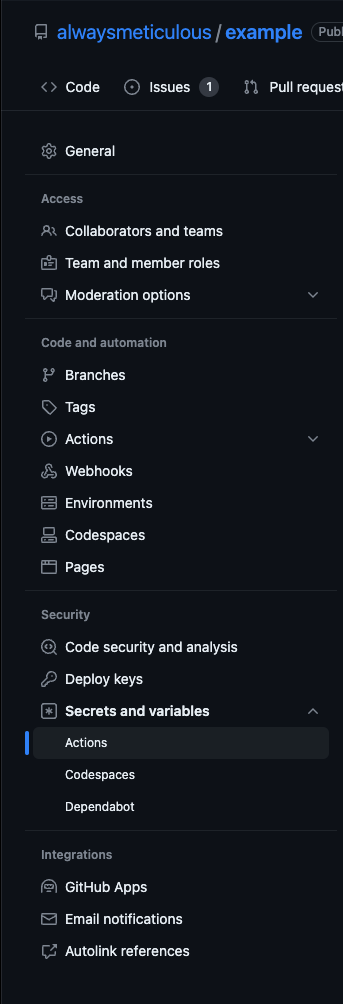 396 397And click the new repository secret button: 398 399 400 401Name the secret \`METICULOUS_API_TOKEN\`, and paste in the API token you copied from the previous step, and click add secret: 402 403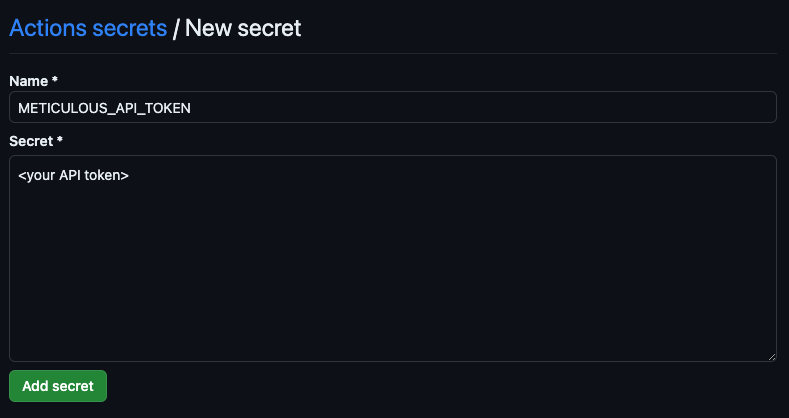 404{% /expand %} 405 406## 3. Add a GitHub Actions workflow to run your tests 407 408To run Meticulous on CI add a new \`.github/workflows/meticulous.yaml\` file, or, if you already use GitHub Actions, you 409can add it as a job to an existing workflow. The workflow needs to run on both [pushes to your main branch and on pull requests](${o.BRANCHES_REQUIRED_TO_RUN_ON_URL}). 410 411Put \`ensure-base\` as the first step of the same \`test\` job that uploads â same workflow file, before checkout. Pass the same \`ref\` as checkout (\`METICULOUS_COMMIT_SHA\` in this example). It works out the commit the upload step will compare against and, if that commit has no test run yet, dispatches this workflow and returns immediately so the base can build in parallel. The upload step still waits only if the base is missing when it finishes. Omit \`ref\` only if checkout uses \`github.sha\`. 412 413We offer two approaches to running Meticulous tests on CI. We recommend choosing the first approach that works for your app: 414 4151. **Upload your built assets** for us to test. This is the recommended approach if your app is a static site, i.e. it can be served as a folder of static assets (HTML/JS/CSS) without any server-side rendering or complex request rewriting. This approach is **NOT recommended** for Next.js applications as they typically cannot be served as static assets. 4162. **Upload a built container image** (e.g. a Docker image) for us to test. This is the recommended approach for most other apps, including Next.js applications. Almost any app can be containerized, so this is the universal fallback. 417 418{% tabs tabNameSpace="type" %} 419{% tab label="Upload static assets" %} 420 421This workflow file should use our \`upload-assets\` action to upload your built assets for us to test. 422 423See below for an example workflow file, which you can add to your repo. Note that you'll need to update it with the build steps for your app. 424 425File name: \`.github/workflows/meticulous.yaml\`. 426
427File contents: 428 429\`\`\`yaml 430# Workflow for building frontend and running Meticulous tests against static assets 431${b} 432 - name: Run Meticulous tests 433 uses: ${i.GITHUB_ACTION_UPLOAD_ASSETS_NAME}@v1 434 with: 435 api-token: \${{ secrets.METICULOUS_API_TOKEN }} 436 # TODO: Update the directory path below to match your app's build output directory 437 # For example, if you're using Vite, this is typically "dist" 438 app-directory: "dist" 439\`\`\` 440 441${y} 442${w} 443{% /tab %} 444{% tab label="Upload container image" %} 445 446This workflow file should use our \`upload-container\` action to upload your built container image for us to test. 447 448Some requirements for the docker image you build are: 449- It should be built for the \`linux/amd64\` platform 450- It should respect the \`PORT\` environment variable, or if it doesn't, you should specify the port using the \`container-port\` input to the \`upload-container\` action. 451- It should respond to the \`GET /\` endpoint for a health check probe. 452 453You can provide additional environment variables, if needed, to the container using the \`container-env\` input to the \`upload-container\` action, 454specifying them as a newline-delimited list of \`NAME=value\` pairs. 455 456See below for an example workflow file, which you can add to your repo. Note that you'll need to update it with the build steps for your app. 457 458File name: \`.github/workflows/meticulous.yaml\`. 459 460File contents: 461 462\`\`\`yaml 463# Workflow for building frontend and running Meticulous tests against a container image 464${b} 465 - name: Set up Docker Buildx 466 uses: docker/setup-buildx-action@v3 467 468 - name: Docker Build (no push) 469 uses: docker/build-push-action@v6 470 with: 471 context: . 472 tags: my-app:\${{ env.METICULOUS_COMMIT_SHA }} 473 push: false 474 # Marks the image as a Meticulous build. Consume it in your 475 # Dockerfile with \`ARG METICULOUS_BUILD\` / \`ENV METICULOUS_BUILD=$METICULOUS_BUILD\` 476 # if you need it at build time (e.g. getStaticProps / static generation). 477 build-args: | 478 METICULOUS_BUILD=true 479 480 - name: Run Meticulous tests 481 uses: ${i.GITHUB_ACTION_UPLOAD_CONTAINER_NAME}@v1 482 with: 483 api-token: \${{ secrets.METICULOUS_API_TOKEN }} 484 image-tag: my-app:\${{ env.METICULOUS_COMMIT_SHA }} 485 # Optional inputs: 486 container-port: 1234 487 # METICULOUS_BUILD is also passed at runtime so server-side code (e.g. 488 # getServerSideProps) can detect the Meticulous replay. 489 container-env: | 490 MY_ENV_VAR=my-value 491 METICULOUS_BUILD=true 492\`\`\` 493 494${y} 495{% /tab %} 496{% /tabs %} 497 498If you hit any issues then email [${p.METICULOUS_SUPPORT_EMAIL}](mailto:${p.METICULOUS_SUPPORT_EMAIL}) and we'll help you get set up. 499 500{% expand title="Naming workflows, jobs and secrets in a monorepo (recommended)" %} 501 502If your repository only ever ships one frontend, the generic names from the example 503above (\`.github/workflows/meticulous.yaml\`, workflow \`name: Meticulous\`, 504\`METICULOUS_API_TOKEN\` secret) are fine and you can skip this section. 505 506If your repository is a monorepo with more than one frontend, **or might host another 507Meticulous-tested frontend later**, per-app naming from the start makes future expansion 508painless: a second project can be added side-by-side without renaming the existing 509workflow file, job, or repository secret. The convention costs nothing on day one and 510keeps later additions contained to a new file. 511 512Two pieces of identity drive everything: 513 514- **\`<app-kebab>\`** â lowercase hyphenated, usually the last path segment of the 515 app you're onboarding (e.g. an app at \`apps/dashboard\` becomes \`dashboard\`). Used 516 in the workflow filename, the workflow \`name:\`, and the job \`name:\`. 517- **\`<APP_SLUG>\`** â the same identity as \`SCREAMING_SNAKE_CASE\` (e.g. \`dashboard\` 518 becomes \`DASHBOARD\`, \`marketing-site\` becomes \`MARKETING_SITE\`). Used in the GitHub 519 repository secret name and every \`secrets.*\` expression that reads it. A second
520 Meticulous project on the same monorepo later picks a different \`<APP_SLUG>\`, so 521 the two never collide. 522 523The convention we recommend: 524 525| | Recommended | Avoid | 526| --- | --- | --- | 527| New workflow file | \`.github/workflows/meticulous-<app-kebab>.yml\` | \`.github/workflows/meticulous.yaml\` | 528| Workflow YAML top-level \`name:\` | \`Meticulous (<app-kebab>)\` | bare \`Meticulous\` | 529| Job \`name:\` (\`jobs.<id>.name\`) | \`Meticulous (<app-kebab>)\` | bare \`Meticulous\` | 530| GitHub repository secret | \`METICULOUS_API_TOKEN_<APP_SLUG>\` | bare \`METICULOUS_API_TOKEN\` | 531| YAML reference to the API token | \`\${{ secrets.METICULOUS_API_TOKEN_<APP_SLUG> }}\` | \`\${{ secrets.METICULOUS_API_TOKEN }}\` | 532 533We also recommend scoping the workflow to the selected app's directory (and the 534shared UI libraries it imports) using \`paths:\` filters on both \`push\` and 535\`pull_request\` triggers, so the workflow only runs on commits that actually touch 536the relevant code. 537 538Pulling those together for an app at \`apps/dashboard\` (so \`<app-kebab>\` is 539\`dashboard\` and \`<APP_SLUG>\` is \`DASHBOARD\`): 540 541\`\`\`yaml 542# .github/workflows/meticulous-dashboard.yml 543name: Meticulous (dashboard) 544 545on: 546 push: 547 branches: [main] 548 paths: 549 - "apps/dashboard/**" 550 # any UI libraries the app imports: 551 - "packages/ui/**" 552 pull_request: 553 paths: 554 - "apps/dashboard/**" 555 - "packages/ui/**" 556 workflow_dispatch: 557 inputs: 558 meticulous-commit-sha: 559 description: Commit Meticulous has asked this run to build. Defaults to the branch head. 560 required: false 561 562permissions: 563 actions: write 564 contents: read 565 issues: write 566 pull-requests: write 567 statuses: read 568 569env: 570 # Prefer the dispatched commit when set; otherwise the PR head. On pull_request github.sha is the merge commit, 571 # not the PR head SHA that Meticulous looks up. 572 METICULOUS_COMMIT_SHA: \${{ github.event.inputs['meticulous-commit-sha'] || (github.event_name == 'pull_request' && github.event.pull_request.head.sha || github.sha) }} 573 574jobs: 575 test: 576 name: Meticulous (dashboard) 577 runs-on: ubuntu-latest 578 579 steps: 580${f("${{ secrets.METICULOUS_API_TOKEN_DASHBOARD }}")} 581 - uses: actions/setup-node@v4 582 with: 583 node-version: "24" 584 cache: pnpm 585 - run: pnpm install --frozen-lockfile 586 - run: pnpm --filter dashboard build 587 env: 588 METICULOUS_BUILD: "true" 589 - uses: ${i.GITHUB_ACTION_UPLOAD_ASSETS_NAME}@v1 590 with: 591 api-token: \${{ secrets.METICULOUS_API_TOKEN_DASHBOARD }} 592 app-directory: "apps/dashboard/dist" 593\`\`\` 594 595When a second app on the same monorepo is later onboarded to Meticulous, copy this 596file to \`meticulous-<other-app-kebab>.yml\` and substitute the second app's 597\`<app-kebab>\` and \`<APP_SLUG>\` â the existing workflow stays untouched. 598 599If a CLI step in the workflow reads \`$METICULOUS_API_TOKEN\` directly (for example a 600script that calls \`npx @alwaysmeticulous/cli\` outside the action), re-expose the 601suffixed secret under the bare environment-variable name on that job or step: 602 603\`\`\`yaml 604jobs: 605 test: 606 # ... 607 env: 608 METICULOUS_API_TOKEN: \${{ secrets.METICULOUS_API_TOKEN_<APP_SLUG> }} 609\`\`\` 610 611The GitHub repository secret name and every \`\${{ secrets.* }}\` expression still use 612the suffixed form; only the in-job environment variable is re-exposed under the 613generic name. 614 615{% /expand %} 616 617{% expand title="Choosing the runner size (optional)" %} 618 619The example workflow uses \`runs-on: ubuntu-latest\` â GitHub's free runner. Meticulous's 620build + replay step can be resource-heavy, so a larger runner can roughly halve the 621wall-clock time of the job at extra cost. GitHub provides progressively larger labels 622such as \`ubuntu-latest-4-cores\`, \`ubuntu-latest-8-cores\`, and \`ubuntu-latest-16-cores\` 623(the exact labels available depend on your account's plan and any 624[larger runners](https://docs.github.com/en/actions/using-github-hosted-runners/about-larger-runners) 625you have configured). 626 627If you already build the app on a larger runner in another workflow, the simplest 628choice is to use the same \`runs-on\` label here so the Meticulous job has at least as 629much capacity as your normal build. Otherwise \`ubuntu-latest\` is a safe starting 630point â you can scale up later if the job runs slowly. 631 632{% /expand %} 633 634{% expand title="Enable source maps (recommended)" %} 635 636Meticulous uses source maps to attribute coverage to the original files in your repository
637so you can see which parts of your code are exercised by the tested sessions. The cleanest 638way to enable them is **inside this Meticulous workflow only**, via a CLI flag or 639environment variable on the build command â your committed build config stays untouched, 640and your other workflows (PR builds, production deploys) keep their existing behaviour. 641 642Pick the snippet for your framework and apply it to the \`Build project\` step of the 643example workflow above: 644 645**Vite** â pass \`--sourcemap\` to \`vite build\`: 646 647\`\`\`yaml 648 - name: Build project 649 run: pnpm build -- --sourcemap 650\`\`\` 651 652\`--sourcemap\` covers JavaScript only â Vite emits no CSS source maps for production builds at all. If you also want 653coverage attributed to your stylesheets, add \`@alwaysmeticulous/recorder-plugin/css-sourcemap\` to your Vite config, as 654described in the 655[Viewing source coverage information in Meticulous guide](${o.ENABLE_SOURCE_COVERAGE_URL}). 656 657**Create React App** â set \`GENERATE_SOURCEMAP=true\`: 658 659\`\`\`yaml 660 - name: Build project 661 env: 662 GENERATE_SOURCEMAP: "true" 663 run: pnpm build 664\`\`\` 665 666**Angular CLI** â pass \`--source-map\` to \`ng build\`: 667 668\`\`\`yaml 669 - name: Build project 670 run: pnpm exec ng build --source-map 671\`\`\` 672 673**webpack (custom config)** â set \`SOURCEMAP=true\` in CI and read it from 674\`webpack.config.js\`: 675 676\`\`\`yaml 677 - name: Build project 678 env: 679 SOURCEMAP: "true" 680 run: pnpm build 681\`\`\` 682 683\`\`\`js 684// webpack.config.js 685module.exports = (env, argv) => ({ 686 // ... 687 devtool: process.env.SOURCEMAP === "true" ? "source-map" : argv.devtool, 688}); 689\`\`\` 690 691**Next.js** and **Vue CLI** don't accept a build-time flag for this; they require a 692one-line config change: 693 694- Next.js â add \`productionBrowserSourceMaps: true\` to \`next.config.js\` (covers App 695 Router and Pages Router). 696- Vue CLI â add \`productionSourceMap: true\` to \`vue.config.js\`. 697 698These settings are safe to leave on permanently; they don't change runtime behaviour. 699 700Source maps must be served alongside the built assets â either as \`.map\` files in the 701same directory, via \`sourceMappingURL\` comments in the bundles, or via the \`SourceMap\` 702HTTP header. The \`upload-assets\` and \`upload-container\` actions pick them up 703automatically when they sit next to the bundles in your build output. 704 705For monorepo source maps that span multiple packages, see the 706[Viewing source coverage information in Meticulous guide](${o.ENABLE_SOURCE_COVERAGE_URL}). 707 708{% callout_card variant="warning" title="Cloud Replay only" %} 709If you use cloud replay against a public preview URL (Vercel, Netlify, etc.), enabling 710source maps will expose them on that public URL. If you would like coverage in this case, 711email [${p.METICULOUS_SUPPORT_EMAIL}](mailto:${p.METICULOUS_SUPPORT_EMAIL}) â we can help you scope 712source-map publishing to the default branch or switch to \`upload-assets\` / 713\`upload-container\` where they stay internal. 714{% /callout_card %} 715 716{% /expand %} 717 718### GitHub Action Configuration Reference 719 720All available inputs are documented in the action definition files: 721- [\`ensure-base\`](https://github.com/alwaysmeticulous/report-diffs-action/blob/main/ensure-base/action.yml) - First step before upload: dispatch a missing base build so it runs in parallel with the PR build. Pass the same \`ref\` as checkout. 722- [\`upload-assets\`](https://github.com/alwaysmeticulous/report-diffs-action/blob/main/upload-assets/action.yaml) - Upload static assets for testing (recommended for static sites) 723- [\`upload-container\`](https://github.com/alwaysmeticulous/report-diffs-action/blob/main/upload-container/action.yml) - Upload a container image for testing 724- [\`report-diffs-action\`](https://github.com/alwaysmeticulous/report-diffs-action/blob/main/action.yml) - Run tests in GitHub Actions runner (legacy) 725 726## 4. Validate that your workflow is working correctly 727 728Create a new pull request to add the above workflow. Then validate that Meticulous is able to access your application 729correctly and is successfully simulating sessions by viewing the test run for your PR in the Meticulous UI. 730 731{% callout_card variant="info" title="PR comments are off by default" %} 732Comments on PRs are disabled by default for new projects (this is an admin-only setting). You'll be able to see all test runs in the Meticulous UI under your project's "Test runs" tab. If you'd like to enable PR comments for your project, contact us at [${p.METICULOUS_SUPPORT_EMAIL}](mailto:${p.METICULOUS_SUPPORT_EMAIL}). 733{% /callout_card %} 734 735## 5. Merge the PR to add your new GitHub workflow, and open a new PR to test Meticulous 736 737Merge the PR to add the above workflow. You won't see any results on the PR that adds the workflow because you need to wait for the workflow to run on your main branch for it to detect any diffs. 738 739Once the PR has merged and Meticulous has run on your base branch you can open a new PR to test Meticulous. The test run will be visible in the Meticulous UI under your project's "Test runs" tab, where you can review any visual diffs before merging your PR. 740 741If PR comments are enabled for your project, Meticulous will also post a comment on the PR if it changed any of the screens or logic for the workflows you've recorded sessions for: 742 743 744 745## 6. (Optional) Require approving diffs before merging a PR 746 747If you've installed the [Meticulous GitHub App](https://github.com/apps/alwaysmeticulous) Meticulous will add a check on your PR that is red 748if there are diffs that haven't been approved yet and becomes green once you click the green 'Approve all Visual Differences' button. 749This button can be found on the test run page in the Meticulous UI (or by clicking the link in the Meticulous PR comment, if comments are enabled). 750 751If you wish, you can make this check blocking by following the instructions [here](${o.MAKE_CHECK_BLOCKING_URL}). Doing so will prevent developers 752from merging a PR which has visual differences until they have clicked the button to acknowledge the differences. 753 754{% /tab %} 755{% tab label="GitLab" %} 756 757If you are able to build your app such that it can be served as a folder of static assets (HTML/JS/CSS) without any server-side rendering or complex request rewriting, 758then you can use our \`ci upload-assets\` CLI command to upload your built assets for us to test. 759 760## 1. Link GitLab to Meticulous 761 762If you haven't already connected this repository in [Connect your repository](${o.ONBOARDING_GUIDE_URL}#1-connect-your-repository), complete the steps below. 763 764${r.linkGitLabInstructions} 765 766## 2. Add your Meticulous API token as a CI/CD variable 767 768Select the project below that contains the sessions you wish to
768simulate, copy and paste the API token, and add it to your GitLab project 769as a CI/CD variable named \`METICULOUS_API_TOKEN\`: 770 771{% code_with_project_selector %} 772METICULOUS_API_TOKEN: 773{% standalone_api_token /%} 774{% /code_with_project_selector %} 775 776*Be very careful with this API token, since it allows the holder access to your recorded sessions.* 777 778## 3. Add a GitLab CI/CD pipeline to run your tests 779 780To run Meticulous on CI, add a new \`.gitlab-ci.yml\` file to your repository. The pipeline needs to run on both pushes to your main branch and on merge requests. 781 782This pipeline should use our \`ci upload-assets\` CLI command to upload your built assets for us to test. 783 784File name: \`.gitlab-ci.yml\` 785 786File contents: 787 788\`\`\`yaml 789stages: 790 - build 791 - test 792 793variables: 794 NODE_VERSION: "24" 795 796build: 797 stage: build 798 image: node:24-alpine 799 # METICULOUS_BUILD marks this as a build for Meticulous testing. 800 variables: 801 METICULOUS_BUILD: "true" 802 script: 803 - pnpm install --frozen-lockfile 804 - pnpm build 805 artifacts: 806 paths: 807 - dist/ 808 expire_in: 1 hour 809 only: 810 - main 811 - merge_requests 812 813test: 814 stage: test 815 image: node:24-alpine 816 dependencies: 817 - build 818 script: 819 - > 820 npx @alwaysmeticulous/cli ci upload-assets 821 --apiToken="$METICULOUS_API_TOKEN" 822 --appDirectory="dist" 823 --commitSha="$CI_COMMIT_SHA" 824 --waitForBase 825 only: 826 - main 827 - merge_requests 828\`\`\` 829 830**Important:** Make sure to update the \`appDirectory\` path to match your app's build output directory. For example, if you're using Vite, this is typically "dist". 831 832{% expand title="Naming jobs and variables in a monorepo (recommended)" %} 833 834If your repository only ever ships one frontend, the generic names from the example 835above (\`meticulous:\` job, \`METICULOUS_API_TOKEN\` variable) are fine and you can skip 836this section. 837 838If your repository is a monorepo with more than one frontend, **or might host another 839Meticulous-tested frontend later**, per-app naming from the start makes future expansion 840painless: a second project can be added side-by-side without renaming the existing job 841or CI/CD variable. The convention costs nothing on day one and keeps later additions 842contained to a new job (or a new included pipeline file). 843 844Two pieces of identity drive everything: 845 846- **\`<app-kebab>\`** â lowercase hyphenated, usually the last path segment of the 847 app you're onboarding (e.g. an app at \`apps/dashboard\` becomes \`dashboard\`). Used 848 in the job key and the optional included file name. 849- **\`<APP_SLUG>\`** â the same identity as \`SCREAMING_SNAKE_CASE\` (e.g. \`dashboard\` 850 becomes \`DASHBOARD\`, \`marketing-site\` becomes \`MARKETING_SITE\`). Used in the GitLab 851 CI/CD variable name and every YAML reference to it. A second Meticulous project on 852 the same monorepo later picks a different \`<APP_SLUG>\`, so the two never collide. 853 854The convention we recommend: 855 856| | Recommended | Avoid | 857| --- | --- | --- | 858| Job key in \`.gitlab-ci.yml\` (or included pipeline file) | \`meticulous-<app-kebab>:\` | bare \`meticulous:\` | 859| GitLab CI/CD variable | \`METICULOUS_API_TOKEN_<APP_SLUG>\` | bare \`METICULOUS_API_TOKEN\` | 860| YAML reference to the API token | \`$METICULOUS_API_TOKEN_<APP_SLUG>\` | bare \`$METICULOUS_API_TOKEN\` | 861| Optional included pipeline file | \`.gitlab/ci/meticulous-<app-kebab>.yml\` (then \`include:\` it from \`.gitlab-ci.yml\`) | a second bare \`meticulous\` block in \`.gitlab-ci.yml\` | 862 863We also recommend scoping the job to the selected app's path (and the shared UI 864libraries it imports) using \`rules: changes:\`, so the Meticulous job only runs on 865commits that actually touch the relevant code. If your existing pipeline uses 866\`only:\` instead of \`rules:\`, mirror that style with \`only: changes:\`. 867 868Pulling those together for an app at \`apps/dashboard\` (so \`<app-kebab>\` is 869\`dashboard\` and \`<APP_SLUG>\` is \`DASHBOARD\`): 870 871\`\`\`yaml 872meticulous-dashboard: 873 stage: test 874 image: node:24-alpine 875 variables: 876 METICULOUS_BUILD: "true" 877 rules: 878 - if: $CI_PIPELINE_SOURCE == "merge_request_event" 879 changes: 880 - "apps/dashboard/**/*" 881 # any UI libraries the app imports: 882 - "packages/ui/**/*"
883 - if: $CI_COMMIT_BRANCH == $CI_DEFAULT_BRANCH 884 changes: 885 - "apps/dashboard/**/*" 886 - "packages/ui/**/*" 887 script: 888 - pnpm install --frozen-lockfile 889 - pnpm --filter dashboard build 890 - > 891 npx @alwaysmeticulous/cli ci upload-assets 892 --apiToken="$METICULOUS_API_TOKEN_DASHBOARD" 893 --appDirectory="apps/dashboard/dist" 894 --commitSha="$CI_COMMIT_SHA" 895 --waitForBase 896\`\`\` 897 898When a second app on the same monorepo is later onboarded to Meticulous, copy this 899block and substitute the second app's \`<app-kebab>\` and \`<APP_SLUG>\` â the existing 900job stays untouched. 901 902If you'd rather expose the suffixed variable under the bare \`METICULOUS_API_TOKEN\` 903name inside the job (for example because the build script reads 904\`process.env.METICULOUS_API_TOKEN\` directly), add a job-scoped \`variables:\` mapping: 905 906\`\`\`yaml 907meticulous-<app-kebab>: 908 # ... 909 variables: 910 METICULOUS_API_TOKEN: $METICULOUS_API_TOKEN_<APP_SLUG> 911\`\`\` 912 913The CI/CD variable name and every direct YAML reference still use the suffixed form; 914only the in-job environment variable is re-exposed under the generic name. 915 916{% /expand %} 917 918{% expand title="Choosing the image and tags (optional)" %} 919 920\`image:\` controls the Docker image used for the job (Node version, OS). The example 921above uses \`node:24-alpine\`; if your existing pipeline uses a different Node version, 922or a non-Alpine image (e.g. \`node:24\` for native build tooling that needs glibc), 923use the same image for the Meticulous job. If your pipeline references a project-level 924\`NODE_VERSION\` variable (e.g. \`image: node:\${NODE_VERSION}-alpine\`), reuse that variable 925rather than hard-coding the version. 926 927\`tags:\` controls which registered runner picks up the job, and you usually do not need 928to set it. Most projects rely on a default runner configured at the project or group 929level, and adding tags can route the job to a runner that doesn't exist. If your 930existing pipeline already sets \`tags:\` on build-heavy jobs (literal strings â not 931\`$VAR\` or \`!reference\` indirection), copy the same list onto the Meticulous job. 932 933If you're on GitLab.com SaaS shared runners and the default \`saas-linux-small-amd64\` 934turns out to be too slow for Meticulous's build + replay, you can opt into a larger 935runner by adding \`tags: [saas-linux-large-amd64]\` (or similar). This is optional and 936only applies to GitLab.com SaaS â self-managed instances configure runner sizes 937differently. 938 939{% /expand %} 940 941{% expand title="Enable source maps (recommended)" %} 942 943Meticulous uses source maps to attribute coverage to the original files in your repository 944so you can see which parts of your code are exercised by the tested sessions. The cleanest 945way to enable them is **inside this Meticulous pipeline only**, via a CLI flag or 946environment variable on the build command â your committed build config stays untouched, 947and your other pipelines (MR builds, production deploys) keep their existing behaviour. 948 949Pick the snippet for your framework and apply it to the \`build\` job of the example 950pipeline above: 951 952**Vite** â pass \`--sourcemap\` to \`vite build\`: 953 954\`\`\`yaml 955build: 956 script: 957 - pnpm install --frozen-lockfile 958 - pnpm build -- --sourcemap 959\`\`\` 960 961\`--sourcemap\` covers JavaScript only â Vite emits no CSS source maps for production builds at all. If you also want 962coverage attributed to your stylesheets, add \`@alwaysmeticulous/recorder-plugin/css-sourcemap\` to your Vite config, as 963described in the 964[Viewing source coverage information in Meticulous guide](${o.ENABLE_SOURCE_COVERAGE_URL}). 965 966**Create React App** â set \`GENERATE_SOURCEMAP=true\`: 967 968\`\`\`yaml 969build: 970 variables: 971 GENERATE_SOURCEMAP: "true" 972 script: 973 - pnpm install --frozen-lockfile 974 - pnpm build 975\`\`\` 976 977**Angular CLI** â pass \`--source-map\` to \`ng build\`: 978 979\`\`\`yaml 980build: 981 script: 982 - pnpm install --frozen-lockfile 983 - pnpm exec ng build --source-map 984\`\`\` 985 986**webpack (custom config)** â set \`SOURCEMAP=true\` in CI and read it from 987\`webpack.config.js\`: 988 989\`\`\`yaml 990build: 991 variables: 992 SOURCEMAP: "true" 993 script: 994 - pnpm install --frozen-lockfile 995 - pnpm build 996\`\`\` 997 998\`\`\`js 999// webpack.config.js 1000module.exports = (env, argv) => ({ 1001 // ... 1002 devtool: process.env.SOURCEMAP === "true" ? "source-map" : argv.devtool, 1003}); 1004\`\`\` 1005 1006**Next.js** and **Vue CLI** don't accept a build-time flag for this; they require a 1007one-line config change: 1008 1009- Next.js â add \`productionBrowserSourceMaps: true\` to \`next.config.js\` (covers App 1010 Router and Pages Router). 1011- Vue CLI â add \`productionSourceMap: true\` to \`vue.config.js\`. 1012 1013These settings are safe to leave on permanently; they don't change runtime behaviour. 1014 1015Source maps must be served alongside the built assets â either as \`.map\` files in the 1016same directory, via \`sourceMappingURL\` comments in the bundles, or via the \`SourceMap\` 1017HTTP header. The \`ci upload-assets\` and \`ci upload-container\` commands pick them up 1018automatically when they sit next to the bundles in your build output. 1019 1020For monorepo source maps that span multiple packages, see the 1021[Viewing source coverage information in Meticulous guide](${o.ENABLE_SOURCE_COVERAGE_
1021URL}).
1022
1023{% /expand %}
1024
1025## 4. Merge the MR to add your new GitLab CI/CD pipeline, and open a new MR to test Meticulous
1026
1027Merge the MR to add the above pipeline configuration. You won't see any results on the MR that adds the pipeline because you need to wait for the pipeline to run on your main branch for it to detect any diffs.
1028
1029Once the MR has merged and Meticulous has run on your base branch you can open a new MR to test Meticulous.
1030Comments are typically disabled when you first create a project in Meticulous, but you'll be able to see the test results within the Meticulous UI.
1031
1032{% /tab %}
1033{% tab label="BitBucket" %}
1034
1035If you are able to build your app such that it can be served as a folder of static assets (HTML/JS/CSS) without any server-side rendering or complex request rewriting,
1036then you can use our \`ci upload-assets\` CLI command to upload your built assets for us to test.
1037
1038## 1. Link Bitbucket to Meticulous
1039
1040If you haven't already connected this repository in [Connect your repository](${o.ONBOARDING_GUIDE_URL}#1-connect-your-repository), complete the steps below.
1041
1042${a.linkBitbucketInstructions}
1043
1044## 2. Add your Meticulous API token as a repository variable
1045
1046Select the project below that contains the sessions you wish to simulate, copy and paste the API token, and add it to your Bitbucket repository
1047as a secured repository variable named \`METICULOUS_API_TOKEN\`:
1048
1049{% code_with_project_selector %}
1050METICULOUS_API_TOKEN:
1051{% standalone_api_token /%}
1052{% /code_with_project_selector %}
1053
1054*Be very careful with this API token, since it allows the holder access to your recorded sessions.*
1055
1056## 3. Add a Bitbucket Pipelines configuration to run your tests
1057
1058To run Meticulous on CI, add a \`bitbucket-pipelines.yml\` file to your repository. The pipeline needs to run on both pushes to your main branch and on pull requests.
1059
1060This pipeline should use our \`ci upload-assets\` CLI command to upload your built assets for us to test.
1061
1062On pull request builds, Bitbucket merges the destination branch into the source branch during **Build Setup** before your steps run. Meticulous does **not** support testing that ephemeral merge commit. **Checkout the PR source tip** before building so uploads use a commit Bitbucket exposes via the API and the backend can compare against the **merge-base** with the destination branch.
1063
1064Add this step at the start of your pull-request pipeline script:
1065
1066\`\`\`bash
1067git reset --hard "$BITBUCKET_COMMIT"
1068\`\`\`
1069
1070The Meticulous CLI uploads \`git rev-parse HEAD\` (the source tip after the reset above). You do **not** need to pass \`--commitSha\` or \`--baseSha\` manually on PR pipelines.
1071
1072File name: \`bitbucket-pipelines.yml\`
1073
1074File contents:
1075
1076\`\`\`yaml
1077image: node:24
1078
1079pipelines:
1080  branches:
1081    main:
1082      - step:
1083          name: Build and test
1084          caches:
1085            - node
1086          script:
1087            - npm ci
1088            # METICULOUS_BUILD marks this as a build for Meticulous testing.
1089            - METICULOUS_BUILD=true npm run build
1090            - >
1091              npx @alwaysmeticulous/cli ci upload-assets
1092              --apiToken="$METICULOUS_API_TOKEN"
1093              --appDirectory="dist"
1094              --waitForBase
1095  pull-requests:
1096    "**":
1097      - step:
1098          name: Build and test
1099          caches:
1100            - node
1101          script:
1102            - git reset --hard "$BITBUCKET_COMMIT"
1103            - npm ci
1104            # METICULOUS_BUILD marks this as a build for Meticulous testing.
1105            - METICULOUS_BUILD=true npm run build
1106            - >
1107              npx @alwaysmeticulous/cli ci upload-assets
1108              --apiToken="$METICULOUS_API_TOKEN"
1109              --appDirectory="dist"
1110              --waitForBase
1111\`\`\`
1112
1113**Important:** Make sure to update the \`appDirectory\` path to match your app's build output directory. For example, if you're using Vite, this is typically "dist".
1114
1115{% /tab %}
1116{% /tabs %}
1117`,k=`---
1118{
1119  "title": "Running tests against existing deployment URLs"
1120}
1121---
1122
1123# {% $frontmatter.title %}
1124
1125{% callout_card variant="info" title="Preferred: Upload static assets or a container image" %}
1126If possible, we recommend [running tests via your CI pipeline](${o.GITHUB_ACTIONS_SETUP_URL}) by uploading static assets or a container image. These approaches are simpler and more reliable. Use deployment URL testing only if those options are not possible for your app.
1127{% /callout_card %}
1128
1129{% tabs %}
1130{% tab label="GitHub" %}
1131
1132If you use Vercel, Netlify, Cloudflare Pages or a similar system to generate PR preview URLs you can use the Meticulous GitHub app to test your PRs for you:
1133
1134#### **Step 1: Install the Meticulous GitHub app**
1135
1136Begin by [installing the Meticulous GitHub app](${i.METICULOUS_GITHUB_APP_INSTALL_URL}).
1137
1138#### **Step 2: Integrate with your preview URL provider**
1139
1140Once the GitHub app is installed, select the system you use to generate PR preview links:
1141
1142{% tabs tabNameSpace="preview-provider" %}
1143{% tab label="Vercel" %}
1144
1145Install the [Meticulous Vercel integration](${i.METICULOUS_VERCEL_INTEGRATION_INSTALL_URL}) and link your Vercel project in Meticulous.
1146
1147If you have multiple Vercel projects for your GitHub repo, or multiple environments that you deploy the same branches/commits to, then you'll
1148need to let Meticulous know which environments it should run the tests against. You can do so by navigating to your project page and clicking on the *'Settings'* tab.
1149
1150{% /tab %}
1151{% tab label="Netlify" %}
1152
1153If you use Netlify you can configure a Netlify webhook so tests are triggered when new preview deploys are ready. Contact
1154[${p.METICULOUS_SUPPORT_EMAIL}](mailto:${p.METICULOUS_SUPPORT_EMAIL}) for help setting this up.
1155
1156{% /tab %}
1157{% tab label="Cloudflare" %}
1158
1159If you use Cloudflare pages you can configure a Cloudflare webhook so tests are triggered when new preview deploys are ready. Contact
1160[${p.METICULOUS_SUPPORT_EMAIL}](mailto:${p.METICULOUS_SUPPORT_EMAIL}) for help setting this up.
1161
1162{% /tab %}
1163{% tab label="Other/Home-Grown" %}
1164
1165If you use another preview URL system, or a home grown system you can generate
1166a GitHub deployment (environment) whenever a commit is pushed to a branch. This can then in turn be used to trigger a Meticulous test run
1167against the new deployment.
1168
1169You can view instructions for how to do this [here](${o.CREATE_DEPLOYMENTS_ON_GITHUB_URL}), however it can be
1170fragile to set up correctly, and requires your PR preview system to have immutable, long-lived preview URLs and use identical
1171build settings across PR branches and main branch commits (to avoid false screenshot diffs). For this reason we recommend
1172[triggering Meticulous from your CI pipeline instead](${o.GITHUB_ACTIONS_SETUP_URL}), if possible.
1173
1174{% /tab %}
1175{% /tabs %}
1176
1177#### **Step 3 (optional): Make the Meticulous check blocking**
1178
1179Whenever you open a new pull request Meticulous will now simulate a set of sessions against the preview URL before and after the PR, and post
1180a comment to the PR notifying of any changes spotted.
1181
1182If you wish, you can make this check blocking by following the instructions [here](${o.MAKE_CHECK_BLOCKING_URL}). Doing so will prevent developers
1183from merging a PR which has visual differences until they have clicked the button to acknowledge the differences.
1184
1185{% /tab %}
1186{% tab label="GitLab" %}
1187
1188## Initial setup
1189
1190If you use Vercel, Netlify or a similar system to generate PR preview URLs, you can use Meticulous to test your PRs.
1191To set this up:
1192
1193${r.linkGitLabInstructions}
1194
1195## Further steps
1196
1197{% tabs %}
1198{% tab label="Vercel" %}
1199
1200Please let us know that you are using Vercel preview URLs in the email you sent us when setting up GitLab.
1201After some setup on our side Meticulous will automatically run tests against Vercel preview URLs whenever a new deployment is ready.
1202
1203{% /tab %}
1204{% tab label="Other preview URL providers" %}
1205
1206Call the */test-runs/trigger* endpoint from your GitLab CI pipeline whenever a new commit is pushed to a branch with an open MR.
1207The endpoint will trigger a test run, and Meticulous will handle setting commit statuses and posting notes to the merge request as
1208the test run progresses.
1209
1210{% code_with_project_selector %}
1211\`\`\`http
1212POST https://app.meticulous.ai/api/test-runs/trigger
1213
1214Headers: {
1215  authorization: "{% api_token /%}"
1216  Content-Type: "application/json"
1217}
1218
1219Body: {
1220  headSha: string, // the SHA of the commit you want to test
1221  headDeploymentUrl: string, // preview URL of headSha
1222  baseSha: string, // the SHA of the commit which the new test run will be compared against
1223  baseDeploymentUrl: string // preview URL of baseSha
1224}
1225\`\`\`
1226{% /code_with_project_selector %}
1227
1228There are two different types of pipelines that GitLab can trigger when a new commit is pushed to a branch with an open MR: *merge request
1229pipelines* and *merged results pipelines* ([GitLab docs](https://docs.gitlab.com/ee/ci/pipelines/merged_results_pipelines.html)). Your
1230pipeline should call the */test-runs/trigger* endpoint with different values for \`headSha\` and \`baseSha\` depending on which type of
1231pipeline you use.
1232
1233If you use merge request pipelines:
1234- \`headSha\` should be the SHA of the commit that was just pushed to the branch. This is exposed in the CI pipeline as
1235\`$CI_COMMIT_SHA\`.
1236- \`baseSha\` should be the SHA of the commit from which the branch was created. This is exposed in the CI pipeline as
1237\`$CI_MERGE_REQUEST_DIFF_BASE_SHA\`.
1238
1239If you use merged results pipelines:
1240- \`headSha\` should be the SHA of the merge commit. This is exposed in the CI pipeline as \`$CI_COMMIT_SHA\`.
1241- \`baseSha\` should be the SHA of the HEAD commit on the target branch. This is exposed in the CI pipeline as
1242\`$CI_MERGE_REQUEST_TARGET_BRANCH_SHA\`.
1243
1244{% /tab %}
1245{% /tabs %}
1246
1247{% /tab %}
1248{% /tabs %}
1249`,S={anchorTagId:"base-urls",title:"How does Meticulous compute the URL to simulate a session against?",body:`
1250When Meticulous simulates sessions it is configured to simulate the sessions against a particular base URL, which will likely be different to the URL the
1251session was recorded at.
1252
1253For example, if Meticulous is set up with GitHub Actions, then the base URL will be the URL you pass as the \`appUrl\` to \`report-diffs-action\`, for example \`http://localhost:3000\`.
1254
1255If Meticulous is set up to use preview URLs, from Vercel or similar services, then the base URL will be the preview URL of the deployment, for example \`https://tps-reports-app-37tz-initech.vercel.app\`. If there are multiple deployments
1256Meticulous will look for one to an environment that is included under \`Environments to Test Against\` in your Meticulous project settings.
1257
1258When simulating a session, Meticulous takes the URL the session was recorded at and swaps out the origin with the new base URL. So if the session was recorded
1259at \`https://www.initech.com/some/path?query=paramValue\`, and you're running the Meticulous tests against \`https://tps-reports-app-37tz-initech.vercel.app\`, then Meticulous will simulate the session at \`https://tps-reports-app-37tz-initech.vercel.app/some/path?query=paramValue\`.
1260
1261**Important limitation**: This base URL swapping applies to:
1262- Page navigation URLs
1263- API requests (fetch/XHR)
1264
1265However, it does **NOT** apply to static assets (CSS, JavaScript, images) that are referenced with absolute URLs directly in your HTML. For example, if your HTML contains \`<script src="https://www.initech.c
1265om/app.js"></script>\`, this URL will not be rewritten. To ensure assets load correctly across environments, use relative URLs like \`<script src="/app.js"></script>\` instead. See [Troubleshooting Cross-Environment Issues](${o.RECORD_AND_REPLAY_ON_DIFFERENT_ENVIRONMENTS_URL}) for more details.
1266
1267You'll therefore need to make sure that the base URL you are simulating sessions against (\`https://tps-reports-app-37tz-initech.vercel.app\`) serves up the same app under the same configuration as the base URL sessions are recorded on (\`https://www.initech.com\`).`},T={anchorTagId:"branches-must-run-on",title:"What branches does Meticulous need to run on, and against which environments?",body:`
1268Meticulous works by simulating sessions against the head commit of each pull request and comparing the results to the base commit of the pull request.
1269
1270It therefore needs to run on your main branch (e.g. main, master or develop) so that it has visual snapshots to compare against. And it also needs to run on any branches that you open pull requests from.
1271
1272If you're using Vercel, Netlify, or similar preview URLs, then Meticulous will compare snapshots from the preview URL of the base commit on the main branch to snapshots from the preview URL of the head commit of the pull request branch.
1273
1274In this case the environment variables and configuration you use to run & build your app needs to be the same for the deployments of the main branch (production deploys) and the deployments of pull request branches (preview deploys). If this isn't the case Meticulous could display false screenshot differences.
1275
1276For example if you configure production deploys of your app (from the main branch) to have a blue banner, and preview deploys of your app (from pull request branches) to have a red banner, then Meticulous would display screenshot diffs of the banner changing from blue to red for every screen. You want to make sure that the only screenshot diffs Meticulous shows are due to changes in the code introduced by the pull request being tested, rather than environmental differences between the environments tested on.
1277
1278You can learn how to avoid this [here](${o.FIX_FALSE_POSITIVES_URL}), and you can learn more about testing across environments [here](${o.RECORD_AND_REPLAY_ON_DIFFERENT_ENVIRONMENTS_URL}).
1279
1280If, instead of preview URLs, you're using the \`report-diffs-action\` GitHub action, then Meticulous will compare snapshots from running your app from the base commit of the main branch to snapshots from running your app from the head commit of the pull request branch. In this case it's similarly important to make sure that you compile and run your app with the same configuration for both the main branch and the pull request branches.`},_={anchorTagId:"cli-in-ci-limitations",title:"Are there any limitations to using the Meticulous CLI to trigger tests in CI?",body:`
1281You might use the Meticulous CLI instead of the GitHub action if you don't use GitHub Actions for CI and don't want to use an additional CI provider. However, there are some limitations to consider when using the CLI in CI.
1282
1283The CLI offers two different approaches:
1284
1285#### **Upload Assets**
1286- *When to use:* If your app can be built into a single directory of static assets that can be served with a command like \`pnpm serve\`
1287- *Command:* \`ci upload-assets\`
1288- *Limitations relative to the GitHub action:* None
1289
1290#### **Upload Container**
1291- *When to use:* If your app can't be built into a single directory of static assets and needs a server to run (e.g. a Next.js app)
1292- *Command:* \`ci upload-container\`
1293- *Limitations relative to the GitHub action:* None
1294`},I={anchorTagId:"cross-environment-record-replay",title:"Can I record sessions from one environment (for example, production, or localhost) and simulate them against another environment (for example, a preview URL)?",body:`
1295  Yes. However the sessions may fail to simulate if there are significant differences between the environments. Please see the [Record and Simulate on Different Environments](${o.RECORD_AND_REPLAY_ON_DIFFERENT_ENVIRONMENTS_URL}) page for more details.`},R={anchorTagId:"data-variants",title:"How does Meticulous handle network requests? / How does Meticulous ensure test coverage over different user types, data variants, or feature flag combinations?",body:`
1296  By default Meticulous will record the network responses (XHR, Fetch & Web Sockets) in the initial session when it is recorded.
1297  These responses will be stored alongside the session, and when the session is later replayed against another commit Meticulous will
1298  automatically stub out the requests with the appropriate responses. Matching within a session is sequence-aware, so mutation-then-GET
1299  flows keep the responses that originally followed those mutations. Similarly Meticulous will record and replay local storage, session storage
1300  and cookie values.
1301
1302  This means that if you have two sessions recorded under different users, and the network responses return different data for each user,
1303  then when the sessions are replayed each session will get the correct original data and you'll be able to test over both cases.
1304
1305  Meticulous's session selection algorithms will automatically select sessions to cover all the different user types, data variants, and feature flag
1306 combinations that lead to different behavior in your code/app. See the [Selecting Which Sessions to Run](${o.TESTING_POOL_URL}) page for details. 1307 1308 Automatically stubbing out the network responses allows Meticulous to ensure your tests are fast, fully deterministic and flake and 1309 side effect free. If you make a breaking API change and recorded responses get out of date, Meticulous first tries to **patch** the 1310 affected sessions using newer recordings of the same endpoint shape (preferring schema updates while keeping the original session's 1311 values where possible). Sessions that no longer add unique coverage are replaced by newer ones that cover the same lines of code / 1312 edge cases. For the full explanation - including why stubs do not need to be perfect for frontend blast-radius testing - see 1313 [Network Recording & Patching](${o.NETWORK_RECORDING_AND_PATCHING_URL}). 1314 1315 ### What is and isn't stubbed/mocked 1316 1317 **Stubbed by Meticulous:** 1318 - XHR (XMLHttpRequest) requests 1319 - Fetch API requests 1320 - WebSocket connections 1321 - Local storage, session storage, and cookies 1322 1323 **NOT stubbed by Meticulous:** 1324 - Static assets (CSS, JavaScript, images) loaded directly by the browser via HTML tags 1325 - Assets referenced with absolute URLs in your HTML (e.g., \`<script src="https://example.com/app.js">\`) 1326 1327 Static assets are loaded live from whatever URL they're referenced at. If you use absolute URLs for static assets in your HTML, those URLs will NOT be rewritten when testing against a different environment. We recommend using relative URLs (e.g., \`/dist/app.js\`) for static assets to ensure they load correctly across all test environments. 1328 1329 However if you wish to test your backend code with Meticulous you can do so by selecting which subset of requests to stub in the 1330 'Network Stubbing' tab in your Meticulous project's settings. If you're using NextJS with the app directory then Meticulous will 1331 automatically pass through requests for React server components if you select the 'Stub all requests, apart from requests for server 1332 components and static assets' option. This is the default behaviour for NextJS apps that use the app directory. 1333 `},C={anchorTagId:"dealing-with-localhost-sessions",title:"If Meticulous records sessions from half-finished branches on localhost won't that cause issues with the tests?",body:` 1334 The answer is no: Meticulous is designed to handle this case. It does so via two strategies: 1335 1336 1. Meticulous doesn't use every session recorded as a test but just [a subset that cover the maximal distinct edge cases and lines/branches 1337 of code](${o.TESTING_POOL_URL}). Broken sessions get filtered out by the session selection algorithms. 1338 1339 2. Meticulous takes the base screenshots for comparison at _replay_ time instead of at record time. When you open a PR we replay 1340 the selected sessions twice: once on the base commit and once on the head commit of the PR. We take screenshots and compare them. If it does replay a 1341 session from localhost that, for example, clicks on a feature that isnât pushed up yet, then that 'broken' session will generate the same screenshots when 1342 replayed against both the base and the head commit. So it wonât create any false diffs. 1343 `},x={anchorTagId:"recorder-first-script",title:"Why does the Meticulous recorder script need to be the first script to execute?",body:` 1344See the [Ensure Recorder Captures All Requests](${o.ENSURE_RECORDER_CAPTURES_ALL_REQUESTS_URL}) page for more details.`},A={anchorTagId:"recorder-performance-impact",title:"Does the Meticulous recorder impact my app's performance?",body:` 1345No. The Meticulous recorder is designed to have no meaningful impact on your application's performance. It operates passively by listening to browser events and recording network requests, without modifying your application's DOM or interfering with its execution. 1346 1347The recorder also monitors the size of data being recorded and will automatically abandon a session if the payload becomes too large, ensuring it never degrades the user's experience.`},M={anchorTagId:"session-selection",title:"How does Meticulous choose which sessions to run?",body:` 1348See the [Selecting Which Sessions to Run](${o.TESTING_POOL_URL}) page for details.`},E=[{section:"How Meticulous Works",questions:[{...R,title:"How does Meticulous handle network requests / BE calls?"},{...R,title:"How does Meticulous ensure test coverage over different user types, data variants, or feature flag combinations?"},M,C]},{section:"CI Setup",questions:[S,T,I,_]},{section:"Recorder Setup",questions:[A,x]}],U=(s=[...E.flatMap(({questions:e})=>e)],t=new Set,s.filter(e=>{let s=e.anchorTagId;return!t.has(s)&&(t.add(s),!0)})).map(e=>"data-variants"===e.anchorTagId?R:e),L=`--- 1349{ 1350 "title": "FAQ & Troubleshooting" 1351} 1352--- 1353 1354# {% $frontmatter.title %} 1355 1356## Contents 1357 1358${E.map(({section:e,questions:t})=>"\n"+e+":\n"+t.map(({title:e,anchorTagId:t})=>`- [${e}](#${t})`).join("\n")).join("\n")} 1359 1360## Questions 1361 1362${U.map(({title:e,body:t,anchorTagId:s})=>'{% anchor id="'+s+'" /%}\n### '+e+"\n"+t).join("\n\n")} 1363 1364${i.WHERE_CAN_I_REACH_OUT_FOR_SUPPORT} 1365`,P=`--- 1366{ 1367 "title": "Additional Guides" 1368} 1369--- 1370 1371# {% $frontmatter.title %} 1372 1373 - [Getting started with backend testing](${o.ADDITIONAL_GUIDES.GETTING_STARTED_BACKEND_TESTING_URL}) 1374 - [Install the backend recorder](${o.ADDITIONAL_GUIDES.INSTALL_BACKEND_RECORDER_URL}) 1375 - [Exporting generated tests](${o.ADDITIONAL_GUIDES.EXPORTING_GENERATED_TESTS_URL}) 1376 - [Not yet run checks](${o.ADDITIONAL_GUIDES.NOT_YET_RUN_CHECKS_URL}) 1377`,O=`--- 1378{ 1379 "title": "Getting Started with Backend Testing" 1380} 1381--- 1382 1383# {% $frontmatter.title %} 1384 1385Meticulous records your interactions with your application on environments such as localhost as you develop it, and replays those 1386sessions on every pull request to surface any differences your change triggers. 1387 1388If your app uses **server-side rendering (SSR)**, part of each user session happens on your backend: data is fetched on the server 1389before the page ever reaches the browser, so the frontend recorder alone never sees those requests. To test these apps, Meticulous 1390additionally records backend spans â the HTTP requests your server makes â and uses them to stub out server-side calls during 1391replay. This lets Meticulous accurately replay and diff server-rendered pages, catching regressions in your backend and SSR code 1392paths as well as your frontend. 1393 1394To set up backend testing you need to: 1395 13961. [Install the frontend session recorder](${o.ADDITIONAL_GUIDES.INSTALL_RECORDER_SCRIPT_FOR_BACKEND_TESTING_URL}) 13972. [Install the backend spans recorder](${o.ADDITIONAL_GUIDES.INSTALL_BACKEND_RECORDER_URL}) 13983. [Set up tests to run in CI](${o.GITHUB_ACTIONS_SETUP_URL}) 13994. [Verify the complete setup](${o.ONBOARDING_GUIDE_URL}#3-verify-the-complete-setup) 1400 1401For additional questions about how Meticulous works, check out the [FAQ and Troubleshooting](${o.FAQ_AND_TROUBLESHOOTING_URL}) section. 1402`;var N=e.i(919275);let D=(e,t=!1)=>` 1403{% code_with_project_selector %} 1404{% tabs tabNameSpace="env" %} 1405{% tab label="Dev & Staging Only" %} 1406\`\`\`jsx 1407<${e}> 1408 ... 1409 {(process.env.NODE_ENV === "development" || process.env.VERCEL_ENV === "preview") && ( 1410 // eslint-disable-next-line @next/next/no-sync-scripts 1411 <script 1412 data-recording-token="{% project_recording_token /%}" 1413 data-is-production-environment="false"${t?'\n data-inject-session-id-header="true"':""} 1414 src="${N.SNIPPET_URL}" 1415 /> 1416 )} 1417 ... 1418</${e}> 1419\`\`\` 1420{% /tab %} 1421{% tab label="All Environments" %} 1422\`\`\`jsx 1423<${e}> 1424 ... 1425 // eslint-disable-next-line @next/next/no-sync-scripts 1426 <script 1427 data-recording-token="{% project_recording_token /%}" 1428 data-is-production-environment={process.env.NODE_ENV === "production" || process.env.VERCEL_ENV === "production"}${t?'\n data-inject-session-id-header="true"':""} 1429 src="${N.SNIPPET_URL}" 1430 /> 1431 ... 1432</${e}> 1433\`\`\` 1434{% /tab %} 1435{% /tabs %} 1436{% /code_with_project_selector %} 1437`,j=(e=!1)=>`Install the Meticulous recorder plugin and add it to your Nuxt config. The plugin injects the recorder script as the first script tag in your app's \`<head>\`, with no async or defer attributes ([learn more](${o.ENSURE_RECORDER_CAPTURES_ALL_REQUESTS_URL})). 1438 1439{% code %} 1440\`\`\`shell 1441npm install @alwaysmeticulous/recorder-plugin@latest --save-dev 1442\`\`\` 1443{% /code %} 1444 1445Modify your \`nuxt.config.ts\` file to include the plugin: 1446 1447{% code_with_project_selector %} 1448{% tabs tabNameSpace="env" %} 1449{% tab label="Dev Only (default)" %} 1450\`\`\`typescript 1451export default defineNuxtConfig({ 1452 modules: [ 1453 [ 1454 "@alwaysmeticulous/recorder-plugin/nuxt", 1455 ${e?`{ 1456 recordingToken: "{% project_recording_token /%}", 1457 attributes: { "data-inject-session-id-header": "true" }, 1458 }`:'{ recordingToken: "{% project_recording_token /%}" }'}, 1459 ], 1460 ], 1461}); 1462\`\`\` 1463{% /tab %} 1464{% tab label="All Environments" %} 1465\`\`\`typescript 1466export default defineNuxtConfig({ 1467 modules: [ 1468 [ 1469 "@alwaysmeticulous/recorder-plugin/nuxt", 1470 { 1471 recordingToken: "{% project_recording_token /%}", 1472 enabled: "always",${e?'\n attributes: { "data-inject-session-id-header": "true" },':""} 1473 }, 1474 ], 1475 ], 1476}); 1477\`\`\` 1478{% /tab %} 1479{% /tabs %} 1480{% /code_with_project_selector %} 1481 1482By default, the plugin injects the recorder only during Nuxt development builds. If you set \`enabled: "always"\`, the plugin will inject the recorder in every environment and automatically set \`data-is-production-environment\` based on Nuxt's detected mode. 1483 1484By default Meticulous will stub out all requests to server side rendered pages, and so won't test server side rendered content. If you 1485use server side rendering and wish to test your server side rendered pages then please reach out to 1486[${p.METICULOUS_SUPPORT_EMAIL}](mailto:${p.METICULOUS_SUPPORT_EMAIL}), or [book a call with us](${p.METICULOUS_SETUP_CALENDLY_LINK}), and we'll help you get set up. 1487`,F=(e=!1)=>`Install the Meticulous recorder plugin and add it to your rsbuild config. The plugin injects the recorder script as the first script tag in your app's \`<head>\`, with no async or defer attributes ([learn more](${o.ENSURE_RECORDER_CAPTURES_ALL_REQUESTS_URL})). 1488 1489{% code %} 1490\`\`\`shell 1491npm install @alwaysmeticulous/recorder-plugin@latest --save-dev 1492\`\`\` 1493{% /code %} 1494 1495Modify your \`rsbuild.config.ts\` file to include the plugin: 1496 1497{% code_with_project_selector %} 1498{% tabs tabNameSpace="env" %} 1499{% tab label="Dev Only (default)" %} 1500\`\`\`typescript 1501import { defineConfig } from "@rsbuild/core"; 1502import meticulous from "@alwaysmeticulous/recorder-plugin/rspack"; 1503 1504export default defineConfig({ 1505 tools: { 1506 rspack: { 1507 plugins: [ 1508 meticulous({ 1509 recordingToken: "{% project_recording_token /%}",${e?'\n attributes: { "data-inject-session-id-header": "true" },':""} 1510 }), 1511 ], 1512 }, 1513 }, 1514}); 1515\`\`\` 1516{% /tab %} 1517{% tab label="All Environments" %} 1518\`\`\`typescript 1519import { defineConfig } from "@rsbuild/core"; 1520import meticulous from "@alwaysmeticulous/recorder-plugin/rspack"; 1521 1522export default defineConfig({ 1523 tools: { 1524 rspack: { 1525 plugins: [ 1526 meticulous({ 1527 recordingToken: "{% project_recording_token /%}", 1528 enabled: "always",${e?'\n attributes: { "data-inject-session-id-header": "true" },':""} 1529 }), 1530 ], 1531 }, 1532 }, 1533}); 1534\`\`\` 1535{% /tab %} 1536{% /tabs %} 1537{% /code_with_project_selector %} 1538 1539By default, the plugin injects the recorder only during non-production rsbuild builds. If you set \`enabled: "always"\`, the plugin will inject the recorder in every environment and automatically set \`data-is-production-environment\` based on Rspack's detected mode. 1540`,H=(e=!1)=>
1540`If you want to record sessions using Storybook, you can add the Meticulous recorder script tag by
1541creating a \`.storybook/preview-head.html\` file and adding the following:
1542
1543{% code_with_project_selector %}
1544\`\`\`html
1545<script
1546  data-recording-token="{% project_recording_token /%}"
1547  data-is-production-environment="false"${e?'\n  data-inject-session-id-header="true"':""}
1548  src="${N.SNIPPET_URL}"
1549></script>
1550<script>
1551  // Record and replay Storybook events sent from the parent (manager) to the
1552  // component iframe. These events capture interactions in Storybook controls
1553  // and actions (e.g., switching between stories).
1554  if (window.Meticulous?.replay) {
1555    window.Meticulous.replay.addCustomEventListener(
1556      "storybook-event",
1557      (serializedData) =>
1558        window.postMessage(serializedData, "*")
1559      ,
1560    )
1561  } else {
1562    window.addEventListener("message", event => {
1563      // Check if it's a storybook event
1564      try {
1565        const data = JSON.parse(event.data)
1566        if (data.key === "storybook-channel") {
1567          if (window.Meticulous?.record) {
1568            window.Meticulous.record.recordCustomEvent(
1569              "storybook-event",
1570              event.data,
1571            )
1572          }
1573        }
1574      } catch (e) {
1575        // Not a JSON message, ignore
1576      }
1577    })
1578  }
1579</script>
1580\`\`\`
1581{% /code_with_project_selector %}
1582
1583For TypeScript type definitions for the \`window.Meticulous\` object, see [TypeScript Types for window.Meticulous](${o.TYPESCRIPT_TYPES_URL}).
1584`,$=(e=!1)=>`**(A)** Add the Meticulous recorder script tag in a \`<svelte:head>\` tag at the top of your \`__layout.svelte\` file. It's important the script is the
1585first script, and async and defer are not set to true ([learn more](${o.ENSURE_RECORDER_CAPTURES_ALL_REQUESTS_URL})):
1586
1587{% code_with_project_selector %}
1588{% tabs tabNameSpace="env" %}
1589{% tab label="Dev & Staging Only" %}
1590\`\`\`svelte
1591<svelte:head>
1592{#if !import.meta.env.PROD}
1593  <script
1594    data-recording-token="{% project_recording_token /%}"
1595    data-is-production-environment="false"${e?'\n    data-inject-session-id-header="true"':""}
1596    src="${N.SNIPPET_URL}"
1597  ></script>
1598{/if}
1599</svelte:head>
1600\`\`\`
1601{% /tab %}
1602{% tab label="All Environments" %}
1603\`\`\`svelte
1604<svelte:head>
1605  <script
1606    data-recording-token="{% project_recording_token /%}"
1607    data-is-production-environment={import.meta.env.PROD}${e?'\n    data-inject-session-id-header="true"':""}
1608    src="${N.SNIPPET_URL}"
1609  ></script>
1610</svelte:head>
1611\`\`\`
1612{% /tab %}
1613{% /tabs %}
1614{% /code_with_project_selector %}
1615
1616**(B)** In your app.html, make sure that \`%svelte.head%\` is above any other scripts in the \`<head>\` tag:
1617
1618Good:
1619
1620{% code %}
1621\`\`\`html
1622<head>
1623    %svelte.head%
1624    <script src="another-script.js"></script>
1625</head>
1626\`\`\`
1627{% /code %}
1628
1629Bad:
1630
1631{% code %}
1632\`\`\`html
1633<head>
1634    <script src="another-script.js"></script>
1635    %svelte.head%
1636</head>
1637\`\`\`
1638{% /code %}
1639
1640**(C)** Wire through the MODE environment variable, and make sure MODE is set to \`production\` only for production builds:
1641
1642Add \`mode: process.env.MODE || 'development'\` to the \`vite\` section of your \`kit\` config in your \`svelte.config.js\` file. For example:
1643
1644{% code %}
1645\`\`\`javascript
1646const config = {
1647  kit: {
1648      vite: {
1649          // default to development as a guard
1650          mode: process.env.MODE || 'development',
1651      }
1652  },
1653}
1654\`\`\`
1655{% /code %}
1656
1657For all builds that get deployed to production, build your application using:
1658
1659\`\`\`bash
1660MODE=production npm run build
1661\`\`\`
1662
1663And for all other builds, including builds that get deployed to staging stacks and preview URLs, build your app using:
1664
1665\`\`\`bash
1666MODE=development npm run build
1667\`\`\`
1668
1669or
1670
1671\`\`\`bash
1672MODE=staging npm run build
1673\`\`\`
1674
1675
1676**(D)** If you want to test your server side rendered content, then contact us
1677
1678By default Meticulous will stub out all requests to server side rendered pages, and so won't test server side rendered content. If you
1679use server side rendering and wish to test your server side rendered pages then please reach out to
1680[${p.METICULOUS_SUPPORT_EMAIL}](mailto:${p.METICULOUS_SUPPORT_EMAIL}), or [book a call with us](${p.METICULOUS_SETUP_CALENDLY_LINK}), and we'll help you get set up.
1681`,q=(e=!1)=>`Install the Meticulous recorder plugin and add it to your Vite config. The plugin injects the recorder script as the first script tag in your app's \`<head>\`, with no async or defer attributes ([learn more](${o.ENSURE_RECORDER_CAPTURES_ALL_REQUESTS_URL})).
1682
1683{% code %}
1684\`\`\`shell
1685npm install @alwaysmeticulous/recorder-plugin@latest --save-dev
1686\`\`\`
1687{% /code %}
1688
1689Modify your \`vite.config.ts\` file to include the plugin:
1690
1691{% code_with_project_selector %}
1692{% tabs tabNameSpace="env" %}
1693{% tab label="Dev Only (default)" %}
1694\`\`\`typescript
1695import { defineConfig } from "vite";
1696import meticulous from "@alwaysmeticulous/recorder-plugin/vite";
1697
1698export default defineConfig({
1699  plugins: [
1700    meticulous({
1701      recordingToken: "{% project_recording_token /%}",${e?'\n      attributes: { "data-inject-session-id-header": "true" },':""}
1702    }),
1703  ],
1704});
1705\`\`\`
1706{% /tab %}
1707{% tab label="All Environments" %}
1708\`\`\`typescript
1709import { defineConfig } from "vite";
1710import meticulous from "@alwaysmeticulous/recorder-plugin/vite";
1711
1712export default defineConfig({
1713  plugins: [
1714    meticulous({
1715      recordingToken: "{% project_recording_token /%}",
1716      enabled: "always",${e?'\n      attributes: { "data-inject-session-id-header": "true" },':""}
1717    }),
1718  ],
1719});
1720\`\`\`
1721{% /tab %}
1722{% /tabs %}
1723{% /code_with_project_selector %}
1724
1725By default, the plugin injects the recorder only during Vite development builds. If you set \`enabled: "always"\`, the plugin will inject the recorder in every environment and automatically set \`data-is-production-environment\` based on Vite's detected mode.
1726`,B=`If it's not possible to meet these requirements then you can [use an NPM dependency instead of a script tag](${o.INSTALL_RECORDER_AS_NPM_DEPENDENCY_URL}). If you need to wait for a network request to complete before you know
1726whether you should record the session then you can [buffer the requests in memory, and only send them later](${o.ADDITIONAL_GUIDES.CONTROLLING_WHEN_RECORDING_STARTS_AND_STOPS_URL}).`,G=({isNextJs:e,notPossibleToMeetRequirementsText:t})=>`
1727{% callout_card showIcon=false %}
1728${"yes"===e?"**Important: The Meticulous Recorder script should use the native `script` tag instead of the NextJS `Script` component, be the first script to load, and have no async or defer attributes**":"**Important: The Meticulous Recorder script should be the first script to load, and have no async or defer attributes**"}
1729
1730Libraries you depend on may snapshot references
1731to \`window.fetch\` or \`window.XMLHttpRequest\` early in the page lifecycle, which means if Meticulous is not the first script to load
1732it may not be able to record all the network
1733responses required for your app to function ([learn more](${o.ENSURE_RECORDER_CAPTURES_ALL_REQUESTS_URL})). Therefore the recorder script
1734must be the first script to load in order to be guaranteed to capture all network requests correctly. This means:
1735
17361. It should be added to your \`index.html\` file, before any other script tags.
17372. It should not have any async or defer attributes set${"yes"===e?", and use the native `script` tag instead of the NextJS `Script` component":"."}${"maybe"===e?" If using NextJS then it should use the native `script` tag instead of the NextJS `Script` component.":""}
17383. It should be present in the initial HTML returned from the server -- you cannot add the script tag dynamically using JavaScript, since if
1739you do so the browser may execute the script after other scripts have loaded. If you need to include the script tag in your HTML only
1740in certain environments then this must be done either server-side, or at build time by templating your HTML.
1741
1742${t??B}
1743
1744{% /callout_card %}
1745`,W=`
1746## Validating installation
1747
1748Once you add the Meticulous snippet, open your webapp (either locally or on the environment that you injected the snippet into) and record a session by clicking around on your web app.
1749
1750If the snippet was installed successfully you should be able to view the recorded session in your
1751{% project_link %}Meticulous dashboard {% /project_link %} in the **Sessions** section.
1752
1753If you set a CSP policy on your application then you'll need to add [these](${o.RECORDER_CSP_EXCEPTIONS_URL}) CSP exceptions.
1754
1755## I've installed the snippet but why do I not see any sessions in my Meticulous dashboard?
1756
1757See [troubleshooting](${o.TROUBLESHOOT_RECORDER_URL}) for more information on why this might be happening.
1758
1759## Issues / questions?
1760
1761We're always happy to help you with any issues you encounter while setting up or anything you might be unsure about.
1762
1763Get in touch by emailing [[email protected]](mailto:[email protected]).
1764`,z=`If you have any issues setting up the recorder then click [here](${p.METICULOUS_SETUP_CALENDLY_LINK}) to book a call with us.`,V=`
1765If you have any cross-origin or sandboxed iFrames then the recorder should be added to each of these iFrames as well as the main frame. ${z}
1766
1767${W}
1768`,K=`---
1769{
1770  "title": "Install the Meticulous recorder via a script tag"
1771}
1772---
1773
1774{% anchor id="${o.INSTALLATION_INSTRUCTIONS_ANCHOR}" /%}
1775# {% $frontmatter.title %}
1776
1777This sets up the frontend recorder with the \`data-inject-session-id-header\` attribute enabled, so that requests made from the
1778browser carry an \`X-Meticulous-Session-Id\` header the [backend recorder](${o.ADDITIONAL_GUIDES.INSTALL_BACKEND_RECORDER_URL}) can use to
1779correlate them with this session.
1780
1781Please select your framework or build tool:
1782
1783{% tabs direction="grid" noTabSelectedByDefault=true %}
1784{% tab label="NextJS with the /pages directory" %}
1785## Installing on NextJS with the /pages directory
1786
1787${G({isNextJs:"yes"})}
1788
1789Add a script tag to your \`_document.js\` file within \`Head\`. If the layout doesn't yet have a \`<Head>\` tag then
1790you can add one within the \`<Html>\` tag.
1791
1792${D("Head",!0)}
1793
1794${V}
1795{% /tab %}
1796{% tab label="NextJS with the /app directory" %}
1797## Installing on NextJS with the /app directory
1798
1799${G({isNextJs:"yes"})}
1800
1801Add a script tag to your \`/app/layout.tsx\` or \`/app/layout.jsx\` file within \`head\`. If the layout doesn't yet have a \`<head>\` tag then
1802you can add one within the \`<html>\` tag.
1803
1804${D("head",!0)}
1805
1806After adding the snippet you'll need to follow a [few additional steps](${o.NEXTJS_APP_ROUTER_ADDITIONAL_SETUP_URL}) to ensure Meticulous can
1807correctly test your app.
1808
1809${V}
1810{% /tab %}
1811{% tab label="Nuxt" %}
1812## Installing on NuxtJS
1813
1814${G({isNextJs:"no"})}
1815
1816${j(!0)}
1817
1818${V}
1819{% /tab %}
1820{% tab label="SvelteKit" %}
1821## Installing on SvelteKit
1822
1823${G({isNextJs:"no"})}
1824
1825${$(!0)}
1826
1827${V}
1828{% /tab %}
1829{% tab label="Vite" %}
1830## Installing on Vite
1831
1832${G({isNextJs:"no"})}
1833
1834${q(!0)}
1835
1836${V}
1837{% /tab %}
1838{% tab label="rsbuild" %}
1839## Installing on rsbuild
1840
1841${G({isNextJs:"no"})}
1842
1843${F(!0)}
1844
1845${V}
1846{% /tab %}
1847{% tab label="Storybook" %}
1848## Installing on Storybook
1849
1850${G({isNextJs:"no"})}
1851
1852${H(!0)}
1853
1854${V}
1855{% /tab %}
1856{% tab label="Any other framework or build tool" %}
1857## Installing on any other framework or build tool
1858
1859${G({isNextJs:"no"})}
1860
1861Add the recorder as the first script tag in your \`<head>
1861\` tag. If you only want to record sessions in non-production environments then
1862you will need to template your HTML to only include the script tag in non-production environments (if this is not possible then you can
1863 [use an NPM dependency instead of a script tag](${o.INSTALL_RECORDER_AS_NPM_DEPENDENCY_INSTALLATION_INSTRUCTIONS_URL})).
1864
1865{% code_with_project_selector %}
1866\`\`\`html
1867<head>
1868  ...
1869  <script
1870    data-recording-token="{% project_recording_token /%}"
1871    data-is-production-environment="<true/false>"
1872    data-inject-session-id-header="true"
1873    src="${N.SNIPPET_URL}">
1874  </script>
1875
1876  <!--Meticulous snippet should be added before your app -->
1877  ...
1878  <script src="main_app.js"></script>
1879</head>
1880\`\`\`
1881{% /code_with_project_selector %}
1882
1883${V}
1884{% /tab %}
1885
1886{% /tabs %}
1887`,Y="@alwaysmeticulous/backend-recorder-launcher",J="@alwaysmeticulous/backend-recorder-workerd",X=`If you have any issues setting up the backend recorder then click [here](${p.METICULOUS_BACKEND_SETUP_CALENDLY_LINK}) to book a call with us.`,Q=`---
1888{
1889  "title": "Install the backend recorder"
1890}
1891---
1892
1893# {% $frontmatter.title %}
1894
1895The backend recorder captures the server side of your users' sessions. It intercepts HTTP requests and responses in your Node.js
1896app using OpenTelemetry approach and exports them to Meticulous, where they are used to stub out backend calls during replays. This means
1897Meticulous can replay sessions accurately even when they depend on data returned by your own API. 1898 1899The backend recorder is installed via the [\`${Y}\`](https://www.npmjs.com/package/${Y}) 1900package from the Meticulous SDK. It is complementary to the [frontend recorder](${o.ADDITIONAL_GUIDES.INSTALL_RECORDER_SCRIPT_FOR_BACKEND_TESTING_URL}) 1901â install the frontend recorder to capture user activity in the browser, and the backend recorder to capture the matching server-side requests. 1902 1903{% callout_card variant="info" title="When do I need the backend recorder?" %} 1904The backend recorder is only required when your app uses **server-side rendering (SSR)**. In SSR apps, data is fetched on the server 1905before the page reaches the browser, so the frontend recorder never sees those requests â the backend recorder captures them instead 1906so Meticulous can stub them during replay. If your app renders entirely on the client (e.g. a standard SPA), the frontend recorder 1907already captures every request and the backend recorder is not needed. ${X} 1908{% /callout_card %} 1909 1910## 1. Install the package 1911 1912\`\`\`bash 1913npm install ${Y} 1914\`\`\` 1915 1916The recorder must be loaded **before** your application code so it can patch Node.js' HTTP modules before any requests are made. 1917Pick the option below that matches your setup. 1918 1919## 2. Initialize the recorder 1920 1921{% tabs direction="grid" noTabSelectedByDefault=true %} 1922{% tab label="Next.js" %} 1923## Next.js 1924 1925Next.js loads the file named \`instrumentation.ts\` (or \`instrumentation.js\`) at the root of your project before the rest of your app 1926boots. Initialize the recorder from its \`register\` hook, guarding on the Node.js runtime so it never runs in the Edge runtime or the browser: 1927 1928{% code_with_project_selector %} 1929\`\`\`ts 1930// instrumentation.ts 1931export async function register() { 1932 if (process.env.NEXT_RUNTIME === "nodejs") { 1933 const { initBackendRecorder } = await import( 1934 "${Y}" 1935 ); 1936 await initBackendRecorder({ 1937 meticulousProjectName: "{% project_name /%}", 1938 recordingToken: "{% project_recording_token /%}", 1939 }); 1940 } 1941} 1942\`\`\` 1943{% /code_with_project_selector %} 1944 1945Mark the package as an external package so Next.js does not try to bundle it. In \`next.config.js\`: 1946 1947\`\`\`js 1948// next.config.js 1949module.exports = { 1950 serverExternalPackages: ["${Y}"], 1951}; 1952\`\`\` 1953 1954If you are using the App Router, also follow the [additional App Router setup](${o.NEXTJS_APP_ROUTER_ADDITIONAL_SETUP_URL}) to ensure 1955Meticulous can correctly test your app. 1956 1957${X} 1958{% /tab %} 1959 1960{% tab label="TanStack Start" %} 1961## TanStack Start 1962 1963TanStack Start's server entry point (\`src/server.ts\` by default) is the first server module that runs, so it's the right place 1964to load the recorder. Create a separate \`src/instrumentation.ts\` file that initializes it, then import that file as the very 1965first import in \`src/server.ts\` â ahead of the \`@tanstack/react-start/server-entry\` import â so the recorder patches Node's 1966HTTP modules before any request-handling code runs: 1967 1968{% code_with_project_selector %} 1969\`\`\`ts
1970// src/instrumentation.ts
1971import { initBackendRecorder } from "${Y}";
1972
1973await initBackendRecorder({
1974  meticulousProjectName: "{% project_name /%}",
1975  recordingToken: "{% project_recording_token /%}",
1976});
1977\`\`\`
1978{% /code_with_project_selector %}
1979
1980\`\`\`ts
1981// src/server.ts 1982import "./instrumentation"; 1983 1984import handler, { createServerEntry } from "@tanstack/react-start/server-entry"; 1985 1986export default createServerEntry({ 1987 fetch(request) { 1988 return handler.fetch(request); 1989 }, 1990}); 1991\`\`\` 1992 1993If your build ends up bundling \`${Y}\` into the server output, mark it as external in your Vite/Nitro 1994server config so it keeps patching the real Node.js \`http\`/\`https\` modules rather than a bundled copy. ${X} 1995{% /tab %} 1996 1997{% tab label="Node.js (instrumentation file)" %} 1998## Node.js 1999 2000Create an \`instrumentation.js\` file at the root of your project that initializes the recorder: 2001 2002{% code_with_project_selector %} 2003\`\`\`js 2004// instrumentation.js 2005const { initBackendRecorder } = require("${Y}"); 2006 2007initBackendRecorder({ 2008 meticulousProjectName: "{% project_name /%}", 2009 recordingToken: "{% project_recording_token /%}", 2010}); 2011\`\`\` 2012{% /code_with_project_selector %} 2013 2014Start your app with the \`--require\` flag so the recorder is loaded before your application code: 2015 2016\`\`\`bash 2017node --require ./instrumentation.js app.js 2018\`\`\` 2019 2020${X} 2021{% /tab %} 2022 2023{% tab label="Cloudflare Workers" %} 2024## Cloudflare Workers 2025 2026Workers run on the workerd runtime rather than Node.js, so the Node backend recorder above cannot be loaded in-process 2027(skip step 1 â the \`${Y}\` package is not used here). Instead, Meticulous records during local 2028development (\`wrangler dev\`) with a two-part setup: 2029 2030- A lightweight **shim** (\`${J}\`) wraps your Worker's fetch handler and captures inbound requests 2031 plus outgoing \`fetch\` calls. Outgoing requests still go directly to their destination â the recorder is never in the 2032 request path â and when no sidecar is configured the shim is a complete no-op, so it is safe to keep in deployed code. 2033- The **Meticulous recorder sidecar**, a small Node process on your dev machine started by the Meticulous CLI, receives 2034 those events and uploads them to Meticulous as backend recordings. 2035 2036Install the shim and wrap your Worker's handler: 2037 2038\`\`\`bash 2039npm install ${J} 2040\`\`\` 2041 2042\`\`\`ts 2043import { withMeticulous } from "${J}"; 2044 2045export default withMeticulous({ 2046 async fetch(request, env, ctx) { 2047 // your app 2048 }, 2049}); 2050\`\`\` 2051 2052Enable the \`nodejs_als\` compatibility flag in your \`wrangler.toml\` (if you already use \`nodejs_compat\` â e.g. for 2053TanStack Start â you're done, it includes it): 2054 2055\`\`\`toml 2056compatibility_flags = ["nodejs_als"] 2057\`\`\` 2058 2059Then run your dev command through the Meticulous CLI, which starts the sidecar and passes its URL to \`wrangler dev\` 2060automatically: 2061 2062\`\`\`bash 2063npx @alwaysmeticulous/cli record backend -- npx wrangler dev 2064\`\`\` 2065 2066Authenticate with \`npx @alwaysmeticulous/cli auth login\` first (or pass \`--apiToken\`). If you prefer to run 2067\`wrangler dev\` yourself, \`npx @alwaysmeticulous/cli record backend\` (without a wrapped command) starts just the 2068sidecar and prints the \`--var METICULOUS_SIDECAR_URL:...\` / \`.dev.vars\` line to point your Worker at it â the value 2069must be a worker var, since host environment variables are not visible inside workerd. 2070 2071\`fetch\` egress is captured (including \`node:http\`/\`node:https\` clients under \`nodejs_compat\`, which are implemented 2072over fetch), as are calls through \`fetch\`-shaped bindings â service bindings and Durable Object stubs â with no code 2073change beyond the \`withMeticulous\` wrapper. Assets bindings are skipped by default, since asset traffic is high-volume 2074and adds nothing to a replay. KV, D1, R2, Queues, RPC method calls on a named entrypoint (\`env.SVC.someMethod()\`), and 2075WebSockets are not yet supported. 2076${X} 2077{% /tab %} 2078 2079{% /tabs %} 2080 2081## 3. Configuration options 2082 2083\`initBackendRecorder\` accepts an optional config object: 2084 2085| Option | Type | Description | 2086|---|---|---| 2087| \`enabled\` | \`boolean\` | Enable or disable the recorder. Defaults to \`true\`. | 2088| \`meticulousProjectName\` | \`string\` | The name of your Meticulous project. | 2089| \`recordingToken\` | \`string\` | Token used to authenticate span uploads. This is the same recording token used by the frontend recorder snippet. | 2090| \`exportMode\` | \`"local" \\| "s3"\` | Where to export recorded spans. Defaults to \`"s3"\`, which uploads to Meticulous. Use \`"local"\` to write sessions to disk for debugging. | 2091| \`localOutputDir\` | \`string\` | Directory for local exports. Only used when \`exportMode\` is \`"local"\`. | 2092| \`flushIntervalMs\` | \`number\` | How often to flush spans, in milliseconds. | 2093| \`spanRedactionHooks\` | \`((value: string, jsonPath: readonly string[]) => string)[]\` | Ordered record-time hooks that transform redactable span strings before they are uploaded. Node.js only. | 2094 2095A common pattern is to record only in the environments you care about: 2096 2097{% code_with_project_selector %} 2098\`\`\`ts 2099await initBackendRecorder({ 2100 enabled: process.env.NODE_ENV !== "production", 2101 meticulousProjectName: "{% project_name /%}", 2102 recordingToken: "{% project_recording_token /%}", 2103}); 2104\`\`\` 2105{% /code_with_project_selector %} 2106 2107### Redacting recorded backend data 2108 2109Use \`spanRedactionHooks\` to replace sensitive values before completed spans are saved or uploaded. Each hook re
2109ceives every 2110redactable string plus the \`jsonPath\` locating it within the span, and must return a string. Hooks run in the order they are provided: 2111 2112{% code_with_project_selector %} 2113\`\`\`ts 2114await initBackendRecorder({ 2115 meticulousProjectName: "{% project_name /%}", 2116 recordingToken: "{% project_recording_token /%}", 2117 spanRedactionHooks: [ 2118 (value, jsonPath) => 2119 jsonPath.at(-1) === "meticulous.prisma.args" 2120 ? redactJsonLeaves(value) 2121 : value.replace( 2122 /api_key=[A-Za-z0-9_-]+/g, 2123 "api_key=[REDACTED_API_KEY]", 2124 ), 2125 ], 2126}); 2127 2128// Only a string leaf can hold a secret: a where: { apiKey: { ... } } relation 2129// filter shares the name but is structure, so the type check leaves it intact. 2130function redactJsonLeaves(json: string): string { 2131 return JSON.stringify(JSON.parse(json), (key, value) => 2132 key === "apiKey" && typeof value === "string" ? "[REDACTED]" : value, 2133 ); 2134} 2135\`\`\` 2136{% /code_with_project_selector %} 2137 2138The hooks cover span names, error/status messages, and all span attribute values, including strings inside arrays or objects and JSON 2139captured inside strings. They do not transform attribute names, trace/span/parent IDs, timestamps, span kind, client-technology routing, 2140or frontend session IDs. 2141 2142Hooks run only while recording. If a hook throws or returns a non-string, Meticulous abandons the recording rather than saving the span 2143without redaction. Replacing backend-generated request data can also change a replay match key; use stable replacements and verify that 2144the corresponding input will have the same value during replay. This programmatic option applies to the Node.js recorder and is not 2145available to the Cloudflare Workers sidecar. 2146 2147Many redactable strings are serialized JSON â database query arguments and results, and request and response bodies. Rewriting those with 2148text substitutions risks emitting something that no longer parses: a pattern matching \`"apiKey":\` followed by an unquoted run will 2149consume the \`{\` of an object value, and replacing a number or boolean with an unquoted placeholder is invalid JSON too. Meticulous 2150matches database mocks on the serialized arguments, so a recording that no longer parses stops matching exactly and falls back to looser 2151tiers, which can serve another query's result. Prefer parsing the JSON, redacting the leaf values, and re-serializing â use \`jsonPath\` 2152to recognise those attributes â and return the input unchanged when a hook redacts n
2152othing, so unaffected bodies keep their exact bytes. 2153 2154## 4. Flush spans on shutdown 2155 2156\`initBackendRecorder\` returns a handle with a \`stopRecording()\` method. Call it before your process exits so any pending spans are 2157flushed and uploaded: 2158 2159\`\`\`ts 2160const handle = await initBackendRecorder({ 2161 /* ...config... */ 2162}); 2163 2164process.on("SIGTERM", async () => { 2165 await handle?.stopRecording(); 2166 process.exit(0); 2167}); 2168\`\`\` 2169 2170## 5. Recording anything else 2171 2172The recorder instruments the common clients automatically â \`fetch\`, \`http\`, Postgres, Prisma, Redis. For anything else, wrap the call 2173yourself: 2174 2175\`\`\`ts 2176const user = await handle.withMeticulousOperation( 2177 { name: "crm.getUser", key: { id } }, 2178 () => crm.getUser(id), 2179); 2180\`\`\` 2181 2182While recording, Meticulous runs your function and captures what it returned. During a replay it does **not** run it â it returns the 2183recorded result (or throws the recorded error) in its place. That is why the wrapper has to make the call rather than be told about it 2184afterwards. 2185 2186There are two good reasons to reach for this. 2187 2188The first is a client we don't instrument â a gRPC stub, a vendor SDK with its own transport. 2189 2190The second is more interesting, and applies even to calls we *do* instrument: **an operation that sits above the network**. Take a 2191function that checks an in-process cache and only calls an API on a miss. If the cache was warm while recording there was no request to 2192record, so nothing is captured and the replay has nothing to serve. Wrap the function instead and the recording holds the operation 2193itself â so it replays whether or not the cache happened to be warm, and cache hits stop making replays inconsistent. 2194 2195\`\`\`ts 2196const getUser = (id: string) => 2197 handle.withMeticulousOperation({ name: "users.get", key: { id } }, async () => { 2198 const cached = cache.get(id); 2199 if (cached) return cached; 2200 const user = await api.fetchUser(id); 2201 cache.set(id, user); 2202 return user; 2203 }); 2204\`\`\` 2205 2206A few things to know: 2207 2208- **\`name\` identifies the operation, so renaming it invalidates existing recordings.** A test run compares against a base recorded days 2209 or weeks earlier, so after a rename every call to that operation has nothing to match and the request fails. Rename deliberately. 2210- **\`key\` is what distinguishes one call from another** â usually the arguments. Leave out values that change on every call but don't 2211 affect the result, such as a request id or a nonce; including them means no call ever matches its recording. Timestamps and UUIDs are 2212 handled for you, and if a key still doesn't match, Meticulous falls back to a recording of the same operation. 2213- **Arguments and results are stored as JSON**, so a \`Date\` comes back as a string and a \`Map\` as \`{}\`. Meticulous logs a warning naming 2214 the exact field when it sees one while recording. Thrown errors are captured and re-thrown with their \`name\`, \`message\` and custom 2215 properties intact, though \`instanceof\` checks against your own error class won't match. 2216- **Synchronous functions stay synchronous** on both paths. 2217- **A call with no recording fails the request** rather than quietly running for real â a replay that reaches live services isn't 2218 reproducible. 2219 2220To record app state that no call produces â resolved feature flags, a chosen experiment arm â use: 2221 2222\`\`\`ts 2223handle.recordMeticulousObservation("featureFlags.resolved", flags); 2224\`\`\` 2225 2226This only records: it never stubs anything, never throws, and is ignored during replay. 2227 2228### If you'd rather not hand us the call 2229 2230Some teams don't want their own code running inside our callback. The same capture is available as two calls you make yourself, with the 2231branch in your code: 2232 2233\`\`\`ts 2234function getUser(id: string) { 2235 if (handle.isMeticulousReplaying()) { 2236 return handle.stubWithMeticulous<User>(\`user_\${id}\`); 2237 } 2238 2239 const user = crm.getUser(id);
2240 handle.recordWithMeticulous(\`user_\${id}\`, user); 2241 2242 return user; 2243} 2244\`\`\` 2245 2246\`recordWithMeticulous\` takes the value the operation produced. A promise is fine, and is the usual case: its resolved value is recorded, the 2247promise you return is untouched, and \`stubWithMeticulous\` then returns a promise to match. These are the same recordings 2248\`withMeticulousOperation\` produces, so you can move between the two forms without invalidating anything. Here the name is the whole 2249identity â there is no separate \`key\`, so put whatever distinguishes one call from another into the name. 2250 2251Use \`isMeticulousReplaying()\` for the branch rather than checking an env var yourself. The mode a process was started in, and an image 2252built for Meticulous, are both the same in either mode, so neither tells you whether a recorded outcome can actually be served. 2253 2254Two things you give up by splitting it, which is why wrapping is still the better default where it's acceptable: 2255 2256- **A thrown error isn't captured.** \`recordWithMeticulous\` is handed a value, so a call that threw never reaches it and the replay has 2257 nothing to serve. A rejected promise *is* captured. If failure is part of the flow, wrap instead. 2258- **The branch is yours to get right**, and only the replay side of it is exercised by a replay â so a mistake in the other side won't 2259 show up until it reaches production. 2260 2261That's it â once your app is running with the backend recorder enabled, server-side requests will be captured alongside the frontend 2262sessions and used to stub backend calls during replay. 2263`,Z=`--- 2264{ 2265 "title": "Architecture Overview" 2266} 2267--- 2268 2269# {% $frontmatter.title %} 2270 2271Understand how Meticulous works at a high level - from recording user sessions to detecting visual differences in your pull requests. 2272 2273--- 2274 2275## The Big Picture 2276 2277Meticulous automates end-to-end testing by: 2278 22791. **Recording** real user interactions in your application 22802. **Selecting** the most valuable sessions for testing 22813. **Replaying** those sessions on every code change 22824. **Comparing** screenshots to detect visual differences 2283 2284Think of it as "TiVo for your application" - recording how users interact with your app, then replaying those interactions to catch bugs. 2285 2286--- 2287 2288## The Four Phases 2289 2290### 1. Recording Phase 2291 2292**What happens**: As users interact with your application, Meticulous captures everything they do. 2293 2294**What gets recorded**: 2295- Clicks, typing, scrolling, navigation 2296- Network requests and their responses 2297- What the page looked like at key moments 2298 2299**Where this happens**: Wherever you install the recorder (localhost, staging, production) 2300 2301**The key idea**: Real users create your tests just by using your app normally. 2302 2303--- 2304 2305### 2. Selection Phase 2306 2307**What happens**: Meticulous analyzes all recorded sessions and picks the best ones for testing. 2308 2309**The goal**: Get maximum coverage with minimal redundancy. Instead of running thousands of sessions, run the 200-500 that matter most. 2310 2311**How sessions are chosen**: 2312- Do they visit unique pages? 2313- Do they exercise different user flows? 2314- Are they recent (newer sessions preferred)? 2315- Do they provide good coverage? 2316 2317**The result**: A "golden set" of sessions that represent your app's core functionality. 2318 2319--- 2320 2321### 3. Replay Phase 2322 2323**What happens**: When you create a pull request, Meticulous replays your golden set against both versions of your app. 2324 2325**The process**: 2326 23271. **Build your app** from the PR code 23282. **Replay each session** - simulating the exact same user interactions 23293. **Take screenshots** at important moments 23304. **Compare with baseline** - screenshots from your main branch 2331 2332**The magic**: Network requests are "stubbed" - Meticulous replays the recorded API responses, so you don't need your backend running. 2333 2334**Two test runs**: 2335- **Base run**: How your app looked on the main branch 2336- **Head run**: How your app looks with your changes 2337 2338--- 2339 2340### 4. Integration Phase 2341 2342**What happens**: Results are posted back to your pull request. 2343 2344**You get**: 2345- A comment showing which screenshots changed 2346- A status check (pass/fail) 2347- A link to review differences visually 2348 2349**What you do**: Review the diffs and either: 2350- Approve them (if changes are intentional) 2351- Fix the bug (if something broke) 2352- Investigate false positives 2353 2354--- 2355 2356## Key Concepts Explained 2357 2358### Network Stubbing: Testing Without a Backend 2359 2360**The problem**: Traditional E2E tests need your entire stack running - database, backend, third-party APIs. This is slow and brittle. 2361 2362**Meticulous' solution**: Record API responses once, replay them forever. 2363 2364**How it works**: 2365 2366**During recording**: 2367- User clicks "Login" 2368- Browser sends request to your API 2369- API responds with user data 2370- Meticulous saves both the request and response 2371 2372**During replay** (weeks later, no backend needed): 2373- Test clicks "Login" 2374- Browser tries to send the same request 2375- Meticulous intercepts it and returns the saved response 2376- Browser never knows the difference! 2377 2378**Why this matters**: 2379- Tests run faster (no real API calls) 2380- Tests are deterministic (same input, same output)
2381- Tests are zero-effort to set up (no backend infrastructure needed) 2382- Edge cases are preserved (error responses replay exactly as recorded) 2383 2384For how stubs stay useful when APIs drift, mutation-then-GET flows, and why stubs don't need to be perfect, see [Network Recording & Patching](${o.NETWORK_RECORDING_AND_PATCHING_URL}). 2385 2386--- 2387 2388### Sessions, Test Runs, and Replays 2389 2390**Session**: One user's journey through your app 2391 2392*Example*: User visits homepage â clicks product â adds to cart â checks out 2393 2394**Test Run**: All tests for one commit 2395 2396*Contains*: Multiple replays (one per selected session) for a specific version of your code 2397 2398**Replay**: Playing back one session 2399 2400*Result*: Series of screenshots showing what happened 2401 2402--- 2403 2404### Base vs Head: How Diffs Are Detected 2405 2406**Base commit**: Your main branch (the "before" state) 2407 2408**Head commit**: Your PR branch (the "after" state) 2409 2410**How comparison works**: 24111. Run tests on base commit â get baseline screenshots 24122. Run tests on head commit â get new screenshots 24133. Compare them pixel-by-pixel 24144. Report any differences 2415 2416**Why you need both**: Without a baseline, there's nothing to compare against. The first PR after setup has no base, so it just establishes one. 2417 2418--- 2419 2420## How Sessions Become Tests 2421 2422Let's follow a session from recording to diff detection: 2423 2424**Day 1 - Recording**: 2425- Sarah (your user) visits your app 2426- She searches for "blue shoes", clicks a result, adds to cart 2427- Meticulous records: every click, every API response, every screenshot 2428 2429**Day 2 - Selection**: 2430- Meticulous analyzes Sarah's session 2431- It covers the search page, product page, and cart - good coverage! 2432- Session added to the golden set 2433 2434**Day 7 - You Create a PR**: 2435- You change the product page layout 2436- CI runs Meticulous tests 2437- Sarah's session replays on both main branch and your PR branch 2438 2439**Comparison**: 2440- Product page screenshot on main: Shows old layout 2441- Product page screenshot on PR: Shows your new layout 2442- **Diff detected!** 2443 2444**Your action**: 2445- Review the diff 2446- Looks good, this was intentional 2447- Click "Approve" 2448- PR can now be merged 2449 2450--- 2451 2452## Deployment Types 2453 2454### Option 1: Upload Static Assets (Recommended for static sites) 2455 2456**When to use**: Pure static site (HTML/JS/CSS, no server-side rendering) 2457 2458**How it works**: 2459- CI builds your static files 2460- Meticulous uploads them to cloud storage 2461- Tests run against the hosted static site 2462 2463**Pros**: Simplest and most reliable setup 2464 2465--- 2466 2467### Option 2: Upload a Docker Container (Recommended for server-rendered apps) 2468 2469**When to use**: Server-rendered apps (Next.js, Nuxt, etc.) 2470 2471**How it works**: 2472- CI builds a Docker image of your app 2473- Meticulous hosts and runs the container 2474- Tests run against the containerized app 2475 2476**Pros**: Works with any server-rendered framework, reliable 2477 2478--- 2479 2480### Option 3: Preview URLs 2481 2482**When to use**: You deploy to preview URLs (Vercel, Netlify, etc.) 2483 2484**How it works**: 2485- Your deployment service creates a preview URL 2486- Meticulous tests directly against that URL 2487- No CI workflow changes needed 2488 2489**Pros**: No build step in CI, tests the actual deployed version 2490 2491--- 2492 2493## Common Questions 2494 2495### "Do I need my backend running during tests?" 2496 2497**No!** That's the whole point of network stubbing. API responses are replayed from recordings. 2498 2499### "What if my backend changes?" 2500 2501Tests still pass as long as your *frontend* works correctly. Backend changes don't affect frontend tests. 2502 2503### "What if I change an API response format?" 2504 2505Meticulous patches affected sessions using newer recordings of the same endpoint shape when possible, and replaces sessions that no longer add unique coverage. See [Network Recording & Patching](${o.NETWORK_RECORDING_AND_PATCHING_URL}). 2506 2507### "How does Meticulous know what changed?" 2508 2509Pixel-by-pixel screenshot comparison. If even one pixel differs, it's flagged as a diff. 2510 2511### "Can't I just approve all diffs and move on?" 2512 2513You could, but then you'd miss real bugs! The point is to catch unintended visual changes. 2514 2515--- 2516 2517## What Meticulous Tests 2518 2519**Tests**: 2520- How your UI looks 2521- How user interactions work 2522- What users see after clicking buttons 2523- Visual regressions (layout shifts, styling bugs) 2524- Functional bugs (broken navigation, missing elements) 2525- Business logic in the frontend (e.g. pricing calculations, discount logic) 2526 2527**Doesn't test**: 2528- Backend logic (we recommend testing backend logic in unit and integration tests) 2529- Cross-browser compatibility (tests run in Chrome) 2530- Accessibility (though visual review can help) 2531 2532--- 2533 2534## Why This Architecture? 2535 2536**Goal**: Make E2E testing so easy that teams actually use it. 2537 2538**Challenges with traditional E2E tests**: 2539- Slow (wait for backend, database, APIs) 2540- Flaky (network issues, timing problems)
2541- Expensive (infrastructure costs) 2542- Hard to maintain (tests break when UI changes and backend logic changes) 2543 2544**How Meticulous solves these**: 2545- **Fast**: Network stubbing removes backend dependency 2546- **Deterministic**: Recorded responses = same results every time 2547- **Low maintenance**: Tests are user sessions, not code to update 2548 2549--- 2550 2551## Summary 2552 2553Meticulous works by: 2554 25551. ð¹ **Recording** real user sessions (clicks, API calls, screenshots) 25562. ð¯ **Selecting** the best sessions for comprehensive coverage 25573. â¶ï¸ **Replaying** sessions on every PR (with API responses stubbed) 25584. ð **Comparing** screenshots to detect visual differences 2559 2560**The insight**: Let users create your tests. You just record what they do and replay it. 2561 2562**The innovation**: Network stubbing makes tests fast and deterministic without needing your backend. 2563 2564**The result**: Catch bugs before they reach production, with minimal effort. 2565`,ee=`--- 2566{ 2567 "title": "Network Recording & Patching" 2568} 2569--- 2570 2571# {% $frontmatter.title %} 2572 2573How Meticulous records network traffic, stubs it during replay, and keeps sessions useful as your frontend and APIs evolve. 2574 2575--- 2576 2577## The short version 2578 2579Meticulous tests your **frontend**, not your backend. 2580 2581When a session is recorded, we store the user events **and** the network request/response pairs from that walkthrough. On each PR we replay the sessions that exercise your changes against your new frontend build with **no live backend**: each request the browser makes is intercepted and answered from the recording. 2582 2583That raises an obvious question: *what happens when APIs change, or when the "same" GET returns different data depending on earlier mutations?* This page explains how that works - and why getting every stub perfectly right is **not** what makes Meticulous valuable. 2584 2585--- 2586 2587## What a recording actually contains 2588 2589A session is **not** a set of screenshots. It is roughly: 2590 25911. **User events** - clicks, keystrokes, scrolls, and so on 25922. **Browser state** - cookies, local/session storage, viewport, and related metadata 25933. **Network traffic** - every XHR/fetch (and related) request and response body from that session 2594 2595Screenshots are taken later, at **replay** time, against whatever frontend build you give us. 2596 2597So the original recording is a frozen walkthrough: at this point we clicked X; the app then issued these requests and got these responses. 2598 2599--- 2600 2601## What happens on a PR (no backend required) 2602 2603When CI sends us your frontend assets (or a container / preview URL): 2604 26051. We spin up your app in our deterministic browser 26062. We evaluate the [selected sessions](${o.TESTING_POOL_URL}) and replay the flows that exercise your PR's code changes - skipping flows that don't reach the diff, or that only repeat coverage another flow already provides 26073. When the app makes a network call, we **stub** it from that session's recorded traffic 26084. We take screenshots whenever the UI changes, on both the base and head commits 26095. We show you every visual / behavioral difference 2610 2611Because network timing and response bodies are controlled, before/after screenshots line up and flake rates stay extremely low. 2612 2613--- 2614 2615## Mutation-then-GET flows 2616 2617A common pattern in complex apps: 2618 2619> A user creates a record, fills fields, submits (mutations), then hits a GET for "latest copy of this data." The GET URL looks the same every time, but the response depends on what happened earlier in the flow. 2620 2621**Within a single recorded session, this works cleanly.** 2622 2623That session's network recording contains: 2624 2625- the create/update/submit calls **and** their responses, in order 2626- the later GET **and** the specific response that followed those mutations 2627 2628On replay we do **not** re-hit a live backend to recreate state. We stub the whole chain. Sequence matters: the Nth matching GET in the recording is returned for the Nth matching GET at replay time. The mutations don't need to "really" mutate anything - their recorded responses are what put the frontend into the right state for the rest of the flow. 2629 2630So for *"someone walked through this setup once while developing"*: that exact walkthrough, with that exact data shape and UI state, stays available to re-test on PRs that exercise that path for as long as that session stays in the golden set. 2631 2632You do **not** need a developer to manually re-run hundreds of permutations later. You need the recorder to have seen each distinct UI path **once**. Session selection keeps the ones that still contribute unique coverage. 2633 2634--- 2635 2636## How we tell similar requests apart 2637 2638There are two different matching problems: 2639 2640### Inside one session (replay stubbing) 2641 2642Matching is **sequence-aware**. Two GETs to the same endpoint with the same shape are not collapsed into one response - we consume recorded entries in order. That preserves mutation â GET causality inside a walkthrough. 2643 2644We also normalize things that change between environments (preview hostname vs recorded hostname, dynamic path IDs like \`/applications/123\` â \`/applications/{id}\`, GraphQL operation name + field selection, and so on) so the same logical call still matches. 2645 2646### Across sessions (keeping old sessions alive when APIs drift) 2647 2648Separately, we maintain a project-wide **pool of recent request fingerprints â responses** from newer recordings. 2649 2650A fingerprint is keyed on things like: 2651 2652- HTTP method 2653- Normalized path (dynamic segments generalized) 2654- For GraphQL: operation name(s), variable **names**, selected fields (not variable *values*) 2655- For other JSON POSTs: top-level body keys (not values) 2656 2657**Values are intentionally ignored in the fingerprint.** The point of cross-session matching is "same endpoint / same schema shape," not "same invoice ID." That is a deliberate tradeoff - see [Why
2657stubs don't need to be perfect](#why-stubs-dont-need-to-be-perfect).
2658
2659When a PR's frontend starts requesting a slightly different shape (new GraphQL field, renamed key, new endpoint), the old session's recorded responses can become stale. We then:
2660
26611. Detect network mismatch / divergence on the original replay
26622. Look up a newer donor response with the same fingerprint
26633. Prefer **schema-level patching**: update the response *shape* while keeping the original session's primitive values where possible
26644. Re-run the affected sessions with the patched recording
26655. Only keep the patched result if it is actually better (fewer console errors / cleaner screenshots)
2666
2667If a session becomes fully obsolete and no longer adds unique code coverage, [session selection](${o.TESTING_POOL_URL}) replaces it with a newer recording that does.
2668
2669If there is no good donor yet, we have fallbacks. In practice, for an active engineering org, new developer and user sessions continuously refill the pool - especially right after an API change, when people are testing the new frontend against the new backend.
2670
2671---
2672
2673## Coverage for flows nobody has touched in months
2674
2675Meticulous is **not** "continuously re-running only the tests someone thought to write this sprint."
2676
2677The model is:
2678
26791. Someone goes through a flow **once** with the recorder on - including obscure settings pages and edge states
26802. That session is mapped to the lines of code it executed
26813. If those lines aren't covered better by another session, it stays in the golden set
26824. PRs that touch those lines re-execute it against the new frontend, with its recorded network traffic (patched over time as schemas evolve)
2683
2684So coverage of "tests we didn't think about" comes from **having seen the UI once**, not from someone remembering to maintain a Playwright or Cypress case for it.
2685
2686What we are *not* claiming: that we magically invent backend states nobody has ever produced. If a UI state has never been reached in a recorded environment, we can't replay it. In practice, large products accumulate a lot of those states quickly (dev, staging, internal dogfood), and selection keeps the rare ones.
2687
2688---
2689
2690## Why stubs don't need to be perfect
2691
2692### What you are optimizing for
2693
2694Meticulous answers: **"If I merge this PR, what will change in the UI - including pages and states I didn't think to check?"**
2695
2696It does **not** answer: **"Is the backend returning the correct business data for record #48291?"** Backend correctness stays with your API and contract tests.
2697
2698Holding network data "close enough" is enough to isolate **frontend** regressions: layout, components, client-side logic, broken conditionals, wrong empty states, permission-denied UI, and so on.
2699
2700### Analogy
2701
2702Playwright tests with fixtures or MSW mocks also don't use live production data for every case. You still catch UI bugs. Meticulous is the same idea, except the fixtures are harvested automatically from real sessions and refreshed automatically when schemas drift.
2703
2704### Why imperfect stubs rarely hide the bugs that matter
2705
2706| Situation | What happens |
2707|-----------|----------------|
2708| Frontend CSS/component change | Screenshots differ even if the API payload is slightly off |
2709| Frontend logic change (error path, disabled button, wrong branch) | Behavior/screenshots differ under the recorded responses |
2710| Stub is badly wrong | Often shows as console errors, blank/error UI, or **network divergence** indicators - not a silent green |
2711| Stub is slightly wrong but unused fields | No visual diff - fine; those fields weren't part of the UI under test |
2712| Schema drift from a real API change | Patching + dual-run merge prefers the result that actually renders cleanly |
2713
2714A bad stub that makes a page explode is **visible**. A perfect stub of an invoice amount you never render does not help catch a broken "Create" button.
2715
2716### Breadth beats perfect fidelity for this class of bug
2717
2718The common pain is not the tests teams already think about - it's the cases they don't realize they're affecting.
2719
2720That problem is solved by **replaying many real UI paths automatically**, not by guaranteeing that every stubbed GET returns the exact same row as production would today. One slightly imperfect recording of an obscure settings page that nobody wrote an E2E for is more valuable than a perfect mock of a flow you already test manually.
2721
2722Backend / data-correctness gaps are real - they are just **out of scope** for a frontend visual/behavioral regression system, the same way a UI E2E against an ephemeral environment doesn't replace unit tests for interest-calculation logic. 2723 2724--- 2725 2726## How this fits with the rest of your tests 2727 2728| Layer | Job | 2729|-------|-----| 2730| Unit / integration / API / contract tests | Logic, services, and backend correctness | 2731| **Meticulous** | Exhaustive frontend blast-radius on every PR, without spinning backends, without writing or maintaining UI tests | 2732 2733Meticulous covers the UI regression and blast-radius problem that hand-written E2Es are usually meant to solve: catching broken screens, flows, and states across the app on every PR. Because we only need the frontend build, you also avoid the cost of spinning every dependent service for that verification. 2734 2735--- 2736 2737## Concrete lifecycle example 2738 27391. **Month 0** - An engineer walks through "create record â fill â submit â view status" on staging. The recorder captures events and all network pairs. 27402. **Month 0** - Session selection puts it in the golden set (it covers unique UI code). 27413. **Month 3** - A PR renames a GraphQL field the status page queries. The original recording is stale â network divergence â we patch the response shape from a newer recording of that operation â re-run â the merged result shows the real UI impact of the rename (or a clean bill of health). 27424. **Month 8** - A newer session covers the same lines more efficiently; the old one ages out. Coverage continues; stubs are fresher. 2743 2744No one had to rewrite a test. No one had to re-walk hundreds of permutations. The original walkthrough kept protecting that UI until something better replaced it. 2745 2746--- 2747 2748## What is and isn't stubbed 2749 2750**Stubbed by Meticulous:** 2751 2752- XHR (XMLHttpRequest) requests 2753- Fetch API requests 2754- WebSocket connections 2755- Local storage, session storage, and cookies 2756 2757**Not stubbed by Meticulous:** 2758 2759- Static assets (CSS, JavaScript, images) loaded directly by the browser via HTML tags 2760- Assets referenced with absolute URLs in your HTML (for example, \`<script src="https://example.com/app.js">\`) 2761 2762Static assets are loaded live from whatever URL they're referenced at. Prefer relative URLs (for example, \`/dist/app.js\`) so assets load correctly across test environments. 2763 2764If you wish to test backend code with Meticulous, you can choose which subset of requests to stub in the **Network Stubbing** tab in your project settings. For Next.js App Router apps, the default is to stub all requests apart from server-component and static-asset requests. 2765 2766--- 2767 2768## Limitations 2769 2770- We test **frontend rendering and client behavior** under recorded (and patched) API traffic - not live backend correctness. 2771- Cross-session donors can come from a **different user/app state** with the same request shape. Heuristics and conservative merge reduce damage; they don't make it impossible. 2772- A UI state that has **never** been recorded cannot be replayed. 2773- For hard cases we have additional repair fallbacks; the best way to evaluate quality for your app is to run Meticulous on real PRs. 2774 2775--- 2776 2777## Summary 2778 2779| Concern | Answer | 2780|---------|--------| 2781| How do mutation â GET flows work? | Whole chain is recorded and sequence-stubbed inside that session. No live backend needed to recreate state. | 2782| How do stubs stay fresh? | Project-wide response pool + schema-preserving patches + golden-set replacement of stale sessions. | 2783| How do identical-looking requests differ? | Inside a session: order. Across sessions: fingerprint is shape (path/op/fields), not values. | 2784| Coverage for forgotten flows? | Record once â stays selected while it adds unique coverage â replayed when a PR touches that path. | 2785| Must stubs be perfect? | No. Signal is UI blast radius. Bad stubs tend to surface loudly; perfect backend data is a different testing layer. | 2786`,et=`--- 2787{ 2788 "title": "Glossary" 2789} 2790--- 2791 2792# {% $frontmatter.title %} 2793 2794Alphabetical reference of Meticulous terminology and concepts. 2795 2796--- 2797 2798## API Token 2799 2800**Definition**: A secret authentication token used to authenticate Meticulous API requests. 2801 2802**Where used**: CI workflows, CLI commands 2803 2804**How to get**: From the Meticulous dashboard project settings 2805 2806**Security**: Should be stored as a CI secret (e.g., \`METICULOUS_API_TOKEN\`) 2807 2808**Related concepts**: [Project](#project) 2809 2810**Related docs**: GitHub Actions setup 2811 2812--- 2813 2814## Base Commit 2815 2816**Definition**: The commit from your main/target branch that a PR is based on. 2817 2818**Purpose**: Provides the comparison point for detecting diffs. The **base test run** shows how the app looked before your changes. 2819 2820**Example**: 2821- Main branch is at commit \`abc123\` 2822- You create a PR from commit \`abc123\` 2823- Base commit = \`abc123\` 2824- Head commit = Your latest PR commit 2825 2826**Related concepts**: [Head Commit](#head-commit), [Base Test Run](#base-test-run), [Diff](#diff) 2827 2828**Related docs**: Architecture overview 2829 2830--- 2831 2832## Base Test Run 2833 2834**Definition**: A test run executed on the **base commit** (main branch). 2835 2836**Purpose**: Serves as the comparison baseline for detecting visual changes in a PR. 2837
2838**When created**:
2839- Automatically on pushes to main branch
2840- Manually via \`workflow_dispatch\`
2841
2842**Why it matters**: Without a base test run, Meticulous cannot detect diffs (no comparison point).
2843
2844**Common issue**: "No base test run found" - occurs when main branch hasn't run yet after adding Meticulous.
2845
2846**Related concepts**: [Head Test Run](#head-test-run), [Base Commit](#base-commit), [Test Run](#test-run)
2847
2848**Related docs**: FAQ and troubleshooting
2849
2850---
2851
2852## Cloud Compute
2853
2854**Definition**: Meticulous execution mode where tests run in Meticulous' cloud infrastructure using a secure tunnel or preview URL.
2855
2856**Use cases**:
2857- Testing locally-served apps via secure tunnel
2858- Testing preview URLs (Vercel, Netlify)
2859- Next.js and server-rendered applications
2860
2861**GitHub Action**: \`alwaysmeticulous/report-diffs-action/cloud-compute@v1\`
2862
2863**Alternative**: [Upload Assets](#upload-assets)
2864
2865**Related concepts**: [Secure Tunnel](#secure-tunnel), [Preview URL](#preview-url)
2866
2867**Related docs**: GitHub Actions setup
2868
2869---
2870
2871## Cloud Replay
2872
2873**Definition**: Testing mode where Meticulous connects directly to a preview URL without a secure tunnel.
2874
2875**Use cases**: Apps deployed to Vercel, Netlify, or other preview URL providers
2876
2877**Advantages**: Faster than tunnel, tests real deployment environment
2878
2879**Configuration**: Requires preview URL integration
2880
2881**Related concepts**: [Preview URL](#preview-url), [Cloud Compute](#cloud-compute)
2882
2883**Related docs**: Cloud replay guide
2884
2885---
2886
2887## Companion Assets
2888
2889**Definition**: Static files uploaded alongside your app and served directly by Meticulous instead of proxying through the tunnel.
2890
2891**Use cases**:
2892- Next.js \`/_next/static/\` folders
2893- Large static assets (images, fonts, videos)
2894- Assets on CDN during recording but local during testing
2895
2896**Configuration**: Requires both:
2897- \`companion-assets-folder\`: Path to local folder
2898- \`companion-assets-regex\`: Regex pattern to match requests
2899
2900**Example**:
2901\`\`\`yaml
2902companion-assets-folder: "companion-assets"
2903companion-assets-regex: "^/_next/static/"
2904\`\`\`
2905
2906**Related concepts**: [Secure Tunnel](#secure-tunnel), [Static Assets](#static-assets)
2907
2908**Related docs**: Companion assets advanced guide
2909
2910---
2911
2912## Custom Event API
2913
2914**Definition**: Advanced Meticulous API for recording and replaying custom events with fine-grained control.
2915
2916**Use cases**:
2917- Complex scenarios beyond custom values API
2918- Timing-sensitive event replay
2919- Custom integration logic
2920
2921**Related concepts**: [Custom Values API](#custom-values-api)
2922
2923**Related docs**: Custom event API guide
2924
2925---
2926
2927## Custom Values API
2928
2929**Definition**: Meticulous API for storing custom data during recording and retrieving it during replay.
2930
2931**Use cases**:
2932- File upload handling (storing file contents)
2933- Feature flag values
2934- User context
2935- Dynamic configuration
2936
2937**Size limits**: 2938- Development: 20MB per value 2939- Production: 1MB per value 2940 2941**API methods**: 2942- \`window.Meticulous.recordCustomValues({})\` 2943- \`window.Meticulous.getCustomValues()\` 2944 2945**Related concepts**: [Custom Event API](#custom-event-api), [File Upload](#file-upload) 2946 2947**Related docs**: Record custom values, Handle file uploads 2948 2949--- 2950 2951## Diff 2952 2953**Definition**: A detected visual difference between base and head test runs. 2954 2955**How detected**: Pixel-by-pixel screenshot comparison 2956 2957**States**: 2958- **Unapproved**: Detected, not reviewed 2959- **Approved**: Reviewed and accepted as expected 2960- **Rejected**: Identified as a bug to fix 2961 2962**Workflow**: 29631. Diff detected in test run 29642. Posted to PR comment 29653. Developer reviews in Meticulous UI 29664. Developer approves or rejects 2967 2968**Related concepts**: [Base Test Run](#base-test-run), [Head Test Run](#head-test-run), [Screenshot](#screenshot) 2969 2970**Related docs**: Reviewing diffs 2971 2972--- 2973 2974## File Upload 2975 2976**Definition**: Handling of file input elements and drag-and-drop uploads in Meticulous tests. 2977 2978**Challenge**: Meticulous doesn't store uploaded files by default. 2979 2980**Solutions**: 29811. **Skip validation** (recommended): Use \`window.Meticulous.isRunningAsTest\` to bypass file validation 29822. **Store contents**: Use custom values API for small files 29833. **Custom events**: For complex scenarios 2984 2985**Related concepts**: [Custom Values API](#custom-values-api), [Network Stubbing](#network-stubbing) 2986 2987**Related docs**: Handle file uploads 2988 2989--- 2990 2991## Golden Set 2992 2993**Definition**: The curated subset of recorded sessions selected for testing. Also called **Selected Sessions**. 2994 2995**Selection criteria**: 2996- Code coverage 2997- Page coverage 2998- User flow diversity 2999- Recency 3000 3001**Typical size**: 200-500 sessions 3002 3003**Updates**: Automatically refreshed as new sessions are recorded 3004 3005**Related concepts**: [Session](#session), [Session Selection](#session-selection) 3006 3007**Related docs**: Architecture overview 3008 3009--- 3010 3011## Head Commit 3012 3013**Definition**: The latest commit in a PR branch being tested. 3014 3015**Purpose**: The **head test run** shows how the app looks with your PR changes. 3016 3017**Related concepts**: [Base Commit](#base-commit), [Head Test Run](#head-test-run) 3018 3019**Related docs**: Architecture overview 3020 3021--- 3022 3023## Head Test Run 3024 3025**Definition**: A test run executed on the **head commit** (PR branch). 3026 3027**Purpose**: Shows how the app looks with your changes. Compared against base test run to detect diffs. 3028 3029**When created**: On every PR commit 3030 3031**Related concepts**: [Base Test Run](#base-test-run), [Head Commit](#head-commit), [Test Run](#test-run) 3032 3033**Related docs**: Architecture overview 3034 3035--- 3036 3037## Network Stubbing 3038 3039**Definition**: Technique where recorded network requests/responses are replayed instead of making real network calls. 3040 3041**How it works**: 3042- During recording: Capture request + response 3043- During replay: Intercept request â Return recorded response 3044- Over time: Patch stale response shapes from newer recordings, and replace sessions that no longer add unique coverage 3045 3046**Benefits**: 3047- No backend needed during tests 3048- Deterministic behavior 3049- Faster test execution 3050 3051**What's stubbed**: All HTTP/HTTPS requests from browser 3052 3053**What's not stubbed**: WebSockets (unless configured), excluded domains 3054 3055**Related concepts**: [Replay](#replay), [Session](#session) 3056 3057**Related docs**: [Network Recording & Patching](${o.NETWORK_RECORDING_AND_PATCHING_URL}), Architecture overview, FAQ 3058 3059--- 3060 3061## Preview URL 3062 3063**Definition**: A unique URL generated by deployment platforms (Vercel, Netlify) for each PR. 3064 3065**Use with Meticulous**: Cloud replay can test preview URLs directly without a tunnel. 3066 3067**Advantages**: Faster than tunnel, tests real deployment 3068 3069**Related concepts**: [Cloud Replay](#cloud-replay), [Secure Tunnel](#secure-tunnel) 3070 3071**Related docs**: Cloud replay guide 3072 3073--- 3074 3075## Project 3076 3077**Definition**: A Meticulous project represents a single application being tested. 3078 3079**Contains**: 3080- API token for authentication 3081- Recorded sessions 3082- Selected sessions (golden set) 3083- Test runs 3084- Configuration settings 3085 3086**One project per app**: If you have multiple apps, create multiple projects. 3087 3088**Related concepts**: [API Token](#api-token), [Session](#session) 3089 3090**Related docs**: Getting started 3091 3092--- 3093 3094## Recorder 3095 3096**Definition**: JavaScript snippet injected into your app that captures user sessions. 3097 3098**Installation methods**: 30991. Script tag in HTML 31002. NPM dependency 3101 3102**What it captures**: 3103- User interactions (clicks, typing, scrolling) 3104- Network requests and responses 3105- DOM snapshots 3106- Page metadata 3107 3108**When active**: During user sessions on production/staging 3109 3110**Related concepts**: [Session](#session), [Session Recording](#session-recording) 3111
3112**Related docs**: Recorder installation 3113 3114--- 3115 3116## Replay 3117 3118**Definition**: The execution of a recorded session in a test environment. 3119 3120**Process**: 31211. Launch browser 31222. Navigate to initial URL 31233. Replay user interactions 31244. Stub network requests 31255. Capture screenshots 3126 3127**States**: 3128- **Success**: All interactions replayed 3129- **Failure**: Errors encountered 3130- **Partial**: Some interactions skipped 3131 3132**Related concepts**: [Simulation](#simulation), [Test Run](#test-run), [Session](#session) 3133 3134**Related docs**: Architecture overview 3135 3136--- 3137 3138## Replay Accuracy 3139 3140**Definition**: Percentage of user interactions successfully replayed. 3141 3142**Calculation**: (Replayed interactions / Total interactions) \xd7 100 3143 3144**Scores**: 3145- **100%**: Perfect replay 3146- **80-99%**: Mostly successful 3147- **<80%**: Significant issues 3148 3149**Factors affecting**: 3150- DOM changes (elements removed/moved) 3151- Timing issues (async loading) 3152- Non-deterministic behavior 3153 3154**Related concepts**: [Simulation](#simulation), [Replay](#replay) 3155 3156**Related docs**: Troubleshoot replay accuracy 3157 3158--- 3159 3160## Screenshot 3161 3162**Definition**: An image captured during replay showing the app state at a specific moment. 3163 3164**When captured**: 3165- Page navigations 3166- Significant DOM changes 3167- User-specified moments 3168 3169**Used for**: Visual comparison between base and head test runs 3170 3171**Storage**: S3 with metadata in database 3172 3173**Related concepts**: [Diff](#diff), [Test Run](#test-run) 3174 3175**Related docs**: Architecture overview 3176 3177--- 3178 3179## Secure Tunnel 3180 3181**Definition**: An encrypted connection from Meticulous' cloud environment to your CI runner, allowing tests to access locally-served apps. 3182 3183**How it works**: 31841. CI starts local app (e.g., \`localhost:3000\`) 31852. Meticulous establishes tunnel connection 31863. Cloud replay environment connects through tunnel 31874. Requests proxied to local app 3188 3189**Security**: HTTP Basic Authentication, encrypted connection 3190 3191**Debugging**: Add \`meticulous-debug\` to PR title for tunnel access 3192 3193**Related concepts**: [Cloud Compute](#cloud-compute), [Companion Assets](#companion-assets) 3194 3195**Related docs**: Tunnel advanced options 3196 3197--- 3198 3199## Session 3200 3201**Definition**: A recorded user journey through your application from entry to exit. 3202 3203**Contains**: 3204- Sequence of user interactions 3205- Network requests and responses 3206- Initial URL and metadata 3207- Duration and timestamp 3208 3209**Lifecycle**: 32101. User interacts with app 32112. Recorder captures session 32123. Session uploaded to S3 32134. Session processed and stored 32145. Session may be selected for golden set 3215 3216**Example**: Homepage â Products â Add to cart â Checkout 3217 3218**Related concepts**: [Recorder](#recorder), [Replay](#replay), [Golden Set](#golden-set) 3219 3220**Related docs**: Architecture overview 3221 3222--- 3223 3224## Session Recording 3225 3226**Definition**: The process of capturing user sessions using the Meticulous recorder. 3227 3228**Phase**: First phase of Meticulous workflow 3229 3230**Where it happens**: Production or staging environment with real users 3231 3232**Related concepts**: [Recorder](#recorder), [Session](#session) 3233 3234**Related docs**: Architecture overview 3235 3236--- 3237 3238## Session Selection 3239 3240**Definition**: The process of choosing which recorded sessions to include in the golden set for testing. 3241 3242**Goal**: Maximize coverage while minimizing redundancy 3243 3244**Criteria**: 3245- Code coverage 3246- Page coverage 3247- Flow diversity 3248- Recency 3249 3250**When it happens**: Automatically after new sessions recorded 3251 3252**Related concepts**: [Golden Set](#golden-set), [Session](#session) 3253 3254**Related docs**: Architecture overview 3255 3256--- 3257 3258## Simulation 3259 3260**Definition**: The process of replaying a session. Synonym for [Replay](#replay). 3261 3262**Simulation accuracy**: See [Replay Accuracy](#replay-accuracy) 3263 3264**Related concepts**: [Replay](#replay), [Session](#session) 3265 3266**Related docs**: Architecture overview 3267 3268--- 3269 3270## Static Assets 3271 3272**Definition**: Files like JavaScript, CSS, images, fonts that don't change based on runtime logic. 3273 3274**Challenges with Meticulous**: 3275- Absolute URLs aren't automatically rewritten 3276- Large files slow down tunnel 3277- Next.js \`/_next/static/\` folders 3278 3279**Solutions**: 3280- Use relative URLs instead of absolute 3281- Use companion assets for large files 3282- Use companion assets for Next.js static folders 3283 3284**Related concepts**: [Companion Assets](#companion-assets) 3285 3286**Related docs**: GitHub Actions setup, Companion assets advanced 3287 3288--- 3289 3290## Test Run 3291 3292**Definition**: A single execution of tests for a specific commit, containing multiple replays. 3293
3294**Contains**:
3295- Commit SHA
3296- Multiple replays (one per selected session)
3297- Screenshots from all replays
3298- Overall status
3299
3300**Types**:
3301- **Base test run**: On base commit
3302- **Head test run**: On head commit (PR)
3303
3304**Lifecycle**:
33051. Triggered by CI (PR or push to main)
33062. Fetch selected sessions
33073. Replay each session
33084. Capture screenshots
33095. Compare to base (if available)
33106. Post results
3311
3312**Related concepts**: [Replay](#replay), [Base Test Run](#base-test-run), [Head Test Run](#head-test-run)
3313
3314**Related docs**: Architecture overview
3315
3316---
3317
3318## Tunnel
3319
3320See [Secure Tunnel](#secure-tunnel).
3321
3322---
3323
3324## Upload Assets
3325
3326**Definition**: Meticulous execution mode where built static assets are uploaded for testing.
3327
3328**Use cases**: Static sites (Vite, Create React App) that can be served as HTML/CSS/JS
3329
3330**Not recommended for**: Next.js, server-rendered apps
3331
3332**GitHub Action**: \`alwaysmeticulous/report-diffs-action/upload-assets@v1\`
3333
3334**Alternative**: [Cloud Compute](#cloud-compute)
3335
3336**Related concepts**: [Static Assets](#static-assets)
3337
3338**Related docs**: GitHub Actions setup
3339
3340---
3341
3342## Visual Regression
3343
3344**Definition**: Unintended visual changes in the UI (layout shifts, style changes, broken components).
3345
3346**How Meticulous detects**: Screenshot comparison between base and head test runs
3347
3348**Examples**:
3349- Button moved to wrong position
3350- Text color changed unexpectedly
3351- Image not loading
3352- Layout broken on mobile
3353
3354**Related concepts**: [Diff](#diff), [Screenshot](#screenshot)
3355
3356**Related docs**: Architecture overview
3357
3358---
3359
3360## Window.Meticulous
3361
3362**Definition**: JavaScript API exposed by the Meticulous recorder for runtime integration.
3363
3364**Available methods**:
3365- \`isRunningAsTest\`: Check if running in test mode
3366- \`recordCustomValues()\`: Store custom data
3367- \`getCustomValues()\`: Retrieve stored data
3368- \`recordCustomEvent()\`: Record custom event
3369- \`pause()\`, \`resume()\`: Control replay timing
3370
3371**Availability**: Only when recorder snippet is loaded
3372
3373**Related concepts**: [Custom Values API](#custom-values-api), [Custom Event API](#custom-event-api)
3374
3375**Related docs**: window.Meticulous object reference
3376
3377---
3378
3379## Workflow
3380
3381**Definition**: CI/CD automation file that defines when and how to run Meticulous tests.
3382
3383**Common locations**:
3384- GitHub Actions: \`.github/workflows/meticulous.yaml\`
3385- GitLab CI: \`.gitlab-ci.yml\`
3386
3387**Required triggers**:
3388- \`push\` to main branch (for base runs)
3389- \`pull_request\` (for head runs)
3390- \`workflow_dispatch\` (for manual triggers)
3391
3392**Related concepts**: [Test Run](#test-run), [Base Test Run](#base-test-run)
3393
3394**Related docs**: GitHub Actions setup
3395`,es=`---
3396{
3397  "title": "Selecting Which Sessions to Run"
3398}
3399---
3400
3401# {% $frontmatter.title %}
3402
3403Meticulous replays each session that gets recorded and tracks the characters of code executed, the components rendered,
3404and the route patterns hit. Meticulous then continuously selects a combination of sessions that aim to collectively cover all of your distinct
3405characters of code (and so all feature flag branches, mutations, conditional logic branches etc.), React components and route patterns. This suite of
3406sessions is then used to test your pull requests.
3407
3408As your app changes, and as new sessions are recorded, Meticulous will automatically update the set of selected sessions to cover the new features.
3409
3410To configure the number of sessions to run, or view the current selection: visit your project page, select the 'Selected Sessions' tab, and click on 'Configure'. You generally
3411want to select sufficient sessions such that the marginal session adds no extra coverage. Meticulous provides guidance on this in the UI.
3412
3413If you're running in Meticulous cloud then test runs should generally complete in under 2 minutes.
3414
3415### Viewing your current coverage
3416
3417If you wish to view your current coverage then visit your project page and click on the 'View coverage & snapshots' button. You'll be able to
3418see the screens covered split out by route, and the sub-variants (same screen, different components visible / different states) within them.
3419If you [provide source maps](${o.ENABLE_SOURCE_COVERAGE_URL}) then you'll be able to see coverage for each folder and file in your codebase.
3420
3421### Manually selecting sessions to run
3422
3423We generally recommend to rely solely on automatic session selection, but if you wish you can select specific sessions to always be executed.
3424
3425To do so visit your project page and click on the 'Sessions' tab. Select the session you want to add and click the 'Add to selected sessions' button
3426in the top right hand corner. If the session is already added to the selected sessions, the button will say 'Remove from selected sessions'.
3427`,eo=`If you have any issues setting up the recorder then click [here](${p.METICULOUS_SETUP_CALENDLY_LINK}) to book a call with us.`,en=`
3428If you have any cross-origin or sandboxed iFrames then the recorder should be added to each of these iFrames as well as the main frame. ${eo}
3429
3430${W}
3431`,ei=`---
3432{
3433  "title": "Install the Meticulous recorder via a script tag"
3434}
3435---
3436
3437{% anchor id="${o.INSTALLATION_INSTRUCTIONS_ANCHOR}" /%}
3438# {% $frontmatter.title %}
3439
3440Please select your framework or build tool:
3441
3442{% tabs direction="grid" noTabSelectedByDefault=true %}
3443{% tab label="NextJS with the /pages directory" %}
3444## Installing on NextJS with the /pages directory
3445
3446${G({isNextJs:"yes"})}
3447
3448Add a script tag to your \`_document.js\` file within \`Head\`. If the layout doesn't yet have a \`<Head>\` tag then
3449you can add one within the \`<Html>\` tag.
3450
3451${D("Head")}
3452
3453${en}
3454{% /tab %}
3455{% tab label="NextJS with the /app directory" %}
3456## Installing on NextJS with the /app directory
3457
3458${G({isNextJs:"yes"})}
3459
3460Add a script tag to your \`/app/layout.tsx\` or \`/app/layout.jsx\` file within \`head\`. If the layout doesn't yet have a \`<head>\` tag then
3461you can add one within the \`<html>\` tag.
3462
3463${D("head")}
3464
3465After adding the snippet you'll need to follow a [few additional steps](${o.NEXTJS_APP_ROUTER_ADDITIONAL_SETUP_URL}) to ensure Meticulous can
3466correctly test your app.
3467
3468${en}
3469{% /tab %}
3470{% tab label="Nuxt" %}
3471## Installing on NuxtJS
3472
3473${G({isNextJs:"no"})}
3474
3475${j()}
3476
3477${en}
3478{% /tab %}
3479{% tab label="SvelteKit" %}
3480## Installing on SvelteKit
3481
3482${G({isNextJs:"no"})}
3483
3484${$()}
3485
3486${en}
3487{% /tab %}
3488{% tab label="Vite" %}
3489## Installing on Vite
3490
3491${G({isNextJs:"no"})}
3492
3493${q()}
3494
3495${en}
3496{% /tab %}
3497{% tab label="rsbuild" %}
3498## Installing on rsbuild
3499
3500${G({isNextJs:"no"})}
3501
3502${F()}
3503
3504${en}
3505{% /tab %}
3506{% tab label="Storybook" %}
3507## Installing on Storybook
3508
3509${G({isNextJs:"no"})}
3510
3511${H()}
3512
3513${en}
3514{% /tab %}
3515{% tab label="Any other framework or build tool" %}
3516## Installing on any other framework or build tool
3517
3518${G({isNextJs:"no"})}
3519
3520Add the recorder as the first script tag in your \`<head>
3520\` tag. If you only want to record sessions in non-production environments then
3521you will need to template your HTML to only include the script tag in non-production environments (if this is not possible then you can
3522 [use an NPM dependency instead of a script tag](${o.INSTALL_RECORDER_AS_NPM_DEPENDENCY_INSTALLATION_INSTRUCTIONS_URL})).
3523
3524{% code_with_project_selector %}
3525\`\`\`html
3526<head>
3527  ...
3528  <script
3529    data-recording-token="{% project_recording_token /%}"
3530    data-is-production-environment="<true/false>"
3531    src="${N.SNIPPET_URL}">
3532  </script>
3533
3534  <!--Meticulous snippet should be added before your app -->
3535  ...
3536  <script src="main_app.js"></script>
3537</head>
3538\`\`\`
3539{% /code_with_project_selector %}
3540
3541${en}
3542{% /tab %}
3543
3544{% /tabs %}
3545`,ea="via-cli",er="via-web",el=`---
3546{
3547  "title": "Manually Recording a Test"
3548}
3549---
3550
3551# {% $frontmatter.title %}
3552
3553Meticulous is designed to run in the background, continuously recording the hundreds of user flows you already perform naturally every day when
3554developing your application. Meticulous then automatically selects a subset of these user flows to run in CI by aiming to ensure coverage
3555over every line of code. However you can also explicitly record a specific user flow, and, if you wish, [specify it to always be run](${o.TESTING_POOL_URL}).
3556
3557There are two ways to record a test:
3558
35591. [Recording tests on an environment with the Meticulous recorder enabled](#${er})
35602. [Recording tests via the Meticulous CLI](#${ea})
3561
3562If you already have Meticulous set up, we recommend the former.
3563
3564{% anchor id="${er}" /%}
3565## Recording tests on an environment with the Meticulous recorder enabled
3566
3567Any user flows on an environment with the Meticulous recorder installed will automatically be recorded, and if they provide coverage
3568over edge cases or lines of code that other user flows do not then they will automatically be selected to run in CI. However if you wish
3569to record a specific user flow and open it in the Meticulous UI then you can do so by following the steps below:
3570
35711. Navigate to your application on an environment that you've already [configured Meticulous to record](${o.INSTALL_RECORDER_URL}), for example localhost.
35722. Perform the user flow you wish to test.
35733. Open the developer tools console: \`COMMAND + OPTION + I\` on Mac, \`CTRL + SHIFT + I\` on Windows.
35744. Run \`window.Meticulous.record.getSessionUrl()\` in the console, and click the link printed out to view the recorded session.
3575
3576{% anchor id="${ea}" /%}
3577## Recording tests via the Meticulous CLI
3578
3579You can use the Meticulous CLI to record a test from any environment:
3580
3581{% command_card title="Create tests" %}
3582
3583{% command_card_block %}
3584\`\`\`shell
3585npx @alwaysmeticulous/cli record session --apiToken="{% api_token /%}"
3586\`\`\`
3587{% /command_card_block %}
3588
3589{% /command_card %}
3590
3591* Note: the above command includes your API token. Make sure to keep this secret: it provides access to all your recorded user sessions.
3592* The command will open up a web browser with a blank page. You can now navigate to the site which you want to record a test on. This could
3593  be your production URL, or localhost.
3594* Your interactions with the site will be recorded. Go through the flow that you wish to record, like signing up.
3595* Once you are finished you can close the browser. Meticulous will print out links for the sessions recorded.
3596* If you navigate across multiple pages then Meticulous may record one separate session per page. This allows it to run the tests for the
3597  multiple pages in parallel. If it prints out multiple links then often the first ones are the login pages, and it's the last link that you
3598  want to use.
3599* Open the link to the recorded session, and click on the 'Simulate' tab. Run the command to simulate the session, and check it simulates
3600  as intended.
3601* Now that the session is recorded Meticulous will automatically test against the session in CI if Meticulous deems it to be one of the sessions
3602  that maximizes the test coverage of your application. If you want to force the session to be used then click the "Add to selected sessions"
3603  button on the session page. Learn more [here](${o.TESTING_POOL_URL}).
3604* If Meticulous isn't yet set up to run on CI then you can set it up by following the instructions [here](${o.GITHUB_ACTIONS_SETUP_URL}).
3605
3606## TypeScript Types
3607
3608For TypeScript type definitions for the \`window.Meticulous\` object, see [TypeScript Types for window.Meticulous](${o.TYPESCRIPT_TYPES_URL}).
3609`,ec=`---
3610  {
3611    "title": "Detecting Diffs Locally"
3612  }
3613  ---
3614
3615  # {% $frontmatter.title %}
3616
3617  With the standard [Meticulous integration in your CI pipeline](https://app.meticulous.ai/docs/cloud-replay), Meticulous will automatically
3618  run on every commit to every PR and will comment on your PRs with a summary and link to the diffs.
3619
3620  However, if you want to quickly try it out before integrating with CI, you can detect diffs locally using the Meticulous CLI.
3621  This guide will walk you through the necessary steps to do so and help clarify how Meticulous works along the way.
3622
3623  ### Prerequisites
3624
3625  * **Have a Meticulous account.** If you don't have one yet, you can [sign up for free](https://app.meticulous.ai/signup).
3626  * **Install the Meticulous CLI.** The Meticulous CLI is available via [NPM](https://www.npmjs.com/package/@alwaysmeticulous/cli).
3627  * **Have a local version of your application running.** This version of your app needs to be locally accessible via a URL (e.g. http://localhost:3000).
3628
3629  ## Step 1: Record a session
3630
3631  At a high level, Meticulous works by recording user sessions and then simulating the sessions on different versions of your app to detect any changes.
3632  In order for Meticulous to detect a diff on a given screen, Meticulous needs to have recorded a session which rendered that screen.
3633
3634  If you have not yet recorded any sessions, you can use the Meticulous CLI to do so:
3635
3636  {% command_card title="Record a session" %}
3637
3638  {% command_card_block %}
3639  \`\`\`shell
3640  npx @alwaysmeticulous/cli record session --apiToken="{% api_token /%}"
3641  \`\`\`
3642  {% /command_card_block %}
3643
3644  {% /command_card %}
3645
3646  * **Note:** the above command includes your API token. Make sure to keep this secret - it provides access to all your recorded user sessions.
3647  * The command will open up a web browser with a blank page. You can now navigate to the URL for the local version of your app.
3648  * Your interactions with the site will be recorded. Go through the flow that you wish to record, like signing up.
3649  * Once you are finished you can close the browser. Meticulous will print out links for the sessions recorded.
3650  * If you navigate across multiple pages then Meticulous may record one separate session per page. This allows Meticulous to simulate sessions
3651    for multiple pages in parallel.
3652
3653  ## Step 2: Generate base screenshots
3654
3655  Meticulous does not take screenshots of your app when recording sessions. Instead, Meticulous records user actions and takes screenshots
3656  when simulating those actions against a version of your application. Comparing screenshots between simulations reduces flakes and
3657  keeps tests up-to-date as your application evolves.
3658
3659  To manually generate the base screenshots from your sessions, you can trigger a test run without providing a base test run to compare against.
3660  This can be done using the Meticulous CLI:
3661
3662  {% command_card title="Trigger a test run to generate base screenshots" %}
3663
3664  {% command_card_block %}
3665  \`\`\`shell
3666  npx @alwaysmeticulous/cli ci run-local --apiToken="{% api_token /%}" --appUrl="<LOCAL_APP_URL>"
3667  \`\`\`
3668  {% /command_card_block %}
3669
3670  {% /command_card %}
3671
3672  {% callout_card %}
3673
3674  If you have multiple sessions recorded, these test runs can take a while to complete. If you are fine with not watching the simulations in
3675  real time, you can speed up the test runs with headless mode by passing the \`--headless\` flag.
3676
3677  {% /callout_card %}
3678
3679  Once the test run completes, the CLI will output a link to the Meticulous web app where you can view the test run results. Because you did not
3680  provide a base test run to compare against, the test run page will show a message indicating that there are no diffs. If you want to see what
3681  screenshots were taken, you can click on the "View Visual Snapshots Tested" button.
3682
3683  Please note down the test run ID for use in a later step. This can be found in the URL of the test run page after \`/test-runs/\`.
3684
3685  ## Step 3: Modify your application
3686
3687  Now that you have generated base screenshots, you can modify your application to introduce a diff.
3688  Please make a change to a screen that was rendered in one of the recorded sessions and then recompile your app.
3689
3690  ## Step 4: Run the tests
3691
3692  Now that you have modified your app, you can run the tests again to see if Meticulous detects any diffs. This time, you will need to provide
3693  the test run ID from step 2 as the base test run to compare against:
3694
3695  {% command_card title="Trigger a test run to detect diffs" %}
3696
3697  {% command_card_block %}
3698  \`\`\`shell
3699  npx @alwaysmeticulous/cli ci run-local --apiToken="{% api_token /%}" --appUrl="<LOCAL_APP_URL>" --baseTestRunId="<TEST_RUN_ID>"  --parallelize
3700  \`\`\`
3701  {% /command_card_block %}
3702
3703  {% /command_card %}
3704
3705  ## Step 5: View your diffs
3706
3707  Just like in step 2, the test run in step 4 will output a link to the Meticulous web app where you can view the test run results.
3708  If Meticulous detects any diffs, you'll see both the base and the new screenshots to help you quickly identify where the diffs occurred.
3709
3710  In this demo, you recorded one or two sessions which will only cover a very small portion of your application. Once you set up [the Meticulous
3711  recorder](https://app.meticulous.ai/docs), Meticulous will auto-curate a test suite from dozens of new sessions a day and will aim to cover
3712  every corner of your application. Additionally, when you [integrate Meticulous with your CI](https://app.meticulous.ai/docs/cloud-replay),
3713  Meticulous will automatically run on every commit to every PR and will comment on your PRs with a summary and link to the diffs. These tests
3714  are run in Meticulous's simulation cluster and normally take less than 2 minutes to run.
3715
3716  ## Issues / questions?
3717
3718  We're always happy to help you with any issues you encounter while setting up or with anything else you might be unsure about.
3719
3720  Get in touch by emailing [${p.METICULOUS_SUPPORT_EMAIL}](mailto:${p.METICULOUS_SUPPORT_EMAIL}).
3721  `,eu=`---
3722{
3723  "title": "Ensuring Base Test Runs are Available"
3724}
3725---
3726
3727# {% $frontmatter.title %}
3728
3729When running Meticulous tests in CI, Meticulous compares the test run on your
3730current commit (the "head" commit) against a test run on the base commit
3731(typically the commit on your main branch that your PR branches from).
3732If no base test run exists yet, Meticulous cannot compute visual differences.
3733
3734The \`ci prepare\` command helps ensure that a base test run
3735is available before running your tests.
3736If no base test run exists, this command will automatically trigger one using a
3737script you provide.
3738
3739## When to use this command
3740
3741You should use \`ci prepare\` if you have CI workflows where
3742base test runs might not be automatically created.
3743If you're using GitHub Actions with the standard Meticulous setup, base test
3744runs are created automatically, and you do not need this command.
3745
3746## How it works
3747
3748The \`ci prepare\` command:
3749
37501. Checks if a base test run exists for the base commit of your PR
37512. If no base test run exists, it executes your provided trigger script to create one
3752
3753You then run \`ci run-with-tunnel\` with the \`--hadPreparedForTests\` flag,
3754which signals that the command should wait for the base test run to be available
3755before proceeding.
3756
3757## Usage
3758
3759### Basic setup
3760
3761The command is meant to be used in your CI workflow before running tests:
3762
3763{% command_card title="Prepare for Meticulous tests" %}
3764
3765{% command_card_block %}
3766\`\`\`shell
3767# First, prepare and ensure base test run exists
3768npx @alwaysmeticulous/cli ci prepare \\
3769  --headCommit <commit-sha> \\
3770  --triggerScript <path-to-trigger-script>
3771
3772# Build your application
3773# (your build commands here)
3774
3775# Run Meticulous tests with the --hadPreparedForTests flag
3776npx @alwaysmeticulous/cli ci run-with-tunnel \\
3777  --commitSha <commit-sha> \\
3778  --appUrl <your-app-url> \\
3779  --hadPreparedForTests
3780\`\`\`
3781{% /command_card_block %}
3782
3783{% /command_card %}
3784
3785### Creating a trigger script
3786
3787Your trigger script should accept a commit SHA as its first argument and should:
3788
37891. Check out the commit
37902. Build the application for that commit
37913. Run Meticulous tests for that commit
3792
3793Here's an example trigger script:
3794
3795\`\`\`bash
3796#!/bin/bash
3797
3798# The commit SHA is passed as the first argument
3799BASE_COMMIT=$1
3800
3801# Clone or navigate to your repository
3802cd /tmp
3803git clone <your-repo-url>
3804cd <your-repo-name>
3805
3806# Check out the base commit
3807git checkout "$BASE_COMMIT"
3808
3809# Install dependencies, build, and start the application in background
3810npm install
3811npm run build
3812npm run preview &
3813
3814# Run Meticulous tests for this commit
3815npx @alwaysmeticulous/cli ci run-with-tunnel \\
3816  --commitSha "$BASE_COMMIT" \\
3817  --appUrl "http://localhost:8080/"
3818\`\`\`
3819
3820Make sure your trigger script is executable:
3821
3822\`\`\`bash
3823chmod +x trigger-base-test.sh
3824\`\`\`
3825
3826## Command options
3827
3828### \`ci prepare\`
3829
3830* \`--headCommit\`: The commit SHA of the head commit (the commit you're testing). Auto-detected from git if not provided.
3831* \`--triggerScript\` (required): Path to the script that should be executed to trigger a base test run
3832
3833### \`ci run-with-tunnel\` with preparation
3834
3835* \`--hadPreparedForTests\`: Signals that \`ci prepare\` was
3836  run, and the command should wait for the base test run to be available before
3837  comparing results.
3838  Note: there is a timeout for this wait, so if the base test run takes too long
3839  to complete, the command will not be stuck forever.
3840
3841* \`--triggerScript\`: Alternative approach that combines preparation and execution.
3842  Instead of using \`ci prepare\` separately followed by
3843  \`--hadPreparedForTests\`, you can pass \`--triggerScript\` directly to
3844  \`ci run-with-tunnel\`.
3845  This is more concise but may take longer to complete since it will trigger the
3846  base test run and wait for it to finish before proceeding with the current
3847  test run.
3848  Parallelizing the generation of the base test run and building the application
3849  is usually more efficient.
3850
3851## Troubleshooting
3852
3853### Base test run not being triggered
3854
3855* Verify your trigger script is executable (\`chmod +x\`)
3856* Check that the script path is correct relative to your CI working directory
3857* Ensure the script has access to necessary environment variables (like \`METICULOUS_API_TOKEN\`)
3858
3859### Tests timing out while waiting for base
3860
3861* Check that your base test run is actually completing successfully
3862* Verify the base commit SHA is correct
3863
3864### Base test run fails
3865
3866* Check the logs from your trigger script
3867* Verify the base commit can be built successfully
3868* Ensure all dependencies are available in the environment where the trigger script runs
3869
3870## More information
3871
3872For more information on setting up Meticulous in CI, see [Setting up Meticulous
3873tests to run in your CI provider](${o.GITHUB_ACTIONS_SETUP_URL}).
3874`,ed=`---
3875{
3876  "title": "window.Meticulous API Reference"
3877}
3878---
3879
3880# {% $frontmatter.title %}
3881
3882Complete reference for the \`window.Meticulous\` JavaScript API available in your application.
3883
3884---
3885
3886## Overview
3887
3888The \`window.Meticulous\` object is exposed by the Meticulous recorder snippet and provides methods for:
3889- Detecting test mode
3890- Recording custom data
3891- Controlling replay timing
3892- Handling custom events
3893
3894**Availability**: Only when Meticulous recorder is loaded.
3895
3896**TypeScript types**: See [TypeScript Types](${o.TYPESCRIPT_TYPES_URL}) for full type definitions.
3897
3898---
3899
3900## API Reference
3901
3902### isRunningAsTest
3903
3904**Type**: \`boolean | undefined\`
3905
3906**Description**: Indicates whether the app is running as a Meticulous test.
3907
3908**Values**:
3909- \`true\`: Running in test/replay mode
3910- \`false\` or \`undefined\`: Running normally (production/development)
3911
3912**Example**:
3913
3914\`\`\`typescript
3915if (window.Meticulous?.isRunningAsTest) {
3916  // Skip validation, use test data, etc.
3917  console.log('Running as Meticulous test');
3918} else {
3919  // Normal application logic
3920  console.log('Running normally');
3921}
3922\`\`\`
3923
3924**Common use cases**:
3925- Skip form validation
3926- Bypass authentication
3927- Use deterministic values (timestamps, IDs)
3928- Show a fixed app version or commit SHA instead of the build's own
3929- Disable analytics/tracking
3930- Skip animations
3931
3932---
3933
3934### recordCustomValues()
3935
3936**Signature**: \`recordCustomValues(values: Record<string, any>): void\`
3937
3938**Description**: Store custom data during recording to be retrieved during replay.
3939
3940**Parameters**:
3941- \`values\`: Object with key-value pairs to store
3942
3943**Size limits**:
3944- **Development**: 20MB total (set \`data-is-production-environment="false"\`)
3945- **Production**: 1MB total
3946
3947**When to use**:
3948- Store file upload contents
3949- Record feature flag values
3950- Save user context
3951- Preserve random/dynamic values
3952
3953**Example**:
3954
3955\`\`\`typescript
3956// During recording
3957const handleFileUpload = (file: File) => {
3958  const reader = new FileReader();
3959  reader.onload = (e) => {
3960    const fileData = e.target?.result as string;
3961
3962    // Store for replay
3963    if (window.Meticulous?.recordCustomValues) {
3964      window.Meticulous.recordCustomValues({
3965        uploadedFile: fileData,
3966        fileName: file.name,
3967        fileType: file.type,
3968      });
3969    }
3970
3971    processFile(fileData);
3972  };
3973  reader.readAsDataURL(file);
3974};
3975\`\`\`
3976
3977**Multiple calls**: Values are merged, not overwritten. Later calls add/update keys.
3978
3979\`\`\`typescript
3980// First call
3981window.Meticulous.recordCustomValues({ key1: 'value1' });
3982
3983// Second call - adds key2, keeps key1
3984window.Meticulous.recordCustomValues({ key2: 'value2' });
3985
3986// Result: { key1: 'value1', key2: 'value2' }
3987\`\`\`
3988
3989---
3990
3991### getCustomValues()
3992
3993**Signature**: \`getCustomValues(): Record<string, any> | undefined\`
3994
3995**Description**: Retrieve custom values stored during recording.
3996
3997**Returns**: Object with stored values, or \`undefined\` if none.
3998
3999**When to use**:
4000- Restore file upload data during replay
4001- Get feature flag values
4002- Restore user context
4003
4004**Example**:
4005
4006\`\`\`typescript
4007// During replay
4008useEffect(() => {
4009  if (window.Meticulous?.isRunningAsTest) {
4010    const stored = window.Meticulous.getCustomValues();
4011
4012    if (stored?.uploadedFile) {
4013      // Restore file preview
4014      setPreview(stored.uploadedFile);
4015    }
4016
4017    if (stored?.featureFlags) {
4018      // Apply feature flags
4019      setFlags(stored.featureFlags);
4020    }
4021  }
4022}, []);
4023\`\`\`
4024
4025**Complete pattern**:
4026
4027\`\`\`typescript
4028function useStoredValue(key: string) {
4029  const [value, setValue] = useState(null);
4030
4031  useEffect(() => {
4032    if (window.Meticulous?.isRunningAsTest) {
4033      const stored = window.Meticulous.getCustomValues();
4034      if (stored?.[key]) {
4035        setValue(stored[key]);
4036      }
4037    }
4038  }, [key]);
4039
4040  return value;
4041}
4042
4043// Usage
4044const userContext = useStoredValue('userContext');
4045\`\`\`
4046
4047---
4048
4049### pause()
4050
4051**Signature**: \`pause(): void\`
4052
4053**Description**: Pause replay until \`resume()\` is called.
4054
4055**When to use**:
4056- Before async operations (data loading, image loading)
4057- Before third-party script initialization
4058- When content loads dynamically
4059
4060**Important**: Always pair with \`resume()\`. Unpaired \`pause()\` will hang the test.
4061
4062**Example - Data Loading**:
4063
4064\`\`\`typescript
4065async function loadCriticalData() {
4066  window.Meticulous?.pause?.();
4067
4068  try {
4069    const data = await fetchDataFromAPI();
4070    setData(data);
4071  } finally {
4072    window.Meticulous?.resume?.();
4073  }
4074}
4075\`\`\`
4076
4077**Example - Image Loading**:
4078
4079\`\`\`typescript
4080function LazyImage({ src }: { src: string }) {
4081  const [loaded, setLoaded] = useState(false);
4082
4083  useEffect(() => {
4084    if (!loaded && window.Meticulous?.isRunningAsTest) {
4085      window.Meticulous?.pause?.();
4086    }
4087  }, [loaded]);
4088
4089  const handleLoad = () => {
4090    setLoaded(true);
4091    window.Meticulous?.resume?.();
4092  };
4093
4094  return <img src={src} onLoad={handleLoad} />;
4095}
4096\`\`\`
4097
4098---
4099
4100### resume()
4101
4102**Signature**: \`resume(): void\`
4103
4104**Description**: Resume replay after \`pause()\`.
4105
4106**When to use**: After the async operation started with \`pause()\` completes.
4107
4108**Example - Third-Party Script**:
4109
4110\`\`\`typescript
4111function loadGoogleMaps() {
4112  return new Promise((resolve) => {
4113    if (window.google?.maps) {
4114      resolve(window.google.maps);
4115      return;
4116    }
4117
4118    window.Meticulous?.pause?.();
4119
4120    const script = document.createElement('script');
4121    script.src = 'https://maps.googleapis.com/.../js?key=KEY';
4122    script.onload = () => {
4123      window.Meticulous?.resume?.();
4124      resolve(window.google.maps);
4125    };
4126    script.onerror = () => {
4127      window.Meticulous?.resume?.();
4128      reject(new Error('Failed to load'));
4129    };
4130
4131    document.head.appendChild(script);
4132  });
4133}
4134\`\`\`
4135
4136---
4137
4138### recordCustomEvent()
4139
4140**Signature**: \`recordCustomEvent(event: { type: string; payload?: any }): void\`
4141
4142**Description**: Record a custom event with optional payload.
4143
4144**Parameters**:
4145- \`event.type\`: String identifying the event type
4146- \`event.payload\`: Optional data to store with event
4147
4148**When to use**: Advanced scenarios requiring fine-grained replay control.
4149
4150**Example**:
4151
4152\`\`\`typescript
4153// Record event during session
4154function handlePaymentComplete(transaction: Transaction) {
4155  if (window.Meticulous?.recordCustomEvent) {
4156    window.Meticulous.recordCustomEvent({
4157      type: 'PAYMENT_COMPLETE',
4158      payload: {
4159        transactionId: transaction.id,
4160        amount: transaction.amount,
4161        timestamp: Date.now(),
4162      },
4163    });
4164  }
4165
4166  showSuccessMessage();
4167}
4168\`\`\`
4169
4170---
4171
4172### onReplayCustomEvent()
4173
4174**Signature**: \`onReplayCustomEvent(handler: (event: CustomEvent) => void): void\`
4175
4176**Description**: Register handler for custom events during replay.
4177
4178**Parameters**:
4179- \`handler\`: Function called when custom event is replayed
4180
4181**Example**:
4182
4183\`\`\`typescript
4184// Setup handler during component mount
4185useEffect(() => {
4186  if (window.Meticulous?.onReplayCustomEvent) {
4187    window.Meticulous.onReplayCustomEvent((event) => {
4188      if (event.type === 'PAYMENT_COMPLETE') {
4189        console.log('Replaying payment:', event.payload);
4190        handlePaymentReplay(event.payload);
4191      }
4192    });
4193  }
4194}, []);
4195\`\`\`
4196
4197---
4198
4199## Backend Detection
4200
4201### meticulous-is-test Header
4202
4203Check for the \`meticulous-is-test\` header in server-side code:
4204
4205**Value**: \`"1"\` when running as test
4206
4207**Security**: For secure detection, set a custom secret header in project settings.
4208
4209### Next.js App Router
4210
4211\`\`\`typescript
4212import { headers } from 'next/headers';
4213
4214export async function isMeticulousTest(): Promise<boolean> {
4215  const requestHeaders = await headers();
4216  return requestHeaders.get('meticulous-is-test') === '1';
4217}
4218
4219// Usage in Server Component
4220export default async function Page() {
4221  const isTest = await isMeticulousTest();
4222
4223  if (isTest) {
4224    // Skip auth, use test data, etc.
4225  }
4226
4227  return <div>...</div>;
4228}
4229\`\`\`
4230
4231### Next.js Pages Router
4232
4233\`\`\`typescript
4234export const getServerSideProps = (context) => {
4235  const { req } = context;
4236  const isTest = req.headers['meticulous-is-test'] === '1';
4237
4238  return {
4239    props: {
4240      isRunningAsMeticulousTest: isTest,
4241    },
4242  };
4243};
4244
4245function Page({ isRunningAsMeticulousTest }) {
4246  if (isRunningAsMeticulousTest) {
4247    // Test-specific rendering
4248  }
4249
4250  return <div>...</div>;
4251}
4252\`\`\`
4253
4254### Express.js
4255
4256\`\`\`typescript
4257app.get('/api/data', (req, res) => {
4258  const isTest = req.headers['meticulous-is-test'] === '1';
4259
4260  if (isTest) {
4261    // Return test data
4262    res.json({ data: 'test-data' });
4263  } else {
4264    // Return real data
4265    res.json({ data: getRealData() });
4266  }
4267});
4268\`\`\`
4269
4270---
4271
4272## Common Patterns
4273
4274### Pattern 1: Skip Validation
4275
4276\`\`\`typescript
4277function submitForm(data: FormData) {
4278  if (!window.Meticulous?.isRunningAsTest) {
4279    // Only validate in normal mode
4280    if (!data.email) {
4281      throw new Error('Email required');
4282    }
4283  }
4284
4285  // Submit form
4286  return api.post('/submit', data);
4287}
4288\`\`\`
4289
4290### Pattern 2: Deterministic Values
4291
4292\`\`\`typescript
4293function generateId(): string {
4294  if (window.Meticulous?.isRunningAsTest) {
4295    return 'test-id-12345';
4296  }
4297  return crypto.randomUUID();
4298}
4299
4300function getCurrentTimestamp(): string {
4301  if (window.Meticulous?.isRunningAsTest) {
4302    return '2024-01-01T00:00:00Z';
4303  }
4304  return new Date().toISOString();
4305}
4306\`\`\`
4307
4308### Pattern 3: Disable Third-Party Services
4309
4310\`\`\`typescript
4311function initializeServices() {
4312  if (!window.Meticulous?.isRunningAsTest) {
4313    initializeAnalytics();
4314    initializeSentry();
4315    initializeIntercom();
4316  }
4317}
4318\`\`\`
4319
4320### Pattern 4: Feature Flags
4321
4322\`\`\`typescript
4323function useFeatureFlag(flagName: string): boolean {
4324  const [enabled, setEnabled] = useState(false);
4325
4326  useEffect(() => {
4327    if (window.Meticulous?.isRunningAsTest) {
4328      const stored = window.Meticulous.getCustomValues();
4329      if (stored?.featureFlags?.[flagName] !== undefined) {
4330        setEnabled(stored.featureFlags[flagName]);
4331        return;
4332      }
4333    }
4334
4335    // Normal flag fetching
4336    fetchFlag(flagName).then(setEnabled);
4337  }, [flagName]);
4338
4339  return enabled;
4340}
4341
4342// Record flags during session
4343if (window.Meticulous?.recordCustomValues) {
4344  window.Meticulous.recordCustomValues({
4345    featureFlags: {
4346      newCheckout: true,
4347      experimentalUI: false,
4348    },
4349  });
4350}
4351\`\`\`
4352
4353### Pattern 5: Conditional Rendering
4354
4355\`\`\`typescript
4356function WelcomeBanner() {
4357  if (window.Meticulous?.isRunningAsTest) {
4358    // Don't show banner during tests
4359    return null;
4360  }
4361
4362  return <div>Welcome!</div>;
4363}
4364\`\`\`
4365
4366---
4367
4368## Integration Patterns
4369
4370### React Hook
4371
4372\`\`\`typescript
4373function useMeticulous() {
4374  return {
4375    isTest: window.Meticulous?.isRunningAsTest ?? false,
4376    recordValues: window.Meticulous?.recordCustomValues,
4377    getValues: window.Meticulous?.getCustomValues,
4378    pause: window.Meticulous?.pause,
4379    resume: window.Meticulous?.resume,
4380  };
4381}
4382
4383// Usage
4384function MyComponent() {
4385  const { isTest, recordValues } = useMeticulous();
4386
4387  if (isTest) {
4388    // Test-specific logic
4389  }
4390}
4391\`\`\`
4392
4393### Context Provider
4394
4395\`\`\`typescript
4396const MeticulousContext = createContext({
4397  isTest: false,
4398  recordValues: () => {},
4399  getValues: () => ({}),
4400});
4401
4402function MeticulousProvider({ children }) {
4403  const value = {
4404    isTest: window.Meticulous?.isRunningAsTest ?? false,
4405    recordValues: window.Meticulous?.recordCustomValues?.bind(window.Meticulous) ?? (() => {}),
4406    getValues: window.Meticulous?.getCustomValues?.bind(window.Meticulous) ?? (() => ({})),
4407  };
4408
4409  return (
4410    <MeticulousContext.Provider value={value}>
4411      {children}
4412    </MeticulousContext.Provider>
4413  );
4414}
4415
4416// Usage
4417const { isTest } = useContext(MeticulousContext);
4418\`\`\`
4419
4420---
4421
4422## Best Practices
4423
4424### 1. Always Use Optional Chaining
4425
4426\`\`\`typescript
4427// Good
4428window.Meticulous?.isRunningAsTest
4429
4430// Bad - throws error if Meticulous not loaded
4431window.Meticulous.isRunningAsTest
4432\`\`\`
4433
4434### 2. Pair pause() with resume()
4435
4436\`\`\`typescript
4437// Good - always resume
4438async function load() {
4439  window.Meticulous?.pause?.();
4440  try {
4441    await fetchData();
4442  } finally {
4443    window.Meticulous?.resume?.();
4444  }
4445}
4446
4447// Bad - might not resume
4448async function load() {
4449  window.Meticulous?.pause?.();
4450  await fetchData();
4451  window.Meticulous?.resume?.(); // Skipped if fetchData throws
4452}
4453\`\`\`
4454
4455### 3. Check isRunningAsTest Before Using Other Methods
4456
4457\`\`\`typescript
4458// Good
4459if (window.Meticulous?.isRunningAsTest) {
4460  const values = window.Meticulous.getCustomValues();
4461}
4462
4463// Also good
4464const values = window.Meticulous?.getCustomValues?.();
4465\`\`\`
4466
4467### 4. Record Early, Retrieve Early
4468
4469\`\`\`typescript
4470// Record as soon as data is available
4471useEffect(() => {
4472  if (userData && window.Meticulous?.recordCustomValues) {
4473    window.Meticulous.recordCustomValues({ user: userData });
4474  }
4475}, [userData]);
4476
4477// Retrieve during component initialization
4478useEffect(() => {
4479  if (window.Meticulous?.isRunningAsTest) {
4480    const stored = window.Meticulous.getCustomValues();
4481    if (stored?.user) {
4482      setUser(stored.user);
4483    }
4484  }
4485}, []); // Empty deps - run once
4486\`\`\`
4487
4488---
4489
4490## Troubleshooting
4491
4492### window.Meticulous is undefined
4493
4494**Cause**: Recorder not loaded
4495
4496**Solutions**:
4497- Verify recorder script tag is in HTML
4498- Check script loads before app code
4499- Check for CSP blocking
4500
4501### Custom values not available during replay
4502
4503**Cause**: Values not recorded or size limit exceeded
4504
4505**Solutions**:
4506- Check \`recordCustomValues\` was called during recording
4507- Verify value size < 1MB (prod) or 20MB (dev)
4508- Check \`data-is-production-environment\` setting
4509
4510### Pause/Resume hanging tests
4511
4512**Cause**: \`resume()\` never called
4513
4514**Solutions**:
4515- Use try/finally to ensure \`resume()\` always runs
4516- Check async callbacks complete
4517- Add timeout fallback
4518
4519---
4520
4521## TypeScript Types
4522
4523For full TypeScript type definitions:
4524
4525\`\`\`typescript
4526interface Meticulous {
4527  isRunningAsTest?: boolean;
4528  recordCustomValues?: (values: Record<string, any>) => void;
4529  getCustomValues?: () => Record<string, any> | undefined;
4530  pause?: () => void;
4531  resume?: () => void;
4532  recordCustomEvent?: (event: { type: string; payload?: any }) => void;
4533  onReplayCustomEvent?: (handler: (event: any) => void) => void;
4534}
4535
4536declare global {
4537  interface Window {
4538    Meticulous?: Meticulous;
4539  }
4540}
4541\`\`\`
4542
4543See [TypeScript Types](${o.TYPESCRIPT_TYPES_URL}) for importable types.
4544
4545---
4546
4547## See Also
4548
4549- [Record Custom Values](${o.RECORD_CUSTOM_VALUES_URL}) - Detailed custom values guide
4550- [Custom Event API](${o.USE_CUSTOM_EVENT_API_URL}) - Advanced event handling
4551- [Handle File Uploads](${o.HANDLE_FILE_UPLOADS_URL}) - File upload patterns
4552`,eh=`---
4553{
4554  "title": "Testing Multiple Apps or App Variants"
4555}
4556---
4557
4558# {% $frontmatter.title %}
4559
4560### I have a single app, but with multiple variants deployed under different configurations to different URLs. How do I use Meticulous to test them?
4561
4562When Meticulous simulates sessions it is configured to simulate the sessions against a particular base URL - for example the \`report-diffs-action\` \`appUrl\` or the URL of the Vercel deployment. This URL will
4563normally be different to the URL the session was recorded at. When simulating a session, Meticulous takes the URL the session was recorded at and swaps out the origin with the new base URL. Learn more [here](${o.BASE_URL_EXPLANATION_URL}).
4564
4565You'll therefore need to make sure that the base URL you are simulating sessions against serves up the same app under the same configuration as the base URL sessions are recorded on.
4566
4567If you have multiple URLs that serve different variants of your app, for example, customized for different customers, then you can set up multiple Meticulous projects and multiple Vercel deployments or \`report-diffs-action\` calls - one to test each variant of the app using the sessions recorded for that variant. See below for more details.
4568
4569### I have multiple independent apps in the same monorepo. How do I use Meticulous to test them?
4570
4571You'll most likely want to set up multiple Meticulous projects for the same GitHub repo. Each Meticulous project will have its own recording token, allowing you
4572to set up each app to record sessions in a different Meticulous project.
4573
4574If you're using Github Actions to run Meticulous in CI you can then set up a separate call
4575to \`report-diffs-action\` for each Meticulous project, passing in the API token of the relevant project, and pointing it to a URL that serves the correct application.
4576
4577If you're using Vercel, or another service that provides preview URLs, then you'll want to configure Vercel deployments for each application separately.
4578Navigate to the project settings page for each Meticulous project and configure that project to test against only the relevant Vercel deployments by
4579selecting the appropriate environments in the \`Environments to Test Against\` section.
4580
4581### GitHub check names with multiple projects
4582
4583When you have multiple Meticulous projects connected to the same GitHub repository, the GitHub status check name includes the project name to differentiate them. For example, instead of *'Meticulous Tests'*, the checks will be named *'Meticulous Tests (project-a)'* and *'Meticulous Tests (project-b)'*.
4584
4585If you have Meticulous configured as a [required check](/docs/make-check-blocking) in your branch protection rules, make sure the required check names match the actual check names. Adding a second project to a repo that previously only had one will change the check name, which can cause PRs to hang waiting for a check that no longer exists under the old name.
4586
4587Reach out to [${p.METICULOUS_SUPPORT_EMAIL}](mailto:${p.METICULOUS_SUPPORT_EMAIL}) and we'll help you get set up.
4588`,ep=`---
4589{
4590  "title": "Testing Feature Flags with Meticulous"
4591}
4592---
4593
4594# {% $frontmatter.title %}
4595
4596> **Note:** To learn how to *register* feature flags in your sessions, see [Recording the context of a user session](${o.RECORD_SESSION_CONTEXT_URL}). This page explains how Meticulous *tests* feature flags.
4597
4598By default Meticulous will snapshot the network responses, local storage values, cookies and session storage values when a session is
4599originally recorded, and [stub out and replay those values](${o.NETWORK_STUBBING_EXPLANATION_URL}) when later replaying the session. This allows
4600Meticulous to test across varied feature flag configurations.
4601
4602If two recorded sessions executed different code because a flag was on in one and off in the other, Meticulous's 4603[coverage-based test suite](${o.TESTING_POOL_URL}) will often keep both. Replays stub the recorded network and storage, so those sessions keep 4604the flag values they were recorded with. Meticulous does not enumerate flag combinations as its own selection signal. 4605 4606For example, say user 1 records session A with *my_new_feature* off, and user 2 records session B with *my_new_feature* on. When Meticulous 4607replays session A it will replay with *my_new_feature* disabled, and when it replays session B it will replay with *my_new_feature* enabled. 4608If those sessions cover different code paths, both are likely to stay in the suite. 4609 4610### Letting Meticulous Override Named Feature Flags 4611 4612Meticulous can ask your application to use a specific value for a *named* feature flag during a replay, 4613so that a replay can exercise code behind a flag that was off â or did not exist â when the session was 4614recorded. 4615 4616To opt in, resolve the value once: prefer \`getFlagOverride\`, otherwise use your own evaluation, then 4617**record that same value** with \`recordFeatureFlag\` before returning it. The two APIs are complementary 4618â \`getFlagOverride\` asks Meticulous which value to use, and \`recordFeatureFlag\` tells Meticulous which 4619value your app actually used. Recording a snapshot from \`getAllFlags()\` (or similar) will miss a forced 4620value, because the SDK never saw the override. 4621 4622\`\`\`typescript 4623const checkGate = (gateName: string) => { 4624 const override = window.Meticulous?.context?.getFlagOverride?.(gateName); 4625 const value = override?.overridden 4626 ? Boolean(override.value) 4627 : myStatsigClient.checkGate(gateName); 4628 window.Meticulous?.context?.recordFeatureFlag?.(gateName, value); 4629 return value; 4630} 4631\`\`\` 4632 4633The same few lines work for any on/off gate, including one you've written yourself. For example, 4634if your app resolves flags from the query string: 4635 4636\`\`\`typescript 4637const resolveFlag = (flagKey: string) => { 4638 const override = window.Meticulous?.context?.getFlagOverride?.(flagKey); 4639 const value = override?.overridden 4640 ? Boolean(override.value) 4641 : flagsFromQueryString[flagKey] || false; 4642 window.Meticulous?.context?.recordFeatureFlag?.(flagKey, value); 4643 return value; 4644} 4645\`\`\` 4646 4647How you consume \`override.value\` depends on the helper you wrap â \`Boolean()\` is not always right. 4648Always record the flag's resolved value (the thing that describes the cohort), not a comparison boolean: 4649 4650- **On/off gate** (\`checkGate(name)\` returns a boolean): \`Boolean(override.value)\`, as above. Record that boolean. 4651- **Value-read** (\`getExperimentValue(name)\` / \`variation(name)\` returns the cohort): return and record \`override.value\` as-is. \`Boolean('control')\` is \`true\`, which would turn every variant on. 4652- **Equality-check** (\`isTreatment(name, expected)\` / \`editorExperiment(name, expected)\` returns a boolean meaning "is this flag set to \`expected\`"): compare, don't coerce. Record \`override.value\`, not the \`===\` result. Wrapping with \`Boolean(override.value)\` makes every \`expected\` match; returning the string is equally wrong because callers expect a boolean: 4653 4654\`\`\`typescript 4655const isTreatment = (name: string, expected: string | boolean) => { 4656 const override = window.Meticulous?.context?.getFlagOverride?.(name); 4657 if (override?.overridden) { 4658 window.Meticulous?.context?.recordFeatureFlag?.(name, override.value); 4659 return override.value === expected; 4660 } 4661 return originalIsTreatment(name, expected); 4662} 4663\`\`\` 4664 4665If you wrap the value-read underneath an equality-check (\`getExperimentValue\` under \`editorExperiment\`), 4666use the value-read rule and record there â the \`===\` already happens above you. 4667 4668Hook the helper your application actually calls. \`getFlagOverride\` returns \`{ overridden: false }\` whenever 4669Meticulous has no override for that flag, and always does so for real users being recorded, so it is safe 4670to leave in production code. Use optional chaining as shown above so your application also works when the 4671Meticulous snippet isn't loaded. 4672 4673It also composes with the blanket default described below: check for an override first, then fall back to 4674defaulting unrecognised flags to enabled, then record the value you return. 4675 4676### Improving Test Coverage with New Feature Flags 4677 4678As mentioned above, sessions recorded with different flag values will keep those values on replay, and 4679coverage-based selection will often keep both. Sessions recorded *prior* to a feature flag being introduced 4680will likely not test the new feature, because they replay old saved network responses and local storage 4681values without an entry for it. Test coverage of new features gated behind flags can therefore stay limited 4682until new sessions are recorded with that flag enabled â unless you opt into \`getFlagOverride\` above, or 4683the default-enabled fallback below. 4684 4685You can enable unrecognised flags by default when running as part of a Meticulous test (i.e. when Meticulous 4686is replaying old network responses or local storage values from before the flag was introduced). We've 4687included instructions for Statsig below, but a similar approach can be applied for any feature flagging 4688framework. **We recommend making this change if you often develop new features gated behind feature flags.** 4689 4690### Configuring Meticulous with Statsig 4691 4692Before checking a feature flag value first check [window.Meticulous?.isRunningAsTest](${o.METICULOUS_WINDOW_OBJECT_URL}), and if so then 4693check if configuration for the feature flag is missing entirely - if it is then default the feature flag to enabled. This then allows
4694Meticulous to use old sessions to test new features. Here's an example for Statsig, however similar approaches can be followed for other
4695feature flagging frameworks, and for Statsig's React integration:
4696
4697\`\`\`typescript
4698import { StatsigClient } from '@statsig/js-client';
4699
4700const myStatsigClient = new StatsigClient(
4701  YOUR_CLIENT_KEY,
4702  { userID: 'a-user' },
4703  ...
4704);
4705await myStatsigClient.initializeAsync();
4706
4707// We wrap checkGate, and use the wrapped version in our code instead of directly calling myStatsigClient.checkGate
4708const checkGate = (gateName: string) => {
4709  const override = window.Meticulous?.context?.getFlagOverride?.(gateName);
4710  if (override?.overridden) {
4711    const value = Boolean(override.value);
4712    window.Meticulous?.context?.recordFeatureFlag?.(gateName, value);
4713    return value;
4714  }
4715
4716  // If the application is running as part of a Meticulous test, and Meticulous is replaying old network responses or local storage values
4717  // from before the feature gate was introduced then let's default the feature to on, so that Meticulous can use old user sessions to test
4718  // new features.
4719  //
4720  // See https://docs.statsig.com/sdk/debugging
4721  const value =
4722    window.Meticulous?.isRunningAsTest
4723      && myStatsigClient.getFeatureGate(gateName).details.reason.endsWith("Unrecognized")
4724      ? true
4725      : myStatsigClient.checkGate(gateName);
4726  window.Meticulous?.context?.recordFeatureFlag?.(gateName, value);
4727  return value;
4728}
4729\`\`\`
4730
4731### Configuring Meticulous with LaunchDarkly
4732
4733When accessing a variation default it to true if [window.Meticulous?.isRunningAsTest](${o.METICULOUS_WINDOW_OBJECT_URL}) is true, after
4734checking for a named override. Record the value you return:
4735
4736\`\`\`typescript
4737const variation = (flagKey: string, defaultValue: boolean) => {
4738  const override = window.Meticulous?.context?.getFlagOverride?.(flagKey);
4739  const value = override?.overridden
4740    ? override.value
4741    : client.variation(
4742        flagKey,
4743        window.Meticulous?.isRunningAsTest ?? defaultValue,
4744      );
4745  window.Meticulous?.context?.recordFeatureFlag?.(flagKey, value);
4746  return value;
4747}
4748\`\`\`
4749
4750We recommend wrapping your client to make this the automatic behavior rather than updating every call site.
4751
4752## Related Pages
4753
4754- [Recording the context of a user session](${o.RECORD_SESSION_CONTEXT_URL}) - Learn how to record feature flags and other session context
4755- [TypeScript Types for window.Meticulous](${o.TYPESCRIPT_TYPES_URL}) - Get type definitions for the \`window.Meticulous\` object
4756`,em=`---
4757{
4758  "title": "Troubleshoot issues when recording on one environment and simulating on another"
4759}
4760---
4761
4762# {% $frontmatter.title %}
4763
4764You can record sessions from one environment (for example, production, or localhost) and simulate them against another environment
4765(for example, a preview URL). However the sessions may fail to simulate if there are significant differences between the environments, for example:
4766
4767 - **Static assets with absolute URLs**: Meticulous automatically swaps the base URL (origin) for page navigation and API requests made via fetch/XHR. However, **static assets (CSS, JavaScript, images) that are referenced with absolute URLs in your HTML are NOT automatically rewritten**.
4768
4769   For example, if your HTML contains \`<script src="https://production.example.com/dist/app.js"></script>\`, this URL will NOT be rewritten when simulating against \`http://localhost:3000\`. The browser will still try to load assets from the original absolute URL.
4770
4771   **Solution**: Use relative URLs for static assets in your HTML:
4772   \`\`\`html
4773   <!-- Instead of this: -->
4774   <script src="https://production.example.com/dist/app.js"></script>
4775
4776   <!-- Use this: -->
4777   <script src="/dist/app.js"></script>
4778   \`\`\`
4779
4780   This ensures assets are loaded from whatever environment the session is being simulated against.
4781
4782 - **Differences in authentication configuration**: If the authentication is configured differently on the different environments, and the frontend javascript performs s
4782ome basic authentication checks before talking to the backend then sessions may not simulate correctly across environments.
4783
4784   Since Meticulous mocks out any requests to the backend, and doesn't hit your real backend, it doesn't matter if the environment hits a different backend or a different auth service. However if, for example, the FE checks for the existence of a certain local storage value to check auth, and redirects the user to the login page if it's absent, and the name of the local storage value that is checked is different between the two environments, then sessions recorded on one environment may not simulate correctly on the other.
4785
4786 - **Fundamental differences in the URL routing, rather than just the base URL**: Meticulous can handle differences in the [base URL](${o.BASE_URL_EXPLANATION_URL})/the origin, however it may not work if there are more fundamental differences in the URL routes between the different environments (for example, one environment uses a path parameter where another uses a query parameter). Click [here](${o.BASE_URL_EXPLANATION_URL}) for more details.
4787
4788If you're using Vercel, Netlify, or similar preview URLs, then Meticulous will simulate sessions against the preview URL of the base commit
4789on the main branch and against the preview URL of the head commit of the pull request branch, and compare visual snapshots between the two. It's therefore
4790also important that the preview URLs of the main branch and the pull request branches are configured to run the app with the same configuration.
4791In this case please check the environment variables and configuration you use to run & build your app are the same for the deployments of the
4792main branch (production deploys) and the deployments of pull request branches (preview deploys). If the configuration is not aligned then it's
4793possible that you could get [false positive screenshot diffs](${o.FIX_FALSE_POSITIVES_URL}).
4794
4795### How do I solve this?
4796
4797To fix these issues you may need to unify some of the configurations across the environments you are recording and simulating on. For example,
4798if there are fundamental differences in the URL routing, then you could alias the routes on the different environments so that they match,
4799and sessions can be simulated.
4800
4801You can also use the [\`Meticulous\` object on the window](${o.METICULOUS_WINDOW_OBJECT_URL}) to detect if the page is being rendered as part of a Meticulous
4802test, rather than for an end user, and if so modify the behaviour of the app to work around the differences between the environments. For
4803example, if sessions are failing to simulate because the frontend code looks for a different cookie name on the different environment to check if the user is authenticated,
4804then you could disable the frontend-only authentication checks if the page is being rendered as part of a Meticulous test. Since the user won't be authenticated any requests
4805to the backend would fail, but since Meticulous mocks out all responses from the backend anyway it doesn't matter.
4806
4807If you have any questions reach out to [${p.METICULOUS_SUPPORT_EMAIL}](mailto:${p.METICULOUS_SUPPORT_EMAIL}) and we'll be happy to help.
4808`,ef="server-side-rendering",eg="env-differences",ey="build-specific-values",ew="pausing-meticulous-replays",eb="other-causes",ev="general-techniques",ek=`---
4809{
4810  "title": "Fix False Positive Diffs"
4811}
4812---
4813
4814# {% $frontmatter.title %}
4815
4816## Overview
4817
4818Ideally every difference you see in the Meticulous UI for a given PR should be directly caused by a code change introduced by that PR. Differences that
4819show up that are unrelated to your code change could be due to:
4820
4821 - [Changes in content derived from database data, or the current date/time, when using server side rendering](#${ef}) (when using client side rendering Meticulous handles this automatically)
4822 - Or, [differences in how you build the code for the two different environments you're comparing between (e.g. PR build vs main branch build)](#${eg})
4823 - Or, [version numbers, commit SHAs or build timestamps baked into the build](#${ey})
4824 - Or, [executing asynchronous tasks that Meticulous doesn't natively handle](#${ew})
4825 - Or, [other causes](#${eb})
4826
4827In all of these cases, if you can't solve the underlying cause, then you can just mark the diff to be ignored:
4828
4829{% anchor id="${ev}" /%}
4830### Configuring certain diffs to be ignored
4831
4832You can configure diffs inside certain elements to be ignored by adding a CSS selector to the
4833_'Elements to ignore when comparing screenshots'_ list in the _'Screenshotting behavior'_ section in project settings, or by adding the
4834\`meticulous-ignore\` class to an element.
4835
4836Please note that if you open a pull request to add a \`meticulous-ignore\` class to an element then the ignore rule will only apply to Meticulous
4837test runs for new PRs opened since the original PR adding the \`meticulous-ignore\` class was merged.
4838
4839Alternatively, you can detect if the app is being rendered as part of a Meticulous test, and disable part of the UI or code that is causing
4840false positive diffs when being rendered in a test. For frontend components you can use the [Meticulous object on the window](${o.METICULOUS_WINDOW_OBJECT_URL}),
4841and for server side components or server side rendering you can use the [\`meticulous-is-test\` header](#${ef}).
4842
4843{% anchor id="${ef}" /%}
4844## Diffs due to changes in data or the current date when using server side rendering, or rendering NextJS server components
4845
4846By default Meticulous stubs out responses for any fetch or XHR requests from the browser and stubs out the Date functions in the browser.
4847This means that even if the data in your database changes or the time changes you won't see any false positive diffs.
4848
4849However if you're using NextJS server components then Meticulous will re-render those server components on the backend every time it replays
4850a session -- this means that if the data in your database changes or the date changes in the short window of time between when Meticulous
4851replays the session on the base commit and when Meticulous replays the session on the head commit, and you render that data or the date to
4852the page inside a server component, then you could see false positive diffs.
4853
4854Meticulous sends a \`meticulous-is-test\` header in every request it makes to your NextJS server. You can use this header to disable parts of
4855your server components which cause flakes in Meticulous tests. It'll always be present (with value '1') if the request is being made as part
4856of a Meticulous test.
4857
4858If you render text based on the current time (for example "Posted 7 minutes ago"), you can configure Meticulous to send a simulated date
4859header with the virtual time by adding a custom header in your project settings (Sett
4859ings > Custom Request Headers). Use the
4860**Simulated Date** template to set the header value - this will be resolved per-request to the virtual time in RFC 7231 format.
4861
4862For example, you could add a custom header named \`meticulous-simulated-date\` using the Simulated Date template, then use it like so:
4863
4864\`\`\`javascript
4865import { headers } from 'next/headers'
4866
4867const getCurrentDate = async () => {
4868  const requestHeaders = await headers()
4869
4870  // If a simulated date header is configured in Meticulous project settings, use it instead of the current date
4871  const simulatedDate = requestHeaders.get('meticulous-simulated-date')
4872  return simulatedDate ? new Date(Date.parse(simulatedDate)) : new Date()
4873}
4874\`\`\`
4875
4876This avoids false positive diffs due to the time changing (e.g. "Posted 7 minutes ago" vs "Posted 8 minutes ago"): Meticulous will send
4877the same timestamp every time for the same request. The timestamp is a UTC date in RFC 7231 format.
4878
4879You can also [configure Meticulous to ignore the diffs using CSS selectors](#${ev}).
4880
4881{% anchor id="${eg}" /%}
4882## Diffs due to differences between environments
4883
4884### Using Vercel
4885
4886If you use Vercel then Meticulous will try to automatically generate previews using the same environmental configuration for both commits to the main branch,
4887and to PR branches. So you shouldn't see any false positive diffs due to differences between environments. If you do, then reach out to
4888the [Meticulous support team](mailto:${p.METICULOUS_SUPPORT_EMAIL}).
4889
4890### Using Netlify, or other preview providers
4891
4892If you use another preview URL provider, such as Netlify, then Meticulous will compare visual snapshots from the preview URL of the base commit on the main branch to snapshots from the preview URL of the head commit of the pull request branch.
4893
4894In this case the environment variables and configuration you use to run & build your app needs to be the same for the deployments of the main branch (production deploys) and the deployments of pull request branches (preview deploys). If this isn't the case Meticulous could display false screenshot differences.
4895
4896For example if you configure production deploys of your app (from the main branch) to have a blue banner, and preview deploys of your app (from pull request branches)
4897 to have a red banner, then Meticulous would display screenshot diffs of the banner changing from blue to red for every screen. You want to make
4898 sure that the only screenshot diffs Meticulous shows are due to changes in the code introduced by the pull request being tested, rather than
4899 environmental differences between the environments tested on.
4900
4901To fix this check the environment variables and configuration you use to run & build your app are the same for the deployments of the
4902main branch (production deploys) and the deployments of pull request branches (preview deploys).
4903
4904If it's not possible to unify the configuration across the environments then you can [configure Meticulous to ignore the diffs](#${ev}).
4905
4906### Using GitHub Actions
4907
4908If, instead of preview URLs, you're using the \`report-diffs-action\` GitHub action, then Meticulous will compare snapshots from running your app from the base
4909commit of the main branch to snapshots from running your app from the head commit of the pull request branch. In this case it's similarly important to make sure
4910that you compile and run your app with the same configuration for both the main branch and the pull request branches.
4911
4912{% anchor id="${ey}" /%}
4913## Diffs due to version numbers, commit SHAs or build timestamps
4914
4915Meticulous compares a replay against the base commit's build with a replay against the head commit's build, so any value baked in at
4916build time -- an app version, a git tag or commit SHA, a build date -- is different on every pull request. This causes false positive diffs in two ways:
4917
4918 - **The value is displayed**, for example "v2.14.0 \xb7 3f9c2ab" in a footer, sidebar or about dialog. Every screenshot showing it has a diff.
4919 - **The value is compared against a response**, for example an update banner ("A new version is available") that compares the bundled version with a
4920   polled \`/api/version\` or \`version.json\`. Meticulous replays the response captured when the session was recorded (often from a local dev
4921   server, or an older deployment), so the versions almost never match and the banner covers the page -- or the app reloads itself mid-replay.
4922
4923To fix this, make the app use a fixed value whenever it runs as a Meticulous test.
4924
4925For an update check, skip the check itself -- pinning the bundled version doesn't help, because the recorded response still carries whatever
4926version the recording environment reported:
4927
4928\`\`\`javascript
4929const isUpdateAvailable = (deployedVersion) => {
4930  // Meticulous replays the recorded /api/version response, which won't match this build's version
4931  if (window.Meticulous?.isRunningAsTest) {
4932    return false
4933  }
4934  return Boolean(deployedVersion) && deployedVersion !== APP_VERSION
4935}
4936\`\`\`
4937
4938For a displayed value, show a placeholder in the same format:
4939
4940\`\`\`javascript
4941const getDisplayVersion = () =>
4942  window.Meticulous?.isRunningAsTest ? '0.0.0-meticulous' : APP_VERSION
4943\`\`\`
4944
4945If the value is also rendered on the server (server side rendering or NextJS server components), return the same placeholder on the server
4946too, otherwise the server HTML still differs and hydration can fail. If you build a separate copy of your app for Meticulous in CI, you can pin the
4947value in your build config (e.g. webpack \`DefinePlugin\` or Vite \`define\`) for that build. Otherwise, check for the 4948[\`meticulous-is-test\` header](#${ef}) on the server. 4949 4950Only change values that are visible on the page -- values sent as error-reporting release tags or analytics properties can keep their real value. 4951 4952{% anchor id="${ew}" /%} 4953## Diffs due to asynchronous tasks not handled natively by Meticulous 4954 4955Meticulous will automatically wait for most browser tasks to complete before continuing with javascript execution. This ensures the 4956resultant screenshots are deterministic. However, if your application waits for asynchronous events that are *not* handled natively by Meticulous 4957you can use the [Meticulous object on the window](${o.METICULOUS_WINDOW_OBJECT_URL}) to pause the execution of the replay while the 4958asynchronous task is in-progress. 4959 4960For example, let's say you send a message to a custom Chrome extension and then wait for a response. 4961In this case you can tell Meticulous to pause the replay until you have received the expected response: 4962 4963\`\`\`javascript 4964function sendMessageToExtension() { 4965 if (window.Meticulous?.isRunningAsTest) { 4966 // Meticulous will pause test execution for up to 30 seconds. If we don't 4967 // call pause() here Meticulous will sometimes take a screenshot before the 4968 // Chrome extension has responded, and sometimes after, causing flaky tests. 4969 window.Meticulous.replay.pause(); 4970 } 4971 chrome.runtime.sendMessage(MY_EXTENSION_ID, "My message", (response) => { 4972 if (window.Meticulous?.isRunningAsTest) { 4973 // Important: we continue the replay even if the request fails 4974 window.Meticulous.replay.resume(); 4975 } 4976 if (response.success) { 4977 doSomething(response.data); 4978 } 4979 }); 4980} 4981\`\`\` 4982 4983{% anchor id="${eb}" /%} 4984## False positive diffs due to other reasons 4985 4986Meticulous ensures the session simulation executes identically every time, even if there are animations, timers, random number generators, 4987changing data, or changing dates and times. So under normal operation false positive diffs or flakes should not happen. 4988 4989However, if you are making extensive use of web workers, WebGL or WASM, it is possible that in some cases you could see false 4990positive diffs. If you do notice a false positive diff please reach out to the [Meticulous support team](mailto:${p.METICULOUS_SUPPORT_EMAIL}) and 4991we'll take a look into it. You can also [configure Meticulous to ignore the diffs](#${ev}). 4992 4993${i.WHERE_CAN_I_REACH_OUT_FOR_SUPPORT} 4994`,eS=`--- 4995{ 4996 "title": "Recording custom values to use when replaying user sessions" 4997} 4998--- 4999 5000# {% $frontmatter.title %} 5001 5002In some situations, you may want to record custom values to use when replaying user sessions. This is typically not needed, but can be 5003useful in some cases â for instance, if: 5004- Meticulous is being served static content when running tests, but your server would normally inject some dynamic values into the page. 5005- You've overridden the default behaviour and configured Meticulous to log in as a single user, but you need to record some user-specific values to replay the session as a different user. 5006 5007### How can I record values? 5008 5009During recording of a user session, you can record custom values using the methods on the \`window.Meticulous.record\` object: 5010- **For object values:** Call \`recordCustomData(key, value)\`. If the value is already present, 5011it will be overwritten. 5012- **For array values:** Call \`pushToCustomDataArray(arrayId, valueToAppend)\`. If the array is not already present, it will be created. 5013The new value will be appended to the array. 5014 5015Note that both these methods take only strings as keys or values, so if you need to record a complex object you'll need to serialize 5016it to a string. For instance you could do: 5017\`\`\`javascript 5018window.Meticulous?.record?.recordCustomData( 5019 "preRenderedData", 5020 JSON.stringify(window.PRE_RENDERED_DATA) 5021); 5022\`\`\` 5023For further information, consult [the code](https://github.com/alwaysmeticulous/meticulous-sdk/blob/617538aae2c00f17155af50d1daf9208353b3956/packages/sdk-bundles-api/src/window-api/public-window-api.ts#L46-L60). 5024 5025### How can I use the recorded values? 5026 5027When Meticulous is running tests, you can access the recorded values in your code by using the methods on the \`window.Meticulous.replay\` 5028object: 5029- **For object values:** Call \`retrieveCustomData(key)\`. This will return \`null\` if the key is not found. 5030- **For array values:** Call \`retrieveCustomDataArray(arrayId)\`. This will return an empty array if the array is not found. 5031 5032For instance, you could do: 5033\`\`\`javascript 5034const preRenderedData = window.Meticulous?.replay?.retrieveCustomData("preRenderedData"); 5035if (preRenderedData) { 5036 window.PRE_RENDERED_DATA = JSON.parse(preRenderedData); 5037} 5038\`\`\` 5039 5040For object values, you can also inject these into request headers in the \`Custom Request Headers\` section of the project settings. 5041 5042## TypeScript Types 5043 5044For TypeScript type definitions for the \`window.Meticulous\` object, see [TypeScript Types for window.Meticulous](${o.TYPESCRIPT_TYPES_URL}). 5045 5046${i.WHERE_CAN_I_REACH_OUT_FOR_SUPPORT} 5047`,eT=`--- 5048{ 5049 "title": "Recording the context of a user session" 5050} 5051--- 5052 5053# {% $frontmatter.title %} 5054
5055When recording user sessions with Meticulous, you can add contextual information. This can 5056make sessions easier to find, help your developers debug diffs in these sessions more 5057easily, and let Meticulous optimise session selection across different combinations of 5058context (e.g. flags, roles, themes). 5059 5060All \`window.Meticulous?.context.*\` calls below use optional chaining, so they're safe 5061no-ops when the recorder isn't loaded â there's no need to guard them or check 5062\`isRunningAsTest\`. 5063 5064If your project uses TypeScript, install 5065[\`@alwaysmeticulous/sdk-bundles-api\`](${o.TYPESCRIPT_TYPES_URL}) and augment the \`Window\` 5066interface as shown in the [TypeScript Types page](${o.TYPESCRIPT_TYPES_URL}); that gives 5067every call below full type safety. You only need to do this once per project â the same 5068augmentation covers \`recordUserId\`, \`recordUserEmail\`, \`recordFeatureFlag\`, 5069\`getFlagOverride\`, \`recordCustomContext\`, and the rest of \`window.Meticulous\`. 5070 5071## Adding context to user sessions 5072 5073Meticulous provides several methods to record different types of context. If you record 5074the same piece of context multiple times, the last value will be used. 5075 5076### Recording user information 5077 5078You can record the ID and email address of the logged-in user: 5079 5080\`\`\`js 5081// Record the ID of the logged-in user 5082window.Meticulous?.context.recordUserId('user-123'); 5083 5084// Record the email address of the logged-in user 5085window.Meticulous?.context.recordUserEmail('[email protected]'); 5086\`\`\` 5087 5088This information is associated with the session and makes it easier to find sessions for 5089specific users. 5090 5091A natural place for these calls is wherever you load the current user (e.g. a 5092\`useCurrentUser\` / \`useSession\` hook, or a \`/me\` query). If your app has a separate 5093post-login flow where the user starts logged out and then signs in, you may also want to 5094record there so those sessions pick up the user identity too. 5095 5096### Recording feature flags 5097 5098You can record which feature flags were active during a session (the value should be a 5099string or boolean): 5100 5101\`\`\`js 5102window.Meticulous?.context.recordFeatureFlag('bigUiRefactor', true); 5103window.Meticulous?.context.recordFeatureFlag('checkoutFlowStyle', 'v3'); 5104\`\`\` 5105 5106Record the value your app **actually used** after any override. The usual place is the 5107same helper that resolves the flag: 5108 5109\`\`\`js 5110const resolveFlag = (flagKey) => { 5111 const override = window.Meticulous?.context?.getFlagOverride?.(flagKey); 5112 const value = override?.overridden 5113 ? Boolean(override.value) 5114 : flagsFromYourApp[flagKey] || false; 5115 window.Meticulous?.context?.recordFeatureFlag?.(flagKey, value); 5116 return value; 5117}; 5118\`\`\` 5119 5120That keeps recording and overriding on one path. \`recordFeatureFlag\` only stores a value; 5121it does not change what a replay sees. \`getFlagOverride\` is what lets Meticulous force a 5122flag so a replay can exercise code that was off when the session was recorded. How you 5123consume \`override.value\` depends on whether the helper is an on/off gate, a value-read, 5124or an equality-check â see 5125[Testing Feature Flags with Meticulous](${o.TESTING_FEATURE_FLAGS}). 5126 5127If you only want to record (and are not wrapping a resolver), you can still loop over the 5128flags your app already evaluates: 5129 5130\`\`\`js 5131// Use whichever flag map your app already has â an SDK snapshot 5132// (e.g. client.getAllFlags() / posthog.getAllFlags()), an API 5133// response from your backend, or a shared flag-provider value. 5134const flags = client.getAllFlags(); 5135for (const [name, value] of Object.entries(flags)) { 5136 window.Meticulous?.context.recordFeatureFlag(name, value); 5137} 5138\`\`\` 5139 5140Do **not** rely on that snapshot if you also call \`getFlagOverride\` in the resolver: the 5141SDK will still report the recorded / stubbed value, not the forced one. Record inside the 5142resolver instead. 5143 5144If your app uses **both** a client-side SDK *and* server-evaluated flags (whose resolved 5145values reach the frontend via something like a \`features\` field on \`/me\`), it's worth 5146looping over both â they each affect what the UI renders. Recording the same flag twice 5147is fine; the last value wins. 5148 5149A reasonable place to call this is wherever flags first become available (the SDK's 5150initial-fetch callback, or the effect that resolves your flags API response). If your app 5151re-evaluates flags after login or identity changes, recording there as well keeps the 5152context accurate for sessions that started logged out. 5153 5154### Recording custom context 5155
5156For any other contextual information that doesn't fit into the categories above, you can 5157use the custom context method (again with a string or boolean value): 5158 5159\`\`\`js 5160window.Meticulous?.context.recordCustomContext('userRole', 'admin'); 5161\`\`\` 5162 5163Anything that changes how the UI looks or behaves between sessions is worth considering, 5164since recording it helps Meticulous tell those differences apart from real diffs. Common 5165examples: 5166 5167- **User role / permissions** â admin vs regular user, role-gated menus and actions. 5168 Often available on the same user object you read for \`recordUserId\`. 5169- **Tenant / organization / workspace ID** â for multi-tenant apps, which tenant is 5170 active. 5171- **Theme / colour scheme** â whatever drives the \`dark\` class on \`<html>\` or your 5172 theme provider. 5173- **Locale / language** â i18n setting from cookies, localStorage, \`useLocale\`, 5174 \`next-intl\`, \`i18next\`, etc. 5175- **Viewport / layout mode** â compact vs comfortable, sidebar collapsed, etc., when 5176 saved per-user. 5177- **Plan / subscription tier** â free vs pro vs enterprise, when it changes the UI. 5178- **Environment or build version** â useful when comparing diffs across deploys. 5179- **A/B test assignments** outside your main flag provider. 5180 5181It's usually enough to record each value once, where it's first read or initialised. If 5182the value can change mid-session (a theme toggle, a locale switcher, a tenant switcher), 5183recording in the change handler too keeps the context accurate. 5184 5185## Related Pages 5186 5187- [Testing Feature Flags with Meticulous](${o.TESTING_FEATURE_FLAGS}) - Learn how Meticulous tests the feature flags you record 5188- [TypeScript Types for window.Meticulous](${o.TYPESCRIPT_TYPES_URL}) - Get type definitions for the \`window.Meticulous\` object 5189 5190${i.WHERE_CAN_I_REACH_OUT_FOR_SUPPORT} 5191`,e_=`--- 5192{ 5193 "title": "Troubleshoot Authentication & Authorisation Issues" 5194} 5195--- 5196 5197# {% $frontmatter.title %} 5198 5199Auth issues are some of the most common issues that you might encounter while setting up Meticulous. 5200This class of issues is easily identifiable by sessions recorded on logged-in pages which, when simulated, consistently redirect to 5201log-in pages or 401 screens. 5202 5203By default Meticulous automatically stubs all XHR, Fetch and WebSocket requests to your backend, and therefore does not necessarily need to 5204authenticate to your backend. In addition Meticulous will also automatically record and replay cookies, 5205local storage & session storage, and so will often be able to authenticate automatically. 5206 5207However if you use server side rendering (SSR), 5208React server components, or wish to test your backend then you may need Meticulous to be able 5209to authenticate correctly with your backend. This works out of the box if your cookie expiries are long enough (at least a week) and 5210you're not using http only cookies. If this isn't the case click [here](${o.AUTH_ENABLING_FULL_AUTH_URL}) for docs on how to enable 5211Meticulous to authenticate correctly with your backend. 5212 5213However even if you are only using Meticulous to test your frontend, there are still some common issues that can arise: 5214 5215### 1. Backend auth checks when serving the document's HTML 5216 5217When requesting your app's document/HTML your backend may check the user's authentication and redirect them to a login page if they are no 5218longer authenticated. If this is the case you'll either need to [disable this redirect](${o.AUTH_BYPASSING_AUTH_URL}) when replaying the Meticulous tests against CI/preview URLs, or allow 5219[Meticulous to authenticate correctly against your backend](${o.AUTH_ENABLING_FULL_AUTH_URL}). 5220 5221### 2. Different auth setups across environments 5222 5223This can be an issue if all of the following hold: 5224 5225 - The environment you replay sessions against in CI and the environment you record sessions on (e.g. localhost) use different auth setups, and: 5226 - Your _frontend_ code checks the user's authentication status, and: 5227 - This check would fail if the cookies or local storage were from an environment with a different auth setup (for example, your FE code 5228 redirects the user to login unless a cookie with name \`auth.\${environment-name}\` exists). 5229 5230In this case you'll either need to [disable the FE check when running Meticulous tests](${o.AUTH_BYPASSING_AUTH_URL}), or standardize your auth provider client across environments. 5231 5232### 3. You are using Auth0 5233
5234In this case you may need to configure Auth0 to store user session data in local storage, or not use httpOnly cookies. See [here](${o.AUTH_ENABLING_FULL_AUTH_URL}?tab=Auth0) for more information. 5235 5236## Issues / questions? 5237 5238We're always happy to help you with any issues you encounter while setting up or with anything else you might be unsure about. 5239 5240Get in touch by emailing [${p.METICULOUS_SUPPORT_EMAIL}](mailto:${p.METICULOUS_SUPPORT_EMAIL}). 5241 5242`,eI=`--- 5243{ 5244 "title": "Troubleshoot Recorder" 5245} 5246--- 5247 5248# {% $frontmatter.title %} 5249 5250## Validating installation 5251 5252Once you add the Meticulous snippet, open your webapp (either locally or on the environment that you injected the snippet into) and record a session by clicking around on your web app. 5253 5254If the snippet was installed successfully you should be able to view the recorded session in your 5255{% project_link %}Meticulous dashboard {% /project_link %} in the **Sessions** section. 5256 5257 5258## I see a warning about high abandon rate 5259 5260If you see a warning about high abandon rate, it means that the Meticulous recorder is abandoning for a large number of sessions due to high load on the network. 5261The Meticulous recorder snippet will automatically abandon if it detects that the load on the network is too large. 5262 5263This is a protection mechanism for production deployments to prevent any performance degradation. 5264 5265It is unnecessary for staging and internal deployments. You can add \`data-is-production-environment="false"\` attribute to your script tag which will increase the threshold at which the snippet abandons. 5266Or alternatively, if using the \`@alwaysmeticulous/recorder-loader\` package you can set \`isProduction: false\` when calling \`tryLoadAndStartRecorder\`. 5267 5268Setting the 'isProduction' flag does not affect whether the recorder will activate in production environments. Instead, it only marks recordings as having been made in a production environment and uses settings that are more appropriate for production recording. If you wish to disable recording in production, see instructions [here](${o.INSTALL_RECORDER_URL}) on how to set up the recorder only on specific environments. 5269 5270 5271## I've installed the snippet but why do I not see any sessions in my Meticulous dashboard? 5272 5273It is possible that the Meticulous recorder snippet is abandoning due to high load on the network. 5274 5275You can verify whether this is the issue or not by adding a query param \`?meticulousForceRecording=true\` to the URL and then verifying whether sessions appear in your dashboard. 5276If they do, then the snippet is abandoning due to large payloads being sent to Meticulous. See the section above for how to fix this. 5277 5278 5279## Session recordings are still abandoned even after I've added \`data-is-production-environment="false"\` to the script tag 5280 5281Setting \`data-is-production-environment="false"\` will increase the threshold at which the snippet abandons, but it will not prevent it from abandoning completely. 5282 5283If you wish to fully disable this behaviour, you can add \`data-force-recording="true"\` to your script tag. This will force the snippet to record all sessions regardless of the load on the network. 5284Alternatively, if using the \`@alwaysmeticulous/recorder-loader\` package you can set \`forceRecording: true\` when calling \`tryLoadAndStartRecorder\`. 5285 5286 5287## Issues / questions? 5288 5289We're always happy to help you with any issues you encounter while setting up or anything you might be unsure about. 5290 5291Get in touch by emailing [${p.METICULOUS_SUPPORT_EMAIL}](mailto:${p.METICULOUS_SUPPORT_EMAIL}). 5292 5293## Next Steps 5294 5295* Relax and sit down while Meticulous is collecting session data for you 5296* [Set up tests to run in CI](${o.CI_SETUP_URL}) 5297`,eR=`--- 5298 { 5299 "title": "Troubleshoot Simulation Accuracy" 5300 } 5301 --- 5302 5303 # {% $frontmatter.title %} 5304 5305 ## I see inaccurate simulation differences on my PR test run 5306 5307 If you see inaccurate simulation differences on your PR test run, it means that the simulation against the new app version could not 5308 reproduce critical user events and page navigations that occurred during the simulation against the old app version. Inaccurate simulations 5309 can be caused by: 5310 1. **A change in your application since the session was recorded.** Changes such as moving a navigational button or modifying the network 5311 API can cause the session to replay incorrectly against new versions of your app. If your pull request made this type of change, then this 5312 is likely the cause, and you can safely ignore the inaccurate simulation diffs. If you want to check directly whether the inaccuracies are 5313 due to a change, you can look for any network requests or âclickâ user events that were successful in the replay timeline before your 5314 change and unsuccessful in the replay timeline after your change. 5315 2. **A difference between the environment the session was recorded on and the environment it is being replayed in**. You can test if this 5316 is the case by replaying the session against the environment it was originally recorded on and the environment it is being replayed in - 5317 see [Troubleshooting failed simulations](${o.TROUBLESHOOTING_FAILED_SIMULATIONS_STEPS_URL}) for more detailed instructions and for advice on how to fix this. 5318 3. **Something else.** You can debug what may be causing it by replaying the session locally, or looking at the replay timeline. In this 5319 case reach out to Meticulous support by emailing [${p.METICULOUS_SUPPORT_EMAIL}](mailto:${p.METICULOUS_SUPPORT_EMAIL}), and we'll help to get 5320 Meticulous working for your application. 5321 5322 ## I see a warning about low simulation accuracy on my project dashboard 5323 5324 If you see a warning about low simulation accuracy, it means that less than 40% of recent simulations can reproduce critical user events 5325 and navigate to all pages within the first 5 minutes of a recorded user session. The primary impact of this issue is reduced test c
5325overage
5326  for your app until the simulation accuracy improves. See [Troubleshooting failed simulations](${o.TROUBLESHOOTING_FAILED_SIMULATIONS_URL})
5327  for more detailed instructions and for advice on how to fix this.
5328
5329  ## Issues / questions?
5330
5331  We're always happy to help you with any issues you encounter while setting up or anything you might be unsure about.
5332
5333  Get in touch by emailing [${p.METICULOUS_SUPPORT_EMAIL}](mailto:${p.METICULOUS_SUPPORT_EMAIL}), or [book a call with us](${p.METICULOUS_SETUP_CALENDLY_LINK}),
5334  and we'll help you get set up.
5335  `,eC=`---
5336  {
5337    "title": "Troubleshoot Failed or Inaccurate Simulations"
5338  }
5339  ---
5340
5341  # {% $frontmatter.title %}
5342
5343  ## Some simulations on my PR test run are failing or inaccurate
5344
5345  Simulations can fail or replay inaccurately for a few reasons:
5346
5347  1. **The session is out of date**: Your application has changed significantly since the session was originally recorded, such that the session can't be replayed against
5348  the new version of your application. This could be due to UI changes, such that the session can't interact with the same elements. Or
5349  it could be due to your application's API changing, triggering errors when Meticulous replays old out-of-date network requests from the
5350  original session. Such failing replays can be safely ignored: Meticulous will automatically detect if the session is no longer able to cover certain code paths or user
5351  flows on your new codebase and select one or more new sessions, with new network responses and user interactions, to correctly cover these paths.
5352  2. **There is an error with your recorder setup**, for example [it's not being initialized early enough so not capturing all network responses](${o.ENSURE_RECORDER_CAPTURES_ALL_REQUESTS_URL}).
5353  3. **There are fundamental differences between the environment the session was recorded on and the environment it is being replayed in**, [such
5354  that sessions recorded on one environment can't be replayed on another](${o.RECORD_AND_REPLAY_ON_DIFFERENT_ENVIRONMENTS_URL}).
5355
5356  Follow the steps below to distinguish between these causes and troubleshoot why simulations may be failing.
5357
5358  {% anchor id="${o.TROUBLESHOOTING_FAILED_SIMULATIONS_STEPS_ANCHOR}" /%}
5359  ## Troubleshooting why simulations may be failing
5360
5361  ### 1. Check if the user session can be simulated accurately *against the environment from which it was recorded*
5362
5363  To verify whether the user session can be simulated accurately in the same environment in which it was recorded, you can:
5364
5365  1. Find a session from the **All Sessions** or **Selected Sessions** tab of your {% project_link %}Meticulous dashboard{% /project_link %}.
5366  2. Follow the command to "Replay this session" on the **Simulate** tab of the session page.
5367  3. Note that if the session was originally recorded on localhost then the \`--appUrl\` flag will be set to a localhost URL, and you'll
5368  need to serve your app on that same port locally to replay the session (or edit the \`--appUrl\`).
5369
5370  While simulating the session, keep an eye out for common symptoms of an unsuccessfully simulated session:
5371  - The simulation hits an error screen
5372  - The simulation fails to populate pages with data
5373  - The simulation hits an error state while navigating through a form and stays there for the duration of the simulation
5374
5375  If you see any of these symptoms, and the application has changed somewhat since the session was first recorded, then the
5376  session is likely failing to replay because it is out of date, and there has since been a breaking API schema change or a breaking UI change.
5377  Such replay failures can be safely ignored: Meticulous will automatically detect if the session is no longer able to cover certain code paths or user
5378  flows on your new codebase and select one or more new sessions, with new network responses and user interactions, to correctly cover these paths. For
5379  more information on how Meticulous selects sessions, see [here](${o.TESTING_POOL_URL}).
5380
5381  If the simulation was successful, proceed to the next troubleshooting step.
5382
5383  ### 2. Check if the user session can be simulated accurately *against the environment used for test runs*
5384
5385  To verify whether the user session can be simulated accurately in the environment used for test runs, you can:
5386
5387  1. Navigate back to the session you selected in the previous step.
5388  2. Click on the **Simulations** tab to find a recent simulation in CI. You'll be able to tell it's a CI simulation since the 'Simulated Against'
5389  URL will show a Meticulous secure tunnel URL (\`*.tunnels.meticulous.ai\`) or a Vercel, Netlify or Cloudflare preview URL.
5390  3. Select one of the simulations and follow the command to "Re-run the simulation with the Meticulous CLI" on the **${i.SIMULATION_TAB_NAMES.DEBUG_LOCALLY}** tab of the simulation page.
5391
5392  If you're triggering Meticulous tests in CI against Vercel, Netlify or Cloudflare preview URLs then you can run this command as is:
5393  the \`--appUrl\` it is set to run against will most likely still be a valid preview URL.
5394
5395  If however you're triggering Meticulous tests in
5396  CI against a Meticulous secure tunnel URL or a localhost server running in your CI runner then you'll need to edit the \`--appUrl\` to point to a valid URL. If you're
5397  using the cloud replay action you can get a URL to run against by opening a new PR with \`${i.METICULOUS_DEBUG_PR_LABEL}\` in the title. This
5398  will keep the secure tunnel open for debugging. Meticulous will post a comment on your PR on how to access the secure tunnel to debug
5399  your application setup, and you can use this as the \`--appUrl\` to replay the simulation against. It will also post a username and password
5400  which you must make available as \`METICULOUS_TUNNEL_USERNAME\` and \`METICULOUS_TUNNEL_PASSWORD\` environment variables when running the Meticulous
5401  CLI.
5402
5403  Look out for any of the symptoms described in step 1. If the simulation fails when simulating against the test run environment but not when simulating against the original recording
5404  environment then the issue is likely environmental differences between the recording and test run environments. For more
5405  information on how to debug environmental differences, see [here](${o.FIX_FALSE_POSITIVES_URL}).
5406
5407  If the simulation was successful, please get in touch by emailing [${p.METICULOUS_SUPPORT_EMAIL}](mailto:${p.METICULOUS_SUPPORT_EMAIL}), or
5408  [book a call with us](${p.METICULOUS_SETUP_CALENDLY_LINK}), and we will help you debug this issue.
5409
5410  ### 3. View the simulation timeline to see why it failed to replay
5411
5412  Find the simulation in the Meticulous web UI and click on the **${i.SIMULATION_TAB_NAMES.TIMELINE_AND_LOGS}** tab. From here you can zoom in using the scroll wheel and
5413  pan by dragging. You'll be able to see each screenshot taken, each click, each console log recorded, and each network request made. Failures
5414  are highlighted in red.
5415
5416  Alternatively, simulating a session locally via the **${i.SIMULATION_TAB_NAMES.DEBUG_LOCALLY}** tab with the flags \`--debugger --devTools\`
5417  will let you step through the simulation one user event at a time and pinpoint exactly where the issue is occurring.
5418  `,ex=`---
5419{
5420  "title": "Ensuring the recorder captures early network requests"
5421}
5422---
5423
5424# {% $frontmatter.title %}
5425
5426The Meticulous recorder captures all fetch, XHR and web socket network requests and responses. These same responses are then used when Meticulous later
5427simulates the session to test your code. To do this Meticulous needs to be the first script to execute so that it can override and wrap
5428\`window.fetch\` and \`XMLHttpRequest\` before any other scripts execute, since these scripts may snapshot references to the original version
5429of the objects.
5430
5431{% anchor id="how-to-make-recorder-first-script" /%}
5432### How do I ensure the Meticulous recorder script is the first script to execute?
5433
5434Please see the instructions [here](${o.INSTALL_RECORDER_URL}) for installing the recorder on your particular framework.
5435
5436**If you're loading the recorder via an NPM dependency:**
5437
5438If you're using
5439\`@alwaysmeticulous/recorder-loader\` then you'll need to wait for the promise returned by \`tryLoadAndStartRecorder\` to
5440resolve before you initialise your app, trigger any network requests, or load any libraries that might take a reference to \`window.fetch\` or
5441\`XMLHttpRequest\`.
5442
5443If you are already waiting for the promise returned by \`tryLoadAndStartRecorder\` to resolve before making any network
5444requests then it may be the case that a library you depend upon is snapshotting a reference to the native version of \`window.fetch\`
5445or \`XMLHttpRequest\` (rather than the version with the Meticulous interceptors) at import time before the recorder script initializes, and then later using
5446this to make network requests. If this is the case then you can switch to [installing the recorder as a script tag](${o.INSTALL_RECORDER_AS_SCRIPT_TAG_URL}) instead.
5447
5448**If you're loading the recorder via a script tag:**
5449
5450If you're adding the Meticulous recorder as a script tag, then you'll need to make sure:
5451
54521. That it is added to your \`index.html\` file, *before* any other script tags.
54532. That it does not have any async or defer attributes set, and, if using NextJS, that it uses the native \`script\` tag instead of the NextJS \`Script\` component.
54543. That it is present in the initial HTML returned from the server -- you cannot add the script tag dynamically using JavaScript, since if
5455you do so the browser may execute the script after other scripts have loaded. If you need to include the script tag in your HTML only
5456in certain environments then this must be done either server-side, or at build time by templating your HTML.
5457
5458${B}
5459
5460{% anchor id="auto-detect-installation-problems" /%}
5461### How can I detect if I installed it correctly?
5462
5463The best way is to look at the network tab of the browser in the environment where you've added the recorder snippet. You should see a GET
5464request to ${N.SNIPPET_URL} prior to any other network activity (as a note, the Meticulous snippet makes a
5465call to Sentry when it initializes, so you might see that early on in the network tab as well).
5466
5467Meticulous can also sometimes automatically detect if the script is not installed correctly. The script monitors for \`window.performance\` entries to
5468detect network requests that occurred before the recorder script initialized. If it detects any missed network requests when recording a session
5469a warning will be shown on the page for that session. However, this only detects cases where the network requests occur before the
5470recorder script initializes, and doesn't detect cases where another script or library which initializes before the recorder script stores a
5471reference to the native \`window.fetch\` or \`XMLHttpRequest\` and then _later_ uses that stored reference to make a network request,
5472without Meticulous being able to intercept it. 5473 5474### Why does Meticulous record and replay network requests? 5475 5476Recording and replaying network requests and responses has a couple of key advantages: 5477 5478 (1) Meticulous does not need to hit your backend when running the tests, so there's no risk of a test causing side effects. This means 5479 you don't need to set up separate test user accounts. 5480 5481 (2) Meticulous can replay the same responses every time, so that the tests are deterministic and don't depend on the state of your 5482 backend. This allows Meticulous to safely compare the results of the test runs from before your code change and after your code change, 5483 while ensuring that the only differences spotted come from your change to the code: your tests are automatically idempotent. As your BE 5484 APIs change Meticulous will automatically swap out old tests for new ones, keeping them up to date. 5485 5486${i.WHERE_CAN_I_REACH_OUT_FOR_SUPPORT} 5487`,eA=`--- 5488{ 5489 "title": "Viewing source coverage information in Meticulous" 5490} 5491--- 5492 5493# {% $frontmatter.title %} 5494 5495Meticulous can be set up to show you what parts of your code are being tested by us. In order to use this feature you must be serving [source maps](https://web.dev/articles/source-maps) for your code in at least some of the environments you're testing against (for instance, if building source maps significantly slows down your build you could do this only on pushes 5496to your main branch to avoid delaying PR runs). 5497 5498## How can I view my source coverage? 5499 5500To view your coverage information, visit your project's landing page on Meticulous (that is, the \`Overview\` tab). From there click the 5501\`View coverage & snapshots\` button, and select the \`Sources\` tab. You'll see a list of all the files in your project, and for each file 5502you'll see a percentage of the lines in that file that are covered by your tests. You can click on a file to see the exact lines that are 5503covered and not covered. 5504 5505## How can I serve source maps so Meticulous finds them? 5506 5507Meticulous will autodetect your source maps in three different ways (you only need to do one of these): 5508 55091. You serve the source map in the same directory as the file it corresponds to, with the same name as the file, but with a \`.map\` 5510extension added at the end. For instance, if you have a file \`https://mysite.com/static/assets/index.js\` then you should serve the 5511source map at \`https://mysite.com/static/assets/index.js.map\`. 55122. You have a \`sourceMappingURL\` comment at the end of your file that points to the source map as documented 5513[here](https://firefox-source-docs.mozilla.org/devtools-user/debugger/how_to/use_a_source_map/index.html). 55143. You set the \`SourceMap\` HTTP header on the response that serves the file to point to the source map as documented 5515[here](https://developer.mozilla.org/en-US/docs/Web/HTTP/Headers/SourceMap). 5516 5517 5518## CSS source maps 5519 5520Meticulous also reports which of your stylesheets each test covered. Doing that needs a source map for the bundled CSS your app 5521loaded, which is a separate artifact from your JavaScript source maps â turning source maps on for JavaScript does not 5522necessarily produce one. Meticulous finds a CSS source map in the same three ways listed above: a \`.map\` file served next to the 5523CSS asset, a \`sourceMappingURL\` comment at the end of the stylesheet, or a \`SourceMap\` response header. 5524 5525### Vite 5526 5527Vite does not emit CSS source maps for production builds at all 5528([vitejs/vite#2830](https://github.com/vitejs/vite/issues/2830)), and \`build.sourcemap: true\` covers JavaScript only â it does 5529nothing for CSS. Without a CSS source map a bundled stylesheet is opaque to us, and its coverage cannot be attributed to any file 5530in your repository. 5531 5532Our plugin closes that gap. It reconstructs a \`<asset>.css.map\` for every CSS asset your build emits, and appends the 5533\`sourceMappingURL\` comment that points at it: 5534 5535\`\`\`shell 5536npm install @alwaysmeticulous/recorder-plugin@latest --save-dev 5537\`\`\` 5538 5539\`\`\`typescript 5540// vite.config.ts 5541import CssSourcemapPlugin from "@alwaysmeticulous/recorder-plugin/css-sourcemap"; 5542import { defineConfig } from "vite"; 5543 5544export default defineConfig({ 5545 plugins: [CssSourcemapPlugin()], 5546}); 5547\`\`\` 5548 5549The same plugin is available as the named export \`cssSourcemapPlugin\` if you prefer. It is independent of the recorder-injection 5550plugin in the same package, so you can use either or both, and it works under Rolldown â used by both the \`rolldown-vite\` 5551package and Vite 8 â as well as under stock Vite. 5552 5553If your Vite project lives in a subdirectory rather than at the root of your repository, pass \`root\` so that the emitted source 5554paths match the paths Meticulous sees: 5555 5556\`\`\`typescript 5557CssSourcemapPlugin({ root: path.resolve(__dirname, "../..") }); 5558\`\`\` 5559 5560#### How precise is the attribution? 5561 5562Every stylesheet is attributed to the file it came from. Line-level accuracy depends on the stylesheet: 5563 55641. Plain CSS in its own file maps line for line. 55652. Sass/SCSS and Less map approximately â Vite drops preprocessor maps in production. 55663. Tailwind \`@import\`s map to the imported file and line for rules the plugin can still find in the compiled CSS. Generated 5567utilities stay on the Tailwind entry, not on the \`className\` that produced them. 55684. A non-Tailwind \`@import\` that Vite inlines still gets the right file, but line numbers below the import
5568can shift. 5569 5570File-level attribution is enough to see which stylesheet a change touched. Tailwind imported rules also get line-level maps; 5571utilities do not. 5572 5573#### The tradeoff: CSS minification 5574 5575The plugin disables Vite's CSS minification, and that is what makes the emitted maps accurate â Vite minifies a CSS asset after 5576the plugin has recorded where each stylesheet landed inside it. Measured on two real apps, the shipped CSS grew by about 11% 5577gzipped on a React and Mantine app, and about 6% on a Tailwind app, with build time within noise. The \`.css.map\` files themselves 5578are only fetched by tooling and never on a page load, so they add nothing to what your users download. 5579 5580Because of that cost, enable the plugin on the build whose coverage Meticulous collects rather than on every production build. 5581You can keep minification on with \`disableCssMinify: false\`, but then the plugin emits no map at all and warns, rather than 5582emitting a partial one that would attribute some stylesheets' rules to their neighbours. 5583 5584 5585## Monorepos 5586 5587If you're using a monorepo, you'll need to build source maps for each package in your monorepo that your app depends on. 5588 5589For example, if your app is within \`apps/frontend\` and you have a package \`packages/utils\` that the app depends on, 5590you'll need to build source maps for both of these packages. You might need to adjust your build process to load source maps 5591for your dependencies, e.g. by using \`source-map-loader\` in your webpack config. 5592 5593 5594### Example Next.js setup 5595 55961. Enable source maps generation in your dependent packages. 5597 \`packages/utils/tsconfig.json\`: 5598 \`\`\`json 5599 { 5600 ... 5601 "sourceMap": true, 5602 "declarationMap": true 5603 } 5604 \`\`\` 56052. Install \`source-map-loader\` in your Next.js project: 5606 \`\`\`bash 5607 npm install --save-dev source-map-loader <OR> 5608 yarn add --dev source-map-loader <OR> 5609 pnpm add --save-dev source-map-loader 5610 \`\`\` 56113. Add the following to your Next.js project's \`next.config.js\` in order to load source maps from your monorepo packages: 5612 \`\`\`javascript 5613 module.exports = { 5614 ... 5615 webpack: (config, { isServer }) => { 5616 // Ensure TypeScript source maps from monorepo packages work correctly 5617 config.module.rules.push({ 5618 test: /\\.js$/, 5619 use: ['source-map-loader'], 5620 enforce: 'pre', 5621 }); 5622 5623 // Silence source map parsing warnings. 5624 config.ignoreWarnings = [ 5625 ...(config.ignoreWarnings || []), 5626 /Failed to parse source map/, 5627 ]; 5628 5629 return config; 5630 }, 5631 }; 5632 \`\`\` 5633 5634${i.WHERE_CAN_I_REACH_OUT_FOR_SUPPORT} 5635`,eM=`--- 5636{ 5637 "title": "Blocking Requests During Replay" 5638} 5639--- 5640 5641# {% $frontmatter.title %} 5642 5643Meticulous automatically stubs network requests during replay to ensure deterministic test results. However, some third-party scripts and services may still cause non-determinism by executing outside of the normal request flow (e.g. via service workers, WebSockets, or inline script tags). 5644 5645You can configure **blocked request patterns** to abort these requests during replay, preventing them from interfering with your tests. 5646 5647## When to use blocked requests 5648 5649Use blocked requests when a third-party service causes flaky diffs or non-deterministic behavior during replay. Common examples include: 5650 5651- **Analytics and tracking scripts** (e.g. Segment, Amplitude, Google Analytics) 5652- **Error monitoring** (e.g. Sentry, Datadog, LogRocket) 5653- **Payment processors** (e.g. Stripe) 5654- **CAPTCHAs** (e.g. reCAPTCHA, hCaptcha) 5655- **Chat widgets** (e.g. Intercom, Zendesk) 5656- **Ad scripts** 5657 5658## Configuring blocked requests 5659 56601. Navigate to your project's **Settings** page. 56612. Scroll to the **Blocked Requests** section. 56623. Click **Add Entry** to add a new pattern. 56634. Fill in one or more of the following fields: 5664 - **Root Domain**: Match requests to a specific domain (e.g. \`stripe.com\`). This matches the domain and all of its subdomains. 5665 - **Resource Type**: Filter by the type of resource being requested (e.g. Script, Document, Image). 5666 - **URL Regex**: A regular expression to match against the full request URL. Use this for more granular control. 56675. Click **Save Changes**. 5668 5669You can combine multiple fields in a single entry to create more specific rules. For example, setting both a root domain and a resource type will only block requests that match both conditions. 5670 5671## How matching works 5672 5673A request is blocked if it matches **any** of the entries in your blocked requests list. Within a single entry, **all** specified fields must match: 5674 5675- **Root Domain**: The request URL's hostname must be the domain itself or a subdomain of it. For example, \`stripe.com\` matches \`js.stripe.com\` and \`api.stripe.com\`. 5676- **Resource Type**: The request's resource type must exactly match (e.g. \`script\`, \`fetch\`, \`xhr\`). 5677- **URL Regex**: The regular expression must match somewhere in the full request URL. The regex is tested against the complete URL string. 5678 5679 5680${i.WHERE_CAN_I_REACH_OUT_FOR_SUPPORT} 5681`,eE=`--- 5682{ 5683 "title": "Configuring Ignore Patterns for Coverage" 5684} 5685--- 5686 5687# {% $frontmatter.title %} 5688 5689Meticulous uses a \`.meticulousignore\` file at the root of your repository to exclude files from [source coverage](${o.ENABLE_SOURCE_COVERAGE_
5689URL}) tracking. The file follows the same syntax as [.gitignore](https://git-scm.com/docs/gitignore). 5690 5691## Global ignore patterns 5692 5693Create a \`.meticulousignore\` file at the root of your repository. Any file whose path matches a pattern in this file is excluded from coverage across all Meticulous projects that point to the repository. 5694 5695\`\`\` 5696# .meticulousignore 5697 5698# Exclude generated files 5699src/generated/** 5700 5701# Exclude Storybook 5702apps/storybook/** 5703 5704# Exclude mobile-specific files 5705**/*.ios.* 5706**/*.android.* 5707\`\`\` 5708 5709## Project-specific ignore patterns (monorepos) 5710 5711If your repository contains multiple Meticulous projects â for example, separate \`dashboard\` and \`admin\` apps in a monorepo â you can create per-project ignore files so that each project only tracks coverage for its own source files. 5712 5713Create a \`.meticulousignore.{slug}\` file at the root of your repository, where \`{slug}\` is derived from your Meticulous project name (see [How the slug is computed](#how-the-slug-is-computed) below). 5714 5715For example, a monorepo with a \`dashboard\` project and an \`admin\` project might have: 5716 5717\`\`\` 5718# .meticulousignore.dashboard 5719# Applied only when running coverage for the "dashboard" project 5720 5721apps/admin/** 5722\`\`\` 5723 5724\`\`\` 5725# .meticulousignore.admin 5726# Applied only when running coverage for the "admin" project 5727 5728apps/dashboard/** 5729\`\`\` 5730 5731Patterns from \`.meticulousignore\` (global) and \`.meticulousignore.{slug}\` (project-specific) are merged together, so both apply at the same time. 5732 5733## How the slug is computed 5734 5735The slug is derived from your Meticulous project name using these steps: 5736 57371. Convert to lowercase 57382. Replace any character that is not alphanumeric, a hyphen (\`-\`), or an underscore (\`_\`) with a hyphen 57393. Collapse consecutive hyphens into a single hyphen 57404. Strip any leading or trailing hyphens 5741 5742| Project name | Ignore file | 5743|---|---| 5744| \`dashboard\` | \`.meticulousignore.dashboard\` | 5745| \`my-next-cloudflare-app\` | \`.meticulousignore.my-next-cloudflare-app\` | 5746| \`meticulous_app\` | \`.meticulousignore.meticulous_app\` | 5747| \`My Dashboard App\` | \`.meticulousignore.my-dashboard-app\` | 5748| \`apps/admin\` | \`.meticulousignore.apps-admin\` | 5749| \`My App (v2)\` | \`.meticulousignore.my-app-v2\` | 5750 5751Your project name is shown in the Meticulous UI in the top-left of your project's page, and in the URL: \`app.meticulous.ai/projects/{org}/{project-name}\`. 5752 5753${i.WHERE_CAN_I_REACH_OUT_FOR_SUPPORT} 5754`,eU=`--- 5755{ 5756 "title": "Handle file uploads" 5757} 5758--- 5759 5760# {% $frontmatter.title %} 5761 5762## Overview 5763 5764By default, Meticulous does not automatically store files that users upload during recording. This design decision is intentional: 5765 5766- **Storage efficiency**: Recording file contents would significantly increase storage costs 5767- **Privacy**: Avoiding file storage prevents capturing potentially sensitive user data 5768- **Performance**: File uploads can be large and would slow down session recording 5769- **Practicality**: Most apps only need to test the upload flow, not the file contents themselves 5770 5771When a user uploads a file during a recorded session (via HTML file input or drag-and-drop), Meticulous records the user interaction but not the file itself. During replay, the file won't be attached to the input element. 5772 5773This guide shows you how to handle file uploads in your Meticulous tests using three different approaches. 5774 5775--- 5776 5777## Approach 1: Skip Validation (Recommended) 5778 5779**When to use**: Most cases where your app validates that a file is present before proceeding. 5780 5781The recommended approach is to bypass file validation during test runs. Since Meticulous stubs out network requests, your backend will respond with mocked data as if the file was successfully uploaded, allowing you to test the complete user flow. 5782 5783### Basic Example 5784 5785\`\`\`typescript 5786const handleClickUpload = () => { 5787 if (window.Meticulous?.isRunningAsTest) { 5788 // Skip validation during Meticulous tests 5789 goToNextStage(); 5790 } else if (fileInput.files.length > 0) { 5791 goToNextStage(); 5792 } else { 5793 showIsRequiredError(); 5794 } 5795} 5796\`\`\` 5797 5798### Single File Input with Validation 5799 5800\`\`\`typescript 5801function ProfilePictureUpload() { 5802 const [file, setFile] = useState<File | null>(null); 5803 const [error, setError] = useState<string>(''); 5804 5805 const handleFileChange = (event: React.ChangeEvent<HTMLInputElement>) => { 5806 const selectedFile = event.target.files?.[0]; 5807 if (selectedFile) { 5808 setFile(selectedFile); 5809 setError(''); 5810 } 5811 }; 5812 5813 const handleSubmit = async () => {
5814 // Skip file validation during Meticulous tests 5815 if (!window.Meticulous?.isRunningAsTest && !file) { 5816 setError('Please select a file'); 5817 return; 5818 } 5819 5820 // During tests, formData will be empty, but the mocked backend response 5821 // will return as if the file was successfully uploaded 5822 const formData = new FormData(); 5823 if (file) { 5824 formData.append('profilePicture', file); 5825 } 5826 5827 const response = await fetch('/api/upload-profile-picture', { 5828 method: 'POST', 5829 body: formData, 5830 }); 5831 5832 const data = await response.json(); 5833 // data.imageUrl will be the mocked value during tests 5834 showSuccessMessage(\`Uploaded: \${data.imageUrl}\`); 5835 }; 5836 5837 return ( 5838 <div> 5839 <input type="file" onChange={handleFileChange} accept="image/*" /> 5840 {error && <span className="error">{error}</span>} 5841 <button onClick={handleSubmit}>Upload</button> 5842 </div> 5843 ); 5844} 5845\`\`\` 5846 5847### Multiple File Inputs 5848 5849\`\`\`typescript 5850function DocumentUploadForm() { 5851 const [resume, setResume] = useState<File | null>(null); 5852 const [coverLetter, setCoverLetter] = useState<File | null>(null); 5853 5854 const handleSubmit = async () => { 5855 // Validate files only when not running as a test 5856 if (!window.Meticulous?.isRunningAsTest) { 5857 if (!resume) { 5858 alert('Resume is required'); 5859 return; 5860 } 5861 if (!coverLetter) { 5862 alert('Cover letter is required'); 5863 return; 5864 } 5865 } 5866 5867 const formData = new FormData(); 5868 if (resume) formData.append('resume', resume); 5869 if (coverLetter) formData.append('coverLetter', coverLetter); 5870 5871 await fetch('/api/submit-application', { 5872 method: 'POST', 5873 body: formData, 5874 }); 5875 5876 // Backend response is mocked during tests, so this will work 5877 navigateToConfirmationPage(); 5878 }; 5879 5880 return ( 5881 <form onSubmit={(e) => { e.preventDefault(); handleSubmit(); }}> 5882 <div> 5883 <label>Resume (Required)</label> 5884 <input 5885 type="file" 5886 onChange={(e) => setResume(e.target.files?.[0] || null)} 5887 accept=".pdf,.doc,.docx" 5888 /> 5889 </div> 5890 <div> 5891 <label>Cover Letter (Required)</label> 5892 <input 5893 type="file" 5894 onChange={(e) => setCoverLetter(e.target.files?.[0] || null)} 5895 accept=".pdf,.doc,.docx" 5896 /> 5897 </div> 5898 <button type="submit">Submit Application</button> 5899 </form> 5900 ); 5901} 5902\`\`\` 5903 5904### Drag-and-Drop Upload 5905 5906\`\`\`typescript 5907function DragDropUpload() { 5908 const [file, setFile] = useState<File | null>(null); 5909 const [isDragging, setIsDragging] = useState(false); 5910 5911 const handleDrop = (e: React.DragEvent) => { 5912 e.preventDefault(); 5913 setIsDragging(false); 5914 5915 const droppedFile = e.dataTransfer.files[0]; 5916 if (droppedFile) { 5917 setFile(droppedFile); 5918 } 5919 }; 5920 5921 const handleUpload = async () => { 5922 // Skip validation during tests 5923 if (!window.Meticulous?.isRunningAsTest && !file) { 5924 alert('Please drop a file first'); 5925 return; 5926 } 5927 5928 const formData = new FormData(); 5929 if (file) { 5930 formData.append('file', file); 5931 } 5932 5933 await fetch('/api/upload', { method: 'POST', body: formData }); 5934 showSuccessMessage(); 5935 }; 5936 5937 return ( 5938 <div 5939 onDrop={handleDrop} 5940 onDragOver={(e) => { e.preventDefault(); setIsDragging(true); }} 5941 onDragLeave={() => setIsDragging(false)} 5942 className={isDragging ? 'dragging' : ''} 5943 > 5944 {file ? \`Selected: \${file.name}\` : 'Drop file here'} 5945 <button onClick={handleUpload}>Upload</button> 5946 </div> 5947 ); 5948} 5949\`\`\` 5950 5951### Why This Works 5952 5953Since Meticulous stubs out network responses from your backend, requests like \`POST /api/upload\` or \`GET /api/file/123\` will replay with the exact responses that were captured during recording. This means: 5954 59551. During recording: Real file uploaded â Real backend response captured â Response includes file metadata/URL 59562. During replay: No file uploaded â Mocked backend response â Same response as recording, so app behaves identically 5957 5958You get complete test coverage of the user flow without needing the actual file contents. 5959 5960--- 5961 5962## Approach 2: Store File Contents (For Frontend Processing) 5963 5964**When to use**: Your app needs a saved value at a known point during replay, and does not need to reproduce the timing of each file selection. 5965 5966Use the [custom values API](${o.RECORD_CUSTOM_VALUES_URL}
5966) to store strings with \`window.Meticulous.record.recordCustomData(key, value)\` and read them during replay with \`window.Meticulous.replay.retrieveCustomData(key)\`.
5967
5968Both keys and values must be strings. Serialize objects with \`JSON.stringify\` before recording and parse them after retrieval. Recording the same key again overwrites its previous value; retrieval returns \`null\` if the key was not recorded.
5969
5970{% callout type="warning" title="Replay timing" %}
5971Custom values do not replay file-selection events or populate \`input.files\`. Restoring a preview in a mount effect can display it before the user originally selected a file, and only the last value for a key is retained. For image previews, CSV processing, or repeated selections that must happen at the recorded time, use Approach 3 below.
5972{% /callout %}
5973
5974{% callout type="warning" title="Size limits" %}
5975The default limits for a custom value in the initialized recorder are **1,000,000 characters in production**, **3,000,000 when the environment is unknown**, and **20,000,000 in non-production**. These limits apply to the stored string, not the original file size; base64 data URLs are larger than the original file. Recorder configuration can override the defaults. Check the returned \`{ success }\` result, as shown under Error Handling below.
5976{% /callout %}
5977
5978### Storing an Image or Text File
5979
5980Call this helper from your existing file-selection handler. It records the contents after reading the file:
5981
5982\`\`\`typescript
5983async function recordFileContents(file: File) {
5984  const dataUrl = await new Promise<string>((resolve, reject) => {
5985    const reader = new FileReader();
5986    reader.onload = () => resolve(reader.result as string);
5987    reader.onerror = () => reject(reader.error);
5988    reader.readAsDataURL(file);
5989  });
5990
5991  const meticulous = window.Meticulous;
5992  if (meticulous && !meticulous.isRunningAsTest) {
5993    return meticulous.record.recordCustomData('imagePreviewData', dataUrl);
5994  }
5995}
5996\`\`\`
5997
5998At the point where your application needs the saved data during replay:
5999
6000\`\`\`typescript
6001if (window.Meticulous?.isRunningAsTest) {
6002  const dataUrl = window.Meticulous.replay.retrieveCustomData('imagePreviewData');
6003  if (dataUrl !== null) {
6004    processFile(dataUrl);
6005  }
6006}
6007\`\`\`
6008
6009For text such as CSV content, store the text directly instead of a data URL:
6010
6011\`\`\`typescript
6012const meticulous = window.Meticulous;
6013if (meticulous && !meticulous.isRunningAsTest) {
6014  meticulous.record.recordCustomData('csvData', csvText);
6015}
6016
6017if (meticulous?.isRunningAsTest) {
6018  const csvText = meticulous.replay.retrieveCustomData('csvData');
6019  if (csvText !== null) {
6020    processCsv(csvText);
6021  }
6022}
6023\`\`\`
6024
6025### Storing File Metadata with Contents
6026
6027Serialize the data and metadata into one string:
6028
6029\`\`\`typescript
6030const meticulous = window.Meticulous;
6031if (meticulous && !meticulous.isRunningAsTest) {
6032  meticulous.record.recordCustomData('uploadedFile', JSON.stringify({
6033    dataUrl,
6034    fileName: file.name,
6035    fileType: file.type,
6036  }));
6037}
6038
6039if (meticulous?.isRunningAsTest) {
6040  const serializedFile = meticulous.replay.retrieveCustomData('uploadedFile');
6041  if (serializedFile !== null) {
6042    const storedFile = JSON.parse(serializedFile);
6043    processFile(storedFile.dataUrl);
6044  }
6045}
6046\`\`\`
6047
6048---
6049
6050## Approach 3: Custom Event API (Advanced)
6051
6052**When to use**: Your app displays a preview or processes file contents when a file is selected, including when users select multiple files in succession.
6053
6054Use the [custom event API](${o.USE_CUSTOM_EVENT_API_URL}) to record each completed file read and deliver its data at the recorded time during replay. Record with \`record.recordCustomEvent(type, serializedData)\` and subscribe with \`replay.addCustomEventListener(type, callback)\`. The callback receives the serialized string.
6055
6056Register the listener before the recorded event occurs. In this React example, the effect ignores callbacks after cleanup because the API does not provide a listener-removal method. Use an event type specific to this upload flow so other upload components do not process the same events.
6057
6058\`\`\`typescript
6059function AdvancedFileUpload() {
6060  const handleFileChange = (event: React.ChangeEvent<HTMLInputElement>) => {
6061    if (window.Meticulous?.isRunningAsTest) return;
6062
6063    const file = event.target.files?.[0];
6064    if (!file) return;
6065
6066    const reader = new FileReader();
6067    reader.onload = (e) => {
6068      const payload = {
6069        fileName: file.name,
6070        fileType: file.type,
6071        fileData: e.target?.result as string,
6072      };
6073
6074      const meticulous = window.Meticulous;
6075      if (meticulous && !meticulous.isRunningAsTest) {
6076        const result = meticulous.record.recordCustomEvent(
6077          'PROFILE_IMAGE_READ',
6078          JSON.stringify(payload),
6079        );
6080        if (!result.success) {
6081          console.warn('File contents could not be recorded for replay');
6082        }
6083      }
6084
6085      // Run the same application logic during recording and replay
6086      processUploadedFile(payload);
6087    };
6088    reader.readAsDataURL(file);
6089  };
6090
6091  useEffect(() => {
6092    if (!window.Meticulous?.isRunningAsTest) return;
6093
6094    let active = true;
6095    window.Meticulous.replay.addCustomEventListener(
6096      'PROFILE_IMAGE_READ',
6097      (serializedData) => {
6098        if (active) {
6099          return processUploadedFile(JSON.parse(serializedData));
6100        }
6101      },
6102    );
6103
6104    return () => { active = false; };
6105  }, []);
6106
6107  return <input type="file" onChange={handleFileChange} />
6107;
6108}
6109\`\`\`
6110
6111---
6112
6113## Complete Integration Examples
6114
6115### With FormData and Fetch
6116
6117\`\`\`typescript
6118async function uploadFile(file: File | null) {
6119  // Skip file validation during tests
6120  if (!window.Meticulous?.isRunningAsTest && !file) {
6121    throw new Error('No file selected');
6122  }
6123
6124  const formData = new FormData();
6125  if (file) {
6126    formData.append('file', file);
6127    formData.append('userId', getCurrentUserId());
6128    formData.append('uploadType', 'document');
6129  }
6130
6131  const response = await fetch('/api/v1/upload', {
6132    method: 'POST',
6133    headers: {
6134      'Authorization': \`Bearer \${getAuthToken()}\`,
6135    },
6136    body: formData,
6137  });
6138
6139  if (!response.ok) {
6140    throw new Error('Upload failed');
6141  }
6142
6143  // Backend response is mocked during replay
6144  const result = await response.json();
6145  return result.fileUrl;
6146}
6147\`\`\`
6148
6149### With XMLHttpRequest Progress Tracking
6150
6151\`\`\`typescript
6152function uploadWithProgress(file: File | null, onProgress: (percent: number) => void) {
6153  return new Promise((resolve, reject) => {
6154    // Skip validation during tests
6155    if (!window.Meticulous?.isRunningAsTest && !file) {
6156      reject(new Error('No file selected'));
6157      return;
6158    }
6159
6160    const xhr = new XMLHttpRequest();
6161
6162    xhr.upload.addEventListener('progress', (e) => {
6163      if (e.lengthComputable) {
6164        const percentComplete = (e.loaded / e.total) * 100;
6165        onProgress(percentComplete);
6166      }
6167    });
6168
6169    xhr.addEventListener('load', () => {
6170      if (xhr.status === 200) {
6171        resolve(JSON.parse(xhr.responseText));
6172      } else {
6173        reject(new Error('Upload failed'));
6174      }
6175    });
6176
6177    xhr.addEventListener('error', () => reject(new Error('Network error')));
6178
6179    xhr.open('POST', '/api/upload');
6180
6181    const formData = new FormData();
6182    if (file) {
6183      formData.append('file', file);
6184    }
6185
6186    xhr.send(formData);
6187  });
6188}
6189\`\`\`
6190
6191---
6192
6193## Common Patterns
6194
6195### Multiple Files from Single Input
6196
6197\`\`\`typescript
6198function MultiFileUpload() {
6199  const [files, setFiles] = useState<File[]>([]);
6200
6201  const handleFilesChange = (event: React.ChangeEvent<HTMLInputElement>) => {
6202    const selectedFiles = Array.from(event.target.files || []);
6203    setFiles(selectedFiles);
6204  };
6205
6206  const handleUpload = async () => {
6207    // Skip validation during tests
6208    if (!window.Meticulous?.isRunningAsTest && files.length === 0) {
6209      alert('Please select at least one file');
6210      return;
6211    }
6212
6213    const formData = new FormData();
6214    files.forEach((file, index) => {
6215      formData.append(\`file\${index}\`, file);
6216    });
6217
6218    await fetch('/api/upload-multiple', {
6219      method: 'POST',
6220      body: formData,
6221    });
6222  };
6223
6224  return (
6225    <div>
6226      <input type="file" multiple onChange={handleFilesChange} />
6227      <p>{files.length} files selected</p>
6228      <button onClick={handleUpload}>Upload All</button>
6229    </div>
6230  );
6231}
6232\`\`\`
6233
6234### Conditional File Processing
6235
6236\`\`\`typescript
6237function ConditionalUpload() {
6238  const [shouldValidate, setShouldValidate] = useState(false);
6239
6240  const handleFileChange = (event: React.ChangeEvent<HTMLInputElement>) => {
6241    const file = event.target.files?.[0];
6242    if (!file) return;
6243
6244    if (shouldValidate && !window.Meticulous?.isRunningAsTest) {
6245      // Only process file if validation is enabled and not in test
6246      const reader = new FileReader();
6247      reader.onload = (e) => {
6248        validateFileContents(e.target?.result);
6249      };
6250      reader.readAsText(file);
6251    } else {
6252      // Skip to upload
6253      uploadFile(file);
6254    }
6255  };
6256
6257  return (
6258    <div>
6259      <label>
6260        <input
6261          type="checkbox"
6262          checked={shouldValidate}
6263          onChange={(e) => setShouldValidate(e.target.checked)}
6264        />
6265        Validate file contents before upload
6266      </label>
6267      <input type="file" onChange={handleFileChange} />
6268    </div>
6269  );
6270}
6271\`\`\`
6272
6273---
6274
6275## Error Handling
6276
6277### File Too Large for Custom Values API
6278
6279\`\`\`typescript
6280function SmartFileUpload() {
6281  const handleFileChange = (event: React.ChangeEvent<HTMLInputElement>) => {
6282    const file = event.target.files?.[0];
6283    if (!file) return;
6284
6285    const reader = new FileReader();
6286    reader.onload = (e) => {
6287      const dataUrl = e.target?.result as string;
6288
6289      const meticulous = window.Meticulous;
6290      if (meticulous && !meticulous.isRunningAsTest) {
6291 const result = meticulous.record.recordCustomData('fileData', dataUrl); 6292 if (!result.success) { 6293 console.warn('File contents could not be recorded for replay'); 6294 // Handle missing replay data in your application. 6295 } 6296 } 6297 6298 processFile(dataUrl); 6299 }; 6300 reader.readAsDataURL(file); 6301 }; 6302 6303 return <input type="file" onChange={handleFileChange} />; 6304} 6305\`\`\` 6306 6307### Handling Unsupported File Types 6308 6309\`\`\`typescript 6310function TypeSafeUpload() { 6311 const ALLOWED_TYPES = { 6312 'image/jpeg': ['.jpg', '.jpeg'], 6313 'image/png': ['.png'], 6314 'application/pdf': ['.pdf'], 6315 }; 6316 6317 const handleFileChange = (event: React.ChangeEvent<HTMLInputElement>) => { 6318 const file = event.target.files?.[0]; 6319 if (!file) return; 6320 6321 if (!window.Meticulous?.isRunningAsTest) { 6322 if (!Object.keys(ALLOWED_TYPES).includes(file.type)) { 6323 alert(\`Unsupported file type: \${file.type}\`); 6324 event.target.value = ''; // Clear input 6325 return; 6326 } 6327 } 6328 6329 uploadFile(file); 6330 }; 6331 6332 const acceptString = Object.values(ALLOWED_TYPES).flat().join(','); 6333 6334 return <input type="file" accept={acceptString} onChange={handleFileChange} />; 6335} 6336\`\`\` 6337 6338--- 6339 6340## Summary 6341 6342**Most apps should use Approach 1** (skip validation during tests) because: 6343- Simple and requires minimal code changes 6344- Works with Meticulous' network stubbing 6345- Tests the complete user flow including backend responses 6346- No file size limitations 6347 6348**Use Approach 2** (store file contents) only when: 6349- You need to test frontend file processing logic 6350- The serialized contents fit within the recorder's configured limit 6351- Your app consumes the saved value at a known point during replay 6352 6353**Use Approach 3** (custom event API) for: 6354- Image previews or file processing that must run at the recorded time 6355- Repeated file selections whose individual contents must be preserved 6356- Integration with existing custom event systems 6357 6358For more details on the Meticulous API, see the [window.Meticulous object documentation](${o.METICULOUS_WINDOW_OBJECT_URL}). 6359`,eL=`--- 6360{ 6361 "title": "Companion Assets (Advanced)" 6362} 6363--- 6364 6365# {% $frontmatter.title %} 6366 6367{% callout type="info" title="Companion assets are only relevant to the cloud-compute (tunnel) workflow" %} 6368If you can build your app as a Docker image, prefer the \`upload-container\` action â Meticulous serves your app directly from the uploaded image, so there is no tunnel and no need for companion assets. The companion-assets pattern below only applies when you're using the tunnel-based \`cloud-compute\` action. 6369{% /callout %} 6370 6371## What are Companion Assets? 6372 6373Companion assets allow you to serve static files alongside your running application during Meticulous tests. When a request matches a specific pattern, Meticulous serves the file from a local folder instead of proxying it through the secure tunnel. 6374 6375This is an advanced feature that solves specific performance and deployment challenges. 6376 6377--- 6378 6379## When to Use Companion Assets 6380 6381### Next.js Applications 6382 6383**Problem**: Next.js apps generate static assets in the \`.next/static/\` folder during build. These assets include JavaScript bundles, CSS files, and other resources. When testing a Next.js app locally, these assets need to be available at the correct paths. 6384 6385**Solution**: Upload the \`.next/static/\` folder as companion assets and configure Meticulous to serve requests to \`/_next/static/\` from this folder. 6386 6387### Large Static Assets 6388 6389**Problem**: Your app has large static assets (images, fonts, videos) that slow down the secure tunnel. Transferring large files through the tunnel adds latency and can timeout. 6390 6391**Solution**: Upload these static assets as companion assets so Meticulous serves them directly, bypassing the tunnel. 6392 6393### CDN-Hosted Assets During Recording 6394 6395**Problem**: During session recording, your app loads assets from a CDN (e.g., \`https://cdn.example.com/assets/\`). During testing, you want to serve these assets locally instead of from the CDN. 6396 6397**Solution**: Download the CDN assets locally, upload them as companion assets, and configure Meticulous to intercept CDN requests and serve them from your local folder. 6398 6399### Multi-Server Applications 6400 6401**Problem**: Your application is served by multiple servers (e.g., main app on \`:3000\`, assets server on \`:8080\`). During tests, you want to consolidate asset serving. 6402
6403**Solution**: Use companion assets to serve assets that would normally come from a separate server. 6404 6405--- 6406 6407## How Companion Assets Work 6408 6409When you configure companion assets, Meticulous: 6410 64111. **Uploads** the specified local folder to cloud storage 64122. **Starts** a static file server in the test environment with your assets 64133. **Intercepts** requests matching the regex pattern 64144. **Redirects** matching requests to the local asset server instead of proxying through the tunnel 6415 6416### Request Routing Example 6417 6418Without companion assets: 6419\`\`\` 6420Browser â /_next/static/chunks/main.js â Tunnel â Your App (localhost:3000) 6421\`\`\` 6422 6423With companion assets: 6424\`\`\` 6425Browser â /_next/static/chunks/main.js â Companion Assets Server â Uploaded files 6426\`\`\` 6427 6428--- 6429 6430## Configuration 6431 6432Companion assets require **two parameters**, and you must provide **both or neither**: 6433 6434### 1. \`companion-assets-folder\` 6435 6436The path to a local folder containing the static files to upload. 6437 6438- Must be a relative or absolute path on your CI runner 6439- The entire folder contents are uploaded 6440- Folder structure is preserved 6441 6442### 2. \`companion-assets-regex\` 6443 6444A regular expression pattern to match request URLs that should be served from companion assets. 6445 6446- Matches against the request **pathname** (e.g., \`/_next/static/chunks/main.js\`) 6447- Should typically start with \`^\` to match from the beginning 6448- Only GET and HEAD requests are intercepted 6449- Case-sensitive by default 6450 6451{% callout type="warning" title="Both Parameters Required" %} 6452You must provide both \`companion-assets-folder\` and \`companion-assets-regex\`, or neither. Providing only one will result in an error. 6453{% /callout %} 6454 6455--- 6456 6457## Complete Examples 6458 6459### Next.js Application 6460 6461Next.js apps are the most common use case for companion assets. 6462 6463#### GitHub Actions Workflow 6464 6465\`\`\`yaml 6466${g} 6467 6468 - name: Setup Node.js 6469 uses: actions/setup-node@v4 6470 with: 6471 node-version: "24" 6472 cache: pnpm 6473 6474 - name: Install dependencies 6475 run: pnpm install --frozen-lockfile 6476 6477 - name: Build Next.js app 6478 run: pnpm build 6479 6480 - name: Prepare companion assets 6481 run: | 6482 # Create companion assets folder 6483 mkdir -p companion-assets/_next 6484 # Copy Next.js static assets 6485 cp -r .next/static companion-assets/_next/ 6486 6487 - name: Serve Next.js app 6488 run: | 6489 pnpm start & 6490 sleep 5 6491 6492 - name: Run Meticulous tests 6493 uses: alwaysmeticulous/report-diffs-action/cloud-compute@v1 6494 with: 6495 api-token: \${{ secrets.METICULOUS_API_TOKEN }} 6496 app-url: "http://localhost:3000" 6497 companion-assets-folder: "companion-assets" 6498 companion-assets-regex: "^/_next/static/" 6499\`\`\` 6500 6501**Key Points:** 6502- Build the Next.js app first (\`pnpm build\`) 6503- Copy \`.next/static/\` to \`companion-assets/_next/\` (preserves path structure) 6504- Regex \`^/_next/static/\` matches all requests starting with \`/_next/static/\` 6505- Folder structure in \`companion-assets\` matches URL structure 6506 6507#### CLI Usage 6508 6509\`\`\`bash 6510# Build the app 6511pnpm build 6512 6513# Prepare companion assets 6514mkdir -p companion-assets/_next 6515cp -r .next/static companion-assets/_next/ 6516 6517# Start the app 6518pnpm start & 6519 6520# Run tests with companion assets 6521npx @alwaysmeticulous/cli ci run-with-tunnel \\ 6522 --apiToken="$METICULOUS_API_TOKEN" \\ 6523 --appUrl="http://localhost:3000" \\ 6524 --companionAssetsFolder="companion-assets" \\ 6525 --companionAssetsRegex="^/_next/static/" 6526\`\`\` 6527 6528### Vite App with CDN Assets 6529 6530If your Vite app loads assets from a CDN during production but you want to test with local assets: 6531 6532\`\`\`yaml 6533 - name: Build Vite app 6534 run: pnpm build 6535 6536 - name: Prepare companion assets 6537 run: | 6538 # Copy built assets 6539 mkdir -p companion-assets/assets 6540 cp -r dist/assets/* companion-assets/assets/ 6541 6542 - name: Serve app 6543 run: | 6544 pnpm preview & 6545 sleep 3 6546 6547 - name: Run Meticulous tests 6548 uses: alwaysmeticulous/report-diffs-action/cloud-compute@v1 6549 with: 6550 api-token: \${{ secrets.METICULOUS_API_TOKEN }} 6551 app-url: "http://localhost:4173" 6552 companion-assets-folder: "companion-assets" 6553 companion-assets-regex: "^/assets/" 6554\`\`\` 6555 6556### Multiple Asset Patterns 6557 6558If you need to serve assets from multiple paths: 6559 6560\`\`\`yaml 6561 - name: Prepare companion assets 6562 run: | 6563 mkdir -p companion-assets 6564 # Copy static assets 6565 cp -r public/static companion-assets/static 6566 # Copy built bundles 6567 cp -r dist/bundles companion-assets/bundles 6568 6569 - name: Run Meticulous tests 6570 uses: alwaysmeticulous/report-diffs-action/cloud-compute@v1 6571 with: 6572 api-token: \${{ secrets.METICULOUS_API_TOKEN }} 6573 app-url: "http://localhost:3000" 6574 companion-assets-folder: "companion-assets" 6575 # Match /static/ OR /bundles/ 6576 companion-assets-regex: "^/(static|bundles)/" 6577\`\`\` 6578 6579### React App (Create React App) 6580 6581\`\`\`yaml 6582 - name: Build React app 6583 run: pnpm build 6584 6585 - name: Prepare companion assets 6586 run: | 6587 mkdir -p companion-assets 6588 # Copy static files from build output 6589 cp -r build/static companion-assets/static 6590 6591 - name: Serve app 6592 run: |
6593 npx serve -s build -p 3000 & 6594 sleep 3 6595 6596 - name: Run Meticulous tests 6597 uses: alwaysmeticulous/report-diffs-action/cloud-compute@v1 6598 with: 6599 api-token: \${{ secrets.METICULOUS_API_TOKEN }} 6600 app-url: "http://localhost:3000" 6601 companion-assets-folder: "companion-assets" 6602 companion-assets-regex: "^/static/" 6603\`\`\` 6604 6605--- 6606 6607## Folder Structure Requirements 6608 6609The folder structure inside \`companion-assets-folder\` must match the URL paths. 6610 6611### Example 1: Next.js 6612 6613**Request URL**: \`http://localhost:3000/_next/static/chunks/main.js\` 6614 6615**Regex**: \`^/_next/static/\` 6616 6617**Folder structure**: 6618\`\`\` 6619companion-assets/ 6620âââ _next/ 6621 âââ static/ 6622 âââ chunks/ 6623 âââ main.js 6624\`\`\` 6625 6626The pathname \`/_next/static/chunks/main.js\` maps to \`companion-assets/_next/static/chunks/main.js\`. 6627 6628### Example 2: Generic Assets 6629 6630**Request URL**: \`http://localhost:3000/assets/images/logo.png\` 6631 6632**Regex**: \`^/assets/\` 6633 6634**Folder structure**: 6635\`\`\` 6636companion-assets/ 6637âââ assets/ 6638 âââ images/ 6639 âââ logo.png 6640\`\`\` 6641 6642### Example 3: Root-Level Assets 6643 6644**Request URL**: \`http://localhost:3000/public/font.woff2\` 6645 6646**Regex**: \`^/public/\` 6647 6648**Folder structure**: 6649\`\`\` 6650companion-assets/ 6651âââ public/ 6652 âââ font.woff2 6653\`\`\` 6654 6655--- 6656 6657## Regex Pattern Guide 6658 6659### Basic Patterns 6660 6661| Use Case | Regex | Matches | 6662|----------|-------|---------| 6663| Next.js static assets | \`^/_next/static/\` | \`/_next/static/chunks/main.js\`<br/>\`/_next/static/css/app.css\` | 6664| Assets folder | \`^/assets/\` | \`/assets/images/logo.png\`<br/>\`/assets/fonts/font.woff\` | 6665| Static folder | \`^/static/\` | \`/static/js/bundle.js\`<br/>\`/static/css/main.css\` | 6666| Multiple folders | \`^/(assets|static)/\` | \`/assets/logo.png\`<br/>\`/static/main.js\` | 6667| Specific file types | \`^/.*\\.(png|jpg|woff2)$\` | \`/images/logo.png\`<br/>\`/fonts/font.woff2\` | 6668 6669### Advanced Patterns 6670 6671**Match all .js files in /dist/**: 6672\`\`\` 6673^/dist/.*\\.js$ 6674\`\`\` 6675 6676**Match versioned assets**: 6677\`\`\` 6678^/assets/v[0-9]+/ 6679\`\`\` 6680Matches: \`/assets/v1/main.js\`, \`/assets/v2/app.css\` 6681 6682**Match specific subdirectories**: 6683\`\`\` 6684^/static/(js|css|media)/ 6685\`\`\` 6686Matches: \`/static/js/main.js\`, \`/static/css/app.css\`, \`/static/media/logo.png\` 6687 6688--- 6689 6690## Troubleshooting 6691 6692### Assets Not Loading 6693 6694**Symptom**: Your app shows missing resources or broken styles during tests. 6695 6696**Possible Causes**: 6697 66981. **Regex doesn't match requests** 6699 - Check the browser network tab in test results 6700 - Verify the exact pathname being requested 6701 - Test your regex pattern at [regex101.com](https://regex101.com) 6702 6703 \`\`\`bash 6704 # Example: If requests are for /_next/static/chunks/main-abc123.js 6705 # This regex won't match (missing trailing slash): 6706 companion-assets-regex: "^/_next/static" 6707 6708 # This will match: 6709 companion-assets-regex: "^/_next/static/" 6710 \`\`\` 6711 67122. **Folder structure doesn't match URL structure** 6713 - Request: \`/_next/static/main.js\` 6714 - Correct: \`companion-assets/_next/static/main.js\` 6715 - Incorrect: \`companion-assets/static/main.js\` 6716 67173. **Files not copied to companion assets folder** 6718 - Verify files exist: \`ls -la companion-assets/_next/static/\` 6719 - Check your build output directory 6720 - Ensure copy commands run after build 6721 6722### Wrong Files Served 6723 6724**Symptom**: Meticulous serves incorrect or outdated files. 6725 6726**Solution**: Ensure you're copying the correct build output. 6727 6728\`\`\`bash 6729# Bad: Copies from source instead of build output 6730cp -r src/assets companion-assets/ 6731 6732# Good: Copies from build output 6733cp -r .next/static companion-assets/_next/ 6734\`\`\` 6735 6736### Assets Upload Too Large 6737 6738**Symptom**: Companion assets upload times out or fails. 6739 6740**Solutions**: 6741 67421. **Exclude unnecessary files**: 6743 \`\`\`bash 6744 # Only copy necessary files 6745 cp -r .next/static companion-assets/_next/ 6746 # Don't copy source maps in production 6747 find companion-assets -name "*.map" -delete 6748 \`\`\` 6749 67502. **Use more specific regex**: 6751 \`\`\`yaml 6752 # Instead of matching all assets 6753 companion-assets-regex: "^/assets/" 6754 6755 # Match only large files (images, fonts) 6756 companion-assets-regex: "^/assets/.*\\.(png|jpg|woff2|woff|ttf)$" 6757 \`\`\` 6758 6759### Debugging Request Matching 6760 6761To see which requests are being intercepted, you can add the \`--printRequests\` flag when using the CLI: 6762 6763\`\`\`bash 6764npx @alwaysmeticulous/cli ci run-with-tunnel \\ 6765 --apiToken="$METICULOUS_API_TOKEN" \\ 6766 --appUrl="http://localhost:3000" \\ 6767 --companionAssetsFolder="companion-assets" \\ 6768 --companionAssetsRegex="^/_next/static/" \\ 6769 --printRequests 6770\`\`\` 6771 6772For GitHub Actions, you can add the \`meticulous-debug\` label to your PR to keep the secure tunnel open and access detailed logs. 6773 6774--- 6775 6776## Performance Considerations 6777 6778### When Companion Assets Help 6779 6780- **Large files**: Images, videos, fonts (>100KB) 6781- **Many files**: Hundreds of small assets loaded per page 6782- **Slow builds**: Next.js apps with large static asset folders 6783- **Bandwidth limits**: CI environments with limited egress 6784 6785### When Companion Assets May Not Help 6786 6787- **Small apps**: Apps with minimal static assets (<10MB total) 6788- **Fast tunnels**: If tunnel performance is already good 6789- **Dynamic assets**: Assets that change based on runtime logic 6790 6791### Measuring Impact 6792 6793Compare test run times with and without companion assets: 6794 67951. Run tests without companion assets 67962. Note the total test run duration 67973. Enable companion assets 67984. Compare the new duration 6799 6800Typical improvements: 10-30% faster test runs for Next.js apps with large static folders. 6801 6802--- 6803 6804## CLI Reference 6805 6806### \`ci run-with-tunnel\` 6807 6808\`\`\`bash 6809npx @alwaysmeticulous/cli ci run-with-tunnel \\ 6810 --apiToken="<token>" \\ 6811 --appUrl="<url>" \\ 6812 --companionAssetsFolder="<folder>" \\ 6813 --companionAssetsRegex="<regex>" 6814\`\`\` 6815 6816**Parameters**: 6817- \`--companionAssetsFolder\`: Path to local folder (relative or absolute) 6818- \`--companionAssetsRegex\`: Regex pattern (must be properly escaped) 6819 6820### \`ci start-tunnel\` 6821 6822When testing tunnel setup locally: 6823 6824\`\`\`bash 6825npx @alwaysmeticulous/cli ci start-tunnel --port=3000 6826\`\`\` 6827 6828--- 6829 6830## GitHub Actions Reference 6831 6832### \`cloud-compute\` Action 6833 6834\`\`\`yaml 6835- uses: alwaysmeticulous/report-diffs-action/cloud-compute@v1 6836 with: 6837 api-token: \${{ secrets.METICULOUS_API_TOKEN }} 6838 app-url: "http://localhost:3000" 6839 companion-assets-folder: "companion-assets" # Required if regex provided 6840 companion-assets-regex: "^/_next/static/" # Required if folder provided 6841\`\`\` 6842 6843**Input Types**: 6844- \`companion-assets-folder\`: String (path) 6845- \`companion-assets-regex\`: String (regex pattern) 6846 6847**Defaults**: Both default to empty string (feature disabled) 6848 6849--- 6850
6851## Common Patterns
6852
6853### Monorepo with Multiple Next.js Apps
6854
6855\`\`\`yaml
6856      - name: Build apps
6857        run: |
6858          pnpm build:app1
6859          pnpm build:app2
6860
6861      - name: Prepare companion assets for both apps
6862        run: |
6863          mkdir -p companion-assets/app1/_next
6864          mkdir -p companion-assets/app2/_next
6865          cp -r apps/app1/.next/static companion-assets/app1/_next/
6866          cp -r apps/app2/.next/static companion-assets/app2/_next/
6867
6868      - name: Run tests for App 1
6869        uses: alwaysmeticulous/report-diffs-action/cloud-compute@v1
6870        with:
6871          api-token: \${{ secrets.APP1_API_TOKEN }}
6872          app-url: "http://localhost:3000"
6873          companion-assets-folder: "companion-assets/app1"
6874          companion-assets-regex: "^/_next/static/"
6875
6876      - name: Run tests for App 2
6877        uses: alwaysmeticulous/report-diffs-action/cloud-compute@v1
6878        with:
6879          api-token: \${{ secrets.APP2_API_TOKEN }}
6880          app-url: "http://localhost:4000"
6881          companion-assets-folder: "companion-assets/app2"
6882          companion-assets-regex: "^/_next/static/"
6883\`\`\`
6884
6885### Conditional Companion Assets
6886
6887\`\`\`yaml
6888      - name: Prepare companion assets (only for Next.js)
6889        if: \${{ env.FRAMEWORK == 'nextjs' }}
6890        run: |
6891          mkdir -p companion-assets/_next
6892          cp -r .next/static companion-assets/_next/
6893
6894      - name: Run Meticulous tests
6895        uses: alwaysmeticulous/report-diffs-action/cloud-compute@v1
6896        with:
6897          api-token: \${{ secrets.METICULOUS_API_TOKEN }}
6898          app-url: "http://localhost:3000"
6899          companion-assets-folder: \${{ env.FRAMEWORK == 'nextjs' && 'companion-assets' || '' }}
6900          companion-assets-regex: \${{ env.FRAMEWORK == 'nextjs' && '^/_next/static/' || '' }}
6901\`\`\`
6902
6903---
6904
6905## Summary
6906
6907**Use companion assets when**:
6908- You have a Next.js application
6909- You have large static assets that slow down the tunnel
6910- Assets are served from a CDN during recording but should be local during tests
6911- You need to consolidate assets from multiple servers
6912
6913**Configuration requirements**:
6914- Both \`companion-assets-folder\` and \`companion-assets-regex\` must be provided
6915- Folder structure must match URL path structure
6916- Regex must accurately match the requests you want to intercept
6917
6918**Common mistakes to avoid**:
6919- Mismatched folder structure and URL paths
6920- Regex that doesn't match actual request paths
6921- Forgetting to build the app before copying assets
6922- Copying source files instead of build output
6923`,eP=`---
6924{
6925  "title": "Using the Custom Event API"
6926}
6927---
6928
6929# {% $frontmatter.title %}
6930
6931The Custom Event API allows you to record and replay custom events in your application with deterministic timing.
6932This can be useful if your application relies on external services or web APIs which Meticulous does not mock out by default
6933(e.g. browser extensions, EventSource, etc).
6934
6935- During recording, you can emit custom events with associated data using the \`window.Meticulous?.record?.recordCustomEvent\` method.
6936- During replay, Meticulous will emit custom events at the same time they occurred during the recording.
6937You can listen for these custom events using the \`window.Meticulous?.replay?.addCustomEventListener\` method:
6938
6939## Examples
6940
6941{% anchor id="orientation-example" /%}
6942### Example: Extend Meticulous to support device orientation events
6943
6944\`\`\`typescript
6945const handleOrientationEvent = (opts) => {
6946  // Your existing code that handles the orientation event
6947};
6948
6949if (window.Meticulous?.replay) {
6950  window.Meticulous.replay.addCustomEventListener("deviceOrientationChanged",
6951      (serializedData) => handleOrientationEvent(JSON.parse(serializedData))
6952    );
6953} else {
6954  window.addEventListener(
6955    "deviceorientation",
6956    (event) => {
6957        window.Meticulous?.record?.recordCustomEvent(
6958          "deviceOrientationChanged",
6959          JSON.stringify({ rotation: event.alpha })
6960        );
6961        handleOrientationEvent({ rotation: event.alpha });
6962    }
6963  );
6964}
6965\`\`\`
6966
6967{% anchor id="message-example" /%}
6968### Example: Simulate messages from a 3rd party iframe, without rendering that iframe at test time
6969
6970Imagine you have a 3rd party iframe you process messages from, but don't actually want to run or test the 3rd party code. Instead you wish to test that your
6971application correctly handles the user flow around the iframe, including correctly handling any messages received from the iframe.
6972
6973In this case your code may look like this: 6974 6975\`\`\`typescript 6976const iframe = createIFrameAndAddToDOM(); 6977iframe.addEventListener("message", handleMessageFromIframe); 6978\`\`\` 6979 6980You can use the custom event API to configure Meticulous to record any messages received from the iframe at recording time, and 6981then simulate those messages at replay time, without actually rendering the iframe at all at replay time: 6982 6983\`\`\`typescript 6984if (window.Meticulous?.replay) { 6985 window.Meticulous.replay.addCustomEventListener( 6986 "message-from-my-iframe", 6987 (serializedData) => handleMessageFromIframe(deserialize(serializedData)) 6988 ); 6989} else { 6990 const iframe = createIFrameAndAddToDOM(); 6991 iframe.addEventListener("message", handleMessageFromIframe); 6992 if (window.Meticulous?.record) { 6993 iframe.addEventListener( 6994 "message", 6995 msg => window.Meticulous.record.recordCustomEvent( 6996 "message-from-my-iframe", 6997 serialize(msg) 6998 ) 6999 ); 7000 } 7001} 7002\`\`\` 7003 7004## Best Practices 7005 7006- window.Meticulous?.record will only be defined at record time and window.Meticulous?.replay will only be defined at replay time, 7007so you don't need to do a special check to see if you're in recording or replay mode 7008- Use descriptive event names that clearly indicate their purpose 7009- Keep event data simple and serializable 7010- Handle cases where the Meticulous API might not be available (e.g., in development) 7011 7012## TypeScript Types 7013 7014For TypeScript type definitions for the \`window.Meticulous\` object, see [TypeScript Types for window.Meticulous](${o.TYPESCRIPT_TYPES_URL}). 7015`,eO="local-mocks",eN="approval",eD=`--- 7016{ 7017 "title": "Recorder Developer Tools" 7018} 7019--- 7020 7021# {% $frontmatter.title %} 7022 7023The recorder ships with an in-browser developer overlay that you can opt into on 7024any non-production environment. It gives you two things directly inside the page 7025the recorder is running on: 7026 70271. **Manual session selection** â mark the session you are currently recording as 7028 always-run in CI, without leaving your app. 70292. **Local mocks** â switch between mock network scenarios served by a local 7030 [Meticulous Local Mocks](#${eO}) MCP server while you iterate 7031 on UI. 7032 7033It appears as a small dark logo in a corner of the page that you can drag and 7034click to expand. The overlay never loads in production environments and the 7035recorder snippet has to be installed for it to show up â see 7036[Install the Recorder](${o.INSTALL_RECORDER_URL}) if you don't have it set up yet. 7037 7038{% anchor id="enable" /%} 7039## Enabling the developer tools 7040 7041Open the browser DevTools console on any page where the recorder is running and 7042run: 7043 7044\`\`\`javascript 7045window.Meticulous.enableDeveloperTools(); 7046\`\`\` 7047 7048This sets a local flag and reloads the page. From then on, every time the 7049recorder loads on any non-production origin in this browser, the developer 7050overlay is loaded too. 7051 7052The overlay does **not** load if the recorder script reports the page as a 7053production environment (\`data-is-production-environment="true"\` on the 7054recorder snippet tag). This is intentional â the manual selection and local 7055mocks features are development tooling, not user-facing features. 7056 7057{% anchor id="manual-selection" /%} 7058## Manually selecting a session 7059 7060Meticulous's [automatic session selection](${o.TESTING_POOL_URL}) is the 7061recommended default for almost everyone: it continuously adapts the suite of 7062sessions executed in CI to maximize coverage of your application as it changes. 7063 7064There are still cases where you want to nail a specific user flow to the 7065suite â for example, a regression you just hand-recorded, or a flow that 7066exercises an edge case the auto-selector keeps missing. The "Manually select 7067session" button in the overlay does exactly that, without you having to leave 7068the page or open the Meticulous app. 7069 7070### How it works 7071 70721. Perform the user flow you want to capture. 70732. Click the Meticulous logo in the corner to open the overlay. 70743. Click **Manually select session**. Optionally give the session a memorable 7075 name (e.g. "Checkout â happy path") and confirm. 70764. A popup will open prompting you to approve the request in the Meticulous 7077 app â see [Approval flow](#${eN}) below. 70785. Once approved, the button switches to **Manually selected**. Click it again 7079 to remove the session from the manually-selected set. 7080 7081A small "Manage manually selected sessions" link in the overlay deep-links you 7082to the project's full manual-selection list in the Meticulous app at any time. 7083 7084### Limits 7085 7086Each project has a hard cap on the number of manually-selected sessions
7087(currently **50**) to keep CI focused. The overlay will warn you about this 7088before you confirm. Manual selection is intended for the handful of flows you 7089explicitly want to pin â use auto-selection for everything else. 7090 7091{% anchor id="${eN}" /%} 7092## The approval flow 7093 7094Because the recorder runs on your own origin (e.g. your local dev URL), rather than meticulous.ai, 7095it cannot directly speak to the Meticulous app with your session cookies. So 7096the first time you ask the overlay to mark or unmark a session, it opens a 7097small approval popup that: 7098 7099- Asks you to sign into the Meticulous app (if you aren't already). 7100- Asks you to explicitly approve giving this browser permission to 7101 mark/unmark sessions for the project. 7102 7103After you approve once, the overlay caches a short-lived bearer token in your 7104browser. Subsequent mark/unmark actions complete instantly without re-prompting, 7105until the token expires (~8 hours) or you sign out. 7106 7107The approval popup is opened synchronously inside the click handler so that 7108browser popup blockers honor it. If your browser still blocks it, allow popups 7109for the page and try again. 7110 7111{% anchor id="${eO}" /%} 7112## Local mocks 7113 7114The "Local Mocks" panel in the overlay is a switcher for mock network scenarios 7115served by the **Meticulous Local Mocks MCP server**, an opt-in tool that 7116records the network traffic of your local browsing and lets your coding agent 7117generate scenarios from it. 7118 7119When the MCP server is running and paired with the overlay, you can pick a 7120scenario from the dropdown to have the overlay intercept and replay its 7121recorded responses for the rest of the page session â useful for flicking 7122between edge cases (e.g. empty state, error state, paginated state) while you 7123iterate on the UI, without having to set up a backend to reproduce them. 7124 7125If you don't have the MCP server running, the panel shows an "Enable 7126Auto-Mocks (alpha)" button that walks you through the one-time pairing step. 7127 7128## Repositioning the overlay 7129 7130Drag the logo to any corner of the page. The overlay remembers which corner it 7131was last in (per browser tab) and snaps to it on the next page load. Because it 7132anchors to the nearest viewport corner with CSS, it stays in view even when you 7133resize the window. 7134 7135{% anchor id="disable" /%} 7136## Disabling the developer tools 7137 7138Run the following in the browser DevTools console: 7139 7140\`\`\`javascript 7141localStorage.removeItem("meticulous.developer-tools"); 7142location.reload(); 7143\`\`\` 7144 7145The overlay will stop loading on subsequent page loads. Your manual-selection 7146approval token and any locally-marked sessions remain on the server; the 7147overlay just won't surface them on this device. 7148`,ej=`--- 7149{ 7150 "title": "Custom checks" 7151} 7152--- 7153 7154# {% $frontmatter.title %} 7155 7156Meticulous visual tests catch any regression that affects the functional or visual behaviour of the application as perceived by a user. By replaying real user sessions and comparing screenshots pixel by pixel, they surface unintended visual changes before they reach production, and through this also surface any behavioural changes that affect these user workflows. But not every regression is visible. A change can leave every screen looking identical while still making your app slower, chattier, or heavier to load. 7157 7158**Meticulous custom checks** let you catch those regressions too. They let you define additional rules that run on top of the same test run â passing, warning, or requiring a reviewer's acknowledgement â surfacing the regressions a screenshot comparison cannot see. Because they reuse the sessions Meticulous already replays on every commit, you get this coverage without writing or maintaining a separate suite of tests. 7159 7160The most common use case is catching **performance and resource regressions**. A refactor might double the number of API calls a page makes, an unstable prop might cause unnecessary React re-renders, or a change might introduce extra round-trips on a critical flow â all while the UI looks pixel-perfect. Custom checks let you assert on these metrics: compare each session's behaviour on the head commit against its baseline, and surface a warning when a threshold is crossed. 7161 7162Your check logic runs in your own CI pipeline and is built with the [\`@alwaysmeticulous/custom-c
7162hecks\`](https://www.npmjs.com/package/@alwaysmeticulous/custom-checks) npm package. Unlike visual regressions â which Meticulous detects the same way for everyone â every organisation has different needs when it comes to non-visual regressions: which metrics matter, what counts as an acceptable change, and where to draw the line between a warning and a failure. Running the check logic in your own CI gives you full control to encode exactly those rules, rather than forcing your requirements into a one-size-fits-all check. 7163 7164Complete, runnable example checks live in the [\`custom-checks-examples\`](https://github.com/alwaysmeticulous/custom-checks-examples) repository. 7165 7166## How custom checks work 7167 7168Custom checks split into three phases: 7169 71701. **Snapshot collection (during replay).** As Meticulous replays each session on the head and base deployments, it captures *snapshots* â structured data points stored alongside the replay so they can be downloaded later. Some snapshot types require no changes in your application, such as \`network-requests\` and \`react-component-renders\` (see [Built-in snapshot types](${o.CUSTOM_CHECKS_BUILT_IN_SNAPSHOT_TYPES_URL})), and you can also record your own from browser code via \`window.Meticulous.replay.recordCustomSnapshot(...)\` (see [Recording custom snapshots](${o.CUSTOM_CHECKS_RECORDING_CUSTOM_DATA_URL})). 71712. **Check computation (in your CI).** After a test run finishes, a script you own downloads the base and head snapshots, runs your comparison logic, and posts the verdicts back to Meticulous in a single API call. For example, a check might sum each session's network requests on base and head, then require a reviewer's acknowledgement if any session makes more than 20% more API calls on head than it did on base. 71723. **Reporting and acknowledgement (on the PR).** Custom checks get their own dedicated status check on the pull request â **Meticulous Custom Checks** â separate from the visual-diff check, so a non-visual regression can be surfaced without cluttering the visual results (and vice versa). Each check decides how strict to be: it can simply warn that something looks potentially off without blocking the pull request, or it can require a reviewer to explicitly acknowledge the result in the Meticulous UI before the pull request can proceed, the same way visual diffs are reviewed. 7173`,eF=`--- 7174{ 7175 "title": "Writing a custom check" 7176} 7177--- 7178 7179# {% $frontmatter.title %} 7180 7181This guide walks through building a **network request capacity check** from scratch: a custom check that makes sure sessions on the head test run do not issue many more network requests than they did on the base. 7182 7183It is organised in four sections, mirroring what every custom check does: 7184 71851. **Read the snapshot data** captured during replay. 71862. **Compute the result** of the check by comparing base and head. 71873. **Report the result** back to Meticulous. 71884. **Set up CI** so the check runs on every PR. 7189 7190Everything lives in a single \`report.ts\` file that we build up as we go. 7191 7192A complete, runnable version of this check lives in the [\`custom-checks-examples\`](https://github.com/alwaysmeticulous/custom-checks-examples) repository. 7193 7194## What we will build 7195 7196Each recorded session has a baseline on the base test run â the number of meaningful HTTP requests that session normally issues. That baseline is the session's **capacity**. On every PR we compare head against base per session, and if head exceeds capacity by too much the check surfaces a warning or failure before the change merges. 7197 7198## Prerequisites 7199 7200Before following this guide, make sure you have: 7201 7202- A Meticulous project with [CI tests set up](${o.CI_SETUP_URL}) so every PR produces head and base test runs. 7203- Custom checks enabled for your project. Contact the Meticulous team to enable the custom checks. 7204- Your Meticulous API token. 7205 7206## Pick an example test run to develop against 7207 7208Before writing any code, choose a **completed test run** to use as a running example while you build the reporter. You will point the script at it repeatedly to check that your filtering, thresholds, and report read the way you expect. Grab its id from the test run's URL in the Meticulous app â \`https://app.meticulous.ai/projects/<org>/<project>/test-runs/<testRunId>\`. 7209 7210It helps to pick a test run that actually exhibits the regression you are checking for, so you can confirm the check *fires*, not just that it runs. For a network request capacity check, a simple way to produce one is to open a PR that deliberately increases network traffic â for example, adding a short polling interval that re-fetches an endpoint â and use the test run associated with that PR as your example. Once the check is working, you can drop the PR. 7211 7212## 1. Read the snapshot data 7213 7214### Set up the reporter project 7215 7216A custom check is just a small Node script â the **reporter** â that you run after a Meticulous test run finishes. It talks to Meticulous through the published [\`@alwaysmeticulous/custom-c
7216hecks\`](https://www.npmjs.com/package/@alwaysmeticulous/custom-checks) SDK, which handles authentication, resolving test runs, downloading data, and posting results. 7217 7218Create a dedicated directory (for example \`custom-checks/\` at the repo root) with its own \`package.json\` and a single \`report.ts\` we will build up as we go: 7219 7220\`\`\`json 7221{ 7222 "name": "my-custom-checks", 7223 "private": true, 7224 "scripts": { 7225 "report": "ts-node report.ts" 7226 }, 7227 "dependencies": { 7228 "@alwaysmeticulous/custom-checks": "^2.296.0" 7229 }, 7230 "devDependencies": { 7231 "ts-node": "^10.8.1", 7232 "typescript": "^5.9.3" 7233 } 7234} 7235\`\`\` 7236 7237Use the latest [\`@alwaysmeticulous/custom-checks\`](https://www.npmjs.com/package/@alwaysmeticulous/custom-checks) release from [npm](https://www.npmjs.com/package/@alwaysmeticulous/custom-checks) â the version above is current at the time of writing. Install dependencies with your package manager (\`npm install\`, \`pnpm install\`, etc.). 7238 7239The [\`custom-checks-examples\`](https://github.com/alwaysmeticulous/custom-checks-examples) repo has this project ready to run if you'd rather skip the boilerplate. 7240 7241### Resolve a test run 7242 7243Before computing anything, get a minimal \`report.ts\` running that connects to Meticulous and resolves your example test run. This confirms your token and SDK setup work before you add any check logic. 7244 7245Two SDK functions get us started: 7246 7247- \`createClient(...)\` opens an authenticated connection to Meticulous from your API token. Every other SDK call takes the client it returns. 7248- \`findTestRunForCustomChecks(...)\` takes a test run id and returns the resolved run together with its **base** run (waiting for the run to finish if it is still in progress). That head/base pair is what a check compares. 7249 7250Start with all the imports we will need across the script: 7251 7252\`\`\`typescript 7253import { 7254 createClient, 7255 findTestRunForCustomChecks, 7256 findTestRunByCommitForCustomChecks, 7257 getSnapshotsFromTestRun, 7258 reportCustomCheckResults, 7259 type MeticulousClient, 7260 type Snapshot, 7261 type CustomCheckVerdict, 7262 type ReportedCustomCheckResult, 7263} from "@alwaysmeticulous/custom-checks"; 7264 7265const testRunId = process.argv[2]; 7266 7267const client = createClient({ 7268 apiToken: process.env.METICULOUS_API_TOKEN, 7269 appInfo: "my-app/custom-checks", 7270}); 7271 7272const { testRun } = await findTestRunForCustomChecks({ 7273 client, 7274 testRunId, 7275 // We are only exploring here, not reporting â don't register this run as 7276 // expecting custom checks (explained under "Report the result"). 7277 skipRegisteringExpectedCustomChecks: true, 7278}); 7279 7280console.log(\`Resolved test run \${testRun.id} (\${testRun.status}): \${testRun.url}\`); 7281\`\`\` 7282 7283Run it against the example test run you picked earlier: 7284 7285\`\`\`shell 7286METICULOUS_API_TOKEN=<token> pnpm run report -- <testRunId> 7287\`\`\` 7288 7289We pass \`skipRegisteringExpectedCustomChecks: true\` here because we are only exploring and will not report results â the *Report the result* section explains this flag. Everything from here on is added to this same \`report.ts\` file. 7290 7291### Understand snapshots 7292 7293The data a custom check compares comes from **snapshots**. While Meticulous replays each session â on both the head and base deployments â it records structured data points called snapshots and stores them alongside the replay. Each snapshot is tagged with: 7294 7295- \`sessionId\` â which session it was captured in, so you can align the same session on base and head. A session is essentially a recorded user flow that Meticulous replays. 7296- \`sessionDescription\` â a short, human-readable summary of what the user was doing in that session (for example \`Added an item to the cart\`), useful for labelling sessions in your report. It is \`null\` when the session has no description, so treat it as optional. 7297- \`type\` â the kind of snapshot (for example \`network-requests\`). 7298- \`stageDuringSession\` â which screenshot in the session timeline the data belongs to. 7299- \`data\` â the payload, whose shape depends on the snapshot type. 7300 7301Some snapshot types are **built in** and need no application code â Meticulous captures them automatically. Built-in types include \`network-requests\` (every \`fetch\` / XHR a session made) and \`react-component-renders\` (a per-component breakdown of which components re-rendered). You can also record your own from browser code; see [Built-in snapshot types](${o.CUSTOM_CHECKS_BUILT_IN_SNAPSHOT_TYPES_URL}) and [recording custom snapshots](${o.CUSTOM_CHECKS_RECORDING_CUSTOM_DATA_URL}). 7302 7303This check uses \`network-requests\`. Each such snapshot's \`data\` describes a single request: 7304 7305\`\`\`typescript 7306interface NetworkRequestSnapshotData { 7307 url: string; 7308 method: string; 7309 requestBody?: string; 7310 status: number | null; 7311 // ...plus request/response headers and other metadata 7312} 7313\`\`\` 7314 7315So one session that made 12 requests produces 12 \`network-requests\` snapshots, all sharing that session's \`sessionId\`. 7316 7317### Fetch the snapshots 7318
7319The SDK function for reading snapshot data is \`getSnapshotsFromTestRun(...)\`. You pass it the client, a test run id, and the \`snapshotTypes\` you care about; it downloads every matching snapshot for both the head run and its base and returns them as two arrays, \`baseSnapshots\` and \`headSnapshots\`. This is the entry point for *any* check, whatever snapshot type it reads. 7320 7321Add the snapshot type constant and a \`computeNetworkRequestsCheck\` function near the top of \`report.ts\`, above the resolving code you added in *Resolve a test run*. For now it just fetches and logs how much data we got: 7322 7323\`\`\`typescript 7324const NETWORK_REQUESTS_SNAPSHOT_TYPE = "network-requests"; 7325 7326const computeNetworkRequestsCheck = async ( 7327 client: MeticulousClient, 7328 testRunId: string, 7329): Promise<void> => { 7330 const { baseSnapshots, headSnapshots } = await getSnapshotsFromTestRun({ 7331 client, 7332 testRunId, 7333 snapshotTypes: [NETWORK_REQUESTS_SNAPSHOT_TYPE], 7334 }); 7335 7336 console.log( 7337 \`Fetched \${baseSnapshots.length} base and \${headSnapshots.length} head snapshots.\`, 7338 ); 7339}; 7340\`\`\` 7341 7342Then call it after resolving the run: 7343 7344\`\`\`typescript 7345await computeNetworkRequestsCheck(client, testRun.id); 7346\`\`\` 7347 7348Re-run the script â you should see non-zero counts. For large test runs this download can take some time, since one snapshot is written per captured request across every session on both base and head. We will change the return type to a check result once we have something to report. 7349 7350## 2. Compute the result of the check 7351 7352### Define the capacity model 7353 7354We now know the raw shape of the data. Next, capture the rules of the check as types and constants so the comparison logic stays readable. Add these near the top of \`report.ts\`: 7355 7356\`\`\`typescript 7357/** Stable id shown in the Meticulous UI. */ 7358const CHECK_ID = "network-requests"; 7359 7360/** Surface a non-blocking warning once a session exceeds base capacity by this much. */ 7361const WARN_PERCENT_INCREASE_THRESHOLD = 10; 7362/** Require reviewer acknowledgement once a session exceeds base capacity by this much. */ 7363const REQUIRE_ACK_PERCENT_INCREASE_THRESHOLD = 20; 7364 7365/** Ignore low-traffic sessions where +1 request is noise. */ 7366const MIN_REQUESTS_FOR_ALARM = 3; 7367 7368interface EndpointComparison { 7369 label: string; 7370 baseCount: number; 7371 headCount: number; 7372 delta: number; 7373} 7374 7375interface SessionComparison { 7376 sessionId: string; 7377 // Short description of what the user did in the session (e.g. "Added an item 7378 // to the cart"), used to label the session in the report. \`null\` when the 7379 // session has no description. 7380 sessionDescription: string | null; 7381 baseCount: number; 7382 headCount: number; 7383 delta: number; 7384 percentIncrease: number; 7385 endpoints: EndpointComparison[]; 7386} 7387\`\`\` 7388 7389A custom check reports one of three verdicts, typed by the SDK as \`CustomCheckVerdict\`: 7390 7391- \`pass\` â no regression; the check is green and no report is surfaced. 7392- \`warn-without-requiring-user-ack\` â surfaces a report in the Meticulous UI as a signal for reviewers to glance at, but does **not** block the pull request or require anyone to act on it. 7393- \`warn-and-require-user-ack\` â surfaces a report that a reviewer must explicitly acknowledge (review) in the Meticulous UI before the run is considered actioned, the same way an unreviewed visual diff blocks until someone accepts or ignores it. 7394 7395Note there is no \`fail\` verdict: instead of failing outright, a check escalates by *requiring acknowledgement*. (A check that errors while *running* is a separate, run-level concern, not a verdict.) 7396 7397That distinction drives the two thresholds here. We surface a non-blocking warning once a session exceeds its base capacity by 10%, and require acknowledgement at 20% â reserving the acknowledgement-required verdict for clear, actionable regressions so a single retried API call does not gate a PR. \`SessionComparison\` and \`EndpointComparison\` are the per-session and per-endpoint breakdown we will produce next. 7398 7399### Filter out noise 7400 7401Not every HTTP request reflects your application's behaviour. Analytics beacons, error trackers, font CDNs, and the Meticulous recorder itself all issue requests during replay. Counting them would let a session "regress" on telemetry noise rather than on product traffic. 7402 7403Each downloaded snapshot is a \`Snapshot\` â the SDK type for the data points from *Understand snapshots*, carrying \`sessionId\`, \`sessionDescription\`, \`type\`, \`stageDuringSession\`, and a \`data\` field typed as \`unknown\` (the SDK does not know the shape of every snapshot type). So declare the minimal shape you need and decide which requests are meaningful: 7404 7405\`\`\`typescript 7406interface NetworkRequestData { 7407 url?: string; 7408 method?: string; 7409 requestBody?: string; 7410} 7411
7412const networkRequestData = (snapshot: Snapshot): NetworkRequestData => 7413 (snapshot.data ?? {}) as NetworkRequestData; 7414 7415/** Hostname substrings to exclude from the comparison. */ 7416const IGNORED_REQUEST_HOST_SUBSTRINGS = [ 7417 "sentry.io", 7418 "segment.io", 7419 "google-analytics.com", 7420 "googletagmanager.com", 7421 // Add the third-party hosts your app loads during replay. 7422]; 7423 7424const isMeaningfulRequest = (snapshot: Snapshot): boolean => { 7425 const { url } = networkRequestData(snapshot); 7426 if (!url) { 7427 return true; 7428 } 7429 try { 7430 const hostname = new URL(url).hostname.toLowerCase(); 7431 return !IGNORED_REQUEST_HOST_SUBSTRINGS.some((needle) => 7432 hostname.includes(needle), 7433 ); 7434 } catch { 7435 // Relative URLs (e.g. "/api/graphql") are same-origin app traffic. 7436 return true; 7437 } 7438}; 7439\`\`\` 7440 7441Tailor \`IGNORED_REQUEST_HOST_SUBSTRINGS\` to your stack. Same-origin and relative URLs should always count as meaningful. 7442 7443### Count requests per session 7444 7445To explain *which* endpoints regressed, group meaningful requests by a human-readable label, then bucket them into per-session, per-endpoint counts: 7446 7447\`\`\`typescript 7448/** GraphQL calls by operation name; everything else as \`METHOD /path\`. */ 7449const describeRequest = (snapshot: Snapshot): string => { 7450 const { url, method } = networkRequestData(snapshot); 7451 if (!url) { 7452 return "(unknown request)"; 7453 } 7454 const verb = (method ?? "GET").toUpperCase(); 7455 try { 7456 const { pathname } = new URL(url); 7457 return \`\${verb} \${pathname}\`; 7458 } catch { 7459 return \`\${verb} \${url.split("?")[0]}\`; 7460 } 7461}; 7462 7463type RequestCountsByEndpoint = Map<string, number>; 7464 7465const countRequestsBySession = ( 7466 snapshots: Snapshot[], 7467): Map<string, RequestCountsByEndpoint> => { 7468 const countsBySession = new Map<string, RequestCountsByEndpoint>(); 7469 for (const snapshot of snapshots) { 7470 if (snapshot.type !== NETWORK_REQUESTS_SNAPSHOT_TYPE) continue; 7471 if (!isMeaningfulRequest(snapshot)) continue; 7472 7473 let byEndpoint = countsBySession.get(snapshot.sessionId); 7474 if (!byEndpoint) { 7475 byEndpoint = new Map(); 7476 countsBySession.set(snapshot.sessionId, byEndpoint); 7477 } 7478 const label = describeRequest(snapshot); 7479 byEndpoint.set(label, (byEndpoint.get(label) ?? 0) + 1); 7480 } 7481 return countsBySession; 7482}; 7483\`\`\` 7484 7485### Compare head against base capacity per session 7486 7487Align sessions by \`sessionId\` and compare each session's head request count against its base capacity. Skip sessions that only ran on head â they have no baseline capacity to compare against: 7488 7489\`\`\`typescript 7490const sumCounts = (byEndpoint: RequestCountsByEndpoint): number => 7491 [...byEndpoint.values()].reduce((total, count) => total + count, 0); 7492 7493const compareEndpoints = ( 7494 base: RequestCountsByEndpoint, 7495 head: RequestCountsByEndpoint, 7496): EndpointComparison[] => { 7497 const labels = new Set([...base.keys(), ...head.keys()]); 7498 return [...labels].map((label) => { 7499 const baseCount = base.get(label) ?? 0; 7500 const headCount = head.get(label) ?? 0; 7501 return { label, baseCount, headCount, delta: headCount - baseCount }; 7502 }); 7503}; 7504 7505// First non-null \`sessionDescription\` seen per \`sessionId\`, so each session can 7506// be labelled by what the user did rather than by its opaque id. 7507const collectSessionDescriptions = ( 7508 ...snapshotLists: Snapshot[][] 7509): Map<string, string | null> => { 7510 const descriptions = new Map<string, string | null>(); 7511 for (const snapshots of snapshotLists) { 7512 for (const snapshot of snapshots) { 7513 const existing = descriptions.get(snapshot.sessionId); 7514 if (existing == null) { 7515 descriptions.set(snapshot.sessionId, snapshot.sessionDescription ?? null); 7516 } 7517 } 7518 } 7519 return descriptions; 7520}; 7521 7522const compareSessions = ( 7523 baseSnapshots: Snapshot[], 7524 headSnapshots: Snapshot[], 7525): SessionComparison[] => { 7526 const baseCounts = countRequestsBySession(baseSnapshots); 7527 const headCounts = countRequestsBySession(headSnapshots); 7528 const descriptions = collectSessionDescriptions(baseSnapshots, headSnapshots); 7529 const comparisons: SessionComparison[] = []; 7530 7531 for (const sessionId of headCounts.keys()) { 7532 // Only compare sessions that also ran on base. 7533 if (!baseCounts.has(sessionId)) continue; 7534 7535 const baseByEndpoint = baseCounts.get(sessionId) ?? new Map(); 7536 const headByEndpoint = headCounts.get(sessionId) ?? new Map(); 7537 const baseCount = sumCounts(baseByEndpoint); 7538 const headCount = sumCounts(headByEndpoint); 7539 7540 comparisons.push({ 7541 sessionId, 7542 sessionDescription: descriptions.get(sessionId) ?? null, 7543 baseCount, 7544 headCount, 7545 delta: headCount - baseCount, 7546 percentIncrease: 7547 baseCount === 0 7548 ? headCount > 0 7549 ? Infinity 7550 : 0 7551 : ((headCount - baseCount) / baseCount) * 100, 7552 endpoints: compareEndpoints(baseByEndpoint, headByEndpoint), 7553 }); 7554 } 7555 7556 return comparisons.sort((a, b) => b.delta - a.delta); 7557}; 7558\`\`\` 7559 7560### Decide whether capacity was exceeded 7561
7562Every check must end on a single verdict, typed by the SDK as \`CustomCheckVerdict\` â the union \`"pass" | "warn-without-requiring-user-ack" | "warn-and-require-user-ack"\`. Turn the per-session comparisons into one of those values: did any session exceed its base capacity beyond the warn or acknowledgement thresholds? Use integer arithmetic on counts so boundary conditions (exactly +10% or +20%) are stable: 7563 7564\`\`\`typescript 7565const hasEnoughTraffic = (c: SessionComparison) => 7566 Math.max(c.baseCount, c.headCount) >= MIN_REQUESTS_FOR_ALARM; 7567 7568const requiresAck = (c: SessionComparison) => 7569 hasEnoughTraffic(c) && 7570 c.baseCount > 0 && 7571 c.headCount * 100 >= 7572 c.baseCount * (100 + REQUIRE_ACK_PERCENT_INCREASE_THRESHOLD); 7573 7574const isWarning = (c: SessionComparison) => { 7575 if (!hasEnoughTraffic(c) || c.delta <= 0 || requiresAck(c)) return false; 7576 if (c.baseCount === 0) return true; // new meaningful traffic on head 7577 return ( 7578 c.headCount * 100 >= 7579 c.baseCount * (100 + WARN_PERCENT_INCREASE_THRESHOLD) 7580 ); 7581}; 7582 7583const computeVerdict = ( 7584 comparisons: SessionComparison[], 7585): CustomCheckVerdict => { 7586 if (comparisons.some(requiresAck)) return "warn-and-require-user-ack"; 7587 if (comparisons.some(isWarning)) return "warn-without-requiring-user-ack"; 7588 return "pass"; 7589}; 7590\`\`\` 7591 7592### Build a report and return the result 7593 7594A verdict on its own does not tell a reviewer *why* the check failed. Meticulous renders a markdown report in the Checks tab, so build one that lists the sessions that exceeded capacity, with a per-endpoint table showing where the extra requests came from. 7595 7596Because this check compares **per session**, link each session in the report to its view in the Meticulous app. That page shows the base vs head comparison for the session â screenshots, timeline, and simulation details â so reviewers can see what changed without hunting for the session id. Label the link with the session's \`sessionDescription\` (e.g. "Added an item to the cart") so reviewers recognise the flow at a glance, falling back to \`session1\`, \`session2\`, ⦠by position when a session has no description. The URL pattern is: 7597 7598\`\`\` 7599https://app.meticulous.ai/projects/<organization>/<project>/test-runs/<testRunId>/sessions/<sessionId> 7600\`\`\` 7601 7602\`<organization>\` and \`<project>\` are the URL slugs from your project's path, \`<testRunId>\` is the head test run you are reporting against, and \`<sessionId>\` is the session id from the snapshot data. 7603 7604\`\`\`typescript 7605const PROJECT_PATH = 7606 "https://app.meticulous.ai/projects/<organization>/<project>"; 7607 7608const sessionUrl = (testRunId: string, sessionId: string): string => 7609 \`\${PROJECT_PATH}/test-runs/\${testRunId}/sessions/\${sessionId}\`; 7610 7611const buildReport = ( 7612 verdict: CustomCheckVerdict, 7613 comparisons: SessionComparison[], 7614 testRunId: string, 7615): string => { 7616 const alarming = comparisons.filter((c) => requiresAck(c) || isWarning(c)); 7617 const lines = [ 7618 "# Network request capacity", 7619 "", 7620 \`**Verdict:** \${verdict}\`, 7621 "", 7622 ]; 7623 7624 alarming.forEach((comparison, index) => { 7625 // Prefer the session's recorded description; fall back to its position when 7626 // the session has none. 7627 const label = comparison.sessionDescription ?? \`session\${index + 1}\`; 7628 lines.push( 7629 \`## [\${label}](\${sessionUrl(testRunId, comparison.sessionId)}) â \${comparison.baseCount} â \${comparison.headCount} requests\`, 7630 "", 7631 "| Endpoint | Base | Head | Î |", 7632 "| --- | ---: | ---: | ---: |", 7633 ); 7634 for (const endpoint of comparison.endpoints.filter((e) => e.delta > 0)) { 7635 lines.push( 7636 \`| \${endpoint.label} | \${endpoint.baseCount} | \${endpoint.headCount} | +\${endpoint.delta} |\`, 7637 ); 7638 } 7639 lines.push(""); 7640 }); 7641 7642 return lines.join("\\n"); 7643}; 7644\`\`\` 7645 7646A check hands its outcome back as a \`ReportedCustomCheckResult\` â the SDK shape that pairs your \`checkId\` with the \`verdict\`, a one-line \`summary\` shown inline in the UI, and a \`report\` (here \`{ type: "markdown", markdown }\`). Every check, whatever it measures, returns this same shape. 7647
7648Now finish the \`computeNetworkRequestsCheck\` function we started in *Fetch the snapshots*. Change its return type to \`Promise<ReportedCustomCheckResult>\` and, after fetching the snapshots, compute the comparisons, verdict, and report: 7649 7650\`\`\`typescript 7651const computeNetworkRequestsCheck = async ( 7652 client: MeticulousClient, 7653 testRunId: string, 7654): Promise<ReportedCustomCheckResult> => { 7655 const { baseSnapshots, headSnapshots } = await getSnapshotsFromTestRun({ 7656 client, 7657 testRunId, 7658 snapshotTypes: [NETWORK_REQUESTS_SNAPSHOT_TYPE], 7659 }); 7660 7661 const comparisons = compareSessions(baseSnapshots, headSnapshots); 7662 const verdict = computeVerdict(comparisons); 7663 7664 return { 7665 checkId: CHECK_ID, 7666 verdict, 7667 summary: 7668 verdict === "pass" 7669 ? "No sessions exceeded their network request capacity" 7670 : \`\${comparisons.filter(requiresAck).length || comparisons.filter(isWarning).length} session(s) exceeded network request capacity\`, 7671 report: { 7672 type: "markdown", 7673 markdown: buildReport(verdict, comparisons, testRunId), 7674 }, 7675 }; 7676}; 7677\`\`\` 7678 7679## 3. Report the result 7680 7681### Run the reporter locally 7682 7683Two more SDK functions complete the round trip: 7684 7685- \`findTestRunByCommitForCustomChecks(...)\` resolves a run from a **commit SHA** (waiting for it to finish). It is the CI-friendly counterpart to \`findTestRunForCustomChecks\`, which takes a run id â CI usually knows the commit, not the run id. 7686- \`reportCustomCheckResults(...)\` posts your computed results back to Meticulous in a single call (more on the "single call" rule below). 7687 7688Wire the bottom of \`report.ts\` to resolve the test run, compute the check, and either print the result (while iterating) or post it back to Meticulous. Accept **either** a positional test run id (handy while developing against your example run) **or** \`--commitSha\` (what CI uses). Replace the resolving block from *Resolve a test run* with: 7689 7690\`\`\`typescript 7691const dryRun = process.argv.includes("--dryRun"); 7692 7693const resolveTestRun = async () => { 7694 const commitShaFlagIndex = process.argv.indexOf("--commitSha"); 7695 const commitSha = 7696 commitShaFlagIndex !== -1 7697 ? process.argv[commitShaFlagIndex + 1] 7698 : undefined; 7699 7700 if (commitSha) { 7701 return findTestRunByCommitForCustomChecks({ 7702 client, 7703 commitSha, 7704 // On a dry run we are only experimenting, so don't tell the backend that 7705 // results are coming for this run (see below). 7706 skipRegisteringExpectedCustomChecks: dryRun, 7707 }); 7708 } 7709 7710 // First positional argument after \`pnpm run report --\`. 7711 const testRunId = process.argv 7712 .slice(2) 7713 .find((arg) => arg !== "--" && !arg.startsWith("-")); 7714 if (testRunId) { 7715 return findTestRunForCustomChecks({ 7716 client, 7717 testRunId, 7718 skipRegisteringExpectedCustomChecks: dryRun, 7719 }); 7720 } 7721 7722 throw new Error( 7723 "Pass a testRunId argument or --commitSha to identify the test run.", 7724 ); 7725}; 7726 7727const { testRun } = await resolveTestRun(); 7728 7729const checks = [await computeNetworkRequestsCheck(client, testRun.id)]; 7730 7731if (dryRun) { 7732 for (const check of checks) { 7733 console.log(\`\${check.checkId}: \${check.verdict}\\n\${check.report.markdown}\`); 7734 } 7735} else { 7736 await reportCustomCheckResults({ 7737 client, 7738 testRunId: testRun.id, 7739 results: { status: "complete", checks }, 7740 }); 7741} 7742\`\`\` 7743 7744Both \`findTestRunForCustomChecks\` and \`findTestRunByCommitForCustomChecks\` **register** the run as expecting custom check results by default â that is what makes the **Checks** tab appear in the Meticulous UI and show a "waiting for checks" state until you report. On a real run that is exactly what you want. But while iterating locally with \`--dryRun\` you are not going to report anything, so registering would leave that run stuck showing a "waiting for checks" tab that never resolves. 7745 7746Pass \`skipRegisteringExpectedCustomChecks: true\` to suppress that signal during dry runs. Tying it to the \`dryRun\` flag (as above) means real runs still register and report normally, while local experiments stay invisible. Note that calling \`reportCustomCheckResults\` always marks the run regardless, so this only matters on the dry-run path that never reports. 7747 7748While building the check, keep using your example test run id: 7749 7750\`\`\`shell 7751METICULOUS_API_TOKEN=<token> pnpm run report -- <testRunId> --dryRun 7752\`\`\` 7753 7754In CI you pass the commit SHA instead (see *Set up CI* below). Read the printed verdict and markdown carefully before reporting for real â confirm that the sessions linked, thresholds, and endpoint breakdowns all make sense for the change under review. When you are satisfied, drop \`--dryRun\` to report results to Meticulous. 7755 7756If anything misbehaves, compare against the runnable version in the [\`custom-checks-examples\`](https://github.com/alwaysmeticulous/custom-c
7756hecks-examples) repo. 7757 7758### Report all checks in a single result 7759 7760A test run accepts custom check results **exactly once**. Every check you run must be computed and submitted together in one \`reportCustomCheckResults\` call, with all of them in the \`checks: [...]\` array. 7761 7762You **cannot** report checks separately â for example, posting the network requests result from one CI job and the React component renders result from another. A test run only accepts one set of results, so a second report is rejected. 7763 7764So when you add more checks later, compute them all in \`report.ts\` and send the complete set in a single API call â one script (or one CI step) that computes every check, then includes every result in the single \`checks\` array passed to \`reportCustomCheckResults\`. 7765 7766### Viewing results 7767 7768Open the test run in the Meticulous app and select the **Checks** tab. Each reported check shows its verdict, one-line summary, and rendered markdown report. For checks that require acknowledgement, reviewers can accept or ignore them from the UI, similar to reviewing visual diffs. 7769 7770## 4. Set up CI 7771 7772Add the reporter as a CI step **after** the step that kicks off your Meticulous test run. When resolved by commit SHA, the reporter waits for the test run to complete before computing and reporting results, so it can run right alongside the rest of your pipeline. A typical GitHub Actions step: 7773 7774\`\`\`yaml 7775- name: Report custom checks 7776 if: always() 7777 working-directory: custom-checks 7778 env: 7779 METICULOUS_API_TOKEN: \${{ secrets.METICULOUS_API_TOKEN }} 7780 run: pnpm run report -- --commitSha \${{ github.sha }} 7781\`\`\` 7782 7783{% callout_card variant="warning" title="Which commit SHA to pass on GitHub" %} 7784\`\${{ github.sha }}\` is usually **not** the tip of the PR branch. For \`pull_request\` workflows it is the temporary **merge commit** GitHub creates between your branch and the base branch â and that is the commit GitHub Actions checks out by default. Meticulous associates the test run with that SHA, so pass \`\${{ github.sha }}\` here rather than the PR head commit shown in the GitHub UI. On other CI providers, pass the commit SHA your Meticulous upload step used. 7785{% /callout_card %} 7786 7787Place this in the same workflow that triggers Meticulous tests (see [GitHub Actions setup](${o.GITHUB_ACTIONS_SETUP_URL})). The job needs the same API token you use for CI uploads. 7788 7789## Choosing a comparison granularity 7790 7791This check compares **per session**: it aligns each session's snapshots on base and head by \`sessionId\` and judges every session independently. That suits network request capacity, where each user flow has its own expected amount of traffic. 7792 7793Other checks may want a different granularity: 7794 7795- **Across the whole test run.** Aggregate the data over every replay without distinguishing sessions â for example, the set of unique endpoints called anywhere in the run â and compare the base aggregate against the head aggregate. 7796- **Per phase.** Use each snapshot's \`stageDuringSession\` to compare only the events that fired before a particular screenshot â for example, the requests made during page load versus after a specific interaction. This catches regressions localised to one part of a flow that a whole-session total would average out. 7797 7798Pick whichever granularity makes the regression you care about easiest to detect and explain. 7799`,eH=`--- 7800{ 7801 "title": "Recording custom snapshots" 7802} 7803--- 7804 7805# {% $frontmatter.title %} 7806 7807Built-in custom checks use snapshots Meticulous captures automatically during replay (for example \`network-requests\`). When you need to check a metric Meticulous does not collect for you â CPU pressure, render timing, memory usage, or any other JSON-serializable signal â record it yourself from browser code during replay with \`window.Meticulous.replay.recordCustomSnapshot(...)\`. 7808 7809Your custom check reporter then downloads those snapshots (alongside built-in ones) with \`getSnapshotsFromTestRun\` and compares base vs head. 7810 7811## Prerequisites 7812 7813- Custom checks enabled for your project. Contact the Meticulous team to enable the custom checks. 7814
7815## The \`recordCustomSnapshot\` API 7816 7817During a replay, call \`window.Meticulous.replay.recordCustomSnapshot\` with: 7818 7819- \`snapshotType\` â a stable name for this kind of snapshot (you will request the same type in your reporter). 7820- \`data\` â a JSON-serializable payload (objects, arrays, strings, numbers, booleans, or \`null\`). 7821- \`versionNumber\` (optional) â increment when you change the shape of \`data\`; Meticulous can surface version mismatches between base and head in the UI. 7822 7823\`\`\`typescript 7824const result = window.Meticulous.replay.recordCustomSnapshot({ 7825 snapshotType: "my-metric", 7826 data: { value: 42, unit: "ms" }, 7827 versionNumber: 1, 7828}); 7829 7830if (!result.success) { 7831 // Custom snapshotting is disabled for this project, or the snapshot was dropped 7832 // (see "When recording is a no-op" below). 7833} 7834\`\`\` 7835 7836### Snapshot type names 7837 7838Choose a \`snapshotType\` that: 7839 7840- Matches \`/^[a-z0-9-]{1,64}$/\` (lowercase letters, digits, and hyphens only). 7841- Does **not** collide with built-in Meticulous types â see [Built-in snapshot types](${o.CUSTOM_CHECKS_BUILT_IN_SNAPSHOT_TYPES_URL}) for the reserved names (\`network-requests\`, \`react-component-renders\`, \`custom-recording\`). 7842 7843Use one type per metric family â for example \`pressure-observer-cpu-read\` for CPU pressure readings, not a new type on every call. 7844 7845### When each snapshot is taken 7846 7847Every snapshot is tagged with a \`stageDuringSession\` â the screenshot in the session timeline that follows the recording (for example \`screenshot-after-event-00012\` or \`final-state\`). This lets you align snapshots with visual diffs when debugging a check. 7848 7849Call \`recordCustomSnapshot\` from: 7850 7851- Your app code at any point during replay (for example when an observer fires). 7852- A listener registered with \`addOnBeforeScreenshotListener\` â snapshots are tagged with the screenshot about to be taken. 7853- A listener registered with \`addOnReplayCompletionListener\` â snapshots are tagged with \`final-state\`. 7854 7855Listeners are useful when you want a consistent sampling point (for example, capture a metric before each comparison screenshot): 7856 7857\`\`\`typescript 7858window.Meticulous.replay.addOnBeforeScreenshotListener(({ stageDuringSession }) => { 7859 window.Meticulous.replay.recordCustomSnapshot({ 7860 snapshotType: "my-metric", 7861 data: { stageDuringSession, value: measureSomething() }, 7862 }); 7863}); 7864\`\`\` 7865 7866Listeners must finish quickly â they run on the screenshot critical path and are bounded by a real-time timeout. Prefer synchronous work or short microtasks; avoid waiting on stubbed timers. 7867 7868## When recording is a no-op 7869 7870\`recordCustomSnapshot\` returns \`{ success: false }\` (and does not throw) when: 7871 7872- Custom snapshot recording is **not enabled** for your project. 7873- The page is **not** running as a Meticulous replay (\`window.Meticulous.isRunningAsTest\` is false). 7874 7875Invalid input (bad \`snapshotType\`, non-JSON-serializable \`data\`, or \`undefined\` data) **throws** so you can catch misconfiguration during development. 7876 7877## Example: sampling JS heap memory during replay 7878 7879A good real-world use is tracking **JavaScript heap memory** so a check can warn when a change makes a flow noticeably heavier. This mirrors how we sample CPU pressure in our own app's [custom checks](${o.CUSTOM_CHECKS_WRITING_A_CUSTOM_CHECK_URL}). 7880 7881Many performance APIs are stubbed during replay, so read real values through \`window.Meticulous.replay.native\`. The example below samples \`performance.memory.usedJSHeapSize\` (Chromium) on an interval and records each reading as a \`js-heap-memory\` snapshot: 7882 7883\`\`\`typescript 7884const JS_HEAP_MEMORY_SNAPSHOT_TYPE = "js-heap-memory"; 7885const SAMPLE_INTERVAL_MS = 1_000; 7886 7887const noop = () => { 7888 /* nothing was started */ 7889}; 7890 7891const startRecordingJsHeapMemory = (): (() => void) => { 7892 if (typeof window === "undefined") { 7893 return noop; 7894 } 7895 7896 // \`window.Meticulous\` is a discriminated union on \`isRunningAsTest\`; the 7897 // \`replay\` API only exists in the running-as-test variant. 7898 const meticulous = window.Meticulous; 7899 if (!meticulous?.isRunningAsTest) { 7900 return noop; 7901 } 7902 const { replay } = meticulous; 7903 7904 // \`native\` exposes the real (non-stubbed) performance metrics. \`memory\` is 7905 // only present on Chromium. 7906 const { memory } = replay.native.performance; 7907 if (!memory) { 7908 return noop; 7909 } 7910 7911 const record = () => {
7912 replay.recordCustomSnapshot({ 7913 snapshotType: JS_HEAP_MEMORY_SNAPSHOT_TYPE, 7914 data: { 7915 usedJSHeapSize: memory.usedJSHeapSize, 7916 totalJSHeapSize: memory.totalJSHeapSize, 7917 time: replay.native.performance.now(), 7918 }, 7919 versionNumber: 1, 7920 }); 7921 }; 7922 7923 // \`native.setInterval\` is the real wall-clock timer captured before stubbing, 7924 // so sampling runs on real time rather than the replay's frozen virtual time. 7925 record(); // initial sample 7926 const interval = replay.native.setInterval(record, SAMPLE_INTERVAL_MS); 7927 7928 return () => replay.native.clearInterval(interval); 7929}; 7930\`\`\` 7931 7932Wire \`startRecordingJsHeapMemory()\` into your app bootstrap so it runs during Meticulous test replays (and is a no-op in production and in browsers without \`performance.memory\`). 7933 7934## Using recorded snapshots in a custom check 7935 7936In your CI reporter, include your \`snapshotType\` when downloading snapshots for the test run: 7937 7938\`\`\`typescript 7939const { baseSnapshots, headSnapshots } = await getSnapshotsFromTestRun({ 7940 client, 7941 testRunId, 7942 snapshotTypes: ["js-heap-memory", "network-requests"], 7943}); 7944\`\`\` 7945 7946Each snapshot includes \`sessionId\`, \`sessionDescription\` (a short, human-readable summary of what the user was doing in the session, or \`null\` when none exists), \`type\`, \`stageDuringSession\`, \`data\`, and optionally \`versionNumber\`. Compare base vs head per session using the same patterns as [Writing a custom check](${o.CUSTOM_CHECKS_WRITING_A_CUSTOM_CHECK_URL}). 7947`,e$=`--- 7948{ 7949 "title": "Built-in snapshot types" 7950} 7951--- 7952 7953# {% $frontmatter.title %} 7954 7955Meticulous captures some snapshot types automatically during replay â no application code required. Your custom check reporter downloads them alongside any [snapshots you record yourself](${o.CUSTOM_CHECKS_RECORDING_CUSTOM_DATA_URL}) and compares base vs head per session. 7956 7957{% callout_card variant="info" title="Contact Meticulous to enable snapshots" %} 7958Built-in snapshots are not enabled by default. Reach out to the Meticulous team at [${p.METICULOUS_SUPPORT_EMAIL}](mailto:${p.METICULOUS_SUPPORT_EMAIL}) to turn on the snapshot types you need for your project. 7959{% /callout_card %} 7960 7961## Snapshot types Meticulous collects for you 7962 7963| Snapshot type | What it captures | 7964| --- | --- | 7965| \`network-requests\` | Every \`fetch\` / XHR issued during replay | 7966| \`react-component-renders\` | Per-component breakdown of which React components re-rendered and how often, sampled at each screenshot | 7967 7968These built-in types capture **data** snapshots. Meticulous also recognizes \`custom-recording\` as a reserved name â that is a **project capability flag** that enables \`recordCustomSnapshot\`, not a snapshot file you download. See [Recording custom snapshots](${o.CUSTOM_CHECKS_RECORDING_CUSTOM_DATA_URL}). 7969 7970Do not use these names for your own \`snapshotType\` values when calling \`recordCustomSnapshot\`. 7971 7972## Common snapshot shape 7973 7974Every snapshot â built-in or customer-recorded â is a JSON object with: 7975 7976- \`stageDuringSession\` â which comparison screenshot in the session timeline this entry belongs to (for example \`screenshot-after-event-00012\` or \`final-state\`). Meticulous tags each entry with the **next** screenshot taken after the captured activity, so you can group data per visual diff stage when debugging a check. 7977- \`data\` â the payload for that entry (schema depends on the snapshot type). 7978- \`versionNumber\` (optional) â only present on customer-recorded snapshots when you pass one to \`recordCu
7978stomSnapshot\`. Built-in snapshots omit this field. 7979 7980Snapshots for a test run are stored per replay under \`custom-checks-snapshots/\` â one uncompressed \`.json\` file per type (for example \`network-requests.json\`). Your reporter downloads them via \`getSnapshotsFromTestRun\` from the [\`@alwaysmeticulous/custom-checks\`](https://www.npmjs.com/package/@alwaysmeticulous/custom-checks) SDK; you do not read these files from S3 directly. 7981 7982When you call \`getSnapshotsFromTestRun\`, each returned snapshot also includes: 7983 7984- \`sessionId\` â the session the snapshot was captured in, so you can align the same session on base and head. 7985- \`type\` â the snapshot kind (for example \`network-requests\`), so you can filter by it. 7986- \`sessionDescription\` â a short, human-readable summary of what the user was doing in that session (for example \`Added an item to the cart\`), generated by Meticulous and handy for labelling sessions in your report. It is \`null\` when the session has no description (for example older sessions, or sessions that have not been selected for testing), so treat it as optional. 7987 7988\`\`\`typescript 7989const { baseSnapshots, headSnapshots } = await getSnapshotsFromTestRun({ 7990 client, 7991 testRunId, 7992 snapshotTypes: ["network-requests", "react-component-renders"], 7993}); 7994\`\`\` 7995 7996## \`network-requests\` 7997 7998**Snapshot type:** \`network-requests\` 7999 8000**When it is captured:** Every \`fetch\` or XHR the page issues during replay. Each request becomes one array entry, tagged with the session stage active when the request was made. 8001 8002**What each entry contains:** 8003 8004| Field | Description | 8005| --- | --- | 8006| \`url\` | Request URL | 8007| \`method\` | HTTP method | 8008| \`requestHeaders\` | Request headers (HAR shape) | 8009| \`requestBody\` | Request body, if any | 8010| \`status\` | Status code of the stubbed response served during replay, or \`null\` if the request was not matched to a recorded request | 8011| \`responseHeaders\` | Response headers (HAR shape) | 8012| \`matched\` | \`true\` if the request was matched and stubbed; \`false\` if it was left unmatched | 8013 8014Large request bodies follow the replay timeline's truncation rules: oversized bodies are ellipsized with an MD5 of the remainder so content changes remain detectable without storing the full payload. 8015 8016**Example entry:** 8017 8018\`\`\`json 8019{ 8020 "stageDuringSession": "screenshot-after-event-00003", 8021 "data": { 8022 "url": "https://app.example.com/api/graphql", 8023 "method": "POST", 8024 "requestHeaders": [{ "name": "content-type", "value": "application/json" }], 8025 "requestBody": "{\\"query\\":\\"...\\"}", 8026 "status": 200, 8027 "responseHeaders": [{ "name": "content-type", "value": "application/json" }], 8028 "matched": true 8029 } 8030} 8031\`\`\` 8032 8033## \`react-component-renders\` 8034 8035**Snapshot type:** \`react-component-renders\` 8036 8037**When it is captured:** Meticulous installs a React DevTools-style hook before your app's \`react-dom\` initializes. On each React commit it walks the committed fiber tree and attributes the work to the components that actually re-rendered (React's \`PerformedWork\` flag), recording a **per-component breakdown** at each comparison screenshot. No application code required; a no-op on non-React pages. 8038 8039**What each entry contains:** 8040 8041| Field | Description | 8042| --- | --- | 8043| \`components\` | Per-component cumulative render counts by this stage, most-active first and capped to the busiest components | 8044 8045**Each \`components\` entry:** 8046 8047| Field | Description | 8048| --- | --- | 8049| \`name\` | The component's display name (e.g. \`UserMenu\`), or \`null\` when the name was minified away by your production build | 8050| \`source\` | Original source location of the component as \`<path>:<line>:<col>\` (resolved from your source maps), or \`null\` when it could not be resolved | 8051| \`commits\` | Cumulative number of commits in which this component re-rendered, by this stage | 8052 8053Use \`source\` (not \`name\`) to align components across base and head: production builds often minify names differently between builds, but the resolved source path is stable. Each entry counts one render **per instance**, so a component rendered in many places (a list row, an icon) can have a high \`commits\` value. What matters for a regression is the **delta vs base**: a component whose \`commits\` jumps on head pinpoints *which* component is responsible â for example from a missing memoization or an unstable prop or context value. 8054 8055**Example entry:** 8056 8057\`\`\`json 8058{ 8059 "stageDuringSession": "screenshot-after-event-00007", 8060 "data": { 8061 "components": [ 8062 { "name": "ResultRow", "source": "src/search/ResultRow.tsx:11:0", "commits": 220 }, 8063 { "name": "ResultsList", "source": "src/search/ResultsList.tsx:24:0", "commits": 38 }, 8064 { "name": null, "source": "node_modules/some-lib/Tooltip.js:8:0", "commits": 9 } 8065 ] 8066 } 8067} 8068\`\`\` 8069`,eq=`--- 8070{ 8071 "title": "Best practices" 8072} 8073--- 8074 8075# {% $frontmatter.title %} 8076 8077Guidance for designing custom checks that surface real regressions without noisy false alarms. For an overview of how custom checks work, see [Custom checks](${o.CUSTOM_CHECKS_URL}). For a worked example, see [Writing a custom check](${o.CUSTOM_CHECKS_WRITING_A_CUSTOM_CHECK_URL}
8077). 8078 8079## Prefer deterministic metrics 8080 8081Start with [built-in snapshot types](${o.CUSTOM_CHECKS_BUILT_IN_SNAPSHOT_TYPES_URL}) such as \`network-requests\` and \`react-component-renders\` â they capture concrete, reproducible signals (request counts, URLs, per-component React re-render counts) that usually only change when your application behaviour changes. 8082 8083Metrics that fluctuate between replays even when nothing meaningful changed â CPU usage, wall-clock timing â are difficult to threshold reliably and tend to produce false alarms. Treat them with scepticism: at most use them as exploratory, non-blocking warnings, never as warnings that require a reviewer's acknowledgement. 8084 8085## Compare base against head 8086 8087Meticulous visual tests compare the head commit against its base and fail when they detect a visual difference. Custom checks should follow the same **diff semantics**: compare each metric on head against the same session's baseline on base, and only surface a warning or require acknowledgement when there is a meaningful difference relative to base. 8088 8089Avoid absolute thresholds that alarm whenever a metric crosses a fixed number (for example, "require acknowledgement if network requests exceed 50"). That pattern ignores whether the change is a regression â a session that always made 60 requests would fail every run even when your commit did not touch networking code. Instead, compare the delta between base and head (for example, "require acknowledgement if head makes more than 20% more requests than base for the same session"). 8090 8091## Filter out sessions with very little data 8092 8093Many Meticulous sessions are short â a quick page view or a single interaction may produce only a handful of snapshots or requests. At that scale, a +1 delta or a large percentage swing is usually noise rather than a real regression (for example, 1 â 2 requests is +100%). 8094 8095Exclude session pairs below a minimum data floor before they can warn. [Writing a custom check](${o.CUSTOM_CHECKS_WRITING_A_CUSTOM_CHECK_URL}) uses \`MIN_REQUESTS_FOR_ALARM\` for this: neither base nor head must reach at least 3 meaningful requests before the check can alarm. 8096 8097## When comparing per session, skip head-only sessions 8098 8099If your check compares base vs head at the session level rather than aggregating across the whole test run, include only sessions that ran on **both** base and head. Sessions that appear only on head â for example because a new flow was added to the test pool to exercise a feature under development â have no baseline to regress against. Omit them from the verdict rather than treating new head traffic as a failure. 8100 8101## Reduce noise in what you measure 8102 8103Not every captured snapshot reflects the behaviour you care about. Filter out irrelevant data before comparing base and head so the check tracks real product changes, not background traffic. 8104 8105In a network request capacity check, count only *meaningful* requests â for example, calls to your own backend (same-origin \`/api/*\` routes) â and exclude third-party endpoints such as analytics, error tracking, font CDNs, and the Meticulous recorder. See [Writing a custom check](${o.CUSTOM_CHECKS_WRITING_A_CUSTOM_CHECK_URL}) for an example filter. 8106 8107## Require acknowledgement only on a high threshold 8108 8109Reserve the acknowledgement-required verdict (\`warn-and-require-user-ack\`) for clear, actionable regressions â for example, when head exceeds base capacity by 20% or more. Requiring acknowledgement on smaller increases creates noisy PR friction and trains reviewers to ignore the check. 8110 8111## Use non-blocking warnings for highly variable metrics 8112 8113When you do track a metric that fluctuates naturally between runs, prefer a non-blocking warning (\`warn-without-requiring-user-ack\`) over one that requires acknowledgement, so the Checks tab surfaces a signal without gating merges. 8114 8115## Make the report explain the outcome 8116 8117A verdict on its own rarely tells a reviewer *why* a check passed or failed. Include enough context in the markdown report for someone to understand and act on the result without re-running anything: which sessions triggered the verdict, the base and head values being compared, the delta and the threshold it crossed, and a breakdown of the specific endpoints, components, or metrics responsible. 8118 8119Where it helps, link directly to the relevant sessions in the Meticulous UI so a reviewer can jump straight to the replay. A clear, self-explanatory report is what lets reviewers confidently accept or address a check that requires acknowledgement. 8120 8121## Report every check in one call 8122 8123All custom check results for a test run must be submitted together in a single \`reportCustomCheckResults\` call. Do not split checks across separate CI jobs that POST independently as each finishes. 8124 8125## Test locally before reporting 8126 8127Before posting results to Meticulous, run your reporter against a real completed test run and inspect the output. Plan for a dry-run mode (for example a \`--dryRun\` flag) that executes your check logic and prints verdicts and markdown reports without calling the reporting API.
8127Confirm the output matches your expectations â filtering, thresholds, session links, and breakdowns â before reporting for real. Once results are posted, reviewers see them in the Checks tab. 8128`,eB=`--- 8129{ 8130 "title": "Built-in checks" 8131} 8132--- 8133 8134# {% $frontmatter.title %} 8135 8136Meticulous can detect non-visual regressions and report them before a pull request is merged. 8137When a check fails, the author of the PR has to acknowledge the result in Meticulous before the pull request can proceed. 8138Every built-in check can be configured to alert only, reporting its findings as warnings that never fail the status check, so you can adopt a check without blocking pull requests on it. 8139Available built-in checks: 8140 8141- [Accessibility](${o.BUILT_IN_CHECKS_ACCESSIBILITY_URL}): catch new accessibility violations introduced by a PR 8142- [Network requests](${o.BUILT_IN_CHECKS_NETWORK_REQUESTS_URL}): catch PRs that make your app issue meaningfully more network requests 8143- [React component renders](${o.BUILT_IN_CHECKS_REACT_COMPONENT_RENDERS_URL}): catch PRs that make your React components re-render meaningfully more 8144 8145A Meticulous admin can turn these on for your project. 8146`,eG=e=>` 8147## How can ${e} testing be enabled? 8148 8149Reach out to the Meticulous team at [${p.METICULOUS_SUPPORT_EMAIL}](mailto:${p.METICULOUS_SUPPORT_EMAIL}) and we'll turn it on for your project. 8150The check can optionally be enabled for a subset of users rather than the entire team. 8151`,eW=e=>` 8152## Does the check block merging? 8153 8154The ${e} check is blocking by default, but it can be configured to never block pull requests. 8155You can change this yourself in the project settings, no Meticulous admin needed. 8156`,ez=`--- 8157{ 8158 "title": "Accessibility" 8159} 8160--- 8161 8162# {% $frontmatter.title %} 8163 8164Meticulous supports accessibility regression testing. 8165When a pull request is opened, Meticulous verifies that it does not introduce new accessibility regressions. 8166If it does, the author of the pull request is notified with a comment and a failing CI check. 8167Meticulous reports only **new** regressions, ignoring pre-existing ones. 8168 8169 8170 8171## How does detection work? 8172 8173Every time Meticulous takes a screenshot of your application, it runs an accessibility check on the rendered web page. 8174It then compares the pre-existing defects with the new ones and reports the freshly introduced regressions. 8175Meticulous scans the screens and states reached by your recorded sessions on every run, with no extra tests to write or maintain. This extends accessibility regression testing across your existing visual test coverage. 8176 8177## Which accessibility rules are tested? 8178 8179Meticulous checks your application against a curated list of accessibility rules. 8180These include text alternatives for images, accessible names for interactive elements and form fields, ARIA validity and required attributes, and a handful of high-signal document and semantic checks. 8181In your project settings under Checks, choose a WCAG version (2.0, 2.1, or 2.2) and level (A, AA, or AAA), then apply the available checks for that target. 8182AA includes A checks, and AAA includes A and AA checks. The catalog currently contains no AAA-specific checks, so AAA selects the same checks as AA. 8183Applying a preset replaces your WCAG rule selection, turning off checks outside that target, while preserving your separate best-practice choices. You can also toggle individual rules. 8184Each rule's badge shows its level and earliest WCAG version; the rule also applies to later versions. 8185 8186These presets select available checks; they do not establish WCAG compliance. Meticulous tests a curated subset of requirements on recorded screens and reports new violations against the base run. A full conformance assessment also requires manual testing. 8187A newly enabled rule starts reporting new violations once a base run has scanned that rule too. 8188 8189${eW("accessibility")}${eG("accessibility")}`;var eV=e.i(896773);let eK=`--- 8190{ 8191 "title": "Network requests" 8192} 8193--- 8194 8195# {% $frontmatter.title %} 8196 8197Meticulous can check whether a pull request introduces a regression in terms of network traffic. 8198A change that makes your application chattier â an accidental N+1, a dropped cache, a component refetching on every render â often produces no visual difference at all: the page looks identical while quietly issuing far more traffic. 8199When network traffic grows past a threshold, Meticulous can block the pull request until the author reviews the per-endpoint breakdown and acknowledges the change. 8200This catches performance regressions that are invisible to visual testing but can increase backend load, infrastru
8200cture costs, and latency for users. 8201 8202 8203 8204## When does the check fail? 8205 8206If Meticulous finds a user flow that issues at least **${eV.DEFAULT_FAIL_PERCENT_INCREASE_THRESHOLD}% more** requests than on base, it marks the network requests status check as failed on the pull request, requiring the author to acknowledge the result in Meticulous before the pull request can proceed. 8207In case Meticulous finds a user flow that issues at least **${eV.DEFAULT_WARN_PERCENT_INCREASE_THRESHOLD}% more** requests than base, that is reported as an informational warning that leaves the check passing. 8208Both thresholds can be configured in the project settings. 8209 8210## Which requests are counted? 8211 8212Every \`fetch\` and XHR request the app issues during replay counts, except traffic to known telemetry and third-party hosts â analytics, error tracking, fonts (Segment, PostHog, Sentry, Datadog, Google Analytics, Google Fonts, and similar). 8213Those are excluded so that an extra analytics beacon can never flag your pull request; requests to your own backend always count. 8214The list of ignored hosts can be customised in the project settings. 8215 8216${eW("network requests")}${eG("network traffic")}`,{warnPercentIncreaseThreshold:eY,failPercentIncreaseThreshold:eJ}=eV.DEFAULT_REACT_COMPONENT_RENDERS_CHECK_CONFIG,eX=`--- 8217{ 8218 "title": "React component renders" 8219} 8220--- 8221 8222# {% $frontmatter.title %} 8223 8224Meticulous checks whether a pull request introduces a regression in how many times your React components render. 8225Render regressions rarely show up visually â the page looks identical while a component quietly re-renders hundreds of extra times. 8226This check can block a pull request with this kind of regression from being merged, preventing the author from introducing a frontend performance regression. 8227 8228 8229 8230## When does the check fail? 8231 8232If Meticulous finds a component that renders at least **${eJ}% more** in a user flow, it marks the React component renders status check as failed on the pull request, requiring the author to acknowledge the result in Meticulous before the pull request can proceed. 8233A component that renders at least **${eY}% more** is reported as a warning that leaves the check passing. 8234The thresholds are configurable in the project settings. 8235 8236## Which components are considered? 8237 8238Only first-party components are considered, since third-party components typically provide a weaker signal. 8239 8240${eW("react component renders")}${eG("react component renders")}`,eQ=`--- 8241{ 8242 "title": "Enabling Meticulous to replay sessions fully authenticated" 8243} 8244--- 8245 8246# {% $frontmatter.title %} 8247 8248Auth issues are some of the most common issues that you might encounter while setting up Meticulous. 8249This class of issues is easily identifiable by sessions recorded on logged-in pages which, when simulated, consistently redirect to 8250log-in pages or 401 screens. 8251 8252Note that you may not need to enable full authentication if you are only using Meticulous to test your frontend (read more [here](${o.TROUBLESHOOT_AUTH_URL})). If you 8253do wish to enable full authentication, then select the auth provider that you're using from the options below: 8254 8255{% tabs %} 8256{% tab label="Auth0" %} 8257 8258## Auth0 8259 8260[Auth0](https://auth0.com/) is a popular auth provider that is used by many web apps. There are many different integration methods with 8261Auth0, but, at a high level, there are two main patterns: 8262 8263### Is the user session managed in the browser? 8264 8265This integration pattern is most common in single page applications (SPAs). In these methods, the user session is managed in 8266the browser, and the browser is responsible for sending the session data to the backend with every request. Common SDKs used for this 8267pattern are [auth0-spa-js](https://github.com/auth0/auth0-spa-js) and [auth0-react](https://github.com/auth0/auth0-react). 8268 8269By default, Auth0 stores user session data in JavaScript memory, which Meticulous cannot access while recording sessions. When Meticulous 8270tries to simulate these sessions, Auth0 will fail to refresh the session data and then will force a redirect to the login screen. 8271 8272To fix this, you need to configure Auth0 to store user session data in \`localstorage\`. See Auth0's documentation [here](https://auth0.com/docs/libraries/auth0-single-page-app-sdk#change-storage-options) 8273for more information on how to set this configuration. 8274 8275### Is the user session managed in the backend? 8276 8277This integration pattern is most common in traditional web applications and in web applications that make heavy use of server-side rendering. 8278In these methods, the user session is managed in the backend, and the backend exposes this
8278session to the frontend via cookies or headers.
8279Common SDKs used for this pattern are [auth0-node](https://github.com/auth0/node-auth0) and [nextjs-auth0](https://github.com/auth0/nextjs-auth0).
8280
8281By default, Auth0 stores user session data in httpOnly cookies, which Meticulous cannot access while recording sessions. When Meticulous
8282tries to replay these sessions, Meticulous will not pass a session cookie when attempting to load the initial page, so Auth0 will force
8283a redirect to the login screen.
8284
8285To fix this, you need to configure Auth0 to not use httpOnly cookies in the environments where Meticulous records sessions. This can be
8286accomplished by setting the \`AUTH0_COOKIE_HTTP_ONLY\` environment variable to false in the desired environments. See Auth0's documentation
8287[here](https://auth0.github.io/nextjs-auth0/types/config.ConfigParameters.html) for more information on how to set this configuration.
8288
8289### Is the same Auth0 client being used across the record and replay environments?
8290
8291If you have made the suggested changes from the previous sections and are still seeing auth issues, then it is possible that the Auth0
8292client is different between the record and simulation environments. Because live requests are being sent to Auth0 at simulation time
8293with session data collected at record time, the same Auth0 client must be used across record and simulation environments.
8294
8295Please standardize your Auth0 client across environments, and try recording and simulating a session again.
8296
8297{% /tab %}
8298
8299{% tab label="Other" %}
8300
8301## Other
8302
8303### Is the same auth provider client being used across the record and replay environments?
8304
8305Because live requests are often sent to auth providers at simulation time with session data collected at record time, the same auth provider
8306client must be used across record and simulation environments.
8307
8308Please standardize your auth provider client across environments, and try recording and simulating a session again.
8309
8310### Does your backend expose user session data to the browser exclusively via httpOnly cookies?
8311
8312If your backend exclusively uses httpOnly cookies to expose user session data to the browser, then Meticulous will not be able to access
8313this data at record time. This will prevent Meticulous from passing a valid session cookie when loading the initial page at simulation time.
8314
8315To fix this, please disable httpOnly cookies in the environments where Meticulous records sessions.
8316
8317{% /tab %}
8318
8319{% /tabs %}
8320
8321## Issues / questions?
8322
8323We're always happy to help you with any issues you encounter while setting up or with anything else you might be unsure about.
8324
8325Get in touch by emailing [${p.METICULOUS_SUPPORT_EMAIL}](mailto:${p.METICULOUS_SUPPORT_EMAIL}).
8326
8327`,eZ=`---
8328{
8329  "title": "Bypassing Auth"
8330}
8331---
8332
8333# {% $frontmatter.title %}
8334
8335If you are only using Meticulous to test your frontend, then Meticulous won't actually need to authenticate with your backend: it'll automatically
8336stub all network responses. However, it may get tripped up if it gets redirected to a login page when trying to simulate a session.
8337
8338You can solve this by disabling the code that performs the redirect or auth check when running Meticulous tests in CI or against your preview URLs.
8339
8340This can be done securely by setting a secret in the 'Custom Request Headers' tab of your project's settings screen, or, if the check or redirect
8341being disabled does not have security implications (and only UX implications), or is for localhost inside CI, then you can disable it in code by checking [the window variables or
8342request headers that Meticulous sets](${o.METICULOUS_WINDOW_OBJECT_URL}).
8343
8344## Issues / questions?
8345
8346We're always happy to help you with any issues you encounter while setting up or with anything else you might be unsure about.
8347
8348Get in touch by emailing [${p.METICULOUS_SUPPORT_EMAIL}](mailto:${p.METICULOUS_SUPPORT_EMAIL}).
8349
8350`;var e0=e.i(646846);let e1=(0,e0.recorderLoaderInstructions)({title:"Installing on Angular",appEntryPointDescription:"app entry point",appEntryPointExampleFileName:"`main.js` or `main.ts`",snippetTemplate:({constants:e,launchRecorderCode:t})=>`import { platformBrowserDynamic } from '@angular/platform-browser-dynamic';
8351import { AppModule } from './app/app.module';
8352import { tryLoadAndStartRecorder } from '@alwaysmeticulous/recorder-loader'
8353${e}
8354async function startApp() {${t}
8355
8356    // Initialise app after the Meticulous recorder is ready, e.g.
8357    platformBrowserDynamic().bootstrapModule(AppModule)
8358        .catch(err => console.error(err));
8359}
8360
8361function isProduction() {
8362    // TODO: Update me with your production hostname
8363    return window.location.hostname.indexOf("your-production-site.com") > -1;
8364}
8365
8366startApp();
8367`}),e2=(0,e0.recorderLoaderInstructions)({title:"Installing on Vue",appEntryPointDescription:"app entry point",appEntryPointExampleFileName:"`main.js` or `main.ts`",snippetTemplate:({constants:e,launchRecorderCode:t})=>`import Vue from "vue";
8368import App from "./App.vue";
8369import router from "./router";
8370import store from "./store";
8371import { tryLoadAndStartRecorder } from '@alwaysmeticulous/recorder-loader'
8372${e}
8373async function startApp() {${t}
8374
8375    // Initialise app after the Meticulous recorder is ready, e.g.
8376    new Vue({
8377      router,
8378      store,
8379      render: h => h(App)
8380    }).$mount("#app");
8381}
8382
8383function isProduction() {
8384    // TODO: Update me with your production hostname
8385    return window.location.hostname.indexOf("your-production-site.com") > -1;
8386}
8387
8388startApp();
8389`}),e3=`If you have any issues setting up the recorder then click [here](${p.METICULOUS_SETUP_CALENDLY_LINK}) to book a call with us.`,e5=`
8390If you have any cross-origin or sandboxed iFrames then the recorder should be added to each of these iFrames as well as the main frame. ${e3}
8391
8392${W}
8393`,e4=`---
8394{
8395  "title": "Set up session recording using an NPM dependency"
8396}
8397---
8398
8399# {% $frontmatter.title %}
8400
8401{% callout_card variant="warning" title="Script tag is the recommended installation method" %}
8402We recommend [installing the recorder via a script tag](${o.INSTALL_RECORDER_AS_SCRIPT_TAG_INSTALLATION_INSTRUCTIONS_URL}) instead. The script tag is the only way to fully guarantee that the recorder initializes before any other scripts execute, ensuring Meticulous can capture all network responses. Only use the NPM package if you cannot template your HTML to conditionally include the script tag.
8403{% /callout_card %}
8404
8405{% anchor id="${o.INSTALLATION_INSTRUCTIONS_ANCHOR}" /%}
8406
8407Please select your framework:
8408
8409{% tabs direction="grid" noTabSelectedByDefault=true %}
8410{% tab label="Angular" %}
8411${e1}
8412
8413${e5}
8414{% /tab %}
8415{% tab label="Vue" %}
8416${e2}
8417
8418${e5}
8419{% /tab %}
8420
8421{% tab label="React or any other framework" %}
8422${(0,e0.recorderLoaderInstructions)({title:"Installing on any other framework",appEntryPointDescription:"app entry point",appEntryPointExampleFileName:"`index.js` or `main.js`",snippetTemplate:e0.anyOtherFrameworkSnippet})}
8423
8424${e5}
8425{% /tab %}
8426
8427{% /tabs %}
8428`,e6=`---
8429{
8430  "title": "Ingest Existing Tests"
8431}
8432---
8433
8434# {% $frontmatter.title %}
8435
8436If you have existing tests (such as Playwright tests) you can configure Meticulous to record them. Meticulous will generally be able to build full coverage over your codebase without ingesting any existing tests -- however ingesting your existing tests can accelerate coverage gain in the first weeks of your setup.
8437
8438This can be particularly useful if existing tests are flaky, have no visual snapshots or have limited visual snapshots.
8439Meticulous captures visual snapshots at every point throughout the flow which can dramatically increase regression protection for these user journeys. Since it runs in a deterministic browser test suites that previously had high flake rates should not flake in Meticulous.
8440
8441## How to setup
8442
84431. Ensure the recorder is available on the page while your tests run - see [Recorder Installation](${o.INSTALL_RECORDER_URL}).
84442. Wait for recording data to be sent to Meticulous before the page is closed, or before a full page navigation (for example: page refresh or navigating to a different single page application). To do this, call [\`window.Meticulous.record.flush()\`](https://github.com/alwaysmeticulous/meticulous-sdk/blob/82bc03633f0c63e196ce5cf4bd5575fcf65a5bdb/packages/sdk-bundles-api/src/window-api/public-window-api.ts#L236) and wait for the returned promise to resolve before closing the page.
84453. You can validate the recording is working as intended by running your test suite, visiting the 'All Sessions' tab on your project page in the Meticulous UI and then modifying the filter on the view to uncheck 'Hide Automated Sessions'.
8446`,e7=`---
8447{
8448  "title": "Controlling the data recorded by the Meticulous recorder"
8449}
8450---
8451
8452# {% $frontmatter.title %}
8453
8454There are two main levers you have to control the data and sessions which are collected:
8455
8456 1. [Controlling when recording starts and stops](${o.ADDITIONAL_GUIDES.CONTROLLING_WHEN_RECORDING_STARTS_AND_STOPS_URL}): Meticulous provides an API to control when you start and stop recording a session. This allows you, for example, to only record for certain users, or certain users when visiting certain pages etc.
8457 2. [Custom redaction](${o.ADDITIONAL_GUIDES.REDACTION_URL}): You can provide custom logic to redact/filter data before it leaves the browser and gets sent to Meticulous.
8458`,e8="https://snippet.meticulous.ai/record/v1/network-recorder.bundle.js",e9="network-recorder.bundle.js",te="via-npm-dependency",tt="stop-recording-mid-session",ts=`---
8459{
8460  "title": "Controlling when recording starts and stops"
8461}
8462---
8463
8464# {% $frontmatter.title %}
8465
8466If you already server-side render your initial HTML, and have sufficient information when rendering the initial HTML to determine whether the
8467Meticulous recorder should record the session, then you can conditionally pre-render the Meticulous recorder script tag into your initial HTML.
8468In this case you can stop reading here.
8469
8470If however you need to make frontend web requests to determine whether to start recording (for example fetching user data from an API), then you
8471can use [${e9}](${e8}).
8472
8473Meticulous needs to be able to record all network requests & responses from the very
8474start of your page load for a session to replay correctly. That means that if you only want to record sessions for certain users with
8475certain attributes then you have an issue: you need to wait for the user information to load before you know whether you can enable the
8476recorder, but if you enable the recorder after the user information has loaded then the recorder won't be able to capture the initial
8477request & response to load the user information, or other early network responses.
8478
8479[${e9}](${e8}) solves this: you include it in the HTML originally returned from the server for all sessions,
8480 and it'll temporarily record any network requests in memory (but _not_ send them to the server).
8481
8482If when you load the user data you find out
8483 you _don't_ want to record the session then you can call the [\`stopIntercepting()\`](https://github.com/alwaysmeticulous/meticulous-sdk/blob/main/packages/recorder-loader/src/early-network-recorder.ts) method from
8484 \`@alwaysmeticulous/recorder-loader\`, and any recorded data will be discarded.
8485
8486 If when you load the user
8487data you find out you _do_ want to record the session then you can call the [\`tryLoadAndStartRecorder()\`](https://github.com/alwaysmeticulous/meticulous-sdk/blob/main/packages/recorder-loader/src/loader.ts)
8488from \`@alwaysmeticulous/recorder-loader\`, at which point the data will start getting sent to the Meticulous servers. You can also
8489[stop recording part way through a session](#${tt}), whichever way you have installed the recorder.
8490
8491{% anchor id="via-script-tag" /%}
8492## Setting up conditional recording using ${e9}
8493
8494### Step 1: Add the ${e9} script tag
8495
8496${G({isNextJs:"maybe",notPossibleToMeetRequirementsText:`If it's not possible to meet these requirements then you can [use an NPM dependency instead of a script tag](#${te}).`})}
8497
8498Add the [${e9}](${e8}) script tag to your index.html, or the HTML returned from your server:
8499
8500\`\`\`html
8501<head>
8502  ...
8503  <script
8504    src="${e8}">
8505  </script>
8506
8507  <!-- ${e9} should be added before your app -->
8508  ...
8509  <script src="main_app.js"></script>
8510</head>
8511\`\`\`
8512
8513
8514### Step 2: Conditionally start recording
8515
8516Load the data you need to determine whether to start recording. If you wish to record the session and start sending data to Meticulous then
8517call \`tryLoadAndStartRecorder()\`, otherwise call \`stopIntercepting()\`:
8518
8519{% code_with_project_selector %}
8520\`\`\`typescript
8521import { tryLoadAndStartRecorder, stopIntercepting } from "@alwaysmeticulous/recorder-loader";
8522
8523...
8524
8525const user = await loadUser();
8526if (isNotProduction() && shouldRecord(user)) {
8527  // Note: all errors are caught and logged, so no need to surround with try/catch
8528  await tryLoadAndStartRecorder({
8529    recordingToken: '{% project_recording_token /%}',
8530    isProduction: false,
8531  });
8532} else {
8533  await stopIntercepting();
8534}
8535\`\`\`
8536{% /code_with_project_selector %}
8537
8538{% anchor id="${tt}" /%}
8539## Stop recording in the middle of the session
8540
8541Once recording has started you can stop it at any point, whether you installed the recorder as an NPM package or as a script
8542tag. This is useful if you only find out part way through a session that you don't want to record it, for example because the
8543user has navigated into an area of your app that you'd rather not capture.
8544
8545{% callout_card showIcon=false %}
8546**Stopping recording is permanent for the current page load**
8547
8548Recording cannot be restarted after it has been stopped, unless the page is reloaded. Everything already uploaded is kept, and
8549the session is flagged in Meticulous as having been stopped by your application. Anything recorded since the last upload is
8550discarded, and no further data is sent to Meticulous's servers.
8551{% /callout_card %}
8552
8553{% tabs %}
8554{% tab label="NPM package" %}
8555\`tryLoadAndStartRecorder()\` resolves to a recorder object with a \`stopRecording()\` method on it. Hold onto that object so that
8556you can stop recording later on:
8557
8558{% code_with_project_selector %}
8559\`\`\`typescript
8560import { tryLoadAndStartRecorder } from "@alwaysmeticulous/recorder-loader";
8561
8562// Start the Meticulous recorder before you initialise your app.
8563// Note: all errors are caught and logged, so no need to surround with try/catch
8564const recorder = await tryLoadAndStartRecorder({
8565  recordingToken: '{% project_recording_token /%}',
8566  isProduction: false,
8567});
8568
8569// ...then later, at any point during the session:
8570await recorder.stopRecording();
8571\`\`\`
8572{% /code_with_project_selector %}
8573
8574If you are using \`tryInstallMeticulousIntercepts()\` instead then call the \`stopRecording()\` method returned by
8575\`startRecordingSession()\` in the same way.
8576{% /tab %}
8577{% tab label="Script tag" %}
8578There is no recorder object to hold onto when using a script tag, so instead call \`stopRecording()\` on the
8579\`window.Meticulous\` API that the recorder script sets up when it initialises:
8580
8581\`\`\`typescript
8582window.Meticulous?.record?.stopRecording();
8583\`\`\`
8584
8585Guard the call as above: \`window.Meticulous\` is not defined if the recorder script failed to load, or if recording was
8586disabled for this page load (for example by setting \`window.METICULOUS_DISABLED\`, or by adding a
8587\`?_meticulousDisabled=true\` query parameter to the URL). \`record\` is likewise absent while Meticulous is replaying the
8588session as a test, when there is nothing to stop -- in TypeScript, narrow on \`isRunningAsTest\` to reach it:
8589
8590\`\`\`typescript
8591if (window.Meticulous && !window.Meticulous.isRunningAsTest) {
8592  window.Meticulous.record.stopRecording();
8593}
8594\`\`\`
8595{% /tab %}
8596{% /tabs %}
8597
8598{% anchor id="${te}" /%}
8599## Alternative: using an NPM dependency
8600
8601If you prefer to use an NPM dependency, rather than a script tag, you can instead use the [tryInstallMeticulousIntercepts() function](https://github.com/alwaysmeticulous/meticulous-sdk/blob/main/packages/recorder-loader/src/install-meticulous-intercepts.ts#L18
8602), instead of [${e9}](${e8}). However this is not recommended since it's
8603 easy to miss network requests if libraries you use snapshot references to \`window.fetch\` or \`window.XMLHttpRequest\` early in the page
8604 lifecycle ([learn more](${o.ENSURE_RECORDER_CAPTURES_ALL_REQUESTS_URL})).
8605
8606If when you load the user data you find out you _don't_ want to re
8606cord the session then you can call the
8607\`stopRecording()\` method returned by \`tryInstallMeticulousIntercepts()\`, and any recorded data will be discarded. If when you load the user
8608data you find out you _do_ want to record the session then you can call the \`startRecordingSession()\` method returned
8609by \`tryInstallMeticulousIntercepts()\`, at which point the data will start getting sent to the Meticulous servers. You can then stop
8610recording a session at any point by calling the \`stopRecording()\` method returned by \`startRecordingSession()\`.
8611
8612 Note: \`tryInstallMeticulousIntercepts\` will return a successful promise even if for some reason the browser is unable
8613 to load the required scripts, so it's safe, and indeed [required](${o.ENSURE_RECORDER_CAPTURES_ALL_REQUESTS_URL}), to block your app loading on the promise returned by \`tryInstallMeticulousIntercepts\` resolving.
8614`,to=`---
8615{
8616  "title": "Redacting/filtering data before it leaves the browser"
8617}
8618---
8619
8620# {% $frontmatter.title %}
8621
8622By default Meticulous will redact any data entered into a password field from both the user input recorded (keystrokes etc.) and the value
8623from the network requests and responses recorded. You can add additional redaction rules by passing in middleware when initializing the
8624Meticulous recorder. These can be used via a [library of helper functions](https://github.com/alwaysmeticulous/meticulous-sdk/tree/main/packages/redaction)
8625we provide for common cases, for example:
8626
8627\`\`\`typescript
8628import { tryLoadAndStartRecorder } from '@alwaysmeticulous/recorder-loader'
8629import { dropRequestHeader, transformJsonResponse, redactRecursively, asterixOut } from "@alwaysmeticulous/redaction";
8630
8631...
8632
8633const middleware = [
8634  dropRequestHeader("Authorization"),
8635  transformJsonResponse({
8636    urlRegExp: /https:\\/\\/api\\.example\\.com\\/sensitive.*/,
8637    transform: (data) => redactRecursively(data, {
8638      redactString: str => asterixOut(str),
8639    }),
8640  }),
8641];
8642
8643await tryLoadAndStartRecorder({
8644  recordingToken: '<your recording token>',
8645  middleware
8646});
8647\`\`\`
8648
8649Or directly by writing custom transformation functions:
8650
8651\`\`\`typescript
8652import { tryLoadAndStartRecorder } from '@alwaysmeticulous/recorder-loader'
8653
8654...
8655
8656await tryLoadAndStartRecorder({
8657  recordingToken: '<your recording token>',
8658  middleware: [
8659    {
8660      transformNetworkResponse: (response, metadata) => {
8661        if (!metadata.request.url.endsWith("get-credit-card-details")) {
8662          return response;
8663        }
8664        return {
8665          ...response,
8666          content: {
8667            ...response.content,
8668            text: JSON.stringify({ creditCardNumber: "REDACTED" }),
8669          }
8670        };
8671      }
8672    }
8673  ]
8674})
8675\`\`\`
8676
8677The full API and documentation for the middleware is available [here](https://github.com/alwaysmeticulous/meticulous-sdk/blob/main/packages/sdk-bundles-api/src/record/middleware.ts).
8678There are some nuances, so it's worthwhile reading the [JSDoc](https://github.com/alwaysmeticulous/meticulous-sdk/blob/main/packages/sdk-bundles-api/src/record/middleware.ts) before implementing custom middleware.
8679
8680In addition to redacting the network requests, responses and application state, you will also need to add the \`${i.METICULOUS_REDACT_RECORDING_CLASS}\`
8681class to any elements that contain data you do not want to record. This will: 8682 8683 1. Stop Meticulous recording the data inside the element in DOM snapshots. These are used for the video replays of the recorded sessions. 8684 2. Stop Meticulous recording text inside the element to identify the elements clicked on when the user clicks on an element. 8685 3. Stop Meticulous from recording keyboard events sent to any widget inside the element. 8686 8687You can use the \`${i.METICULOUS_MASK_RECORDING_PREVIEW_CLASS}\` class to stop (1) without stopping (2) and (3). 8688 8689Please reach out to [${p.METICULOUS_SUPPORT_EMAIL}](mailto:${p.METICULOUS_SUPPORT_EMAIL}) before implementing custom redaction. We can help 8690make sure it is implemented in a way that still allows comprehensive test coverage of all edge cases for your codebase. 8691`,tn=`--- 8692{ 8693 "title": "Next.js App Router - Complete Setup Guide" 8694} 8695--- 8696 8697# {% $frontmatter.title %} 8698 8699Complete guide for setting up Meticulous with Next.js applications using the App Router (Next.js 13+). 8700 8701--- 8702 8703## Overview 8704 8705Next.js App Router introduces React Server Components, server actions, and streaming - all of which require special handling for automated testing. This guide covers: 8706 8707- **Recorder installation** in App Router layout 8708- **CI/CD configuration** with companion assets optimization 8709- **Server component testing** with deterministic rendering 8710- **Common patterns** for authentication, data fetching, and more 8711 8712**Prerequisites**: 8713- Next.js 13+ using App Router 8714- Basic familiarity with [Meticulous concepts](${o.ONBOARDING_GUIDE_URL}) 8715 8716--- 8717 8718## Quick Start 8719 8720### 1. Install Recorder in Root Layout 8721 8722Add the Meticulous recorder script to your root layout **before any other scripts**. 8723 8724**File**: \`app/layout.tsx\` 8725 8726\`\`\`typescript 8727import type { Metadata } from 'next' 8728 8729export const metadata: Metadata = { 8730 title: 'Your App', 8731 description: 'Your app description', 8732} 8733 8734export default function RootLayout({ 8735 children, 8736}: { 8737 children: React.ReactNode 8738}) { 8739 return ( 8740 <html lang="en"> 8741 <head> 8742 {/* Meticulous recorder - MUST be first script */} 8743 {/* Replace YOUR_PROJECT_ID with your project ID from the dashboard */} 8744 <script 8745 data-project-id="YOUR_PROJECT_ID" 8746 src="https://snippet.meticulous.ai/v1/meticulous.js" 8747 /> 8748 </head> 8749 <body>{children}</body> 8750 </html> 8751 ) 8752} 8753\`\`\` 8754 8755**Important**: The recorder must load before Next.js client-side JavaScript to capture all events. 8756 8757### 2. Configure GitHub Actions Workflow 8758 8759The recommended approach for Next.js apps is to **build a Docker image of your app and have Meticulous host it** via the \`upload-container\` action. The container only needs to live for the duration of the upload step â Meticulous runs it on its own infrastructure for the actual test run. 8760 8761**File**: \`.github/workflows/meticulous.yml\` 8762 8763\`\`\`yaml 8764${g} 8765 8766 - uses: docker/setup-buildx-action@v3 8767 8768 - name: Build Docker image 8769 uses: docker/build-push-action@v6 8770 with: 8771 context: . 8772 tags: my-app:\${{ env.METICULOUS_COMMIT_SHA }} 8773 platforms: linux/amd64 8774 push: false 8775 load: true 8776 8777 - name: Run Meticulous tests 8778 uses: alwaysmeticulous/report-diffs-action/upload-container@v1 8779 with: 8780 api-token: \${{ secrets.METICULOUS_API_TOKEN }} 8781 image-tag: my-app:\${{ env.METICULOUS_COMMIT_SHA }} 8782 # Optional: set if your container does not respect the PORT env var 8783 container-port: 3000 8784 # Optional: extra runtime env vars for the container 8785 container-env: | 8786 NODE_ENV=production 8787\`\`\` 8788 8789Your Dockerfile should: 8790- Build for \`linux/amd64\` 8791- Run \`next start\` (or equivalent) in the foreground 8792- Listen on the \`PORT\` env var (or set \`container-port\` to match) 8793- Respond \`2xx\` to a health-check endpoint (defaults to \`GET /\`; override with \`container-health-check-endpoint\`) 8794 8795If you don't already have a Dockerfile, the [Next.js with Docker example](https://github.com/vercel/next.js/tree/canary/examples/with-docker) is a good starting point. 8796 8797### 3. Add API Token Secret 8798 87991. Get your API token from [Meticulous dashboard](https://app.meticulous.ai) â Project Settings
88002. Go to GitHub repo â Settings â Secrets and variables â Actions 88013. Create secret named \`METICULOUS_API_TOKEN\` with your token 8802 8803### 4. Configure Project Settings 8804 8805Visit your project settings in Meticulous dashboard: 8806 88071. Go to **Network Stubbing** section 88082. Select: **"Stub all requests, apart from requests for server components and static assets"** 88093. Save settings 8810 8811This ensures React Server Components work correctly during test replay. 8812 8813--- 8814 8815## Network Stubbing for Server Components 8816 8817### How It Works 8818 8819Next.js App Router makes requests to itself for Server Components (RSC protocol). These requests look like: 8820 8821\`\`\` 8822GET /?_rsc=123abc 8823\`\`\` 8824 8825**Meticulous behavior**: 8826- **Client-side API calls**: Automatically stubbed with recorded responses 8827- **Server Component requests**: Passed through to running app (not stubbed) 8828- **Static assets**: Served directly by your app (not stubbed) 8829 8830### Why This Matters 8831 8832Server Components render on the server and stream HTML to the client. Stubbing these requests would break the App Router's streaming architecture. 8833 8834**Solution**: Configure network stubbing (step 4 above) to allow Server Component requests through while stubbing external APIs. 8835 8836--- 8837 8838## Ensuring Deterministic Rendering 8839 8840{% anchor id="${o.NEXTJS_APP_ROUTER_ENSURING_DETERMINISM_ANCHOR}" /%} 8841 8842### Why Determinism Matters 8843 8844Meticulous compares screenshots from before/after your code change. If rendering is non-deterministic (produces different HTML on each run), you'll get false positive diffs. 8845 8846**Common sources of non-determinism in Server Components**: 8847- \`Math.random()\` 8848- \`Date.now()\` or \`new Date()\` 8849- \`crypto.randomUUID()\` 8850- External API calls with changing data 8851 8852--- 8853 8854### Handling Math.random() in Server Components 8855 8856If you use \`Math.random()\` in Server Components, prefer a request-scoped deterministic random helper: 8857 8858**Install dependency**: 8859 8860\`\`\`bash 8861npm install seedrandom 8862\`\`\` 8863 8864**Create \`lib/random.ts\`**: 8865 8866\`\`\`typescript 8867import { headers } from 'next/headers'; 8868import { alea } from 'seedrandom'; 8869 8870export const createDeterministicRandom = async (): Promise<() => number> => { 8871 const requestHeaders = await headers(); 8872 const isMeticulousTest = requestHeaders.get('meticulous-is-test') === '1'; 8873 8874 if (!isMeticulousTest) { 8875 return Math.random; 8876 } 8877 8878 const seed = 8879 requestHeaders.get('meticulous-simulated-date') ?? 'meticulous-test'; 8880 const random = alea(seed); 8881 8882 return () => random(); 8883}; 8884\`\`\` 8885 8886**Requirements**: 8887- \`seedrandom\` package 8888 8889**How it works**: 88901. Meticulous sets \`meticulous-is-test: 1\` header during tests 88912. If you've configured a simulated date header in your Meticulous project settings (using the Simulated Date template), it provides a deterministic seed 88923. Calls to your helper return predictable values during tests 88934. Production behavior unchanged 8894 8895--- 8896 8897### Handling Timestamps in Server Components 8898 8899For time-based rendering (e.g., "Posted 5 minutes ago"), you can configure Meticulous to send a simulated date header. Go to your 8900project settings (Settings > Custom Request Headers), add a header named \`meticulous-simulated-date\`, and select the **Simulated Date** 8901template for the value. Then use it in your server code: 8902 8903\`\`\`typescript 8904import { headers } from 'next/headers' 8905 8906const getCurrentDate = async (): Promise<Date> => { 8907 const requestHeaders = await headers() 8908 8909 // If a simulated date header is configured in Meticulous project settings, use it for determinism 8910 const simulatedDate = requestHeaders.get('meticulous-simulated-date') 8911 8912 if (simulatedDate) { 8913 return new Date(Date.parse(simulatedDate)) 8914 } 8915 8916 return new Date() 8917} 8918 8919// Usage in Server Component 8920export default async function PostCard() { 8921 const currentDate = await getCurrentDate() 8922 const timeSincePost = calculateTimeDiff(post.createdAt, currentDate) 8923 8924 return ( 8925 <div> 8926 <p>Posted {timeSincePost} ago</p> 8927 </div> 8928 ); 8929} 8930\`\`\` 8931 8932**Format**: The simulated date is in RFC 7231 format (e.g., \`"Fri, 17 May 2024 13:35:20 GMT"\`) 8933 8934--- 8935 8936### Testing Determinism Locally 8937 8938Use a browser extension to simulate Meticulous headers: 8939 89401. Install [ModHeader](https://chromewebstore.google.com/detail/modheader-modify-http-hea/idgpnmonknjnojddfkpgkljpfnnfcklj) 89412. Add headers:
8942 - \`meticulous-is-test\`: \`1\` 8943 - If you've configured a simulated date header, add it too (e.g. \`meticulous-simulated-date\`: \`Fri, 17 May 2024 13:35:20 GMT\`) 89443. Visit your page and reload multiple times 89454. Content should be identical on each reload 8946 8947--- 8948 8949### Alternative: Ignore Changing Elements 8950 8951If you can't make an element deterministic, ignore it in screenshots: 8952 8953**Option 1: Add CSS class** 8954 8955\`\`\`typescript 8956<div className="meticulous-ignore"> 8957 Posted {timeSincePost} ago 8958</div> 8959\`\`\` 8960 8961**Option 2: Configure in project settings** 8962 8963Go to Project Settings â Screenshots & Flakes â Add CSS selectors to ignore: 8964 8965\`\`\` 8966.timestamp 8967.relative-time 8968[data-testid="posted-time"] 8969\`\`\` 8970 8971Learn more: [Fix False Positive Diffs](${o.FIX_FALSE_POSITIVES_URL}) 8972 8973--- 8974 8975## Complete Setup Example 8976 8977### File Structure 8978 8979\`\`\` 8980your-app/ 8981âââ app/ 8982â âââ layout.tsx # Recorder installation 8983â âââ page.tsx # Server Component 8984â âââ components/ 8985â âââ client-component.tsx 8986âââ instrumentation.ts # Math.random() seeding 8987âââ lib/ 8988â âââ date-utils.ts # getCurrentDate helper 8989âââ .github/ 8990â âââ workflows/ 8991â âââ meticulous.yml # CI/CD 8992âââ package.json 8993\`\`\` 8994 8995### Example: Server Component with Deterministic Rendering 8996 8997**File**: \`lib/date-utils.ts\` 8998 8999\`\`\`typescript 9000import { headers } from 'next/headers' 9001 9002export const getCurrentDate = async (): Promise<Date> => { 9003 const requestHeaders = await headers() 9004 9005 // If you've configured a simulated date header in Meticulous project settings, use it for determinism 9006 const simulatedDate = requestHeaders.get('meticulous-simulated-date') 9007 return simulatedDate ? new Date(Date.parse(simulatedDate)) : new Date() 9008} 9009 9010export const isMeticulousTest = async (): Promise<boolean> => { 9011 const requestHeaders = await headers() 9012 return requestHeaders.get('meticulous-is-test') === '1' 9013} 9014\`\`\` 9015 9016**File**: \`app/posts/[id]/page.tsx\` 9017 9018\`\`\`typescript 9019import { getCurrentDate, isMeticulousTest } from '@/lib/date-utils' 9020import { formatDistanceToNow } from 'date-fns' 9021 9022interface Post { 9023 id: string 9024 title: string 9025 content: string 9026 createdAt: Date 9027 author: { 9028 name: string 9029 avatar: string 9030 } 9031} 9032 9033async function getPost(id: string): Promise<Post> { 9034 // This fetch is automatically stubbed by Meticulous 9035 const res = await fetch(\`https://api.example.com/posts/\${id}\`) 9036 return res.json() 9037} 9038 9039export default async function PostPage({ 9040 params, 9041}: { 9042 params: Promise<{ id: string }> 9043}) { 9044 const { id } = await params 9045 const post = await getPost(id) 9046 const currentDate = await getCurrentDate() 9047 9048 // Calculate time difference using deterministic date 9049 const timeAgo = formatDistanceToNow(post.createdAt, { 9050 addSuffix: true, 9051 includeSeconds: false 9052 }) 9053 9054 return ( 9055 <article> 9056 <h1>{post.title}</h1> 9057 9058 <div className="author-info"> 9059 <img src={post.author.avatar} alt={post.author.name} /> 9060 <div> 9061 <p>{post.author.name}</p> 9062 <p className="text-gray-500"> 9063 Posted {timeAgo} 9064 </p> 9065 </div> 9066 </div> 9067 9068 <div className="content"> 9069 {post.content} 9070 </div> 9071 9072 {(await isMeticulousTest()) && ( 9073 /* Show test indicator in tests */ 9074 <div className="bg-yellow-100 p-2">Running as test</div> 9075 )} 9076 </article> 9077 ) 9078} 9079\`\`\` 9080 9081--- 9082 9083## Common Patterns 9084 9085### Pattern 1: Detect Test Mode in Server Components 9086 9087\`\`\`typescript 9088import { headers } from 'next/headers' 9089 9090export default async function Page() { 9091 const requestHeaders = await headers() 9092 const isTest = requestHeaders.get('meticulous-is-test') === '1' 9093 9094 if (isTest) { 9095 // Skip expensive operations during tests 9096 // Or use mock data 9097 } 9098 9099 return <div>...</div> 9100} 9101\`\`\` 9102 9103### Pattern 2: Bypass Authentication in Tests 9104 9105\`\`\`typescript 9106import { headers } from 'next/headers' 9107import { redirect } from 'next/navigation' 9108 9109export default async function ProtectedPage() { 9110 const requestHeaders = await headers() 9111 const isTest = requestHeaders.get('meticulous-is-test') === '1' 9112 9113 if (!isTest) { 9114 const session = await getServerSession() 9115 if (!session) { 9116 redirect('/login') 9117 } 9118 } 9119 9120 // Render protected content 9121 return <div>Protected content</div> 9122} 9123\`\`\` 9124 9125### Pattern 3: Use Mock Data for Tests 9126 9127\`\`\`typescript 9128import { headers } from 'next/headers' 9129 9130async function getData() { 9131 const requestHeaders = await headers() 9132 const isTest = requestHeaders.get('meticulous-is-test') === '1' 9133 9134 if (isTest) { 9135 // Return deterministic test data 9136 return { 9137 id: 'test-id-123', 9138 name: 'Test User', 9139 createdAt: new Date('2024-01-01T00:00:00Z') 9140 } 9141 } 9142 9143 // Fetch real data 9144 const res = await fetch('https://api.example.com/data') 9145 return res.json() 9146} 9147\`\`\` 9148 9149### Pattern 4: Handle Feature Flags 9150 9151\`\`\`typescript 9152import { headers } from 'next/headers' 9153 9154async function getFeatureFlags() { 9155 const requestHeaders = await headers() 9156 const isTest = requestHeaders.get('meticulous-is-test') === '1' 9157 9158 if (isTest) { 9159 // Use deterministic flags during tests 9160 return { 9161 newCheckout: true, 9162 experimentalUI: false 9163 } 9164 } 9165 9166 // Fetch real flags from feature flag service 9167 return await fetchFlags() 9168} 9169\`\`\` 9170 9171--- 9172 9173## CI/CD Configuration Details 9174 9175{% callout type="info" title="The sections below apply to the cloud-compute (tunnel) path only" %} 9176If you're using \`upload-container\` (the recommended approach), Meticulous serves your app from the uploaded image â there's no tunnel and no need for companion assets. The companion-assets, custom-tunnel-options, and similar sections below only apply if you're using \`cloud-compute\`. 9177{% /callout %} 9178 9179### Why Companion Assets? 9180 9181Next.js static assets (\`/_next/static/\`) are large and numerous. Serving them through the tunnel is slow. 9182 9183**Without companion assets**: 9184\`\`\` 9185Test Duration: ~5 minutes 9186Tunnel Traffic: ~50MB per test run 9187\`\`\` 9188 9189**With companion assets**: 9190\`\`\` 9191Test Duration: ~2 minutes 9192Tunnel Traffic: ~5MB per test run 9193Performance: 60% faster 9194\`\`\` 9195 9196### Companion Assets Setup 9197 9198**Step 1: Copy static files after build** 9199 9200\`\`\`yaml 9201- name: Build Next.js app 9202 run: npm run build 9203 9204- name: Prepare companion assets 9205 run: | 9206 mkdir -p companion-assets/_next 9207 cp -r .next/static companion-assets/_next/ 9208 ls -la companion-assets # Verify files copied 9209\`\`\` 9210 9211**Step 2: Configure Meticulous action** 9212 9213\`\`\`yaml 9214- name: Run Meticulous tests 9215 uses: alwaysmeticulous/report-diffs-action/cloud-compute@v1 9216 with: 9217 api-token: \${{ secrets.METICULOUS_API_TOKEN }} 9218 app-url: "http://localhost:3000" 9219 companion-assets-folder: "companion-assets" 9220 companion-assets-regex: "^/_next/static/" 9221\`\`\` 9222 9223**How it works**: 92241. Meticulous intercepts requests matching \`^/_next/static/\` 92252. Files are served from \`companion-assets/_next/static/\` 92263. Other requests go through tunnel to running app 9227 9228--- 9229 9230### Environment Variables 9231 9232**Build-time variables** (prefixed with \`NEXT_PUBLIC_\`): 9233 9234\`\`\`yaml 9235- name: Build Next.js app 9236 run: npm run build 9237 env: 9238 NEXT_PUBLIC_API_URL: "http://localhost:3000/api" 9239 NODE_ENV: production 9240\`\`\` 9241 9242**Runtime variables** (server-side only): 9243 9244\`\`\`yaml 9245- name: Start app 9246 run: npm start & 9247 env: 9248 DATABASE_URL: "postgresql://..." 9249 API_SECRET: \${{ secrets.API_SECRET }} 9250\`\`\` 9251 9252--- 9253 9254## Troubleshooting 9255 9256### Issue: "Failed to fetch RSC payload" 9257 9258**Symptom**: Console errors about RSC fetch failures 9259 9260**Cause**: Network stubbing is blocking Server Component requests 9261 9262**Fix**: Update project settings to allow Server Component requests (see step 4 in Quick Start) 9263 9264--- 9265 9266### Issue: Timestamps Cause False Positives 9267 9268**Symptom**: Diffs showing "Posted 5 min ago" vs "Posted 6 min ago" 9269 9270**Causes**: 92711. Not using a simulated date header for server-side rendering 92722. Using \`Date.now()\` or \`new Date()\` in Server Components 9273 9274**Fix**: Configure a simulated date header in Meticulous project settings using the Simulated Date template, then use the \`getCurrentDate()\` helper (see Handling Timestamps section) 9275 9276--- 9277 9278### Issue: Math.random() Produces Different Results 9279 9280**Symptom**: Random UUIDs, shuffled arrays, or randomized content causes diffs 9281 9282**Fix**: Install seedrandom and setup instrumentation.ts (see Handling Math.random() section) 9283 9284--- 9285 9286### Issue: Companion Assets Not Loading 9287 9288**Symptom**: Console errors for \`/_next/static/\` files, or slow test runs 9289 9290**Checks**: 92911. Verify folder exists: \`ls -la companion-assets/_next/static\` 92922. Check files were copied: Should see CSS/JS files 92933. Verify regex pattern matches: \`^/_next/static/\` should match \`/_next/static/chunks/123.js\` 92944. Check workflow syntax: Both \`companion-assets-folder\` and \`companion-assets-regex\` required 9295 9296**Debug**: 9297\`\`\`yaml 9298- name: Debug companion assets 9299 run: | 9300 echo "Checking companion assets..." 9301 ls -la companion-assets/_next/static || echo "Directory not found" 9302 find companion-assets -type f | head -10 9303\`\`\` 9304 9305--- 9306 9307### Issue: App Doesn't Start in CI 9308 9309**Symptom**: "ECONNREFUSED" or "Failed to connect to http://localhost:3000" 9310 9311**Common causes**: 93121. Build failed silently 93132. Port already in use 93143. Missing environment variables 93154. App requires database connection 9316 9317**Debug steps**: 9318 9319\`\`\`yaml 9320- name: Start app with logging 9321 run: | 9322 npm start > app.log 2>&1 & 9323 sleep 5 9324 cat app.log # Check for startup errors 9325 9326- name: Verify app is running 9327 run: | 9328 curl http://localhost:3000 || echo "App not responding" 9329 npx wait-on http://localhost:3000 --timeout 60000 9330\`\`\` 9331 9332--- 9333 9334### Issue: Authentication Blocks Tests 9335 9336**Symptom**: Tests fail because pages redirect to login 9337 9338**Solutions**: 9339 9340**Option 1: Bypass auth in tests** (recommended) 9341 9342\`\`\`typescript 9343import { headers } from 'next/headers' 9344 9345const isMeticulousTest = async () => { 9346 const requestHeaders = await headers() 9347 return requestHeaders.get('meticulous-is-test') === '1' 9348} 9349 9350export default async function ProtectedLayout({ children }) { 9351 if (!(await isMeticulousTest())) { 9352 const session = await getServerSession() 9353 if (!session) redirect('/login') 9354 } 9355 9356 return <>{children}</> 9357} 9358\`\`\` 9359 9360**Option 2: Mock authentication** 9361 9362\`\`\`typescript 9363if (isMeticulousTest()) { 9364 // Return mock session for tests 9365 return { 9366 user: { id: 'test-user', name: 'Test User' } 9367 } 9368} 9369\`\`\` 9370 9371See full guide: [Troubleshoot Authentication](${o.TROUBLESHOOT_AUTH_URL}) 9372 9373--- 9374 9375## Advanced Configuration 9376 9377### Custom Tunnel Options 9378 9379If you need to proxy multiple ports or use HTTPS: 9380 9381\`\`\`yaml 9382- name: Run Meticulous tests 9383 uses: alwaysmeticulous/report-diffs-action/cloud-compute@v1 9384 with: 9385 api-token: \${{ secrets.METICULOUS_API_TOKEN }} 9386 app-url: "http://localhost:3000" 9387 proxy-all-urls: true # Proxy all domains, not just app-url 9388 companion-assets-folder: "companion-assets" 9389 companion-assets-regex: "^/_next/static/" 9390\`\`\` 9391 9392See: [Tunnel Advanced Options](${o.TUNNEL_ADVANCED_OPTIONS_URL}) 9393 9394--- 9395 9396### Monorepo Setup 9397 9398If your Next.js app is in a subdirectory: 9399 9400\`\`\`yaml 9401- name: Install dependencies 9402 working-directory: ./apps/frontend 9403 run: npm ci 9404 9405- name: Build app 9406 working-directory: ./apps/frontend 9407 run: npm run build 9408 9409- name: Prepare companion assets 9410 working-directory: ./apps/frontend 9411 run: | 9412 mkdir -p companion-assets/_next 9413 cp -r .next/static companion-assets/_next/ 9414 9415- name: Start app 9416 working-directory: ./apps/frontend 9417 run: npm start & 9418 9419- name: Run Meticulous tests 9420 uses: alwaysmeticulous/report-diffs-action/cloud-compute@v1 9421 with: 9422 api-token: \${{ secrets.METICULOUS_API_TOKEN }} 9423 app-url: "http://localhost:3000" 9424 companion-assets-folder: "./apps/frontend/companion-assets" 9425 companion-assets-regex: "^/_next/static/" 9426\`\`\` 9427 9428--- 9429 9430## Testing Best Practices 9431 9432### 1. Record Real User Sessions 9433 9434Record sessions in staging or production (with appropriate privacy controls): 9435 9436\`\`\`typescript 9437// Only load recorder in staging/production 9438const shouldLoadRecorder = 9439 process.env.NEXT_PUBLIC_ENV === 'staging' || 9440 process.env.NEXT_PUBLIC_ENV === 'production' 9441 9442export default function RootLayout({ children }) { 9443 return ( 9444 <html> 9445 <head> 9446 {shouldLoadRecorder && ( 9447 <script 9448 data-project-id={process.env.NEXT_PUBLIC_METICULOUS_PROJECT_ID} 9449 src="https://snippet.meticulous.ai/v1/meticulous.js" 9450 /> 9451 )} 9452 </head> 9453 <body>{children}</body> 9454 </html> 9455 ) 9456} 9457\`\`\` 9458 9459### 2. Curate Your Test Suite 9460 9461Review recorded sessions in the dashboard and select high-value flows: 9462- Critical user journeys (signup, checkout, etc.) 9463- High-traffic pages 9464- Recently changed features 9465- Edge cases 9466 9467### 3. Handle Dynamic Content 9468 9469For content that changes frequently (ads, recommendations, live data): 9470 9471\`\`\`typescript 9472<div className="meticulous-ignore"> 9473 {/* Content that changes frequently */} 9474</div> 9475\`\`\` 9476 9477### 4. Test Locally Before CI 9478 9479Run tests locally to catch issues faster: 9480 9481\`\`\`bash 9482# Start your app 9483npm run dev 9484 9485# In another terminal, run Meticulous CLI 9486npx @alwaysmeticulous/cli simulate \\ 9487 --sessionId="YOUR_SESSION_ID" \\ 9488 --appUrl="http://localhost:3000" 9489\`\`\` 9490 9491--- 9492 9493## Migration from Pages Router 9494 9495If you're migrating from Pages Router to App Router: 9496 94971. **Keep recorder in head**: Move from \`_document.tsx\` to \`app/layout.tsx\` 94982. **Update network stubbing**: Enable Server Component request passthrough 94993. **Update Math.random() calls**: Use \`createDeterministicRandom()\` helper in Server Components 95004. **Update date handling**: Use \`getCurrentDate()\` helper in Server Components 95015. **Test thoroughly**: Server Components behave differently than client components 9502 9503--- 9504 9505## Example Repository 9506 9507The configuration above is a complete App Router setup. 9508 9509--- 9510 9511## See Also 9512 9513- [Onboarding Guide](${o.ONBOARDING_GUIDE_URL}
9513) - General Meticulous setup 9514- [Network Stubbing Explanation](${o.NETWORK_STUBBING_EXPLANATION_URL}) - How API mocking works 9515- [Fix False Positives](${o.FIX_FALSE_POSITIVES_URL}) - Handle non-deterministic content 9516- [Troubleshoot Authentication](${o.TROUBLESHOOT_AUTH_URL}) - Auth patterns and solutions 9517- [Companion Assets Guide](${o.COMPANION_ASSETS_ADVANCED_URL}) - Deep dive into static asset optimization 9518 9519`,ti=`--- 9520{ 9521 "title": "Next.js Pages Router - Complete Setup Guide" 9522} 9523--- 9524 9525# {% $frontmatter.title %} 9526 9527Complete guide for setting up Meticulous with Next.js applications using the Pages Router (Next.js 12 and earlier, or Next.js 13+ without App Router). 9528 9529--- 9530 9531## Overview 9532 9533The Pages Router is the traditional Next.js routing system. This guide covers: 9534 9535- **Recorder installation** in \`_document.tsx\` 9536- **CI/CD configuration** with companion assets 9537- **Authentication handling** 9538- **Common patterns** and troubleshooting 9539 9540**Prerequisites**: 9541- Next.js application using Pages Router 9542- Basic familiarity with [Meticulous concepts](${o.ONBOARDING_GUIDE_URL}) 9543 9544--- 9545 9546## Quick Start 9547 9548### Step 1: Install Recorder in _document.tsx 9549 9550Add the Meticulous recorder script to your custom Document component **before any other scripts**. 9551 9552**File**: \`pages/_document.tsx\` 9553 9554\`\`\`typescript 9555import { Html, Head, Main, NextScript } from 'next/document' 9556 9557export default function Document() { 9558 return ( 9559 <Html lang="en"> 9560 <Head> 9561 {/* Meticulous recorder - MUST be first script */} 9562 {/* Replace YOUR_PROJECT_ID with your project ID from the dashboard */} 9563 <script 9564 data-project-id="YOUR_PROJECT_ID" 9565 src="https://snippet.meticulous.ai/v1/meticulous.js" 9566 /> 9567 </Head> 9568 <body> 9569 <Main /> 9570 <NextScript /> 9571 </body> 9572 </Html> 9573 ) 9574} 9575\`\`\` 9576 9577**Important**: The recorder must load before Next.js client-side JavaScript to capture all events. 9578 9579**If you don't have _document.tsx**: Create it in \`pages/_document.tsx\` with the code above. 9580 9581--- 9582 9583### Step 2: Configure GitHub Actions Workflow 9584 9585Create a workflow that builds your app and uses companion assets for optimal performance. 9586 9587**File**: \`.github/workflows/meticulous.yml\` 9588 9589\`\`\`yaml 9590${g} 9591 9592 - uses: docker/setup-buildx-action@v3 9593 9594 - name: Build Docker image 9595 uses: docker/build-push-action@v6 9596 with: 9597 context: . 9598 tags: my-app:\${{ env.METICULOUS_COMMIT_SHA }} 9599 platforms: linux/amd64 9600 push: false 9601 load: true 9602 9603 - name: Run Meticulous tests 9604 uses: alwaysmeticulous/report-diffs-action/upload-container@v1 9605 with: 9606 api-token: \${{ secrets.METICULOUS_API_TOKEN }} 9607 image-tag: my-app:\${{ env.METICULOUS_COMMIT_SHA }} 9608 # Optional: set if your container does not respect the PORT env var 9609 container-port: 3000 9610 # Optional: extra runtime env vars for the container 9611 container-env: | 9612 NODE_ENV=production 9613\`\`\` 9614 9615The recommended approach is to **build a Docker image of your Next.js app and have Meticulous host it** via the \`upload-container\` action. The container only needs to live for the duration of the upload step â Meticulous runs it on its own infrastructure for the actual test run. 9616 9617Your Dockerfile should: 9618- Build for \`linux/amd64\` 9619- Run \`next start\` (or equivalent) in the foreground 9620- Listen on the \`PORT\` env var (or set \`container-port\` to match) 9621- Respond \`2xx\` to a health-check endpoint (defaults to \`GET /\`; override with \`container-health-check-endpoint\`) 9622 9623If you don't already have a Dockerfile, the [Next.js with Docker example](https://github.com/vercel/next.js/tree/canary/examples/with-docker) is a good starting point. 9624 9625--- 9626 9627### Step 3: Add API Token Secret 9628 96291. Get your API token from [Meticulous dashboard](https://app.meticulous.ai) â Project Settings 96302. Go to GitHub repo â Settings â Secrets and variables â Actions 96313. Create secret named \`METICULOUS_API_TOKEN\` with your token 9632 9633--- 9634 9635## Companion Assets 9636 9637{% callout type="info" title="Only relevant if you're using cloud-compute" %} 9638The companion-assets pattern only applies to the \`cloud-compute\` (tunnel) workflow. If you're using the recommended \`upload-container\` action, Meticulous serves your app directly from the uploaded image and there's nothing additional to configure. 9639{% /callout %} 9640 9641### Why Use Companion Assets? 9642 9643Next.js static assets (\`/_next/static/\`) are large and numerous. Serving them through the tunnel is slow. 9644 9645**Performance improvement**: 9646- **Without companion assets**: ~5 minutes test duration 9647- **With companion assets**: ~2 minutes test duration (60% faster) 9648 9649### Setup 9650 9651Add these steps to your \`cloud-compute\` workflow: 9652 9653\`\`\`yaml 9654- name: Prepare companion assets 9655 run: | 9656 mkdir -p companion-assets/_next 9657 cp -r .next/static companion-assets/_next/ 9658 9659- name: Run Meticulous tests 9660 with: 9661 companion-assets-folder: "companion-assets" 9662 companion-assets-regex: "^/_next/static/" 9663\`\`\` 9664 9665**How it works**: 96661. Build creates \`.next/static/\` with all static assets 96672. Copy \`.next/static/\` to \`companion-assets/_next/static/\` 96683. Meticulous serves these files directly, bypassing the tunnel 9669 9670Learn more: [Companion Assets Guide](${o.COMPANION_ASSETS_ADVANCED_URL}) 9671 9672--- 9673
9674## Common Patterns
9675
9676### Pattern 1: Detect Test Mode
9677
9678Use \`window.Meticulous.isRunningAsTest\` to detect when running as a test:
9679
9680\`\`\`typescript
9681// In any component
9682function MyComponent() {
9683  const isTest = window.Meticulous?.isRunningAsTest
9684
9685  if (isTest) {
9686    // Skip animations, use test data, etc.
9687  }
9688
9689  return <div>...</div>
9690}
9691\`\`\`
9692
9693### Pattern 2: Bypass Authentication
9694
9695\`\`\`typescript
9696// pages/_app.tsx 9697import { useEffect } from 'react' 9698import { useRouter } from 'next/router' 9699 9700function MyApp({ Component, pageProps }) { 9701 const router = useRouter() 9702 9703 useEffect(() => { 9704 if (window.Meticulous?.isRunningAsTest) { 9705 // Mock authentication for tests 9706 localStorage.setItem('auth-token', 'test-token') 9707 localStorage.setItem('user', JSON.stringify({ 9708 id: 'test-user', 9709 name: 'Test User', 9710 email: '[email protected]' 9711 })) 9712 } 9713 }, []) 9714 9715 return <Component {...pageProps} /> 9716} 9717\`\`\` 9718 9719### Pattern 3: Server-Side Detection 9720 9721Check for \`meticulous-is-test\` header in \`getServerSideProps\`: 9722 9723\`\`\`typescript 9724export const getServerSideProps = async (context) => { 9725 const { req } = context 9726 const isTest = req.headers['meticulous-is-test'] === '1' 9727 9728 if (isTest) { 9729 // Skip auth redirect, use test data, etc. 9730 return { 9731 props: { 9732 user: { id: 'test-user', name: 'Test User' } 9733 } 9734 } 9735 } 9736 9737 // Normal server-side logic 9738 const session = await getSession(context) 9739 if (!session) { 9740 return { 9741 redirect: { 9742 destination: '/login', 9743 permanent: false, 9744 } 9745 } 9746 } 9747 9748 return { 9749 props: { 9750 user: session.user 9751 } 9752 } 9753} 9754\`\`\` 9755 9756### Pattern 4: Handle Dynamic Timestamps 9757 9758Ignore elements with frequently changing content: 9759 9760\`\`\`typescript 9761// Add meticulous-ignore class 9762<div className="meticulous-ignore"> 9763 Posted {formatDistanceToNow(post.createdAt)} ago 9764</div> 9765\`\`\` 9766 9767Or configure in project settings to ignore CSS selectors globally. 9768 9769--- 9770 9771## Complete Example 9772 9773### File Structure 9774 9775\`\`\` 9776your-app/ 9777âââ pages/ 9778â âââ _app.tsx # App wrapper 9779â âââ _document.tsx # Recorder installation 9780â âââ index.tsx # Home page 9781â âââ dashboard.tsx # Protected page 9782âââ lib/ 9783â âââ auth.ts # Auth utilities 9784âââ .github/ 9785â âââ workflows/ 9786â âââ meticulous.yml # CI/CD 9787âââ package.json 9788\`\`\` 9789 9790### Example: Protected Page 9791 9792**File**: \`pages/dashboard.tsx\` 9793 9794\`\`\`typescript 9795import { GetServerSideProps } from 'next' 9796import { getSession } from 'next-auth/react' 9797 9798interface DashboardProps { 9799 user: { 9800 id: string 9801 name: string 9802 email: string 9803 } 9804} 9805 9806export const getServerSideProps: GetServerSideProps<DashboardProps> = async (context) => { 9807 const isTest = context.req.headers['meticulous-is-test'] === '1' 9808 9809 if (isTest) { 9810 // Bypass auth during tests 9811 return { 9812 props: { 9813 user: { 9814 id: 'test-user-123', 9815 name: 'Test User', 9816 email: '[email protected]' 9817 } 9818 } 9819 } 9820 } 9821 9822 // Normal auth flow 9823 const session = await getSession(context) 9824 9825 if (!session) { 9826 return { 9827 redirect: { 9828 destination: '/login?redirect=/dashboard', 9829 permanent: false, 9830 } 9831 } 9832 } 9833 9834 return { 9835 props: { 9836 user: session.user 9837 } 9838 } 9839} 9840 9841export default function Dashboard({ user }: DashboardProps) { 9842 return ( 9843 <div> 9844 <h1>Welcome, {user.name}!</h1> 9845 <p>Email: {user.email}</p> 9846 </div> 9847 ) 9848} 9849\`\`\` 9850 9851--- 9852 9853## CI/CD Configuration Details 9854 9855### Environment Variables 9856 9857**Build-time variables** (prefixed with \`NEXT_PUBLIC_\`): 9858 9859\`\`\`yaml 9860- name: Build Next.js app 9861 run: npm run build 9862 env: 9863 NEXT_PUBLIC_API_URL: "http://localhost:3000/api" 9864 NODE_ENV: production 9865\`\`\` 9866 9867**Runtime variables** (server-side only): 9868 9869\`\`\`yaml 9870- name: Start app 9871 run: npm start & 9872 env: 9873 DATABASE_URL: "postgresql://..." 9874 API_SECRET: \${{ secrets.API_SECRET }} 9875\`\`\` 9876 9877### Custom Build Scripts 9878 9879If you have a custom build process: 9880 9881\`\`\`yaml 9882- name: Build app 9883 run: | 9884 npm run build:custom 9885 npm run postbuild:assets 9886 9887- name: Prepare companion assets 9888 run: | 9889 mkdir -p companion-assets/_next 9890 cp -r .next/static companion-assets/_next/ 9891 # Copy any additional static assets 9892 cp -r public/static companion-assets/static 9893\`\`\` 9894 9895--- 9896 9897## Troubleshooting 9898 9899### Issue: Recorder Not Loading 9900 9901**Symptom**: \`window.Meticulous\` is undefined 9902 9903**Checks**: 99041. Verify \`_document.tsx\` has recorder script in \`<Head>\` 99052. Check project ID is correct 99063. Check for CSP blocking (console errors) 99074. Verify script loads before other scripts 9908 9909**Fix**: Ensure recorder is in \`<Head>\`, not \`<body>\`: 9910 9911\`\`\`typescript 9912<Head> 9913 <script data-project-id="..." src="https://snippet.meticulous.ai/v1/meticulous.js" /> 9914 {/* Other head elements */} 9915</Head> 9916\`\`\` 9917 9918--- 9919 9920### Issue: App Doesn't Start in CI 9921 9922**Symptom**: "ECONNREFUSED" or "Failed to connect to http://localhost:3000" 9923 9924**Common causes**: 99251. Build failed silently 99262. Port already in use 99273. Missing environment variables 9928 9929**Debug**: 9930 9931\`\`\`yaml 9932- name: Start app with logging 9933 run: | 9934 npm start > app.log 2>&1 & 9935 sleep 5 9936 cat app.log 9937 9938- name: Verify app is running 9939 run: | 9940 curl http://localhost:3000 || echo "App not responding" 9941 npx wait-on http://localhost:3000 --timeout 60000 9942\`\`\` 9943 9944--- 9945 9946### Issue: Authentication Blocks Tests 9947 9948**Symptom**: Tests fail because pages redirect to login 9949
9950**Solution 1: Bypass auth in \`getServerSideProps\`** 9951 9952\`\`\`typescript 9953export const getServerSideProps = (context) => { 9954 const isTest = context.req.headers['meticulous-is-test'] === '1' 9955 9956 if (isTest) { 9957 return { props: { user: mockUser } } 9958 } 9959 9960 // Normal auth flow 9961} 9962\`\`\` 9963 9964**Solution 2: Mock auth in \`_app.tsx\`** 9965 9966\`\`\`typescript 9967useEffect(() => { 9968 if (window.Meticulous?.isRunningAsTest) { 9969 // Set mock auth data 9970 localStorage.setItem('token', 'test-token') 9971 } 9972}, []) 9973\`\`\` 9974 9975See full guide: [Troubleshoot Authentication](${o.TROUBLESHOOT_AUTH_URL}) 9976 9977--- 9978 9979### Issue: Companion Assets Not Loading 9980 9981**Symptom**: Console errors for \`/_next/static/\` files 9982 9983**Checks**: 99841. Verify folder exists: \`ls -la companion-assets/_next/static\` 99852. Check files were copied after build 99863. Verify regex pattern: \`^/_next/static/\` 9987 9988**Fix**: Ensure build completes before copying: 9989 9990\`\`\`yaml 9991- name: Build Next.js app 9992 run: npm run build 9993 9994- name: Verify build output 9995 run: ls -la .next/static 9996 9997- name: Prepare companion assets 9998 run: | 9999 mkdir -p companion-assets/_next 10000 cp -r .next/static companion-assets/_next/ 10001 ls -la companion-assets/_next/static 10002\`\`\` 10003 10004--- 10005 10006### Issue: False Positive Diffs 10007 10008**Symptom**: Tests show diffs for content that hasn't changed 10009 10010**Common causes**: 100111. Timestamps: "Posted 5 min ago" vs "Posted 6 min ago" 100122. Random IDs or UUIDs 100133. Animations not completing 10014 10015**Fixes**: 10016 10017**Timestamps**: Add \`meticulous-ignore\` class 10018\`\`\`typescript 10019<span className="meticulous-ignore"> 10020 Posted {timeAgo} ago 10021</span> 10022\`\`\` 10023 10024**Random IDs**: Use deterministic IDs in tests 10025\`\`\`typescript 10026const generateId = () => { 10027 if (window.Meticulous?.isRunningAsTest) { 10028 return 'test-id-12345' 10029 } 10030 return crypto.randomUUID() 10031} 10032\`\`\` 10033 10034**Animations**: Disable in tests 10035\`\`\`typescript 10036const animationDuration = window.Meticulous?.isRunningAsTest ? 0 : 300 10037\`\`\` 10038 10039Learn more: [Fix False Positive Diffs](${o.FIX_FALSE_POSITIVES_URL}) 10040 10041--- 10042 10043## Migration from App Router 10044 10045If you're migrating to Pages Router from App Router: 10046 100471. **Move recorder**: From \`app/layout.tsx\` to \`pages/_document.tsx\` 100482. **Update auth**: Change from \`headers()\` to \`getServerSideProps\` 100493. **Test thoroughly**: Server-side logic differs between routers 10050 10051--- 10052 10053## Testing Best Practices 10054 10055### 1. Record Real User Sessions 10056 10057Record sessions in staging or production (with appropriate privacy controls): 10058 10059\`\`\`typescript 10060// Only load recorder in specific environments 10061const shouldLoadRecorder = 10062 process.env.NEXT_PUBLIC_ENV === 'staging' || 10063 process.env.NEXT_PUBLIC_ENV === 'production' 10064\`\`\` 10065 10066### 2. Handle Dynamic Content 10067 10068For frequently changing content: 10069 10070\`\`\`typescript 10071<div className="meticulous-ignore"> 10072 {/* Content that changes frequently */} 10073</div> 10074\`\`\` 10075 10076### 3. Test Locally 10077 10078Run tests locally before CI: 10079 10080\`\`\`bash 10081# Start your app 10082npm run dev 10083 10084# In another terminal 10085npx @alwaysmeticulous/cli simulate \\ 10086 --sessionId="YOUR_SESSION_ID" \\ 10087 --appUrl="http://localhost:3000" 10088\`\`\` 10089 10090--- 10091 10092## Advanced Configuration 10093 10094### Monorepo Setup 10095 10096If your Next.js app is in a subdirectory: 10097 10098\`\`\`yaml 10099- name: Install dependencies 10100 working-directory: ./apps/frontend 10101 run: npm ci 10102 10103- name: Build app 10104 working-directory: ./apps/frontend 10105 run: npm run build 10106 10107- name: Prepare companion assets 10108 working-directory: ./apps/frontend 10109 run: | 10110 mkdir -p companion-assets/_next 10111 cp -r .next/static companion-assets/_next/ 10112 10113- name: Start app 10114 working-directory: ./apps/frontend 10115 run: npm start & 10116 10117- name: Run Meticulous tests 10118 uses: alwaysmeticulous/report-diffs-action/cloud-compute@v1 10119 with: 10120 api-token: \${{ secrets.METICULOUS_API_TOKEN }} 10121 app-url: "http://localhost:3000" 10122 companion-assets-folder: "./apps/frontend/companion-assets" 10123 companion-assets-regex: "^/_next/static/" 10124\`\`\` 10125 10126--- 10127 10128## See Also 10129 10130- [Onboarding Guide](${o.ONBOARDING_GUIDE_URL}) - General Meticulous setup 10131- [Troubleshoot Authentication](${o.TROUBLESHOOT_AUTH_URL}) - Auth patterns and solutions 10132- [Companion Assets Guide](${o.COMPANION_ASSETS_ADVANCED_URL}) - Deep dive into static asset optimization 10133- [Fix False Positives](${o.FIX_FALSE_POSITIVES_URL}) - Handle non-deterministic content 10134`,ta=`--- 10135{ 10136 "title": "React with Vite - Complete Setup Guide" 10137} 10138--- 10139 10140# {% $frontmatter.title %} 10141 10142Complete guide for setting up Meticulous with React applications built with Vite. 10143 10144--- 10145 10146## Overview 10147 10148Vite is a fast build tool for modern web applications. This guide covers: 10149 10150- **Recorder installation** in \`index.html\` 10151- **CI/CD configuration** with static asset upload 10152- **Authentication handling** 10153- **Common patterns** and troubleshooting 10154 10155**Prerequisites**: 10156- React application using Vite 10157- Basic familiarity with [Meticulous concepts](${o.ONBOARDING_GUIDE_URL}) 10158 10159--- 10160 10161## Quick Start 10162 10163### Step 1: Install Recorder in index.html 10164 10165Add the Meticulous recorder script to your \`index.html\` **before any other scripts**. 10166 10167**File**: \`index.html\` 10168 10169\`\`\`html 10170<!DOCTYPE html> 10171<html lang="en"> 10172 <head> 10173 <meta charset="UTF-8" /> 10174 <link rel="icon" type="image/svg+xml" href="/vite.svg" /> 10175 <meta name="viewport" content="width=device-width, initial-scale=1.0" /> 10176 <title>Your App Name</title> 10177 10178 <!-- Meticulous recorder - MUST be first script --> 10179 <!-- Replace YOUR_PROJECT_ID with your project ID from the dashboard --> 10180 <script 10181 data-project-id="YOUR_PROJECT_ID" 10182 src="https://snippet.meticulous.ai/v1/meticulous.js" 10183 ></script> 10184 </head> 10185 <body> 10186 <div id="root"></div> 10187 <script type="module" src="/src/main.tsx"></script> 10188 </body> 10189</html> 10190\`\`\` 10191 10192**Important**: The recorder must load before your application code to capture all events. 10193 10194--- 10195 10196### Step 2: Configure GitHub Actions Workflow 10197 10198Vite builds to static files, so we use the \`upload-assets\` action instead of \`cloud-compute\`. 10199 10200**File**: \`.github/workflows/meticulous.yml\` 10201 10202\`\`\`yaml 10203${g} 10204 10205 - uses: actions/setup-node@v4 10206 with: 10207 node-version: 20 10208 cache: 'npm' 10209 10210 - name: Install dependencies 10211 run: npm ci 10212 10213 - name: Build app 10214 run: npm run build 10215 env: 10216 NODE_ENV: production 10217 10218 - name: Upload and test 10219 uses: alwaysmeticulous/report-diffs-action/upload-assets@v1 10220 with: 10221 api-token: \${{ secrets.METICULOUS_API_TOKEN }} 10222 app-directory: "dist" 10223 rewrites: | 10224 [ 10225 { "source": "/(.*)", "destination": "/index.html" } 10226 ] 10227\`\`\` 10228 10229--- 10230 10231### Step 3: Add API Token Secret 10232 102331. Get your API token from [Meticulous dashboard](https://app.meticulous.ai) â Project Settings
102342. Go to GitHub repo â Settings â Secrets and variables â Actions 102353. Create secret named \`METICULOUS_API_TOKEN\` with your token 10236 10237--- 10238 10239## How It Works 10240 10241### upload-assets Action 10242 10243The \`upload-assets\` action: 102441. Uploads your built static files to Meticulous 102452. Serves them on a temporary URL 102463. Runs tests against that URL 102474. Reports diffs back to your PR 10248 10249**Key differences from cloud-compute**: 10250- Simpler setup (no server needed) 10251- Faster for static sites 10252- Can't test server-side logic 10253- No backend API calls (unless mocked) 10254 10255### Rewrites Configuration 10256 10257The \`rewrites\` parameter handles client-side routing: 10258 10259\`\`\`json 10260[ 10261 { "source": "/(.*)", "destination": "/index.html" } 10262] 10263\`\`\` 10264 10265This ensures all routes (\`/about\`, \`/dashboard\`, etc.) serve \`index.html\`, allowing React Router to handle routing. 10266 10267--- 10268 10269## Common Patterns 10270 10271### Pattern 1: Detect Test Mode 10272 10273Use \`window.Meticulous.isRunningAsTest\` to detect when running as a test: 10274 10275\`\`\`typescript 10276// In any component 10277function MyComponent() { 10278 const isTest = window.Meticulous?.isRunningAsTest 10279 10280 if (isTest) { 10281 // Skip animations, use test data, etc. 10282 } 10283 10284 return <div>...</div> 10285} 10286\`\`\` 10287 10288### Pattern 2: Bypass Authentication 10289 10290\`\`\`typescript 10291// In App.tsx or auth provider 10292import { useEffect } from 'react' 10293 10294function App() { 10295 useEffect(() => { 10296 if (window.Meticulous?.isRunningAsTest) { 10297 // Mock authentication for tests 10298 localStorage.setItem('auth-token', 'test-token') 10299 localStorage.setItem('user', JSON.stringify({ 10300 id: 'test-user', 10301 name: 'Test User', 10302 email: '[email protected]' 10303 })) 10304 } 10305 }, []) 10306 10307 return <YourApp /> 10308} 10309\`\`\` 10310 10311### Pattern 3: Mock API Responses 10312 10313Since there's no backend in upload-assets mode, API calls need to be mocked: 10314 10315**Option 1: Use MSW (Mock Service Worker)** 10316 10317\`\`\`typescript
10318// src/mocks/browser.ts
10319import { setupWorker } from 'msw/browser'
10320import { handlers } from './handlers'
10321
10322export const worker = setupWorker(...handlers)
10323
10324// src/main.tsx 10325if (window.Meticulous?.isRunningAsTest && 'serviceWorker' in navigator) { 10326 const { worker } = await import('./mocks/browser') 10327 await worker.start() 10328} 10329\`\`\` 10330 10331**Option 2: Use recorded custom values** 10332 10333\`\`\`typescript 10334// During recording 10335window.Meticulous?.recordCustomValues?.({ 10336 apiData: await fetchFromAPI() 10337}) 10338 10339// During replay 10340const data = window.Meticulous?.isRunningAsTest 10341 ? window.Meticulous.getCustomValues()?.apiData 10342 : await fetchFromAPI() 10343\`\`\` 10344 10345### Pattern 4: Handle Environment Variables 10346 10347Vite exposes environment variables prefixed with \`VITE_\`: 10348 10349\`\`\`typescript 10350const apiUrl = import.meta.env.VITE_API_URL 10351 10352// Use different URL for tests 10353const effectiveUrl = window.Meticulous?.isRunningAsTest 10354 ? 'https://api.test.example.com' 10355 : apiUrl 10356\`\`\` 10357 10358--- 10359 10360## Complete Example 10361 10362### File Structure 10363 10364\`\`\` 10365your-app/ 10366âââ src/ 10367â âââ main.tsx # Entry point 10368â âââ App.tsx # Main app component 10369â âââ components/ 10370â âââ lib/ 10371â â âââ auth.ts # Auth utilities 10372â âââ mocks/ # MSW mocks (optional) 10373âââ index.html # Recorder installation 10374âââ vite.config.ts # Vite configuration 10375âââ .github/ 10376â âââ workflows/ 10377â âââ meticulous.yml # CI/CD 10378âââ package.json 10379\`\`\` 10380 10381### Example: Protected Route 10382 10383**File**: \`src/App.tsx\` 10384 10385\`\`\`typescript 10386import { useEffect, useState } from 'react' 10387import { BrowserRouter, Routes, Route, Navigate } from 'react-router-dom' 10388 10389function App() { 10390 const [user, setUser] = useState(null) 10391 const [loading, setLoading] = useState(true) 10392 10393 useEffect(() => { 10394 // Mock auth for tests 10395 if (window.Meticulous?.isRunningAsTest) { 10396 setUser({ 10397 id: 'test-user-123', 10398 name: 'Test User', 10399 email: '[email protected]' 10400 }) 10401 setLoading(false) 10402 return 10403 } 10404 10405 // Normal auth flow 10406 checkAuth().then(user => { 10407 setUser(user) 10408 setLoading(false) 10409 }) 10410 }, []) 10411 10412 if (loading) { 10413 return <div>Loading...</div> 10414 } 10415 10416 return ( 10417 <BrowserRouter> 10418 <Routes> 10419 <Route path="/" element={<HomePage />} /> 10420 <Route 10421 path="/dashboard" 10422 element={user ? <Dashboard user={user} /> : <Navigate to="/login" />} 10423 /> 10424 <Route path="/login" element={<LoginPage />} /> 10425 </Routes> 10426 </BrowserRouter> 10427 ) 10428} 10429 10430export default App 10431\`\`\` 10432 10433--- 10434 10435## CI/CD Configuration Details 10436 10437### Environment Variables 10438 10439Add build-time environment variables: 10440 10441\`\`\`yaml 10442- name: Build app 10443 run: npm run build 10444 env: 10445 VITE_API_URL: "https://api.example.com" 10446 VITE_APP_NAME: "My App" 10447 NODE_ENV: production 10448\`\`\` 10449 10450**In code**: 10451\`\`\`typescript 10452const apiUrl = import.meta.env.VITE_API_URL 10453\`\`\` 10454 10455### Custom Build Directory 10456 10457If Vite outputs to a different directory: 10458 10459\`\`\`yaml 10460- name: Upload and test 10461 uses: alwaysmeticulous/report-diffs-action/upload-assets@v1 10462 with: 10463 api-token: \${{ secrets.METICULOUS_API_TOKEN }} 10464 app-directory: "build" # Change from default "dist" 10465 rewrites: | 10466 [ 10467 { "source": "/(.*)", "destination": "/index.html" } 10468 ] 10469\`\`\` 10470 10471### Multiple Rewrites 10472 10473For complex routing: 10474 10475\`\`\`yaml 10476rewrites: | 10477 [ 10478 { "source": "/api/(.*)", "destination": "/api/index.html" }, 10479 { "source": "/(.*)", "destination": "/index.html" } 10480 ] 10481\`\`\` 10482 10483--- 10484 10485## Troubleshooting 10486 10487### Issue: Recorder Not Loading 10488 10489**Symptom**: \`window.Meticulous\` is undefined 10490 10491**Checks**: 104921. Verify recorder script is in \`index.html\` \`<head>\` 104932. Check project ID is correct 104943. Check for CSP blocking (console errors) 104954. Verify script loads before \`src/main.tsx\` 10496 10497**Fix**: Ensure correct order in \`index.html\`: 10498 10499\`\`\`html 10500<head> 10501 <!-- Recorder FIRST --> 10502 <script data-project-id="..." src="https://snippet.meticulous.ai/v1/meticulous.js"></script> 10503 10504 <!-- Then other scripts --> 10505</head> 10506<body> 10507 <div id="root"></div> 10508 <script type="module" src="/src/main.tsx"></script> 10509</body> 10510\`\`\` 10511 10512--- 10513 10514### Issue: Routes Return 404 10515 10516**Symptom**: Direct navigation to \`/about\` returns 404 10517 10518**Cause**: Missing rewrite configuration 10519 10520**Fix**: Add rewrites to workflow: 10521 10522\`\`\`yaml 10523rewrites: | 10524 [ 10525 { "source": "/(.*)", "destination": "/index.html" } 10526 ] 10527\`\`\` 10528 10529--- 10530 10531### Issue: API Calls Fail 10532 10533**Symptom**: API requests fail during tests 10534 10535**Cause**: No backend in upload-assets mode 10536 10537**Solutions**: 10538 10539**Option 1: Mock APIs with MSW** (recommended) 10540 10541See Pattern 3 above. Keeps you on \`upload-assets\`, which is the simplest and most reliable workflow. 10542 10543**Option 2: Switch to \`upload-container\`** (if you have a backend you want to actually run) 10544 10545Build a Docker image that runs both your frontend and backend (or just your backend, if your built frontend is what \`upload-assets\` was uploading), and switch the workflow to \`upload-container\`: 10546 10547\`\`\`yaml 10548- uses: docker/setup-buildx-action@v3 10549 10550- uses: docker/build-push-action@v6 10551 with: 10552 context: . 10553 tags: my-app:\${{ env.METICULOUS_COMMIT_SHA }} 10554 platforms: linux/amd64 10555 push: false 10556 load: true 10557 10558- name: Run Meticulous tests 10559 uses: alwaysmeticulous/report-diffs-action/upload-container@v1 10560 with: 10561 api-token: \${{ secrets.METICULOUS_API_TOKEN }} 10562 image-tag: my-app:\${{ env.METICULOUS_COMMIT_SHA }} 10563 container-port: 5173 10564\`\`\` 10565 10566--- 10567 10568### Issue: Build Fails 10569 10570**Symptom**: \`npm run build\` fails in CI 10571 10572**Common causes**:
105731. TypeScript errors 105742. Missing environment variables 105753. Linting errors treated as build errors 10576 10577**Debug**: 10578 10579\`\`\`yaml 10580- name: Build app 10581 run: npm run build 10582 env: 10583 CI: false # Treats warnings as non-blocking 10584 NODE_ENV: production 10585\`\`\` 10586 10587--- 10588 10589### Issue: False Positive Diffs 10590 10591**Symptom**: Tests show diffs for content that hasn't changed 10592 10593**Common causes**: 105941. Animations not completing 105952. Random IDs or keys 105963. Timestamps 10597 10598**Fixes**: 10599 10600**Animations**: Disable in tests 10601\`\`\`typescript 10602const duration = window.Meticulous?.isRunningAsTest ? 0 : 300 10603\`\`\` 10604 10605**Random IDs**: Use deterministic values 10606\`\`\`typescript 10607const generateId = () => { 10608 if (window.Meticulous?.isRunningAsTest) { 10609 return 'test-id-12345' 10610 } 10611 return crypto.randomUUID() 10612} 10613\`\`\` 10614 10615**Timestamps**: Add \`meticulous-ignore\` class 10616\`\`\`typescript 10617<span className="meticulous-ignore"> 10618 {new Date().toLocaleString()} 10619</span> 10620\`\`\` 10621 10622Learn more: [Fix False Positive Diffs](${o.FIX_FALSE_POSITIVES_URL}) 10623 10624--- 10625 10626## Testing Best Practices 10627 10628### 1. Test Locally First 10629 10630Run tests locally before CI: 10631 10632\`\`\`bash 10633# Build your app 10634npm run build 10635 10636# Serve built files 10637npx serve dist 10638 10639# In another terminal, run Meticulous 10640npx @alwaysmeticulous/cli simulate \\ 10641 --sessionId="YOUR_SESSION_ID" \\ 10642 --appUrl="http://localhost:3000" 10643\`\`\` 10644 10645### 2. Handle Loading States 10646 10647Ensure loading states complete: 10648 10649\`\`\`typescript 10650useEffect(() => { 10651 const fetchData = async () => { 10652 setLoading(true) 10653 const data = await getData() 10654 setData(data) 10655 setLoading(false) 10656 } 10657 10658 fetchData() 10659}, []) 10660 10661if (loading) { 10662 return <div>Loading...</div> 10663} 10664\`\`\` 10665 10666### 3. Use Skeleton Screens 10667 10668Instead of spinners: 10669 10670\`\`\`typescript 10671if (loading) { 10672 return <SkeletonCard /> // Consistent placeholder 10673} 10674\`\`\` 10675 10676--- 10677 10678## Advanced Configuration 10679 10680### Monorepo Setup 10681 10682If your Vite app is in a subdirectory: 10683 10684\`\`\`yaml 10685- name: Install dependencies 10686 working-directory: ./apps/frontend 10687 run: npm ci 10688 10689- name: Build app 10690 working-directory: ./apps/frontend 10691 run: npm run build 10692 10693- name: Upload and test 10694 uses: alwaysmeticulous/report-diffs-action/upload-assets@v1 10695 with: 10696 api-token: \${{ secrets.METICULOUS_API_TOKEN }} 10697 app-directory: "./apps/frontend/dist" 10698 rewrites: | 10699 [ 10700 { "source": "/(.*)", "destination": "/index.html" } 10701 ] 10702\`\`\` 10703 10704### Custom Vite Config 10705 10706If you have a custom Vite config: 10707 10708**File**: \`vite.config.ts\` 10709 10710\`\`\`typescript 10711import { defineConfig } from 'vite' 10712import react from '@vitejs/plugin-react' 10713import CssSourcemapPlugin from '@alwaysmeticulous/recorder-plugin/css-sourcemap' 10714 10715export default defineConfig({ 10716 plugins: [react(), CssSourcemapPlugin()], 10717 build: { 10718 outDir: 'dist', 10719 sourcemap: true, 10720 }, 10721 server: { 10722 port: 5173, 10723 } 10724}) 10725\`\`\` 10726 10727**Important**: \`build.sourcemap\` covers JavaScript only â it does nothing for CSS. Vite emits no CSS source maps for 10728production builds at all, so without extra help Meticulous cannot attribute stylesheet coverage back to the files in your repo. 10729\`@alwaysmeticulous/recorder-plugin/css-sourcemap\` emits a \`.css.map\` for each CSS asset to close that gap. 10730 10731The plugin disables Vite's CSS minification, which is what makes the maps accurate, so enable it on the build whose coverage 10732Meticulous collects rather than on every production build. See 10733[Viewing source coverage information](${o.ENABLE_SOURCE_COVERAGE_URL}) for the accuracy details and the full set of options. 10734 10735--- 10736 10737## See Also 10738 10739- [Onboarding Guide](${o.ONBOARDING_GUIDE_URL}) - General Meticulous setup 10740- [Troubleshoot Authentication](${o.TROUBLESHOOT_AUTH_URL}) - Auth patterns and solutions 10741- [Fix False Positives](${o.FIX_FALSE_POSITIVES_URL}) - Handle non-deterministic content 10742`,tr=`--- 10743{ 10744 "title": "Create React App - Complete Setup Guide" 10745} 10746--- 10747 10748# {% $frontmatter.title %} 10749 10750Complete guide for setting up Meticulous with React applications built with Create React App (CRA). 10751 10752--- 10753 10754## Overview 10755 10756Create React App is the official way to create single-page React applications. This guide covers: 10757 10758- **Recorder installation** in \`public/index.html\` 10759- **CI/CD configuration** with static asset upload 10760- **Authentication handling** 10761- **Common patterns** and troubleshooting 10762 10763**Prerequisites**: 10764- React application created with Create React App 10765- Basic familiarity with [Meticulous concepts](${o.ONBOARDING_GUIDE_URL}) 10766 10767**Note**: Create React App is no longer actively maintained. For new projects, consider using [Vite](${o.REACT_VITE_URL}) or Next.js. 10768 10769--- 10770 10771## Quick Start 10772 10773### Step 1: Install Recorder in public/index.html 10774 10775Add the Meticulous recorder script to your \`public/index.html\` **before any other scripts**. 10776 10777**File**: \`public/index.html\` 10778 10779\`\`\`html 10780<!DOCTYPE html> 10781<html lang="en"> 10782 <head> 10783 <meta charset="utf-8" /> 10784 <link rel="icon" href="%PUBLIC_URL%/favicon.ico" /> 10785 <meta name="viewport" content="width=device-width, initial-scale=1" /> 10786 <meta name="theme-color" content="#000000" /> 10787 <meta name="description" content="Your app description" /> 10788 <title>Your App Name</title> 10789 10790 <!-- Meticulous recorder - MUST be first script --> 10791 <!-- Replace YOUR_PROJECT_ID with your project ID from the dashboard --> 10792 <script 10793 data-project-id="YOUR_PROJECT_ID" 10794 src="https://snippet.meticulous.ai/v1/meticulous.js" 10795 ></script> 10796 </head> 10797 <body> 10798 <noscript>You need to enable JavaScript to run this app.</noscript> 10799 <div id="root"></div> 10800 </body> 10801</html> 10802\`\`\` 10803 10804**Important**: The recorder must load before React to capture all events. 10805 10806--- 10807 10808### Step 2: Configure GitHub Actions Workflow 10809 10810CRA builds to static files, so we use the \`upload-assets\` action. 10811 10812**File**: \`.github/workflows/meticulous.yml\` 10813 10814\`\`\`yaml 10815${g} 10816 10817 - uses: actions/setup-node@v4 10818 with: 10819 node-version: 20 10820 cache: 'npm' 10821 10822 - name: Install dependencies 10823 run: npm ci 10824 10825 - name: Build app 10826 run: npm run build 10827 env: 10828 NODE_ENV: production 10829 CI: false # Treats warnings as non-blocking 10830 10831 - name: Upload and test 10832 uses: alwaysmeticulous/report-diffs-action/upload-assets@v1 10833 with: 10834 api-token: \${{ secrets.METICULOUS_API_TOKEN }} 10835 app-directory: "build" 10836 rewrites: | 10837 [ 10838 { "source": "/(.*)", "destination": "/index.html" } 10839 ] 10840\`\`\` 10841 10842**Note**: \`CI: false\` prevents build from failing on warnings. Remove if you want strict builds. 10843 10844--- 10845 10846### Step 3: Add API Token Secret 10847 108481. Get your API token from [Meticulous dashboard](https://app.meticulous.ai) â Project Settings
108492. Go to GitHub repo â Settings â Secrets and variables â Actions 108503. Create secret named \`METICULOUS_API_TOKEN\` with your token 10851 10852--- 10853 10854## How It Works 10855 10856### upload-assets Action 10857 10858The \`upload-assets\` action: 108591. Uploads your built static files to Meticulous 108602. Serves them on a temporary URL 108613. Runs tests against that URL 108624. Reports diffs back to your PR 10863 10864**Build output**: CRA builds to \`build/\` directory by default. 10865 10866### Rewrites Configuration 10867 10868The \`rewrites\` parameter handles client-side routing: 10869 10870\`\`\`json 10871[ 10872 { "source": "/(.*)", "destination": "/index.html" } 10873] 10874\`\`\` 10875 10876This ensures all routes serve \`index.html\`, allowing React Router to handle routing. 10877 10878--- 10879 10880## Common Patterns 10881 10882### Pattern 1: Detect Test Mode 10883 10884Use \`window.Meticulous.isRunningAsTest\` in your components: 10885 10886\`\`\`typescript 10887function MyComponent() { 10888 const isTest = window.Meticulous?.isRunningAsTest 10889 10890 if (isTest) { 10891 // Skip animations, use test data, etc. 10892 } 10893 10894 return <div>...</div> 10895} 10896\`\`\` 10897 10898### Pattern 2: Bypass Authentication 10899 10900\`\`\`typescript 10901// In src/App.js or auth provider 10902import { useEffect } from 'react' 10903 10904function App() { 10905 useEffect(() => { 10906 if (window.Meticulous?.isRunningAsTest) { 10907 // Mock authentication for tests 10908 localStorage.setItem('auth-token', 'test-token') 10909 localStorage.setItem('user', JSON.stringify({ 10910 id: 'test-user', 10911 name: 'Test User', 10912 email: '[email protected]' 10913 })) 10914 } 10915 }, []) 10916 10917 return <YourApp /> 10918} 10919\`\`\` 10920 10921### Pattern 3: Handle Environment Variables 10922 10923CRA uses \`REACT_APP_\` prefix for environment variables: 10924 10925\`\`\`typescript 10926const apiUrl = process.env.REACT_APP_API_URL 10927 10928// Use different URL for tests 10929const effectiveUrl = window.Meticulous?.isRunningAsTest 10930 ? 'https://api.test.example.com' 10931 : apiUrl 10932\`\`\` 10933 10934**In workflow**: 10935\`\`\`yaml 10936- name: Build app 10937 run: npm run build 10938 env: 10939 REACT_APP_API_URL: "https://api.example.com" 10940 NODE_ENV: production 10941 CI: false 10942\`\`\` 10943 10944### Pattern 4: Mock Service Worker for APIs 10945 10946Use MSW to mock API calls: 10947 10948\`\`\`typescript
10949// src/mocks/browser.js
10950import { setupWorker } from 'msw/browser'
10951import { handlers } from './handlers'
10952
10953export const worker = setupWorker(...handlers)
10954
10955// src/index.js 10956if (window.Meticulous?.isRunningAsTest && 'serviceWorker' in navigator) { 10957 const { worker } = await import('./mocks/browser') 10958 await worker.start() 10959} 10960 10961ReactDOM.render(<App />, document.getElementById('root')) 10962\`\`\` 10963 10964--- 10965 10966## Complete Example 10967 10968### File Structure 10969 10970\`\`\` 10971your-app/ 10972âââ public/ 10973â âââ index.html # Recorder installation 10974âââ src/ 10975â âââ index.js # Entry point 10976â âââ App.js # Main app component 10977â âââ components/ 10978â âââ lib/ 10979â â âââ auth.js # Auth utilities 10980â âââ mocks/ # MSW mocks (optional) 10981âââ .github/ 10982â âââ workflows/ 10983â âââ meticulous.yml # CI/CD 10984âââ package.json 10985âââ .env # Environment variables 10986\`\`\` 10987 10988### Example: App with Authentication 10989 10990**File**: \`src/App.js\` 10991 10992\`\`\`jsx 10993import { useEffect, useState } from 'react' 10994import { BrowserRouter, Routes, Route, Navigate } from 'react-router-dom' 10995import { checkAuth } from './lib/auth' 10996 10997function App() { 10998 const [user, setUser] = useState(null) 10999 const [loading, setLoading] = useState(true) 11000 11001 useEffect(() => { 11002 // Mock auth for tests 11003 if (window.Meticulous?.isRunningAsTest) { 11004 setUser({ 11005 id: 'test-user-123', 11006 name: 'Test User', 11007 email: '[email protected]' 11008 }) 11009 setLoading(false) 11010 return 11011 } 11012 11013 // Normal auth flow 11014 checkAuth().then(user => { 11015 setUser(user) 11016 setLoading(false) 11017 }).catch(() => { 11018 setUser(null) 11019 setLoading(false) 11020 }) 11021 }, []) 11022 11023 if (loading) { 11024 return ( 11025 <div className="loading"> 11026 <p>Loading...</p> 11027 </div> 11028 ) 11029 } 11030 11031 return ( 11032 <BrowserRouter> 11033 <Routes> 11034 <Route path="/" element={<HomePage />} /> 11035 <Route 11036 path="/dashboard" 11037 element={user ? <Dashboard user={user} /> : <Navigate to="/login" />} 11038 /> 11039 <Route path="/login" element={<LoginPage />} /> 11040 </Routes> 11041 </BrowserRouter> 11042 ) 11043} 11044 11045export default App 11046\`\`\` 11047 11048--- 11049 11050## CI/CD Configuration Details 11051 11052### Environment Variables 11053 11054CRA environment variables must be prefixed with \`REACT_APP_\`: 11055 11056\`\`\`yaml 11057- name: Build app 11058 run: npm run build 11059 env: 11060 REACT_APP_API_URL: "https://api.example.com" 11061 REACT_APP_APP_NAME: "My App" 11062 NODE_ENV: production 11063 CI: false 11064\`\`\` 11065 11066**In code**: 11067\`\`\`javascript 11068const apiUrl = process.env.REACT_APP_API_URL 11069\`\`\` 11070 11071### Custom Build Script 11072 11073If you have a custom build script: 11074 11075\`\`\`yaml 11076- name: Build app 11077 run: npm run build:custom 11078 env: 11079 NODE_ENV: production 11080\`\`\` 11081 11082### Using Yarn 11083 11084If your project uses Yarn: 11085 11086\`\`\`yaml 11087- uses: actions/setup-node@v4 11088 with: 11089 node-version: 20 11090 cache: 'yarn' 11091 11092- name: Install dependencies 11093 run: yarn install --frozen-lockfile 11094 11095- name: Build app 11096 run: yarn build 11097\`\`\` 11098 11099--- 11100 11101## Troubleshooting 11102 11103### Issue: Build Fails with Warnings 11104 11105**Symptom**: Build fails in CI with ESLint or TypeScript warnings 11106 11107**Cause**: CRA treats warnings as errors when \`CI=true\` 11108 11109**Fix**: Set \`CI=false\` in build step: 11110 11111\`\`\`yaml 11112- name: Build app 11113 run: npm run build 11114 env: 11115 CI: false 11116 NODE_ENV: production 11117\`\`\` 11118 11119**Alternative**: Fix the warnings properly 11120 11121--- 11122 11123### Issue: Recorder Not Loading 11124 11125**Symptom**: \`window.Meticulous\` is undefined 11126 11127**Checks**: 111281. Verify recorder script is in \`public/index.html\` \`<head>\` 111292. Check project ID is correct 111303. Check for CSP blocking (console errors) 11131 11132**Fix**: Ensure correct placement in \`public/index.html\`: 11133 11134\`\`\`html 11135<head> 11136 <!-- Recorder FIRST --> 11137 <script data-project-id="..." src="https://snippet.meticulous.ai/v1/meticulous.js"></script> 11138 11139 <!-- Then other head elements --> 11140 <title>Your App</title> 11141</head> 11142\`\`\` 11143 11144--- 11145 11146### Issue: Routes Return 404 11147 11148**Symptom**: Direct navigation to routes like \`/about\` returns 404 11149 11150**Cause**: Missing rewrite configuration 11151 11152**Fix**: Ensure rewrites in workflow: 11153 11154\`\`\`yaml 11155rewrites: | 11156 [ 11157 { "source": "/(.*)", "destination": "/index.html" } 11158 ] 11159\`\`\` 11160 11161--- 11162 11163### Issue: Environment Variables Not Working 11164 11165**Symptom**: \`process.env.REACT_APP_API_URL\` is undefined 11166 11167**Common causes**: 111681. Variable not prefixed with \`REACT_APP_\` 111692. Not added to workflow \`env:\` section 111703. Trying to access in workflow but not in code 11171 11172**Fix**: 11173 11174\`\`\`yaml 11175# In workflow 11176- name: Build app 11177 run: npm run build 11178 env: 11179 REACT_APP_API_URL: "https://api.example.com" # Must have REACT_APP_ prefix 11180\`\`\` 11181 11182\`\`\`javascript 11183// In code 11184const apiUrl = process.env.REACT_APP_API_URL 11185console.log('API URL:', apiUrl) // Should log the URL 11186\`\`\` 11187 11188--- 11189 11190### Issue: API Calls Fail 11191 11192**Symptom**: API requests fail during tests 11193 11194**Cause**: No backend in upload-assets mode 11195 11196**Solutions**: 11197 11198**Option 1: Mock APIs with MSW** (recommended â see Pattern 4 above) 11199 11200Keeps you on \`upload-assets\`, which is the simplest and most reliable workflow. 11201 11202**Option 2: Switch to \`upload-container\`** (if you have a backend you want to actually run) 11203 11204Build a Docker image that runs your backend (and optionally your frontend), and switch the workflow to \`upload-container\`: 11205 11206\`\`\`yaml 11207- uses: docker/setup-buildx-action@v3 11208 11209- uses: docker/build-push-action@v6 11210 with: 11211 context: . 11212 tags: my-app:\${{ env.METICULOUS_COMMIT_SHA }} 11213 platforms: linux/amd64 11214 push: false 11215 load: true 11216 11217- name: Run Meticulous tests 11218 uses: alwaysmeticulous/report-diffs-action/upload-container@v1 11219 with: 11220 api-token: \${{ secrets.METICULOUS_API_TOKEN }} 11221 image-tag: my-app:\${{ env.METICULOUS_COMMIT_SHA }} 11222 container-port: 3000 11223\`\`\` 11224 11225--- 11226 11227### Issue: False Positive Diffs 11228 11229**Symptom**: Tests show diffs for unchanged content 11230 11231**Common causes**: 112321. Animations not completing 112332. Random keys or IDs 112343. Timestamps or dynamic data 11235 11236**Fixes**: 11237 11238**Animations**: Disable in tests 11239\`\`\`javascript 11240const animationDuration = window.Meticulous?.isRunningAsTest ? 0 : 300 11241\`\`\` 11242 11243**Random IDs**: Use deterministic values 11244\`\`\`javascript 11245const generateId = () => { 11246 if (window.Meticulous?.isRunningAsTest) { 11247 return 'test-id-12345' 11248 } 11249 return Math.random().toString(36).substr(2, 9) 11250} 11251\`\`\` 11252 11253**Timestamps**: Add \`meticulous-ignore\` class 11254\`\`\`jsx 11255<span className="meticulous-ignore">
11256 Last updated: {new Date().toLocaleString()} 11257</span> 11258\`\`\` 11259 11260Learn more: [Fix False Positive Diffs](${o.FIX_FALSE_POSITIVES_URL}) 11261 11262--- 11263 11264## Testing Best Practices 11265 11266### 1. Test Build Locally 11267 11268Before pushing to CI: 11269 11270\`\`\`bash 11271# Build your app 11272npm run build 11273 11274# Serve built files 11275npx serve -s build 11276 11277# Verify it works at http://localhost:3000 11278\`\`\` 11279 11280### 2. Handle Loading States Properly 11281 11282Ensure loading states complete before rendering content: 11283 11284\`\`\`jsx 11285if (loading) { 11286 return <div className="loading">Loading...</div> 11287} 11288 11289if (error) { 11290 return <div className="error">Error: {error.message}</div> 11291} 11292 11293return <div>{/* Your content */}</div> 11294\`\`\` 11295 11296### 3. Use Consistent Placeholders 11297 11298Instead of spinners, use skeleton screens for consistent layouts: 11299 11300\`\`\`jsx 11301if (loading) { 11302 return <SkeletonCard /> 11303} 11304\`\`\` 11305 11306--- 11307 11308## Advanced Configuration 11309 11310### Monorepo Setup 11311 11312If your CRA app is in a subdirectory: 11313 11314\`\`\`yaml 11315- name: Install dependencies 11316 working-directory: ./apps/frontend 11317 run: npm ci 11318 11319- name: Build app 11320 working-directory: ./apps/frontend 11321 run: npm run build 11322 env: 11323 CI: false 11324 11325- name: Upload and test 11326 uses: alwaysmeticulous/report-diffs-action/upload-assets@v1 11327 with: 11328 api-token: \${{ secrets.METICULOUS_API_TOKEN }} 11329 app-directory: "./apps/frontend/build" 11330 rewrites: | 11331 [ 11332 { "source": "/(.*)", "destination": "/index.html" } 11333 ] 11334\`\`\` 11335 11336### Custom Public Path 11337 11338If you serve your app from a subdirectory: 11339 11340**In \`package.json\`**: 11341\`\`\`json 11342{ 11343 "homepage": "/my-app" 11344} 11345\`\`\` 11346 11347**In workflow**: 11348\`\`\`yaml 11349rewrites: | 11350 [ 11351 { "source": "/my-app/(.*)", "destination": "/index.html" } 11352 ] 11353\`\`\` 11354 11355--- 11356 11357## Migration to Modern Tools 11358 11359CRA is no longer actively maintained. Consider migrating to: 11360 11361- **Vite**: Faster builds, modern tooling 11362- **Next.js**: Server-side rendering, better performance 11363- **Remix**: Full-stack framework 11364 11365Migration resources: 11366- [Vite Migration Guide](https://vitejs.dev/guide/migration.html) 11367- [Next.js Migration Guide](https://nextjs.org/docs/migrating/from-create-react-app) 11368 11369--- 11370 11371## See Also 11372 11373- [Onboarding Guide](${o.ONBOARDING_GUIDE_URL}) - General Meticulous setup 11374- [Troubleshoot Authentication](${o.TROUBLESHOOT_AUTH_URL}) - Auth patterns and solutions 11375- [Fix False Positives](${o.FIX_FALSE_POSITIVES_URL}) - Handle non-deterministic content 11376- [React with Vite](${o.REACT_VITE_URL}) - Modern alternative to CRA 11377`,tl=`--- 11378{ 11379 "title": "Vue 3 with Vite - Complete Setup Guide" 11380} 11381--- 11382 11383# {% $frontmatter.title %} 11384 11385Complete guide for setting up Meticulous with Vue 3 applications built with Vite. 11386 11387--- 11388 11389## Overview 11390 11391Vue 3 with Vite provides a fast development experience. This guide covers: 11392 11393- **Recorder installation** in \`index.html\` 11394- **CI/CD configuration** with static asset upload 11395- **Authentication handling** 11396- **Common patterns** and troubleshooting 11397 11398**Prerequisites**: 11399- Vue 3 application using Vite 11400- Basic familiarity with [Meticulous concepts](${o.ONBOARDING_GUIDE_URL}) 11401 11402--- 11403 11404## Quick Start 11405 11406### Step 1: Install Recorder in index.html 11407 11408Add the Meticulous recorder script to your \`index.html\` **before any other scripts**. 11409 11410**File**: \`index.html\` 11411 11412\`\`\`html 11413<!DOCTYPE html> 11414<html lang="en"> 11415 <head> 11416 <meta charset="UTF-8" /> 11417 <link rel="icon" href="/favicon.ico" /> 11418 <meta name="viewport" content="width=device-width, initial-scale=1.0" /> 11419 <title>Your App Name</title> 11420 11421 <!-- Meticulous recorder - MUST be first script --> 11422 <!-- Replace YOUR_PROJECT_ID with your project ID from the dashboard --> 11423 <script 11424 data-project-id="YOUR_PROJECT_ID" 11425 src="https://snippet.meticulous.ai/v1/meticulous.js" 11426 ></script> 11427 </head> 11428 <body> 11429 <div id="app"></div> 11430 <script type="module" src="/src/main.ts"></script> 11431 </body> 11432</html> 11433\`\`\` 11434 11435**Important**: The recorder must load before your application code. 11436 11437--- 11438 11439### Step 2: Configure GitHub Actions Workflow 11440 11441Vue/Vite builds to static files, so we use the \`upload-assets\` action. 11442 11443**File**: \`.github/workflows/meticulous.yml\` 11444 11445\`\`\`yaml 11446${g} 11447 11448 - uses: actions/setup-node@v4 11449 with: 11450 node-version: 20 11451 cache: 'npm' 11452 11453 - name: Install dependencies 11454 run: npm ci 11455 11456 - name: Build app 11457 run: npm run build 11458 env: 11459 NODE_ENV: production 11460 11461 - name: Upload and test 11462 uses: alwaysmeticulous/report-diffs-action/upload-assets@v1 11463 with: 11464 api-token: \${{ secrets.METICULOUS_API_TOKEN }} 11465 app-directory: "dist" 11466 rewrites: | 11467 [ 11468 { "source": "/(.*)", "destination": "/index.html" } 11469 ] 11470\`\`\` 11471 11472--- 11473 11474### Step 3: Add API Token Secret 11475 114761. Get your API token from [Meticulous dashboard](https://app.meticulous.ai) â Project Settings
114772. Go to GitHub repo â Settings â Secrets and variables â Actions 114783. Create secret named \`METICULOUS_API_TOKEN\` with your token 11479 11480--- 11481 11482## How It Works 11483 11484### upload-assets Action 11485 11486The \`upload-assets\` action uploads your built files and runs tests against them. 11487 11488**Build output**: Vite builds to \`dist/\` directory by default. 11489 11490### Rewrites Configuration 11491 11492Handles client-side routing (Vue Router): 11493 11494\`\`\`json 11495[ 11496 { "source": "/(.*)", "destination": "/index.html" } 11497] 11498\`\`\` 11499 11500--- 11501 11502## Common Patterns 11503 11504### Pattern 1: Detect Test Mode 11505 11506Use \`window.Meticulous.isRunningAsTest\` in your components: 11507 11508**Options API**: 11509\`\`\`vue 11510<template> 11511 <div> 11512 <p v-if="isTest">Running as test</p> 11513 <p v-else>Running normally</p> 11514 </div> 11515</template> 11516 11517<script> 11518export default { 11519 data() { 11520 return { 11521 isTest: window.Meticulous?.isRunningAsTest || false 11522 } 11523 } 11524} 11525</script> 11526\`\`\` 11527 11528**Composition API**: 11529\`\`\`vue 11530<template> 11531 <div> 11532 <p v-if="isTest">Running as test</p> 11533 </div> 11534</template> 11535 11536<script setup> 11537import { ref } from 'vue' 11538 11539const isTest = ref(window.Meticulous?.isRunningAsTest || false) 11540</script> 11541\`\`\` 11542 11543### Pattern 2: Bypass Authentication 11544 11545**File**: \`src/main.ts\` 11546 11547\`\`\`typescript 11548import { createApp } from 'vue' 11549import { createPinia } from 'pinia' 11550import App from './App.vue' 11551import router from './router' 11552 11553const app = createApp(App) 11554 11555// Mock authentication for tests 11556if (window.Meticulous?.isRunningAsTest) { 11557 localStorage.setItem('auth-token', 'test-token') 11558 localStorage.setItem('user', JSON.stringify({ 11559 id: 'test-user', 11560 name: 'Test User', 11561 email: '[email protected]' 11562 })) 11563} 11564 11565app.use(createPinia()) 11566app.use(router) 11567app.mount('#app') 11568\`\`\` 11569 11570### Pattern 3: Router Navigation Guards 11571 11572Handle authentication in router: 11573 11574**File**: \`src/router/index.ts\` 11575 11576\`\`\`typescript 11577import { createRouter, createWebHistory } from 'vue-router' 11578import type { RouteLocationNormalized } from 'vue-router' 11579 11580const router = createRouter({ 11581 history: createWebHistory(import.meta.env.BASE_URL), 11582 routes: [ 11583 { 11584 path: '/', 11585 name: 'home', 11586 component: () => import('../views/HomeView.vue') 11587 }, 11588 { 11589 path: '/dashboard', 11590 name: 'dashboard', 11591 component: () => import('../views/DashboardView.vue'), 11592 meta: { requiresAuth: true } 11593 } 11594 ] 11595}) 11596 11597router.beforeEach((to: RouteLocationNormalized) => { 11598 // Skip auth check during tests 11599 if (window.Meticulous?.isRunningAsTest) { 11600 return true 11601 } 11602 11603 // Normal auth check 11604 if (to.meta.requiresAuth && !isAuthenticated()) { 11605 return { name: 'login', query: { redirect: to.fullPath } } 11606 } 11607 11608 return true 11609}) 11610 11611export default router 11612\`\`\` 11613 11614### Pattern 4: Composable for Test Detection 11615 11616Create a reusable composable: 11617 11618**File**: \`src/composables/useMeticulous.ts\` 11619 11620\`\`\`typescript 11621import { ref, readonly } from 'vue' 11622 11623export function useMeticulous() { 11624 const isRunningAsTest = ref( 11625 window.Meticulous?.isRunningAsTest || false 11626 ) 11627 11628 const recordCustomValues = (values: Record<string, any>) => { 11629 window.Meticulous?.recordCustomValues?.(values) 11630 } 11631 11632 const getCustomValues = () => { 11633 return window.Meticulous?.getCustomValues?.() 11634 } 11635 11636 return { 11637 isRunningAsTest: readonly(isRunningAsTest), 11638 recordCustomValues, 11639 getCustomValues 11640 } 11641} 11642\`\`\` 11643 11644**Usage**: 11645\`\`\`vue 11646<script setup> 11647import { useMeticulous } from '@/composables/useMeticulous' 11648 11649const { isRunningAsTest } = useMeticulous() 11650</script> 11651\`\`\` 11652 11653--- 11654 11655## Complete Example 11656 11657### File Structure 11658 11659\`\`\` 11660your-app/ 11661âââ src/ 11662â âââ main.ts # Entry point 11663â âââ App.vue # Root component 11664â âââ router/ 11665â â âââ index.ts # Router configuration 11666â âââ stores/ # Pinia stores 11667â âââ views/ # Page components 11668â âââ components/ # Reusable components 11669â âââ composables/ 11670â âââ useMeticulous.ts # Test detection composable 11671âââ index.html # Recorder installation 11672âââ vite.config.ts # Vite configuration 11673âââ .github/ 11674â âââ workflows/ 11675â âââ meticulous.yml # CI/CD 11676âââ package.json 11677\`\`\` 11678 11679### Example: Protected View 11680 11681**File**: \`src/views/DashboardView.vue\` 11682 11683\`\`\`vue 11684<template> 11685 <div class="dashboard"> 11686 <h1>Welcome, {{ user?.name }}!</h1> 11687 <p>Email: {{ user?.email }}</p> 11688 11689 <div v-if="loading"> 11690 <p>Loading dashboard...</p> 11691 </div> 11692 <div v-else-if="error"> 11693 <p class="error">{{ error }}</p> 11694 </div> 11695 <div v-else> 11696 <!-- Dashboard content --> 11697 </div> 11698 </div> 11699</template> 11700 11701<script setup lang="ts"> 11702import { ref, onMounted } from 'vue' 11703import { useRouter } from 'vue-router' 11704 11705interface User { 11706 id: string 11707 name: string 11708 email: string 11709} 11710 11711const router = useRouter() 11712const user = ref<User | null>(null) 11713const loading = ref(true) 11714const error = ref('') 11715 11716onMounted(async () => { 11717 // Mock data for tests 11718 if (window.Meticulous?.isRunningAsTest) { 11719 user.value = { 11720 id: 'test-user-123', 11721 name: 'Test User', 11722 email: '[email protected]' 11723 } 11724 loading.value = false 11725 return 11726 } 11727 11728 // Normal data fetching 11729 try { 11730 const response = await fetch('/api/user') 11731 if (!response.ok) throw new Error('Failed to fetch user') 11732 user.value = await response.json() 11733 } catch (err) { 11734 error.value = err instanceof Error ? err.message : 'Unknown error' 11735 router.push('/login') 11736 } finally { 11737 loading.value = false 11738 } 11739}) 11740</script> 11741\`\`\` 11742 11743--- 11744 11745## CI/CD Configuration Details 11746 11747### Environment Variables 11748 11749Vite exposes environment variables prefixed with \`VITE_\`: 11750 11751\`\`\`yaml 11752- name: Build app 11753 run: npm run build 11754 env: 11755 VITE_API_URL: "https://api.example.com" 11756 VITE_APP_NAME: "My App" 11757 NODE_ENV: production 11758\`\`\` 11759 11760**In code**: 11761\`\`\`typescript 11762const apiUrl = import.meta.env.VITE_API_URL 11763\`\`\` 11764 11765### TypeScript Configuration 11766 11767Ensure TypeScript recognizes Vite env variables: 11768 11769**File**: \`src/env.d.ts\` 11770 11771\`\`\`typescript 11772/// <reference types="vite/client" /> 11773 11774interface ImportMetaEnv { 11775 readonly VITE_API_URL: string 11776 readonly VITE_APP_NAME: string 11777} 11778 11779interface ImportMeta { 11780 readonly env: ImportMetaEnv 11781} 11782\`\`\` 11783 11784--- 11785 11786## Troubleshooting 11787 11788### Issue: Recorder Not Loading 11789 11790**Symptom**: \`window.Meticulous\` is undefined 11791 11792**Checks**: 117931. Verify recorder script in \`index.html\` \`<head>\` 117942. Check project ID is correct 117953. Check for CSP blocking 11796 11797**Fix**: Ensure correct placement: 11798 11799\`\`\`html 11800<head> 11801 <!-- Recorder FIRST --> 11802 <script data-project-id="..." src="https://snippet.meticulous.ai/v1/meticulous.js"></script> 11803 11804 <!-- Then other elements --> 11805 <title>Your App</title> 11806</head> 11807\`\`\` 11808 11809--- 11810 11811### Issue: Routes Return 404 11812 11813**Symptom**: Direct navigation to routes returns 404 11814 11815**Cause**: Missing rewrite configuration 11816 11817**Fix**: 11818 11819\`\`\`yaml 11820rewrites: | 11821 [ 11822 { "source": "/(.*)", "destination": "/index.html" } 11823 ] 11824\`\`\` 11825 11826--- 11827 11828### Issue: TypeScript Errors 11829 11830**Symptom**: \`Property 'Meticulous' does not exist on type 'Window'.\` 11831
11832**Fix**: Add type declarations 11833 11834**File**: \`src/types/meticulous.d.ts\` 11835 11836\`\`\`typescript 11837interface Meticulous { 11838 isRunningAsTest?: boolean 11839 recordCustomValues?: (values: Record<string, any>) => void 11840 getCustomValues?: () => Record<string, any> | undefined 11841 pause?: () => void 11842 resume?: () => void 11843} 11844 11845declare global { 11846 interface Window { 11847 Meticulous?: Meticulous 11848 } 11849} 11850 11851export {} 11852\`\`\` 11853 11854--- 11855 11856### Issue: False Positive Diffs 11857 11858**Common causes**: 118591. Animations not completing 118602. Random data 118613. Timestamps 11862 11863**Fixes**: 11864 11865**Disable animations in tests**: 11866\`\`\`vue 11867<template> 11868 <Transition :duration="transitionDuration"> 11869 <div>Content</div> 11870 </Transition> 11871</template> 11872 11873<script setup> 11874import { computed } from 'vue' 11875 11876const transitionDuration = computed(() => 11877 window.Meticulous?.isRunningAsTest ? 0 : 300 11878) 11879</script> 11880\`\`\` 11881 11882**Deterministic IDs**: 11883\`\`\`typescript 11884const generateId = () => { 11885 if (window.Meticulous?.isRunningAsTest) { 11886 return 'test-id-12345' 11887 } 11888 return crypto.randomUUID() 11889} 11890\`\`\` 11891 11892**Ignore timestamps**: 11893\`\`\`vue 11894<template> 11895 <span class="meticulous-ignore"> 11896 {{ new Date().toLocaleString() }} 11897 </span> 11898</template> 11899\`\`\` 11900 11901Learn more: [Fix False Positive Diffs](${o.FIX_FALSE_POSITIVES_URL}) 11902 11903--- 11904 11905## Testing Best Practices 11906 11907### 1. Handle Loading States 11908 11909Always show loading states: 11910 11911\`\`\`vue 11912<template> 11913 <div v-if="loading"> 11914 <SkeletonLoader /> 11915 </div> 11916 <div v-else-if="error"> 11917 <ErrorMessage :error="error" /> 11918 </div> 11919 <div v-else> 11920 <!-- Content --> 11921 </div> 11922</template> 11923\`\`\` 11924 11925### 2. Use Suspense for Async Components 11926 11927\`\`\`vue 11928<template> 11929 <Suspense> 11930 <template #default> 11931 <AsyncComponent /> 11932 </template> 11933 <template #fallback> 11934 <LoadingSpinner /> 11935 </template> 11936 </Suspense> 11937</template> 11938\`\`\` 11939 11940### 3. Test Locally First 11941 11942\`\`\`bash 11943# Build your app 11944npm run build 11945 11946# Serve built files 11947npx serve dist 11948 11949# Verify at http://localhost:3000 11950\`\`\` 11951 11952--- 11953 11954## Advanced Configuration 11955 11956### Monorepo Setup 11957 11958\`\`\`yaml 11959- name: Install dependencies 11960 working-directory: ./apps/frontend 11961 run: npm ci 11962 11963- name: Build app 11964 working-directory: ./apps/frontend 11965 run: npm run build 11966 11967- name: Upload and test 11968 uses: alwaysmeticulous/report-diffs-action/upload-assets@v1 11969 with: 11970 api-token: \${{ secrets.METICULOUS_API_TOKEN }} 11971 app-directory: "./apps/frontend/dist" 11972 rewrites: | 11973 [ 11974 { "source": "/(.*)", "destination": "/index.html" } 11975 ] 11976\`\`\` 11977 11978### Custom Vite Config 11979 11980**File**: \`vite.config.ts\` 11981 11982\`\`\`typescript 11983import { fileURLToPath, URL } from 'node:url' 11984import { defineConfig } from 'vite' 11985import vue from '@vitejs/plugin-vue' 11986import CssSourcemapPlugin from '@alwaysmeticulous/recorder-plugin/css-sourcemap' 11987 11988export default defineConfig({ 11989 plugins: [vue(), CssSourcemapPlugin()], 11990 resolve: { 11991 alias: { 11992 '@': fileURLToPath(new URL('./src', import.meta.url)) 11993 } 11994 }, 11995 build: { 11996 outDir: 'dist', 11997 sourcemap: true 11998 } 11999}) 12000\`\`\` 12001 12002**Important**: \`build.sourcemap\` covers JavaScript only â it does nothing for CSS. Vite emits no CSS source maps for 12003production builds at all, so without extra help Meticulous cannot attribute stylesheet coverage back to the files in your repo. 12004\`@alwaysmeticulous/recorder-plugin/css-sourcemap\` emits a \`.css.map\` for each CSS asset to close that gap. 12005 12006The plugin disables Vite's CSS minification, which is what makes the maps accurate, so enable it on the build whose coverage 12007Meticulous collects rather than on every production build. See 12008[Viewing source coverage information](${o.ENABLE_SOURCE_COVERAGE_URL}) for the accuracy details and the full set of options. 12009 12010--- 12011 12012## See Also 12013 12014- [Onboarding Guide](${o.ONBOARDING_GUIDE_URL}) - General Meticulous setup 12015- [Troubleshoot Authentication](${o.TROUBLESHOOT_AUTH_URL}) - Auth patterns and solutions 12016- [Fix False Positives](${o.FIX_FALSE_POSITIVES_URL}) - Handle non-deterministic content 12017`,tc=`--- 12018{ 12019 "title": "Angular - Complete Setup Guide" 12020} 12021--- 12022 12023# {% $frontmatter.title %} 12024 12025Complete guide for setting up Meticulous with Angular applications. 12026 12027--- 12028 12029## Overview 12030 12031Angular is a comprehensive framework for building web applications. This guide covers: 12032 12033- **Recorder installation** in \`src/index.html\` 12034- **CI/CD configuration** with static asset upload 12035- **Authentication handling** 12036- **Common patterns** and troubleshooting 12037 12038**Prerequisites**: 12039- Angular application (version 12+) 12040- Basic familiarity with [Meticulous concepts](${o.ONBOARDING_GUIDE_URL}) 12041 12042--- 12043 12044## Quick Start 12045 12046### Step 1: Install Recorder in src/index.html 12047 12048Add the Meticulous recorder script to your \`src/index.html\` **before any other scripts**. 12049 12050**File**: \`src/index.html\` 12051 12052\`\`\`html 12053<!doctype html> 12054<html lang="en"> 12055<head> 12056 <meta charset="utf-8"> 12057 <title>Your App Name</title> 12058 <base href="/"> 12059 <meta name="viewport" content="width=device-width, initial-scale=1"> 12060 <link rel="icon" type="image/x-icon" href="favicon.ico"> 12061 12062 <!-- Meticulous recorder - MUST be first script --> 12063 <!-- Replace YOUR_PROJECT_ID with your project ID from the dashboard --> 12064 <script 12065 data-project-id="YOUR_PROJECT_ID" 12066 src="https://snippet.meticulous.ai/v1/meticulous.js" 12067 ></script> 12068</head> 12069<body> 12070 <app-root></app-root> 12071</body> 12072</html> 12073\`\`\` 12074 12075**Important**: The recorder must load before Angular bootstraps. 12076 12077--- 12078 12079### Step 2: Configure GitHub Actions Workflow 12080 12081Angular builds to static files, so we use the \`upload-assets\` action. 12082 12083**File**: \`.github/workflows/meticulous.yml\` 12084 12085\`\`\`yaml 12086${g} 12087 12088 - uses: actions/setup-node@v4 12089 with: 12090 node-version: 20 12091 cache: 'npm' 12092 12093 - name: Install dependencies 12094 run: npm ci 12095 12096 - name: Build app 12097 run: npm run build 12098 env: 12099 NODE_ENV: production 12100 12101 - name: Upload and test 12102 uses: alwaysmeticulous/report-diffs-action/upload-assets@v1 12103 with: 12104 api-token: \${{ secrets.METICULOUS_API_TOKEN }} 12105 app-directory: "dist/your-app-name" 12106 rewrites: | 12107 [ 12108 { "source": "/(.*)", "destination": "/index.html" } 12109 ] 12110\`\`\` 12111 12112**Important**: Replace \`your-app-name\` with your actual app name from \`angular.json\`. 12113 12114--- 12115 12116### Step 3: Add API Token Secret 12117 121181. Get your API token from [Meticulous dashboard](https://app.meticulous.ai) â Project Settings
121192. Go to GitHub repo â Settings â Secrets and variables â Actions 121203. Create secret named \`METICULOUS_API_TOKEN\` with your token 12121 12122--- 12123 12124## Finding Your App Name 12125 12126The build output directory depends on your app name in \`angular.json\`: 12127 12128**File**: \`angular.json\` 12129 12130\`\`\`json 12131{ 12132 "projects": { 12133 "my-angular-app": { 12134 "architect": { 12135 "build": { 12136 "options": { 12137 "outputPath": "dist/my-angular-app" 12138 } 12139 } 12140 } 12141 } 12142 } 12143} 12144\`\`\` 12145 12146Use \`dist/my-angular-app\` as the \`app-directory\` in your workflow. 12147 12148--- 12149 12150## Common Patterns 12151 12152### Pattern 1: Detect Test Mode 12153 12154For a quick check, you can access \`window.Meticulous\` directly. For a cleaner, reusable approach, see [Pattern 4: Service for Test Detection](#pattern-4-service-for-test-detection) below. 12155 12156**Component**: 12157\`\`\`typescript 12158import { Component, OnInit } from '@angular/core' 12159 12160@Component({ 12161 selector: 'app-dashboard', 12162 templateUrl: './dashboard.component.html' 12163}) 12164export class DashboardComponent implements OnInit { 12165 isTest = false 12166 12167 ngOnInit() { 12168 this.isTest = (window as any).Meticulous?.isRunningAsTest || false 12169 12170 if (this.isTest) { 12171 // Skip animations, use test data, etc. 12172 } 12173 } 12174} 12175\`\`\` 12176 12177**Template**: 12178\`\`\`html 12179<div *ngIf="isTest" class="test-indicator"> 12180 Running as test 12181</div> 12182\`\`\` 12183 12184### Pattern 2: Bypass Authentication 12185 12186**File**: \`src/app/app.component.ts\` 12187 12188\`\`\`typescript 12189import { Component, OnInit } from '@angular/core' 12190import { Router } from '@angular/router' 12191 12192@Component({ 12193 selector: 'app-root', 12194 templateUrl: './app.component.html' 12195}) 12196export class AppComponent implements OnInit { 12197 constructor(private router: Router) {} 12198 12199 ngOnInit() { 12200 // Mock authentication for tests 12201 if ((window as any).Meticulous?.isRunningAsTest) { 12202 localStorage.setItem('auth-token', 'test-token') 12203 localStorage.setItem('user', JSON.stringify({ 12204 id: 'test-user', 12205 name: 'Test User', 12206 email: '[email protected]' 12207 })) 12208 } 12209 } 12210} 12211\`\`\` 12212 12213### Pattern 3: Route Guards 12214 12215Handle authentication in route guards: 12216 12217**File**: \`src/app/guards/auth.guard.ts\` 12218 12219\`\`\`typescript 12220import { Injectable } from '@angular/core' 12221import { Router, CanActivate } from '@angular/router' 12222import { AuthService } from '../services/auth.service' 12223 12224@Injectable({ 12225 providedIn: 'root' 12226}) 12227export class AuthGuard implements CanActivate { 12228 constructor( 12229 private authService: AuthService, 12230 private router: Router 12231 ) {} 12232 12233 canActivate(): boolean { 12234 // Skip auth check during tests 12235 if ((window as any).Meticulous?.isRunningAsTest) { 12236 return true 12237 } 12238 12239 // Normal auth check 12240 if (this.authService.isAuthenticated()) { 12241 return true 12242 } 12243 12244 this.router.navigate(['/login']) 12245 return false 12246 } 12247} 12248\`\`\` 12249 12250### Pattern 4: Service for Test Detection 12251 12252Create a reusable service: 12253 12254**File**: \`src/app/services/meticulous.service.ts\` 12255 12256\`\`\`typescript 12257import { Injectable } from '@angular/core' 12258 12259interface MeticulousWindow extends Window { 12260 Meticulous?: { 12261 isRunningAsTest?: boolean 12262 recordCustomValues?: (values: Record<string, any>) => void 12263 getCustomValues?: () => Record<string, any> | undefined 12264 } 12265} 12266 12267@Injectable({ 12268 providedIn: 'root' 12269}) 12270export class MeticulousService { 12271 get isRunningAsTest(): boolean { 12272 return (window as MeticulousWindow).Meticulous?.isRunningAsTest || false 12273 } 12274 12275 recordCustomValues(values: Record<string, any>): void { 12276 (window as MeticulousWindow).Meticulous?.recordCustomValues?.(values) 12277 } 12278 12279 getCustomValues(): Record<string, any> | undefined { 12280 return (window as MeticulousWindow).Meticulous?.getCustomValues?.() 12281 } 12282} 12283\`\`\` 12284 12285**Usage**: 12286\`\`\`typescript 12287import { Component, OnInit } from '@angular/core' 12288import { MeticulousService } from './services/meticulous.service' 12289 12290@Component({ 12291 selector: 'app-my-component', 12292 templateUrl: './my-component.component.html' 12293}) 12294export class MyComponent implements OnInit { 12295 constructor(private meticulous: MeticulousService) {} 12296 12297 ngOnInit() { 12298 if (this.meticulous.isRunningAsTest) { 12299 // Test-specific logic 12300 } 12301 } 12302} 12303\`\`\` 12304 12305--- 12306
12307## Complete Example 12308 12309### File Structure 12310 12311\`\`\` 12312your-app/ 12313âââ src/ 12314â âââ app/ 12315â â âââ app.component.ts # Root component 12316â â âââ app-routing.module.ts # Router configuration 12317â â âââ guards/ 12318â â â âââ auth.guard.ts # Auth guard 12319â â âââ services/ 12320â â â âââ auth.service.ts # Auth service 12321â â â âââ meticulous.service.ts 12322â â âââ components/ 12323â âââ index.html # Recorder installation 12324â âââ main.ts # Bootstrap 12325âââ angular.json # Angular configuration 12326âââ .github/ 12327â âââ workflows/ 12328â âââ meticulous.yml # CI/CD 12329âââ package.json 12330\`\`\` 12331 12332### Example: Protected Component 12333 12334**File**: \`src/app/components/dashboard/dashboard.component.ts\` 12335 12336\`\`\`typescript 12337import { Component, OnInit } from '@angular/core' 12338import { Router } from '@angular/router' 12339import { MeticulousService } from '../../services/meticulous.service' 12340 12341interface User { 12342 id: string 12343 name: string 12344 email: string 12345} 12346 12347@Component({ 12348 selector: 'app-dashboard', 12349 templateUrl: './dashboard.component.html', 12350 styleUrls: ['./dashboard.component.css'] 12351}) 12352export class DashboardComponent implements OnInit { 12353 user: User | null = null 12354 loading = true 12355 error = '' 12356 12357 constructor( 12358 private router: Router, 12359 private meticulous: MeticulousService 12360 ) {} 12361 12362 async ngOnInit() { 12363 // Mock data for tests 12364 if (this.meticulous.isRunningAsTest) { 12365 this.user = { 12366 id: 'test-user-123', 12367 name: 'Test User', 12368 email: '[email protected]' 12369 } 12370 this.loading = false 12371 return 12372 } 12373 12374 // Normal data fetching 12375 try { 12376 const response = await fetch('/api/user') 12377 if (!response.ok) throw new Error('Failed to fetch user') 12378 this.user = await response.json() 12379 } catch (err) { 12380 this.error = err instanceof Error ? err.message : 'Unknown error' 12381 this.router.navigate(['/login']) 12382 } finally { 12383 this.loading = false 12384 } 12385 } 12386} 12387\`\`\` 12388 12389**File**: \`src/app/components/dashboard/dashboard.component.html\` 12390 12391\`\`\`html 12392<div class="dashboard"> 12393 <h1 *ngIf="user">Welcome, {{ user.name }}!</h1> 12394 12395 <div *ngIf="loading"> 12396 <p>Loading dashboard...</p> 12397 </div> 12398 12399 <div *ngIf="error" class="error"> 12400 <p>{{ error }}</p> 12401 </div> 12402 12403 <div *ngIf="!loading && !error && user"> 12404 <p>Email: {{ user.email }}</p> 12405 <!-- Dashboard content --> 12406 </div> 12407</div> 12408\`\`\` 12409 12410--- 12411 12412## CI/CD Configuration Details 12413 12414### Environment Variables 12415 12416Angular doesn't have built-in support for runtime environment variables in the browser. Use build-time configuration: 12417 12418**File**: \`src/environments/environment.prod.ts\` 12419 12420\`\`\`typescript 12421export const environment = { 12422 production: true, 12423 apiUrl: 'https://api.example.com' 12424} 12425\`\`\` 12426 12427**In workflow**: 12428\`\`\`yaml 12429- name: Build app 12430 run: npm run build -- --configuration production 12431\`\`\` 12432 12433### Custom Output Directory 12434 12435If you have a custom output directory in \`angular.json\`: 12436 12437\`\`\`json 12438{ 12439 "architect": { 12440 "build": { 12441 "options": { 12442 "outputPath": "build" 12443 } 12444 } 12445 } 12446} 12447\`\`\` 12448 12449Update workflow: 12450\`\`\`yaml 12451- name: Upload and test 12452 uses: alwaysmeticulous/report-diffs-action/upload-assets@v1 12453 with: 12454 api-token: \${{ secrets.METICULOUS_API_TOKEN }} 12455 app-directory: "build" 12456\`\`\` 12457 12458--- 12459 12460## Troubleshooting 12461 12462### Issue: Recorder Not Loading 12463 12464**Symptom**: \`window.Meticulous\` is undefined 12465 12466**Checks**: 124671. Verify recorder script in \`src/index.html\` \`<head>\` 124682. Check project ID is correct 124693. Check for CSP blocking 12470 12471**Fix**: Ensure correct placement: 12472 12473\`\`\`html 12474<head> 12475 <!-- Recorder FIRST --> 12476 <script data-project-id="..." src="https://snippet.meticulous.ai/v1/meticulous.js"></script> 12477 12478 <!-- Then other elements --> 12479 <meta name="viewport" content="width=device-width, initial-scale=1"> 12480</head> 12481\`\`\` 12482 12483--- 12484 12485### Issue: TypeScript Errors 12486 12487**Symptom**: \`Property 'Meticulous' does not exist on type 'Window'.\` 12488
12489**Fix**: Add type declarations
12490
12491**File**: \`src/typings.d.ts\`
12492
12493\`\`\`typescript
12494interface Meticulous {
12495  isRunningAsTest?: boolean
12496  recordCustomValues?: (values: Record<string, any>) => void
12497  getCustomValues?: () => Record<string, any> | undefined
12498  pause?: () => void
12499  resume?: () => void
12500}
12501
12502declare interface Window {
12503  Meticulous?: Meticulous
12504}
12505\`\`\`
12506
12507**Update**: \`tsconfig.app.json\`
12508
12509\`\`\`json
12510{
12511  "files": [
12512    "src/main.ts",
12513    "src/typings.d.ts"
12514  ]
12515}
12516\`\`\`
12517
12518---
12519
12520### Issue: Wrong Output Directory
12521
12522**Symptom**: \`app-directory "dist/your-app-name" not found\`
12523
12524**Cause**: App name doesn't match \`angular.json\`
12525
12526**Fix**: Check \`angular.json\` for correct output path:
12527
12528\`\`\`bash
12529# Find your app name
12530cat angular.json | grep "outputPath"
12531
12532# Output example: "outputPath": "dist/my-app"
12533# Use "dist/my-app" in workflow
12534\`\`\`
12535
12536---
12537
12538### Issue: Routes Return 404
12539
12540**Symptom**: Direct navigation to routes returns 404
12541
12542**Cause**: Missing rewrite configuration
12543
12544**Fix**:
12545
12546\`\`\`yaml
12547rewrites: |
12548  [
12549    { "source": "/(.*)", "destination": "/index.html" }
12550  ]
12551\`\`\`
12552
12553---
12554
12555### Issue: False Positive Diffs
12556
12557**Common causes**:
125581. Animations not completing
125592. Random data
125603. Timestamps
12561
12562**Fixes**:
12563
12564**Disable animations in tests**:
12565\`\`\`typescript
12566import { Component, OnInit } from '@angular/core'
12567import { MeticulousService } from './services/meticulous.service'
12568
12569@Component({
12570  selector: 'app-my-component',
12571  animations: [/* your animations */]
12572})
12573export class MyComponent implements OnInit {
12574  animationState = 'initial'
12575
12576  constructor(private meticulous: MeticulousService) {}
12577
12578  ngOnInit() {
12579    // Skip animations in tests
12580    if (this.meticulous.isRunningAsTest) {
12581      this.animationState = 'final'
12582    }
12583  }
12584}
12585\`\`\`
12586
12587**Deterministic values**:
12588\`\`\`typescript
12589generateId(): string {
12590  if ((window as any).Meticulous?.isRunningAsTest) {
12591    return 'test-id-12345'
12592  }
12593  return crypto.randomUUID()
12594}
12595\`\`\`
12596
12597**Ignore timestamps**:
12598\`\`\`html
12599<span class="meticulous-ignore">
12600  {{ currentDate | date:'medium' }}
12601</span>
12602\`\`\`
12603
12604Learn more: [Fix False Positive Diffs](${o.FIX_FALSE_POSITIVES_URL})
12605
12606---
12607
12608## Testing Best Practices
12609
12610### 1. Handle Loading States
12611
12612Always show loading states:
12613
12614\`\`\`html
12615<div *ngIf="loading">
12616  <app-skeleton-loader></app-skeleton-loader>
12617</div>
12618<div *ngIf="!loading && !error">
12619  <!-- Content -->
12620</div>
12621<div *ngIf="error">
12622  <app-error-message [error]="error"></app-error-message>
12623</div>
12624\`\`\`
12625
12626### 2. Use Resolvers for Data
12627
12628Angular resolvers ensure data is loaded before navigation:
12629
12630\`\`\`typescript
12631import { Injectable } from '@angular/core'
12632import { Resolve } from '@angular/router'
12633import { Observable } from 'rxjs'
12634
12635@Injectable({
12636  providedIn: 'root'
12637})
12638export class UserResolver implements Resolve<User> {
12639  constructor(
12640    private userService: UserService,
12641    private meticulous: MeticulousService
12642  ) {}
12643
12644  resolve(): Observable<User> | Promise<User> | User {
12645    if (this.meticulous.isRunningAsTest) {
12646      return {
12647        id: 'test-user',
12648        name: 'Test User',
12649        email: '[email protected]'
12650      }
12651    }
12652
12653    return this.userService.getUser()
12654  }
12655}
12656\`\`\`
12657
12658### 3. Test Locally First
12659
12660\`\`\`bash
12661# Build your app
12662npm run build
12663
12664# Serve built files
12665npx http-server dist/your-app-name
12666
12667# Verify at http://localhost:8080
12668\`\`\`
12669
12670---
12671
12672## Advanced Configuration
12673
12674### Monorepo Setup
12675
12676\`\`\`yaml
12677- name: Install dependencies
12678  working-directory: ./apps/frontend
12679  run: npm ci
12680
12681- name: Build app
12682  working-directory: ./apps/frontend
12683  run: npm run build
12684
12685- name: Upload and test
12686  uses: alwaysmeticulous/report-diffs-action/upload-assets@v1
12687  with:
12688    api-token: \${{ secrets.METICULOUS_API_TOKEN }}
12689    app-directory: "./apps/frontend/dist/frontend"
12690    rewrites: |
12691      [
12692        { "source": "/(.*)", "destination": "/index.html" }
12693      ]
12694\`\`\`
12695
12696### Base Href Configuration
12697
12698If your app is served from a subdirectory:
12699
12700**In \`angular.json\`**:
12701\`\`\`json
12702{
12703  "build": {
12704    "options": {
12705      "baseHref": "/my-app/"
12706    }
12707  }
12708}
12709\`\`\`
12710
12711**In workflow**:
12712\`\`\`yaml
12713rewrites: |
12714  [
12715    { "source": "/my-app/(.*)", "destination": "/index.html" }
12716  ]
12717\`\`\`
12718
12719---
12720
12721## See Also
12722
12723- [Onboarding Guide](${o.ONBOARDING_GUIDE_URL}
12723) - General Meticulous setup 12724- [Troubleshoot Authentication](${o.TROUBLESHOOT_AUTH_URL}) - Auth patterns and solutions 12725- [Fix False Positives](${o.FIX_FALSE_POSITIVES_URL}) - Handle non-deterministic content 12726`,tu=`--- 12727{ 12728 "title": "Trigger the Meticulous tests by manually creating deployments on GitHub" 12729} 12730--- 12731 12732# {% $frontmatter.title %} 12733 12734If you're using GitHub, and you have the ability to generate public URLs that serve up the code at a particular commit, then you can trigger 12735the Meticulous tests by manually creating deployments on GitHub. By tagging commits in your repository with a link to the deployment URL Meticulous 12736can then automatically run the tests for that commit, and compare the results of the tests between commits to your feature branches and the corresponding 12737base commit on the main/master branch. 12738 12739If you're using Vercel with the Vercel GitHub integration then you can skip this guide: Vercel will automatically tag GitHub commits with the deployments it creates, and 12740Meticulous will work out of the box. 12741 12742### How to manually create deployments on GitHub 12743 12744To begin with: 12745 12746 1. Make sure you have the [Meticulous GitHub app](${i.METICULOUS_GITHUB_APP_INSTALL_URL}) installed. 12747 2. Create a GitHub personal access token with read & write permissions for 'Deployments and deployment statuses' or the \`repo_deployment\` scope. You can create a token [here](https://github.com/settings/tokens). You can use this token as the bearer token in your requests to the GitHub API. 12748 12749For every commit pushed to a pull request and every commit pushed to the main/master branch, you'll need to set up your CI to: 12750 12751 1. [Create a deployment](https://docs.github.com/en/rest/deployments/deployments?apiVersion=2022-11-28#create-a-deployment) for the commit. You'll need to provide the commit SHA as the 'ref', and you can pass 'meticulous-tests' as the 'environment' (or some other name that will allow you to distinguish it from other environments). 12752 2. [Create a status for your new deployment](https://docs.github.com/en/rest/deployments/statuses?apiVersion=2022-11-28). Set the state to 'in_progress'. 12753 3. Create a public URL that serves up the version of the web application at this commit. If this commit is on the main/master branch then this URL will need to be long lived, since future pull requests may compare against it. In order to avoid [false positive diffs](${o.FIX_FALSE_POSITIVES_URL}) you'll need to make sure to build your app with the same configuration for all commits. 12754 4. Update the status by calling the [create status endpoint](https://docs.github.com/en/rest/deployments/statuses?apiVersion=2022-11-28) again. This time set the state to 'success', and the environment_url to the URL that serves up the commit. 12755 12756Once this has executed you should see the new environment name show up on your project settings page under 'Environments to test against'. Tick the checkbox for this environment, and untick the others. 12757 12758Meticulous will now monitor for new pull requests and new deployments, run the tests against the new deployment when it sees one, and post a link to the results as a comment to your pull request. 12759 12760${i.WHERE_CAN_I_REACH_OUT_FOR_SUPPORT} 12761`;var td=e.i(458636),th=e.i(991234);let tp=[{id:"overview",url:"/docs",document:n},{id:"onboarding-guide",url:"/docs/onboarding-guide",document:c},{id:"recorder-installation",url:"/docs/recorder-installation",document:d},{id:"ci",url:"/docs/ci",document:h},{id:"github-actions-v2",url:"/docs/github-actions-v2",document:v},{id:"make-check-blocking",url:"/docs/make-check-blocking",document:`--- 12762{ 12763 "title": "Require approving diffs before merging a PR" 12764} 12765--- 12766 12767# {% $frontmatter.title %} 12768 12769{% tabs %} 12770{% tab label="GitHub" %} 12771 12772If you've installed the [Meticulous GitHub App](https://github.com/apps/alwaysmeticulous) Meticulous will add a check on your PR that is red 12773if there are diffs that haven't been approved yet and becomes green once you click the green 'Approve all Visual Differences' button. 12774This button can be found by clicking on the link in the Meticulous comment. 12775 12776If you wish you can make this check blocking, so developers will be unable to merge a PR which has visual differences until they have clicked the button to acknowledge the differences. 12777 12778To do so click on the *'Settings'* tab of your repo, and then select the *'Branches'* tab: 12779 12780 12781 12782Select your main or master branch, tick the box to *'Require status checks to pass before merging'*, and add *'Meticulous Tests'* to the list of status checks that are required: 12783 12784 12785 12786{% callout type="warning" %} 12787**Multiple projects for the same repository:** If you have more than one Meticulous project connected to the same GitHub repository (e.g. for testing different app variants or environments), the check name will include the project name â for example, *'Meticulous Tests (my-project)'*. Make sure to add the correct check name(s) to your required status checks. If you later add a second project to a repo that previously only had one, the check name will change and you'll need to update your branch protection rules accordingly. 12788{% /callout %} 12789 12790{% /tab %} 12791{% tab label="GitLab" %} 12792 12793Requiring diffs to be approved before merging is not yet supported on GitLab. 12794 12795{% /tab %} 12796{% /tabs %} 12797`},{id:"cloud-replay",url:"/docs/cloud-replay",document:k},{id:"faq-and-troubleshooting",url:"/docs/faq-and-troubleshooting",document:L},{id:"additional-guides",url:"/docs/additional-guides",document:P},{id:"getting-started-backend-testing",url:"/docs/additional-guides/getting-started-backend-testing",document:O},{id:"recorder-script-backend-testing",url:"/docs/additional-guides/recorder-script-backend-testing",document:K}
12797,{id:"backend-recorder",url:"/docs/additional-guides/backend-recorder",document:Q},{id:"architecture-overview",url:"/docs/concepts/architecture-overview",document:Z},{id:"network-recording-and-patching",url:"/docs/concepts/network-recording-and-patching",document:ee},{id:"glossary",url:"/docs/concepts/glossary",document:et},{id:"testing-pool",url:"/docs/how-to/testing-pool",document:es},{id:"recorder-script",url:"/docs/how-to/recorder-script",document:ei},{id:"manually-recording-tests",url:"/docs/how-to/manually-recording-tests",document:el},{id:"detect-diffs-locally",url:"/docs/how-to/detect-diffs-locally",document:ec},{id:"prepare-for-tests",url:"/docs/how-to/prepare-for-tests",document:eu},{id:"window-meticulous-object",url:"/docs/how-to/window-meticulous-object",document:ed},{id:"typescript-types",url:"/docs/how-to/typescript-types",document:`---
12798{
12799  "title": "TypeScript Types for window.Meticulous"
12800}
12801---
12802
12803# {% $frontmatter.title %}
12804
12805TypeScript definitions for the \`window.Meticulous\` object are available in the [\`@alwaysmeticulous/sdk-bundles-api\`](https://www.npmjs.com/package/@alwaysmeticulous/sdk-bundles-api) package.
12806
12807## Installation
12808
12809Install the package as a dev dependency:
12810
12811\`\`\`bash
12812npm install --save-dev @alwaysmeticulous/sdk-bundles-api@latest
12813\`\`\`
12814
12815## Usage
12816
12817Import the type and extend the Window interface:
12818
12819\`\`\`typescript
12820import type { MeticulousPublicApi } from '@alwaysmeticulous/sdk-bundles-api';
12821
12822declare global {
12823  interface Window {
12824    Meticulous?: MeticulousPublicApi;
12825  }
12826}
12827\`\`\`
12828
12829Now you have full type safety when using the \`window.Meticulous\` object:
12830
12831\`\`\`typescript
12832// Detect if running as a test
12833if (window.Meticulous?.isRunningAsTest) {
12834  console.log('Running as a Meticulous test');
12835}
12836
12837// Record session context with type safety
12838window.Meticulous?.context.recordUserId('user-123');
12839window.Meticulous?.context.recordUserEmail('[email protected]');
12840window.Meticulous?.context.recordFeatureFlag('myFlag', true);
12841window.Meticulous?.context.recordCustomContext('userRole', 'admin');
12842
12843const override = window.Meticulous?.context?.getFlagOverride?.('myFlag');
12844if (override?.overridden) {
12845  // Prefer override.value in your resolver, then record that same value
12846}
12847\`\`\`
12848
12849## Full API Reference
12850
12851For the complete type definition, see [public-window-api.ts](https://github.com/alwaysmeticulous/meticulous-sdk/blob/main/packages/sdk-bundles-api/src/window-api/public-window-api.ts) in the meticulous-sdk repository.
12852`},{id:"testing-multiple-apps",url:"/docs/how-to/testing-multiple-apps-or-app-variants",document:eh},{id:"testing-feature-flags",url:"/docs/how-to/testing-feature-flags",document:ep},{id:"record-and-replay-on-different-environments",url:"/docs/how-to/record-and-replay-on-different-environments",document:em},{id:"fix-false-positive-diffs",url:"/docs/how-to/fix-false-positive-diffs",document:ek},{id:"record-custom-values",url:"/docs/how-to/record-custom-values",document:eS},{id:"record-session-context",url:"/docs/how-to/record-session-context",document:eT},{id:"ignore-url-patterns",url:"/docs/how-to/ignore-url-patterns",document:`---
12853{
12854  "title": "Ignoring URL patterns"
12855}
12856---
12857
12858# {% $frontmatter.title %}
12859
12860You can configure the Meticulous recorder to ignore certain URL patterns. This can be useful if you have specific network requests that you do not want Meticulous to capture or interfere with.
12861
12862### Usage
12863
12864To ignore URL patterns, set the \`window.METICULOUS_IGNORE_URL_PATTERNS\` array before loading the recorder script.
12865
12866#### Example
12867
12868\`\`\`html
12869<script>
12870  window.METICULOUS_IGNORE_URL_PATTERNS = [
12871    "^https://.*\\.amazonaws\\.com/.*"
12872  ];
12873</script>
12874
12875<!-- Load the recorder script after setting the ignore patterns -->
12876<script
12877  data-recording-token="<YOUR_RECORDING_TOKEN>"
12878  data-is-production-environment="false"
12879  src="https://snippet.meticulous.ai/v1/meticulous.js">
12880</script>
12881\`\`\`
12882
12883### Syntax
12884
12885The patterns are defined as strings and are treated as standard JavaScript regular expressions. They are matched against the full URL using \`String.match()\`.
12886
12887### Why no allowlist?
12888
12889We do not explicitly support an allowlist because Meticulous generally needs to capture all or most network requests to replay user sessions accurately. Relying on external sources for network requests during replay can introduce non-determinism, which affects the reliability of the tests.
12890`},{id:"troubleshoot-auth",url:"/docs/how-to/troubleshoot-auth",document:e_},{id:"troubleshoot-recorder",url:"/docs/how-to/troubleshoot-recorder",document:eI},{id:"troubleshoot-replay-accuracy",url:"/docs/how-to/troubleshoot-replay-accuracy",document:eR},{id:"troubleshoot-failed-simulations",url:"/docs/how-to/troubleshoot-failed-simulations",document:eC},{id:"ensure-recorder-captures-all-requests",url:"/docs/how-to/ensure-recorder-captures-all-requests",document:ex},{id:"enable-source-coverage",url:"/docs/how-to/enable-source-coverage",document:eA},{id:"blocked-requests",url:"/docs/how-to/blocked-requests",document:eM},{id:"configure-ignore-patterns",url:"/docs/how-to/configure-ignore-patterns",document:eE},{id:"built-in-checks",url:"/docs/built-in-checks",document:eB},{id:"built-in-checks-accessibility",url:"/docs/built-in-checks/accessibility",document:ez},{id:"built-in-checks-network-requests",url:"/docs/built-in-checks/network-requests",document:eK},{id:"built-in-checks-react-component-renders",url:"/docs/built-in-checks/react-component-renders",document:eX}
12890,{id:"custom-checks",url:"/docs/custom-checks",document:ej},{id:"custom-checks-writing-a-custom-check",url:"/docs/custom-checks/writing-a-custom-check",document:eF},{id:"custom-checks-recording-custom-data",url:"/docs/custom-checks/recording-custom-data",document:eH},{id:"custom-checks-built-in-snapshot-types",url:"/docs/custom-checks/built-in-snapshot-types",document:e$},{id:"custom-checks-best-practices",url:"/docs/custom-checks/best-practices",document:eq},{id:"handle-file-uploads",url:"/docs/how-to/handle-file-uploads",document:eU},{id:"companion-assets-advanced",url:"/docs/how-to/companion-assets-advanced",document:eL},{id:"incremental-asset-upload",url:"/docs/how-to/incremental-asset-upload",document:`--- 12891{ 12892 "title": "Incremental Asset Upload" 12893} 12894--- 12895 12896# {% $frontmatter.title %} 12897 12898{% callout type="info" title="This is an advanced workflow" %} 12899Most apps should use the standard [\`upload-assets\`](/docs/github-actions-v2) workflow, which uploads your whole build on every commit. Incremental asset upload is an optimisation for **extremely large builds** where only a small fraction of files change between commits. It lets your CI pipeline upload only the chunks that changed, while still running tests against a complete build. 12900{% /callout %} 12901 12902## Overview 12903 12904With incremental asset upload, you split your build into named **chunks** and upload each chunk to Meticulous independently. A chunk that 12905hasn't changed since a previous build is already stored under its version id, so re-uploading it is a no-op. Once every chunk that was 12906modified in the build has been uploaded, you trigger a test run by pointing Meticulous at a **manifest** that specifies the version to use 12907for each chunk, so that Meticulous can re-assemble a full build. 12908 12909This splits the work into two commands: 12910 129111. [\`ci upload-asset-chunk\`](#1-upload-each-chunk) â upload a single chunk (skipped instantly if already uploaded). 129122. [\`ci run-with-uploaded-asset-chunks\`](#2-trigger-the-test-run) â assemble the referenced chunks and trigger a test run. 12913 12914Meticulous downloads the referenced chunks into each test run, assembles them â using each chunk's directory prefix â into a single directory, serves that directory from an asset server, and runs your tests against that localhost URL. 12915 12916--- 12917 12918## How Chunks Are Assembled 12919 12920Each chunk has: 12921 12922- **\`chunkName\`** â a logical name for the chunk (e.g. \`app\`, \`vendor\`, \`home-page-app\`). Chunks are deduped by the \`(chunkName, chunkVersionId)\` pair. 12923- **\`chunkVersionId\`** â a version identifier for the chunk's contents. See [Choosing a version id](#choosing-a-version-id). 12924- **\`chunkAssetsDirectory\`** â the local directory whose contents are packaged into the chunk. 12925- **\`chunkAssetsDirectoryPrefix\`** â an optional path prefix prepended to every file in the chunk. Files in \`chunkAssetsDirectory\` are served under this prefix at replay time. Leave it empty to serve the files at the root. 12926 12927When Meticulous assembles a build, it lays each chunk's files down under its prefix. For example, given: 12928 12929- **chunk1** â prefix \`""\`, contains \`file1.js\` and \`sub-folder/file2.js\` 12930- **chunk2** â prefix \`""\`, contains \`file2.js\` 12931- **chunk3** â prefix \`"sub-folder2"\`, contains \`file3.js\` 12932 12933the assembled directory is: 12934 12935\`\`\` 12936file1.js 12937file2.js 12938sub-folder/file2.js 12939sub-folder2/file3.js 12940\`\`\` 12941 12942{% callout type="warning" title="Colliding paths resolve last-wins" %} 12943If two chunks contain a file at the same final path, the chunk **later in the manifest wins** â its copy of the file is served. Meticulous logs a warning for every collision and the CLI prints them, but the run still proceeds. Make sure your chunking scheme partitions files so that no two chunks produce the same final path. 12944{% /callout %} 12945 12946### Choosing a version id 12947 12948It is a **hard requirement** that two chunks with different bytes never share the same version id â otherwise Meticulous may serve stale files and your test results will be incorrect. 12949 12950It is a **soft requirement** that two chunks with identical bytes share the same version id â if this is violated too often you lose the deduplication benefit (the chunk is re-uploaded unnecessarily), but correctness is unaffected. 12951 12952A version id can be: 12953 12954- A hash of the chunk's contents (e.g. the directory's content hash), or 12955- A hash of the inputs to the build task that produced the chunk (e.g. the build cache key). 12956 12957You'll need to provide Meticulous with a manfiest of the versions of **all** chunks to be used, not just the versions of the chunks modified 12958in the build. For this reason using the hash of the inputs to the build task that produced the chunk (e.g. the build cache key) can work 12959well, since for build tasks that have been skipped it's easier to compute the hash of the inputs than it is to compute the hash of the 12960contents of the chunk (hash of the output). 12961 12962--- 12963 12964## 1. Upload Each Chunk 12965 12966For every chunk that makes up your build, call \`ci upload-asset-chunk\`: 12967 12968\`\`\`bash 12969npx @alwaysmeticulous/cli ci upload-asset-chunk \\ 12970 --apiToken="$METICULOUS_API_TOKEN" \\ 12971 --chunkName="home-page-app" \\ 12972 --chunkVersionId="ad8a8da9aaaweaad9" \\ 12973 --chunkAssetsDirectory="dist/home-page-app" \\ 12974 --chunkAssetsDirectoryPrefix="" \\ 12975 --commitSha="$CI_COMMIT_SHA" 12976\`\`\` 12977 12978If a chunk with the same \`chunkName\` and \`chunkVersionId\` is already uploaded, the command exits \`0\` after compressing but before uploading. 12979 12980For the first build on your main branch you run you'll need to upload **every** chunk in your application. If you consistently run builds 12981for every commit in the chain from thereon then you'll only need to upload the chunks that changed in that commit -- *assuming 12982that every ancestor commit successfully uploaded all of its changed chunks, all the way back to a commit where you uploaded every chunk*. 12983We therefore recommend either calling \`upload-asset-chunk\` for every commit, or using your build cache to skip chunk versions which you know 12984for certain have already been uploaded, since there is already a cache entry from that build task. 12985 12986For more information on the command run \`npx @alwaysmeticulous/cli ci upload-asset-chunk\`, or 12987[view the source code](https://github.com/alwaysmeticulous/meticulous-sdk/blob/main/packages/cli/src/commands/ci/upload-asset-chunk.command.ts
12987). 12988 12989--- 12990 12991## 2. Trigger the Test Run 12992 12993Once every chunk has been uploaded, write a manifest that references **every chunk required to assemble the full build** â not just the ones that changed in this commit â and pass it to \`ci run-with-uploaded-asset-chunks\`. 12994 12995The manifest is a JSON array of \`{ name, versionId }\` references: 12996 12997\`\`\`bash 12998cat > assets-manifest.json <<'EOF' 12999[ 13000 { "name": "home-page-app", "versionId": "ad8a8da9aaaweaad9" }, 13001 { "name": "settings-page-app", "versionId": "dd8ffdaa9dfedebb3" } 13002] 13003EOF 13004 13005npx @alwaysmeticulous/cli ci run-with-uploaded-asset-chunks \\ 13006 --apiToken="$METICULOUS_API_TOKEN" \\ 13007 --assetReferencesManifest="./assets-manifest.json" \\ 13008 --commitSha="$CI_COMMIT_SHA" \\ 13009 --waitForBase 13010\`\`\` 13011 13012Because the version ids are required, your build needs to know â or be able to regenerate â the version id of **every** chunk that forms the build, including the unchanged ones. Using a content hash or build cache key as the version id (see [Choosing a version id](#choosing-a-version-id)) makes this deterministic. 13013 13014This command **fails if any referenced chunk has not been fully uploaded**, so make sure every chunk in the manifest has been uploaded (step 1) before triggering the run, and that your pipeline handles failed uploads. 13015 13016To restrict the run to sessions starting on specific routes, pass \`--sessionFilter\` â see 13017[Filter Sessions by Start URL](/docs/how-to/filter-sessions-by-start-url). 13018 13019For more information on the command run \`npx @alwaysmeticulous/cli ci run-with-uploaded-asset-chunks\`, or 13020[view the source code](https://github.com/alwaysmeticulous/meticulous-sdk/blob/main/packages/cli/src/commands/ci/run-with-uploaded-asset-chunks.command.ts). 13021 13022### Manifest format 13023 13024The manifest is a non-empty JSON array with no duplicate chunk names. Each entry must be an object in one of two shapes: 13025 13026- \`{ "name": string, "versionId": string }\` â an explicit chunk version (both values non-empty), or 13027- \`{ "name": string, "versionLookup": "latest-in-history" }\` â Meticulous resolves the version from the base test run's history (see [Version lookup for unchanged chunks](#version-lookup-for-unchanged-chunks)). 13028 13029\`\`\`json 13030[ 13031 { "name": "charts-app", "versionId": "ad8a8da9aaaweaad9" }, 13032 { "name": "plugin-1", "versionLookup": "latest-in-history" } 13033] 13034\`\`\` 13035 13036Names should be as stable as possible across builds. 13037 13038### Version lookup for unchanged chunks 13039 13040Instead of computing and tracking version ids for chunks that haven't changed, you can reference them with 13041\`{ "name": "<chunk>", "versionLookup": "latest-in-history" }\`. When the test run is triggered, Meticulous walks the base test run and its 13042ancestors (up to 16 levels) and resolves the lookup to the version that chunk had in the **nearest ancestor test run** whose manifest 13043included it. Chunks with explicit \`versionId\`s are used as-is. 13044 13045This means your CI only needs to compute version ids for (and upload) the chunks that changed in each commit; every unchanged chunk can be 13046a one-line lookup entry. 13047 13048Lookups are resolved **once per upload**, against the base of the first run created for it, and the resolved versions are then fixed for 13049that upload. If several runs share the same uploaded chunk set but have different bases, they all serve the versions resolved for the first 13050run â a single uploaded build serves a single set of chunk versions. Every subsequent run still re-checks that those chunks are still stored 13051(see the retention requirement below). In the normal one-run-per-commit CI flow this is invisible; it only matters if you re-run the same 13052upload against a different base. 13053 13054Requirements: 13055 13056- **A base commit is required**, since lookups are resolved from the base test run's history. For GitHub projects Meticulous infers the 13057 base automatically (the same base it would compare the run against), so you normally don't need to pass anything. Pass \`--baseSha\` 13058 (or \`--repoDirectory\`, which infers it) only to override the base explicitly. 13059- **A prior chunked-asset test run must exist** in the base commit's ancestry (within 16 levels) that referenced each looked-up chunk. 13060 For the first run you must upload every chunk with explicit version ids. 13061- **The resolved chunk version must still be stored** â if it was deleted by your data retention policy, the trigger fails with an error 13062 and you'll need to re-upload that chunk with an explicit version id. 13063- **Keep \`--waitForBase\` enabled** (the default). Lookups can only resolve once the base test run exists, so the trigger polls for it; 13064 running without a base is not possible for manifests with lookup entries. 13065 13066{% callout type="warning" title="Only mark truly unchanged chunks as lookups" %} 13067It is a **hard requirement** that a chunk referenced with \`versionLookup\` is byte-for-byte unchanged relative to the base build. 13068Meticulous cannot verify this: if the chunk actually changed, the stale version from the base lineage is served silently and your test 13069results will be incorrect â the same class of failure as reusing a version id for different bytes. 13070{% /callout %} 13071 13072--- 13073 13074## 3. Test it 13075 13076\`run-with-uploaded-asset-chunks\` will print out a URL at which you can download the assembled build. Download it and check that the build 13077has been re-assembled correctly, with the correct versions of the correct assets mounted
13077in the correct folders. If you have a backend 13078running at the URL hardcoded into the assets then you can also spin up a local server to serve the directory and check your app loads and 13079runs correctly. 13080 13081--- 13082 13083## Full CI Example 13084 13085An example for a SvelteKit app; 13086 13087\`\`\`bash 13088#!/usr/bin/env bash 13089set -euo pipefail 13090 13091# Build your app into per-chunk directories (e.g. dist/charts-app, dist/plugin-1). 13092# 13093# Note: some build outputs can vary slightly between builds even if the input 13094# source files are identical. 13095# 13096# For example some builds may embed the commit SHA in one of the built assets, 13097# or some builds may not be be fully deterministic. In the case of builds that 13098# embed information like a commit SHA you may want to make sure this is split out 13099# into a seperate chunk, rather than injected into every chunk. In the case 13100# of builds that are not fully deterministic (bytes can change slightly on a rebuild) 13101# you may want to use build caching on a stable cache key to ensure chunk version 13102# ids stay stable when the outputs are functionally identical. 13103yarn build 13104 13105# Split the SvelteKit static build into two chunks along a natural boundary: 13106# - "html": root-level pages + static assets, served at / 13107# - "app": the hashed _app/ bundle, served under the _app prefix 13108 13109rm -rf chunks 13110mkdir -p chunks/html 13111 13112# Root-served files (everything except the _app bundle). 13113find build -maxdepth 1 -mindepth 1 ! -name _app \\ 13114 -exec cp -R {} chunks/html/ \\; 13115# The _app bundle is uploaded as its own chunk under the _app prefix. 13116 13117# Version each chunk by a content checksum (SHA1 over relative path + bytes) 13118# so chunks dedupe across commits when their contents are unchanged. 13119hash_dir() { 13120 ( cd "$1" && find . -type f -print0 | sort -z | xargs -0 sha1sum ) | sha1sum | cut -d' ' -f1 13121} 13122HTML_VERSION=$(hash_dir chunks/html) 13123APP_VERSION=$(hash_dir build/_app) 13124 13125# Upload the html chunk (short circuits if already uploaded) 13126npx -y @alwaysmeticulous/cli@latest ci upload-asset-chunk \\ 13127 --chunkName=html \\ 13128 --chunkVersionId="$HTML_VERSION" \\ 13129 --chunkAssetsDirectory=chunks/html \\ 13130 --commitSha="\${{ github.sha }}" 13131 13132# Upload the app chunk (short circuits if already uploaded) 13133npx -y @alwaysmeticulous/cli@latest ci upload-asset-chunk \\ 13134 --chunkName=app \\ 13135 --chunkVersionId="$APP_VERSION" \\ 13136 --chunkAssetsDirectory=build/_app \\ 13137 --chunkAssetsDirectoryPrefix=_app \\ 13138 --commitSha="\${{ github.sha }}" 13139 13140# Trigger the run 13141cat > manifest.json <<JSON 13142[ 13143 { "name": "html", "versionId": "$HTML_VERSION" }, 13144 { "name": "app", "versionId": "$APP_VERSION" } 13145] 13146JSON 13147npx -y @alwaysmeticulous/cli@latest ci run-with-uploaded-asset-chunks \\ 13148 --commitSha="\${{ github.sha }}" \\ 13149 --assetReferencesManifest=manifest.json \\ 13150 --waitForBase=true 13151\`\`\` 13152 13153--- 13154 13155## Chunk Retention 13156 13157Meticulous persists uploaded chunks so they can be reused across builds. A chunk is retained as long as it has been **used** by a test run in 13158the last N days, even if it was **uploaded** more than N days ago. N is set to match the data retention period you have configured for 13159your project (default ~90 days). 13160 13161--- 13162 13163## Summary 13164 13165- Split your build into named chunks and give each a version id derived from its contents or build inputs. 13166- Upload at least the changed chunk on each commit with \`ci upload-asset-chunk\`. 13167- Reference **every** chunk required for the full build in the manifest â with an explicit \`versionId\` for changed chunks, or 13168 \`versionLookup: "latest-in-history"\` for unchanged ones â then trigger the run with \`ci run-with-uploaded-asset-chunks\`. 13169`},{id:"filter-sessions-by-start-url",url:"/docs/how-to/filter-sessions-by-start-url",document:`--- 13170{ 13171 "title": "Filter Sessions by Start URL" 13172} 13173--- 13174 13175# {% $frontmatter.title %} 13176 13177Meticulous automatically replays the set of sessions that will exhaustively test your change. However, when triggering a 13178run with [\`ci run-with-uploaded-asset-chunks\`](/docs/how-to/incremental-asset-upload), you can pass a session filter 13179to restrict the set of sessions executed beyond that, by filtering to only sessions that start on specific routes â for 13180example to only test the part of your app affected by a change. This can be useful in extremely large applications, 13181where your build system may be able to more tightly isolate the blast radius of a change than Meticulous can via static 13182analysis. 13183 13184## Usage 13185 13186Write a JSON file with a \`session-start-url-matches-any-regex\` key listing one or more regexes: 13187 13188\`\`\`bash 13189cat > session-filter.json <<'EOF' 13190{ 13191 "session-start-url-matches-any-regex": [ 13192 "/checkout/", 13193 "^https://app\\\\.example\\\\.com/settings" 13194 ] 13195} 13196EOF 13197 13198npx @alwaysmeticulous/cli ci run-with-uploaded-asset-chunks \\ 13199 --apiToken="$METICULOUS_API_TOKEN" \\ 13200 --commitSha="$CI_COMMIT_SHA" \\ 13201 --assetReferencesManifest="./assets-manifest.json" \\ 13202 --sessionFilter="./session-filter.json" 13203\`\`\` 13204 13205A session is replayed if its **start URL** â the URL the session started recording on â matches **at least one** of the 13206regexes. The same filtered set of sessions is used for both the head run and any base run created to compare against, so 13207comparisons stay consistent. 13208 13209## When the filter matches no sessions 13210 13211No test run is triggered, and the CLI exits with code \`4\` (every other failure exits with \`1\`). The distinct code lets 13212a pipeline treat "this change touches no recorded flow" as a skip rather than a build failure: 13213 13214\`\`\`bash 13215set +e 13216npx @alwaysmeticulous/cli ci run-with-uploaded-asset-chunks ... --sessionFilter="./session-filter.json" 13217exit_code=$? 13218set -e 13219if [ "$exit_code" -eq 4 ]; then 13220 echo "No sessions matched the filter â skipping Meticulous for this change." 13221 exit 0 13222fi 13223exit "$exit_code" 13224\`\`\` 13225 13226### Skipping a change that touches no routes 13227 13228If your build system determines that a change affects no routes, pass a filter with an empty list (
13228or only blank 13229strings) rather than skipping the Meticulous step entirely: 13230 13231\`\`\`json 13232{ 13233 "session-start-url-matches-any-regex": [] 13234} 13235\`\`\` 13236 13237The command still uploads the build and creates the deployment, but triggers no test run and exits with code \`4\`. 13238Keeping the deployment matters for stacked pull requests: a pull request built on top of this commit needs something to 13239compare against, and Meticulous can create that base test run from the deployment on demand. Skipping the step entirely 13240leaves the stacked pull request with no base. 13241 13242## Regex syntax 13243 13244Regexes use [Google's RE2 syntax](https://github.com/google/re2/wiki/Syntax). They are validated before the run is 13245triggered, so a regex that doesn't compile fails fast in the CLI with a clear error. 13246 13247{% callout type="info" title="Filtering only affects which sessions run" %} 13248The session filter narrows a single test run down from the project's selected sessions; it doesn't change which sessions 13249Meticulous records or selects. Runs triggered without \`--sessionFilter\` still replay the full selected set. 13250{% /callout %} 13251`},{id:"retry-test-run",url:"/docs/how-to/retry-test-run",document:`--- 13252{ 13253 "title": "Retry a test run" 13254} 13255--- 13256 13257# {% $frontmatter.title %} 13258 13259In this guide, we'll show you how to retry a Meticulous test run if there are failures. It should hopefully be very rare that you need to do this. 13260The Meticulous team will have already been alerted and be investigating the root cause. 13261 13262To re-run the workflow, you can always push up another commit: 13263 13264\`\`\`bash 13265git commit --allow-empty -m "Retry Meticulous" && git push 13266\`\`\` 13267 13268However sometimes it's faster to just re-run the workflow directly in your CI system. Those instructions depend on your CI provider: 13269 13270{% tabs noTabSelectedByDefault=true %} 13271{% tab label="GitHub Actions" %} 13272 13273Meticulous will show as two checks. The first shows the Meticulous results, and has the Meticulous logo next to it: 13274 13275 13276 13277The second is your GitHub Actions workflow that triggers Meticulous: 13278 13279 13280 13281It's this second workflow that you need to re-trigger. To do so click 'View Details'. It will show the workflow steps, where 13282one of those workflow steps is the step that triggers Meticulous: 13283 13284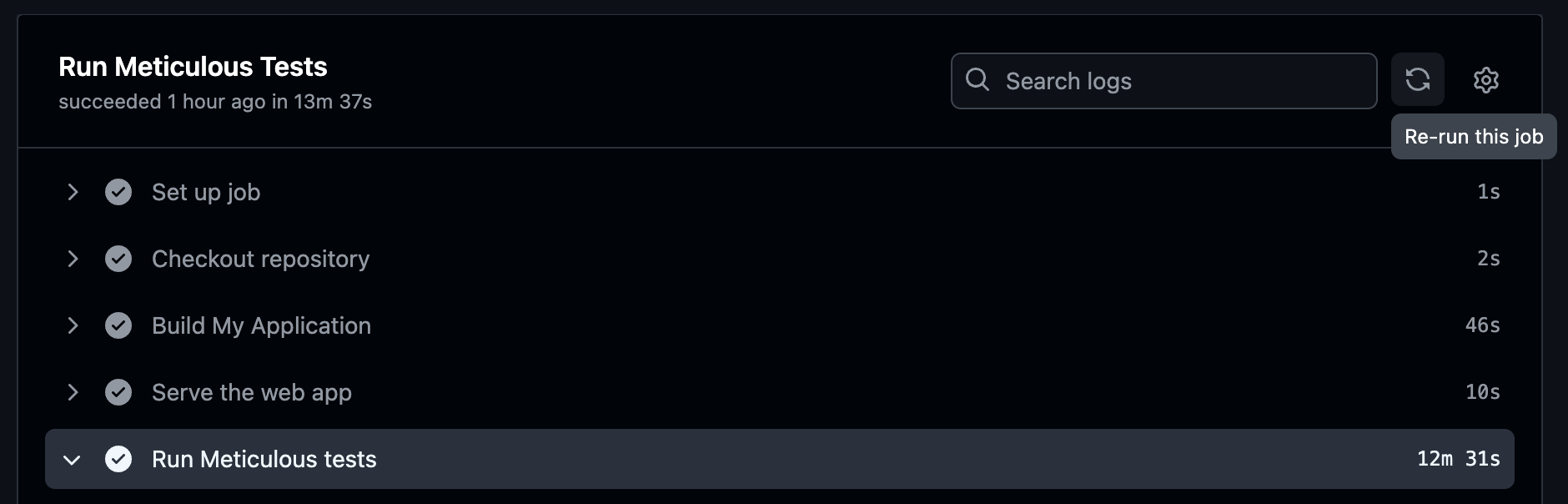 13285 13286Click the 'Re-run this job' button in the top right: 13287 13288 13289 13290This will open a modal where you can re-run the workflow: 13291 13292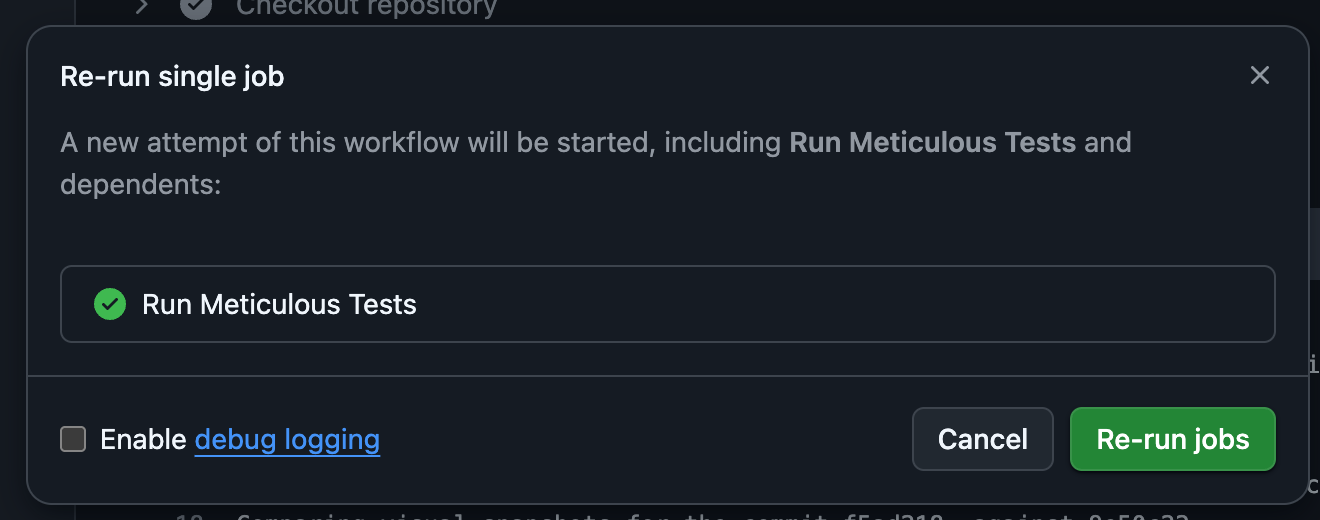 13293 13294{% /tab %} 13295 13296{% tab label="Other CI Runners" %} 13297 13298Use the native retry functionality in your CI provider to re-run the workflow that runs the Meticulous tests, or run: 13299 13300\`\`\`bash 13301git commit --allow-empty -m "Retry Meticulous" && git push 13302\`\`\` 13303 13304This will push up a new commit and trigger a new workflow run. 13305 13306{% /tab %} 13307{% /tabs %} 13308`},{id:"setup-okta-sso",url:"/docs/how-to/setup-okta-sso",document:`--- 13309{ 13310 "title": "Setting up Okta SSO for Meticulous" 13311} 13312--- 13313 13314# {% $frontmatter.title %} 13315 13316This guide will show you how to set up Okta SSO for Meticulous. You will need to be an admin of your Okta instance to follow these steps. If you need any help, please reach out to us at \`[email protected]\`. 13317 13318## Configuration 13319 13320Throughout these instructions, replace \`<CompanyName>\` with the name of your company. 13321 13322### Create the application 13323 13324In the *Applications* tab create a new application called *Meticulous* with: 13325 13326- Sign-in method: OIDC - OpenID Connect 13327- Application type: Web Application 13328- Sign in redirect URI: 13329 13330{% command_card_block %} 13331\`\`\`text 13332https://app.meticulous.ai/auth/realms/meticulous/broker/SSO_<CompanyName>/endpoint 13333\`\`\` 13334{% /command_card_block %} 13335 13336- Sign out redirect URI: 13337 13338{% command_card_block %} 13339\`\`\`text 13340https://app.meticulous.ai/auth/realms/meticulous/broker/SSO_<CompanyName>/endpoint/logout_response 13341\`\`\` 13342{% /command_card_block %} 13343 13344### Configure the application 13345 13346Once the application is created, configure it with the following settings: 13347 13348- Assign the application to all potential users of Meticulous. We do not charge anything for users in the UI (our billing is based on contributors to your codebase), so feel free to add a very broad group here such as the whole Engineering org. 13349- Grab our logo from \`https://app.meticulous.ai/logo512.png\` and add it to the application. 13350- Login initiated by: Either Okta or App 13351- Application visibility: Display application icon to users 13352- Login flow: Redirect to app to initiate login (OIDC Compliant) 13353- Initiate login URI: 13354 13355{% command_card_block %} 13356\`\`\`text 13357https://app.meticulous.ai/api/auth/signin?next=https%3A%2F%2Fapp%2Emeticulous%2Eai&idp=SSO_<CompanyName> 13358\`\`\` 13359{% /command_card_block %} 13360 13361### Send the details to Meticulous 13362 13363Send the following in a secure manner (e.g. a single-use 1Password link that's protected with 2FA) to \`[email protected]\` or your point of contact within Meticulous: 13364 13365 1. The client ID of the application. 13366 2. The client secret of the application. 13367 3. What the Okta domain that your users log in at is (i.e. what is in their address bar when they are authenticating - should be something like \`https://<org>.okta.com/\`). 13368 4. A list of domain name(s) your users' emails might have. 13369 5. What value you used for \`<CompanyName>\`. 13370 13371### [Optional] Configure the SSO claims 13372 13373If you wish to restrict access for certain users, you can configure a custom token claim in Okta. You can set either of these two claims (or both) to overwrite a user's current permissions: 13374 13375- \`meticulous_role\`: The role of the user in your organization. Valid values are \`owner\`, \`member\`, and \`reader\`. Owners have full access including member/project management. Members can view and modify projects, and approve diffs. Readers can only view projects. 13376- \`meticulous_projects\`: A comma-separated list of project names in your organization to give the user access to. You can set this to \`*\` to give the user access to all projects in the organization. Note this is ignored for owners who always have access to all projects. 13377 13378If you do not set these claims then an existing user's permissions will be preserved and new users will be added as \`member\`s with access to all projects in the organization. 13379 13380## FAQs 13381 13382- **Do users still need to be invited to Meticulous once we've set up SSO?** No. If a user comes in via SSO then they will automatically have a Meticulous account created and be added to your org. 13383 13384- **How does SSO work for existing Meticulous users?** When an existing user first logs in via SSO they will receive an email asking them if they want to link their account. After clicking to confirm, they can now use SSO to log in to their existing Meticulous account. 13385 13386- **Can we enforce login via SSO?** Yes! Drop us a message once everything is set up and we can enforce login via SSO for you. All users who have logged in via a non-SSO method will be signed out, and from then on Meticulous users in your org will only be able to sign in via SSO. 13387`},{id:"use-custom-event-api",url:"/docs/how-to/use-custom-event-api",document:eP},{id:"recorder-developer-tools",url:"/docs/how-to/recorder-developer-tools",document:eD},{id:"enabling-full-auth",url:"/docs/how-to/auth/enabling-full-auth",document:eQ},{id:"bypassing-auth",url:"/docs/how-to/auth/bypassing-auth",document:eZ},{id:"recorder-npm-dependency",url:"/docs/session-recording/recorder-npm-dependency",document:e4},{id:"ingest-existing-tests",url:"/docs/session-recording/ingest-existing-tests",document:e6},{id:"controlling-data-recorded",url:"/docs/session-recording/controlling-data-recorded",document:e7},{id:"controlling-when-recording-starts-and-stops",url:"/docs/session-recording/controlling-when-recording-starts-and-stops",document:ts},{id:"csp-exceptions",url:"/docs/session-recording/csp-exceptions",document:`--- 13388{ 13389 "title": "Content Security Policy (CSP) exceptions for the recorder snippet" 13390} 13391--- 13392 13393# {% $frontmatter.title %} 13394 13395If you have a strict Content Security Policy (CSP) in place, you may
13395need to add the following exceptions to allow the Meticulous recorder to work correctly: 13396 13397 - \`frame-src\`: https://snippet.meticulous.ai 13398 - \`script-src\`: https://snippet.meticulous.ai 13399 - \`script-src\`: https://browser.sentry-cdn.com 13400 - \`connect-src\`: https://cognito-identity.us-west-2.amazonaws.com 13401 - \`connect-src\`: https://user-events-v3.s3-accelerate.amazonaws.com 13402 - \`connect-src\`: *.sentry.io 13403`},{id:"redaction",url:"/docs/session-recording/redaction",document:to},{id:"nextjs-app-router",url:"/docs/frameworks/nextjs/app-router",document:tn},{id:"nextjs-pages-router",url:"/docs/frameworks/nextjs/pages-router",document:ti},{id:"react-vite",url:"/docs/frameworks/react/vite",document:ta},{id:"react-create-react-app",url:"/docs/frameworks/react/create-react-app",document:tr},{id:"vue-vite",url:"/docs/frameworks/vue/vite",document:tl},{id:"angular-cli",url:"/docs/frameworks/angular/angular-cli",document:tc},{id:"create-deployments-on-github",url:"/docs/alternative-ci-setups/create-deployments-on-github",document:tu},{id:"exporting-generated-tests",url:"/docs/export/exporting-generated-tests",document:`--- 13404{ 13405 "title": "Exporting generated tests" 13406} 13407--- 13408 13409# {% $frontmatter.title %} 13410 13411If you wish to re-use the Meticulous tests in another tool there are three main ways you can export tests from Meticulous: 13412 13413 1. Via the Meticulous CLI by running [npx @alwaysmeticulous/cli download session](https://github.com/alwaysmeticulous/meticulous-sdk/blob/main/packages/cli/src/commands/download-session/download-session.command.ts#L34) 13414 2. Via the Meticulous SDK by calling [getOrFetchRecordedSessionData](https://github.com/alwaysmeticulous/meticulous-sdk/blob/main/packages/downloading-helpers/src/file-downloads/sessions.ts#L42) 13415 3. Via the Meticulous REST API at \`https://app.meticulous.ai/api/\` by calling \`GET sessions/[id]\` (with your API token as the bearer token) 13416 13417Sessions (tests) are returned as JSON, and have two main components: 13418 13419 1. Network requests and responses. These are stored in [HAR format](https://en.wikipedia.org/wiki/HAR_(file_format)) and so can be used by most 13420 testing frameworks that support network stubbing, and are supported natively in Chrome, Safari, Firefox and Edge. 13421 2. User interactions. These are stored as JSON serialized UI events as per the [W3C UI Events spec](https://www.w3.org/TR/uievents/#events-uievent-types), and so are usable by most major testing 13422 frameworks, or by calling \`dispatchEvent\` in a browser. 13423`},{id:"not-yet-run-checks",url:"/docs/ci/not-yet-run-checks",document:`--- 13424{ 13425 "title": "Create Meticulous check in 'success' state until tests start running" 13426} 13427--- 13428 13429# {% $frontmatter.title %} 13430 13431In the default Meticulous setup you'll have a workflow that builds your app and invokes the 13432[Meticulous GitHub Action](${o.GITHUB_ACTIONS_SETUP_URL}) (\`upload-assets\` or \`upload-container\` depending on how your app is served). Say you name this workflow '*trigger-meticulous-tests.yml*'. You can 13433make Meticulous a blocking check by marking the '*${td.METICULOUS_GITHUB_CHECK_NAME}*' check as 13434a [required check](${o.MAKE_CHECK_BLOCKING_URL}). The build process would therefore look like this: 13435 13436 1. Your '*trigger-meticulous-tests.yml*' GitHub workflow is triggered (e.g. when a PR is opened). The '*${td.METICULOUS_GITHUB_CHECK_NAME}*' check 13437 has not been created yet, since the Meticulous tests have not started yet, and since you've marked '*${td.METICULOUS_GITHUB_CHECK_NAME}*' as 13438 a required check the PR will not be able to be merged yet. 13439 2. Once the build and pre-steps complete, the Meticulous action is invoked. This creates a second check on the PR, normally 13440 named '*${td.METICULOUS_GITHUB_CHECK_NAME}*'. This check will show as pending until the tests complete. If there are unapproved differences it 13441 will show as a failure, and will be updated to success when the differences are approved. Since you've marked the '*${td.METICULOUS_GITHUB_CHECK_NAME}*' 13442 check as a required check, the PR will not be able to be merged until the differences are approved. 13443 3. Finally the '*trigger-meticulous-tests.yml*' workflow will complete, and be marked as success. 13444 13445{% callout type="warning" %} 13446**Multiple projects for the same repository:** If you have more than one Meticulous project connected to the same GitHub repository (e.g. for testing different app variants or environments), the check name will include the project name â for example, *'Meticulous Tests (my-project)'* instead of *'${td.METICULOUS_GITHUB_CHECK_NAME}'*. Make sure your required status checks use the correct name. If you later add a second project to a repo that previously only had one, the check name will change and you'll need to update your branch protection rules accordingly. 13447{% /callout %} 13448 13449However having the '*${td.METICULOUS_GITHUB_CHECK_NAME}*' check as a required check can cause issues in a couple of scenarios: 13450 13451 1. If you use merge queues. In this case you don't want Meticulous to post a failed check if diffs are detected at the merge queue stage, 13452 since that would block the merge queue from merging. Any differences should have already been approved before the PR was added to the 13453 merge queue. It is therefore standard to skip the Meticulous workflow for merge queue triggers. However, if Meticulous is a 13454 [required checks](${o.MAKE_CHECK_BLOCKING_URL}) then the merge queue would be indefinitely blocked because it'd be waiting for a check 13455 that is never created. 13456 2. If you don't trigger Meticulous for every pull request. In this case you don't want to block merging PRs where Meticulous doesn't run 13457 (i.e. no Meticulous check was ever created). 13458 13459There are two ways of solving these issues: 13460 13461 1. Tick the '*${th.INITIALIZE_WITH_SUCCESSFUL_CHECK_CHECKBOX_LABEL}*' option in your Meticulous project settings. 13462 This will cause Meticulous to register GitHub webhooks to monitor for new pull requests, new commit pushes, and for pull requests added 13463 to merge queues. It will then create a successful '*${td.METICULOUS_GITHUB_CHECK_NAME}*' check in each of these cases straight away. This 13464 check will start off as 'success' and turn to 'pending' when and if the Meticulous tests start running. If the Meticulous tests never run 13465 then the check will be successful, and the PR can merge. This does however mean that developers will be able to merge pull requests in
13466 the period between the PR being opened and the Meticulous tests being triggered after the build or deployment completes. 13467 2. Use a GitHub action such as [wait-for-checks](https://github.com/marketplace/actions/wait-for-checks) that only waits for checks that 13468 are actually triggered, rather than waiting for a hard coded list of checks even if some of them are never triggered on some PRs. As long 13469 as a GitHub workflow is running or a check pending while the application is being built prior to the Meticulous tests being triggered then 13470 the PR will not be able to be merged until the tests complete. However if you trigger the Meticulous tests indirectly by creating a GitHub 13471 deployment then there is a risk the PR will be mergeable in the handful of seconds between the workflow that creates the deployment completing 13472 and Meticulous receiving the GitHub webhook for the new deployment and starting the tests. 13473`},{id:"agents-setup",url:"/docs/agents/setup",document:`--- 13474{ 13475 "title": "Setting up Meticulous for agents" 13476} 13477--- 13478 13479# {% $frontmatter.title %} 13480 13481Meticulous exposes the same read, analysis, and test-run-triggering operations to agents in a few different ways â pick whichever fits how your agent connects. 13482 13483- [CLI](#cli) â a global \`meticulous\` binary the agent runs in your terminal. 13484- [MCP](#mcp) â the hosted MCP server, for agents that speak MCP. 13485- [Skills](#skills) â pre-defined workflows on top of any of the above. 13486- [Ready to use integrations](#ready-to-use-integrations) â one-click installs for Claude Code and Cursor. 13487- [Org-wide setup](#org-wide-setup) â connect Meticulous for your whole team at once, via an OAuth-based connector or a centrally-managed project token. 13488 13489--- 13490 13491## CLI 13492 13493To set up the Meticulous CLI: 13494 13495\`\`\`bash 13496npm install --global @alwaysmeticulous/cli@latest 13497meticulous auth login 13498\`\`\` 13499 13500See [CLI commands](${o.AGENTS_CLI_COMMANDS_URL}) for more details, including more authentication options and the command reference. 13501 13502--- 13503 13504## MCP 13505 13506**Claude Code** 13507 13508Run the following in your terminal: 13509 13510\`\`\`bash 13511claude mcp add --transport http Meticulous https://app.meticulous.ai/api/mcp 13512\`\`\` 13513 13514Then, in Claude Code, type \`/mcp\` and choose "Authenticate" for the Meticulous MCP. 13515 13516**Cursor** 13517 13518Add to \`~/.cursor/mcp.json\` (global) or \`.cursor/mcp.json\` (per project): 13519 13520\`\`\`json 13521{ 13522 "mcpServers": { 13523 "Meticulous": { "url": "https://app.meticulous.ai/api/mcp" } 13524 } 13525} 13526\`\`\` 13527 13528**Codex/ChatGPT** 13529 13530Add a server with name "Meticulous" and URL \`https://app.meticulous.ai/api/mcp\`, then click "Authenticate". 13531 13532See [MCP server](${o.AGENTS_MCP_SERVER_URL}) for more details, including the full list of available tools. 13533 13534--- 13535 13536## Skills 13537 13538To install, and update, the skills into your project using [npx skills](https://github.com/vercel-labs/skills) (for the specified agents): 13539 13540\`\`\`bash 13541npx skills add alwaysmeticulous/skills --skill "*" --agent claude-code --agent codex --agent cursor -y 13542\`\`\` 13543 13544See [Skills & Use cases](${o.AGENTS_SKILLS_URL}) for what skills are, the full list of them, and what each one is for. 13545 13546--- 13547 13548## Ready to use integrations 13549 13550**Claude Code MCP** 13551 13552Install the hosted MCP server directly from the [Claude directory](https://claude.ai/directory/meticulous). 13553 13554**Claude Code plugin** 13555 13556For Claude Code, the skills and the MCP server come packaged together as a [plugin](https://code.claude.com/docs/en/discover-plugins), covering both of those steps in one go. It installs all the skills, namespaced as \`/meticulous:<skill-name>\`, and connects the hosted MCP server for you. Run in Claude Code: 13557 13558\`\`\`shell 13559/plugin marketplace add alwaysmeticulous/skills 13560\`\`\` 13561 13562Then install the Meticulous plugin: 13563 13564\`\`\`shell 13565/plugin install meticulous@meticulous 13566\`\`\` 13567 13568Then type \`/mcp\` and choose "Authenticate" for the Meticulous MCP server. 13569 13570**Cursor plugin** 13571 13572Install the MCP server and skills directly from the [Cursor marketplace](https://cursor.com/marketplace/meticulous). 13573 13574--- 13575 13576## Org-wide setup {% #org-wide-setup %} 13577 13578The steps above set up Meticulous for a single user. To roll it out to your whole team, there are two approaches: 13579 13580- **OAuth-based connectors** authenticate each user individually â an org admin adds a shared connector once, then every team member still authenticates via OAuth themselves the first time they use it, to activate their own access. 13581- **A project API token** authenticates everyone centrally â configured once by an admin, with no individual OAuth step. This is also the option for agent platforms that take a fixed credential instead of a CLI or MCP client (e.g. Claude Tag). 13582 13583To set up an org-wide MCP connector, navigate to: 13584 13585- **Claude Code:** Organization Settings > Connectors > Add (Web). 13586- **Cursor:** Settings > Integrations & MCP > Team MCP Servers > Add (Remote HTTPS). 13587 13588To configure it with a project API token, so it authenticates every user centrally, do the following: 13589 13590- **URL:** \`https://app.meticulous.ai/api/mcp\` 13591- **Credential type:** Bearer 13592- **Prefix:** \`Bearer\` 13593- **Value:** a project API token 13594 13595Select the project below, then copy the token (careful: grants access to recorded sessions!): 13596 13597{% code_with_project_selector %} 13598{% standalone_api_token /%} 13599{% /code_with_project_selector %} 13600 13601As a concrete example of the general steps above, for Claude Tag (Claude in Slack): 13602 136031. Go to [claude.ai/admin-settings/claude-tag/access-bundles](https://claude.ai/admin-settings/claude-tag/access-bundles). 136042. Under **General > Credentials**, click **Connect**. 136053. Set Name to \`Meticulous\` and Credential type to \`Bearer\`. 136064. Set Allowed websites to \`app.meticulous.ai\`. 136075. Under **Custom headers**, click **Add header**, and set: 13608 - Name: \`Authorization\` 13609 - Prefix: \`Bearer\` 13610 - Value: the project API token created above. 13611 13612--- 13613 13614{% footnote %} 13615*There is also an [agent-addressed version of this page](${o.AGENTS_SETUP_FOR_AGENTS_URL}), written for the agent rather than for you. That's what we point agents at in various places like CI comments, so they can get set up without you having to explain any of the above â feel free to hand your agent the link directly.* 13616{% /footnote %} 13617`},{id:"agents-setup-for-agents",url:"/docs/agents/setup-for-agents",document:`--- 13618{ 13619 "title": "Meticulous for coding agents" 13620} 13621--- 13622 13623# {% $frontmatter.title %} 13624 13625This page is addressed to AI coding agents. If you're a human setting Meticulous up for your agent, you probably want the [setup guide](${o.AGENTS_SETUP_URL}
13625) instead â it covers the same ground, aimed at you rather than at the agent. 13626 13627{% agent_instructions_heading /%} 13628 13629${(0,td.buildAgentInstructionsBody)()} 13630`},{id:"agent-swarm",url:"/docs/agents/agent-swarm",document:`--- 13631{ 13632 "title": "Set up Agent swarm" 13633} 13634--- 13635 13636# {% $frontmatter.title %} 13637 13638Agent swarm uses a Meticulous-hosted agent to explore and test your application for a pull request. Meticulous uploads the build from your CI job and opens it in a recorder-instrumented browser, where the agent follows your instructions to exercise happy paths, edge cases, and potential regressions. The Agent swarm page reports each test case's result with step-by-step screenshots, and the discovered flows are saved as sessions that extend your replay-test coverage. 13639 13640Use this guide to add Agent swarm to your CI workflow. It complements ordinary Meticulous replay tests; it does not replace the sessions you record or the normal PR-test workflow. 13641 13642{% callout type="warning" title="Contact us before adding this to CI" %} 13643Agent swarm is currently in beta and is **not** enabled until we turn it on for your project. **Contact us before merging the workflow** and wait for confirmation that your project is opted in. If you add the workflow first, launches will fail until we enable it. 13644 13645When you reach out, include your Meticulous org/project, whether you plan to use local mocks or a staging backend, and â if you need staging login â the details in [Login setup](#login-setup). 13646{% /callout %} 13647 13648## Before you start 13649 13650You need: 13651 13652- A Meticulous project linked to the repository and opted in to the beta (see above). 13653- A project-scoped API token stored in your CI provider as \`METICULOUS_API_TOKEN\`. 13654- A build command that produces a directory of static frontend assets. 13655- A GitHub Actions workflow (or equivalent CI job) that runs when a pull request is opened, plus a way to re-run manually. 13656 13657Choose one environment for the agent: 13658 13659| Your application | Recommended setup | 13660| --- | --- | 13661| Static site, or frontend whose API responses can be mocked | Upload the build only. | 13662| Static frontend with a disposable staging API | Upload the build and proxy selected paths, such as \`/api\`, to that API. | 13663| App that can run in a Docker image | Upload the container with \`--localImageTag\`; see the [CLI command reference](${o.AGENTS_CLI_COMMANDS_URL}). | 13664 13665The rest of this guide walks through the first two options. 13666 13667--- 13668 13669## 1. Add agent instructions 13670 13671Create and commit \`.meticulous/agent-swarm-instructions.md\`. Describe the app in terms the agent can act on: routes, important controls, test accounts, and the expected flows. Keep secrets out of this file. 13672 13673Meticulous reads this file from the repository at the commit being tested for every Agent swarm run, whether it was launched from CI with \`ci agent-test\` or triggered automatically. This means a pull request can change its own instructions, but uncommitted changes are not visible to Meticulous. 13674 13675For example: 13676 13677\`\`\`md 13678# Storefront 13679 13680Start at \`/\`. Browse the catalogue, add an item to the cart, and complete the checkout form. Use \`[email protected]\` and the test account details supplied by the environment. Also visit \`/orders\` and check empty and populated states. 13681\`\`\` 13682 13683Good instructions name the goal and the UI affordances that lead to it. They should also call out variants worth exercising, such as validation errors, filters, feature flags, or a dark-mode toggle. 13684 13685If a first-time tour, tip, or consent banner can cover the application, name it and its visible dismiss control in the instructions. Agent swarm automatically closes common consent banners and vendor tours before starting a flow, and it remembers any other disposable overlay it has had to dismiss so later runs close it automatically too. To have an overlay closed from the very first run, add a \`data-meticulous-overlay-dismiss\` attribute to its dismiss control, or name the overlay and its dismiss control in the instructions. Do not tell the agent to close a dialog that is part of the behavior you want tested. 13686 13687For applications with configured staging login, the most deterministic option is to complete the onboarding state as part of that project login setup. Meticulous captures the resulting cookies and local storage and seeds each case browser with them, so the popup never appears or adds a dismissal action to the recorded session. Tell us which tour-completion state or action is required when you send the [login setup](#login-setup) details. 13688 13689### Overriding the instructions file 13690
13691Pass \`--instructionsFile <path>\` to use a different markdown file for one CLI-launched run. The override replaces \`.meticulous/agent-swarm-instructions.md\`; the two files are not merged. This is useful for environment- or mode-specific instructions. 13692 13693If you already use \`.github/agent-review/instructions.md\`, move it to \`.meticulous/agent-swarm-instructions.md\` so automatically triggered runs can find it. Alternatively, keep passing the old path with \`--instructionsFile\` for CLI-launched runs. 13694 13695--- 13696 13697## 2. Build and launch the static frontend 13698 13699Add a separate pull-request workflow, or a job after your existing build. Agent swarm runs are relatively expensive, so prefer **not** running on every push. Trigger on PR **opened** / **reopened**, and use \`workflow_dispatch\` when you want a fresh run after later commits. 13700 13701The following GitHub Actions job builds a static site in \`build/\` and launches Agent swarm for the PR's **head commit**: 13702 13703\`\`\`yaml 13704name: Agent swarm 13705 13706on: 13707 pull_request: 13708 types: [opened, reopened] 13709 workflow_dispatch: 13710 13711jobs: 13712 generate-sessions: 13713 runs-on: ubuntu-latest 13714 env: 13715 METICULOUS_API_TOKEN: \${{ secrets.METICULOUS_API_TOKEN }} 13716 steps: 13717 - uses: actions/checkout@v4 13718 - uses: pnpm/action-setup@v4 13719 - uses: actions/setup-node@v4 13720 with: 13721 node-version: "22" 13722 cache: pnpm 13723 - run: pnpm install --frozen-lockfile 13724 - run: pnpm build 13725 - name: Launch Agent swarm 13726 run: | 13727 npx -y @alwaysmeticulous/cli@latest ci agent-test \\ 13728 --assetsDir build \\ 13729 --commitSha "\${{ github.event.pull_request.head.sha || github.sha }}" 13730\`\`\` 13731 13732Replace \`build\` with your build output directory. The command runs the agent in Meticulous; your CI runner does not need Docker or LLM credentials. 13733 13734Do **not** use bare \`on: pull_request:\` (that fires on every push to the PR). To re-run after later commits, use **Actions â Agent swarm â Run workflow**. 13735 13736{% callout type="warning" title="Use the pull request head SHA" %} 13737On a \`pull_request\` event, \`github.sha\` can be GitHub's temporary merge commit. Pass \`github.event.pull_request.head.sha || github.sha\` so the generated sessions and their result are associated with the commit that Meticulous tests and displays for the PR. 13738{% /callout %} 13739 13740To prove the command and paths are valid without launching an agent, append \`--dryRun\`. You can also run the same command locally after building, with \`METICULOUS_API_TOKEN\` exported. 13741 13742--- 13743 13744## 3. Connect a staging backend (when needed) 13745 13746If the uploaded frontend needs a live backend, serve a disposable staging environment over public HTTPS and proxy the frontend's relative API paths to it: 13747 13748\`\`\`yaml 13749 - name: Launch Agent swarm with staging API 13750 env: 13751 METICULOUS_STAGING_USERNAME: \${{ secrets.STAGING_AGENT_USERNAME }} 13752 METICULOUS_STAGING_PASSWORD: \${{ secrets.STAGING_AGENT_PASSWORD }} 13753 run: | 13754 npx -y @alwaysmeticulous/cli@latest ci agent-test \\ 13755 --assetsDir frontend/dist \\ 13756 --backendUrl "https://staging.example.com" \\ 13757 --backendProxyPaths /api \\ 13758 --commitSha "\${{ github.event.pull_request.head.sha || github.sha }}" 13759\`\`\` 13760 13761Your frontend must make same-origin requests under the configured prefixes (for example, \`fetch('/api/tasks')\`). \`--backendProxyPaths\` defaults to \`/api\`, so you can omit it when that is the only prefix you need. Absolute API URLs bypass this proxy; contact Meticulous to configure an egress policy for every required cross-origin host. The backend must be publicly reachable on HTTPS, accept the proxied requests, and use a disposable account because the agent can perform writes. 13762 13763### Login setup 13764 13765If the agent needs to sign in against your staging backend, we configure the login flow for your project â it is not something you set in CI. Send us the following **before** your first credentialed run (ideally when you request beta access): 13766 13767| Tell us | Why we need it | 13768| --- | --- | 13769| How users sign in (username/password on the app, redirect to IdP/SSO, magic link, etc.) |
13769Chooses / customizes the login flow; popups and many OAuth/SSO flows are not supported today | 13770| Login page URL or path (e.g. \`/login\`, or "opens at app root") | The standard username/password flow starts at the app URL and expects the form there | 13771| Username and password field selectors if non-standard | Defaults are \`input[type="email"]\` / \`input[name="email"]\` / \`input[name="username"]\`, \`input[type="password"]\`, and \`button[type="submit"]\` / \`input[type="submit"]\` | 13772| Submit control (button text / selector) | Same as above | 13773| What "logged in" looks like (URL after login, cookie names, or a screenshot) | Confirms the flow succeeded before the agent starts | 13774| Any first-time tour or tip that appears after login, and how to complete it | Lets us capture and seed the completed onboarding state before each case | 13775| Staging origin (\`https://â¦\`) | Wired as \`--backendUrl\` | 13776| Whether MFA / captcha / bot checks apply to the test account | Usually blocks automated login unless disabled for that account | 13777 13778You can paste this into Slack or email: 13779 13780\`\`\`text 13781Project: <org/project> 13782Staging backend URL: https://⦠13783Login type: username/password on app | SSO/IdP | other (describe) 13784Login URL/path: ⦠13785Username field: (default ok / selector: â¦) 13786Password field: (default ok / selector: â¦) 13787Submit: (default ok / selector or button text: â¦) 13788After login: lands on ⦠/ session cookie ⦠13789Post-login tour/tip: none | completion action/state: ⦠13790Test account: (username/password go in CI secrets only) 13791MFA/captcha on staging for this account: yes/no 13792\`\`\` 13793 13794Once we have configured login, provide credentials and any other login options only through \`METICULOUS_STAGING_*\` environment variables: \`METICULOUS_STAGING_USERNAME\` and \`METICULOUS_STAGING_PASSWORD\`, plus any flow-specific values we agree on â for example \`METICULOUS_STAGING_TOTP_SECRET\` (base32 TOTP seed) for an MFA flow, or \`METICULOUS_STAGING_SKIP_EMAIL_CLIENT_ID\` (trusted-automation client id) when the login flow must bypass an email verification challenge. Every environment variable with the \`METICULOUS_STAGING_\` prefix is forwarded to the login flow, so adding a new option never requires a CLI upgrade. Do not put these values in agent instructions or commit them to the repository. 13795 13796--- 13797 13798## 4. Verify the first run 13799 138001. Open a pull request with a small, visible change (or manually re-run the workflow). 138012. Confirm the **Agent swarm** job uploads the build and prints a workflow run identifier. 138023. Open the Meticulous test run for the PR commit, then open **Agent swarm** to inspect the generated test cases, results, and screenshots. 138034. Review the recorded flows and adjust \`.meticulous/agent-swarm-instructions.md\` if important routes or states were missed. 13804 13805If the agent cannot reach an API request, first check that the frontend uses a relative URL under \`--backendProxyPaths\`, or ask Meticulous to add an egress policy for its cross-origin host; then check that the staging deployment is healthy and the test credentials can sign in. For command syntax and the container option, see [CLI commands](${o.AGENTS_CLI_COMMANDS_URL}). 13806`},{id:"agents-whats-new",url:"/docs/agents/whats-new",document:`--- 13807{ 13808 "title": "What's new" 13809} 13810--- 13811 13812# {% $frontmatter.title %} 13813 13814Unless a change is specific to one surface, changes listed here apply equally to the CLI and the corresponding MCP tools. 13815 13816### October 2, 2026 â list test runs and review non-visual checks 13817 13818- \`meticulous agent test-runs\` **(new)** lists a project's pull request test runs, newest first, or its base test runs with \`--baseTestRuns\`. Options filter the runs and add more detail to each one. 13819- \`meticulous agent reject-check\`, \`approve-check\` and \`ignore-check\` **(new)** record an agent decision on a failing builtin or custom check, the same way the diff commands do for screenshot diffs. Rejecting is always available; approving and ignoring need **Enable approve/ignore check actions** under the project's Agents settings. An agent can never approve or ignore a check a person rejected. Like the other test-run commands, they take \`--prNumber\` as an alternative to \`--testRunId\`. 13820- \`meticulous agent check-comments\` **(new)** reads back the reasons given with those decisions, which are stored as their justification. 13821 13822\`\`\`bash 13823meticulous agent test-runs --prNumber=123 13824meticulous agent reject-check --testRunId="<id>" --checkId="network-requests" --reason="..." 13825meticulous agent check-comments --testRunId="<id>" --checkId="network-requests" 13826\`\`\` 13827 13828--- 13829 13830### September 30, 2026 â look up a test run by pull request number 13831 13832- Every command that resolves a test run from \`--testRunId\` or \`--commitSha\` â \`test-run-for-commit\`, \`test-run-diffs\`, \`test-run-check\`, \`js-coverage\` and \`js-coverage-diff\` â now also accepts \`--prNumber\`, which resolves to the latest test run for the pull request's head commit, exactly as \`--commitSha\` would for that commit. On the MCP server, the test-run tools take \`prNumber\` in place of \`testRunId\`. 13833 13834\`\`\`bash 13835meticulous agent test-run-diffs --prNumber=123 13836\`\`\` 13837 13838--- 13839 13840### September 29, 2026 â approve and ignore diffs 13841 13842- \`meticulous agent approve-diff\` **(new)** approves a screenshot diff, optionally with a review comment explaining why (\`--reason\` with \`--x\`/\`--y\`). It is only available on projects that turn on **Enable approve/ignore diff actions** under the project's Agents settings; on those projects \`ignore-diff\` also records a real ignore rather than just a comment, so an agent can pass the Meticulous check without a human review. An agent can never approve or ignore a diff a person rejected. 13843 13844\`\`\`bash 13845meticulous agent approve-diff --replayDiffId="<id>" --screenshotName="<name>" 13846\`\`\` 13847 13848--- 13849 13850### September 28, 2026 â promote recorded sessions into the selected set 13851 13852- \`meticulous agent promote-sessions\` **(new)** adds sessions you recorded to the selected set straight away, rather than waiting for the next session selection. Pass the test run you triggered over them with \`trigger-test-run --sessionIds\`. The commit's coverage reflects the promotion as soon as the updated base run it creates has finished post-processing. 13853 13854\`\`\`bash 13855meticulous agent trigger-test-run --sessionIds="<id1>,<id2>" 13856meticulous agent promote-sessions --testRunId="<id>" 13857\`\`\` 13858 13859--- 13860 13861### September 28, 2026 â \`agent upload-build\` takes a build directory only 13862 13863\`meticulous agent upload-build\` no longer accepts \`--appZip\`. Pass the build output directory instead; it uploads in the format replays can start from without unpacking. This change is CLI-only: the MCP asset upload still takes a zip. 13864 13865\`\`\`bash 13866meticulous agent upload-build --appDirectory="<path-to-build>" 13867\`\`\` 13868 13869--- 13870 13871### September 28, 2026 â filter sessions by what recorded them 13872 13873\`meticulous agent sessions\` can drop sessions recorded by Agent swarm (\`--excludeAgentReviewSessions\`), keep only sessions that captured their page's HTML document (\`--requireInitialNavigationResponse\`), and show what recorded each session (\`--includeSource\`). 13874 13875\`\`\`bash 13876meticulous agent sessions --excludeAgentReviewSessions --includeSource 13877meticulous agent sessions --requireInitialNavigationResponse --includeStartUrl 13878\`\`\` 13879 13880--- 13881 13882### September 15, 2026 â retrieve, filter and order the selected set 13883 13884- \`meticulous agent sessions --selectedSet\` narrows the listing to the selected set Met
13884iculous replays. 13885- \`--includeSelectedSince\` adds when each session entered that set. 13886- \`--includeAdditionalCoverage\` adds the coverage each session contributed over everything picked before it. 13887- \`--orderBy\` chooses the order (\`rank\`, \`selectedSince\`, \`additionalCoverage\`), and \`--order\` sets the direction (\`asc\`/\`desc\`). 13888 13889\`\`\`bash 13890meticulous agent sessions --selectedSet --includeSelectedSince 13891meticulous agent sessions --selectedSet --orderBy=rank 13892meticulous agent sessions --selectedSet="2026-07-01" 13893meticulous agent sessions --selectedSet --orderBy=selectedSince --order=asc 13894meticulous agent sessions --selectedSet --includeAdditionalCoverage --orderBy=additionalCoverage 13895\`\`\` 13896 13897--- 13898 13899### September 11, 2026 â export reporting statistics 13900 13901Three new commands export test-run, daily-project, and test-run-event reporting statistics in machine-readable pages, scoped by \`--since\` (\`--until\` defaults to now) or by identifiers. 13902 13903\`\`\`bash 13904meticulous agent test-run-stats --since="2026-08-01" 13905meticulous agent project-daily-stats --since="2026-08-01" 13906meticulous agent test-run-event-stats --testRunIds="<id1>,<id2>" --json 13907\`\`\` 13908 13909--- 13910 13911### September 11, 2026 â coverage you can triage, total, and compare 13912 13913- \`meticulous agent js-coverage --summary\` **(new)** reports a run's overall coverage â executed, executable and uncovered line counts and the coverage percentage â instead of the per-file list. 13914- \`--includeLineCounts\` **(new)** adds per-file \`executedLines\`/\`executableLines\`/\`uncoveredLines\` instead of ranges. 13915- \`--orderBy\` and \`--limit\`/\`--offset\` **(new)** order and page the output server-side. 13916- \`--globFilter\` is now repeatable, matching any of several globs. 13917- \`meticulous agent js-coverage-diff\` now diffs a whole test run against the base run it was compared against, and shares most of its arguments with \`js-coverage\`. 13918 13919\`\`\`bash 13920meticulous agent js-coverage --summary 13921meticulous agent js-coverage --includeLineCounts --orderBy=uncoveredLines --limit=50 13922meticulous agent js-coverage-diff --summary 13923\`\`\` 13924 13925--- 13926 13927### September 4, 2026 â link to a group of diffs 13928 13929- Gallery group headers have "Copy link to group" in Similar, URL, User flow, and custom groupings. The link opens that grouping and scrolls to the group. 13930- For a Similar-group link, \`meticulous agent test-run-diffs --similarGroupId="<id>"\` returns every screenshot in that group. \`--includeSimilarGroupId\` adds the id on each row. 13931 13932\`\`\`bash 13933meticulous agent test-run-diffs --similarGroupId="<id>" --testRunId="<id>" 13934\`\`\` 13935 13936--- 13937 13938### August 17, 2026 â get real coverage for a base commit 13939 13940- \`meticulous agent complete-base-run\` **(new)** replays the rest of a base run's selected sessions, to complete its coverage information. 13941- \`meticulous agent js-coverage\` now refuses a base run whose selected set hasn't fully replayed, saying how many sessions are missing, rather than reporting an understated total. 13942 13943\`\`\`bash 13944meticulous agent complete-base-run 13945meticulous agent js-coverage 13946\`\`\` 13947 13948--- 13949 13950### August 11, 2026 â discover available check IDs, and a renamed check command 13951 13952- \`meticulous agent test-run-checks\` is renamed to \`meticulous agent test-run-check\`, since it operates on a single check. 13953- The new \`--availableIds\` flag (MCP: \`get_test_run_check_available_ids\`) lists the check IDs that have reported results for a test run. 13954 13955\`\`\`bash 13956meticulous agent test-run-check --availableIds --testRunId="<id>" 13957meticulous agent test-run-check --checkId="accessibility" --testRunId="<id>" 13958\`\`\` 13959 13960--- 13961 13962### August 10, 2026 â agent diff reviews and review comment writes 13963 13964- \`meticulous agent reject-diff\` records a rejection with a review comment explaining why. 13965- \`meticulous agent ignore-diff\` says a diff looks like an unrelated variant / flake, currently as a comment only. 13966- The new \`create-diff-comment\` and \`reply-to-diff-comment\` commands let agents start and continue review threads independently of a decision. 13967- \`meticulous agent diff-comments\` gained an \`isAgentAuthored\` attribute, distinguishing agent-written comments from human ones. 13968 13969\`\`\`bash 13970meticulous agent reject-diff --replayDiffId="<id>" --screenshotName="<name>" --reason="..." --x=0.5 --y=0.5 13971meticulous agent reply-to-diff-comment --commentId="<id>" --text="..." 13972\`\`\` 13973 13974--- 13975 13976### August 7, 2026 â non-visual check reports, session activity counts, and see and change which project you're querying 13977 13978- \`meticulous agent test-run-checks\` retrieves the Markdown report for a non-visual check. For customer-reported checks, use \`--checkType="custom"\`. 13979- \`meticulous agent sessions\` gained \`--includeNumberUserEvents\` and \`--includeNumberUrlsVisited\` for adding the recorded user-event and URL-visit counts to each session, and \`--includeDurationSeconds\` for adding each session's duration in seconds (omitted for sessions where a duration couldn't be computed, e.g. recorded before this was tracked).
13980- The MCP server gained \`whoami\`, \`list_projects\`, \`get_project\` and \`set_project\`, matching the existing \`meticulous auth\` commands â so an agent can now check which project its calls resolve to, and change it, without leaving the connection. \`meticulous auth get-project\` and \`set-project\` also gained \`--json\`. 13981- Relatedly, an empty test-run or session lookup now names the project it searched and how to change it, rather than just reporting nothing found: a default project lives on your user account, so it is shared across machines and sessions and an unexpectedly empty result is usually the wrong project rather than missing data. 13982 13983\`\`\`bash 13984meticulous agent test-run-checks --checkId="accessibility" 13985meticulous agent test-run-checks --checkId="network-requests" --testRunId="<id>" 13986meticulous agent sessions --includeDurationSeconds 13987meticulous agent sessions --includeNumberUserEvents 13988meticulous agent sessions --includeNumberUrlsVisited 13989meticulous auth get-project --json 13990\`\`\` 13991 13992--- 13993 13994### August 4, 2026 â filter and focus test-run diffs 13995 13996- \`meticulous agent test-run-diffs --onlyWithComments\` filters to screenshot diffs with at least one open review comment. 13997- The \`--only*\` row filters now combine as a union, so passing several returns the diffs matching any of them. 13998- \`meticulous agent test-run-diffs\` returns all diffs when there are at most five; above that, a selected representative subset in priority order. Full-diff results no longer include an \`isSelected\` field. \`--onlyRejected\`/\`--onlyWithComments\` are unaffected by this cap, they always return every matching diff. 13999- \`meticulous agent test-run-diffs --counts\` now also reports \`numWithOpenComments\`. 14000 14001--- 14002 14003### August 3, 2026 â review comments, rejected diffs, and leaner test-run-diffs output 14004 14005- \`meticulous agent test-run-diffs --includeReviews\` adds \`decision\` (previously \`--includeReviewDecisions\`) and \`openComments\` to each diff. 14006- \`meticulous agent diff-comments --replayDiffId="<id>" --screenshotName="<name>"\` retrieves the corresponding open comments with nested replies. 14007- \`meticulous agent test-run-diffs --onlyRejected\` returns every screenshot diff already marked rejected, across every difference rather than only the selected subset. 14008- \`meticulous agent test-run-diffs\` no longer returns \`index\` or \`outcome\`, and now returns \`mismatchFraction\` only with \`--includeMismatchFraction\`. 14009 14010\`\`\`bash 14011meticulous agent test-run-diffs --includeReviews 14012meticulous agent diff-comments --replayDiffId="<id>" --screenshotName="<name>" 14013meticulous agent test-run-diffs --onlyRejected 14014meticulous agent test-run-diffs --includeMismatchFraction 14015\`\`\` 14016 14017--- 14018 14019### July 24, 2026 â submit feedback about Meticulous 14020 14021- \`meticulous agent submit-feedback\` **(new)** lets an agent send free-form feedback to the Meticulous team â whether Meticulous helped catch or debug a problem, what was confusing, and what information would have made the task easier. Optionally tag it with \`--outcome\` (\`helped\`/\`neutral\`/\`hindered\`), the related \`--testRunId\`, the \`--skill\` being followed, and \`--agentName\`/\`--agentModel\`. 14022 14023\`\`\`bash 14024meticulous agent submit-feedback --message="Caught a real regression in the checkout flow" --outcome="helped" --testRunId="<id>" --skill="meticulous-review" 14025\`\`\` 14026 14027--- 14028 14029### July 21, 2026 â OAuth device flow login and project-level JS coverage 14030 14031- \`meticulous auth login --device\` **(new)** logs in via the [OAuth 2.0 Device Authorization Grant](https://www.rfc-editor.org/rfc/rfc8628): the CLI prints a URL and code you can open and confirm in a browser on any device, then polls until the grant is confirmed. Use this on remote or sandboxed machines (SSH sessions, containers, cloud coding agents) where a browser can't reach the CLI's localhost â unlike \`--non-interactive\`, which still requires opening the printed URL on the same machine as the CLI. 14032- \`meticulous agent js-coverage\` gained \`--latestForProject\`, which returns per-file coverage from the project's preferred latest successful test run. 14033 14034--- 14035 14036### July 20, 2026 â list a project's recently recorded sessions 14037 14038- \`meticulous agent sessions\` **(new)** lists a project's most recently created sessions, newest first â useful, for instance, for finding the id of a session you just recorded. 14039- \`meticulous agent trigger-test-run\` gained \`--maxDurationSeconds\` (or \`none\` for unlimited) to override the replay engine's duration cap on runs with pinned \`--sessionIds\` â useful, for instance, to prevent agent-recorded sessions from being cut at the default 5min cap. 14040 14041\`\`\`bash 14042meticulous agent sessions 14043meticulous agent sessions --createdSince="2026-07-01" --createdUntil="2026-07-10" 14044meticulous agent sessions --recordedBy="[email protected]" --visitedUrlFilter="*/checkout*" 14045meticulous agent sessions --recordedSince 2026-07-10 --excludeSyntheticSessions --l
14045imit 10 14046meticulous agent trigger-test-run --sessionIds="<id1>,<id2>" --maxDurationSeconds=none 14047\`\`\` 14048 14049--- 14050 14051### July 16, 2026 â MCP server for agents 14052 14053The Meticulous MCP server exposes the agent CLI's read and analysis commands as tools your coding agent can call directly â see the [MCP server](${o.AGENTS_MCP_SERVER_URL}) page for setup and the full list of available tools. Every read-only \`agent\` command has a matching tool; the two mutating ones, \`upload-build\` and \`trigger-test-run\`, aren't exposed yet but are coming soon. 14054 14055--- 14056 14057### July 13, 2026 â review-state aware test-run-diffs, diff counts, and per-account default project 14058 14059- \`meticulous agent test-run-diffs\` now understands PR review state, and can report totals without the full list: 14060 14061 | Flag | What it does | 14062 |------|--------------| 14063 | \`--includeReviewDecisions\` | Add a \`decision\` column with each diff's PR review decision (\`accepted\`/\`rejected\`/\`ignored\`/\`unreviewed\`; \`unreviewed\` when undecided or there's no PR) | 14064 | \`--onlyUnreviewed\` | Return only the diffs still awaiting review â everything left to look at, across every difference (implies \`--includeAllDiffs\`, so the \`isSelected\` column is included) | 14065 | \`--counts\` | Print just the aggregate totals â number of replays, number of differences, and the review-decision breakdown (approved / ignored / rejected / unreviewed) â instead of the per-diff list | 14066 14067- Your default project is now a per-account setting, too: 14068 - \`meticulous auth set-project\` now persists your default project on your Meticulous account instead of a local file â so it's consistent across machines and available to the MCP server. \`meticulous auth logout\` leaves it untouched. 14069 - \`meticulous auth get-project\` **(new)** prints your default project, which you can also view and change from your user settings in the web app. 14070 - \`meticulous agent test-run-for-commit\`, \`test-run-diffs\`, \`js-coverage\`, and \`trigger-test-run\` gained \`--project\` â a one-off override (id, \`organization/name\` slug, or unique bare name) for that call only, which doesn't change your stored default. 14071 14072 \`\`\`bash 14073 meticulous auth set-project --project="my-org/my-project" 14074 meticulous auth get-project 14075 meticulous agent js-coverage --project="my-org/my-project" 14076 \`\`\` 14077 14078--- 14079 14080### July 10, 2026 â test-run-diffs is differences-only 14081 14082\`meticulous agent test-run-diffs\` no longer returns matching screenshots â it reports only genuine visual differences, the same set Meticulous counts and displays everywhere else. The \`--includeMatches\` flag is removed. 14083 14084--- 14085 14086### July 7, 2026 â get combined coverage from multiple test runs 14087 14088\`meticulous agent js-coverage\` gained \`--headPlusTestRunIds\` and \`--testRunIds\` for unioning coverage across several test runs (same project, same commit) â e.g. combining a run's head coverage with a separate run triggered via \`agent trigger-test-run --sessionIds="<ids>"\` to assess how these sessions improve coverage. 14089 14090\`\`\`bash 14091meticulous agent js-coverage --headPlusTestRunIds="<id1>,<id2>" 14092meticulous agent js-coverage --testRunIds="<id1>,<id2>,<id3>" 14093\`\`\` 14094 14095--- 14096 14097### July 6, 2026 â consistent machine-readable output for agent & auth 14098 14099- \`agent\` and \`auth\` commands gained \`--json\` for JSON-structured output instead of default format. 14100- \`agent\` and \`auth\` commands also gained \`--verbose\`, which prints additional progress logs on stderr. 14101- \`--rawJson\` is renamed to \`--jsonArgs\` (old name still works, now deprecated). 14102 14103\`\`\`bash 14104meticulous agent js-coverage --json 14105meticulous auth whoami --json 14106\`\`\` 14107 14108--- 14109 14110### July 1, 2026 â more coverage info, session pinning, and non-interactive login 14111 14112- \`meticulous agent js-coverage\` gained new flags for richer per-file coverage data: \`--includeExecutableRanges\`, \`--includeUncoveredRanges\`, \`--includeCoveragePercentage\`, and \`--prDiffOnly\` (test-run queries only), plus \`--includeAllFiles\` and \`--globFilter\` (also for replay and replay-diff queries). 14113- \`meticulous agent trigger-test-run\` can now run with no arguments at all â it infers the already-uploaded deployment for your local HEAD commit. 14114- \`meticulous agent trigger-test-run\` now accepts \`--sessionIds\`, a comma-separated list of session IDs to replay for both the base and the head, instead of the project's auto-selected golden set. 14115- \`meticulous agent trigger-test-run\` now also accepts \`--commitSha\` as an alternative to \`--deploymentId\`, resolving to the most recently uploaded deployment for that commit â useful for re-triggering a run against a commit that has already gone through Meticulous. 14116- \`meticulous auth login --non-interactive\` lets the login flow run without a TTY: it prints the login URL instead of opening a browser. 14117 14118\`\`\`bash 14119meticulous agent js-coverage --includeCoveragePercentage --prDiffOnly 14120meticulous agent trigger-test-run 14121meticulous agent trigger-test-run --deploymentId="<id>
14121" --baseSha="<base-sha>" --sessionIds="<id1>,<id2>" 14122meticulous agent trigger-test-run --commitSha="<sha>" --baseSha="<base-sha>" 14123meticulous auth login --non-interactive --project="my-org/my-project" 14124\`\`\` 14125 14126--- 14127 14128### June 29, 2026 â separate build upload from triggering a test run 14129 14130Two new agent commands, \`upload-build\` and \`trigger-test-run\`, give agents their own counterparts to the CI upload commands (\`ci upload-assets\` / \`ci upload-container\`) â and split building and uploading your app from kicking off a test run. You can now upload a build once, capture its deployment ID, and trigger one or more runs against it independently. Git options such as the commit SHA are resolved automatically from your local repository. 14131 14132\`\`\`bash 14133# Upload a static build (or a container image) and capture the deploymentId 14134meticulous agent upload-build --appDirectory="<path-to-build>" 14135meticulous agent upload-build --localImageTag="<image-tag>" 14136 14137# Trigger a run against an uploaded build 14138meticulous agent trigger-test-run --deploymentId="<id>" 14139\`\`\` 14140 14141--- 14142 14143### June 24, 2026 â smoother authentication and non-interactive project selection 14144 14145Authentication is easier to drive from scripts and agents, and a stored login is no longer shadowed by a stale token. 14146 14147- A logged-in OAuth session now takes precedence over a stale \`METICULOUS_API_TOKEN\` or \`~/.meticulous/config.json\` token, so you won't get silently stuck on an expired credential. 14148- \`meticulous auth login\` **(new)** forces a fresh browser login and then selects a project. 14149- \`meticulous auth whoami\` now also reports which credential is actually in use. 14150- \`meticulous auth logout\` now also clears the selected project, and warns if an environment-variable or config-file token will keep being used. 14151- \`meticulous auth list-projects\` **(new)** lists the projects you can access. 14152- Argument \`--project org/project\` **(new)** on \`login\` / \`set-project\` lets you select a project non-interactively. 14153 14154\`\`\`bash 14155meticulous auth login --project="my-org/my-project" 14156meticulous auth list-projects 14157\`\`\` 14158 14159--- 14160 14161### June 19, 2026 â richer, curated test-run-diffs output 14162 14163By default, \`meticulous agent test-run-diffs\` now returns a curated, priority-ordered set of the most relevant visual differences as a single flat list. New flags let you control what comes back: 14164 14165| Flag | What it does | 14166|------|--------------| 14167| \`--includeDomDiffIds\` | Include DOM-diff IDs for each screenshot | 14168| \`--includeAllDiffs\` | Return every diff, not just the curated set (adds an \`isSelected\` column) | 14169| \`--includeMatches\` | Include matching and known-flaky screenshots too, not just differences (implies \`--includeAllDiffs\`) | 14170| \`--orderByReplayDiffs\` | Order by replay then event index instead of priority | 14171 14172Polling output is also quieter, and runs that can't produce diffs now fail fast with a clear message. 14173 14174--- 14175 14176### June 12, 2026 â JavaScript coverage and lookup by commit 14177 14178New agent commands surface the JavaScript code coverage captured during replays, and let you resolve a test run straight from a commit â so an agent can go from local git context to the right run without tracking run IDs. 14179 14180\`\`\`bash 14181meticulous agent js-coverage # coverage for a test run (defaults to the current git HEAD) 14182meticulous agent js-coverage-diff # base-vs-head coverage diff for a replay diff 14183meticulous agent test-run-for-commit # the latest test run for the current commit 14184\`\`\` 14185`},{id:"agents-cli-commands",url:"/docs/agents/cli-commands",document:`--- 14186{ 14187 "title": "CLI commands for agents" 14188} 14189--- 14190 14191# {% $frontmatter.title %} 14192 14193The Meticulous CLI provides tools which enable agents to interface with Meticulous: get test run diffs, replay details, coverage, and more. We furthermore provide [agent skills](${o.AGENTS_SKILLS_URL}) which compose these tools into higher-level workflows, like a skill to review a PR test run. 14194 14195- [Install & update the Meticulous CLI](#install-update-the-meticulous-cli) 14196- [Authentication](#authentication) 14197- [Command reference](#command-reference) 14198 14199--- 14200 14201## Install & update the Meticulous CLI 14202 14203To install, and update, the Meticulous CLI: 14204 14205\`\`\`bash 14206npm install --global @alwaysmeticulous/cli@latest 14207\`\`\` 14208 14209You can also install it locally per-project instead of globally. 14210 14211The CLI is under active development with frequent changes and improvements â re-run the same command to update the CLI to the latest version. 14212 14213--- 14214 14215## Authentication 14216 14217Authenticate the CLI with your Meticulous account: 14218 14219\`\`\`bash 14220meticulous auth login 14221\`\`\` 14222 14223This will open a browser to sign in, and if you're a member of multiple projects, let you pick a default project to use. This default is saved to your Meticulous account â so it's consistent across machines and available to the MCP server â and you can change it any time from your [user settings](${o.USER_SETTINGS_U
14223RL}) or by running \`meticulous auth set-project\`. Non-interactive versions of both commands are also available, for use in CI or other non-TTY environments: 14224 14225\`\`\`bash 14226meticulous auth login --non-interactive --project <organization/project> 14227meticulous auth set-project --project <organization/project> 14228\`\`\` 14229 14230\`set-project\` is fully unattended. \`login --non-interactive\` still completes via a localhost callback, so it only drops the requirement for an interactive TTY â the URL it prints must still be opened on this same machine. 14231 14232If the CLI is running on a remote or sandboxed machine (SSH session, container, cloud coding agent) where a browser can't reach that machine's localhost, use \`--device\` instead: it logs in via the OAuth device flow, printing a URL and code that can be opened and confirmed in a browser on any device. 14233 14234\`\`\`bash 14235meticulous auth login --device --project <organization/project> 14236\`\`\` 14237 14238{% expand title="Alternative: using an API token" %} 14239Select the project below that contains the sessions you wish to work with, then copy the token: 14240 14241{% code_with_project_selector %} 14242METICULOUS_API_TOKEN: 14243{% standalone_api_token /%} 14244{% /code_with_project_selector %} 14245 14246*Be very careful with this API token, since it allows the holder access to your recorded sessions.* 14247 14248Pass it to the CLI in one of two ways: 14249 14250- Set the \`METICULOUS_API_TOKEN\` environment variable: 14251 14252 \`\`\`bash 14253 export METICULOUS_API_TOKEN="<paste-token-here>" 14254 \`\`\` 14255 14256- Or store it in \`~/.meticulous/config.json\`: 14257 14258 \`\`\`json 14259 { "apiToken": "<paste-token-here>" } 14260 \`\`\` 14261{% /expand %} 14262 14263--- 14264 14265## Command reference 14266 14267### Global command options 14268 14269\`\`\`bash 14270meticulous <command> --json # output in JSON format on stdout instead of default format 14271meticulous <command> --jsonArgs="<json>" # pass all options as a JSON string 14272meticulous <command> --verbose # also print progress to stderr (instead of just warnings) 14273meticulous <command> --dryRun # print what a mutating command would do, without doing it 14274\`\`\` 14275 14276--- 14277 14278### Authentication 14279 14280\`\`\`bash 14281meticulous auth login # force a fresh browser login, then select a project (interactive) 14282meticulous auth login --non-interactive --project="{org}/{proj}" # same, but non-interactive 14283meticulous auth login --device --project="{org}/{proj}" # same, but OAuth device flow 14284meticulous auth whoami # show how you're currently authenticated 14285meticulous auth logout # revoke and clear stored tokens 14286meticulous auth get-project # print your default project 14287meticulous auth set-project # choose your default project (interactive) 14288meticulous auth set-project --project="{org}/{proj}" # same, but non-interactive 14289meticulous auth list-projects # list the projects you can access 14290\`\`\` 14291 14292--- 14293 14294### Discover the CLI surface 14295 14296\`\`\`bash 14297meticulous schema # full schema 14298meticulous schema simulate # narrow to a single command or group 14299\`\`\` 14300 14301--- 14302 14303### Look up the test run for a commit 14304 14305\`\`\`bash 14306meticulous agent test-run-for-commit # latest run for the current git HEAD 14307meticulous agent test-run-for-commit --commitSha="<sha>" # â¦or for a specific commit 14308meticulous agent test-run-for-commit --prNumber=123 # â¦or for a pull request's head commit 14309meticulous agent test-run-for-commit --dontWaitForTestRunToComplete # don't block on in-progress runs 14310meticulous agent test-run-for-commit --project="{org}/{proj}" # override default project for this call 14311\`\`\` 14312 14313--- 14314 14315### List a project's test runs 14316 14317\`\`\`bash 14318meticulous agent test-runs # 100 most recent pull request test runs 14319meticulous agent test-runs --prNumber=123 # test runs of one pull request 14320meticulous agent test-runs --baseTestRuns # base test runs instead of pull request test runs 14321meticulous agent test-runs --latestPerPullRequest # newest run of each pull request 14322meticulous agent test-runs --status=Running,Scheduled # only runs in these statuses 14323meticulous agent test-runs --withDiffsOnly # only runs that found differences 14324meticulous agent test-runs --withCheckIssuesOnly # only runs where a builtin check failed or warned 14325meticulous agent test-runs --withCheckIssuesOnly --checkIds=accessibility # â¦only for these checks 14326meticulous agent test-runs --createdSince="2026-09-01" # only runs created at/after this date 14327meticulous agent test-runs --includeBaseTestRunId # add a baseTestRunId column 14328meticulous agent test-runs --includeDiffCount # add a diffCount column 14329meticulous agent test-runs --includeCheckIssueCounts # add checkWarningCount and checkFailureCount columns 14330meticulous agent test-runs --includeDurationSeconds # add a durationSeconds column 14331meticulous agent test-runs --project="{org}/{proj}" # override default project for this call 14332meticulous agent test-runs --limit=25 --offset=50 # override count / page through results 14333\`\`\` 14334 14335--- 14336 14337### Retrieve diffs for a test run 14338 14339\`\`\`bash 14340meticulous agent test-run-diffs # diffs for test run on current commit 14341meticulous agent test-run-diffs --testRunId="<id>" # â¦or for an explicit test run
14342meticulous agent test-run-diffs --commitSha="<sha>" # â¦or for a specific commit 14343meticulous agent test-run-diffs --prNumber=123 # â¦or for a pull request's head commit 14344meticulous agent test-run-diffs --dontWaitForTestRunToComplete # don't block on in-progress runs 14345meticulous agent test-run-diffs --includeReplayIds # include base and head replay IDs per diff 14346meticulous agent test-run-diffs --includeMismatchFraction # include the fraction of changed pixels 14347meticulous agent test-run-diffs --includeReviews # add decision and comment count per diff 14348meticulous agent test-run-diffs --includeDomDiffIds # include DOM-diff IDs per screenshot 14349meticulous agent test-run-diffs --includeSimilarGroupId # add the Similar group id per diff 14350meticulous agent test-run-diffs --similarGroupId="<id>" # every diff in a Similar group 14351meticulous agent test-run-diffs --includeAllDiffs # every diff, not just the selected set 14352meticulous agent test-run-diffs --onlyUnreviewed # only diffs awaiting review 14353meticulous agent test-run-diffs --onlyRejected # all rejected diffs 14354meticulous agent test-run-diffs --onlyWithComments # only diffs with open review comments 14355meticulous agent test-run-diffs --orderByReplayDiffs # group by replay diff instead of priority order 14356meticulous agent test-run-diffs --project="{org}/{proj}" # override default project for this call 14357meticulous agent test-run-diffs --counts # just the total counts, not the full diff list 14358\`\`\` 14359 14360--- 14361 14362### Investigate a diff in more detail 14363 14364\`\`\`bash 14365# Download screenshots to ~/.meticulous/agent-images/, or get image URLs 14366meticulous agent image-files --replayDiffId="<id>" --screenshotName="<name>" 14367meticulous agent image-urls --replayDiffId="<id>" --screenshotName="<name>" 14368 14369# DOM diff for a single replay-diff screenshot 14370meticulous agent dom-diff --replayDiffId="<id>" --screenshotName="<name>" 14371 14372# Timeline diff for a replay diff 14373meticulous agent timeline-diff --replayDiffId="<id>" 14374\`\`\` 14375 14376--- 14377 14378### Review diffs 14379 14380\`\`\`bash 14381meticulous agent diff-comments --replayDiffId="<id>" --screenshotName="<name>" 14382meticulous agent diff-comments ... --includeResolved # include resolved comments 14383meticulous agent approve-diff --replayDiffId="<id>" --screenshotName="<name>" 14384meticulous agent reject-diff ... --reason="..." --x=0.5 --y=0.5 14385meticulous agent ignore-diff ... --reason="..." --x=0.5 --y=0.5 14386meticulous agent create-diff-comment ... --text="..." --x=0.4 --y=0.6 14387meticulous agent reply-to-diff-comment --commentId="<id>" --text="..." 14388\`\`\` 14389 14390--- 14391 14392### Retrieve a non-visual check report 14393 14394\`\`\`bash 14395meticulous agent test-run-check --checkId="accessibility" # builtin check for the current commit 14396meticulous agent test-run-check --checkId="network-requests" --testRunId="<id>" # â¦or an explicit run 14397meticulous agent test-run-check --checkId="accessibility" --commitSha="<sha>" # â¦or a specific commit 14398meticulous agent test-run-check --checkId="accessibility" --prNumber=123 # â¦or for a pull request's head commit 14399meticulous agent test-run-check --checkType="custom" --checkId="my-check" # customer-reported check 14400 14401# List available check IDs 14402meticulous agent test-run-check --availableIds # for the current commit 14403meticulous agent test-run-check --availableIds --testRunId="<id>" # â¦or an explicit run 14404meticulous agent test-run-check --availableIds --commitSha="<sha>" # â¦or a specific commit 14405meticulous agent test-run-check --availableIds --prNumber=123 # â¦or for a pull request's head commit 14406\`\`\` 14407 14408--- 14409 14410### Review non-visual checks 14411 14412\`\`\`bash 14413meticulous agent check-comments --testRunId="<id>" --checkId="network-requests" 14414meticulous agent check-comments ... --includeResolved # include reasons a later decision replaced 14415meticulous agent approve-check --testRunId="<id>" --checkId="network-requests" 14416meticulous agent approve-check --prNumber=123 --checkId="network-requests" # â¦or for a pull request's head commit 14417meticulous agent reject-check ... --reason="..." 14418meticulous agent ignore-check ... --reason="..." 14419meticulous agent reject-check --testRunId="<id>" --checkType="custom" --checkId="my-check" --reason="..." # customer-reported check 14420\`\`\` 14421 14422--- 14423 14424### Inspect JS code coverage 14425 14426\`\`\`bash 14427# Per-file coverage: a test run, the project's latest run, or a single replay 14428meticulous agent js-coverage # coverage for current commit 14429meticulous agent js-coverage --testRunId="<id>" # â¦or for an explicit test run
14430meticulous agent js-coverage --commitSha="<sha>" # â¦or for a specific commit 14431meticulous agent js-coverage --prNumber=123 # â¦or for a pull request's head commit 14432meticulous agent js-coverage --dontWaitForTestRunToComplete # don't block on in-progress runs 14433meticulous agent js-coverage --latestForProject # â¦or project's preferred latest successful run 14434meticulous agent js-coverage --project="{org}/{proj}" # override default project for this call 14435meticulous agent js-coverage --replayId="<id>" # coverage for a single replay 14436meticulous agent js-coverage --replayId="<id>" --screenshotName="<name>" # or a single screenshot 14437meticulous agent js-coverage --summary # aggregate totals, not the per-file list 14438 14439# Coverage diff: a whole test run against its own base run, or one replay diff 14440meticulous agent js-coverage-diff # diff for the current commit's run 14441meticulous agent js-coverage-diff --testRunId="<id>" # â¦or for an explicit test run 14442meticulous agent js-coverage-diff --commitSha="<sha>" # â¦or for a specific commit 14443meticulous agent js-coverage-diff --prNumber=123 # â¦or for a pull request's head commit 14444meticulous agent js-coverage-diff --replayDiffId="<id>" # â¦or the diff of a single replay pair 14445meticulous agent js-coverage-diff --replayDiffId="<id>" --screenshotName="<name>" 14446meticulous agent js-coverage-diff --summary # aggregate difference (whole-run only) 14447 14448# Filter and page â these work the same on js-coverage and js-coverage-diff 14449meticulous agent js-coverage --globFilter="src/components/**" # only matching repo paths 14450meticulous agent js-coverage --globFilter="src/**" --globFilter="libs/**" # any of several 14451meticulous agent js-coverage --limit=50 # page size (1-1000, default 100) 14452meticulous agent js-coverage --limit=100 --offset=100 # the next page 14453 14454# Order, choose columns, and pick rows (js-coverage on a whole test run only) 14455meticulous agent js-coverage --orderBy=uncoveredLines --limit=50 # the 50 least-covered files 14456meticulous agent js-coverage --orderBy=coveragePercentage --order=asc 14457meticulous agent js-coverage --includeExecutedRanges # executed line ranges (default) 14458meticulous agent js-coverage --includeExecutableRanges # line ranges that could be executed 14459meticulous agent js-coverage --includeUncoveredRanges # executable ranges that were not executed 14460meticulous agent js-coverage --includeLineCounts # executed/executable/uncovered line counts 14461meticulous agent js-coverage --includeCoveragePercentage # % of executable lines executed 14462meticulous agent js-coverage --includeAllFiles # not just ones with coverage 14463meticulous agent js-coverage --prDiffOnly # restrict to files changed in the PR diff 14464 14465# Aggregated coverage for multiple test runs (same project + commit; test-run only) 14466meticulous agent js-coverage --headPlusTestRunIds="<id1>,<id2>" # in addition to the current commit 14467meticulous agent js-coverage --testRunIds="<id1>,<id2>,<id3>" # list of runs to combine 14468 14469# Complete a base run 14470meticulous agent complete-base-run # replay the rest of the current commit's base run 14471meticulous agent complete-base-run --testRunId="<id>" # â¦or of an explicit run 14472meticulous agent complete-base-run --commitSha="<sha>" # â¦or of a specific commit's run 14473meticulous agent complete-base-run --project="{org}/{proj}" # override default project for this call 14474meticulous agent complete-base-run --dontWaitForTestRunToComplete # return once the replays are scheduled 14475 14476# Add sessions a pinned-session run (trigger-test-run --sessionIds) replayed to the selected set 14477meticulous agent promote-sessions --testRunId="<id>" # all of the run's sessions 14478meticulous agent promote-sessions --testRunId="<id>" --sessionIds="<id1>" # â¦or a subset of them 14479\`\`\` 14480 14481--- 14482 14483### Find recently created sessions 14484 14485\`\`\`bash 14486meticulous agent sessions # 100 most recently created sessions 14487meticulous agent sessions --project="{org}/{proj}" # override default project for this call 14488meticulous agent sessions --createdSince="2026-07-01" # only sessions created at/after this date 14489meticulous agent sessions --recordedSince="2026-07-01" # only sessions originally recorded at/after 14490meticulous agent sessions --recordedBy="[email protected]" # only sessions recorded by this identity 14491meticulous agent sessions --excludeSyntheticSessions # drop patched/sliced/mutated sessions 14492meticulous agent sessions --excludeAgentReviewSessions # drop sessions recorded by Agent swarm 14493meticulous agent sessions --requireInitialNavigationResponse # only sessions with a recorded HTML document 14494meticulous agent sessions --visitedUrlFilter="*/checkout*" # only sessions that visited a matching URL 14495meticulous agent sessions --selectedSet # only sessions in the current selected set 14496meticulous agent sessions --selectedSet="2026-07-01" # only sessions selected as of that point 14497meticulous agent sessions --selectedSet --includeSelectedSince # add when each entered the set 14498meticulous agent sessions --selectedSet --orderBy=rank # in the selection's own pick order 14499meticulous agent sessions --selectedSet --orderBy=selectedSince # most recently selected first 14500meticulous agent sessions --selectedSet --includeAdditionalCoverage # add the coverage each one added 14501meticulous agent sessions --selectedSet --orderBy=additionalCoverage # biggest contributors first 14502meticulous agent sessions --order=asc # reverse the chosen ordering 14503meticulous agent sessions --includeDurationSeconds # add a durationSeconds column 14504meticulous agent sessions --includeNumberUserEvents # add a numberUserEvents column 14505meticulous agent sessions --includeNumberUrlsVisited # add a numberUrlsVisited column 14506meticulous agent sessions --includeStartUrl # add a startUrl column 14507meticulous agent sessions --includeAbandonedReason # add an abandonedReason column 14508meticulous agent sessions --includeSource # add a source column
14509meticulous agent sessions --limit=25 --offset=50 # override count / page through results 14510 14511# Identify sessions that exercise your branch's code changes 14512meticulous local relevant-sessions --format=multi-file --minimum-times-to-cover-each-line=1 14513\`\`\` 14514 14515--- 14516 14517### Export reporting statistics 14518 14519\`\`\`bash 14520meticulous agent test-run-stats --since="2026-08-01" # --until defaults to now 14521meticulous agent test-run-stats --testRunIds="<id1>,<id2>" # or scope by identifiers instead 14522meticulous agent test-run-stats --prNumbers="123,456" 14523meticulous agent test-run-stats --commitShas="<sha1>,<sha2>" 14524meticulous agent project-daily-stats --since="2026-08-01" # matches the Metrics dashboard 14525meticulous agent test-run-event-stats --since="2026-08-01" # views, reviews, comments 14526meticulous agent test-run-event-stats --eventTypes="test_run_viewed" --since="2026-08-01" 14527meticulous agent test-run-event-stats --cursor="<next-cursor>" --since="2026-08-01" # next page 14528\`\`\` 14529 14530--- 14531 14532### Upload a build and trigger a test run 14533 14534\`\`\`bash 14535# Upload a static build, or a container image, and capture the deploymentId 14536meticulous agent upload-build --appDirectory="<path-to-build>" 14537meticulous agent upload-build --localImageTag="<image-tag>" --commitSha="<sha>" 14538 14539# Trigger a run against that deployment (infers a diff against local HEAD) 14540meticulous agent trigger-test-run --deploymentId="<id>" 14541meticulous agent trigger-test-run --project="{org}/{proj}" # override default project for this call 14542 14543# â¦and pin an explicit base (diffs against local HEAD) 14544meticulous agent trigger-test-run --deploymentId="<id>" --baseSha="<sha>" 14545 14546# â¦or pass a diff yourself, instead of inferring one locally 14547meticulous agent trigger-test-run --deploymentId="<id>" --baseSha="<sha>" --gitDiffOutput="<diff>" 14548 14549# â¦or skip the upload step and target an already-uploaded deployment for a commit 14550meticulous agent trigger-test-run 14551meticulous agent trigger-test-run --commitSha="<sha>" 14552 14553# Replay only specific sessions, instead of the auto-selected golden set 14554meticulous agent trigger-test-run --sessionIds="<id1>,<id2>" 14555\`\`\` 14556 14557--- 14558 14559### Submit feedback about Meticulous 14560 14561\`\`\`bash 14562# Tell the Meticulous team whether Meticulous helped, and what would have made your task easier 14563meticulous agent submit-feedback --message="<one or two sentences>" 14564meticulous agent submit-feedback --message="<â¦>" --outcome="helped" # or "neutral" / "hindered" 14565meticulous agent submit-feedback --message="<â¦>" --testRunId="<id>" # tie it to a test run 14566meticulous agent submit-feedback --message="<â¦>" --skill="meticulous-review" # workflow being followed 14567meticulous agent submit-feedback --message="<â¦>" --agentName="claude-code" --agentModel="<model>" 14568\`\`\` 14569 14570--- 14571 14572### Set up an AI-ready debug workspace 14573 14574\`\`\`bash 14575# Download all replay data into a structured local debug workspace in ~/.meticulous 14576meticulous debug replay <replayId> # debug a single replay, optionally with --baseReplayId 14577meticulous debug replay-diff <replayDiffId> # debug a specific replay diff 14578meticulous debug clean # clean up old debug workspaces 14579\`\`\` 14580 14581--- 14582 14583### Run Agent swarm (beta) 14584 14585Agent swarm uploads a build and lets a Meticulous-hosted agent explore and test it. The Agent swarm page reports the test-case results and screenshots, and the discovered flows are saved as additional sessions for the PR. This is an opt-in beta: your project must be enabled before \`ci agent-test\` can launch. 14586 14587\`\`\`bash 14588meticulous ci agent-test \\ 14589 --assetsDir="build" \\ 14590 --commitSha="<pr-head-sha>" 14591\`\`\` 14592 14593By default, the agent reads instructions from \`.meticulous/agent-swarm-instructions.md\` in the repository at the commit being tested. Use \`--instructionsFile\` to override those instructions for one CLI-launched run. 14594 14595Use exactly one of \`--assetsDir\` or \`--localImageTag\`. For a staging backend, add \`--backendUrl\`; \`--backendProxyPaths\` defaults to \`/api\`. Contact Meticulous to configure egress policies for any absolute cross-origin API or auth requests. Uploaded assets are served at \`http://localhost:8000\` by default; pass \`--appPort\` to override. Do not combine \`--backendUrl\` with \`--enableLocalMocks\`. 14596 14597For a container build, use \`--containerPort\`, repeatable \`--containerEnv NAME=value\` options, and \`--containerHealthCheckEndpoint\` when the defaults do not fit your image. Use \`--enableLocalMocks\` to mock the container's network traffic from relevant recorded sessions. See [Set up Agent swarm](${o.AGENT_SWARM_DOCS_URL}) for the prerequisites, CI workflow, and staging-backend setup. 14598 14599--- 14600 14601### Replay a single session locally 14602 14603\`\`\`bash 14604meticulous simulate --sessionId="<id>" --appUrl="<appUrl>" 14605meticulous simulate --sessionId="<id>" --appUrl="<appUrl>" --baseReplayId="<id>" # diff against base 14606meticulous simulate --sessionId="<id>" --appUrl="<appUrl>" --screenshot # capture screenshots 14607meticulous simulate --sessionId="<id>" --appUrl="<appUrl>" --headless # run in headless mode 14608meticulous simulate --sessionId="<id>" --appUrl="<appUrl>" --devtools # open Chromium DevTools 14609meticulous simulate --sessionId="<id>" --appUrl="<appUrl>" --maxDurationMs=<ms> # set max virtual time 14610\`\`\` 14611 14612--- 14613 14614### Download artefacts 14615 14616\`\`\`bash 14617# Downloads to ~/.meticulous/ by default (override with --dataDir) 14618meticulous download session --sessionId="<id>" 14619meticulous download replay --replayId="<id>" 14620meticulous download test-run --testRunId="<id>" 14621\`\`\` 14622`},{id:"agents-mcp-server",url:"/docs/agents/mcp-server",document:`--- 14623{ 14624 "title": "MCP server for agents" 14625} 14626--- 14627 14628# {% $frontmatter.title %} 14629 14630The Meticulous MCP server provides tools which enable agents to interface with Meticulous: get test run diffs, replay details, coverage, and more. It's a hosted [Model Context Protocol](https://modelcontextprotocol.io) endpoint, hosted at https://app.meticulous.ai/api/mcp. We furthermore provide [agent skills](${o.AGENTS_SKILLS_URL}) which compose these tools into higher-level workflows, like a skill to review a PR test run. 14631 14632- [What it's for](#what-its-for) 14633- [Connecting a client](#connecting-a-client) 14634- [Authenticating with a token instead](#authenticating-with-a-token-instead) 14635- [Available tools](#available-tools) 14636- [What this connector can access](#what-this-connector-can-access) 14637- [Troubleshooting](#troubleshooting) 14638- [Support and policies](#support-and-policies) 14639 14640--- 14641 14642## What it's for 14643 14644Meticulous records real user sessions in your app and replays them against every commit to catch visual regressions before they ship. This server lets an agent â reviewing a PR, debugging a failing check, or investigating coverage â pull that data directly: which screenshots changed and why, whether a diff is a real regression or noise, which lines of a change are covered by a test, and (for CI/build agents) trigger a new run against a build. 14645 14646--- 14647
14648## Connecting a client 14649 14650The server is an OAuth 2.1 protected resource â it supports dynamic client registration and standard discovery (\`/.well-known/oauth-protected-resource\`, \`/.well-known/oauth-authorization-server\`), so clients connect with just the endpoint URL above. There is no client id, secret, scope, or authorization-server URL to configure by hand. Login happens in your browser on first connect and tokens refresh automatically. 14651 14652{% expand title="OAuth details for other clients" %} 14653 14654Discovery follows the [MCP authorization spec](https://modelcontextprotocol.io/specification/draft/basic/authorization). The protected-resource document at \`https://app.meticulous.ai/.well-known/oauth-protected-resource\` names the authorization server, whose metadata is at \`https://app.meticulous.ai/.well-known/oauth-authorization-server/auth/realms/meticulous\` (also served at the OpenID Connect location \`/.well-known/openid-configuration/auth/realms/meticulous\`). If your client lets you set the authorization-server metadata URL directly, use that one. 14655 14656- **Dynamic client registration** is at the \`registration_endpoint\` in that metadata and returns a public client. The identity provider's own registration endpoint is intentionally closed. 14657- **Without registration:** client id \`meticulous-cli\`, public client with PKCE (S256), scopes \`openid email profile offline_access\`. 14658- **Request \`offline_access\` explicitly.** It is an optional scope, so it is granted only when your authorization request asks for it, and it is what grants the long-lived refresh token. Omit it and the access token is short-lived and tied to the browser SSO session, leaving the client no way to refresh and no choice but to send the user back through an interactive login. 14659 14660{% /expand %} 14661 14662**Claude Code** 14663 14664Run the following in your terminal: 14665 14666\`\`\`bash 14667claude mcp add --transport http Meticulous https://app.meticulous.ai/api/mcp 14668\`\`\` 14669 14670Then, in Claude Code, type \`/mcp\` and choose "Authenticate" for the Meticulous MCP. 14671 14672**Cursor** 14673 14674Add to \`~/.cursor/mcp.json\` (global) or \`.cursor/mcp.json\` (per project): 14675 14676\`\`\`json 14677{ 14678 "mcpServers": { 14679 "Meticulous": { "url": "https://app.meticulous.ai/api/mcp" } 14680 } 14681} 14682\`\`\` 14683 14684**Codex/ChatGPT** 14685 14686Add a server with name "Meticulous" and URL \`https://app.meticulous.ai/api/mcp\`, then click "Authenticate". 14687 14688Calls are scoped to your default project. If you only have access to a single project, that one is used automatically; otherwise set a default in your [user settings](${o.USER_SETTINGS_URL}) in the web app, or via the CLI: \`meticulous auth set-project\`. 14689 14690--- 14691 14692## Authenticating with a token instead 14693 14694Any MCP client can also authenticate with a static bearer token instead of the browser OAuth flow â useful in CI, or wherever an interactive login isn't possible. The token is a Meticulous OAuth token or a project API token (see [Setup > Org-wide setup](${o.AGENTS_SETUP_URL}#org-wide-setup) for how to obtain one). A project API token scopes every call to that one project. 14695 14696\`\`\`json 14697{ 14698 "url": "https://app.meticulous.ai/api/mcp", 14699 "headers": { "Authorization": "Bearer <token>" } 14700} 14701\`\`\` 14702 14703--- 14704 14705## Available tools 14706 14707Every tool takes broadly the same arguments as its matching [CLI command](${o.AGENTS_CLI_COMMANDS_URL}) and returns the same data as that command's \`--json\` output â with minor differences inherent to a hosted endpoint rather than a local CLI (for example, no git-inferred \`commitSha\`, since the server has no checkout to infer it from). "Access" below reflects each tool's MCP annotations, which determine whether a client can call it without per-call confirmation. 14708 14709### Identity and project selection 14710 14711| Tool | Access | What it does | 14712|---|---|---| 14713| \`whoami\` | Read | Show the identity the connection is authenticated as, and the project it resolves to. | 14714| \`list_projects\` | Read | List the projects the authenticated user, or API token, can access. | 14715| \`get_project\` | Read | Show the project project-scoped tools use when not given a \`project\` argument, and where that came from. | 14716| \`set_project\` | Write | Change the default project for the user account â every session and machine, not just this connection. | 14717 14718### Test runs and diffs 14719 14720| Tool | Access | What it does | 14721|---|---|---| 14722| \`get_test_run_for_commit\` | Read | Look up the latest test run for a commit or pull request; returns its ID and status. | 14723| \`get_test_runs\` | Read | List a project's pull request test runs, or its base test runs, newest first, optionally for one pull request. | 14724| \`get_test_run_diffs\` | Read | Get the (curated, full, or Similar-group) list of screenshot diffs for a test run. | 14725| \`get_test_run_diffs_counts\` | Read | Get aggregate diff counts for a test run, including the six-way review-decision breakdown. | 14726| \`get_image_urls\` | Read | Get signed URLs for a screenshot diff's before/after/diff images. | 14727| \`get_images\` | Read | Get a screenshot diff's before, after, and diff images as native MCP image blocks. | 14728| \`get_dom_diff\` | Read | Get the structural DOM diff for one screenshot diff, as unified-diff-style hunks. | 14729| \`get_timeline_diff\` | Read | Get the list of timeline event differences (e.g. network requests, DOM mutations) for a replay diff. | 14730| \`get_test_run_check\` | Read | Get the Markdown report for a builtin or custom non-visual check. | 14731| \`get_test_run_check_available_ids\` | Read | List the check IDs available for a test run, for the checks that have reported results so far. | 14732 14733#### Results that are not ready yet 14734 14735Every tool that reads a test run's or replay's results â \`get_test_run_diffs\`, \`get_test_run_diffs_counts\`, \`get_test_run_check\`, the four test-run coverage tools, and the replay-level \`get_replay_js_coverage\` and \`get_replay_diff_js_coverage_diff\` â returns \`{ status: 'processing' }\` (the diffs list also \`{ status: 'pending' }\`) while the test run or replay is still running, or while its result is still being computed after it finished, rather than an empty or partial result that would read as a finished one. Callers should poll the same tool every 10s until it returns the result, for up to 10 minutes. A \`failed\` result (with a \`reason\`) means nothing is still computing and retrying reproduces it. 14736 14737For \`get_test_run_diffs\`, a poll can itself start the underlying compute workflow; that lazy compute does not make the tool a write. A completed \`get_test_run_check\` response is \`{ status: 'complete', text }\`, or \`{ status: 'complete', text, url }\` when the report is too large to return inline â \`text\` is then a short notice and the full report is downloadable from \`url\`. With \`checkType: 'custom'\`, an error saying the run is not expecting custom check results can be transient shortly after the run completes, since your CI registers its checks separately from the run itself â this is usually resolved by retrying for a minute or so. Use \`get_test_run_check_available_ids\` to find a valid \`checkId\` instead of guessing one. 14738 14739### Reviewing diffs 14740 14741| Tool | Access | What it does | 14742|---|---|---| 14743| \`get_diff_comments\` | Read | Get the review comments (with replies) for a screenshot diff, oldest first. | 14744| \`approve_diff\` | Write | Agent-approve a screenshot diff, optionally commenting why, if the project allows it. | 14745| \`reject_diff\` | Write | Agent-reject a screenshot diff and comment why. | 14746| \`ignore_diff\` | Write | Agent-ignore a screenshot diff as unrelated to the change under review, and comment why; a real ignore only if the project allows it. | 14747| \`create_diff_comment\` | Write | Start a review comment thread at approximate image coordinates. | 14748| \`reply_to_diff_comment\` | Write | Reply to an existing review comment thread. | 14749 14750### Reviewing non-visual checks 14751 14752| Tool | Access | What it does | 14753|---|---|---| 14754| \`get_check_comments\` | Read | Get the reasons recorded with agent decisions on a non-visual check of a test run, oldest first. | 14755| \`approve_check\` | Write | Agent-approve a failing non-visual check, optionally with a reason, if the project allows it. | 14756| \`reject_check\` | Write | Agent-reject a failing non-visual check, with a reason. | 14757| \`ignore_check\` | Write | Agent-ignore a failing non-visual check as unrelated to the change under review, with a reason, if the project allows it. | 14758 14759### JS coverage 14760 14761| Tool | Access | What it does | 14762|---|---|---| 14763| \`get_test_run_js_coverage\` | Read | Get per-file JavaScript coverage for a test run. | 14764| \`get_project_js_coverage\` | Read | Get per-file JavaScript coverage for a project's latest successful test run. | 14765| \`get_test_run_js_coverage_summary\` | Read | Get aggregate JavaScript coverage totals for a test run. | 14766| \`get_project_js_coverage_summary\` | Read | Get aggregate JavaScript coverage totals for a project's latest successful test run. | 14767| \`get_replay_js_coverage\` | Read | Get per-file JavaScript coverage for a single replay, or one screenshot of it. | 14768| \`get_test_run_js_coverage_diff\` | Read | Get per-file JavaScript coverage differences for a test run against its own base run. | 14769| \`get_test_run_js_coverage_diff_summary\` | Read | Get the aggregate JavaScript coverage difference for a test run against its own base run. | 14770| \`get_replay_diff_js_coverage_diff\` | Read | Get per-file JavaScript coverage differences (base vs. head) for a replay diff. | 14771 14772### Sessions 14773 14774| Tool | Access | What it does | 14775|---|---|---| 14776| \`get_sessions\` | Read | List a project's recorded sessions, newest first by default, optionally narrowed to the selected set. | 14777| \`get_session_data\` | Read | Get the recorded user-flow and network summary for a session â useful for understanding what a replay exercises. | 14778 14779### Reporting statistics 14780 14781| Tool | Access | What it does | 14782|---|---|---| 14783| \`get_test_run_stats\` | Read | Export reporting statistics for a project's test runs. | 14784| \`get_project_daily_stats\` | Read | Export daily project reporting statistics matching the Metrics dashboard. | 14785| \`get_test_run_event_stats\` | Read | Export a project's test-run reporting events such as views, reviews, and comments. | 14786 14787### Triggering a test run 14788 14789| Tool | Access | What it does | 14790|---|---|---| 14791| \`request_asset_upload\` | Write | Request a signed URL to upload a zipped static-asset build. | 14792| \`register_asset_build\` | Write | Register an uploaded zipped asset build as an ephemeral deployment. Keep the returned deploymentId; local uploads are not discoverable later by commit SHA. | 14793| \`request_container_upload\` | Write | Request registry credentials to push a Docker container build. | 14794| \`register_container_build\` | Write | Register a pushed container build as an ephemeral deployment. Keep the returned deploymentId; local uploads are not discoverable later by commit SHA. | 14795| \`trigger_test_run\` | Write | Trigger a test run against a registered deploymentId, or a persistent CI deployment identified by commit SHA. | 14796| \`complete_base_run\` | Write | Replay the selected sessions a base run has not run yet. | 14797| \`promote_sessions\` | Write | Add sessions a pinned-session test run replayed to the project's selected set, without waiting for session selection. | 14798 14799### Feedback 14800 14801| Tool | Access | What it does | 14802|---|---|---| 14803| \`submit_feedback\` | Write | Send free-form feedback about Meticulous to the Meticulous team. | 14804 14805--- 14806 14807## What this connector can access 14808 14809- **Reads:** your identity and the projects you can access; test runs and their status; reporting statistics and engagement events; screenshot diffs, outcomes, and images; DOM and timeline diffs; JavaScript coverage; and recorded session data (the user flow and network requests a session exercises). 14810- **Writes** (only when the corresponding tool is called): uploads a build's assets or container image, registers it as a deployment, triggers a new test run against it, changes your account's default project, and submits feedback to the Meticulous team. 14811- **Never accesses:** your repository's source code, or PR titles/descriptions â Meticulous's diffs and coverage are computed from screenshots, DOM snapshots, and instrumented JS execution, not from reading your co
14811de. 14812- **Scope:** every call is scoped to the projects the authenticated user (or, for a project API token, the single owning project) has access to. 14813 14814--- 14815 14816## Troubleshooting 14817 14818- **401/403 on every call:** your token has expired or was revoked â reconnect via \`/mcp\` (Claude Code) or your client's equivalent to re-authenticate. 14819- **Claude Code: "Issuer mismatch in authorization response (RFC 9207)":** Claude Code is reusing an authorization-server URL it cached from an earlier login. In \`/mcp\`, pick the Meticulous server and choose **Clear authentication** (not Re-authenticate), then **Authenticate** again. 14820- **"No default project" errors:** call \`set_project\` (\`list_projects\` shows the options), set one from your [user settings](${o.USER_SETTINGS_URL}) in the web app, or run \`meticulous auth set-project\` â or, for a one-off call, pass the optional \`project\` argument most tools accept (id, \`org/proj\`, or simply \`proj\`; with an API token, only projects the token has access to â \`list_projects\` shows them). 14821- **A lookup returns nothing when you expected results:** it may have run against a different project. The default project is stored against your user account, so it is shared with the CLI and every other session, and changing it anywhere changes it everywhere. Call \`get_project\` to see which project is in play â an empty test-run or session result already names it for you. 14822- **SSO-only organizations:** if your organization enforces a specific identity provider, a token issued outside that flow is rejected; log in again through your organization's SSO entry point. 14823- Anything else: contact us (see below). 14824 14825--- 14826 14827## Support and policies 14828 14829- **Support:** [${p.METICULOUS_SUPPORT_EMAIL}](mailto:${p.METICULOUS_SUPPORT_EMAIL}) 14830- **Privacy policy:** [meticulous.ai/privacy-policy](https://www.meticulous.ai/privacy-policy) 14831- **Terms of service:** [meticulous.ai/terms-conditions](https://www.meticulous.ai/terms-conditions) 14832- **Security and compliance:** [security.meticulous.ai](https://security.meticulous.ai/) 14833`},{id:"agents-skills",url:"/docs/agents/skills",document:`--- 14834{ 14835 "title": "Skills & Use cases" 14836} 14837--- 14838 14839# {% $frontmatter.title %} 14840 14841Skills add higher-level workflows on top of the CLI and the MCP server â pre-defined workflows for reviewing test runs, running a test run end to end, debugging diffs, and more. They are Markdown files in the \`SKILL.md\` format, and the full source is released in [this repo](https://github.com/alwaysmeticulous/skills). They work the same way whichever way you connect. See [Setup](${o.AGENTS_SETUP_URL}#skills) for how to install and update them. 14842 14843- [Use cases](#use-cases) 14844 - [Ask the agent to review your test-run diffs](#ask-the-agent-to-review-your-test-run-diffs) 14845 - [Ask the agent to fix your rejected diffs](#ask-the-agent-to-fix-your-rejected-diffs) 14846 - [Ask the agent to implement a change end-to-end against Meticulous](#ask-the-agent-to-implement-a-change-end-to-end-against-meticulous) 14847 - [Ask the agent to increase coverage for your project](#ask-the-agent-to-increase-coverage-for-your-project) 14848- [Why reject and comment?](#why-reject-and-comment) 14849- [Install & update the skills](#install-update-the-skills) 14850- [Skills reference](#skills-reference) 14851 14852--- 14853 14854## Use cases 14855 14856There are three core flows. They differ in who reviews and who fixes, and they stack: the agent swarms for you, the agent fixes for you, or the agent does both on its own. A fourth sits outside that loop, pointing the agent at coverage rather than at a run's diffs. 14857 14858### Ask the agent to review your test-run diffs 14859 14860> *Review the Meticulous diffs for this PR: work out which visual changes it's meant to produce from the PR description, flag and reject anything unintended, and tell me what you found.* 14861 14862The [\`meticulous-review\`](#meticulous-review) skill establishes what's expected first â from the PR description, or from the conversation if it has that context â then works through the run's representative diffs looking for the ones that don't match, using screenshots, DOM diffs and replay timelines. It reviews as a reviewer rather than as the author, and it records each unintended diff in Meticulous the way you would, rejecting real regressions and leaving a comment with its reasoning. 14863 14864If there's no run to review yet â the change isn't pushed, or isn't even committed â [\`meticulous-test\`](#meticulous-test) uploads the build and triggers the run first, then hands off to \`meticulous-review\`. To validate as you go instead of at the end, [\`meticulous-iterative-dev\`](#meticulous-iterative-dev) checks each step locally before the final cloud run. 14865 14866### Ask the agent to fix your rejected diffs 14867 14868> *I've rejected the Meticulous diffs that are real bugs, and commented on some of them. Fix the underlying code, answer on each thread, then push and check the diffs are gone on the next run.* 14869 14870The [\`meticulous-fix\`](#meticulous-fix) skill starts from the diffs you rejected and the comments you left, fixes the underlying code, replies on each thread with the outcome, and pushes â then waits for the next CI run to confirm the diffs are actually gone. 14871
14872### Ask the agent to implement a change end-to-end against Meticulous 14873 14874> *Upgrade React from v18 to v19. Nothing should change visually, so use Meticulous as the loop: trigger a run, fix whatever diffs come back, and repeat until it's clean â then open the PR.* 14875 14876The fully autonomous loop: the [\`meticulous-zero-diff-task\`](#meticulous-zero-diff-task) skill combines the two flows above into one the agent drives itself â implement, build, run, review its own diffs, fix what broke, run again â until the run comes back clean, and only then opens a PR. 14877 14878It works because the success criterion is unambiguous enough to hand over: on an upgrade, a refactor or a migration, *any* diff is a sign something broke, so there's no judgment call for the agent to get wrong and no reason for you to be in the loop until it's done. Meticulous isn't the final check here, it's what the agent iterates against. 14879 14880### Ask the agent to increase coverage for your project 14881 14882> *I want to improve the coverage for our project. Identify the code parts that no recorded session currently reaches, record sessions that exercise them, and show me which files improved.* 14883 14884The [\`meticulous-increase-coverage\`](#meticulous-increase-coverage) skill reads the project's per-file coverage and splits what it finds in two. Code a real user flow could reach but no session happens to, it traces back to the UI action that calls it, drives that action in a real browser to record a session, and includes in a new test run. Code that never executes in a browser at all, it proposes as \`.meticulousignore\` entries in a PR â so the number you're measuring stops counting code that was never coverable in the first place. 14885 14886Two caveats worth knowing about: run it on a clean \`main\`, for clean coverage information. And the skill only records sessions, but still relies on the next session selection run to pick them up, so project coverage won't improve immediately. 14887 14888--- 14889 14890## Why reject and comment? {% #why-reject-and-comment %} 14891 14892Rejecting a diff and pinning a comment on it isn't just bookkeeping â it's the task list your agent works from. 14893 14894- **A rejection or comment defines the scope.** \`meticulous-fix\` works from the diffs you rejected, plus any diff you left an actionable comment on â so there's no risk of the agent "fixing" a change you meant to keep. Use **ignore** rather than reject for noise or a flake â the skill deliberately leaves those threads alone. 14895- **A comment is anchored to a point.** Comments carry coordinates on the screenshot, so the agent knows *where*, not just *which* â and it pulls the before/after images and the DOM diff for that same spot. 14896- **A comment says what "fixed" means.** "This should stay left-aligned when the label wraps" is an instruction. A bare rejection only says "this is wrong", leaving the agent to infer your intent from pixels â it will try, but one sentence of intent buys you a much better fix. 14897- **The outcome lands next to the diff.** The agent answers on your thread rather than only in its own chat window, including giving a reason if something couldn't be fixed. 14898 14899Because both sides read and write the same threads, the roles compose: let \`meticulous-review\` review a run, skim its rejections in the gallery, override or annotate the ones you see differently, then hand the set to \`meticulous-fix\`. 14900 14901--- 14902 14903## Install & update the skills 14904 14905To install, and update, the skills into your project using [npx skills](https://github.com/vercel-labs/skills) (for the specified agents): 14906 14907\`\`\`bash 14908npx skills add alwaysmeticulous/skills --skill "*" --agent claude-code --agent codex --agent cursor -y 14909\`\`\` 14910 14911--- 14912 14913## Skills reference 14914 14915#### meticulous-review 14916 14917Analyze a completed Meticulous test run â compare the diffs against the PR description to see what's expected, then focus on finding and flagging potential regressions. Resolves the test run from the local repo's current commit, or from an explicit test-run ID or commit SHA. Use when asked to review Meticulous test results, when babysitting a pull/merge request's Meticulous Tests CI check, or right after implementing a frontend change yourself. 14918 14919#### meticulous-fix 14920 14921Fix the visual diffs that have been reviewed and rejected on a test run, following their review comments if given. Use when a user has reviewed the results of a test run and is handing off to an agent to implement the fixes. 14922 14923#### meticulous-test 14924 14925Run a Meticulous test run after implementing a frontend change, then hand off to the \`meticulous-review\` skill to classify each visual change as intended or unintended. Uploads the build once â the same build can be re-triggered against different bases without rebuilding â and it works with uncommitted changes. Use when implementing a feature autonomously end-to-e
14925nd before creating a PR. 14926 14927#### meticulous-zero-diff-task 14928 14929Implement a task for which no visual diffs are expected end to end, using Meticulous to drive the implementation to a clean visual diff before opening a PR. Use when the task's whole premise is that the UI shouldn't change â a dependency/version upgrade, a code refactor, a migration, or similar. 14930 14931#### meticulous-increase-coverage 14932 14933Increase coverage for a project by tracing specific under-covered files back to a real UI action in the codebase, driving that action with a real recorded browser session, and validating the improvement with a clean coverage comparison. Also opens a PR proposing \`.meticulousignore\` entries for code that structurally never executes in-browser. Use when asked to increase coverage, to find untested code, or to add \`.meticulousignore\` entries for a project. 14934 14935#### meticulous-iterative-dev 14936 14937Iterative frontend development loop using Meticulous for per-step visual validation. Use when implementing a multi-step frontend change and want to catch visual regressions and unintended side effects at each step, before the final cloud test run. 14938 14939#### meticulous-simulate-and-diff 14940 14941Run a Meticulous session simulation against a live URL and analyze the visual output â either by inspecting screenshots directly (quick-check mode) or by comparing pixel and HTML diffs against a base replay. Use when checking whether a code change has introduced visual regressions for a specific session. 14942 14943#### meticulous-use-session-data 14944 14945Download and use structured Meticulous session data (user flows + network mocks) for testing code changes locally. Use when you need to understand what user interactions and API calls a test c
14945overs, or when you want network mocks for writing tests. 14946 14947--- 14948 14949### Supporting skills 14950 14951#### meticulous-cli 14952 14953Overview of the Meticulous CLI tool and its global options. Use when asking about the meticulous CLI in general, available commands, or global flags that apply to all commands. 14954 14955#### meticulous-cli-update 14956 14957Checks whether the Meticulous CLI (\`@alwaysmeticulous/cli\`) and the skills themselves are installed and up to date, and installs/updates them if not. Invoked at the start of every other Meticulous skill, since both are under active development with frequent changes and improvements. 14958`},{id:"cli-commands",url:"/docs/reference/cli-commands",document:`--- 14959{ 14960 "title": "CLI Commands Reference" 14961} 14962--- 14963 14964# {% $frontmatter.title %} 14965 14966Complete reference for Meticulous CLI commands, flags, and usage patterns. 14967 14968--- 14969 14970## Installation 14971 14972Install the CLI globally or use npx: 14973 14974\`\`\`bash 14975# Using npx (recommended) 14976npx @alwaysmeticulous/cli [command] 14977 14978# Or install globally 14979npm install -g @alwaysmeticulous/cli 14980meticulous [command] 14981\`\`\` 14982 14983--- 14984 14985## Commands Overview 14986 14987| Command | Purpose | Use Case | 14988|---------|---------|----------| 14989| \`onboard\` | Install Meticulous using local Claude Code or Codex | Initial recorder and CI setup | 14990| \`ci run-with-tunnel\` | Run tests in cloud via tunnel | CI testing with local app | 14991| \`ci upload-assets\` | Upload and test static assets | CI testing for static sites | 14992| \`ci upload-asset-chunk\` | Upload one named, versioned asset chunk | Multi-bundle deployments | 14993| \`ci run-with-uploaded-asset-chunks\` | Trigger a test run against uploaded chunks | Multi-bundle deployments | 14994| \`ci upload-container\` | Upload Docker container and test | CI testing with containers | 14995| \`ci agent-test\` | Upload a build and launch an agent to explore the PR | Beta, opt-in Agent swarm | 14996| \`ci run-local\` | Run all replay test cases locally | Local test execution | 14997| \`ci prepare\` | Ensure base run exists | CI setup | 14998| \`ci label-commit\` | Attach labels to a commit | Marking commits as not relevant for testing | 14999| \`ci start-tunnel\` | Start secure tunnel | Manual testing/debugging | 15000| \`simulate\` (alias: \`replay\`) | Replay session locally | Local debugging | 15001| \`record session\` | Record a user session | Session recording | 15002| \`record login\` | Record a login flow | Login flow recording | 15003| \`crawl\` | Crawl your app to record sessions and create a test run | Bootstrapping session coverage | 15004| \`auth login\` | Force a fresh browser login and select a project | Authentication | 15005| \`auth whoami\` | Show current user | Authentication check | 15006| \`auth logout\` | Revoke and clear stored tokens | Authentication | 15007| \`auth get-project\` | Print your default project | Authentication | 15008| \`auth set-project\` | Choose your default project | Authentication | 15009| \`auth list-projects\` | List the projects you can access | Authentication | 15010| \`project show\` | Show linked project | Project info | 15011| \`project upload-source\` | Upload a source-code archive for a given commit | Source coverage / CI | 15012| \`download session\` | Download a recorded session | Debugging | 15013| \`download replay\` | Download a replay | Debugging | 15014| \`download test-run\` | Download a test run | Debugging | 15015| \`local relevant-sessions\` | Find sessions covering the current branch's code changes | Local development | 15016| \`debug replay\` | Set up a debug workspace for a single replay | Investigating a replay | 15017| \`debug replay-diff\` | Set up a debug workspace for a specific replay diff | Investigating a diff | 15018| \`debug clean\` | Clean up debug workspaces | Debug workspace maintenance | 15019| \`agent upload-build\` | Upload a build (static assets or container) and capture a deployment ID | Agent/programmatic use | 15020| \`agent trigger-test-run\` | Trigger a test run against an uploaded build | Agent/programmatic use | 15021| \`agent test-run-diffs\` | List replay diffs for a test run with summary | Agent/programmatic use | 15022| \`agent diff-comments\` | Get review comments for a replay-diff screenshot | Agent/programmatic use | 15023| \`agent approve-diff\` | Agent-approve a screenshot diff, optionally commenting why, if the project allows it | Agent/programmatic use | 15024| \`agent reject-diff\` | Agent-reject a screenshot diff and comment why | Agent/programmatic use | 15025| \`agent ignore-diff\` | Agent-ignore a screenshot diff as unrelated to the change and comment why; a real ignore only if the project allows it | Agent/programmatic use | 15026| \`agent create-diff-comment\` | Start a review comment thread on a screenshot diff | Agent/programmatic use | 15027| \`agent reply-to-diff-comment\` | Reply to a review comment thread | Agent/programmatic use | 15028| \`agent dom-diff\` | Get the DOM diff for a replay-diff screenshot | Agent/programmatic use | 15029| \`agent image-urls\` | Get screenshot image URLs for a replay-diff screenshot | Agent/programmatic use | 15030| \`agent image-files\` | Download screenshot images to \`~/.meticulous/agent-images\` | Agent/programmatic use | 15031| \`agent timeline-diff\` | Get the timeline diff for a replay diff | Agent/programmatic use | 15032| \`agent test-run-check\` | Get a builtin or custom non-visual check report for a test run, or list available check IDs with \`--availableIds\` | Agent/programmatic use | 15033| \`agent check-comments\` | Get the reasons recorded with agent decisions on a non-visual check of a test run | Agent/programmatic use | 15034| \`agent approve-check\` | Agent-approve a failing non-visual check, optionally with a reason, if the project allows it | Agent/programmatic use | 15035| \`agent reject-check\` | Agent-reject a failing non-visual check, with a reason | Agent/programmatic use | 15036| \`agent ignore-check\` | Agent-ignore a failing non-visual check as unrelated to the change, with a reason, if the project allows it | Agent/programmatic use | 15037| \`agent test-run-for-commit\` | Look up the latest test run for a commit (defaults to git HEAD) | Agent/programmatic use | 15038| \`agent test-runs\` | List a project's pull request test runs, or its base test runs, newest first | Agent/programmatic use | 15039| \`agent sessions\` | List a project's recorded sessions, newest first by default, optionally narrowed to the selected set | Agent/programmatic use | 15040| \`agent test-run-stats\` | Export reporting statistics for a project's test runs | Agent/programmatic use | 15041| \`agent project-daily-stats\` | Export daily project reporting statistics | Agent/programmatic use | 15042| \`agent test-run-event-stats\` | Export a project's test-run reporting events | Agent/programmatic use | 15043| \`agent js-coverage\` | Get JS coverage for a replay or a whole test run, per file or as aggregate totals | Agent/programmatic use | 15044| \`agent js-coverage-diff\` | Get the JS coverage diff (base vs head) for a replay diff, or between two whole test runs | Agent/programmatic use | 15045| \`agent upload-build\` | Upload a build (static assets or container) and capture a deployment ID | Agent/programmatic use | 15046| \`agent trigger-test-run\` | Trigger a test run against an uploaded build | Agent/programmatic use | 15047| \`agent complete-base-run\` | Replay the selected sessions a base run has not run yet | Agent/programmatic use | 15048| \`agent promote-sessions\` | Add sessions a pinned-session test run replayed to the selected set | Agent/programmatic use | 15049| \`agent submit-feedback\` | Submit free-form feedback about Meticulous to the Meticulous team | Agent/programmatic use | 15050| \`schema\` | Print the CLI command schema as JSON | Agent/programmatic use | 15051 15052For a closer look at the \`agent\` and \`auth\` commands â including their flags and how they compose into agent workflows â see [CLI commands for agents](${o.AGENTS_CLI_COMMANDS_URL}). 15053 15054--- 15055 15056## onboard 15057 15058Install Meticulous in the current Git repository using your local Claude Code 15059or Codex. The command reviews the frontend application and prepares a pull 15060request with recorder and CI configuration. Model inference runs through your 15061own coding-agent account, not Meticulous-hosted inference. 15062 15063### Authentication 15064 15065If you are not already logged in, \`onboard\` opens a browser to sign in and 15066then selects the Meticulous project. On a remote or sandboxed machine, run 15067\`npx @alwaysmeticulous/cli auth login --device\` first. Alternatively, pass 15068\`--apiToken\`. 15069 15070### Examples 15071 15072\`\`\`bash 15073# Interactive setup from the connected application repository 15074npx @alwaysmeticulous/cli onboard --project="<ORGANIZATION>/<PROJECT>" 15075 15076# Choose an app in a monorepo and use Claude Code 15077npx @alwaysmeticulous/cli onboard \\ 15078 --project="<ORGANIZATION>/<PROJECT>" \\ 15079 --app="apps/web" \\ 15080 --agent=claude 15081 15082# Prepare the workspace without launching an agent 15083npx @alwaysmeticulous/cli onboard --printOnly 15084\`\`\` 15085 15086Key options include \`--cwd\`, \`--project\`, \`--app\`, \`--agent\`, 15087\`--model\`, \`--headless\`, \`--auto\`, \`--printOnly\`, and 15088\`--apiToken\`. 15089 15090--- 15091 15092## ci run-with-tunnel 15093 15094Run Meticulous tests in the cloud against a locally-running application. 15095 15096### Synopsis 15097 15098\`\`\`bash 15099npx @alwaysmeticulous/cli ci run-with-tunnel \\ 15100 --apiToken="<token>" \\ 15101 --appUrl="<url>" \\ 15102 [options] 15103\`\`\` 15104 15105### Required Flags 15106 15107#### \`--apiToken\` 15108 15109**Type**: String 15110**Description**: Your Meticulous API token 15111**How to get**: From Meticulous dashboard project settings 15112 15113**Example**: 15114\`\`\`bash 15115--apiToken="met_live_abc123..." 15116\`\`\` 15117 15118**Note**: Can also be set via \`METICULOUS_API_TOKEN\` environment variable. 15119 15120--- 15121 15122#### \`--appUrl\` 15123 15124**Type**: String 15125**Description**: URL where your app is running 15126**Format**: Full URL including protocol and port 15127 15128**Examples**: 15129\`\`\`bash 15130--appUrl="http://localhost:3000" 15131--appUrl="http://localhost:8080" 15132--appUrl="https://localhost:3000" 15133\`\`\` 15134 15135--- 15136 15137### Optional Flags 15138 15139#### \`--commitSha\` 15140 15141**Type**: String 15142**Description**: Commit SHA being tested 15143**Default**: Auto-detected from git 15144
15145**Example**:
15146\`\`\`bash
15147--commitSha="$GITHUB_SHA"
15148--commitSha="abc123def456..."
15149\`\`\`
15150
15151---
15152
15153#### \`--companionAssetsFolder\`
15154
15155**Type**: String (path)
15156**Description**: Path to local folder with static assets to upload
15157**Default**: None
15158**Requires**: Must also provide \`--companionAssetsRegex\`
15159
15160**Example**:
15161\`\`\`bash
15162--companionAssetsFolder="companion-assets"
15163\`\`\`
15164
15165---
15166
15167#### \`--companionAssetsRegex\`
15168
15169**Type**: String (regex)
15170**Description**: Regex pattern for requests to serve from companion assets
15171**Default**: None
15172**Requires**: Must also provide \`--companionAssetsFolder\`
15173
15174**Example**:
15175\`\`\`bash
15176--companionAssetsRegex="^/_next/static/"
15177\`\`\`
15178
15179---
15180
15181#### \`--proxyAllUrls\`
15182
15183**Type**: Boolean
15184**Description**: Proxy all URLs through tunnel (not just app URL)
15185**Default**: false
15186
15187**Example**:
15188\`\`\`bash
15189--proxyAllUrls
15190\`\`\`
15191
15192**Use case**: Multi-server applications (frontend + API on different ports)
15193
15194---
15195
15196#### \`--rewriteHostnameToAppUrl\`
15197
15198**Type**: Boolean
15199**Description**: Rewrite request hostname to match app U
15199RL 15200**Default**: false 15201 15202**Example**: 15203\`\`\`bash 15204--rewriteHostnameToAppUrl 15205\`\`\` 15206 15207**Use case**: When HTML contains absolute URLs 15208 15209--- 15210 15211#### \`--secureTunnelHost\` 15212 15213**Type**: String 15214**Description**: Custom tunnel server host 15215**Default**: Meticulous production tunnel 15216**Note**: For Meticulous team use only 15217 15218--- 15219 15220#### \`--hadPreparedForTests\` 15221 15222**Type**: Boolean 15223**Description**: Indicate that \`meticulous ci prepare\` was already run 15224**Default**: false 15225 15226--- 15227 15228### Complete Example 15229 15230\`\`\`bash 15231# Basic usage 15232npx @alwaysmeticulous/cli ci run-with-tunnel \\ 15233 --apiToken="$METICULOUS_API_TOKEN" \\ 15234 --appUrl="http://localhost:3000" 15235 15236# With companion assets (Next.js) 15237npx @alwaysmeticulous/cli ci run-with-tunnel \\ 15238 --apiToken="$METICULOUS_API_TOKEN" \\ 15239 --appUrl="http://localhost:3000" \\ 15240 --companionAssetsFolder="companion-assets" \\ 15241 --companionAssetsRegex="^/_next/static/" 15242 15243# Multi-server app 15244npx @alwaysmeticulous/cli ci run-with-tunnel \\ 15245 --apiToken="$METICULOUS_API_TOKEN" \\ 15246 --appUrl="http://localhost:3000" \\ 15247 --proxyAllUrls 15248\`\`\` 15249 15250--- 15251 15252### Exit Codes 15253 15254| Code | Meaning | 15255|------|---------| 15256| 0 | Success - all tests passed or diffs approved | 15257| 1 | Failure - tests failed or unapproved diffs | 15258| 2 | Error - configuration or connection error | 15259 15260--- 15261 15262## ci agent-test 15263 15264{% callout type="info" title="Beta opt-in" %} 15265Agent swarm is currently in beta and is not available to every customer. Your Meticulous project must be explicitly enabled before this command can launch. [Set up Agent swarm](${o.AGENT_SWARM_DOCS_URL}) explains how to request access and configure the workflow. 15266{% /callout %} 15267 15268Upload one build target and launch a Meticulous-hosted agent that explores the pull request and creates additional recorded sessions. 15269 15270### Synopsis 15271 15272\`\`\`bash 15273npx @alwaysmeticulous/cli ci agent-test \\ 15274 --assetsDir="<path-to-built-assets>" \\ 15275 --commitSha="<pr-head-sha>" \\ 15276 [options] 15277\`\`\` 15278 15279Provide exactly one target: 15280 15281- \`--assetsDir\` â a built static frontend directory. 15282- \`--localImageTag\` â a locally built Docker image. 15283 15284By default, the agent reads routes and flows to exercise from \`.meticulous/agent-swarm-instructions.md\` in the repository at the commit being tested. Use \`--instructionsFile\` to override those instructions for one CLI-launched run. With an uploaded frontend, \`--backendUrl\` proxies configured relative paths (\`--backendProxyPaths\`, default \`/api\`) to a public HTTPS staging backend. It cannot be combined with \`--enableLocalMocks\`. For absolute cross-origin requests, contact Meticulous to add the required egress policy for your project. 15285 15286For a pull request workflow, pass \`github.event.pull_request.head.sha || github.sha\` as \`--commitSha\`, rather than only \`github.sha\`. Use \`--dryRun\` to validate options without launching an agent. 15287 15288--- 15289 15290## ci upload-assets 15291 15292Upload static assets and run tests in the cloud. 15293 15294### Synopsis 15295 15296\`\`\`bash 15297npx @alwaysmeticulous/cli ci upload-assets \\ 15298 --apiToken="<token>" \\ 15299 --appDirectory="<path>" \\ 15300 [options] 15301\`\`\` 15302 15303### Required Flags 15304 15305#### \`--apiToken\` 15306 15307**Type**: String 15308**Description**: Your Meticulous API token 15309 15310--- 15311 15312#### \`--appDirectory\` 15313 15314**Type**: String (path) 15315**Description**: Path to directory containing built static assets 15316**Common values**: \`dist\`, \`build\`, \`out\` 15317 15318**Examples**: 15319\`\`\`bash 15320--appDirectory="dist" # Vite 15321--appDirectory="build" # Create React App 15322--appDirectory="out" # Next.js static export 15323\`\`\` 15324 15325--- 15326 15327### Optional Flags 15328 15329#### \`--commitSha\` 15330 15331**Type**: String 15332**Description**: Commit SHA being tested 15333**Default**: Auto-detected from git 15334 15335--- 15336 15337#### \`--rewrites\` 15338 15339**Type**: String (JSON) 15340**Description**: URL rewrite rules in Vercel format 15341**Use case**: SPA routing, redirects 15342 15343**Example**: 15344\`\`\`bash 15345--rewrites='[{"source":"/(.*)", "destination":"/index.html"}]' 15346\`\`\` 15347 15348**Common patterns**: 15349 15350**SPA routing**: 15351\`\`\`json 15352[{"source": "/(.*)", "destination": "/index.html"}] 15353\`\`\` 15354 15355**API proxy**: 15356\`\`\`json 15357[{"source": "/api/(.*)", "destination": "https://api.example.com/$1"}] 15358\`\`\` 15359 15360--- 15361 15362#### \`--waitForBase\` 15363
15364**Type**: Boolean
15365**Description**: Wait for base test run
15366**Default**: false
15367
15368---
15369
15370#### \`--waitForTestRunToComplete\`
15371
15372**Type**: Boolean
15373**Description**: After the upload succeeds and Meticulous has started a test run, keep polling until that run reaches a terminal status, then exit non-zero if the run failed.
15374
15375**Default**: false (omit the flag)
15376
15377**Standard CI setups should leave this flag off.** For GitHub, GitLab, Buildkite, CircleCI, and similar pipelines, the usual pattern is: build, run \`ci upload-assets\` (or \`ci upload-container\`) to upload and trigger a run, then let the job exit. Meticulous reports progress and outcomes on the pull request or through your VCS integration. Holding the whole CI job open until every replay finishes makes pipelines slower, rarely adds value, and tooling (including some AI code reviewers) often suggests this flag because the name sounds helpful.
15378
15379**Why avoid it by default:** the run can still have background work in some configurations (for example lazy session execution), so a naive "wait until complete" loop may exit too early or fail with errors that are hard to interpret if you were only trying to "wait for Meticulous."
15380
15381**When it may be appropriate:** automation that deliberately must block until the run is fully finished (for example internal regression checks where the process relies on the CLI exit code). If you are onboarding a new project or wiring PR checks, you almost never need this flag.
15382
15383---
15384
15385#### \`--json\`
15386
15387**Type**: Boolean
15388**Description**: Print one machine-readable JSON result on stdout. See [Machine-readable output](#machine-readable-output).
15389**Default**: \`false\`
15390
15391---
15392
15393### Complete Example
15394
15395\`\`\`bash
15396# Basic usage
15397npx @alwaysmeticulous/cli ci upload-assets \\
15398  --apiToken="$METICULOUS_API_TOKEN" \\
15399  --appDirectory="dist"
15400
15401# With SPA routing
15402npx @alwaysmeticulous/cli ci upload-assets \\
15403  --apiToken="$METICULOUS_API_TOKEN" \\
15404  --appDirectory="dist" \\
15405  --rewrites='[{"source":"/(.*)", "destination":"/index.html"}]'
15406
15407# With commit SHA
15408npx @alwaysmeticulous/cli ci upload-assets \\
15409  --apiToken="$METICULOUS_API_TOKEN" \\
15410  --appDirectory="build" \\
15411  --commitSha="$CI_COMMIT_SHA"
15412\`\`\`
15413
15414---
15415
15416### Exit Codes
15417
15418| Code | Meaning |
15419|------|---------|
15420| 0 | Success |
15421| 1 | Failure |
15422| 2 | Error |
15423
15424---
15425
15426## ci upload-asset-chunk
15427
15428Upload a named, versioned chunk of static assets to Meticulous for incremental deployments.
15429
15430### Synopsis
15431
15432\`\`\`bash
15433npx @alwaysmeticulous/cli ci upload-asset-chunk \\
15434  --apiToken="<token>" \\
15435  --chunkName="<name>" \\
15436  --chunkVersionId="<version>" \\
15437  --chunkAssetsDirectory="<path>" \\
15438  [options]
15439\`\`\`
15440
15441### Required Flags
15442
15443#### \`--apiToken\`
15444
15445**Type**: String
15446**Description**: Your Meticulous API token
15447
15448**Note**: Can also be set via \`METICULOUS_API_TOKEN\` environment variable.
15449
15450---
15451
15452#### \`--chunkName\`
15453
15454**Type**: String
15455**Description**: Logical name of the asset chunk (e.g. \`app\`, \`vendor\`).
15456
15457**Example**:
15458\`\`\`bash
15459--chunkName="app"
15460\`\`\`
15461
15462---
15463
15464#### \`--chunkVersionId\`
15465
15466**Type**: String
15467**Description**: Version identifier for this chunk (e.g. content hash or build id). Chunks are deduped by (chunkName, chunkVersionId).
15468
15469**Example**:
15470\`\`\`bash
15471--chunkVersionId="$CI_COMMIT_SHA"
15472\`\`\`
15473
15474---
15475
15476#### \`--chunkAssetsDirectory\`
15477
15478**Type**: String (path)
15479**Description**: Directory whose contents should be packaged into this chunk.
15480
15481**Example**:
15482\`\`\`bash
15483--chunkAssetsDirectory="dist"
15484\`\`\`
15485
15486---
15487
15488### Optional Flags
15489
15490#### \`--chunkAssetsDirectoryPrefix\`
15491
15492**Type**: String
15493**Description**: Path prefix prepended to every entry in the chunk (e.g. \`static/assets\`). Files in \`chunkAssetsDirectory\` will be served under this prefix at replay time.
15494
15495**Example**:
15496\`\`\`bash
15497--chunkAssetsDirectoryPrefix="static/assets"
15498\`\`\`
15499
15500---
15501
15502#### \`--commitSha\`
15503
15504**Type**: String
15505**Description**: Commit SHA being tested
15506**Default**: Auto-detected from git
15507
15508---
15509
15510#### \`--force\`
15511
15512**Type**: Boolean
15513**Description**: Re-upload even if a chunk with the same \`--chunkName\` and \`--chunkVersionId\` is already marked as uploaded on the server. Use only for recovery (e.g., a corrupted S3 object). The server will over
15513write the existing chunk; downstream test runs that already referenced the old bytes will resolve to the new ones. 15514**Default**: \`false\` 15515 15516**Example**: 15517\`\`\`bash 15518--force 15519\`\`\` 15520 15521--- 15522 15523### Complete Example 15524 15525\`\`\`bash 15526npx @alwaysmeticulous/cli ci upload-asset-chunk \\ 15527 --apiToken="$METICULOUS_API_TOKEN" \\ 15528 --chunkName="app" \\ 15529 --chunkVersionId="$CI_COMMIT_SHA" \\ 15530 --chunkAssetsDirectory="dist" 15531\`\`\` 15532 15533--- 15534 15535### Exit Codes 15536 15537| Code | Meaning | 15538|------|---------| 15539| 0 | Success | 15540| 1 | Failure | 15541| 2 | Error | 15542 15543--- 15544 15545## ci run-with-uploaded-asset-chunks 15546 15547Trigger a test run against already-uploaded asset chunks. Pair with \`ci upload-asset-chunk\`. 15548 15549### Synopsis 15550 15551\`\`\`bash 15552npx @alwaysmeticulous/cli ci run-with-uploaded-asset-chunks \\ 15553 --apiToken="<token>" \\ 15554 --commitSha="<sha>" \\ 15555 --assetReferencesManifest="<path>" \\ 15556 [options] 15557\`\`\` 15558 15559### Required Flags 15560 15561#### \`--apiToken\` 15562 15563**Type**: String 15564**Description**: Your Meticulous API token 15565 15566--- 15567 15568#### \`--assetReferencesManifest\` 15569 15570**Type**: String (path) 15571**Description**: Path to a JSON file containing a list of references to previously uploaded asset chunks (see \`ci upload-asset-chunk\`). Each entry is either \`{ name, versionId }\` (an explicit chunk version) or \`{ name, versionLookup: "latest-in-history" }\` (resolves the version of an unchanged chunk from the base test run's history; the base is inferred automatically for GitHub projects, or pass \`--baseSha\` to override it). Chunk names must be unique. Chunked analog of \`--appDirectory\` / \`--appZip\` on \`ci upload-assets\`. 15572 15573**File format**: 15574\`\`\`json 15575[ 15576 { "name": "app", "versionId": "ad8a8da9aaaweaad9" }, 15577 { "name": "plugin-1", "versionLookup": "latest-in-history" } 15578] 15579\`\`\` 15580 15581**Example**: 15582\`\`\`bash 15583--assetReferencesManifest="./manifest.json" 15584\`\`\` 15585 15586--- 15587 15588### Optional Flags 15589 15590#### \`--commitSha\` 15591 15592**Type**: String 15593**Description**: Commit SHA being tested 15594**Default**: Auto-detected from git 15595 15596--- 15597 15598#### \`--baseSha\` 15599 15600**Type**: String 15601**Description**: The base commit SHA to compare against. Intended for custom test run triggers. Cannot be combined with \`--repoDirectory\`. 15602 15603--- 15604 15605#### \`--gitDiffOutput\` 15606 15607**Type**: String 15608**Description**: Raw git diff output between the base and head commits. Requires \`--baseSha\`. Cannot be combined with \`--repoDirectory\`. 15609 15610--- 15611 15612#### \`--repoDirectory\` 15613 15614**Type**: String (path) 15615**Description**: The path to a git repository. Intended for custom test run triggers. Automatically infers \`--commitSha\`, \`--baseSha\`, and \`--gitDiffOutput\` from the repo. Cannot be combined with \`--commitSha\`, \`--baseSha\`, or \`--gitDiffOutput\`. 15616 15617--- 15618 15619#### \`--rewrites\` 15620 15621**Type**: String (JSON) 15622**Description**: URL rewrite rules in Vercel \`serve-handler\` format. 15623**Default**: \`'[]'\` (falls back to \`{ source: "**", destination: "/index.html" }\`) 15624 15625**Example**: 15626\`\`\`bash 15627--rewrites='[{"source":"/(.*)", "destination":"/index.html"}]' 15628\`\`\` 15629 15630--- 15631 15632#### \`--sessionFilter\` 15633 15634**Type**: String (path) 15635**Description**: Path to a JSON file restricting which sessions the test run replays. A session is replayed if its start URL matches at least one of the regexes ([RE2 syntax](https://github.com/google/re2/wiki/Syntax)). If omitted, all selected sessions are replayed. See [Filter Sessions by Start URL](/docs/how-to/filter-sessions-by-start-url). 15636 15637**File format**: 15638\`\`\`json 15639{ 15640 "session-start-url-matches-any-regex": ["/checkout/", "/settings/"] 15641} 15642\`\`\` 15643 15644**Example**: 15645\`\`\`bash 15646--sessionFilter="./session-filter.json" 15647\`\`\` 15648 15649If the filter excludes every session, no test run is triggered and the command exits with code \`4\` rather than the 15650generic \`1\`, so a pipeline can tell "nothing to test" apart from a real failure. An empty regex list (or one containing 15651only blank strings) also exits with \`4\`, but still creates the deployment, so later runs whose base is this commit â 15652such as a stacked pull request â can compare against it. 15653 15654--- 15655 15656#### \`--waitForBase\` 15657 15658**Type**: Boolean 15659**Description**: If true, wait for a base test run to be created before triggering a test run. 15660**Default**: \`true\` 15661 15662--- 15663 15664#### \`--waitForTestRunToComplete\` 15665 15666**Type**: Boolean 15667**Description**: Block until the triggered test run finishes. Only for runs tied to a local branch: requires \`--repoDirectory\`, or both \`--baseSha\` and \`--gitDiffOutput\`. Implies \`--waitForBase\`. 15668**Default**: \`false\` 15669 15670--- 15671 15672#### \`--dryRun\` 15673 15674**Type**: Boolean 15675**Description**: Print what would be triggered without making the API call. 15676**Default**: \`false\` 15677 15678--- 15679 15680#### \`--json\` 15681 15682**Type**: Boolean 15683**Description**: Print one machine-readable JSON result on stdout. See [Machine-readable output](#machine-readable-output). 15684**Default**: \`false\` 15685 15686--- 15687 15688### Complete Example 15689 15690\`\`\`bash 15691# manifest.json 15692# [ 15693# { "name": "app", "versionId": "ad8a8da9aaaweaad9" }, 15694# { "name": "plugin-1", "versionId": "dd8ffdaa9dfedebb3" } 15695# ] 15696 15697npx @alwaysmeticulous/cli ci run-with-uploaded-asset-chunks \\ 15698 --apiToken="$METICULOUS_API_TOKEN" \\ 15699 --commitSha="$CI_COMMIT_SHA" \\ 15700 --assetReferencesManifest="./manifest.json" 15701\`\`\` 15702 15703--- 15704 15705### Exit Codes 15706 15707| Code | Meaning | 15708|------|---------| 15709| 0 | Success | 15710| 1 | Failure | 15711| 4 | No test run triggered: \`--sessionFilter\` excluded every session that would otherwise have been replayed | 15712 15713--- 15714 15715## simulate 15716 15717Replay a session locally for debugging. 15718 15719### Synopsis 15720 15721\`\`\`bash 15722npx @alwaysmeticulous/cli simulate \\ 15723 --sessionId="<id>" \\ 15724 --appUrl="<url>" \\ 15725 [options] 15726\`\`\` 15727 15728### Required Flags 15729 15730#### \`--sessionId\` 15731 15732**Type**: String 15733**Description**: ID of session to replay 15734**How to get**: From Meticulous dashboard or test run 15735 15736**Example**: 15737\`\`\`bash 15738--sessionId="ses_abc123..." 15739\`\`\` 15740 15741--- 15742 15743#### \`--appUrl\` 15744 15745**Type**: String 15746**Description**: URL where your app is running locally 15747 15748**Example**: 15749\`\`\`bash 15750--appUrl="http://localhost:3000" 15751\`\`\` 15752 15753--- 15754 15755### Optional Flags 15756 15757#### \`--apiToken\` 15758 15759**Type**: String 15760**Description**: Your Meticulous API token 15761**Note**: Required if session is private 15762 15763--- 15764 15765#### \`--headless\` 15766 15767**Type**: Boolean 15768**Description**: Run browser in headless mode 15769**Default**: false 15770 15771**Example**: 15772\`\`\`bash 15773--headless 15774\`\`\` 15775 15776--- 15777 15778#### \`--devtools\` 15779 15780**Type**: Boolean 15781**Description**: Open browser DevTools automatically 15782**Default**: false 15783 15784**Example**: 15785\`\`\`bash 15786--devtools 15787\`\`\` 15788 15789--- 15790 15791### Complete Example 15792 15793\`\`\`bash 15794# Basic replay 15795npx @alwaysmeticulous/cli simulate \\ 15796 --sessionId="ses_abc123..." \\ 15797 --appUrl="http://localhost:3000" 15798 15799# With DevTools for debugging 15800npx @alwaysmeticulous/cli simulate \\ 15801 --sessionId="ses_abc123..." \\ 15802 --appUrl="http://localhost:3000" \\ 15803 --devtools 15804 15805# Headless mode for CI 15806npx @alwaysmeticulous/cli simulate \\ 15807 --sessionId="ses_abc123..." \\ 15808 --appUrl="http://localhost:3000" \\ 15809 --headless 15810\`\`\` 15811 15812--- 15813 15814### Exit Codes 15815 15816| Code | Meaning | 15817|------|---------| 15818| 0 | Replay completed successfully | 15819| 1 | Replay failed | 15820 15821--- 15822 15823## crawl 15824 15825Crawl your app from one or more start URLs to record sessions and create a test run from them. Opens a local headed browser at the first start URL and pauses so you can manually log in before crawling starts â useful for bootstrapping session coverage on apps that require a login. 15826 15827Passing several start URLs crawls each of them in turn in the same browser, so a single login covers the whole list, and each URL is opened by a full page load so that it records a session of its own. 15828 15829{% callout type="warning" %}
15830Recording starts as soon as the browser opens, so the login flow (including any credentials you type) is recorded as part of the first session. 15831{% /callout %} 15832 15833### Synopsis 15834 15835\`\`\`bash 15836npx @alwaysmeticulous/cli crawl \\ 15837 --apiToken="<token>" \\ 15838 --startUrl="<url>" \\ 15839 [options] 15840\`\`\` 15841 15842### Required Flags 15843 15844#### \`--startUrl\` 15845 15846**Type**: String (repeatable) 15847**Description**: A URL to crawl. Repeat the flag, or give it several values, to crawl a list of URLs in order â they share one browser (and so one login), and each is loaded afresh so that it records its own session 15848 15849**Example**: 15850\`\`\`bash 15851--startUrl="https://app.example.com" 15852 15853# Several URLs behind one login 15854--startUrl="https://app.example.com/dashboard" \\ 15855 --startUrl="https://app.example.com/settings" \\ 15856 --startUrl="https://app.example.com/billing" 15857\`\`\` 15858 15859--- 15860 15861### Optional Flags 15862 15863#### \`--apiToken\` 15864 15865**Type**: String 15866**Description**: The API token of the project to record sessions into 15867**Note**: When omitted, the command uses your OAuth login (run \`meticulous auth login\` and \`meticulous auth set-project\` to choose the project), falling back to the \`METICULOUS_API_TOKEN\` environment variable or your locally stored token 15868 15869--- 15870 15871#### \`--crawlingTimeoutSeconds\` 15872 15873**Type**: Number 15874**Description**: The maximum total time in seconds to spend crawling, shared out between the start URLs â each remaining URL gets an equal share of the time left, so one that finishes early hands its unused budget to the ones after it (time spent logging in doesn't count) 15875**Default**: 120 15876 15877--- 15878 15879#### \`--maxNumSessions\` 15880 15881**Type**: Number 15882**Description**: The maximum number of sessions to record 15883**Default**: 200 15884 15885--- 15886 15887#### \`--skipTestRun\` 15888 15889**Type**: Boolean 15890**Description**: Don't create a test run from the recorded sessions 15891**Default**: false 15892 15893--- 15894 15895### Complete Example 15896 15897\`\`\`bash 15898# Crawl for 2 minutes and create a test run from the recorded sessions 15899npx @alwaysmeticulous/cli crawl \\ 15900 --apiToken="<token>" \\ 15901 --startUrl="https://app.example.com" 15902 15903# Longer crawl, sessions only (no test run) 15904npx @alwaysmeticulous/cli crawl \\ 15905 --apiToken="<token>" \\ 15906 --startUrl="https://app.example.com" \\ 15907 --crawlingTimeoutSeconds=600 \\ 15908 --skipTestRun 15909 15910# A list of URLs behind one login, 10 minutes shared between them 15911npx @alwaysmeticulous/cli crawl \\ 15912 --apiToken="<token>" \\ 15913 --startUrl="https://app.example.com/dashboard" \\ 15914 --startUrl="https://app.example.com/settings" \\ 15915 --startUrl="https://app.example.com/billing" \\ 15916 --crawlingTimeoutSeconds=600 15917\`\`\` 15918 15919When the browser opens, log in if your app requires it, then press Enter in the terminal to start crawling. Once the crawl finishes the CLI prints the URL of the created test run. 15920 15921--- 15922 15923### Exit Codes 15924 15925| Code | Meaning | 15926|------|---------| 15927| 0 | Crawl completed successfully | 15928| 1 | Crawl failed or no sessions were recorded | 15929 15930--- 15931 15932## ci start-tunnel 15933 15934Start a secure tunnel for manual testing and debugging. 15935 15936### Synopsis 15937 15938\`\`\`bash 15939npx @alwaysmeticulous/cli ci start-tunnel \\ 15940 --port=<port> \\ 15941 [options] 15942\`\`\` 15943 15944### Required Flags 15945 15946#### \`--port\` / \`-p\` 15947 15948**Type**: Number 15949**Description**: Port your local server is running on 15950 15951**Example**: 15952\`\`\`bash 15953--port=3000 15954-p 3000 15955\`\`\` 15956 15957--- 15958 15959### Optional Flags 15960 15961#### \`--apiToken\` 15962 15963**Type**: String 15964**Description**: Your Meticulous API token 15965**Note**: Required for authentication 15966 15967--- 15968 15969#### \`--localHost\` / \`-l\` 15970 15971**Type**: String 15972**Description**: Host to tunnel to 15973**Default**: localhost 15974 15975**Example**: 15976\`\`\`bash 15977--localHost=127.0.0.1 15978\`\`\` 15979 15980--- 15981 15982#### \`--localHttps\` 15983 15984**Type**: Boolean 15985**Description**: Connect to local HTTPS server 15986**Default**: false 15987 15988**Example**: 15989\`\`\`bash 15990--localHttps 15991\`\`\` 15992 15993--- 15994 15995#### \`--localCert\` 15996 15997**Type**: String (path) 15998**Description**: Path to SSL certificate file 15999 16000**Example**: 16001\`\`\`bash 16002--localCert="./certs/server.crt" 16003\`\`\` 16004 16005--- 16006 16007#### \`--localKey\` 16008 16009**Type**: String (path) 16010**Description**: Path to SSL key file 16011 16012**Example**: 16013\`\`\`bash 16014--localKey="./certs/server.key" 16015\`\`\` 16016 16017--- 16018 16019#### \`--localCa\` 16020 16021**Type**: String (path) 16022**Description**: Path to CA file for self-signed certificates 16023 16024**Example**: 16025\`\`\`bash 16026--localCa="./certs/ca.crt" 16027\`\`\` 16028 16029--- 16030 16031#### \`--allowInvalidCert\` 16032 16033**Type**: Boolean 16034**Description**: Ignore SSL certificate errors 16035**Default**: false 16036 16037**Example**: 16038\`\`\`bash 16039--allowInvalidCert 16040\`\`\` 16041 16042--- 16043 16044#### \`--proxyAllUrls\` 16045 16046**Type**: Boolean 16047**Description**: Proxy all URLs through tunnel 16048**Default**: false 16049 16050--- 16051 16052#### \`--rewriteHostnameToAppUrl\` 16053 16054**Type**: Boolean 16055**Description**: Rewrite request hostnames 16056**Default**: false 16057 16058--- 16059 16060#### \`--enableDnsCache\` 16061 16062**Type**: Boolean 16063**Description**: Enable DNS caching 16064**Default**: false 16065 16066--- 16067 16068#### \`--printRequests\` 16069 16070**Type**: Boolean 16071**Description**: Log all requests through tunnel 16072**Default**: false 16073 16074**Example**: 16075\`\`\`bash 16076--printRequests 16077\`\`\` 16078 16079--- 16080 16081#### \`--http2Connections\` 16082 16083**Type**: Number 16084**Description**: Number of HTTP/2 connections for multiplexing 16085**Default**: Number of CPU cores 16086 16087**Example**: 16088\`\`\`bash 16089--http2Connections=8 16090\`\`\` 16091 16092--- 16093 16094### Complete Example 16095 16096\`\`\`bash 16097# Basic tunnel 16098npx @alwaysmeticulous/cli ci start-tunnel \\ 16099 --port=3000 16100 16101# With request logging 16102npx @alwaysmeticulous/cli ci start-tunnel \\ 16103 --port=3000 \\ 16104 --printRequests 16105 16106# HTTPS tunnel with self-signed cert 16107npx @alwaysmeticulous/cli ci start-tunnel \\ 16108 --port=3000 \\ 16109 --localHttps \\ 16110 --allowInvalidCert 16111 16112# Multi-server setup 16113npx @alwaysmeticulous/cli ci start-tunnel \\ 16114 --port=3000 \\ 16115 --proxyAllUrls 16116\`\`\` 16117 16118--- 16119 16120### Output 16121 16122When tunnel starts successfully: 16123 16124\`\`\` 16125Your url is: https://abc123.meticulous.ai 16126user: meticulous, password: ****** 16127\`\`\` 16128 16129Use these credentials to access your app through the tunnel. 16130 16131--- 16132 16133## ci prepare 16134 16135Ensure a base test run exists before running tests. 16136 16137### Synopsis 16138 16139\`\`\`bash 16140npx @alwaysmeticulous/cli ci prepare \\ 16141 --apiToken="<token>" \\ 16142 [options] 16143\`\`\` 16144 16145### Required Flags 16146 16147#### \`--apiToken\` 16148 16149**Type**: String 16150**Description**: Your Meticulous API token 16151 16152--- 16153 16154### Required Flags 16155 16156#### \`--triggerScript\` 16157 16158**Type**: String 16159**Description**: Path to script that triggers a test run on a specific commit 16160 16161--- 16162 16163### Optional Flags 16164 16165#### \`--headCommit\` 16166 16167**Type**: String 16168**Description**: Commit SHA to check/prepare 16169**Default**: Auto-detected 16170 16171--- 16172 16173### Complete Example 16174 16175\`\`\`bash 16176npx @alwaysmeticulous/cli ci prepare \\ 16177 --apiToken="$METICULOUS_API_TOKEN" \\ 16178 --triggerScript="./scripts/trigger-test-run.sh" 16179\`\`\` 16180 16181--- 16182 16183## ci label-commit 16184 16185Attach labels to a commit. Labelling a commit as \`not-relevant\` tells Meticulous the commit doesn't affect the app under test, so it can be skipped when searching for a base test run to compare against. 16186 16187### Synopsis 16188 16189\`\`\`bash 16190npx @alwaysmeticulous/cli ci label-commit \\ 16191 --apiToken="<token>" \\ 16192 --labels not-relevant \\ 16193 [options] 16194\`\`\` 16195 16196### Required Flags 16197 16198#### \`--apiToken\` 16199 16200**Type**: String 16201**Description**: Your Meticulous API token 16202 16203--- 16204 16205#### \`--labels\` 16206 16207**Type**: String (list) 16208**Description**: The labels to attach to the commit. Supported labels: \`not-relevant\` 16209 16210--- 16211 16212### Optional Flags 16213 16214#### \`--commitSha\` 16215 16216**Type**: String 16217**Description**: The commit to label 16218**Default**: Auto-detected from git 16219 16220--- 16221 16222### Complete Example 16223 16224\`\`\`bash 16225npx @alwaysmeticulous/cli ci label-commit \\ 16226 --apiToken="$METICULOUS_API_TOKEN" \\ 16227 --labels not-relevant 16228\`\`\` 16229 16230--- 16231
16232## Common Patterns 16233 16234### Environment Variables 16235 16236Set API token via environment variable: 16237 16238\`\`\`bash 16239export METICULOUS_API_TOKEN="met_live_abc123..." 16240 16241# Now can omit --apiToken flag 16242npx @alwaysmeticulous/cli ci run-with-tunnel \\ 16243 --appUrl="http://localhost:3000" 16244\`\`\` 16245 16246--- 16247 16248### CI Integration 16249 16250#### GitHub Actions 16251 16252\`\`\`yaml 16253- name: Run Meticulous tests 16254 run: | 16255 npx @alwaysmeticulous/cli ci run-with-tunnel \\ 16256 --apiToken="\${{ secrets.METICULOUS_API_TOKEN }}" \\ 16257 --appUrl="http://localhost:3000" 16258\`\`\` 16259 16260#### GitLab CI 16261 16262\`\`\`yaml 16263script: 16264 - > 16265 npx @alwaysmeticulous/cli ci upload-assets 16266 --apiToken="$METICULOUS_API_TOKEN" 16267 --appDirectory="dist" 16268 --commitSha="$CI_COMMIT_SHA" 16269\`\`\` 16270 16271--- 16272 16273### Debug Mode 16274 16275Enable verbose logging: 16276 16277\`\`\`bash 16278DEBUG=meticulous:* npx @alwaysmeticulous/cli ci run-with-tunnel \\ 16279 --apiToken="$METICULOUS_API_TOKEN" \\ 16280 --appUrl="http://localhost:3000" 16281\`\`\` 16282 16283--- 16284 16285### Scripting 16286 16287Use in shell scripts: 16288 16289\`\`\`bash 16290#!/bin/bash 16291set -e 16292 16293# Start app 16294npm start & 16295APP_PID=$! 16296 16297# Wait for app 16298npx wait-on http://localhost:3000 16299 16300# Run tests 16301npx @alwaysmeticulous/cli ci run-with-tunnel \\ 16302 --apiToken="$METICULOUS_API_TOKEN" \\ 16303 --appUrl="http://localhost:3000" 16304 16305# Cleanup 16306kill $APP_PID 16307\`\`\` 16308 16309--- 16310 16311### Machine-readable output 16312 16313\`ci upload-assets\`, \`ci upload-container\`, and \`ci run-with-uploaded-asset-chunks\` accept \`--json\`. With it, the command prints exactly one JSON object on stdout describing the outcome. Progress, notices, and errors go to stderr, so stdout can be parsed directly. Exit codes are the same with or without \`--json\`. 16314 16315\`--json\` hides progress logs by default. To see them as well, pass \`--logLevel info\` (or \`debug\`); they are written to stderr and stdout still carries only the JSON. 16316 16317The result is one of three shapes, told apart by \`outcome\`: 16318 16319\`\`\`json 16320{ 16321 "cliVersion": "x.y.z", 16322 "outcome": "success", 16323 "testRunId": "â¦", 16324 "status": null, 16325 "sourceDeploymentId": "â¦", 16326 "testRunUrl": "https://app.meticulous.ai/projects/<org>/<project>/test-runs/<testRunId>" 16327} 16328\`\`\` 16329 16330\`\`\`json 16331{ 16332 "cliVersion": "x.y.z", 16333 "outcome": "skipped", 16334 "reason": "comments_disabled_for_author", 16335 "message": "Test run skipped because CI comments and checks are disabled for this pull request author.", 16336 "testRunId": null, 16337 "status": null, 16338 "sourceDeploymentId": "â¦" 16339} 16340\`\`\` 16341 16342\`\`\`json 16343{ 16344 "cliVersion": "x.y.z", 16345 "outcome": "failed", 16346 "reason": "remote", 16347 "message": "â¦" 16348} 16349\`\`\` 16350 16351| Field | Present | Meaning | 16352|-------|---------|---------| 16353| \`cliVersion\` | Always | Version of \`@alwaysmeticulous/cli\` that produced the result | 16354| \`outcome\` | Always | \`success\`, \`skipped\`, or \`failed\` | 16355| \`reason\` | \`skipped\` and \`failed\` | Why the run was skipped or failed (see below) | 16356| \`message\` | \`skipped\` and \`failed\` | Human-readable explanation | 16357| \`testRunId\` | \`success\` and \`skipped\`, and \`failed\` once a test run exists | ID of the test run, or \`null\` when none was created | 16358| \`status\` | \`success\` and \`skipped\` | On \`success\` with \`--waitForTestRunToComplete\`, the final test-run status. Otherwise \`null\` | 16359| \`sourceDeploymentId\` | When a deployment was created | ID of the uploaded build. This is not the test run ID | 16360| \`testRunUrl\` | When a test run was created | Link to the test run | 16361 16362\`sourceDeploymentId\` is also included on a \`failed\` result when the upload finished but the test run could not be created. With \`--waitForTestRunToComplete\`, a run that ends as \`Aborted\` or \`ExecutionError\`, or does not finish within 10 minutes, gives a \`failed\` result that still includes \`testRunId\`, \`testRunUrl\`, and \`sourceDeploymentId\`. 16363 16364Skip reasons: \`comments_disabled_for_author\` (CI comments and checks are disabled for the pull request author; the build is still uploaded), \`all_sessions_excluded\` (\`--sessionFilter\` matched no sessions), \`nothing_to_test\` (base and head are the same commit with no diff), and \`dry_run\`. 16365 16366Failure reasons: \`usage\` (invalid arguments), \`auth\` (the API token was rejected), \`environment\` (a local file or directory is missing or unreadable), \`cli_out_of_date\` (upgrade the CLI), \`remote\` (the Met
16366iculous API returned an error), and \`unexpected\`.
16367
16368A \`comments_disabled_for_author\` skip exits with code 0.
16369
16370Upload sizes and part-by-part progress are not included in the JSON. Pass \`--logLevel info\` to get them on stderr.
16371
16372---
16373
16374## Troubleshooting
16375
16376### "API token required"
16377
16378**Cause**: No API token provided
16379
16380**Solution**: Pass \`--apiToken\` or set \`METICULOUS_API_TOKEN\` env var
16381
16382---
16383
16384### "Failed to connect"
16385
16386**Cause**: App not running or wrong URL
16387
16388**Solutions**:
163891. Verify app is running: \`curl http://localhost:3000\`
163902. Check port in \`--appUrl\` matches actual port
163913. Increase wait time before running command
16392
16393---
16394
16395### "No sessions found"
16396
16397**Cause**: No recorded sessions for project
16398
16399**Solution**: Record sessions first (add recorder snippet to app)
16400
16401---
16402
16403### "Tunnel connection failed"
16404
16405**Cause**: Network/firewall issue
16406
16407**Solutions**:
164081. Check outbound HTTPS (443) is allowed
164092. Try \`--printRequests\` to debug
164103. Contact support if persists
16411
16412---
16413
16414## See Also
16415
16416- [GitHub Actions Setup](${o.GITHUB_ACTIONS_SETUP_URL}) - GitHub Actions configuration
16417- [Tunnel Advanced Options](${o.TUNNEL_ADVANCED_OPTIONS_URL}) - Detailed tunnel configuration
16418- [FAQ & Troubleshooting](${o.FAQ_AND_TROUBLESHOOTING_URL}) - Common issues and solutions
16419`},{id:"environment-variables",url:"/docs/reference/environment-variables",document:`---
16420{
16421  "title": "Environment Variables Reference"
16422}
16423---
16424
16425# {% $frontmatter.title %}
16426
16427Reference for environment variables that configure Meticulous replay behavior. These are primarily useful when running [local simulations](${o.DETECT_DIFFS_LOCALLY_URL}) or debugging replay issues.
16428
16429Set these in your shell before running [CLI commands](${o.CLI_COMMANDS_URL}):
16430
16431\`\`\`bash
16432METICULOUS_HOLD_BROWSER_OPEN=true npx @alwaysmeticulous/cli simulate \\
16433  --sessionId="<id>" --appUrl="<url>"
16434\`\`\`
16435
16436---
16437
16438## Debugging & Inspection
16439
16440### \`METICULOUS_HOLD_BROWSER_OPEN\`
16441
16442**Type**: Boolean (\`true\`/\`false\`)
16443
16444Keep the browser open after a replay completes so you can inspect the final state, open DevTools, and explore the DOM.
16445
16446\`\`\`bash
16447METICULOUS_HOLD_BROWSER_OPEN=true npx @alwaysmeticulous/cli simulate \\
16448  --sessionId="<id>" --appUrl="<url>"
16449\`\`\`
16450
16451---
16452
16453### \`METICULOUS_SHOW_MOUSE_LOCATION\`
16454
16455**Type**: Boolean (\`true\`/\`false\`)
16456
16457Displays the mouse position as a red dot on the page during replay. Helpful for verifying that mouse events are targeting the correct elements.
16458
16459---
16460
16461### \`METICULOUS_TRACK_UNEXPECTED_EXECUTION\`
16462
16463**Type**: Boolean (\`true\`/\`false\`)
16464
16465Enables tracking and pausing on unexpected JavaScript execution (code running outside of the expected replay timeline). When the replay encounters unexpected execution it will pause in the Chromium debugger.
16466
16467**Tips**:
16468- Run \`new Error().stack\` in the console when paused to get a stack trace
16469- In the Chromium debugger, tick "Show ignore-listed frames" when viewing stack traces
16470
16471> **Note**: This must be enabled for \`METICULOUS_UNEXPECTED_EXECUTION_AUTO_RESUME\` and \`METICULOUS_SET_BREAKPOINTS\` to take effect.
16472
16473---
16474
16475### \`METICULOUS_UNEXPECTED_EXECUTION_AUTO_RESUME\`
16476
16477**Type**: Boolean (\`true\`/\`false\`)
16478
16479Automatically resumes when unexpected execution is encountered instead of pausing. Use this when you want to see the logs without manually stepping through each pause.
16480
16481Requires \`METICULOUS_TRACK_UNEXPECTED_EXECUTION=true\`.
16482
16483---
16484
16485### \`METICULOUS_SET_BREAKPOINTS\`
16486
16487**Type**: JSON string
16488
16489Set breakpoints as a JSON array. You can copy breakpoint strings from the logs when \`METICULOUS_TRACK_UNEXPECTED_EXECUTION\` is enabled.
16490
16491Breakpoints can be specified as objects:
16492
16493\`\`\`bash
16494METICULOUS_SET_BREAKPOINTS='[{"scriptId": "<id>", "lineNumber": 10, "columnNumber": 5}]'
16495\`\`\`
16496
16497Or as URL strings:
16498
16499\`\`\`bash
16500METICULOUS_SET_BREAKPOINTS='["https://example.com/script.js:10:5"]'
16501\`\`\`
16502
16503---
16504
16505### \`METICULOUS_DEBUG_DOM_UPDATES\`
16506
16507**Type**: Boolean (\`true\`/\`false\`)
16508
16509Logs details of DOM mutations that occur at unexpected times (e.g. outside of \`advanceVirtualTime\`), including the HTML of the mutated elements.
16510
16511---
16512
16513### \`METICULOUS_PAUSE_BEFORE_REDIRECT\`
16514
16515**Type**: String (URL fragment)
16516
16517Pauses the browser before any redirects whose URL contains the specified fragment. For example, to pause before redirecting to a login page:
16518
16519\`\`\`bash
16520METICULOUS_PAUSE_BEFORE_REDIRECT=login
16521\`\`\`
16522
16523---
16524
16525## Timing & Timeouts
16526
16527### \`METICULOUS_NO_TIMEOUT\`
16528
16529**Type**: Boolean (\`true\`/\`false\`)
16530
16531Disables all timeouts except for the navigation timeout (which is extended to 60 minutes). Useful when pausing in debuggers or stepping through replay execution.
16532
16533---
16534
16535### \`METICULOUS_REPLAY_TIMEOUT_MINUTES\`
16536
16537**Type**: Number (minutes)
16538
16539Sets the replay timeout to the specified number of minutes, overriding the default.
16540
16541\`\`\`bash
16542METICULOUS_REPLAY_TIMEOUT_MINUTES=10
16543\`\`\`
16544
16545---
16546
16547### \`METICULOUS_MAX_DURATION_MS\`
16548
16549**Type**: Number (milliseconds)
16550
16551Cuts replays short when they reach the specified virtual time. Useful when running a test run and you only want to replay the first portion of each session.
16552
16553\`\`\`bash
16554METICULOUS_MAX_DURATION_MS=30000
16555\`\`\`
16556
16557---
16558
16559## Browser Configuration
16560
16561### \`METICULOUS_ADDITIONAL_CHROMIUM_FLAGS\`
16562
16563**Type**: String (comma-separated flags)
16564
16565Passes additional flags to the Chromium browser instance launched for replay.
16566
16567\`\`\`bash
16568METICULOUS_ADDITIONAL_CHROMIUM_FLAGS="--disable-gpu,--no-sandbox"
16569\`\`\`
16570
16571
16572---
16573
16574## Feature Toggles
16575
16576### \`METICULOUS_DISABLE_SENTRY\`
16577 16578**Type**: Boolean (\`true\`/\`false\`) 16579 16580Disables the customer application's Sentry initialization during replay. This simplifies stack traces and reduces noise when debugging replay issues. 16581 16582--- 16583 16584### \`METICULOUS_DISABLE_RECAPTCHA\` 16585 16586**Type**: Boolean (\`true\`/\`false\`) 16587 16588Disables Google reCAPTCHA script loading during replay. This simplifies stack traces and reduces noise when debugging. 16589 16590--- 16591 16592### \`METICULOUS_DISABLE_WEB_WORKERS\` 16593 16594**Type**: Boolean (\`true\`/\`false\`) 16595 16596Disables Web Workers (\`window.Worker\`) during replay. Useful if workers are causing replay issues. Leave disabled (or set project setting \`disableWebWorkers: false\`) when using dedicated worker network recording. 16597 16598--- 16599 16600### \`METICULOUS_DISABLE_SHARED_WORKERS\` 16601 16602**Type**: Boolean (\`true\`/\`false\`) 16603 16604Disables Shared Workers (\`window.SharedWorker\`) during replay. 16605 16606 16607`},{id:"performance-api",url:"/docs/reference/performance-api",document:`--- 16608{ 16609 "title": "Performance API Reference" 16610} 16611--- 16612 16613# {% $frontmatter.title %} 16614 16615{% callout_card variant="info" title="Actively under development" %} 16616The Performance API is under active development and its surface may evolve. If you're interested in using it or have feedback, we'd love to hear from you â reach out at [[email protected]](mailto:[email protected]). 16617{% /callout_card %} 16618 16619Meticulous can feed frontend performance data into your existing monitoring systems â such as Datadog, Grafana, New Relic, or any custom analytics pipeline â so you can track how rendering speed, JavaScript execution time, and memory usage change across commits. 16620 16621When Meticulous replays a recorded session, it stubs browser time and performance APIs to ensure deterministic behavior. The Performance API provides access to **real, non-stubbed** browser performance primitives that you can report directly to your monitoring backend. 16622 16623--- 16624 16625## Overview 16626 16627During a Meticulous replay: 16628 16629- \`performance.now()\`, \`Date.now()\`, and other timing APIs return **virtual** (deterministic) values. 16630- \`performance.memory\` returns **fixed** values. 16631- \`performance.measureUserAgentSpecificMemory()\` returns **fixed** values. 16632- \`PerformanceObserver\` is stubbed. 16633- \`PressureObserver\` is stubbed. 16634- \`setTimeout\`, \`setInterval\`, \`clearTimeout\`, and \`clearInterval\` schedule callbacks on **virtual** (deterministic) time. 16635 16636The Performance API, available on \`window.Meticulous.replay.native\`, bypasses this stubbing and returns **real** values. This lets you measure actual frontend performance and feed it into dashboards like Datadog, Grafana, or your own monitoring system. 16637 16638{% callout_card variant="warning" title="Frontend performance only" %} 16639This API measures **frontend performance only**: rendering time, JavaScript execution, and memory usage. 16640 16641During replays all network traffic is mocked using previously recorded responses â network requests return instantly with cached data. **Do not use these APIs to measure network latency, API response times, or backend performance.** Those measurements are not meaningful during a replay. 16642{% /callout_card %} 16643 16644--- 16645 16646## When to Use 16647 16648Only collect and report metrics when \`isBenchmarkableReplay\` is \`true\`. This flag indicates the replay was executed under conditions where performance data is meaningful. 16649 16650\`\`\`typescript 16651if (window.Meticulous?.replay?.isBenchmarkableReplay) { 16652 // Safe to collect and report performance metrics 16653} 16654\`\`\` 16655 16656--- 16657 16658## Available APIs 16659 16660All APIs live on \`window.Meticulous.replay.native\`. 16661 16662### \`native.performance.now()\` 16663 16664Returns the real elapsed time in milliseconds, bypassing Meticulous's virtual time. Wraps the native [\`Performance.now()\`](https://developer.mozilla.org/en-US/docs/Web/API/Performance/now). 16665 16666**Returns**: \`number\` 16667 16668\`\`\`typescript 16669const realElapsed = window.Meticulous.replay.native.performance.now(); 16670\`\`\` 16671 16672Use this wherever you would normally use \`performance.now()\` to measure durations: 16673 16674\`\`\`typescript 16675const perf = window.Meticulous?.replay?.isBenchmarkableReplay 16676 ? window.Meticulous.replay.native.performance 16677 : window.performance; 16678 16679const start = perf.now(); 16680doExpensiveWork(); 16681const duration = perf.now() - start; 16682\`\`\` 16683 16684--- 16685 16686### \`native.performance.memory\` 16687 16688**Type**: \`{ jsHeapSizeLimit: number; totalJSHeapSize: number; usedJSHeapSize: number } | undefined\` 16689 16690Returns actual browser memory usage, bypassing the fixed values Meticulous stubs in. Wraps the native [\`Performance.memory\`](https://developer.mozilla.org/en-US/docs/Web/API/Performance/memory). 16691 16692| Property | Type | Description | 16693|----------|------|-------------| 16694| \`jsHeapSizeLimit\` | \`number\` | Maximum heap size in bytes | 16695| \`totalJSHeapSize\` | \`number\` | Total allocated heap in bytes | 16696| \`usedJSHeapSize\` | \`number\` | Currently used heap in bytes | 16697 16698\`\`\`typescript 16699const mem = window.Meticulous.replay.native.performance.memory; 16700if (mem) { 16701 console.log("Heap used:", mem.usedJSHeapSize); 16702} 16703\`\`\` 16704 16705--- 16706 16707### \`native.performance.measureUserAgentSpecificMemory()\` 16708 16709**Type**: \`(() => Promise<MemoryMeasurement>) | undefined\` 16710 16711Returns a promise that resolves to a detailed, attributed breakdown of the memory used by all JavaScript realms (the page, its iframes, and its workers), bypassing Meticulous's deterministic stub. Wraps the native [\`Performance.measureUserAgentSpecificMemory()\`](https://developer.mozilla.org/en-US/docs/Web/API/Performance/measureUserAgentSpecificMemory). 16712 16713The resolved value has the following shape: 16714 16715| Property | Type | Description | 16716|----------|------|-------------| 16717| \`bytes\` | \`number\` | Total memory used, in bytes | 16718| \`breakdown\` | \`Array<{ bytes: number; attribution: unknown[]; types: string[] }>\` | Per-realm/per-type breakdown of \`bytes\` | 16719 16720\`breakdown[].types\` is an open-ended set that varies by browser, build, and the page itself (e.g. \`"JavaScript"\`, \`"DOM"\`, \`"Shared"\`, \`"WebAssembly"\`, \`"Detached"\`, ...). A single breakdown entry can carry multiple types, so per-type buckets generally do not sum to \`bytes\` â use \`bytes\` for the canonical total. 16721 16722\`\`\`typescript 16723const measure = window.Meticulous.replay.native.performance 16724 .measureUserAgentSpecificMemory; 16725 16726if (measure) { 16727 const measurement = await measure(); 16728 console.log("Total bytes:", measurement.bytes); 16729 for (const entry of measurement.breakdown) {
16730 console.log(entry.types, entry.bytes); 16731 } 16732} 16733\`\`\` 16734 16735{% callout_card variant="warning" title="Cross-origin isolation and availability" %} 16736The native \`measureUserAgentSpecificMemory()\` is normally only callable from a [cross-origin isolated](https://developer.mozilla.org/en-US/docs/Web/API/Window/crossOriginIsolated) context. **Meticulous replays do not run in a cross-origin isolated context**, so this API may be \`undefined\` (or throw a \`SecurityError\` when called) and you should always check for its presence and \`try/catch\` around the call. 16737 16738However, depending on how Meticulous proxies and serves your application during replay, the underlying browser context may end up satisfying the security checks even when \`window.crossOriginIsolated\` is \`false\`. As a result, on some projects this function is callable and returns real measurements. Contact the Meticulous engineering team for more information about whether this API is available for your project. 16739{% /callout_card %} 16740 16741--- 16742 16743### \`native.PerformanceObserver\` 16744 16745**Type**: \`typeof PerformanceObserver\` 16746 16747The native [\`PerformanceObserver\`](https://developer.mozilla.org/en-US/docs/Web/API/PerformanceObserver) constructor for observing real performance entries (e.g., \`navigation\`, \`resource\`, \`measure\`), unaffected by virtual time. 16748 16749\`\`\`typescript 16750const observer = new window.Meticulous.replay.native.PerformanceObserver( 16751 (list) => { 16752 for (const entry of list.getEntries()) { 16753 reportMetric(entry.name, entry.duration); 16754 } 16755 } 16756); 16757observer.observe({ entryTypes: ["measure", "navigation"] }); 16758\`\`\` 16759 16760--- 16761 16762### \`native.PressureObserver\` 16763 16764**Type**: \`typeof PressureObserver | undefined\` 16765 16766The native [\`PressureObserver\`](https://developer.mozilla.org/en-US/docs/Web/API/PressureObserver) constructor from the [Compute Pressure API](https://developer.mozilla.org/en-US/docs/Web/API/Compute_Pressure_API), exposed under \`native\` for symmetry with the other performance primitives. 16767 16768Use it to observe the pressure state of system resources such as the CPU (\`"nominal"\`, \`"fair"\`, \`"serious"\`, \`"critical"\`) and correlate it with your frontend performance metrics. 16769 16770\`\`\`typescript 16771const replay = window.Meticulous?.replay; 16772const PressureObserver = replay?.native.PressureObserver; 16773 16774if (replay?.isBenchmarkableReplay && PressureObserver) { 16775 const observer = new PressureObserver((records) => { 16776 for (const record of records) { 16777 reportPressure({ 16778 source: record.source, 16779 state: record.state, 16780 time: record.time, 16781 }); 16782 } 16783 }); 16784 16785 observer.observe("cpu", { sampleInterval: 1000 }).catch((err) => { 16786 console.warn("Failed to observe CPU pressure", err); 16787 }); 16788} 16789\`\`\` 16790 16791The callback receives \`MeticulousPressureRecord[]\` entries, each with a \`source\` (\`MeticulousPressureSource\`, currently \`"cpu"\`), a \`state\` (\`MeticulousPressureState\`), and a \`time\` (\`DOMHighResTimeStamp\`). Types are exported from [\`@alwaysmeticulous/replay-browser-scripts-api\`](${o.TYPESCRIPT_TYPES_URL}) as \`MeticulousPressureObserver\`, \`MeticulousPressureObserverConstructor\`, \`MeticulousPressureRecord\`, \`MeticulousPressureSource\`, and \`MeticulousPressureState\`. 16792 16793--- 16794 16795### \`native.setTimeout()\`, \`native.setInterval()\`, \`native.clearTimeout()\`, and \`native.clearInterval()\` 16796 16797**Types**: Same signatures as the native [\`setTimeout\`](https://developer.mozilla.org/en-US/docs/Web/API/setTimeout), [\`setInterval\`](https://developer.mozilla.org/en-US/docs/Web/API/setInterval), [\`clearTimeout\`](https://developer.mozilla.org/en-US/docs/Web/API/clearTimeout), and [\`clearInterval\`](https://developer.mozilla.org/en-US/docs/Web/API/clearInterval) functions. 16798 16799During a replay, the global \`setTimeout\` and \`setInterval\` are intercepted and schedule callbacks against Meticulous's virtual time. The versions on \`window.Meticulous.replay.native\` use the **real** browser timer functions instead, so callbacks fire after actual wall-clock delays. 16800 16801Use these when you need real-time scheduling â for example, to defer performance metric collection until after the main thread has settled: 16802 16803\`\`\`typescript 16804const replay = window.Meticulous?.replay; 16805if (replay?.isBenchmarkableReplay) { 16806 replay.native.setTimeout(() => { 16807 reportPerformanceMetrics(); 16808 }, 0); 16809} 16810\`\`\` 16811 16812{% callout_card variant="warning" title="Use with extreme care" %} 16813These functions run against **real wall-clock time** and their callbacks are **not** synchronized with Meticulous's virtual event loop or screenshot timing. 16814 16815**Avoid any callback behaviour that has a visual impact** â including DOM mutations, CSS changes, animations, scrolls, focus changes, toasts, modals, or any other UI updates. Such side effects can desynchronize the replay from its recorded state and cause visual-test failures or flaky results. 16816 16817Restrict callbacks to **non-visual** work such as collecting metrics, sending analytics payloads, or other read-only instrumentation. Never use these timers to drive UI updates, lazy-load visible content, or trigger layout during a replay. 16818{% /callout_card %} 16819 16820--- 16821 16822## Metadata 16823 16824When reporting metrics you'll typically want to attach context about what is being tested. Two properties on \`window.Meticulous.replay\` provide this: 16825 16826### \`commitUnderTest\` 16827 16828**Type**: \`{ sha: string; baseCommitSha: string | null; branchName: string | null; date: string | null } | undefined\` 16829 16830| Property | Type | Description | 16831|----------|------|-------------| 16832| \`sha\` | \`string\` | Full commit SHA being tested | 16833| \`baseCommitSha\` | \`string \\| null\` | Base commit SHA this test run is compared against (typically the commit on the main branch that the PR branch forked from). \`null\` when the test run is not associated with a PR, or when no base commit was specified or could be determined | 16834| \`branchName\` | \`string \\| null\` | Git branch name | 16835| \`date\` | \`string \\| null\` | Commit date in ISO 8601 format | 16836 16837### \`sessionBeingReplayed\` 16838 16839**Type**: \`{ id: string }\` 16840 16841The ID of the recorded session being replayed. 16842 16843### \`browser\` 16844 16845**Type**: \`{ version: string }\` 16846 16847Information about the Chrome/Chromium build that is driving the replay. 16848Useful for tagging reported metrics so that performance dashboards can be 16849sliced by browser version â rendering speed, JavaScript execution time, and 16850memory usage can shift meaningfully between Chrome releases, and aggregating 16851across versions can mask regressions. 16852 16853| Property | Type | Description | 16854|----------|------|-------------| 16855| \`version\` | \`string\` | The Chrome/Chromium version, e.g. \`"139.0.7258.5"\`. The leading product label (\`"Chrome/"\`, \`"HeadlessChrome/"\`, ...) is stripped, so the value can be parsed directly as a dotted version number. Falls back to \`"unknown"\` only in the very rare case Meticulous could not read the version from the underlying browser. | 16856 16857\`\`\`typescript 16858const replay = window.Meticulous?.replay; 16859if (replay) { 16860 console.log("Replay running on Chrome", replay.browser.version); 16861} 16862\`\`\` 16863 16864--- 16865 16866## Sending Data to Analytics 16867 16868During replays, Meticulous intercepts and mocks network requests. To let your analytics requests pass through, add the \`meticulous-passthrough\` header set to \`"true"\`: 16869 16870\`\`\`typescript 16871fetch("https://analytics.example.com/metrics", { 16872 method: "POST", 16873 headers: { 16874 "Content-Type": "application/json", 16875 "meticulous-passthrough": "true", 16876 }, 16877 body: JSON.stringify(payload), 16878}); 16879\`\`\` 16880 16881Without this header, the request will be intercepted by the network stubbing layer and will not reach your analytics endpoint. 16882 16883--- 16884 16885## Full Example 16886 16887\`\`\`typescript 16888const reportPerformanceMetrics = () => { 16889 const replay = window.Meticulous?.replay; 16890 if (!replay?.isBenchmarkableReplay) { 16891 return; 16892 } 16893
16894 const elapsed = replay.native.performance.now(); 16895 const memory = replay.native.performance.memory; 16896 const commit = replay.commitUnderTest; 16897 16898 fetch("https://analytics.example.com/metrics", { 16899 method: "POST", 16900 headers: { 16901 "Content-Type": "application/json", 16902 "meticulous-passthrough": "true", 16903 }, 16904 body: JSON.stringify({ 16905 elapsedMs: elapsed, 16906 heapUsedBytes: memory?.usedJSHeapSize, 16907 heapTotalBytes: memory?.totalJSHeapSize, 16908 commitSha: commit?.sha, 16909 baseCommitSha: commit?.baseCommitSha, 16910 branch: commit?.branchName, 16911 sessionId: replay.sessionBeingReplayed.id, 16912 chromeVersion: replay.browser.version, 16913 }), 16914 }); 16915}; 16916\`\`\` 16917 16918--- 16919 16920## Data Noise 16921 16922Treat performance data collected from Meticulous replays as **noisy**. Two factors introduce variance: 16923 16924- **Hardware differences**: Replays may execute on different machines with different CPU, memory, and disk characteristics. Absolute numbers will vary across runs. 16925- **Network mocking overhead**: Meticulous intercepts and mocks all network requests during replay. The mocking mechanism itself introduces some overhead that does not exist in production. 16926 16927Because of this, focus on **trends over time** rather than individual data points. Aggregate across multiple replays and commits to identify meaningful regressions or improvements. 16928 16929--- 16930 16931## Requirements 16932 16933- **Gate on \`isBenchmarkableReplay\`**: Always check this before collecting metrics. When \`false\`, the replay conditions do not guarantee meaningful numbers and results should be discarded. 16934- **Do not render metrics in the UI**: Displaying real performance values in the DOM will cause visual differences between runs. Report them to external systems only. 16935- **Native timers are for non-visual work only**: \`native.setTimeout\` and \`native.setInterval\` bypass virtual time. Avoid any callback behaviour with a visual impact â DOM updates, animations, scrolls, focus changes, and similar side effects can break visual tests. 16936- **Use the passthrough header**: Without \`meticulous-passthrough: "true"\`, analytics requests will be intercepted and mocked, and your data will never reach your analytics endpoint. 16937- **Frontend metrics only**: Rendering, JavaScript execution, and memory are meaningful. Network and backend latency are not, because all requests return mocked responses. 16938 16939--- 16940 16941## See Also 16942 16943- [window.Meticulous API](${o.METICULOUS_WINDOW_OBJECT_URL}) â detecting test mode, pause/resume, custom data 16944- [TypeScript Types](${o.TYPESCRIPT_TYPES_URL}) â importable type definitions for \`window.Meticulous\` 16945`}];e.s(["DOC_REGISTRY",0,tp,"getDocumentByDocsUrl",0,e=>tp.find(t=>t.url===e)?.document],88865)},828220,452290,727685,e=>{"use strict";var t=e.i(318008),s=e.i(35203),o=e.i(687652),n=e.i(761947),i=e.i(837991),a=e.i(917910);let r=e.i(88865).DOC_REGISTRY.map(({id:e,url:t,document:s})=>(0,a.processDocument)(e,t,s)),l=(0,o.createContext)(null);function c(e,t){return t[1]-e[1]}function u(e){let[t]=e;return t}function d(e){return null!==e}e.s(["SearchProvider",0,e=>{let a,h,p,m,f,g,y,w,b,v=(0,s.c)(15),{children:k}=e,[S,T]=(0,o.useState)("");v[0]===Symbol.for("react.memo_cache_sentinel")?(a=[],v[0]=a):a=v[0];let[_,I]=(0,o.useState)(a),[R,C]=(0,o.useState)(!1);if(v[1]===Symbol.for("react.memo_cache_sentinel")){let e=new n.default.Index({tokenize:"forward",context:!0}),t=new n.default.Index({tokenize:"forward",context:!0}),s=new n.default.Index({tokenize:"forward",context:!0});r.forEach(o=>{e.add(o.id,o.title),t.add(o.id,o.headings.join(" ")),s.add(o.id,o.content)}),h={titleIndex:e,headingsIndex:t,contentIndex:s},v[1]=h}else h=v[1];let{titleIndex:x,headingsIndex:A,contentIndex:M}=h;v[2]===Symbol.for("react.memo_cache_sentinel")?(p=e=>{if(T(e),!e.trim())return void I([]);try{let t=x.search(e,{limit:50}),s=A.search(e,{limit:50}),o=M.search(e,{limit:50}),n=new Map;t.forEach(e=>{n.set(e,(n.get(e)||0)+3)}),s.forEach(e=>{n.set(e,(n.get(e)||0)+2)}),o.forEach(e=>{n.set(e,(n.get(e)||0)+1)});let i=Array.from(n.entries()).sort(c).map(u).slice(0,20).map(t=>{let s=r.find(e=>e.id===t);if(!s)return null;let o=((e,t)=>{let s=t.toLowerCase(),o=e.toLowerCase().indexOf(s);if(-1===o)return e.slice(0,150)+(e.length>150?"...":"");let n=Math.max(0,o-Math.floor(75)),i=Math.min(e.length,n+150),a=e.slice(n,i);return n>0&&(a="..."+a),i<e.length&&(a+="..."),a.trim()})(s.content,e);return{id:s.id,title:s.title,url:s.url,excerpt:o,headings:s.headings}}).filter(d);I(i)}catch(e){console.error("Search error:",e),I([])}},v[2]=p):p=v[2];let E=p;v[3]===Symbol.for("react.memo_cache_sentinel")?(m=()=>{C(!0)},v[3]=m):m=v[3];let U=m;v[4]===Symbol.for("react.memo_cache_sentinel")?(f=()=>{C(!1),T(""),I([])},v[4]=f):f=v[4];let L=f;v[5]!==R?(g=()=>{let e=e=>{if(((0,i.isMacPlatform)()?e.metaKey:e.ctrlKey)&&"k"===e.key.toLowerCase()){e.preventDefault(),R?L():U();return}"Escape"===e.key&&R&&L()};return document.addEventListener("keydown",e),()=>document.removeEventListener("keydown",e)},y=[R,L,U],v[5]=R,v[6]=g,v[7]=y):(g=v[6],y=v[7]),(0,o.useEffect)(g,y),v[8]!==R||v[9]!==S||v[10
16945]!==_?(w={query:S,results:_,isOpen:R,search:E,openSearch:U,closeSearch:L},v[8]=R,v[9]=S,v[10]=_,v[11]=w):w=v[11];let P=w;return v[12]!==k||v[13]!==P?(b=(0,t.jsx)(l.Provider,{value:P,children:k}),v[12]=k,v[13]=P,v[14]=b):b=v[14],b},"useSearch",0,()=>{let e=(0,o.useContext)(l);if(!e)throw Error("useSearch must be used within a SearchProvider");return e}],828220);let h=()=>()=>{},p=()=>(0,i.getCommandModifierLabel)(),m=()=>null;e.s(["useCommandModifierLabel",0,()=>(0,o.useSyncExternalStore)(h,p,m)],452290);let f=o.forwardRef(function({title:e,titleId:t,...s},n){return o.createElement("svg",Object.assign({xmlns:"http://www.w3.org/2000/svg",viewBox:"0 0 20 20",fill:"currentColor","aria-hidden":"true","data-slot":"icon",ref:n,"aria-labelledby":t},s),e?o.createElement("title",{id:t},e):null,o.createElement("path",{fillRule:"evenodd",d:"M7.455 2.004a.75.75 0 0 1 .26.77 7 7 0 0 0 9.958 7.967.75.75 0 0 1 1.067.853A8.5 8.5 0 1 1 6.647 1.921a.75.75 0 0 1 .808.083Z",clipRule:"evenodd"}))}),g=o.forwardRef(function({title:e,titleId:t,...s},n){return o.createElement("svg",Object.assign({xmlns:"http://www.w3.org/2000/svg",viewBox:"0 0 20 20",fill:"currentColor","aria-hidden":"true","data-slot":"icon",ref:n,"aria-labelledby":t},s),e?o.createElement("title",{id:t},e):null,o.createElement("path",{d:"M10 2a.75.75 0 0 1 .75.75v1.5a.75.75 0 0 1-1.5 0v-1.5A.75.75 0 0 1 10 2ZM10 15a.75.75 0 0 1 .75.75v1.5a.75.75 0 0 1-1.5 0v-1.5A.75.75 0 0 1 10 15ZM10 7a3 3 0 1 0 0 6 3 3 0 0 0 0-6ZM15.657 5.404a.75.75 0 1 0-1.06-1.06l-1.061 1.06a.75.75 0 0 0 1.06 1.06l1.06-1.06ZM6.464 14.596a.75.75 0 1 0-1.06-1.06l-1.06 1.06a.75.75 0 0 0 1.06 1.06l1.06-1.06ZM18 10a.75.75 0 0 1-.75.75h-1.5a.75.75 0 0 1 0-1.5h1.5A.75.75 0 0 1 18 10ZM5 10a.75.75 0 0 1-.75.75h-1.5a.75.75 0 0 1 0-1.5h1.5A.75.75 0 0 1 5 10ZM14.596 15.657a.75.75 0 0 0 1.06-1.06l-1.06-1.061a.75.75 0 1 0-1.06 1.06l1.06 1.06ZM5.404 6.464a.75.75 0 0 0 1.06-1.06l-1.06-1.06a.75.75 0 1 0-1.061 1.06l1.06 1.06Z"}))});var y=e.i(944967),w=e.i(136195);e.s(["DocsThemeToggle",0,()=>{let e,o,n=(0,s.c)(2);return n[0]===Symbol.for("react.memo_cache_sentinel")?(e=(0,y.default)("inline-flex","items-center","justify-center","rounded-md","p-2","text-zinc-500","hover:bg-zinc-200/60","hover:text-zinc-900","dark:text-zinc-400","dark:hover:bg-zinc-800","dark:hover:text-zinc-100"),n[0]=e):e=n[0],n[1]===Symbol.for("react.memo_cache_sentinel")?(o=(0,t.jsxs)("button",{type:"button",onClick:w.toggleDocsTheme,className:e,"aria-label":"Toggle dark mode",children:[(0,t.jsx)(f,{className:"h-5 w-5 dark:hidden","aria-hidden":"true"}),(0,t.jsx)(g,{className:"hidden h-5 w-5 dark:block","aria-hidden":"true"})]}),n[1]=o):o=n[1],o}],727685)}]);
16946
16947//# debugId=ca7a8cdf-fb23-afd1-3be2-210be472a154
Line numbers count LF bytes from the start of the resource, as the search results do. Vendor segments are library code the classifier recognised; they are stored but not indexed. Bytes are shown as Latin1 characters, one per byte.