1import{i as e}from"./site-url-B0cAIHW1.js";var t=`--- 2title: "Open API | Wonder Payment Developer Portal" 3description: "" 4source: https://developer.wonder.today/category/open-api 5--- 6 7 8[**ðï¸Introduction** \\\\ 9Wonder Open API uses a unified method to access different functions, adopts a JSON-based transmission protocol](/api/openapi)[**ðï¸Customer Management API** \\\\ 10The Customer Management API allows you to manage basic customer information,](/api/openapi/customer_management)[**ðï¸MIT Management API** \\\\ 11Please refer to Payment Scenarios - Batch MIT get more details.](/api/openapi/batch_mit_transaction_management)[**ðï¸Order Management API** \\\\ 12Order Management API allows to create / get / void / refund orders (or transactions)](/api/openapi/order_management)[**ðï¸Recurring Management API** \\\\ 13Wonder Recurring solution allows you to enable recurring payment acceptance from customers (including services subscriptions, and instalments etc.) via APIs.](/api/openapi/recurring_payment_management)[**ðï¸Issuing Management API** \\\\ 14This part have released for public.](/api/openapi/issuing_management)[**ðï¸Payout Management API** \\\\ 15This part have released for public.](/api/openapi/payout_management)`,n=`--- 16title: "Overview | Wonder Payment Developer Portal" 17description: "" 18source: https://developer.wonder.today/category/overview 19--- 20 21 22[**ðï¸Get Started** \\\\ 23Create an business account and lean how to build on Wonder.](/api/overview/get_started)[**ðï¸Create AppID** \\\\ 24The AppID is an important credential for you to call the Wonder OpenAPI. One AppID can only be associated with one Business Account.](/api/overview/create_appid)[**ðï¸Authentication** \\\\ 25Authentication requires the creation of an AppID, and requests must be signed according to the signature algorithm provided in this document.](/api/overview/authentication)[**ðï¸Process Request** \\\\ 26The Wonder API is organized around REST. Our API has predictable resource-oriented URLs, accepts JSON-encoded request bodies,](/api/overview/process_request)[**ðï¸Webhook** \\\\ 27Create an event destination to receive events at an HTTPS webhook endpoint. After you register a webhook endpoint,](/api/overview/webhook)[**ðï¸Environments** \\\\ 28All Wonder Gateway OpenAPIs use the same endpoint, different environments provide different access to the domain name, except for the domain name all other information is identical (including API Uri / Header etc...).](/api/overview/environment)`,r=`--- 29title: "Payment Scenarios | Wonder Payment Developer Portal" 30description: "" 31source: https://developer.wonder.today/category/payment-scenarios 32--- 33 34 35[**ðï¸Payment Link** \\\\ 36Payment Link are a simple way for customers to pay you when you sell online.](/api/payment_scenarios/payment_link)[**ðï¸Batch MIT Transaction** \\\\ 37Batch MIT (Merchant-Initiated Transaction) is a payment processing capability designed for high-efficiency](/api/payment_scenarios/batch_mit)[**ðï¸Payment ECR** \\\\ 385 items](/api/payment_scenarios/payment_ecr)[**ðï¸Payment SDK** \\\\ 393 items](/api/payment_scenarios/payment_sdk)[**ðï¸Payment App to App** \\\\ 40Inter-App Communication](/api/payment_scenarios/payment_app_to_app)[**ðï¸Payment for Taximeter** \\\\ 412 items](/api/payment_scenarios/payment_for_taximeter)[**ðï¸Payment ECR 1.0** \\\\ 423 items](/api/payment_scenarios/payment_ecr1.0)[**ðï¸Direct Payment** \\\\ 43Direct Payment refers to a payment method completed directly via API, applicable to specific scenariosâfor example, when you already have a mature Qrcode Scanner in place. You can collect the parameters required for payment in your POS system and complete the actual payment through the Wonder OpenAPI.](/api/payment_scenarios/direct_payment)`,i=`--- 44title: "Payment | Wonder Payment Developer Portal" 45description: "" 46source: https://developer.wonder.today/category/payment 47--- 48 49 50[**ðï¸Available Currencies**](/api/payment/availble_currenies)[**ðï¸Available Payment Methods** \\\\ 51Wonder gateway supports many different payment methods, including all major markets and Hong Kong local payment methods.](/api/payment/available_payment_methods)[**ðï¸Payment Enum** \\\\ 521\\. Payment Entries](/api/payment/payment_enum)[**ðï¸Payment Data** \\\\
53Since the specific payment data varies depending on different payment methods, this document lists the payment data formats and corresponding examples for all payment methods.](/api/payment/payment_data)`,a=`--- 54title: "Resources | Wonder Payment Developer Portal" 55description: "" 56source: https://developer.wonder.today/category/resources 57--- 58 59 60[**ðï¸Test Cards** \\\\ 61Cards](/api/resources/test_card)[**ðï¸Advanced Query DSL** \\\\ 62By referencing most popular programming languages and technical frameworks,](/api/resources/query_dsl)[**ðï¸Source Codes** \\\\ 63Signature examples](/api/resources/source_code)[**ðï¸Error Codes** \\\\ 64API Gateway Codes](/api/resources/error_codes)`,o=`--- 65title: "Treasury Scenarios | Wonder Payment Developer Portal" 66description: "" 67source: https://developer.wonder.today/category/treasury-scenarios 68--- 69 70 71[**ðï¸Card Issuing** \\\\ 72Issue multi-currency cards on a massive scale! Apart from local transaction services, they also support international payments at ultra-low rates.](/api/treasury_scenarios/card_issuing)`,s=`--- 73title: "MIT Management API | Wonder Payment Developer Portal" 74description: "Please refer to Payment Scenarios - Batch MIT get more details." 75source: https://developer.wonder.today/doc/openapi/batch_mit_transaction_management 76--- 77 78 79On this page 80 81Please refer to [Payment Scenarios - Batch MIT](/api/payment_scenarios/batch_mit) get more details. 82 83## Create batch MIT transaction [â](https://developer.wonder.today/doc/openapi/batch_mit_transaction_management/\\#create-batch-mit-transaction "Direct link to Create batch MIT transaction") 84 85file\\_url is a required parameter. It must be a complete, publicly accessible URL on the internet. 86For the specific protocol, please refer to the file format documentation. 87 88## Query batch MIT transaction by ID [â](https://developer.wonder.today/doc/openapi/batch_mit_transaction_management/\\#query-batch-mit-transaction-by-id "Direct link to Query batch MIT transaction by ID") 89 90After an MIT Batch Transaction is created, you can query its processing details via the Query Batch MIT Transactions By ID API. 91 92## Query batch MIT transaction by search [â](https://developer.wonder.today/doc/openapi/batch_mit_transaction_management/\\#query-batch-mit-transaction-by-search "Direct link to Query batch MIT transaction by search") 93 94You can use the Query Batch MIT Transactions By Search API to search for a specific transaction or transactions within a certain time range. 95 96<APIBlock method="POST" name="Create MIT Transaction" uri="/api/api_references/create-mit-transactions" /> 97<APIBlock method="GET" name="Get MIT Transactions By ID" uri="/api/api_references/get-mit-transactions-by-id" /> 98<APIBlock method="GET" name="Get MIT Transactions By Search" uri="/api/api_references/get-mit-transactions" /> 99 100* * * 101 102* * * 103 104## File Format [â](https://developer.wonder.today/doc/openapi/batch_mit_transaction_management/\\#file-format "Direct link to File Format") 105 1061. CSV. [Download sample csv file](https://developer.wonder.today/assets/files/Sample-31b65550ddb5aaa5bc7cf984f405bf06.csv) 1072. Excel. [Download sample excel file](https://developer.wonder.today/assets/files/Sample-93d328099e3ed73f7abfbffc5e030685.xlsx) 108 109| Parameter | Required | Description | | 110| --- | --- | --- | --- | 111| Action | Yes | Type of operation. Supported values ( **lowercase only**
111): authorize / payment / void / cancellation / refund | | 112| Reference Number | No | Merchant-side order reference number | | 113| Original Transaction ID | Conditionally Required | Original transaction ID: Not required when Action = authorize, must be provided when Action = void / refund | | 114| Customer UUID | No | Unique customer identifier | | 115| Amount | Yes | Transaction amount. The unit is subject to the interface agreement. | | 116| Token ID | Conditionally Required | Card token. Either Token ID or Card Number is required (mutually exclusive). | | 117| Card Number | Conditionally Required | Card number. Either Card Number or Token ID is required (mutually exclusive). | | 118| Expiry Month | Conditionally Required | Card expiration month (MM format). Required if Card Number is provided. | | 119| Expiry Year | Conditionally Required | Card expiration year (YY format, e.g., 25 represents 2025). Required if Card Number is provided. | | 120| CVC | No | Card verification code | | 121| Remark | No | Remarks/notes information | | 122 123- [Create batch MIT transaction](/api/openapi/batch_mit_transaction_management/#create-batch-mit-transaction) 124- [Query batch MIT transaction by ID](/api/openapi/batch_mit_transaction_management/#query-batch-mit-transaction-by-id) 125- [Query batch MIT transaction by search](/api/openapi/batch_mit_transaction_management/#query-batch-mit-transaction-by-search) 126- [File Format](/api/openapi/batch_mit_transaction_management/#file-format)`,ee=`--- 127title: "Customer Management API | Wonder Payment Developer Portal" 128description: "" 129--- 130 131# Customer Management API 132 133 134The \`Customer Management API\` allows you to manage basic customer information, 135and integration with the Customer API is a must if you need to support save payment token functionality. 136 137* **Name:** Customer nickname. 138* **Email:** Customer email. Will send invoice to this email. 139* **Phone:** Customer phone. 140* **Reference Number:** Your side unique customer ID. 141* **Default Payment Method:** default selected payment method on Payment SDK / Payment Link. 142 143:::info 144If you want to associate an order with a customer, then you can pass the \`customer_UUID\` field when creating the order. 145::: 146 147## Create a customer 148 149You can use your systemâs unique id as \`referncce_number\` to create a customer in Wonder Gateway. And Wonder Gateway will reply to you a UUID, 150then you can use this UUID to make further request. 151 152Please refer to [Create Customer API](/api/api_references/create-a-customer) 153 154 155## Update a customer profile 156 157For easier integration, the create customer API provides idempotency, where creating a customer with the same \`reference_number\` is equivalent to updating the object. 158 159## Get customer 160 161Get customer profile by customer UUID. 162 163Please refer to [Get Customer API](/api/api_references/get-a-customer) 164 165Please refer to [Get Customer by Ref ID API](/api/api_references/get-customer-by-ref-id) 166 167 168## Get customer list 169 170Get customers by search conditions: 171 172* linked_source_type: 173 * User 174 * Store: When fill \`company_name\` when create customer, the \`linked_source_type\` will be \`Store\`. 175 176Please refer to [Get Customers API](/api/api_references/get-customers) 177 178## Delete Customer 179 180deleted a customer. 181 182Please refer to [Delete Customer API](/api/api_references/delete-a-customer) 183 184--- 185 186## Get customer payment token list 187 188Get all payment(card) tokens for one specific customer with the given UUID and token. 189 190Please refer to [Get Customer Payment Tokens](/api/api_references/get-customer-payment-tokens) 191Please refer to [Get Business Payment Tokens](/api/api_references/get-business-payment-tokens) 192 193## Delete a customer payment token 194 195Permanently deletes a customer payment token. Attempts to delete a customer payment token that are no long need. 196 197Please refer to [Delete Payment Token](/api/api_references/delete-a-customer-payment-token) 198 199## Get customer wallet link 200 201Get a customer wallet link for customer manage payment methods. 202 203Please refer to [Get customer wallet link](/api/api_references/create-customer-wallet-link) 204`,te=`--- 205title: "Issuing Management API | Wonder Payment Developer Portal" 206description: "" 207--- 208 209# Issuing Management API 210 211:::warning 212This part have released for public. 213::: 214 215The Issuing management API is about how to create and manage your cards through OpenAPI. 216 217Cards are divided into B2B cards and B2C cards, suitable for different business needs: 218 219 220--- 221 222## Cards API 223 224The Cards API is a core interface for card management systems, which is used to manage card statuses and edit card limits, among other operations such as updating cardholder information. 225 226:::info 227The cards need to be purchased in one batch through the business team. After the purchase is completed, a document containing all card information will be delivered to you. Therefore, there is no need to create cards via the online API. 228::: 229 230* ** Lock Card: ** If you want to temporarily deactivate the card, then please change the card status to Locked via the card lock API, the Locked status of the card will not allow any transactions. 231* ** Unlock Card: ** If the temporary deactivation is expected to be terminated, then the card can be brought back into normal use via the Unlock Card API. 232* ** Termination Card: ** If it is decided that the card is no longer to be used, the card is terminated via the Card Termination API. 233 234:::info 235which is used to terminate the card. 236Unlike the Lock Card API, terminating a card is permanent and unrecoverable. 237::: 238 239### Card Limit
240
241In addition to specifying the limit policy when creating the card, it can be modified through the Edit Card Limit Configure API.
242We support 4 different rules at the same time, if you want to disable a rule, set the amount to 0.
243
244* **Transaction:** Maximum limit per transaction.
245* **Daily:** Aggregate limit within a single natural day.
246* **Monthly:** Aggregate limit within a single natural month.
247* **Lifetime:** Aggregate limit within whole lifetime.
248
249### Physical card activation
250
251When the bulk card purchase is completed, the virtual cards will be activated immediately and ready for direct use. However,
252physical cards require a PIN code setup to initiate the activation process.
253
254* Generate keys using the ECDSA algorithm
255* Send a POST request to the Exchange Key API to exchange keys
256* Calculate and obtain the secretKey using the returned key
257* Encrypt the password with the secretKey and send a POST request to the Set Pin And Card Active API
258
259### Get Full Card Number
260
261The full card number is extremely sensitive information and also requires ECDSA encrypted transmission in requests.
262
263### ECDSA Sample Code - Golang
264
265This process implements a secure workflow for physical card activation and PIN code setup, leveraging Elliptic Curve Cryptography (ECC) (ECDSA for key generation, ECDH for key exchange), SHA-256 for key derivation, and JWE (JSON Web Encryption) for PIN encryption. The core goal is to ensure the secure transmission of the PIN code during the card activation process by
266avoiding plaintext transmission and using ephemeral key exchange.
267
268* ** Generate ECDSA Key Pair: ** Generate an Elliptic Curve Digital Signature Algorithm (ECDSA) key pair using the NIST P-256 (secp256r1) curve, a widely adopted 256-bit elliptic curve standard for balancing security and performance. The key pair consists of a private key (a large random integer) and a public key (a point on the curve represented by X/Y coordinates). Additionally, generate a unique Key ID (Kid) to identify this key pair.
269* ** Exchange Keys via the Exchange Key API: ** Send a POST request to the /svc/card_issuer/api/v1/pci_session endpoint (Exchange Key API) with the ECDSA public key (X/Y coordinates in hex string format) and Kid. The server responds with its ephemeral public key (EphemPubKey) in JWK (JSON Web Key) format, which is also based on the P-256 curve.
270* ** Derive SecretKey via ECDH and SHA-256: **  ECDH Key Exchange: Use the client's ECDSA private key and the server's ephemeral public key to compute a shared secret via the Elliptic Curve Diffie-Hellman (ECDH) algorithm. Both parties (client and server) can independently compute the same shared secret without transmitting it directly.Key Derivation Function (KDF): Combine the shared secret with context data (e.g., Kid) and apply the SHA-256 hash function to derive a fixed-length (32-byte) symmetric key (secretKey). This step enhances key uniqueness and security by incorporating additional context.
271* ** Encrypt PIN with SecretKey and Call Set Pin And Card Active API: ** Encrypt the PIN code using the derived secretKey with the JWE (JSON Web Encryption) standard in DIRECT encryption mode (a lightweight symmetric encryption mode for short data). Send a POST request to the /api/v1/pci_pin_with_session endpoint with the JWE-encrypted data to complete PIN setup and physical card activation.
272
273\`\`\`js
274// Global constants and dependencies
275CONST P256_CURVE = NIST P-256 (secp256r1)
276CONST KEY_SIZE = 32  // 256 bits for SHA-256 derived key
277CONST EXCHANGE_KEY_API = "/svc/card_issuer/api/v1/pci_session"
278CONST SET_PIN_ACTIVE_API = "/api/v1/pci_pin_with_session"
279
280// Step 1: Generate ECDSA key pair and Kid
281FUNCTION generateECDSAKeyPair():
282    // Generate ECDSA private key using cryptographically secure random number generator
283    privateKey = ECDSA.GenerateKey(P256_CURVE, CryptRandom.Reader)
284    // Extract public key (X/Y coordinates) from the private key
285    publicKey = privateKey.PublicKey
286    // Encode X/Y coordinates to hex strings for API transmission
287    pubKeyX = Hex.Encode(publicKey.X.Bytes())
288    pubKeyY = Hex.Encode(publicKey.Y.Bytes())
289    // Generate unique Key ID (Kid) for the key pair
290    kid = UUID.Generate()
291    RETURN privateKey, pubKeyX, pubKeyY, kid
292
293// Step 2: Call Exchange Key API to get server's ephemeral public key
294FUNCTION exchangeKeys(pubKeyX, pubKeyY, kid):
295    // Build request payload (JWK format for ECC key)
296    requestPayload = {
297        "kty": "EC",
298        "crv": "P-256",
299        "kid": kid,
300        "x": pubKeyX,
301        "y": pubKeyY
302    }
303    // Send POST request to Exchange Key API
304    response = HTTP.Post(EXCHANGE_KEY_API, requestPayload)
305    // Parse response to extract server's ephemeral public key (JWK
305)
306    serverEphemPubKey = response.jwk
307    RETURN serverEphemPubKey
308
309// Step 3: Derive secretKey using ECDH and SHA-256 KDF
310FUNCTION deriveSecretKey(clientPrivateKey, serverEphemPubKey, kid):
311    // Decode server's X/Y hex strings to big integers
312    sdkX = Hex.Decode(serverEphemPubKey.x)
313    sdkY = Hex.Decode(serverEphemPubKey.y)
314    x = BigInt.FromBytes(sdkX)
315    y = BigInt.FromBytes(sdkY)
316
317    // Validate if the server's public key is on the P-256 curve (security check)
318    IF NOT P256_CURVE.IsOnCurve(x, y):
319        THROW Error("Server public key is not on P-256 curve")
320
321    // Construct server's ECDSA public key object
322    serverPublicKey = ECDSA.PublicKey(Curve = P256_CURVE, X = x, Y = y)
323
324    // Compute ECDH shared secret
325    clientECDHKey = clientPrivateKey.ECDH()
326    serverECDHKey = serverPublicKey.ECDH()
327    sharedSecret = clientECDHKey.ECDH(serverECDHKey)
328
329    // Build combined data for KDF: alg + apuData + apvData + kid + sharedSecret
330    combinedData = Concat(EmptyBytes, EmptyBytes, kid.Bytes(), sharedSecret)
331
332    // Apply SHA-256 hash and truncate to key size
333    derivedKey = SHA256.Hash(combinedData)
334    secretKey = derivedKey[:KEY_SIZE]
335
336    RETURN secretKey
337
338// Step 4: Encrypt PIN with secretKey via JWE and call activation API
339FUNCTION encryptPINAndActivate(secretKey, kid, pinCode):
340    // Build payload with PIN code
341    pinData = {
342        "password": pinCode
343    }
344    pinDataBytes = JSON.Marshal(pinData)
345
346    // Build JWE protected headers (include Kid for key identification)
347    jweHeaders = JWE.NewHeaders()
348    jweHeaders.Set("kid", kid)
349
350    // Encrypt PIN data using JWE DIRECT mode with secretKey
351    jweBlock = JWE.Encrypt(
352        plaintext = pinDataBytes,
353        key = secretKey,
354        algorithm = JWA.DIRECT,
355        headers = jweHeaders
356    )
357
358    // Send POST request to Set Pin And Card Active API
359    activationResponse = HTTP.Post(SET_PIN_ACTIVE_API, jweBlock)
360
361    RETURN activationResponse
362
363// Main workflow
364FUNCTION main(pinCode):
365    // Step 1: Generate ECDSA key pair
366    privateKey, pubKeyX, pubKeyY, kid = generateECDSAKeyPair()
367
368    // Step 2: Exchange keys with server
369    serverEphemPubKey = exchangeKeys(pubKeyX, pubKeyY, kid)
370
371    // Step 3: Derive secretKey
372    secretKey = deriveSecretKey(privateKey, serverEphemPubKey, kid)
373
374    // Step 4: Encrypt PIN and activate card
375    activationResult = encryptPINAndActivate(secretKey, kid, pinCode)
376
377    PRINT "Card activation result: ", activationResult
378\`\`\`
379
380---
381
382<APIBlock method="PUT"  name="Edit Card Limit Configure" uri="/api/api_references/edit-a-card-limits" />
383<APIBlock method="GET"  name="Get Account Balance" uri="/api/api_references/get-ledger-accounts" />
384<APIBlock method="GET"  name="Get Card Limit Logs" uri="/api/api_references/get-card-limit-histories" />
385<APIBlock method="PUT"  name="Card Lock" uri="/api/api_references/lock-a-card" />
386<APIBlock method="PUT"  name="Card Unlock" uri="/api/api_references/unlock-a-card" />
387<APIBlock method="PUT"  name="Card Termination" uri="/api/api_references/terminate-a-card" />
388<APIBlock method="GET"  name="Get Card" uri="/api/api_references/get-a-card" />
389<APIBlock method="GET"  name="Get Card List" uri="/api/api_references/get-cards" />
390<APIBlock method="GET"  name="Get Card Transaction List" uri="/api/api_references/get-card-transactions" />
391<APIBlock method="GET"  name="Exchange Key" uri="/api/api_references/start-encryption-session" />
392<APIBlock method="GET"  name="Get Full Card Number" uri="/api/api_references/get-card-full-number" />
393<APIBlock method="GET"  name="Set Card Pin And Active" uri="/api/api_references/active-a-card" />
394
395
396---
397
398## Users API
399
400If you need to use B2C Cards, you must use the User API to associate them with your users.
401You must ensure that the submitted eKYC information is accurate.
402
403* ** Link Card: ** After a user is created, the Link Card API can be used to assign one card to the user from the unassigned B2C card pool, with a limit of one card per user.
404
405<APIBlock method="POST"  name="Create User" uri="/api/api_references/create-a-user" />
406<APIBlock method="PUT"  name="Edit User" uri="/api/api_references/edit-a-user" />
407<APIBlock method="GET"  name="Get User" uri="/api/api_references/get-a-user" />
408<APIBlock method="GET"  name="Get Account Balance" uri="/api/api_references/get-ledger-accounts" />
409<APIBlock method="POST"  name="Link Card" uri="/api/api_references/link-a-card" />
410
411---
412
413## Platform Transfer API
414
415The Platform Transfer API enables you to transfer account balances between your users.
416
417
418### Create platform transfer
419
420When initiating a transfer request from User A (sender_party) to User B (receiver_party), the following conditions must be met:
421The eKYC information is consistent with that submitted during registration.
422User A has a sufficient balance in the corresponding currency.
423The status of User A or User B is Active.
424
425**The Platform Transfer is completed instantly, with no waiting required.**
426
427
428
429<APIBlock method="POST"  name="Create Platform Transfer" uri="/api/api_references/platform-transfer" />
430<APIBlock method="GET"  name="Get Platform Transfer Transaction List" uri="/api/api_references/platform-transfer-transaction-list" />
431
432
433---
434
435## Balance API
436
437Both Business Wallets and B2C User Wallets may have wallets in different currencies based on actual circumstances, and the Balance API will return balance information for each currency. 438 439 440 441The Balance API is an interface used to query the balance of your corporate account or B2C User account. Once the funds in an account change, 442the data returned by the Balance API will update in real time immediately. 443 444If you pass the \`p_user_id\` parameter, the API will query the balance of the B2C User account; otherwise, it will query the balance of the corporate account. 445 446<APIBlock method="GET" name="Get Account Balance" uri="/api/api_references/query-ledger-account-details" /> 447 448## Process 3DS Verification 449 450When a card is used for an online transaction, 3DS verification may be triggered. We support sending the verification code to your server via webhook, 451and you can then send it to your users in any way you like. We will send the webhook in the following format. 452 453\`\`\`json 454{ 455 "p_business_id": "********", 456 "card_reference_id": "33cc2ca1-b4bf-4516-9962-31c67a885eeb", 457 "verification_id": "03e69dd9-a70c-4b0f-b084-c0ee077772fb", 458 "business_name": "******", 459 "card_num": "356772******8213" 460 "transaction_currency": "HKD", 461 "transaction_amount": "-101", 462 "merchant_id": "666666660057123", 463 "merchant_country": "HK", 464 "merchant_city": "", 465 "merchant_name": "Bindo Simulator Test", 466 "p_created_at": "2025-03-04T03:32:11.051702Z" 467 "otp_code": "123456" // éªè¯ç 468} 469\`\`\` 470 471| Field | Comment | 472| --- | --- | 473| p_business_id | your wonder side merchant id | 474| card_reference_id | the card identifier | 475| verification_id | the verification identifier | 476| business_name | name of the p_business_id | 477| card_num |desensitized card number information | 478| transaction_currency | the transaction currency | 479| transaction amount | the transaction amount | 480| merchant_id | the transaction merchant id | 481| merchant_city | the transaction merchant city | 482| merchant_name | the transaction merchant name | 483| otp_code | OTP code of the verification, 6 digits | 484 485## Realtime Webhook 486 487If you would like to receive real-time notifications of transactions via webhook, please contact us to configure the webhook url. 488 489For each transaction we will send the following transaction notification: 490 491### Actions 492| Action | Description | 493| --- | --- | 494| Authorization | When new transaction authorized | 495| Reversed | When transaction void from acquirer side | 496| Settled | Settled an authorized transaction | 497 498### Request Body 499 500\`\`\`json 501{ 502 "action": "Authorization", 503 "card_transaction": { 504 "id": "33cc2ca1-b4bf-4516-9962-31c67a885eeb", 505 "p_business_id": "***************", 506 "card": "03e69dd9-a70c-4b0f-b084-c0ee077772fb", 507 "status": "Declined", 508 "type": "Sales", 509 "transaction_currency": "HKD", 510 "transaction_amount": "-101", 511 "local_currency": "HKD", 512 "local_amount": "-101", 513 "final_local_amount": "-101", 514 "billing_currency" : "HKD", 515 "billing_amount" : "-106" 516 "calculated_fee": "5", 517 "merchant_id": "666666660057123", 518 "merchant_country": "HK", 519 "merchant_city": "", 520 "merchant_name": "Bindo Simulator Test", 521 "p_created_at": "2025-03-04T03:32:11.051702Z" 522 } 523} 524\`\`\` 525 526| Field | Comment | 527| --- | --- | 528| id | the transaction id | 529| p_business_id | your wonder side merchant id | 530| card | the wonder card id | 531| type | transaction type | 532| transaction_currency | the transaction currency | 533| transaction amount | the transaction amount | 534| local currency | billing currency| 535| local amount | billing_amount | 536| calculated_fee | total transaction fee of local_currency | 537| billing_currency | equal to local_currency | 538| billing_amount | total billing_amount, includes calculated_fee | 539| merchant_id | the transaction merchant id | 540| merchant_city | the transaction merchant city | 541| merchant_name | the transaction merchant name | 542`,ne=`--- 543title: "Order Management API | Wonder Payment Developer Portal" 544description: "" 545--- 546 547# Order Management API 548 549\`Order Management API\` allows to create / get / void / refund orders (or transactions) 550 551## Models 552 553### Order 554 555* **Number:** Wonder gateway unique order number. This is a best practice for mapping with your system. 556* **Reference Number:** A unique number of third-party system, like your POS order id. 557* **Due Date:** Payment termination time, if the order is not completed within the specified time the order will be voided. 558* **Charge Fee:** Order amount charged to the customer. 559* **Tips:** Additional tips to be paid by customers. 560* **Callback URL:** When the order/payment status changes, a webhook will be sent to this url. 561* **Redirect URL:** When the Payment Link ends the payment (either successfully or unsuccessfully) it redirect to this url. 562* **Note:** Any string, but it needs to be less than 255 characters.
563*  **Currency:** Standard payment currency code.
564*  **Line Item:** Order details
565*  **Source:** Marks the platform from which the order or transaction was generated
566
567:::info
568Since due date is a specified date, we use the timezone represented by the business timezone configuration entry.
569:::
570
571### Order source
572
573| Source | Comment |
574| --- | --- |
575| Bindo POS | Invoice and payment created through Bindo POS |
576| Wonder Platform | Invoice and paument created via Online Payment Link |
577| Wonder Paystation Link | Invoice and payment created through Wonder Paysation Link |
578| Wonder Soft POS | Invoice and payment created through Virtual Terminal on Wonder App |
579| Wonder POS | Invoice and payment created through Wonder mPOS |
580| Wonder Integration Link | Invoice and payment created through Wonder Integration Link |
581| Wonder Payment SDK | Invoice and payment created through Wonder Payment SDK |
582| Wonder OpenAPI | Invoice and payment created through Wonder OpenAPI |
583
584
585#### State
586| State | Comment                                                    |
587| --- |------------------------------------------------------------|
588| invoiced | Order created.                                             |
589| voided | Order voided. You can not do any  operations after voided. |
590| completed | Order is completed and closed with full payment            |
591
592#### Correspondence State
593| Correspondence State | Comment                                                                       |
594|----------------------|-------------------------------------------------------------------------------|
595| authorized           | Credit card authorized                                                        |
596| paid                 | Order already full paid                                                       |
597| over_paid            | Sum of all successful transactions over order amount                          |
598| partial_paid         | Sum of all successful transactions less than order amount                     |
599| unpaid               | Order doesn't have any successful transaction                                 |
600| refunded             | Order has been fully refunded, for partial refunds, it will be \`partial_paid\` |
601
602### Line Items
603
604line item represents the details of the item in the order.
605
606* **Purchasable Type:** Detailed types, enumerated types, support for parameters such as \`Charge\`, \`Tips\`, \`Listing\`, etc.
607* **Purchase ID:** Just for purchasable_type = Listing, wonder inventory system id.
608* **Label:** Product name for displaying to customers.
609* **Price:** Product price
610* **Quantity:** Product quantity
611* **Total:** \`total = price * quantity\`
612* **UUID:** The unique line item id in your system, not required.
613
614If you don't need to show your customers the specific content of the paid item, then you can leave this parameter unspecified and the backend will generate it automatically.
615
616If you don't have access to Wonder Inventory Management System yet, but still want to display product details,
617you can use the following format for reference:
618
619\`\`\`json
620{
621"order" : {
622  "reference_number" : "<Your system unique number>",
623  "charge_fee" : "40",
624  "line_items" : [
625    {
626      "purchasable_type" : "Charge",
627      "label" : "<Your Product Name Here>",
628      "price" : "10.0",
629      "quantity" : 2,
630       "total" : "20"
631    },
632    {
633      "purchasable_type" : "Charge",
634      "label" : "<Your Product Name Here>",
635      "price" : "10.0",
636      "quantity" : 2,
637       "total" : "20"
638    }
639  ]
640}
641}
642\`\`\`
643:::warning
644When you choose to manage the line item yourself, note that the charge_fee needs to be the same as the sum of the Charge line item.
645:::
646
647---
648
649### Transaction
650
651Transaction records
652
653* **Type:** Transaction type.
654* **UUID:** The uuid field can be passed in the payment api, must be UUID V4 compliant.
655* **Currency:** The transaction currency.
656* **Amount:** The transaction amount
657* **Is Pending:** Whether the payment is in the PENDING state. Some of the payment methods are asynchronous and require the Query Order API to detect the final payment result.
658* **Captured:** For a pre-authorization transaction, has this pre-authorization captured.
659* **Allow Void:** Whether to allow void.
660* **Allow Refund:** Whether to allow refunds.
661* **Payment Method:** Payment methods for transactions. Please refer to [Supported payment methods](/doc/payment/payment_method)
662* **Original Transaction UUID:** The original transaction of capture or refund transaction.
663
664#### TransactionType
665
666Transaction type represents different payment behaviors.
667
668| Transaction Type | Comment |
669| --- | --- |
670| Sales | One-time payment |
671| Authorization | Credit card authorized transaction |
672| Capture | Captured an authorization transaction  |
673| Refund | Refunded a sales or authorized transaction |
674
675---
676
677## Payment
678
679Regardless of which product is used for integration, for payments it always includes the following behaviors.
680
681### One-time Payment
682
683One time payment is a method of receiving a known amount of money directly from the customer. Its background is that the final amount of the order is already calculated when the customer initiates the transaction.
684
685For a one-time payment, the field \`transactions.type\` will be \`Sales\`.
686
687Each Sales transaction will have a record in \`order.transactions\`.
688
689### Pre-authorization Payment
690
691Unlike one-time payment, pre-authorization is performed in two steps.
692
693* **Authorization:** An authorization transaction is initiated, and although an amount is entered in the authorization transaction, it does not represent the final amount of the transaction, and the amount in the authorization transaction will only be frozen in the client's bank (Wallet) and will not be cleared to any third party.
694* **Capture:** When the transaction is Authorized, you can use the Capture API to complete the Captured, Captured amount is the final amount of this payment.
695
696Both Authorization and Capture are included in \`order.transactions\`, and for Capture transactions, the \`transaction.original_transaction_uuid\` field is the corresponding Authorization uuid of the transaction
697
698---
699
700
701## Create a payment link
702
703Use [Create Order API](/api/api_references/create-an-order), and add \`with_payment_link=true\` to Query param,
704\`payment_link\` will be returned in the response.
705
706---
707
708## Update exists order
709
710After the order has been created, you can use the [Update Order API](/api/api_references/edit-an-order)  to modify the data in the order again.
711
712:::warning
713If the order has already been voided, no modifications are allowed.
714:::
715
716---
717
718## Query an order
719
720Getting the status of an order in real time via the Query Order API is usually applicable:
721* After creating an order, checking if the payment was returned
722* Synchronizing Wonder Order data to your system
723
724:::info
725In addition to using Order Number and Order Reference Number for query, the function of using Transaction UUID for order
726query has been added. You only need to choose one or the other, order and transaction object.
727:::
728
729Please refer to [Query Order API](/api/api_references/get-an-order)
730
731---
732
733## Query order list
734
735Supports query order list via [Advanced Query DSL](/doc/resources/query_dsl).
736
737** Supported Query DSL Fields: **
738
739| Field Name |
740| --- |
741| number |
742| reference_number |
743| due_date |
744| initial_total |
745| state |
746| correspondence_state |
747| created_at |
748| updated_at |
749| customer_uuid |
750
751Please refer to [Query Order API](/api/api_references/get-orders)
752
753## Query transaction list
754
755Supports query transaction list via [Advanced Query DSL](/doc/resources/query_dsl)
756
757** Supported Query DSL Fields: **
758
759| Field Name |
760| --- |
761| amount |
762| created_at |
763| success |
764| is_pending|
765| voided_at|
766|updated_at |
767|reference_id|
768
769Please refer to [Query Transaction API](/api/api_references/get-transactions)
770
771
772## Void transaction
773
774Void a transaction that has not been fulfilled or before setttlement. Whether this transaction can be void, you
775can check the Query Order API by \`allowed_void\` field.
776
777Typically, void transactions are allowed to be initiated before the day end.
778
779Please refer to [Void transaction API](/api/api_references/void-a-transaction)
780
781---
782
783## Void an order
784
785Allow void only if the order is in the \`unpaid\` state, consistent with the void transaction API, but without passing the \`transaction\` parameter.
786
787Please refer to [Void Order API](/api/api_references/void-an-order)
788
789---
790
791## Make transaction refund
792
793Refund a transaction that allows you to refund a previously created charge that isn't refund yet. Typically, only after settlement can be use this API to do refund ,
794otherwise, it should use Void transaction API. You can optionally refund only a part of charge, and you can do multiple times until the entire payment has been refunded.
795
796Please check \`transaction.allow_refund\` via Get Order API first.
797
798In contrast to  \`Void transaction\`, a refund allows for the following after day end.
799
800Please refer to [Refund transaction API](/api/api_references/refund-a-transaction)
801
802
803## Capture pre-authorization transaction
804
805Once you've completed the pre-authorization, you can captured the transaction via the Capture API.
806
807This API has two modes to affect order behavior, in the request body if \`capture.close_order\` is true, \`capture.amount\` will be updated to the amount of the order, so if \`capture.close_order\` is true, then captured After that the order is \`paid\`.
808
809Please refer to [Capture transaction API](/api/api_references/capture-a-transaction)
810
811## Make payment
812
813After the customer adds a payment token using the customer wallet link, you can create an instant payment via API.
814
815\`\`\`mermaid
816flowchart LR
817    CC[Create Customer API]
818    CW[Get Customer Wallet Link API]
819    CQ[Get Customer Payment Token API]
820    CO[Create Order API]
821    MP[Make Payment API]
822    OW[Order Webhook]
823
824    CC --> CW --> CQ --> CO --> MP --> OW
825
826\`\`\`
827
828Refer to [Direct Payment](/doc/payment_scenarios/direct_payment/)
829
830## Webhook
831
832When creating an order, you are allowed to specify the \`callback_url\` parameter or set a [generic webhook endpoint](/doc/overview/create_appid#generic-webhook-endpoint), which will send data to this address when the order changes.
833The data format is consistent with the Query Order API.
834
835Please refer to [Webhook](/doc/overview/webhook) check webhook details.
836
837### Actions
838
839| X-Action                    |comment | state(order state) | correspondence_state(payment state) |
840| --------------------------- | --- |------------------ | ----------------------------------- |
841| order.created               | when order created |invoiced           | unpaid                              |
842| order.paid         | partial paid |in_completed       | partial_paid                        |
843| order.paid           | fully paid | fully paid |completed          | paid                                |
844| order.payment_failure       | failure payment |invoiced           | unpaid                              |
845| order.voided                | order voided |voided             | unpaid                              |
846| order.refunded     | partial refunded | in_completed       | partial_paid                        |
847| order.refunded       | fully refunded          | refunded                            |
848| transaction.voided | not all transactions voided |in_completed       | partial_paid                        |
849| transaction.voided   | all transactions voided | invoiced          | unpaid                              |
850
851### Request Body
852
853\`Order\` webhook request body format same as the [Get-an-order API](/api/api_references/get-an-order) response.
854
855\`\`\`json
856{
857    "source": "Wonder OpenAPI",
858    "type": "Invoice",
859    "number": "202601151500014115038150",
860    "due_date": null,
861    "paid_total": "3",
862    "unpaid_total": "0",
863    "reference_number": "PAY2026011515000128400000030",
864    "initial_total": 3,
865    "initial_tips": 0,
866    "subtotal": 3,
867    "state": "completed",
868    "correspondence_state": "paid",
869    "currency": "HKD",
870    "note": null,
871    "auth_code": "EWKff1ffZr7bhFt",
872    "return_url": "<Your return url>",
873    "notify_url": "<Your server callback url>",
874    "business": {
875        "id": "<business id>",
876        "business_name": "<business name>"
877    },
878    "line_items": [
879        {
880            "label": "<product name>",
881            "purchasable_type": "Charge",
882            "purchasable_id": null,
883            "price": 3,
884            "quantity": 1,
885            "total": 3,
886            "uuid": "66a86066-89a6-439a-809a-210e720542d6",
887            "created_at": "2026-01-15T07:00:02Z",
888            "updated_at": "2026-01-15T07:00:02Z"
889        }
890    ],
891    "transactions": [
892        {
893            "type": "Sales",
894            "source": "Wonder OpenAPI",
895            "success": true,
896            "is_pending": false,
897            "captured": false,
898            "allow_void": true,
899            "allow_refund": true,
900            "refunded_amount": 0,
901            "void_is_pending": false,
902            "payment_method": "unionpay_wallet",
903            "currency": "HKD",
904            "amount": 3,
905            "change_amount": null,
906            "original_currency_amount": null,
907            "tips_amount": null,
908            "uuid": "1a4bafa9-c44a-498d-8ca0-b44c3b6c5063",
909            "note": null,
910            "payment_data": {
911                "datetime": "",
912                "acquirer_name": "fake",
913                "acquirer_type": "unionpay_wallet",
914                "brn": "76270837",
915                "merchant_id": "3333",
916                "new_gateway_txn_id": "4611446116183971840",
917                "payment_method": "unionpay_wallet",
918                "rrn": "1446116653727745",
919                "transaction_state": "success"
920            },
921            "voided": false,
922            "voided_at": null,
923            "device_sn": "c7a7321c44fad348af8bf655c66643cb",
924            "extra": null,
925            "acquirer_response_body": "{\\"unionpay_wallet\\":{\\"first_6_digits\\":\\"625094\\",\\"in_web\\":{},\\"last_4_digits\\":\\"3456\\"}}",
926            "created_at": "2026-01-15T07:00:08Z",
927            "3ds": {
928                "enrolled": "",
929                "redirect_url": ""
930            },
931            "original_transaction_uuid": null
932        }
933    ],
934    "created_at": "2026-01-15T07:00:02Z",
935    "updated_at": "2026-01-15T07:00:08Z"
936}
937
938\`\`\`
939
940## Data Flow
941
942In order to better understand the data flow of a transaction, we drafted a relatively complex case.
943
944| Order Reference Number | Order Initial Total| Order Correspondence State | Transaction uuid                     | Transaction Type | Transaction Amount | Transaction Success | Transaction Voided | Transaction Original UUID             | Action                       |
945| --- | --- |----------------------------|--------------------------------------|------------------|--------------------|---------------------|--------------------|---------------------------------------|------------------------------|
946|2024050100000001 | 100 | unpaid                     | -                                    | -                | -                  | -                   | -                  | -                                     | After order created          |
947|2024050100000001 | 100 | partial_paid               | 37b56236-5d86-44c2-8baa-200568036650 | Sales            | 40                 | true                | false              | -                                     | After successful $40 payment |
948|2024050100000001 | 100 | partial_paid               | 1b6e8ae1-0f1b-4e2b-83e8-27b3e1b6f951 | Sales            | 60                 | false               | false              | -                                     | After failed $60 payment |
949|2024050100000001 | 100 | paid                       | 9f9a1f4c-98c4-4e95-8e3a-2c8d058c42a7 | Sales            | 60                 | true                | false              | -                                     | After success $60 payment |
950|2024050100000001 | 100 | partial_paid               | 9f9a1f4c-98c4-4e95-8e3a-2c8d058c42a7 | Sales            | 60                 | true                | true               | -                                     | After voided the successful $40 payment |
951|2024050100000001 | 100 | unpaid                     | a2e2f43e-b4d7-4b16-858a-9055bfb2c8d1  | Refund           | 40                 | true                | false              | 37b56236-5d86-44c2-8baa-200568036650  | After refunded the $60 payment |
952|2024050100000001 | 100 | unpaid                     | 5873b6b4-5ad6-46b9-92e8-63be11c4b8eb  | Authorization    | 50                 | true                | false              | -                                     | After authorized |
953|2024050100000001 | 100 | paid                       | 3b3f2a24-96c6-4e0b-b2e8-1a27a97dc4be  | Capture          | 100                | true                | false              | 5873b6b4-5ad6-46b9-92e8-63be11c4b8eb  | After captured the authorized payment |
954|2024050100000001 | 100 | unpaid                     | 6c5f34d3-9676-45db-9d6a-19b3d6c6b89e  | Refund           | 100                | true                | false              | 3b3f2a24-96c6-4e0b-b2e8-1a27a97dc4be  | After refund the captured payment |
955
956
957## Understand payment data
958
959[Payment Data](/doc/payment/payment_data) is the core object within the transaction object that describes payment information, and its content varies depen
959ding on the payment method. 960`,re=`--- 961title: "Payout Management | Wonder Payment Developer Portal" 962description: "" 963--- 964 965# Payout Management 966Programmatically send money from your Wonder Wallet to bank accounts via \`FPS\`, \`RTGS\`, or \`SWIFT\`. Register a payee once with their bank details, then create payout requests â one-off or scheduled â to transfer funds. Track each transfer through its full lifecycle via webhook callbacks. 967 968## Workflow 969A payout always starts with a payee. Register it once, then reference its ID in every transfer. 970 9711. Call [**create payee**](/api/api_references/create-payee) with the recipient's bank details and transfer method. The response returns a \`payee.id\`(UUID). 9722. Call [**create payout request**](/api/api_references/create-payout) for a transfer. 9733. Call [**retrieve a payout request**](/api/api_references/get-payout) by \`payout_requests.id\` for full payout details, including current \`transfer_status\`, and you can receive the webhook on each transfer status change, And need to [**configure your webhook destination in Wonder dashboard**](https://help.wonder.app/articles/how-to-generate-openapi-authentication-for-wonder-payment-integration#toc-submit-new-webhook-destination-2) first. Then Wonder will send the webhook to your webhook destination that you configured. 974 975## Payee 976A payee is the recipient of funds. Register their bank details and transfer method once, then reference their ID in every payout request. 977| Field | Required | Description | 978|------|------|------| 979| **Type** |\`Yes\` | \`Business\` or \` People\`.Determines whether \`company_name\` (Business) or \`date_of_birth\` (\`People\` + \`FPS\`) is required. | 980| **Nickname** | \`Yes\` | Display name in the Wonder App. Max 50 characters. | 981| **Email** | \`Yes\` | Payee email address. Max 100 characters. | 982| **Phone_country_code** | \`Yes\` | Country calling code (e.g. \`+852\`). | 983| **Phone_number** | \`Yes\` | Phone number. | 984| **Company_name** | \`No\` | Required when \`type = Business\`. Max 120 characters. | 985| **Payout_category_name** | \`Yes\` | Payout purpose: \`Related Company Transfer\`, \`Capital Investment\`, or \`Office Supplies\`. | 986| **Country** | \`Yes\` | Payee's country code (e.g. \`HK\`). | 987| **Currency** | \`Yes\` | Currency of the receiving account (e.g. \`HKD\`, \`USD\`). | 988| **Transfer_method** | \`Yes\` |\`HK FPS - Account Number\`,\` HK FPS - Mobile\`, \`HK FPS - Email\`, \`HK FPS - FPS ID\`, \`RTGS\`, or \`SWIFT\`. | 989| **Date_of_birth** | \`No\` |Required when \`transfer_method is FPS\` and \`type = People\`. ISO date format (\`2000-10-24\`). | 990 991### Transfer methods 992Wonder supports transfers to both local and abroad. 993|Transfer Method| Type | Currency |Speed |Notes| 994|------|------|------|------|------| 995| **FPS** | External | HKD/CNY |Minutes to hours|Hong Kong Faster Payment System. Supports transfers via \`account_number\`, \`mobile_number\`, \`e-mail\`, or \`FPS-ID\`.| 996|**RTGS** |External|HKD/CNY/USD|T+1|Real Time Gross Settlement. Typically used for larger-value bank transfers in Hong Kong.| 997|**SWIFT**|External|Any supported currency |1-3 business days|International wire transfers. Requires SWIFT/BIC code and account details.| 998:::info 999**Choose one transfer method**: Only populate one \`transfer_method\` for one payee and one payout request. 1000::: 1001 1002## Payout request 1003|Field| Required |Description | 1004|------|------|------| 1005|**Payee_id**|\`Yes\`|ID returned by the Create Payee API.| 1006|**Currency**|\`Yes\`|Which Wonder Wallet currency to deduct from(e.g. \`HKD\`, \`USD\`).| 1007|**Amount**|\`Yes\`|Transfer amount(e.g. \`1000.00\`).| 1008|**Reference_id**|\`No\`| Your system's unique ID. Max 80 characters.| 1009|**Remark**|\`No\`| Note sent to the payee's bank. Max 120 characters.| 1010|**Schedule_at**|\`No\`| Scheduled transfer time in ISO 8601 UTC format (e.g. \`2025-11-29T15:30:00Z\`). Omitting this executes the transfer immediately.| 1011 1012### Transfer status 1013|Status| Description | 1014|------|------| 1015|**Initiated**|Request created; not yet submitted to the bank network.| 1016|**Processing transfer**|Request is being processed by the bank or payment network.| 1017|**Settled**|Transfer completed successfully. Funds have reached the payee.| 1018|**Reversed**|Transfer was cancelled â either manually rejected or by the system for internal reasons.| 1019|**Refunded**|Bank rejected the transfer after it was sent. An additional pay-in is generated to return the funds to your wallet.| 1020|**Terminated**|Request permanently stopped before processing.| 1021 1022:::info 1023**Reversed vs Refunded** 1024 1025**Reversed**: The transfer never reached the bank network. Funds return directly to your wallet. 1026 1027**Refunded**: The bank received the funds but rejected the transfer. An additional pay-in transaction is created to restore the balance. 1028::: 1029 1030### Payout webhook
1031Wonder sends real-time webhooks to your [**webhook destination that you configured on Wonder dashboard**](https://help.wonder.app/articles/how-to-generate-openapi-authentication-for-wonder-payment-integration#toc-submit-new-webhook-destination-2) at every stage of a payout's lifecycle. Use these webhook to track transfers without polling. 1032 1033|Action| When it trrigers | 1034|------|------| 1035|**Payout_request.created**|A payout request is successfully submitted.| 1036|**Payout_request.processing transfer**|Request is being processed by the bank or payment network.| 1037|**Payout_request.settled**|The transfer completed. Funds have reached the payee's bank account.| 1038|**Payout_request.reversed**|The transfer was reversed by the system for internal reasons. Funds return to your wallet.| 1039|**Payout_request.refunded**| The bank received the funds but rejected the transfer. An additional pay-in transaction is created to restore your wallet balance.| 1040 1041**The webhook format for payout request** 1042\`\`\` 1043{ 1044 "payout_request": { 1045 "id": "1a2b3c4d-1111-2222-3333-444455556666", 1046 "reference_id": "INV-2026-0001", 1047 "payee_id": "7c9e6679-7425-40de-944b-e07fc1f90ae7", 1048 "amount": "100.50", 1049 "currency": "HKD", 1050 "fee_amount": "1.50", 1051 "fee_currency": "HKD", 1052 "remark": "Invoice payment", 1053 "transfer_method": "HK FPS - Account Number", 1054 "transfer_status": "Settled", 1055 "schedule_at": null, 1056 "error_code": "", 1057 "error_message": "", 1058 "settled_at": "2026-07-22T04:05:00Z", 1059 "reversed_at": null, 1060 "refunded_at": null, 1061 "cancelled_at": null, 1062 "created_at": "2026-07-22T04:00:00Z", 1063 "updated_at": "2026-07-22T04:05:00Z" 1064 } 1065} 1066\`\`\` 1067 1068## Related APIs 1069 [**Create payee**](/api/api_references/create-payee) 1070 1071Register a recipient with their bank details and transfer method. Returns a \`payee.id\` (UUID) that you reference in every payout request. Payees persist â create once, reuse indef
1071initely. 1072 1073[**Get a payee**](/api/api_references/get-payee) 1074 1075Retrieve a payee's full details â including bank account information and transfer method â by \`payee_id\`. 1076 1077[**Delete a payee**](/api/api_references/delete-payee) 1078 1079Soft-delete a payee â sets \`deleted_at\` without permanently removing the record. 1080 1081[**Create a payout request**](/api/api_references/create-payout) 1082 1083Initiate a transfer by referencing a \`payee.id\` and other required fields. Optionally set \`schedule_at\` for a future transfer. 1084 1085[**Get a payout request**](/api/api_references/get-payout) 1086 1087Retrieve a payout request's full details and the linked payee information. 1088 1089[**Cancel a scheduled payout request**](/api/api_references/cancel-payout) 1090 1091Cancel a payout that hasn't been executed yet. Once cancelled, the transfer will not proceed. 1092`,c='---\ntitle: "Recurring Management API | Wonder Payment Developer Portal"\ndescription: ""\n---\n\n# Recurring Management API\n\nWonder Recurring solution allows you to enable recurring payment acceptance from customers (including services subscriptions, and instalments etc.) via APIs.\n\nOur entire solution contains:\n* **OpenAPI:** Connect to Wonder gateway to manage customer subscriptions & sale products.\n* **Payment Link:** Web-base platform for customer initiate and complete payment.\n* **Wallet Link:** Web-base platform for customer manage the payment methods and invocies (change card to another one).\n\n## Models\n* **Recurring Item:** The recurring products that are included in the recurring cycle and will determine the billing amount.\n* **Recurring Billing Config:** Set up billing logic for a recurring cycle, including billing intervals, interval counts, and proration logic. These are to be assigned to newly created billing cycles to instruct the billing and start dates of the cycle. Furthermore, the Wonder system allows additional customization of billing dates for monthly/annual recurring cycles.\n* **Recurring Plan:** This record will contain specific customer profile to collect recurring/ instalment payments. The plan can be set up with default information, such as the default collection method and the default payment method. The recurring cycle billing orders will obtain the configured data from the recurring plan and do the invoicing, respectively.\n* **Recurring Cycle:** A recurring cycle consists of recurring billing configurations and items. It determines the recurring billing date and amount. A recurring plan can have either one or multiple recurring cycles, depending on whether it will have different billing amounts within a plan at different billing durations/intervals. For example, a recurring plan can have a free period for a month (cycle 1), followed by an annual payment (cycle 2).\n* **Recurring Order:** The system will generate a new recurring order once a billing cycleâs set date/time has been reached (set in Recurring Billing Configs). The individual recurring billing invoice can be fulfilled by automatically charging the assigned customer payment tokens or other forms of payments depending on the cycles\' configurations.\n\n\n### Recurring Item\n\n* **Reference ID:** This is the external unique reference id for the sales items. It can be used to map with your inventory system.\n* **Label:** This is name of the recurring product.\n* **Price:** This is to set the price of the item. The price will be the billing amount for the recurring order.\n* **Currency:** The supported currency base on your business configuration.\n* **Description:** A description text.\n\n### Recurring Billing Config\n\n* **Interval Count:** The number of intervals between recurring billings.\n* **Billing Interval:** The frequency at which a recurring invoice is billed to the customer.\n* **Billing Type:** This is to determine if the system will apply automated billing date based on the current day of when the date the recurring plan is created.\n* **Billing Month:** This is to determine which month of the year should the system issue the recurring billing invoice to the customer. This field is only applicable for `billing_interval = yearly` AND `billing_type = customized`.\n* **Billing Day Of Month:** This is to determine which day of the month
1092should the system issue the monthly/yearly recurring billing invoice to the customer. This field is only applicable for `billing_type = customized`.\n* **Billing Proration Enabled:** - This data field is let the system knows if needs to calculate prorated amount, if the customer is entering a recurring cycle that is not a full cycle period.\n* **Description:** A internal description text to identify to set of rules.\n\n#### Billing Interval\n\n| Value | Comment |\n|--------|---------------------------------------------|\n| daily | The invoice will be billed on daily basis |\n| weekly | The invoice will be billed on weekly basis |\n|monthly| The invoice will be billed on monthly basis |\n|yearly | The invoice will be billed on yearly basis |\n\n#### Interval Count\nThe number of intervals between recurring billings.\n* If`billing_interval=monthly` and `interval_count=3`, then system bills every 3 months.\n* If `billing_interval=monthly` and `interval_count=1` , then system bills every 1 month.\n* If `billing_interval=yearly` and `interval_count=1`, then system bills every 1 year.\n\n#### Billing Month\nThis data field is for yearly subscription to determine which month of the year should the system issue the recurring billing invoice to the customer. This field is only applicable for `billing_interval = yearly`.\nThe billing time will always be set at 00:00:00 (local time to the business account) of the given defined billing date.\n* If `billing_interval= yearly` and `interval_count =1` , and also `billing_month= 3`, then it means that for the yearly recurring plan of this customer, the system should charge the customer once in a year, on 1st March (if `billing_day_of_month` is not defined, then default to first date of the month). If the current date/time that the user triggers the subscription is `1st May 2024`, and `billing_proration_enabled=TRUE`, then the system will calculate the payment to be paid from `1st May 2024 - 1st March 2025`. The calculation will be calculated based on total `X` amount of `recurring_items data / 365 * 304`.\nThe system will issue a billing invoice for customer to pay for recurring period of `1st May 2024 - 1st March 2025`. The invoiceâs billing start date will be `1st May 2024`, and this should consider as one count for `recurring_cycles.billing_count`\n* If `billing_interval= yearly` and `interval_count =1`, and also `billing_month= 3`,then it means that for the yearly recurring plan of this customer, the system should charge the customer once in a year, on 1st March (if `billing_day_of_month` is not defined, then default to first date of the month). If the current date/time that the user triggers the subscription is `1st February 2024`, and `billing_proration_enabled=TRUE`, then the system will calculate the payment to be paid from `1st February 2024 - 1st March 2024`. The calculation will be calculated based on total `X` amount of `recurring_items data / 365 * 29`.\nThe system will issue a billing invoice for customer to pay for recurring period of `1st February 2024 - 1st March 2024`. The invoiceâs billing start date `1st February 2024`, and this should consider as one count for `recurring_cycles.billing_count`\n* If `billing_interval= yearly` and `interval_count = 2`, and also `billing_month= 3`,then it means that for the recurring plan of this customer, the system should charge the customer once in 2 years, on `1st March`. (if `billing_day_of_month` is not defined, then default to first date of the month). If the current date/time that the user triggers the subscription is `1st May 2024`, and `billing_proration_enabled=TRUE`, then the system will calculate the payment to be paid from `1st May 2024 - 1st March 2026`.\nThe calculation will be calculated based on total `X` amount of `recurring_items data / (365*2) * 669`. The system will issue a billing invoice for customer to pay for recurring period of `1st May 2024 - 1st March 2026`. The invoiceâs billing start date will be `1st May 2024 00:00:00`, and this should consider as one count for `recurring_cycles.billing_count`\n\n\n#### Billing Day Of Month\nThis data field is for `monthly`, or `yearly` subscription to determine which day of the month
1092should the system issue the recurring billing invoice to the customer.\nThis field is only applicable for `billing_interval = monthly/yearly`. The billing time will always be set at 00:00:00 (local time to the business account) of the given defined billing date.\n* If `billing_interval= yearly` and `interval_count =1`, and also `billing_month= 3`,`billing_day_of_month= 20`,then it means that for the yearly recurring plan of this customer, the system should charge the customer once in a year, on `20th March`. If the current date/time that the user triggers the subscription is `1st May 2024`, and `billing_proration_enabled=TRUE`, then the system will calculate the payment to be paid from `1st May 2024 - 20th March 2025`. The calculation will be calculated based on total `X` amount of `recurring_items data / 365 * 323`. The system will issue a billing invoice for customer to pay for recurring period of `1st May 2024 - 20th March 2025`. The invoiceâs billing start date will be `1st May 2024 00:00:00`, and this should consider as one `recurring_cycles.billing_count`.\n* If `billing_interval= yearly` and `interval_count =2`, and also`billing_month= 3`,`billing_day_of_month= 31`,then it means that for the recurring plan of this customer, the system should charge the customer once in 2 year, on `31st March`. If the current date/time that the user triggers the subscription is `1st May 2024`, and `billing_proration_enabled=TRUE`, then the system will calculate the payment to be paid from `1st May 2024 - 30st March 2026`. The calculation will be calculated based on total `X` amount of `recurring_items data / (365*2) * 699`. The system will issue a billing invoice for customer to pay for recurring period of `1st May 2024 - 31st March 2026`. The invoiceâs billing start date will be `1st May 2024 00:00:00`, and this should consider as one count for `recurring_cycles.billing_count`.\n* If `billing_interval= monthly` and `interval_count = 1`, and also `billing_day_of_month= 31`,then it means that for the monthly recurring plan of this customer, the system should charge the customer once in a month, on `31st of each month`. If the current date/time that the user triggers the subscription is `1st May 2024`, and `billing_proration_enabled= TRUE`, then the system will calculate the payment to be paid from 1st May 2024 - 31st May 2024. The system will issue a billing invoice for customer to pay for recurring period of `1st May 2024 - 31st May 2024`. The invoiceâs billing start date will be 1st May 2024 00:00:00, and this should consider as one recurring_cycles.billing_count\n* If `billing_interval= monthly` and `interval_count = 1`, and also `billing_day_of_month= 31`,then it means that for the monthly recurring plan of this customer, the system should charge the customer once in a month, on `31st of each month`. If the current date/time that the user triggers the subscription is `3rd February 2024`, and `billing_proration_enabled= TRUE`, then the system will calculate the payment to be paid from `3rd February 2024 - 29th February 2024`. This is because in `February 2024`, there is only 29 days (leap year). Need to note that for special months that donât have 31 days: only have 28/29/30 days, then the system will use that last date of the month; if `billing_day_of_month= 31`. The system will issue a billing invoice for customer to pay for recurring period of `3rd February 2024 - 29th February 2024`. The invoiceâs billing start date will be `3rd February 2024 00:00:00`, and this should consider as one `recurring_cycles.billing_count`\n* If `billing_interval= monthly` and `interval_count = 6`, and also `billing_day_of_month= 28`,then it means that for the 6-month recurring plan of this customer, the system should charge the customer once in in 6 months, on the 28th. If the current date/time that the user triggers the subscription is `30th May 2024`, and `billing_proration_enabled= TRUE`, then the system will calculate the payment to be paid from `30th May 2024 - 28th November 2024` (6th months from May is November). The calculation will be calculated based on total `X` amount of `recurring_items data / 184 (days between 28th May - 28th Nov 2024) * 182 (days between 30th May - 28th Nov 2024)`. The system will issue a billing invoice for customer to pay for recurring period of `5th May 2024 - 28th November 2026`. The invoiceâs billing start date will be `5th May 2024 00:00:00`, and this should consider as one `recurring_cycles.billing_count`.\n\n#### Billing Type\n\n|Value | Comment |\n| --- |---------|\n|automated | - |\n|customized | - |\n\nThis is to determine if the system will apply automated billing date/time based on the current date/time of when the date the recurring plan is created.\n\n* **automated**: the system will select the current calendar date/time to be the start date of the recurring billing cycle. For example:\n * If user is subscribing on `1st March 2024`, and `billing_interval= yearly`and `interval_count =1`; then, user will be issued with a billing invoice of `1st March 2024 - 1st March 2025`.\n * If user is subscribing on `1st March 2024`, and `billing_interval= monthly` and `interval_count =2`; then, user will be issued with a billing invoice of `1st March 2024 - 1st May 2024`.\n * If user is subscribing on `1st March 2024`, and `billing_interval= weekly` and `interval_count = 2`; then, user will be issued with a billing invoice of `1st March 2024 - 15th March 2024`.\n* **customized**: if user chooses this option, depending on which data is set in `billing_interval`, they will need to configure `billing_month`; `billing_day_of_month`. This option is only applicable for when `billing_interval = monthly/yearly`.\n\n\n### Recurring Plan\n\n* **Name:** The recurring plan
1092name.\n* **Description:** Any description to remark about this record.\n* **Customer UUID:** The customer to be assigned with this recurring plan.\n* **Default Collection Method:** Single option choice - `charge_automatically`:When the recurring cycle has reached its due date, the system will automatically charge the tokenised card data from `default_payment_method`.\n* **Payment Retry Day Period:** Once the initial payment request attempt is unsuccessful, the system will wait until the next given period data specified in `payment_retry_day_period`. Once the specified day period has reached, then the system will pose another charge attempt to the recurring order.\n* **Payment Retry Count:** This is to set the limit how many attempts to be executed. Once the count limit has reached, then the system will change the status to recurring_cycles.state = uncollectible.\n* **Grace Period:** This field is to count the day period that after the final attempt of payment charge is unsuccessful, then how many more days until the system will void the `recurring_order` record. Then change the status to `recurring_cycles.state = uncollectible`.\nIf `grace_period = NULL` , then the system will never void the `recurring_orders` record\n\n### Recurring Cycle\n\n* **Billing Count:** This is to count how long will the recurring cycle run for.\n* **Recurring Billing Config:** This is for the system to know the billing date of a cycle, once the cycle has started\n* **Recurring Items:** For the system to know how much it should be charging for the particular recurring invoice based on the defined items.\n* **Discount Type:** The discount type can be `fixed` or `percentage`, a combined configuration with `discount_amount`.\n* **Discount Amount:** A combined configuration with `discount_amount`. If `discount_type = fixed`, `discount_amount` unit is in: dollars; If `discount_type = percentage`, `discount_amount` can only be over 0 and not over 100.\n\n#### Billing Count\nThis is to count how long will the recurring cycle run for. For example:\n* If the `recurring_billing_configs.billing_interval = monthly`, with `recurring_billing_configs.interval_count = 1` , and `billing_count = 3`, then it means this `recurring_cycles` record will run for `3 months`  (with each invoice to be billed every 1 month).\n* If the `recurring_billing_configs.billing_interval = monthly`, with `recurring_billing_configs.interval_count = 6` , and `billing_count = 3`, then it means this `recurring_cycles` record will run for `18 months` (with each invoice to be billed every 3 months).\n* If data is null, then consider this `recurring_cycles` record will run forerver. For example if the `recurring_billing_configs.billing_interval = yearly`, with `recurring_billing_configs.interval_count = 1` , and `billing_count = NULL`, then it means this `recurring_cycles` record will run with no ending (with each invoice to be billed every 1 year).\n\n### Recurring Order\nPlease refer to [Order Management Order Model](/doc/openapi/order_management#order).\n\n## API List\n\n### API Workflow for creating recurring plan.\n\n```mermaid\nsequenceDiagram\n    Merchant ->> Wonder Gateway: 1. Create a customer profile.\n    Wonder Gateway -->> Merchant: 2. Return the customer uuid.\n    Merchant ->> Wonder Gateway: 3. Create recurring items & recurring billing configs via API.\n    Wonder Gateway -->> Merchant: 4. Return the plan information and first order payment link.\n    Merchant ->> Customer: 5. Share the payment link to customer.\n    Customer -->> Wonder Gateway: 6. Save payment token and complete the pay.\n```\n\n1. Create a customer profile via [Create Customer API](/doc/openapi/customer_management#create-a-customer).\n2. Create recurring items via API [Create Recurring Item API](/api/api_references/create-a-item).\n3. Create recurring billing configs via API [Create Recurring Billing Config API](/api/api_references/create-a-billing-config)\n4. Create recurring plan [Create Recurring Plan API](/api/api_references/create-a-plan).\n5. Share the recurring plan\'s first order payment link to customer.\n6. Customer add or choose a exists payment token to complete pay the first order.\n7. After the first order paid, then next orders will be use the same payment token in the future.\n\n## API References\n\nPlease refer to [API References - Recurring Payments](/api/api_references/recurring-payments)\n',l=`---
1093title: "Introduction | Wonder Payment Developer Portal"
1094description: ""
1095---
1096
1097# Introduction
1098
1099Wonder Open API uses a unified method to access different functions, adopts a JSON-based transmission protocol
1100and an RSA-based signature algorithm to protect data security, and currently includes the following functions:
1101
1102* **Customers API:** Manage your customer resources.
1103* **Payment Tokens API:** Mange your customer payment tokens
1104* **Orders API:** Manage your orders.
1105* **Transactions API:** Manage your transactions.
1106* **Recurring Payments API:** A solution suitable for payment scenarios involving automatic recurring subscriptions, which deducts funds from the customer's card regularly according to a set schedule.
1107* **Issuing API:** Wonder supports creating and managing JCB credit cards issued through Wonder via the OpenAPI.
1108* **Payout API:** Wonder supports managing your payers and initiating payment requests via the OpenAPI.
1109
1110Please refer to [API References](/api/api_references/open-api) to explor all APIs.
1111`,u=`---
1112title: "Authentication | Wonder Payment Developer Portal"
1113description: "Authentication requires the creation of an AppID, and requests must be signed according to the signature algorithm provided in this document. In addition, signature verification must be performed in a"
1114source: https://developer.wonder.today/doc/overview/authentication
1115---
1116
1117Authentication requires [the creation of an AppID](/api/overview/create_appid), and requests must be signed according to the signature algorithm provided in this document.
1118In addition, signature verification must be performed in accordance with the guidelines in this document when processing webhooks.
1119
1120
1121
1122## Signature API request
1123
1124Common HTTP Request Header:
1125
1126| Header Name | Example | Comment |
1127| --- | --- | --- |
1128|Credential| d900da8b-6e16-4a85-8a66-05d29ac53f24/20240501120123/Wonder-RSA-SHA256 | - |
1129|Signature |lM42cgyuLS98Dieydc8K2OD3KwYkOXibpV9pFvr/R0i/830M/FPKUKba v2UBBN3M3EdPk/PpvKQlvBNT+NbEg20C KuiDTZWDc3r7KiA1pdZsui/57XCVhC2s01W8jEM+G5lS362+p8+E0K6 UKQDrJMyVpbDT31XSkSJIxae+uDi2nJr4DnIkemeU2LlNDRPPGe9NeX7z3B3N3LwIi QgKMyauPqAjro0UrZykQM9pv4UySRSU2cT8EcjQmyKxbzy uR2A47PyeodJvotlIthdfCHIxG52D06tpRJlRVbUdvxSg14bFiPbr3F wCvruZlbR15gOanJCq
1129E4wp4fC8qEXXsg== | - | 1130|Nonce | 0000000000000000 | randomly 16 bytes | 1131|Content-Type| application/json | - | 1132|X-Request-ID| d900da8b-6e16-4a85-8a66-05d29ac53f24| unique HTTP request tracking id,please make sure each request is unique. | 1133 1134### 1. Generate header Credential 1135 1136\`\`\`bash 1137CREDENTIAL="$APPID/$REQUEST_TIME/Wonder-RSA-SHA256" 1138\`\`\` 1139 1140\`$REQUEST_TIME\` is **UTC** time in yyyymmddHHMMSS format: 1141 * yyyy: 4 digits years 1142 * mm: 2 digits months 1143 * dd: 2 digits days 1144 * HH 2 digits hours 1145 * MM 2 digits minutes 1146 * SS 2 digits seconds 1147 1148When send HTTP request, you need to add header Credential: \`$CREDENTIAL\` 1149 1150:::warning 1151Notice: Needs to be generated in **UTC** time zone, not local time 1152::: 1153 1154### 2. Generate nonce 1155 1156\`Nonce\` is a random 16 bytes alphanumerics. 1157 1158When send HTTP request, you need to add header Nonce: \`$Nonce\` 1159 1160### 3. Generate signature 1161 1162\`\`\`py 1163#The Appid generated on wonder dashboard 1164APPID="\${YOUR_APPID}" 1165 1166# Please refer to generate RSA key pair 1167SIGNATURE_RSA_PRIVATE_KEY="\${YOUR_SIGNATURE_RSA_PRIVATE_KEY}" 1168 1169REQUEST_TIME="20231201154523" #Format:YYYYMMDDhhmmss, please make sure it's UTC time 1170 1171#random 16-bit alphanumerics 1172NONCE="<Randomly Nonce>" 1173 1174HTTP_URI="$API_URI_PATH" #The full url Path 1175 1176HTTP_METHOD="$API_HTTP_METHOD" #HTTP Method, GET / POST 1177 1178BODY = "$API_REQUEST_BODY" #The raw request body 1179 1180CREDENTIAL="$APPID/$REQUEST_TIME/Wonder-RSA-SHA256" 1181 1182PRE_SIGNATURE_STRING=HTTP_METHOD + "\\n" + HTTP_URI 1183 1184# If it is a Get request or the request body is empty, then this step is not needed 1185IF BODY AND LENGTH(BODY) > 0 THEN 1186 PRE_SIGNATURE_STRING = PRE_SIGNATURE_STRING + "\\n" + BODY 1187ENDIF 1188 1189SIGNATURE = HMAC_SHA256($NONCE,$REQUEST_TIME) 1190 1191SIGNATURE = HMAC_SHA256($SIGNATURE,"Wonder-RSA-SHA256") 1192 1193SIGNATURE = HMAC_SHA256($SIGNATURE,$PRE_SIGNATURE_STRING) 1194 1195HEXED_HASH = HEX($SIGNATURE) 1196 1197FINAL_SIGNATURE = BASE64_ENCODE(RSA_SHA256_PKCS1v15($SIGNATURE_RSA_PRIVATE_KEY,$HEXED_HASH)) 1198\`\`\` 1199 1200When send HTTP request, you need to add header Signature: \`$FINAL_SIGNATURE\` 1201 1202### 4. Sending requests 1203 1204\`\`\`bash 1205curl -X\${APIMethod} -H 'Content-Type: application/json' \\ 1206-H 'Credential: \${YourAppID}/\${UTC_NOW}/Wonder-RSA-SHA256' \\ 1207-H 'Signature: \${BASE64_ENCODED_SIGNATURE_CONTENT}' \\ 1208-H 'Nonce: \${Nonce}' \\ 1209-H 'X-Request-ID: \${UUIDV4}' \\ 1210https://\${EnvironmentDomain}/\${APIPath} \\ 1211-d '<Request Body>' 1212\`\`\` 1213 1214--- 1215 1216 1217## Verify webhook signature 1218 1219When an object undergoes a state change, you can obtain the latest data by subscribing to the [webhook](webhook) 1220Similar to sending a request, Wonder backend will sign every webhook request we send. You can verify the request using the webhook public key obtained during [AppID](create_appid) creation. 1221 1222Each webhook requests includes headers: 1223 1224* Signature 1225* Nonce 1226* Credential 1227* X-Action 1228 1229\`\`\`py 1230BODY = http_request.request_body 1231HTTP_METHOD = http_request.method 1232HTTP_URI = http_request.uri 1233CREDENTIAL = http_request.headers['Credential'] 1234PARSED_CREDENTIAL = PARSE_CREDENTIAL(CREDENTIAL) 1235NONCE = http_request.headers['Nonce'] 1236RECEIVED_SIGNATURE = http_request.headers['Signature'] 1237APPID = PARSED_CREDENTIAL['appid'] 1238REQUEST_TIME = PARSED_CREDENTIAL['request_time'] 1239ALGORITHM = PARSED_CREDENTIAL['algorithm'] 1240WEBHOOK_PUBLIC_KEY = "<You will receive the public key when you created appid.>" 1241 1242PRE_SIGNATURE_STRING = HTTP_METHOD + "\\n" + HTTP_URI 1243 1244# If it is a Get request or the request body is empty, then this step is not needed 1245IF BODY AND LENGTH(BODY) > 0 THEN 1246 PRE_SIGNATURE_STRING = PRE_SIGNATURE_STRING + "\\n" + BODY 1247ENDIF 1248 1249SIGNATURE = HMAC_SHA256($NONCE,$REQUEST_TIME) 1250 1251SIGNATURE = HMAC_SHA256($SIGNATURE,$ALGORITHM) 1252 1253SIGNATURE = HMAC_SHA256($SIGNATURE,$PRE_SIGNATURE_STRING) 1254 1255HEXED_HASH = HEX($SIGNATURE) 1256 1257RSA_SHA256_PKCS1v15_VERIFY($WEBHOOK_PUBLIC_KEY,$HEXED_HASH,$RECEIVED_SIGNATURE) 1258 1259\`\`\` 1260 1261## Source Codes 1262 1263Please refer to [Signature Examples](/api/resources/source_code) 1264 1265--- 1266 1267## Online Signature Debug Tool 1268 1269Through the Wonder Gateway Online Signature Debug Tool you can quickly online debugging signature and webhook verification of each detailed step, we recommend that you through this tool for development debugging. 1270 1271[Wonder Gateway Online Signature Debug Tool](https://developer.wonder.today/html/online-signature-tool.html) 1272`,d=`--- 1273title: "Create AppID | Wonder Payment Developer Portal" 1274description: "The \`AppID\` is an important credential for you to call the Wonder OpenAPI. One \`AppID\` can only be associated with one Business Account. A \`AppID\` consists of two pairs of RSA key pairs: * An RSA key " 1275source: https://developer.wonder.today/doc/overview/create_appid 1276--- 1277 1278The \`AppID\` is an important credential for you to call the Wonder OpenAPI. One \`AppID\` can only be associated with one Business Account. 1279A \`AppID\` consists of two pairs of RSA key pairs: 1280* An RSA key pair for sending requests, you need to upload the public key to the Wonder Portal when creating AppID. 1281* An RSA key pair for verifying the legitimacy of webhooks (which can be obtained from the Wonder Portal in one go when creating the AppID). 1282 1283## Restricted IP 1284 1285After creating the AppID, use the Restrict IP feature to configure one or more Public IPv4 Addresses, 1286which restricts API requests to be initiated only from these servers and ensures the network security of API requests. 1287 1288## Generic webhook endpoint 1289 1290Many modules will trigger webhooks, which will be sent to the specified endpoint. 1291 1292:::warning 1293NOTICE: If we detect an excessive number of error responses from the endpoint, we may suspend the usage of the AppID. 1294::: 1295 1296## Step-by-step guide 1297 1298 1299### Generate an RSA Key pair 1300 1301\`OpenSSL\` is the most popular open source project for cryptography. 1302Follow the openssl command below to generate a rsa key pair. 1303 1304\`\`\`sh 1305# generate a private key with 2048 bits key size 1306openssl genpkey -algorithm RSA -out private_key.pem -pkeyopt rsa_keygen_bits:2048 1307# generate the public key, your should copy-paste the full content when you try to create a appid on wonder-dashboard 1308openssl rsa -pubout -in private_key.pem -out public_key.pem 1309\`\`\` 1310 1311:::info 1312The Public Key needs to be uploaded in the Wonder Dashboard to get the AppID, if the private key is lost, you have to regenerate the RSA Key pair and regenerate the AppID. 1313Please be careful with your private key, no one will have any reason to get your private key. 1314\`\`\`bash 1315::: 1316 1317 1318### Create AppID 1319 1320You need to create an appid on the Wonder dashboard: https://hq.wonder.app 1321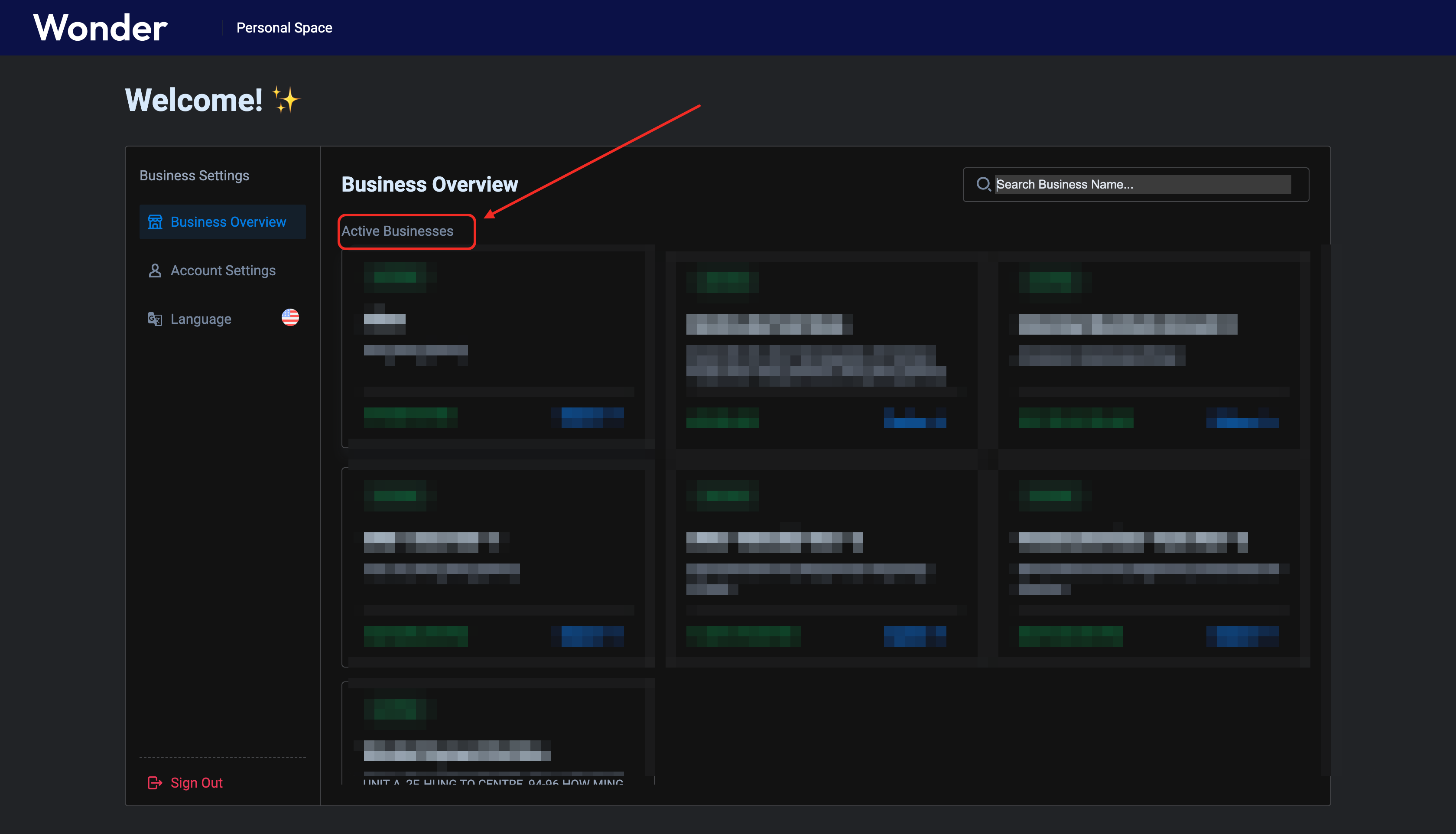 1322 1323Click the button pointed by the red arrow to create an appid 1324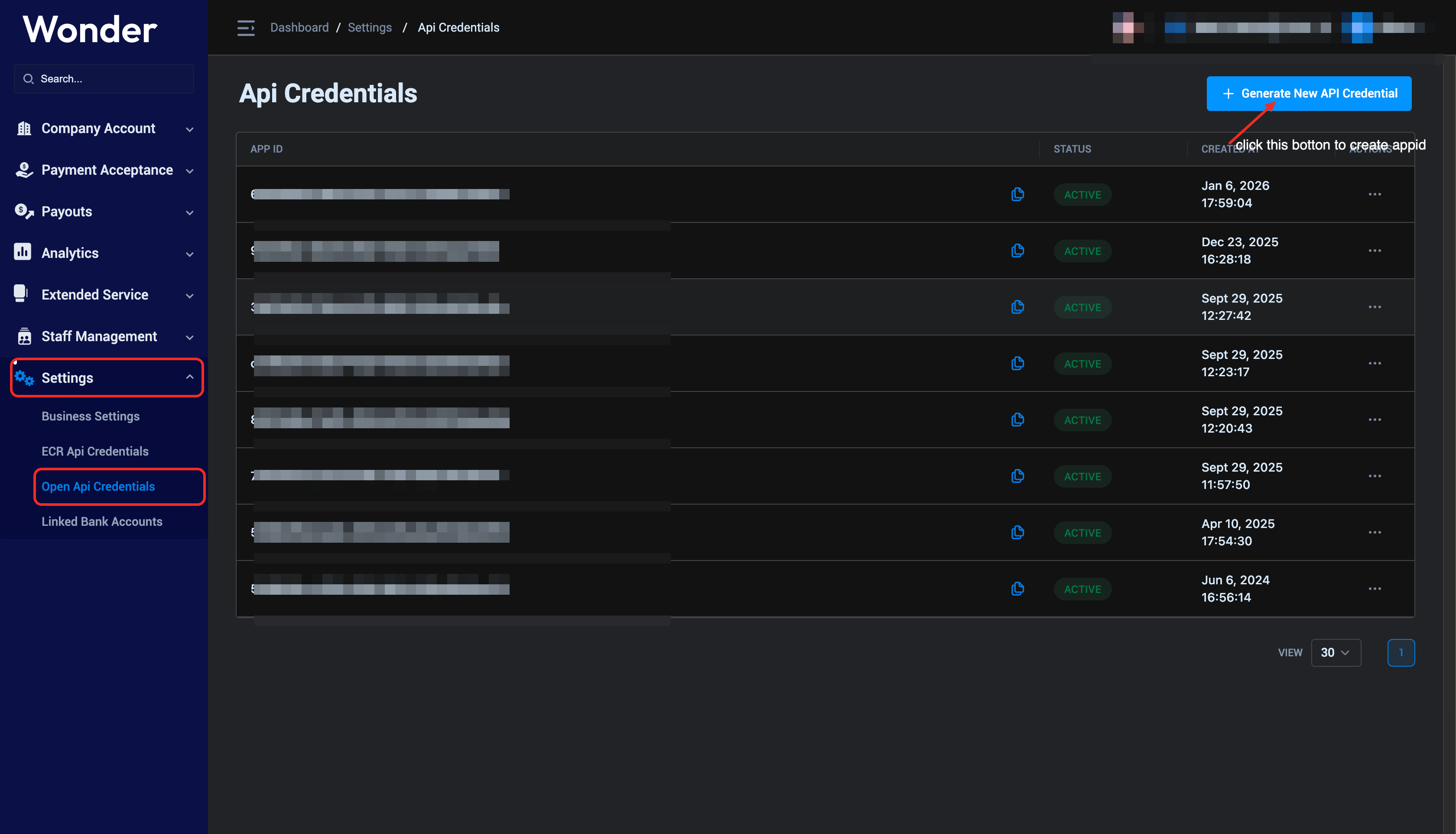 1325 1326After uploading the public key, click the upload button to get an appid 1327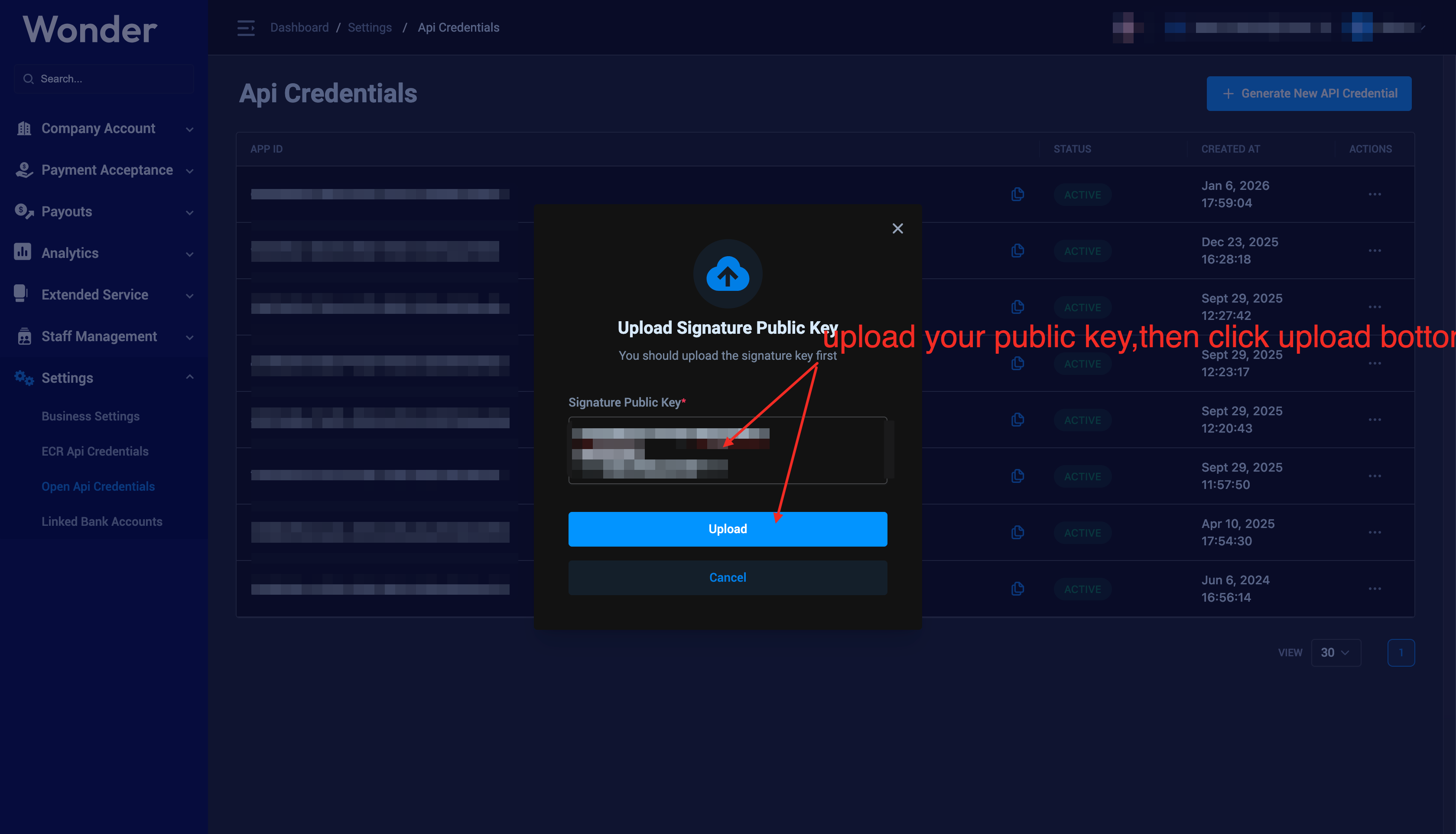 1328 1329The following figure shows the use of appid and public key,Please save the appid and public key properly 1330 1331webhook docs:https://developer.wonder.today/api/openapi/webhook 1332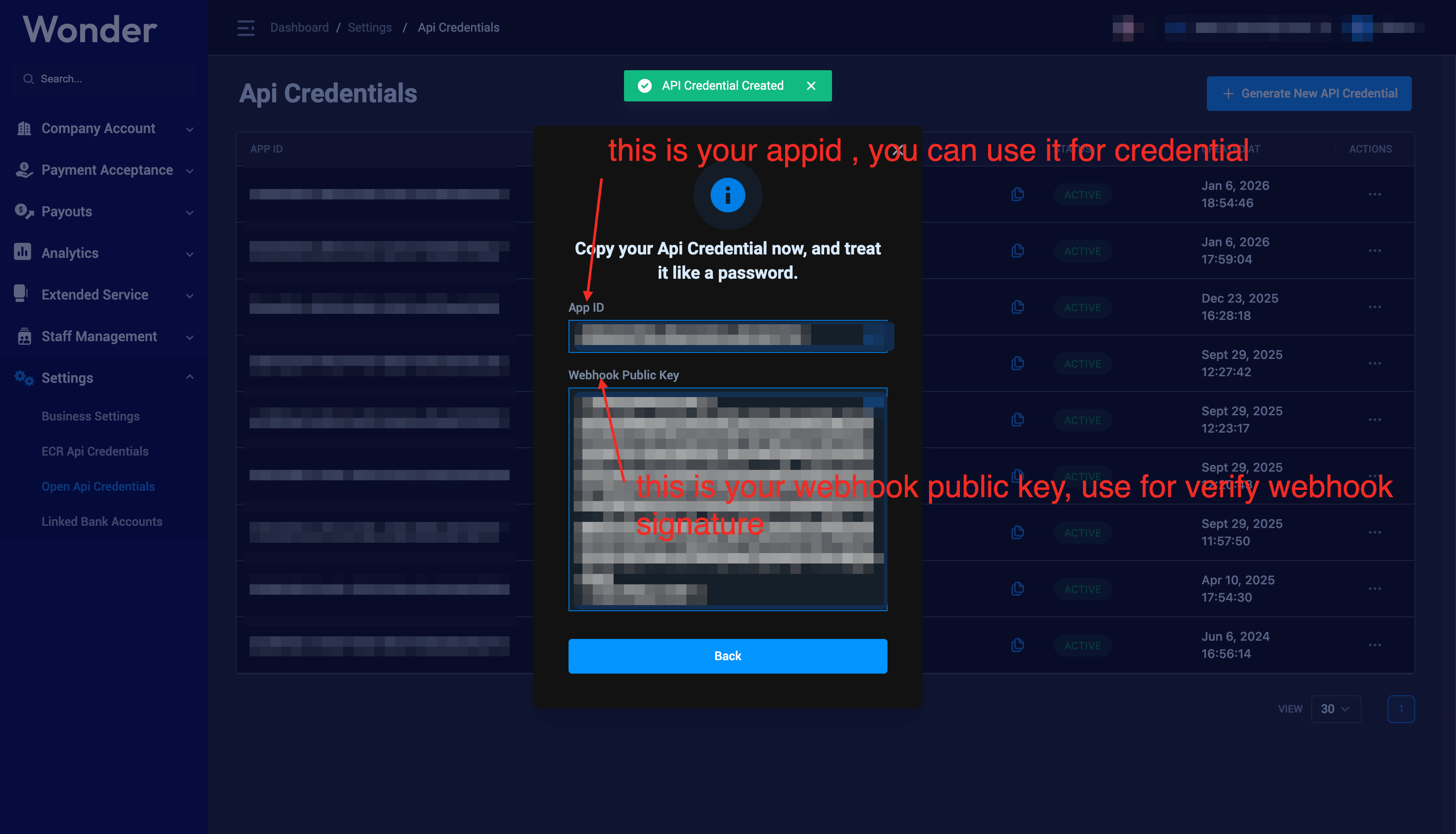 1333 1334if you want to delete a appid,please click the delete botton 1335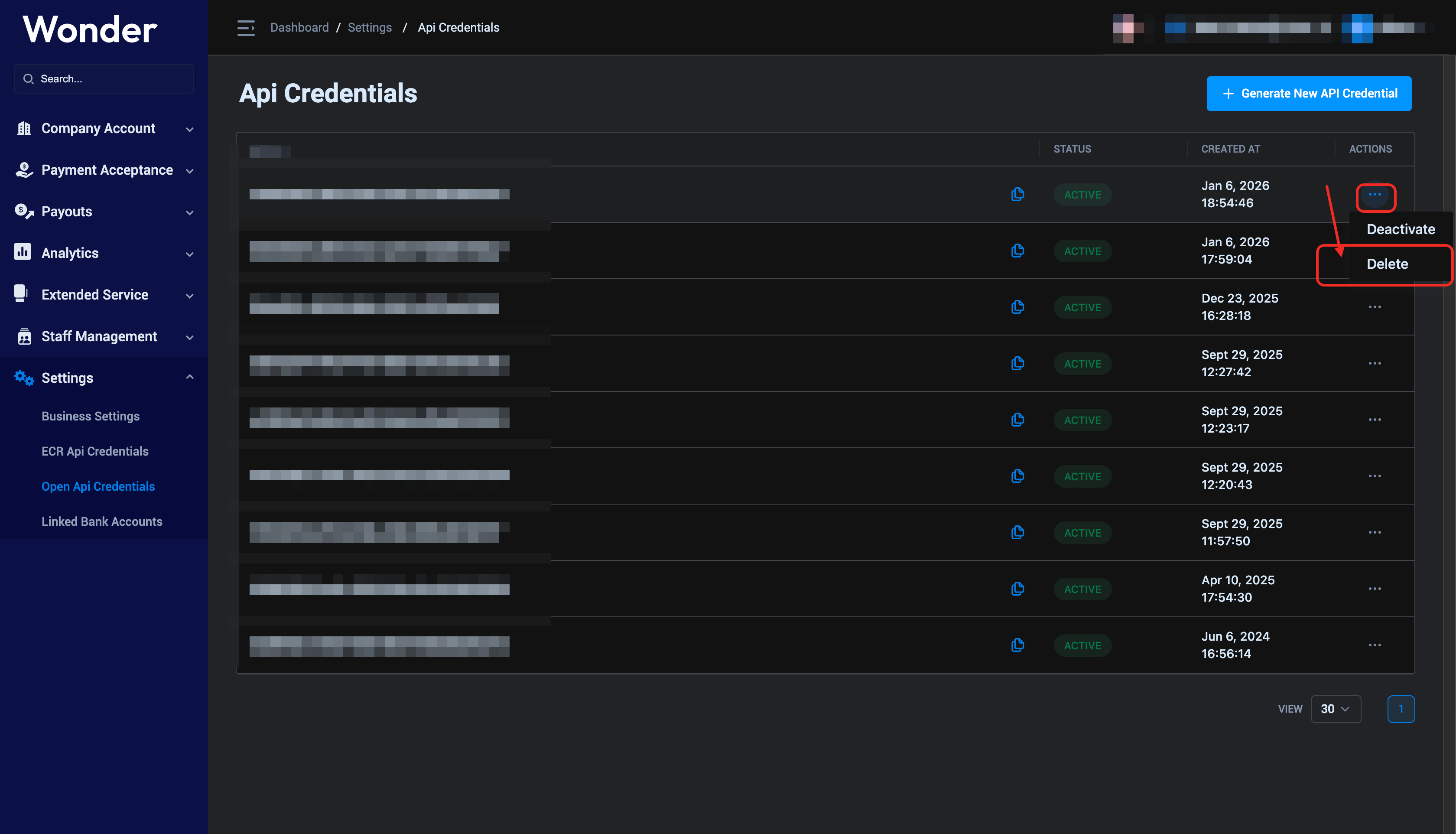 1336 1337### Verify AppID 1338 1339Verify AppID via [the Echo API](/api/api_references/echo) 1340`,f=`--- 1341title: "Environments | Wonder Payment Developer Portal" 1342description: "All Wonder Gateway OpenAPIs use the same endpoint, different environments provide different access to the domain name, except for the domain name all other information is identical (including API Uri " 1343source: https://developer.wonder.today/doc/overview/environment 1344--- 1345 1346All Wonder Gateway OpenAPIs use the same endpoint, different environments provide different access to the domain name, except for the domain name all other information is identical (including API Uri / Header etc...). 1347 1348| Environment | Domain | 1349| --- | --- | 1350| Sandbox | https://gateway-stg.wonder.today | 1351| Production | https://gateway.wonder.today | 1352`,p=`--- 1353title: "Get Started | Wonder Payment Developer Portal" 1354description: "Create an business account and lean how to build on Wonder." 1355source: https://developer.wonder.today/doc/overview/get_started 1356--- 1357 1358Create an business account and lean how to build on Wonder. 1359 1360## Requirements 1361 1362* Have you already created a business account in the Wonder app? [Onboard y
1362our business in wonder app](https://help.wonder.app/articles/onboard-your-business-in-wonder-app) 1363* Have you already created a sandbox environment? [Go to wonder portal active a sandbox environment](https://hq.wonder.app) 1364* Have you already created a sandbox appID? [Go to Settings -> Open Api Credentials create AppID](/api/overview/create_appid) 1365* Have you already created a sandbox webhook endpoint? [Go to Settings -> Open API Credential create a webhook endpoints.](https://hq.wonder.app) 1366 1367## Starting build 1368 1369Learning how to complete your first API call. 1370 1371### Implement the signature algorithm 1372 1373The Wonder Open API adheres to the same signature algorithm. Please implement it in your system with reference to the algorithm description and sample source code. 1374 1375* Following [Authentication](/api/overview/authentication) 1376* Use [Online Signature Tool](https://developer.wonder.today/html/online-signature-tool.html) 1377* Use [Source Code - Examples](/api/resources/source_code) 1378 1379You can test whether your signature is correct without side effects via the \`echo API\`, which does not generate any side effects. 1380The response also includes the message field from the request body. 1381 1382\`\`\`bash 1383curl -XPOST -H 'Content-Type: application/json' \\ 1384-H 'Credential: \${YourAppID}/\${UTC_NOW}/Wonder-RSA-SHA256' \\ 1385-H 'Signature: \${BASE64_ENCODED_SIGNATURE_CONTENT}' \\ 1386-H 'Nonce: \${Nonce}' \\ 1387-H 'X-Request-ID: \${UUIDV4}' \\ 1388https://\${EnvironmentDomain}/svc/payment/api/v1/echo \\ 1389-d '{"message" : "Hello,Wonder!"}' 1390\`\`\` 1391 1392:::warning 1393 1394If a 401 or 403 error is returned, it may indicate that there is an issue with your implementation of the signature algorithm. 1395Please double-check your signature algorithm implementation carefully and test it with the [online signature algorithm debugging tool](https://developer.wonder.today/html/online-signature-tool.html). 1396 1397::: 1398 1399### Connect to wonder sandbox environment 1400 1401* Switch to sandbox mode on wonder portal create appid. 1402* connect all wonder apis endpoint as : https://gateway-stg.wonder.today 1403 1404### Connect to wonder production environment 1405 1406* Please make sure you production business application already approved, and business status is Active. 1407* Switch to production mode on wonder portal create appid. 1408* connect all wonder apis endpoint as : https://gateway.wonder.today 1409 1410:::info 1411In the production environment, the execution standards for the signature algorithm are consistent with those in the test environment, 1412so you do not need to worry about additional differences in implementation details caused by switching environments. 1413::: 1414`,m=`--- 1415title: "Process Request | Wonder Payment Developer Portal" 1416description: "The \`Wonder API\` is organized around \`REST\`. Our API has predictable resource-oriented URLs, accepts \`JSON-encoded\` request bodies, returns \`JSON-encoded\` responses, and uses standard HTTP response co" 1417source: https://developer.wonder.today/doc/overview/process_request 1418--- 1419 1420The \`Wonder API\` is organized around \`REST\`. Our API has predictable resource-oriented URLs, accepts \`JSON-encoded\` request bodies, 1421returns \`JSON-encoded\` responses, and uses standard HTTP response codes, authentication, and verbs. 1422 1423## Authentication 1424 1425Every API request uses [a consistent signature algorithm](authentication), 1426which protects your API requests against man-in-the-middle attacks and malicious tampering. 1427 1428## Add request ID 1429 1430The Request ID is a critical parameter for tracking the status of API requests. We recommend that you add the \`UUIDV4\` header \`X-Request-ID\` to every API request. 1431Later, you can provide the Request ID to the technical support team for further assistance. 1432 1433## Pagination and data filtering 1434 1435List APIs such as [Get Customers](/api/api_references/get-customers) and [Get Orders](/api/api_references/get-orders) follow the same design rules for data filtering and pagination called [Advanced Query DSL](/api/resources/query_dsl). 1436Unless there are special reasons, no additional explanations will be provided in the interface documentation. 1437 1438## Errors 1439 1440Standard HTTP status codes are followed for responses. A successful request will return \`200\`; 1441\`400\` indicates invalid parameters; \`500\` indicates an internal server error. 1442 1443[Error Codes](/api/resources/error_codes) defined each module error codes details. 1444 1445### Error response body example 1446 1447\`\`\`json 1448{ 1449 "code" : "E000002", 1450 "message" : "Invalid Credential Format." 1451} 1452\`\`\` 1453 1454## Timestamp 1455 1456Unless otherwise specified, the time format shall comply with [RFC 3339](https://www.rfc-editor.org/rfc/rfc3339) in both requests and responses. 1457`,h=`--- 1458title: "Webhook | Wonder Payment Developer Portal" 1459description: "Create an event destination to receive events at an \`HTTPS\` webhook endpoint. After you register a webhook endpoint, Wonder backend can push real-time event data to your applicationâs webhook endpoint" 1460source: https://developer.wonder.today/doc/overview/webhook 1461--- 1462 1463Create an event destination to receive events at an \`HTTPS\` webhook endpoint. After you register a webhook endpoint, 1464Wonder backend can push real-time event data to your applicationâs webhook endpoint when events happen in your Wonder business account. 1465Wonder uses \`HTTPS\` to send webhook events to your app as a \`JSON\` payload. 1466 1467Each webhook request included headers: 1468 1469| Header Name | Comment | 1470| --- | --- | 1471| Credential | Same as API request signature, refer to [Authentication](/api/overview/authentication) | 1472| Nonce | Same as API request signature, refer to [Authentication](/api/overview/authentication) | 1473| Signature| Same as API request signature, but use the Wonder owner RSA private key to
1473signature the request, and your should get the public key from wonder portal when When [creating an AppID](/api/overview/create_appid), refer to [Verify webhook signature](/api/overview/authentication#verify-webhook-signature) | 1474| X-Action | A event name of this webhook. | 1475 1476* [Order - Webhook](/api/openapi/order_management#webhook) 1477* [Issuing - Webhook](/api/treasury_scenarios/card_issuing#transaction-webhook) 1478* [Payout - Webhook](/api/openapi/payout_management#webhook) 1479 1480## Workflow 1481 1482To start receiving webhook events in your app: 1483 1484* Create a \`HTTPS\` public webhook endpoint handler to receive event data \`POST\` requests. 1485* When [creating an AppID](/api/overview/create_appid), you will obtain a Webhook signature public key in the Wonder Portal. 1486* Return HTTP status code \`200\` if your successful received the webhook, otherwise, you will receive duplicated webhook request. 1487 1488## Retry logics 1489 1490The system will retry up to 15 times, with a maximum of 6 hours between retries. 1491 149215 retries will be sent within 24 hours. 1493 1494## Security 1495 1496If you have firewall requirements and need to allow specific IP addresses to access your production environment, 1497please add the following IP addresses to your firewall whitelist: \`119.8.39.23/32\` and \`119.8.232.135/32\` 1498`,g=`--- 1499title: "Available Payment Methods | Wonder Payment Developer Portal" 1500description: "Wonder gateway supports many different payment methods, including all major markets and Hong Kong local payment methods." 1501--- 1502 1503# Payment methods 1504 1505Wonder gateway supports many different payment methods, including all major markets and Hong Kong local payment methods. 1506 1507| Identifier | Payment Method | 1508|----------------------------|--------------------------------| 1509| alipay | Alipay wallet | 1510| wechat_pay | Wechat wallet | 1511| unionpay_wallet | UnionPay wallet, such as \`äºéªä»\` | 1512| apple_pay | Apple wallet | 1513| google_pay | Google wallet | 1514| fps | Hong Kong FPS | 1515| payment_token | Card tokenisation | 1516| consumer_presented_qr_code | Merchant qrcode | 1517| credit_card | Credit card | 1518| octopus_business | Hong Kong octopus | 1519| payme | PayMe | 1520| samsung_pay | Samsung pay wallet | 1521 1522## Cards 1523 1524Cards are a common way for consumers and businesses to pay online or in person. 1525Wonder gateway supports global and local card networks. See the card brands that Wonder Gateway supports. 1526 1527| Brand | 1528| --- | 1529| Visa | 1530| Mastercard| 1531| American Express | 1532| Diners | 1533| Discover | 1534| JCB | 1535| Union Pay | 1536 1537## Wallets 1538 1539Wallets provide a fast and secure way for consumers to pay with a saved card or a stored balance. 1540Wallets improve conversion and reduce fraud, especially on mobile. See wallets to learn more. 1541 1542| Brand | 1543| --- | 1544| Apple Pay | 1545| Google Pay | 1546| Wechat Pay | 1547| Alipay | 1548| Samsung Pay | 1549 1550## Local Payment Methods in Hong Kong 1551 1552For the Hong Kong market, we have also introduced local payment method support: 1553 1554| Method | 1555| --- | 1556| Octopus | 1557| FPS | 1558| PayMe | 1559`,_=`--- 1560title: "Available Currencies | Wonder Payment Developer Portal" 1561description: "" 1562--- 1563 1564| Currency Code | 1565| --- | 1566| HKD | 1567| CNY | 1568| USD | 1569| JPY | 1570| EUR | 1571| GBP | 1572| NZD | 1573| AUD | 1574| CAD | 1575| SGD | 1576`,v=`--- 1577title: "Payment Data | Wonder Payment Developer Portal"
1578description: "Since the specific payment data varies depending on different payment methods, this document lists the payment data formats and corresponding examples for all payment methods." 1579--- 1580 1581Since the specific payment data varies depending on different payment methods, this document lists the payment data formats and corresponding examples for all payment methods. 1582 1583## Common fields for successful payment 1584 1585| Field Name | Comment | 1586| --- | --- | 1587| acquirer_name | | 1588| acquirer_type | | 1589| batch_no | | 1590| brn | | 1591| device_id | | 1592| new_gateway_txn_id | | 1593| rrn | 1594| payment_method | See [Payment Entries](/api/payment/payment_enum#1-payment-entries) 1595| transaction_state | | 1596 1597\`\`\`json 1598{ 1599 "acquirer_name": "wechatpay", 1600 "acquirer_type": "wechat", 1601 "batch_no": "", 1602 "brn": "600107383", 1603 "date_time": "2026-01-01T09:43:02.678Z", 1604 "device_id": "N**O-N**-N9******01750", 1605 "new_gateway_txn_id": "4598564109087234048", 1606 "payment_method": "consumer_presented_qr_code", 1607 "rrn": "42000029042*****067338709511", 1608 "transaction_state": "success" 1609} 1610\`\`\` 1611 1612## Common fields for fail transaction 1613 1614| Field Name | Comment | 1615|------------| --- | 1616| resp_code | Error Code | 1617| resp_msg | Error Message | 1618 1619\`\`\`json 1620{ 1621 "payment_method": "payment_token", 1622 "resp_code": "100039", 1623 "resp_msg": "The Bind Card Is Invalid Or Expired", 1624 "transaction_state": "failed" 1625} 1626\`\`\` 1627 1628## Special fields for payment method 1629 1630If a payment method has any special fields returned, they will be listed here. If there is no description here, it means that no special fields are returned. 1631 1632### Card Payments 1633 1634For visa / mastercard / unionpay / ... 1635 1636| Field Name | Comment | 1637| --- | --- | 1638| card_read_mode | | 1639| credit_card_type | | 1640| first_6_digits | | 1641| last_4_digits | | 1642| exp_month | | 1643| exp_year | | 1644 1645\`\`\`json 1646{ 1647 "card_read_mode": "bindo_soft_contactless", 1648 "credit_card_type": "visa", 1649 "first_6_digits": "451461", 1650 "last_4_digits": "6424", 1651 "exp_month": "09", 1652 "exp_year": "30" 1653 1654} 1655\`\`\` 1656`,y=`--- 1657title: "Payment Enum | Wonder Payment Developer Portal" 1658description: "" 1659--- 1660 1661## 1. Payment Entries 1662 1663| Enum | Mode | Description EN | Description EN | 1664| :------------------------- | :------ | :--------------------------------------------------------------------------------------------------------------------- | ------------------------------------------------------------------------ | 1665| swipe | offline | Swipe card on POS terminal | å¨posç»ç«¯æºä¸å·å¡æ¯ä» | 1666| contact | offline | Insert card on POS terminal(EMV) | å¨posç»ç«¯æºä¸æå¡æ¯ä» ï¼EMVï¼ | 1667| contactless | offline | Tap card on POS terminal(EMV) | å¨posç»ç«¯æºä¸æå¡æ¯ä»ï¼EMVï¼ | 1668| consumer_presented_qr_code | offline | Customer-presented QR code payment | ç¨æ·åºç¤ºä»æ¬¾ç è¿è¡æ¯ä» | 1669| in_web | online | Web client invokes e-wallets (Alipay/WeChat Pay)<br />via computer browser to complete payment | éè¿çµèæµè§å¨è°èµ·æ°åé±å <br />ï¼æ¯ä»å® / 微信æ¯ä»ï¼å®ææ¯ä» | 1670| in_app | online | Merchant app invokes e-wallet to complete payment(precondition: acquirer app installed on device, e.g., Alipay Wallet) | åæ·åºç¨è°ç¨é±å åºç¨å®ææ¯ä»(åæ)设å¤éå®è£ æ¶åæºæåºç¨ï¼å¦æ¯ä»å®é±å ï¼ | 1671| merchant_presented_qr_code | online | Merchant-presented QR code for payment collection | åæ·å±ç¤ºæ¶æ¬¾ç æ¶å款项 |
1672| apple_pay | online | Payment completed via Apple Pay wallet | éè¿ Apple Pay é±å å®ææ¯ä» | 1673| official_account | online | WeChat Official Account payment | å¾®ä¿¡å ¬ä¼å·æ¯ä» | 1674| mini_program | online | Payment completed via WeChat Mini Program (invokes WeChat Pay) | éè¿å¾®ä¿¡å°ç¨åºè°ç¨å¾®ä¿¡æ¯ä»å®æ交æ | 1675| google_pay | online | Payment completed via Google Pay wallet | éè¿ Google Pay é±å å®ææ¯ä» | 1676| samsung_pay | online | Payment completed via Samsung Pay wallet | éè¿ Samsung Pay é±å å®ææ¯ä» | 1677| mit | online | Merchant-Initiated Transaction | åæ·åèµ·ç交æ | 1678| cit | online | Consumer-Initiated Transaction | ç¨æ·åèµ·ç交æ | 1679| moto | online | Mail and Telephone Order payment | é®ä»¶ / çµè¯è®¢åæ¯ä» | 1680| manual | online | Transaction completed by manually entering bank card number, CVV, and expiration date | æå¨è¾å ¥é¶è¡å¡å·ãCVV ç åæææå®æç交æ | 1681 1682## 2. Acquirer Types 1683 1684| Enum | Description EN | Description CN | 1685| :-------------- | :----------------------------------- | :--------------- | 1686| cup | UnionPay card payment | é¶èå¡æ¯ä» | 1687| visa | Visa card payment | Visa å¡æ¯ä» | 1688| mastercard | Mastercard payment | ä¸äºè¾¾å¡æ¯ä» | 1689| jcb | JCB card payment | JCB å¡æ¯ä» | 1690| amex | American Express (Amex) card payment | ç¾å½è¿éå¡æ¯ä» | 1691| diners | Diners Club card payment | 大æ¥å¡æ¯ä» | 1692| discover | Discover card payment | åç°å¡æ¯ä» | 1693| wechat | WeChat Pay Wallet payment | 微信é±å æ¯ä» | 1694| octopus | Octopus payment | å «è¾¾éæ¯ä» | 1695| alipay | Alipay Wallet Payment | æ¯ä»å®é±å æ¯ä» | 1696| fps | FPS (Faster Payment System) payment | å¿«è½¬ä» | 1697| unionpay_wallet | UnionPay Wallet payment | é¶èé±å æ¯ä» | 1698| xpay | XPay Wallet Payment | Xpayé±å æ¯ä» | 1699| payme | PayMe wallet Payment | PayMeé±å æ¯ä» | 1700| jkopay | JKO pay wallet payment | JKO Pay é±å æ¯ä» | 1701 1702## 3. Payment Methods 1703 1704| Enum | Description EN | Description CN | 1705| :-------------- | :----------------------------------- | :--------------- | 1706| credit_card | Credit Card | ä¿¡ç¨å¡ | 1707| fps | FPS | 转æ°å¿« | 1708| octopus | Octopus | å «è¾¾éæ¯ä» | 1709| consumer_presented_qr_code | Consumer-presented QR Code Payment | ç¨æ·å±ç¤ºæ¶æ¬¾ç æ¯ä» | 1710| all | All payment methods are only applicable in ECR scenarios | æææ¯ä»æ¹å¼ï¼åªè¿ç¨äºECRåºæ¯ | 1711`,b=`--- 1712title: "Batch MIT Transaction | Wonder Payment Developer Portal" 1713description: "" 1714--- 1715 1716Batch MIT (Merchant-Initiated Transaction) is a payment processing capability designed for high-efficiency 1717handling of recurring or scheduled payments. It allows merchants to bundle a large volume of MIT requests into 1718a single batch for centralized processing, which is ideal for scenarios like subscription renewals, 1719installment deductions, and periodic bill settlements. 1720 1721You can upload a CSV file via the API to complete MIT Transactions. 1722 1723Please refer to [Batch MIT Transaction Management API](/doc/openapi/batch_mit_transaction_management) get more details. 1724 1725 1726## Workflow - payment token 1727 1728Share the Wallet URL to let the customer bind a card and obtain a payment token, then populate the \`token_id\` field when generating the file. 1729 1730\`\`\`mermaid 1731sequenceDiagram 1732 1733Your Server ->> Wonder Backend: 1. Call Customer API manage your customers 1734Your Server ->> Wonder Backend: 2. Call Get Customer Wallet Link API to get a URL for customer manage the credit cards. 1735Your Server ->> Your Customer: 3. Sharing the wallet URL to customer 1736Your Customer ->> Payment Link: 4. Completed save a credit card as a payment token. 1737Payment Link ->> Your Application: 5. Redirect to your application 1738Your Server ->> Wonder Backend: 6. Call Get Customer Payment Token List API get the saved token 1739Your Server ->> Wonder Backend: 7. Call Create MIT Transactions API upload the generated CSV file. 1740Your Server ->> Wonder Backend: 8. Call Get MIT Transactions with the Batch ID check process progress. 1741\`\`\` 1742 17431. Call [Customer Management API](/doc/openapi/customer_management) manage your customer. 17442. Call [Get Customer Wallet Link API](/doc/openapi/customer_management#get-customer-wallet-link) get a wallet URL for the customer to manage credit cards. 17453. Sharing the wallet URL to customer. 17464. Completed save a credit card as a payment token. 17475. Redirect to your application. 17486. Call [Get Customer Payment Token List API](/doc/openapi/customer_management#get-customer-payment-token-list) get the saved token. 17497. Call [Create Batch MIT Transaction API](/doc/openapi/batch_mit_transaction_management#create-batch-mit-transaction) upload a csv or xlsx file(use token_id). 17508. Call [Get Batch MIT Transaction API](/doc/openapi/batch_mit_transaction_management#query-batch-mit-transaction-by-id) check progress. 1751 1752 1753## Workflow - card number 1754 1755Directly using the card details (card number/expiry month/expiry year/CVC) without requiring any additional action from the customer. \`CVC\` is not mandatory. 1756 1757\`\`\`mermaid 1758sequenceDiagram 1759Your Server ->> Wonder Backend: 7. Call Create MIT Transactions API upload the generated CSV file. 1760Your Server ->> Wonder Backend: 8. Call Get MIT Transactions with the Batch ID check process progress. 1761\`\`\` 17621. Call [Create Batch MIT Transaction API](/doc/openapi/batch_mit_transaction_management#create-batch-mit-transaction) upload a csv or xlsx file(use card_number/expiry_month/expiry_
1762year/cvc). 17632. Call [Get Batch MIT Transaction API](/doc/openapi/batch_mit_transaction_management#query-batch-mit-transaction-by-id) check progress. 1764 1765 1766 1767## Verify a batch state 1768 1769After upload a file via [Create Batch MIT Transaction API](/doc/openapi/batch_mit_transaction_management#create-batch-mit-transaction), you can get a \`batch id\` from response. 1770Then, call [Get Batch MIT Transaction API](/doc/openapi/batch_mit_transaction_management#query-batch-mit-transaction-by-id) check the field \`process_status\`. 1771 1772* **pending:** The file pending to process. 1773* **success:** The file processed. 1774* **failed:** The file process failed. 1775`,x=`--- 1776title: "Direct Payment | Wonder Payment Developer Portal" 1777description: "" 1778--- 1779 1780Direct Payment refers to a payment method completed directly via API, applicable to specific scenariosâfor example, when you already have a mature Qrcode Scanner in place. You can collect the parameters required for payment in your POS system and complete the actual payment through the Wonder OpenAPI. 1781 1782Refer to [Create a transaction API](/api/api_references/create-a-transaction) 1783 1784 1785## Payment token 1786 1787A payment token is a credit card token created via the [Customer Wallet API](/doc/openapi/customer_management#get-customer-wallet-link). You can directly use this token for subsequent deductions without requiring the user to manually enter card inform. 1788 1789\`\`\`json 1790{ 1791 "payment" : { 1792 "payment_token" : { 1793 "amount" : "1.00", 1794 "token" : "<The customer's payment token>", 1795 "consume_mode" : "sales", 1796 "entry_type" : "mit" 1797 } 1798 } 1799} 1800\`\`\` 1801 1802## Unified Consumer Presented QR Code 1803 1804Supports Wallet Apps: 1805 1806* Wechat Pay 1807* Alipay 1808* X Pay 1809* Pay Me 1810* JKO Pay 1811* Union Pay (Includes all of Union Pay family wallets, like BOCPay) 1812 1813\`\`\`json 1814{ 1815 "payment" : { 1816 "consumer_presented_qr_code" : { 1817 "amount" : "10.0", 1818 "code_type" : "qrcode", 1819 "content" : "<The customer's qrcode>" 1820 } 1821 } 1822 1823} 1824\`\`\` 1825 1826## Webhook 1827 1828Refer to [Order - Webhook](/doc/openapi/order_management#webhook) 1829`,S=`--- 1830title: "Payment App to App | Wonder Payment Developer Portal" 1831description: "" 1832--- 1833 1834>Inter-App Communication 1835 1836 > Complete the order collection through the App-to-App method 1837 1838## 1. Interface Protocol 1839 1840--- 1841### 1.1 Sale 1842 1843- Action: <font color="green">Sale</font> 1844 1845#### Request Params 1846| Variable | Type | Required | Description | 1847| :----------- | :----- | :------- | :---------------------------- | 1848| action | enum | Y | Actions: Sale, Void, Refund, ... | 1849| referenceID | String | Y | Reference ID: Every time a transaction request is initiated, it is crucial to ensure the uniqueness of this ID. Failure to do so will render any subsequent operations on the transaction invali
1849d. | 1850| paymentMethod | enum | N | Payment methods: <br />-credit_card, <br />-fps, <br />-octopus. <br />-consumer_presented_qr_code, <br /> -all, <br /> If the payment method is transmitted, it will directly redirect to the target page | 1851| restrictedPaymentMethods | Array | N | [Payment Methods](/doc/payment/payment_enum#2-acquirer-types) | 1852| currency | String | Y | Example: HKD / USD / RMB | 1853| amount | String | Y | Sale amount | 1854| remark | String | N | Remark | 1855| print | enum | N | YES/NO: To define whether the transaction is printed or not. YES means to print, and NO means not to print. default is YES | 1856| callback | String | N | When Softpos finishes processing a sale, use this Deep Link to pass the response parameters.<br />This parameter requires the address to be encoded (URLEncoder) | 1857 1858##### Example: 1859\`\`\`json 1860 1861String callback = "merchantpos://public/payment/result"; 1862 1863String encodedCallback = URLEncoder.encode(callback, "UTF-8"); 1864 1865Uri uri = Uri.parse( 1866 "wondermpos://public/payment?action=Sale&...&callback=" + encodedCallback 1867); 1868 1869wondermpos://public/payment?action=Sale&referenceID=5debf769-49d7-4c9b-b6f4-8a9d90e1a874¤cy=HKD&amount=100.00&callback={encodedCallback} 1870 1871\`\`\` 1872
1873#### Response Params
1874|   Variable       | Type     | Required | Description                     |
1875| :-----------     | :-----   | :------- | :----------------------------   |
1876| status           | String   | Y        | Response status: Success / Failed |
1877| errorCode        | String   | Y        |   |
1878| errorMessage     | String   | Y        |   |
1879| referenceID      | String   | Y        | The referenceID from the request body  |
1880| currency         | String   | N        | Example: HKD / USD / RMB  |
1881| amount           | String   | N        | Sale amount |
1882| paymentMethod    | String   | N        | Payment method |
1883| paymentEntryType | String   | N        | [Payment entries](/doc/payment/payment_enum#1-payment-entries), Example: contactless |
1884| transactionUuid  | String   | N        | Transaction UUID |
1885| allowVoid        | Boolean     | N        | Allow Void: true / false <br />true: Allows void <br />false: Does not allow void  |
1886| allowRefund      | Boolean     | N        | Allow Refund: true / false <br />true: Allows refund <br />false: Does not allow refund  |
1887| consumerCountryCode      | String   | N        | Consumer country code |
1888| rrn              | String   | N        | Receiver Reference Number |
1889| brn              | String   | N        | Bindo Reference Number |
1890| transactionType  | String   | N        | Transaction type: Sale / PreAuth / Void / Refund |
1891| transactionTime  | Datetime | N        | Transaction Time |
1892| creditCard       | Object | N        |   |
1893| creditCard.panPrefix6Digits   | String | Y        | First 6 digits of the credit card number  |
1894| creditCard.panLast4Digits     | String | Y        | Last 4 digits of the credit card number  |
1895| creditCard.consumerIdentify            | String | Y        | Consumer identify, e.g. Card Number, Open ID, etc.  |
1896
1897
1898
1899---
1900### 1.2 PreAuth
1901
1902- Action: <font color="green">PreAuth</font>
1903
1904#### Request Params
1905|   Variable       | Type     | Required | Description                     |
1906| :-----------     | :-----   | :------- | :----------------------------   |
1907| action           | enum     | Y        | Actions: Sale, Void, Refund, ... |
1908| referenceID      | String   | Y        | Reference ID: Every time a transaction request is initiated, it is crucial to ensure the uniqueness of this ID. Failure to do so will render any subsequent operations on the transaction invali
1908d. | 1909| paymentMethod | enum | N | Payment methods: <br />-credit_card | 1910| currency | String | Y | Example: HKD / USD / RMB | 1911| amount | String | Y | Sale amount | 1912| remark | String | N | Remark | 1913| print | enum | N | YES/NO: To define whether the transaction is printed or not. YES means to print, and NO means not to print. default is YES | 1914| callback | String | N | When Softpos finishes processing a sale, use this Deep Link to pass the response parameters.<br />This parameter requires the address to be encoded (URLEncoder) | 1915 1916##### Example: 1917\`\`\`json 1918 1919String callback = "merchantpos://public/payment/result"; 1920 1921String encodedCallback = URLEncoder.encode(callback, "UTF-8"); 1922 1923Uri uri = Uri.parse( 1924 "wondermpos://public/payment?action=PreAuth&...&callback=" + encodedCallback 1925); 1926 1927wondermpos://public/payment?action=PreAuth&referenceID=5debf769-49d7-4c9b-b6f4-8a9d90e1a874¤cy=HKD&amount=100.00&callback={encodedCallback} 1928 1929\`\`\` 1930
1931#### Response Params
1932|   Variable       | Type     | Required | Description                     |
1933| :-----------     | :-----   | :------- | :----------------------------   |
1934| status           | String   | Y        | Response status: Success / Failed |
1935| errorCode        | String   | Y        |   |
1936| errorMessage     | String   | Y        |   |
1937| referenceID      | String   | Y        | The referenceID from the request body  |
1938| currency         | String   | N        | Example: HKD / USD / RMB  |
1939| amount           | String   | N        | Sale amount |
1940| paymentMethod    | String   | N        | Payment method |
1941| paymentEntryType | String   | N        | [Payment entries](/doc/payment/payment_enum#1-payment-entries), Example: contactless |
1942| transactionUuid  | String   | N        | Transaction UUID |
1943| allowVoid        | Boolean     | N        | Allow Void: true / false <br />true: Allows void <br />false: Does not allow void  |
1944| allowRefund      | Boolean     | N        | Allow Refund: true / false <br />true: Allows refund <br />false: Does not allow refund  |
1945| consumerCountryCode      | String   | N        | Consumer country code |
1946| rrn              | String   | N        | Receiver Reference Number |
1947| brn              | String   | N        | Bindo Reference Number |
1948| transactionType  | String   | N        | Transaction type: Sale / PreAuth / Void / Refund |
1949| transactionTime  | Datetime | N        | Transaction Time |
1950| creditCard       | Object | N        |   |
1951| creditCard.panPrefix6Digits   | String | Y        | First 6 digits of the credit card number  |
1952| creditCard.panLast4Digits     | String | Y        | Last 4 digits of the credit card number  |
1953| creditCard.consumerIdentify            | String | Y        | Consumer identify, e.g. Card Number, Open ID, etc.  |
1954
1955---
1956### 1.3 Void
1957
1958- Action: <font color="green">Void</font>
1959
1960#### Request Params
1961|   Variable       | Type     | Required | Description                     |
1962| :-----------     | :-----   | :------- | :----------------------------   |
1963| action           | enum     | Y        | Actions: Sale, Void, Refund, ... |
1964| pwd      | String   | Y        | Void password. It is currently the Store ID |
1965| orgReferenceID   | String   | Y        | The reference ID  that was carried during the transaction made at that time. |
1966| print            | enum   | N        | YES/NO: To define whether the transaction is printed or not. YES means to print, and NO means not to print. default is YES |
1967| callback         | String   | N        | When Softpos finishes processing a void, use this Deep Link to pass the response parameters.<br />This parameter requires the address to be encoded (URLEncoder) |
1968
1969##### Example:
1970\`\`\`json
1971
1972String callback = "merchantpos://public/payment/result";
1973
1974String encodedCallback = URLEncoder.encode(callback, "UTF-8");
1975
1976Uri uri = Uri.parse(
1977  "wondermpos://public/payment?action=Void&...&callback=" + encodedCallback
1978);
1979
1980wondermpos://public/payment?action=Void&pwd=123456&orgReferenceID=5debf769-49d7-4c9b-b6f4-8a9d90e1a874&callback={encodedCallback}
1981
1982\`\`\`
1983
1984#### Response Params
1985|   Variable       | Type     | Required | Description                     |
1986| :-----------     | :-----   | :------- | :----------------------------   |
1987| status           | String   | Y        | Response status: Success / Failed |
1988| errorCode        | String   | Y        |   |
1989| errorMessage     | String   | Y        |   |
1990| referenceID     | String   | Y        | The orgReferenceID from the request body  |
1991
1992---
1993### 1.4 Refund
1994
1995- Action: <font color="green">Refund</font>
1996
1997#### Request Params
1998|   Variable       | Type     | Required | Description                     |
1999| :-----------     | :-----   | :------- | :----------------------------   |
2000| action           | enum     | Y        | Actions: Sale, Void, Refund, ... |
2001| pwd      | String   | Y        | Void password. It is currently the Store ID |
2002| referenceID      | String   | Y        | Reference ID: Every time a transaction request is initiated, it is crucial to ensure the uniqueness of this ID. Failure to do so will render any subsequent operations on the transaction invali
2002d. | 2003| orgReferenceID | String | Y | The reference ID that was carried during the transaction made at that time. | 2004| currency | String | N | Example: HKD / USD / RMB | 2005| amount | String | Y | Refund amount | 2006| print | enum | N | YES/NO: To define whether the transaction is printed or not. YES means to print, and NO means not to print. default is YES | 2007| callback | String | N | When Softpos finishes processing a refund, use this Deep Link to pass the response parameters.<br />This parameter requires the address to be encoded (URLEncoder) | 2008 2009##### Example: 2010\`\`\`json 2011 2012String callback = "merchantpos://public/payment/result"; 2013 2014String encodedCallback = URLEncoder.encode(callback, "UTF-8"); 2015 2016Uri uri = Uri.parse( 2017 "wondermpos://public/payment?action=Refund&...&callback=" + encodedCallback 2018); 2019 2020wondermpos://public/payment?action=Refund&pwd=123456&referenceID=5debf769-49d7-4c9b-b6f4-8a9d90e1a874&orgReferenceID=4b02c099-4dc9-4b30-bd2c-27bf3223df6b¤cy=HKD&amount=100.00&callback={encodedCallback} 2021 2022\`\`\` 2023
2024#### Response Params
2025|   Variable       | Type     | Required | Description                     |
2026| :-----------     | :-----   | :------- | :----------------------------   |
2027| status           | String   | Y        | Response status: Success / Failed |
2028| errorCode        | String   | Y        |   |
2029| errorMessage     | String   | Y        |   |
2030| referenceID     | String   | Y        | The referenceID from the request body  |
2031
2032
2033---
2034### 1.5 Capture
2035
2036- Action: <font color="green">Capture</font>
2037
2038#### Request Params
2039|   Variable       | Type     | Required | Description                     |
2040| :-----------     | :-----   | :------- | :----------------------------   |
2041| action           | enum     | Y        | Actions: Sale, Void, Refund, ... |
2042| pwd      | String   | Y        | Void password. It is currently the Store ID |
2043| referenceID      | String   | Y        | Reference ID: Every time a transaction request is initiated, it is crucial to ensure the uniqueness of this ID. Failure to do so will render any subsequent operations on the transaction invali
2043d. | 2044| orgReferenceID | String | Y | The reference ID that was carried during the transaction made at that time. | 2045| currency | String | N | Example: HKD / USD / RMB | 2046| amount | String | Y | Refund amount | 2047| print | enum | N | YES/NO: To define whether the transaction is printed or not. YES means to print, and NO means not to print. default is YES | 2048| callback | String | N | When Softpos finishes processing a refund, use this Deep Link to pass the response parameters.<br />This parameter requires the address to be encoded (URLEncoder) | 2049 2050##### Example: 2051\`\`\`json 2052 2053String callback = "merchantpos://public/payment/result"; 2054 2055String encodedCallback = URLEncoder.encode(callback, "UTF-8"); 2056 2057Uri uri = Uri.parse( 2058 "wondermpos://public/payment?action=Capture&...&callback=" + encodedCallback 2059); 2060 2061wondermpos://public/payment?action=Capture&pwd=123456&referenceID=5debf769-49d7-4c9b-b6f4-8a9d90e1a874&orgReferenceID=4b02c099-4dc9-4b30-bd2c-27bf3223df6b¤cy=HKD&amount=100.00&callback={encodedCallback} 2062 2063\`\`\` 2064
2065#### Response Params
2066|   Variable       | Type     | Required | Description                     |
2067| :-----------     | :-----   | :------- | :----------------------------   |
2068| status           | String   | Y        | Response status: Success / Failed |
2069| errorCode        | String   | Y        |   |
2070| errorMessage     | String   | Y        |   |
2071| referenceID     | String   | Y        | The referenceID from the request body  |
2072
2073
2074---
2075### 1.6 Query Transaction Status
2076
2077- Action: <font color="green">TransactionStatus</font>
2078
2079#### Request Params
2080|   Variable       | Type     | Required | Description                     |
2081| :-----------     | :-----   | :------- | :----------------------------   |
2082| action           | enum     | Y        | Actions: Sale, Void, Refund, ... |
2083| pwd      | String   | Y        | Void password. It is currently the Store ID |
2084| targetReferenceID   | String   | Y        | The reference ID  that was carried during the transaction made at that time. |
2085| callback         | String   | N        | When Softpos finishes processing a refund, use this Deep Link to pass the response parameters.<br />This parameter requires the address to be encoded (URLEncoder) |
2086
2087##### Example:
2088\`\`\`json
2089
2090String callback = "merchantpos://public/payment/result";
2091
2092String encodedCallback = URLEncoder.encode(callback, "UTF-8");
2093
2094Uri uri = Uri.parse(
2095  "wondermpos://public/payment?action=TransactionStatus&...&callback=" + encodedCallback
2096);
2097
2098wondermpos://public/payment?action=TransactionStatus&pwd=123456&targetReferenceID=4b02c099-4dc9-4b30-bd2c-27bf3223df6b&callback={encodedCallback}
2099
2100\`\`\`
2101
2102#### Response Params 2103> This interface supports querying transactions related to Sale, Void, Refund, etc.<br/> 2104> The response results can be referred to the relevant interfaces. 2105 2106--- 2107`,C=`--- 2108title: "Cloud ECR | Wonder Payment Developer Portal" 2109description: "" 2110--- 2111 2112We recommend that you use local communication protocols such as LAN or RS232 to connect to Wonder Terminals. 2113This connection method is usually more stable and faster than an internet connection. 2114However, we understand that in certain scenarios (e.g., when Wonder Terminals cannot be placed on the same network 2115as your POS devices due to specific reasons), an internet connection may be the only option. Therefore, we have also prepared 2116a connection solution based on internet technologies. 2117 2118:::warning 2119Since the ECR itself already has a complete data encryption process, the Cloud ECR API does not require signature verification with an appid, unlike other Open APIs. This is to maintain consistency with the LAN/RS232 mode, 2120so there is no need to refer to the authentication documentation. 2121::: 2122 2123## Workflow 2124 2125* Get the 6 digits numbers from wonder terminal paring page. 2126* Get terminal basic information via [Get Device Info API](/api/api_references/get-device-info). 2127* Send command to terminal via [Send Command to terminal API](/api/api_references/send-command-to-terminal), follow [ECR body protocols](/doc/payment_scenarios/payment_ecr/ecr_interface_protocol#3-interface-protocol) 2128 2129:::info 2130* Use the 6 digits number to encrypt the \`Get Device Info API\` and \`Pair\` command. 2131* The \`Pair\` command will be return a new pin code, use the new pin code to encrypt other commands. 2132::: 2133 2134 2135 2136## Environments 2137 2138Please check [Environments](/doc/overview/environment) learn how to connect \`Sandbox\` or \`Production\`. 2139 2140 2141## Data Format 2142 2143### Request body 2144 2145| Variable | Type | Required | Description | 2146| :----------- | :----- | :------- | :---------------------------- | 2147| version | String | Y | Current communication protocol version number | 2148| action | enum | Y | Actions: Pair, DeviceInfo, Sale, ... | 2149| data | String | Y | Encrypted data, It is necessary to distinguish the encryption keys of this data: pinCode1 and pinCode2 | 2150 2151 2152### Response body 2153 2154| Variable | Type | Required | Description | 2155| :----------- | :----- | :------- | :---------------------------- | 2156| code | Number | Y | Current communication protocol version number | 2157| message | String | Y | Actions: Pair, DeviceInfo, Sale, ... | 2158| data | Object | Y | This data object is an ECR response data structure | 2159| data.version | String | Y | Please refer to the version description of the ECR response data structure | 2160| data.action | enum | Y | Please refer to the action description of the ECR response data structure | 2161| data.data | String | Y | Please refer to the data description of the ECR response data structure | 2162 2163 2164## Get Device info API 2165
2166Retrieves the basic information of the device for subsequent operations. 2167 2168* **Device SN:** Each command API request should include the device SN for backend identifier decide send command to which terminal. 2169* **Local LAN Server Information:** The terminal local network ECR API endpoint if it's connected a LAN network. 2170 2171### Request Body Header 2172 2173| Header Name | Comment | 2174| --- | --- | 2175| X-P-Business-ID | the business id | 2176| X-Request-ID | A unique UUIDv4 for track api call | 2177 2178### Reqeust Body Format - Before encryption 2179 2180| Field Name | Comment | 2181| --- | --- | 2182| pairUuid | A randomly UUIDV4 | 2183 2184\`\`\`json 2185{ 2186 "header": { 2187 "requestID": "9c07d8d7-2a43-4a29-9c6d-6b8d8f7d44e5", 2188 "timestamp": "2025-11-12T10:12:04+00:00" 2189 }, 2190 "body": { 2191 "pairUuid": "3f37e6c0-bf6e-4c00-b1fa-b2bd5e1d6a3b" 2192 } 2193} 2194\`\`\` 2195 2196### Response - After decryption 2197 2198| Field Name | Comment | 2199| --- | --- | 2200| ip | The terminal local server IP Address | 2201|port | The terminal local server listen port | 2202|deviceSn| The terminal device SN | 2203 2204\`\`\`json 2205{ 2206 "header": { 2207 "responseID": "2c7f32e1-b9e4-4b34-96cc-15c51289f69b", 2208 "clientDeviceSN": "NEXGO-N96-1170270945", 2209 "timestamp": "2025-11-12T10:12:04+00:00" 2210 }, 2211 "body": { 2212 "ip": "127.0.0.1", 2213 "port": "4499", 2214 "deviceSn": "NEXGO-N96-1170270945" 2215 } 2216} 2217\`\`\` 2218 2219Use \`http://\${ip}:\${port}/v2/wonder/payment/ecr\` connect to Local ECR Server. 2220 2221## Send command to terminal API 2222 2223Used to send commands to the terminal for execution. Check [ECR interfaces](/doc/payment_scenarios/payment_ecr/ecr_interface_protocol#3-interface-protocol) 2224get all command details. 2225 2226:::info 2227Note: Void/Refund commands will not be forwarded to the terminal and will be processed directly in the cloud. 2228Therefore, Void/Refund operations do not depend on whether the device is powered on or the network is online. 2229::: 2230 2231## Start building 2232 2233Please refer to our [Source Codes - Cloud ECR examples](/doc/resources/source_code#cloud-ecr-example) get more details. 2234`,w=`--- 2235title: "ECR Connection | Wonder Payment Developer Portal" 2236description: "" 2237--- 2238 2239## 1. Activate the ECR terminal device 2240 22411.1 Open and log in to the Wonder App, and switch to the relevant business. 2242 22431.2 Start the ECR terminal device, a QR code associated with the business will be presented on the device's screen. 2244 2245 22461.3 Bind the ECR terminal device with the business using the Wonder App's barcode scanner. 2247 22481.4 Once the binding is successful, the device application will automatically redirect you to the device pairing page. 2249 2250 2251:::info The data format of the QR code 2252 2253\`\`\`json 2254{ 2255 "deviceId":"NEXGO-N62-N620W318000", 2256 "ip":"172.16.91.29", 2257 "pairCode":"672633", 2258 "port":8443, 2259 "businessId":"411d6207-1470-4d35-a557-54852463844d" 2260} 2261\`\`\` 2262::: 2263 2264## 2. ECR terminal device pairing 2265 2266### 2.1 Via Cloud 2267 22681. Obtain a six-digit terminal device pairing code. 2269 22702. Enter the pairing code into the customer's pairing page, which is similar to the following flow: 2271 22723. Generate an AES256 Key using the pairing code 2273 22744. Use the ECR terminal Device synchronization interface to obtain the Device SN of the ECR terminal device 2275 22765. After obtaining the Device SN, pair the device using the pairing and confirmation pairing interfaces 2277 2278 2279 2280### 2.2 Via RS232 22811. Obtain a six-digit terminal device pairing code 2282 22832. Enter the Pairing Code into the Customer's Pairing Page, which is similar to the following flow: 2284 22853. Generate an AES256 Key using the pairing code 2286 22874. After obtaining the device SN, pair the device using the pairing and confirmation pairing interfaces. 2288 2289 2290 2291### 2.3 Via Local Area Network 22921. Obtain a six-digit terminal device pairing code 2293 22942. Enter the pairing code into the customer's pairing page, which is similar to the following flow: 2295 22963. Generate an AES256 Key using the pairing code 2297 22984. Enter the IP address and port 2299 23005. After obtaining the device SN, pair the device using the pairing and confirmation pairing interfaces. 2301 2302 2303 2304## 3. Interface Protocol Specification 2305### 3.1 Cloud Interface Protocol 2306> All instructions communicate using the following interface addresses 2307> 2308URL(Staging): https://gateway-stg.wonder.today/svc/payment/public/api/v1/openapi/terminal/async 2309> 2310URL(Production): https://gateway.wonder.today/svc/payment/public/api/v1/openapi/terminal/async 2311 2312 2313#### 1. Request header 2314 2315| Variable | Type | Required | Description | 2316| :----------- | :----- | :------- | :---------------------------- | 2317| x-p-business-id | String | Y | The current business ID, Specify the ECR device to receive orders for a certain Business |
2318| x-device-sn            | String   | Y        | The serial number of the ecr terminal payment device |
2319| x-request-id           | String   | Y        | Every time communication takes place, it is crucial to ensure that the Request ID is a unique UUID. |
2320
2321#### 2. Request body
2322
2323|   Variable       | Type     | Required | Description                     |
2324| :-----------     | :-----   | :------- | :----------------------------   |
2325| version          | String   | Y        | Current communication protocol version number |
2326| action           | enum     | Y        | Actions: Pair, DeviceInfo, Sale, ... |
2327| data             | String   | Y        | Encrypted data, It is necessary to distinguish the encryption keys of this data: pinCode1 and pinCode2 |
2328
2329
2330#### 3. Response body
2331
2332|   Variable       | Type     | Required | Description                     |
2333| :-----------     | :-----   | :------- | :----------------------------   |
2334| code          | Number   | Y        | Current communication protocol version number |
2335| message           | String     | Y        | Actions: Pair, DeviceInfo, Sale, ... |
2336| data             | Object   | Y        | This data object is an ECR response data structure |
2337| data.version     | String   | Y        | Please refer to the version description of the ECR response data structure |
2338| data.action      | enum   | Y        | Please refer to the action description of the ECR response data structure |
2339| data.data        | String   | Y        | Please refer to the data description of the ECR response data structure |
2340
2341
2342### 3.2 LAN Interface Protocol
2343#### 1. Request url
2344
2345\`\`\`js
2346http://<ECR terminal device IP address>:<ECR terminal device port>/v2/wonder/payment/ecr
2347\`\`\`
2348
2349#### 2. Request body
2350
2351Please refer to the [Request data structure](/doc/payment_scenarios/payment_ecr/ecr_interface_protocol#22-request-data-structure) of the ECR interface protocol
2352
2353
2354#### 3. Response body
2355Please refer to the [Response data structure](/doc/payment_scenarios/payment_ecr/ecr_interface_protocol#23-response-data-structure) of the ECR interface protocol
2356
2357
2358### 3.3 Serial port RS232 protocol
2359Please refer to the [communication protocol of the ECR serial port RS232](/doc/payment_scenarios/payment_ecr/ecr_via_rs232_retail#1-communication-interaction-protocol-data-format)
2360
2361
2362## 4. Other interface request protocols
2363### 4.1 Obtain device pairing information
2364> After you obtain the 6-digit pair Pin Code(pinCode1) generated by the ECR terminal device, you generate the AES Key through a certain algorithm. Through this secret key, you can obtain the current configuration information of the ECR terminal Device, such as: Device SN, IP address, port.
2365>
2366URL(Staging): https://gateway-stg.wonder.today/svc/payment/public/api/v1/openapi/terminal/info
2367>
2368URL(Production): https://gateway.wonder.today/svc/payment/public/api/v1/openapi/terminal/info
2369
2370#### Request body
2371
2372Please refer to the [Request body](/doc/payment_scenarios/payment_ecr/ecr_connection#2-request-body)
2373
2374#### Request "data.body" structure
2375|   Variable       | Type     | Required | Description                     |
2376| :-----------     | :-----   | :------- | :----------------------------   |
2377| businessID    | UUID     | Y        | The current business ID, Specify the ECR device to receive orders for a certain Business |
2378
2379##### Example:
2380\`\`\`json
2381
2382/*
2383Pin Code: pinCode1
2384Encrypt the original data:
2385{
2386  "header": {
2387    "requestID": "2c7f32e1-b9e4-4b34-96cc-15c51289f69b",
2388    "clientDeviceSN": "126498561093",
2389    "timestamp": "2025-11-12T10:11:04+00:00"
2390  },
2391  "body": {
2392    "businessID": "ff467f02-5b69-45f3-81aa-bffcca55fe8f"
2393  }
2394}
2395*/
2396
2397{
2398  "version": "2.0",
2399  "action": "ConnectionInfo",
2400  "data": "OSNqYo/FulKRnNOS1g2WtsjIw/Kvlv2yczj92Zom1NxWHXd74aJk84zoO7JwhwEwEwAwUN/VNP61lCxhCNWhWKC+rP0H4ApQ0jBJcqP9fGZ5TgL9Sxwz2/VdgR6QIk2yOgflnlINqLFSRoPi2fltDjc8DIqRuWtXnaFYar1TIzABcigSmHQY/av2FIbB+If7qBHada03AdlpV91dQgLCjbuYCQB47wUZt4v2mm3jqFUVDYfBdDi0hNKtErNEC1bex/iuD8AC/GZY1EP18Cg7G3C2RPsEonvcxcLrES3ydJ2n33RZVwro32C4NIzew0oX"
2401}
2402
2403\`\`\`
2404
2405#### Response body
2406
2407Please refer to the [Response body](/doc/payment_scenarios/payment_ecr/ecr_connection#3-response-body)
2408
2409#### Response "data.body" structure
2410|   Variable       | Type     | Required | Description                     |
2411| :-----------     | :-----   | :------- | :----------------------------   |
2412| deviceSn | String | Y | The serial number of the payment device | 2413| ip | String | N | The IP address of the payment device | 2414| port | String | N | The port number of the payment device | 2415 2416##### Example: 2417\`\`\`json 2418 2419/* 2420Pin Code: pinCode1 2421Encrypt the original data: 2422{ 2423 "header": { 2424 "responseID": "2c7f32e1-b9e4-4b34-96cc-15c51289f69b", 2425 "serverDeviceSN": "NEXGO-N96-1170270945", 2426 "timestamp": "2025-11-12T10:12:04+00:00" 2427 }, 2428 "body": { 2429 "deviceSn": "NEXGO-N96-1170270945", 2430 "ip": "192.168.1.100", 2431 "port": "8858" 2432 } 2433} 2434*/ 2435 2436{ 2437 "version": "2.0", 2438 "action": "DeviceInfo", 2439 "data": "FusVfCI3cJZMaiO0hvBaTxAK+kJ7oa5+SlXWFQCNOh2xmieB6TiVJWkBfcL3Ydo/b88+XGfIueLoHFWh1LPFYH/yY6v1AHyx7KeZnK8sQ33fRnmizzJqmZ8OzZww/pmpiw/X6aNeZoilWUbllQ2uBQDRmYNHeyNnu0mBT2osYrOnPJ8RYajHeBo4WcQlh8582o/HzJwMa1ZXK17LpD9+qYkQG3cd/y+/+XPJT+L/yVT3NFGHgEgc3YGxfEVAzGUBVx1X6DK58npB2jTCOd+ntttjZN9I5SK/J34uEXafvPxRHApRr/BqIYRfV4aKgNih4DRovheAFyhFDl7gmUS+wQ==" 2440} 2441 2442\`\`\` 2443`,T=`--- 2444title: "ECR Interface Protocol | Wonder Payment Developer Portal" 2445description: "" 2446--- 2447 2448## 1. Encrypt the data of the protocol 2449### 1.1 Get a 6-digit pair Pin Code 2450When the Wonder terminal enters the pair page, a 6-digit pair Pin Code(pinCode1) or the QR code generated by it will be displayed. The client device can obtain this string by scanning a code or manually entering it 2451 2452##### Example: 2453\`\`\`js 2454const pinCode1 = '260880'; 2455\`\`\` 2456 2457### 1.2 Encrypt the data of the protocol with AES256 2458 2459<Tabs groupId="current-os" queryString> 2460<TabItem value="JavaScript" label="JavaScript"> 2461 2462\`\`\`html 2463 2464<!DOCTYPE html> 2465<html lang="zh-CN"> 2466 2467<head> 2468 <meta charset="UTF-8"> 2469 <meta name="viewport" content="width=device-width, initial-scale=1.0"> 2470 <title>æµè§å¨ç«¯AESå 解å¯æ¼ç¤º</title> 2471 <style> 2472 * { 2473 box-sizing: border-box; 2474 margin: 0; 2475 padding: 0; 2476 } 2477 2478 body { 2479 font-family: 'Segoe UI', Tahoma, Geneva, Verdana, sans-serif; 2480 background-color: #f5f7fa; 2481 color: #333; 2482 line-height: 1.6; 2483 padding: 20px; 2484 } 2485 2486 .container { 2487 max-width: 1200px; 2488 margin: 0 auto; 2489 background-color: #fff; 2490 border-radius: 8px; 2491 box-shadow: 0 2px 10px rgba(0, 0, 0, 0.1); 2492 overflow: hidden; 2493 } 2494 2495 .header { 2496 background-color: #4a90e2; 2497 color: white; 2498 padding: 20px; 2499 text-align: center; 2500 } 2501 2502 .header h1 { 2503 font-size: 24px; 2504 font-weight: 500; 2505 } 2506 2507 .content { 2508 padding: 30px; 2509 } 2510 2511 .section { 2512 margin-bottom: 30px; 2513 padding: 20px; 2514 border-radius: 8px; 2515 border: 1px solid #e1e8ed; 2516 background-color: #fafbfc; 2517 } 2518 2519 .section-title { 2520 font-size: 18px; 2521 font-weight: 500; 2522 margin-bottom: 15px; 2523 color: #4a90e2; 2524 border-bottom: 1px solid #e1e8ed; 2525 padding-bottom: 8px; 2526 } 2527 2528 .form-group { 2529 margin-bottom: 15px; 2530 } 2531 2532 .form-group label { 2533 display: block; 2534 margin-bottom: 5px; 2535 font-weight: 500; 2536 color: #555; 2537 } 2538 2539 .form-group input, 2540 .form-group textarea { 2541 width: 100%; 2542 padding: 10px; 2543 border: 1px solid #ddd; 2544 border-radius: 4px; 2545 font-size: 14px; 2546 font-family: inherit; 2547 } 2548 2549 .form-group textarea { 2550 resize: vertical; 2551 min-height: 100px; 2552 } 2553 2554 .btn { 2555 background-color: #4a90e2; 2556 color: white; 2557 border: none; 2558 padding: 10px 20px; 2559 border-radius: 4px; 2560 cursor: pointer; 2561 font-size: 14px; 2562 font-weight: 500; 2563 margin-right: 10px; 2564 margin-bottom: 10px; 2565 transition: background-color 0.3s; 2566 } 2567 2568 .btn:hover { 2569 background-color: #357abd; 2570 } 2571 2572 .btn-secondary { 2573 background-color: #6c757d; 2574 } 2575 2576 .btn-secondary:hover { 2577 background-color: #5a6268; 2578 } 2579 2580 .result { 2581 margin-top: 20px; 2582 padding: 15px; 2583 border-radius: 4px; 2584 background-color: #e9ecef; 2585 font-family: 'Courier New', Courier, monospace; 2586 font-size: 14px; 2587 word-break: break-all; 2588 } 2589 2590 .result.success { 2591 background-color: #d4edda; 2592 border: 1px solid #c3e6cb; 2593 color: #155724; 2594 } 2595 2596 .result.error { 2597 background-color: #f8d7da; 2598 border: 1px solid #f5c6cb; 2599 color: #721c24; 2600 } 2601 2602 .test-results { 2603 margin-top: 20px; 2604 } 2605 2606 .test-item { 2607 margin-bottom: 20px; 2608 padding: 15px; 2609 border-radius: 4px; 2610 border: 1px solid #e1e8ed; 2611 background-color: #fff; 2612 } 2613 2614 .test-title { 2615 font-weight: 500; 2616 margin-bottom: 10px; 2617 color: #4a90e2; 2618 } 2619 2620 .test-details {
2621 font-family: 'Courier New', Courier, monospace; 2622 font-size: 13px; 2623 margin-bottom: 8px; 2624 } 2625 2626 .test-status { 2627 font-weight: 500; 2628 padding: 4px 8px; 2629 border-radius: 4px; 2630 display: inline-block; 2631 } 2632 2633 .test-status.passed { 2634 background-color: #d4edda; 2635 color: #155724; 2636 } 2637 2638 .test-status.failed { 2639 background-color: #f8d7da; 2640 color: #721c24; 2641 } 2642 2643 .copy-btn { 2644 background-color: #28a745; 2645 color: white; 2646 border: none; 2647 padding: 5px 10px; 2648 border-radius: 4px; 2649 cursor: pointer; 2650 font-size: 12px; 2651 margin-left: 10px; 2652 transition: background-color 0.3s; 2653 } 2654 2655 .copy-btn:hover { 2656 background-color: #218838; 2657 } 2658 2659 @media (max-width: 768px) { 2660 body { 2661 padding: 10px; 2662 } 2663 2664 .content { 2665 padding: 20px; 2666 } 2667 2668 .btn { 2669 width: 100%; 2670 margin-right: 0; 2671 } 2672 } 2673 </style> 2674</head> 2675 2676<body> 2677 <div class="container"> 2678 <div class="header"> 2679 <h1>æµè§å¨ç«¯AES-256-CBCå 解å¯æ¼ç¤º</h1> 2680 </div> 2681 2682 <div class="content"> 2683 <!-- æå¨å å¯è§£å¯åºå --> 2684 <div class="section"> 2685 <div class="section-title">æå¨å å¯è§£å¯</div> 2686 2687 <div class="form-group"> 2688 <label for="key">å¯é¥ (Password/Key):</label> 2689 <input type="text" id="key" placeholder="请è¾å ¥å¯é¥" value="260880"> 2690 </div> 2691 2692 <div class="form-group"> 2693 <label for="plaintext">æææ°æ®:</label> 2694 <textarea id="plaintext" placeholder="请è¾å ¥è¦å å¯çæææ°æ®">123</textarea> 2695 </div> 2696 2697 <div class="form-group"> 2698 <label for="ciphertext">å¯ææ°æ®:</label> 2699 <textarea id="ciphertext" placeholder="请è¾å ¥è¦è§£å¯çå¯ææ°æ®"></textarea> 2700 </div> 2701 2702 <button class="btn" onclick="encryptData()">å å¯</button> 2703 <button class="btn btn-secondary" onclick="decryptData()">解å¯</button> 2704 2705 <div id="manual-result" class="result"></div> 2706 </div> 2707 2708 <!-- èªå¨æµè¯åºå --> 2709 <div class="section"> 2710 <div class="section-title">èªå¨æµè¯</div> 2711 <button class="btn" onclick="runTests()">è¿è¡æææµè¯</button> 2712 <div id="test-results" class="test-results"></div> 2713 </div> 2714 </div> 2715 </div> 2716 2717 <script src="https://cdnjs.cloudflare.com/ajax/libs/crypto-js/4.2.0/crypto-js.min.js"><\/script> 2718 <script> 2719 /** 2720 * AESå å¯è§£å¯å·¥å ·ç±» 2721 * 使ç¨CryptoJSå®ç°AES-256-CBCå å¯è§£å¯ 2722 * å å«PKCS7å¡«å åPBKDF2å¯é¥æ´¾çåè½ 2723 */ 2724 const AESCrypto = { 2725 // 常éå®ä¹ 2726 BLOCK_SIZE: 16, // AESå大å°ï¼åèï¼ 2727 KEY_SIZE: 256 / 32, // å¯é¥å¤§å°ï¼WordArrayåä½ï¼ 2728 ITERATIONS: 100, // PBKDF2è¿ä»£æ¬¡æ° 2729 SALT_SIZE: 16, // ç大å°ï¼åèï¼ 2730 IV_SIZE: 16, // IV大å°ï¼åèï¼ 2731 2732 /** 2733 * PKCS7å¡«å å½æ° 2734 * @param {CryptoJS.lib.WordArray} wordArray - è¦å¡«å çæ°æ® 2735 * @param {number} [blockSize=16] - åå¤§å° 2736 * @returns {CryptoJS.lib.WordArray} å¡«å åçæ°æ® 2737 */ 2738 pkcs7Pad: function(wordArray, blockSize = this.BLOCK_SIZE) { 2739 if (!wordArray || typeof wordArray.sigBytes !== 'number') { 2740 throw new Error('Invalid input: wordArray must be a valid CryptoJS WordArray'); 2741 } 2742 2743 const padding = blockSize - (wordArray.sigBytes % blockSize); 2744 const paddingWords = []; 2745 const paddingWord = ((padding & 0xff) << 24) | ((padding & 0xff) << 16) | ((padding & 0xff) << 8) | (padding & 0xff); 2746 2747 for (let i = 0; i < padding / 4; i++) { 2748 paddingWords.push(paddingWord); 2749 } 2750 2751 return wordArray.clone().concat(CryptoJS.lib.WordArray.create(paddingWords, padding)); 2752 }, 2753 2754 /** 2755 * PKCS7å»å¡«å å½æ° 2756 * @param {CryptoJS.lib.WordArray} wordArray - è¦å»å¡«å çæ°æ® 2757 * @returns {CryptoJS.lib.WordArray} å»å¡«å åçæ°æ® 2758 */ 2759 pkcs7Unpad: function(wordArray) { 2760 if (!wordArray || typeof wordArray.sigBytes !== 'number') { 2761 throw new Error('Invalid input: wordArray must be a valid CryptoJS WordArray'); 2762 } 2763 2764 const sigBytes = wordArray.sigBytes; 2765 if (sigBytes === 0) { 2766 throw new Error('Invalid input: wordArray is empty'); 2767 } 2768 2769 // è·åæåä¸ä¸ªåèä½ä¸ºå¡«å é¿åº¦ 2770 const lastWord = wordArray.words[Math.floor((sigBytes - 1) / 4)]; 2771 const padding = lastWord & 0xff;
2772 2773 // éªè¯å¡«å é¿åº¦ 2774 if (padding < 1 || padding > this.BLOCK_SIZE) { 2775 throw new Error('Invalid PKCS7 padding: padding length out of range'); 2776 } 2777 2778 // éªè¯ææå¡«å åè 2779 for (let i = sigBytes - padding; i < sigBytes; i++) { 2780 const currentWord = wordArray.words[Math.floor(i / 4)]; 2781 const currentByte = (currentWord >> (24 - (i % 4) * 8)) & 0xff; 2782 if (currentByte !== padding) { 2783 throw new Error('Invalid PKCS7 padding: inconsistent padding bytes'); 2784 } 2785 } 2786 2787 // å建å»å¡«å åçæ°æ® 2788 return CryptoJS.lib.WordArray.create(wordArray.words, sigBytes - padding); 2789 }, 2790 2791 /** 2792 * 使ç¨PBKDF2æ´¾çå¯é¥ 2793 * @param {string} pinCode - å¯ç /å¯é¥ 2794 * @param {CryptoJS.lib.WordArray} salt - çå¼ 2795 * @returns {CryptoJS.lib.WordArray} æ´¾ççå¯é¥ 2796 */ 2797 deriveKeySecure: function(pinCode, salt) { 2798 if (!pinCode || !salt) { 2799 throw new Error('Invalid input: pinCode and salt are required'); 2800 } 2801 2802 return CryptoJS.PBKDF2(pinCode, salt, { 2803 keySize: this.KEY_SIZE, 2804 iterations: this.ITERATIONS, 2805 hasher: CryptoJS.algo.SHA256 2806 }); 2807 }, 2808 2809 /** 2810 * å å¯æ°æ® 2811 * @param {string} pinCode - å¯ç /å¯é¥ 2812 * @param {string} data - è¦å å¯çæææ°æ® 2813 * @returns {string} Base64ç¼ç çå å¯ç»æ 2814 */ 2815 encrypt: function(pinCode, data) { 2816 try { 2817 if (!pinCode) { 2818 throw new Error('Invalid input: pinCode and data are required'); 2819 } 2820 2821 // çæéæºçåIV 2822 const salt = CryptoJS.lib.WordArray.random(this.SALT_SIZE); 2823 const iv = CryptoJS.lib.WordArray.random(this.IV_SIZE); 2824 2825 // æ´¾çå¯é¥ 2826 const key = this.deriveKeySecure(pinCode, salt); 2827 2828 // 转æ¢æ°æ®å¹¶å¡«å 2829 const dataWA = CryptoJS.enc.Utf8.parse(data); 2830 const paddedData = this.pkcs7Pad(dataWA); 2831 2832 // æ§è¡å å¯ 2833 const encrypted = CryptoJS.AES.encrypt(paddedData, key, { 2834 iv: iv, 2835 mode: CryptoJS.mode.CBC, 2836 padding: CryptoJS.pad.NoPadding 2837 }); 2838 2839 // æ¼æ¥çãIVåå¯æ并Base64ç¼ç 2840 return CryptoJS.enc.Base64.stringify( 2841 salt.clone().concat(iv).concat(encrypted.ciphertext) 2842 ); 2843 } catch (error) { 2844 console.error('Encryption failed:', error); 2845 throw error; 2846 } 2847 }, 2848 2849 /** 2850 * 解å¯æ°æ® 2851 * @param {string} pinCode - å¯ç /å¯é¥ 2852 * @param {string} encryptedBase64 - Base64ç¼ç çå å¯æ°æ® 2853 * @returns {string} 解å¯åçæææ°æ® 2854 */ 2855 decrypt: function(pinCode, encryptedBase64) { 2856 try { 2857 if (!pinCode || !encryptedBase64) { 2858 throw new Error('Invalid input: pinCode and encryptedBase64 are required'); 2859 } 2860 2861 // 解æBase64æ°æ® 2862 const encryptedData = CryptoJS.enc.Base64.parse(encryptedBase64); 2863 2864 // éªè¯æ°æ®é¿åº¦ 2865 if (encryptedData.sigBytes < this.SALT_SIZE + this.IV_SIZE) { 2866 throw new Error('Invalid encrypted data: data too short'); 2867 } 2868 2869 // æåçãIVåå¯æ 2870 const salt = CryptoJS.lib.WordArray.create( 2871 encryptedData.words.slice(0, this.SALT_SIZE / 4), 2872 this.SALT_SIZE 2873 ); 2874 const iv = CryptoJS.lib.WordArray.create( 2875 encryptedData.words.slice(this.SALT_SIZE / 4, (this.SALT_SIZE + this.IV_SIZE) / 4), 2876 this.IV_SIZE 2877 ); 2878 const ciphertext = CryptoJS.lib.WordArray.create( 2879 encryptedData.words.slice((this.SALT_SIZE + this.IV_SIZE) / 4), 2880 encryptedData.sigBytes - this.SALT_SIZE - this.IV_SIZE 2881 ); 2882 2883 // æ´¾çå¯é¥ 2884 const key = this.deriveKeySecure(pinCode, salt); 2885 2886 // æ§è¡è§£å¯ 2887 const decrypted = CryptoJS.AES.decrypt({ ciphertext: ciphertext }, key, { 2888 iv: iv, 2889 mode: CryptoJS.mode.CBC, 2890 padding: CryptoJS.pad.NoPadding 2891 }); 2892 2893 // å»å¡«å 并转æ¢ä¸ºå符串 2894 const unpaddedData = this.pkcs7Unpad(decrypted); 2895 return CryptoJS.enc.Utf8.stringify(unpaddedData); 2896 } catch (error) { 2897 console.error('Decryption failed:', error); 2898 throw error; 2899 } 2900 } 2901 }; 2902 2903 /** 2904 * å å¯æ°æ®å¹¶æ¾ç¤ºç»æ 2905 */ 2906 function encryptData() {
2907 const key = document.getElementById('key').value; 2908 const plaintext = document.getElementById('plaintext').value; 2909 const resultDiv = document.getElementById('manual-result'); 2910 2911 try { 2912 const encrypted = AESCrypto.encrypt(key, plaintext); 2913 document.getElementById('ciphertext').value = encrypted; 2914 resultDiv.innerHTML = \`å å¯æå: <br><strong>å¯æ:</strong> \${encrypted}\`; 2915 resultDiv.className = 'result success'; 2916 } catch (error) { 2917 resultDiv.innerHTML = \`å å¯å¤±è´¥: \${error.message}\`; 2918 resultDiv.className = 'result error'; 2919 } 2920 } 2921 2922 /** 2923 * 解å¯æ°æ®å¹¶æ¾ç¤ºç»æ 2924 */ 2925 function decryptData() { 2926 const key = document.getElementById('key').value; 2927 const ciphertext = document.getElementById('ciphertext').value; 2928 const resultDiv = document.getElementById('manual-result'); 2929 2930 try { 2931 const decrypted = AESCrypto.decrypt(key, ciphertext); 2932 resultDiv.innerHTML = \`解å¯æå: <br><strong>ææ:</strong> \${decrypted}\`; 2933 resultDiv.className = 'result success'; 2934 } catch (error) { 2935 resultDiv.innerHTML = \`解å¯å¤±è´¥: \${error.message}\`; 2936 resultDiv.className = 'result error'; 2937 } 2938 } 2939 2940 /** 2941 * æ·»å æµè¯ç»æå°UI 2942 * @param {string} title - æµè¯æ é¢ 2943 * @param {string} details - æµè¯è¯¦ç»ä¿¡æ¯ 2944 * @param {boolean} passed - æ¯å¦éè¿ 2945 */ 2946 function addTestResult(title, details, passed) { 2947 const testResultsDiv = document.getElementById('test-results'); 2948 const testItem = document.createElement('div'); 2949 testItem.className = 'test-item'; 2950 2951 const testTitle = document.createElement('div'); 2952 testTitle.className = 'test-title'; 2953 testTitle.innerHTML = title; 2954 2955 const testDetails = document.createElement('div'); 2956 testDetails.className = 'test-details';
2957 testDetails.innerHTML = details.replace(/\\n/g, '<br>'); 2958 2959 const testStatus = document.createElement('div'); 2960 testStatus.className = \`test-status \${passed ? 'passed' : 'failed'}\`; 2961 testStatus.textContent = passed ? 'éè¿' : '失败'; 2962 2963 testItem.appendChild(testTitle); 2964 testItem.appendChild(testDetails); 2965 testItem.appendChild(testStatus); 2966 testResultsDiv.appendChild(testItem); 2967 } 2968 2969 /** 2970 * è¿è¡æææµè¯ 2971 */ 2972 function runTests() { 2973 // æ¸ ç©ºä¹åçæµè¯ç»æ 2974 document.getElementById('test-results').innerHTML = ''; 2975 2976 console.log('=== AESCrypto æµè¯å¼å§ ==='); 2977 2978 let testCount = 0; 2979 let passedCount = 0; 2980 2981 // æµè¯1: åºæ¬åè½æµè¯ 2982 testCount++; 2983 try { 2984 const pinCode1 = '260880'; 2985 const data1 = '123'; 2986 2987 const encrypted1 = AESCrypto.encrypt(pinCode1, data1); 2988 const decrypted1 = AESCrypto.decrypt(pinCode1, encrypted1); 2989 2990 const passed = decrypted1 === data1; 2991 if (passed) passedCount++; 2992 2993 const details = \`å¯é¥: \${pinCode1}\\nææ: \${data1}\\nå¯æ: \${encrypted1}\\n解å¯å: \${decrypted1}\`; 2994 addTestResult(\`æµè¯\${testCount} - åºæ¬åè½æµè¯\`, details, passed); 2995 } catch (error) { 2996 addTestResult(\`æµè¯\${testCount} - åºæ¬åè½æµè¯\`, error.message, false); 2997 } 2998 2999 // æµè¯2: å¤æå¯é¥åä¸ææ°æ®æµè¯ 3000 testCount++; 3001 try { 3002 const pinCode2 = 'OvSdpyD2FoUNR5rNyte41QqZzR1Y4DVN'; 3003 const data2 = 'è¿æ¯ä¸æ®µä¸ææµè¯æ°æ®'; 3004 3005 const encrypted2 = AESCrypto.encrypt(pinCode2, data2); 3006 const decrypted2 = AESCrypto.decrypt(pinCode2, encrypted2); 3007 3008 const passed = decrypted2 === data2; 3009 if (passed) passedCount++; 3010 3011 const details = \`å¯é¥: \${pinCode2}\\nææ: \${data2}\\nå¯æ: \${encrypted2}\\n解å¯å: \${decrypted2}\`; 3012 addTestResult(\`æµè¯\${testCount} - å¤æå¯é¥åä¸ææ°æ®æµè¯\`, details, passed); 3013 } catch (error) { 3014 addTestResult(\`æµè¯\${testCount} - å¤æå¯é¥åä¸ææ°æ®æµè¯\`, error.message, false); 3015 } 3016 3017 // æµè¯3: 空æ°æ®æµè¯ 3018 testCount++; 3019 try { 3020 const pinCode3 = '260880'; 3021 const data3 = ''; 3022 3023 const encrypted3 = AESCrypto.encrypt(pinCode3, data3); 3024 const decrypted3 = AESCrypto.decrypt(pinCode3, encrypted3); 3025 3026 const passed = decrypted3 === data3; 3027 if (passed) passedCount++; 3028 3029 const details = \`å¯é¥: \${pinCode3}\\nææ: (空å符串)\\nå¯æ: \${encrypted3}\\n解å¯å: (空å符串)\`; 3030 addTestResult(\`æµè¯\${testCount} - 空æ°æ®æµè¯\`, details, passed); 3031 } catch (error) { 3032 addTestResult(\`æµè¯\${testCount} - 空æ°æ®æµè¯\`, error.message, false); 3033 } 3034 3035 // æµè¯4: ç¹æ®å符æµè¯ 3036 testCount++; 3037 try { 3038 const pinCode4 = '260880'; 3039 const data4 = '!@#$%^&*()_+-=[]{}|;:,.<>?'; 3040 3041 const encrypted4 = AESCrypto.encrypt(pinCode4, data4); 3042 const decrypted4 = AESCrypto.decrypt(pinCode4, encrypted4); 3043 3044 const passed = decrypted4 === data4; 3045 if (passed) passedCount++; 3046 3047 const details = \`å¯é¥: \${pinCode4}\\nææ: \${data4}\\nå¯æ: \${encrypted4}\\n解å¯å: \${decrypted4}\`; 3048 addTestResult(\`æµè¯\${testCount} - ç¹æ®å符æµè¯\`, details, passed); 3049 } catch (error) { 3050 addTestResult(\`æµè¯\${testCount} - ç¹æ®å符æµè¯\`, error.message, false); 3051 } 3052 3053 // æµè¯5: é¿ææ¬æµè¯ 3054 testCount++; 3055 try { 3056 const pinCode5 = '260880'; 3057 const data5 = 'è¿æ¯ä¸æ®µè¾é¿çæµè¯ææ¬ï¼ç¨äºæµè¯AESå å¯è§£å¯çæ§è½åæ£ç¡®æ§ãè¿æ®µææ¬å å«äºå¤ç§å符ï¼å æ¬ä¸æãè±æãæ°ååç¹æ®ç¬¦å·ã'; 3058 3059 const encrypted5 = AESCrypto.encrypt(pinCode5, data5); 3060 const decrypted5 = AESCrypto.decrypt(pinCode5, encrypted5); 3061 3062 const passed = decrypted5 === data5; 3063 if (passed) passedCount++; 3064 3065 const details = \`å¯é¥: \${pinCode5}\\nææé¿åº¦: \${data5.length} å符\\nå¯æé¿åº¦: \${encrypted5.length} å符\\n解å¯åé¿åº¦: \${decrypted5.length} å符\\n解å¯åä¸ææä¸è´: \${passed}\`;
3066 addTestResult(\`æµè¯\${testCount} - é¿ææ¬æµè¯\`, details, passed); 3067 } catch (error) { 3068 addTestResult(\`æµè¯\${testCount} - é¿ææ¬æµè¯\`, error.message, false); 3069 } 3070 3071 // æµè¯6: é误å¯é¥æµè¯ 3072 testCount++; 3073 try { 3074 const pinCode6 = '260880'; 3075 const wrongKey = 'wrongkey'; 3076 const data6 = '123'; 3077 3078 const encrypted6 = AESCrypto.encrypt(pinCode6, data6); 3079 // 使ç¨é误å¯é¥è§£å¯ï¼åºè¯¥å¤±è´¥ 3080 const decrypted6 = AESCrypto.decrypt(wrongKey, encrypted6); 3081 3082 // è¿éåºè¯¥æåºé误ï¼å¦æ没ææåºåæµè¯å¤±è´¥ 3083 addTestResult(\`æµè¯\${testCount} - é误å¯é¥æµè¯\`, '使ç¨é误å¯é¥è§£å¯æ¶æ²¡ææåºé¢æçé误', false); 3084 } catch (error) { 3085 // é¢æåºè¯¥æåºé误ï¼æ以æµè¯éè¿ 3086 passedCount++; 3087 addTestResult(\`æµè¯\${testCount} - é误å¯é¥æµè¯\`, \`使ç¨é误å¯é¥è§£å¯æ¶æ£ç¡®æåºé误: \${error.message}\`, true); 3088 } 3089 3090 // æ¾ç¤ºæµè¯æ»ç» 3091 const summary = document.createElement('div'); 3092 summary.className = 'test-item'; 3093 summary.innerHTML = \` 3094 <div class="test-title">æµè¯æ»ç»</div> 3095 <div class="test-details"> 3096 æ»æµè¯æ°: \${testCount}<br> 3097 éè¿æµè¯: \${passedCount}<br> 3098 失败æµè¯: \${testCount - passedCount}<br> 3099 éè¿ç: \${((passedCount / testCount) * 100).toFixed(2)}% 3100 </div> 3101 <div class="test-status \${passedCount === testCount ? 'passed' : 'failed'}"> 3102 \${passedCount === testCount ? 'å ¨é¨éè¿' : 'é¨å失败'} 3103 </div> 3104 \`; 3105 document.getElementById('test-results').appendChild(summary); 3106 3107 console.log(\`=== AESCrypto æµè¯ç»æ ===\`); 3108 console.log(\`æ»æµè¯æ°: \${testCount}\`); 3109 console.log(\`éè¿æµè¯: \${passedCount}\`); 3110 console.log(\`失败æµè¯: \${testCount - passedCount}\`); 3111 console.log(\`éè¿ç: \${((passedCount / testCount) * 100).toFixed(2)}%\`); 3112 } 3113 3114 // 页é¢å è½½å®æåèªå¨è¿è¡æµè¯ 3115 window.addEventListener('load', function() { 3116 runTests(); 3117 }); 3118 <\/script> 3119</body> 3120 3121</html> 3122 3123\`\`\` 3124 3125</TabItem> 3126<TabItem value="Node.js" label="Node.js"> 3127 3128\`\`\`js 3129 3130const crypto = require("crypto"); 3131 3132/** 3133 * å å¯è§£å¯å·¥å ·ç±» 3134 */ 3135class CryptoUtil { 3136 // 常éå®ä¹ 3137 static get ALGORITHM() { return 'aes-256-cbc'; } 3138 static get SALT_LENGTH() { return 16; } 3139 static get IV_LENGTH() { return 16; } 3140 static get KEY_LENGTH() { return 32; } 3141 static get ITERATIONS() { return 100; } 3142 static get HASH_ALGORITHM() { return 'sha256'; } 3143 3144 /** 3145 * å®å ¨çå¯é¥æ´¾çå½æ° 3146 * @param {string|Buffer} pinCode - å¯ç æå¯é¥ 3147 * @param {Buffer} salt - çå¼ 3148 * @returns {Promise<Buffer>} æ´¾ççå¯é¥ 3149 */ 3150 static async deriveKeySecure(pinCode, salt) { 3151 return new Promise((resolve, reject) => { 3152 crypto.pbkdf2( 3153 pinCode, 3154 salt, 3155 CryptoUtil.ITERATIONS, 3156 CryptoUtil.KEY_LENGTH, 3157 CryptoUtil.HASH_ALGORITHM, 3158 (err, derivedKey) => { 3159 if (err) return reject(err); 3160 resolve(derivedKey); 3161 } 3162 ); 3163 }); 3164 } 3165 3166 /** 3167 * PKCS7å¡«å 3168 * @param {Buffer} data - è¦å¡«å çæ°æ® 3169 * @param {number} blockSize - åå¤§å° 3170 * @returns {Buffer} å¡«å åçæ°æ® 3171 */ 3172 static pkcs7Pad(data, blockSize = 16) { 3173 const padding = blockSize - (data.length % blockSize); 3174 const padded = Buffer.alloc(data.length + padding); 3175 data.copy(padded); 3176 padded.fill(padding, data.length); 3177 return padded; 3178 } 3179 3180 /** 3181 * PKCS7åæ¶å¡«å 3182 * @param {Buffer} padded - å¡«å åçæ°æ® 3183 * @returns {Buffer} åæ¶å¡«å åçæ°æ® 3184 * @throws {Error} æ æçå¡«å 3185 */ 3186 static pkcs7Unpad(padded) { 3187 if (!Buffer.isBuffer(padded)) { 3188 throw new TypeError('Input must be a Buffer'); 3189 } 3190 3191 const length = padded.length; 3192 if (length === 0) { 3193 throw new Error('Invalid padding: empty input'); 3194 } 3195 3196 const padding = padded[length - 1]; 3197 if (padding < 1 || padding > length) { 3198 throw new Error(\`Invalid padding: padding value \${padding} out of range\`); 3199 } 3200 3201 // éªè¯ææå¡«å åèé½æ£ç¡® 3202 for (let i = length - padding; i < length; i++) { 3203 if (padded[i] !== padding) { 3204 throw new Error('Invalid padding: inconsistent padding bytes'); 3205 } 3206 } 3207 3208 return padded.slice(0, length - padding); 3209 } 3210 3211 /** 3212 * å å¯æ°æ® 3213 * @param {string|Buffer} pinCode - å¯ç æå¯é¥ 3214 * @param {string|Buffer} data - è¦å å¯çæ°æ® 3215 * @returns {Promise<string>} å å¯åçBase64å符串 3216 * @throws {TypeError} æ æçè¾å ¥ç±»å 3217 * @throws {Error} å å¯å¤±è´¥ 3218 */ 3219 static async encrypt(pinCode, data) { 3220 // åæ°éªè¯ 3221 if (typeof pinCode !== 'string' && !Buffer.isBuffer(pinCode)) { 3222 throw new TypeError('pinCode must be a string or Buffer'); 3223 } 3224 if (typeof data !== 'string' && !Buffer.isBuffer(data)) { 3225 throw new TypeError('data must be a string or Buffer'); 3226 } 3227 3228 try { 3229 // çæéæºçåIV 3230 const salt = await CryptoUtil.generateRandomBytes(CryptoUtil.SALT_LENGTH); 3231 const iv = await CryptoUtil.generateRandomBytes(CryptoUtil.IV_LENGTH); 3232 3233 // 使ç¨PBKDF2æ´¾çå¯é¥
3234 const key = await CryptoUtil.deriveKeySecure(pinCode, salt); 3235 3236 // 转æ¢æ°æ®ä¸ºBuffer 3237 const dataBuffer = typeof data === 'string' ? Buffer.from(data, 'utf8') : data; 3238 3239 // PKCS7å¡«å 3240 const paddedData = CryptoUtil.pkcs7Pad(dataBuffer, 16); 3241 3242 // AES-256-CBCå å¯ 3243 const cipher = crypto.createCipheriv(CryptoUtil.ALGORITHM, key, iv); 3244 cipher.setAutoPadding(false); // ç¦ç¨èªå¨å¡«å 3245 const ciphertext = Buffer.concat([cipher.update(paddedData), cipher.final()]); 3246 3247 // æ¼æ¥çãIVåå¯æ 3248 const result = Buffer.concat([salt, iv, ciphertext]); 3249 return result.toString('base64'); 3250 } catch (error) { 3251 throw new Error(\`Encryption failed: \${error.message}\`); 3252 } 3253 } 3254 3255 /** 3256 * 解å¯æ°æ® 3257 * @param {string|Buffer} pinCode - å¯ç æå¯é¥ 3258 * @param {string} encryptedBase64 - å å¯åçBase64å符串 3259 * @returns {Promise<string>} 解å¯åçå符串 3260 * @throws {TypeError} æ æçè¾å ¥ç±»å 3261 * @throws {Error} 解å¯å¤±è´¥ 3262 */ 3263 static async decrypt(pinCode, encryptedBase64) { 3264 // åæ°éªè¯ 3265 if (typeof pinCode !== 'string' && !Buffer.isBuffer(pinCode)) { 3266 throw new TypeError('pinCode must be a string or Buffer'); 3267 } 3268 if (typeof encryptedBase64 !== 'string') { 3269 throw new TypeError('encryptedBase64 must be a string'); 3270 } 3271 3272 try { 3273 // Base64解ç 3274 const encryptedData = Buffer.from(encryptedBase64, 'base64'); 3275 3276 // éªè¯æ°æ®é¿åº¦ï¼è³å°å å«ç+IVï¼ 3277 const minLength = CryptoUtil.SALT_LENGTH + CryptoUtil.IV_LENGTH; 3278 if (encryptedData.length < minLength) { 3279 throw new Error(\`Encrypted data too short: expected at least \${minLength} bytes, got \${encryptedData.length} bytes\`); 3280 } 3281 3282 // æåçãIVåå¯æ 3283 const salt = encryptedData.slice(0, CryptoUtil.SALT_LENGTH); 3284 const iv = encryptedData.slice(CryptoUtil.SALT_LENGTH, CryptoUtil.SALT_LENGTH + CryptoUtil.IV_LENGTH); 3285 const ciphertext = encryptedData.slice(CryptoUtil.SALT_LENGTH + CryptoUtil.IV_LENGTH); 3286 3287 // éªè¯å¯æé¿åº¦ 3288 if (ciphertext.length % 16 !== 0) { 3289 throw new Error('Invalid ciphertext length: must be a multiple of 16 bytes'); 3290 } 3291 3292 // 使ç¨PBKDF2æ´¾çå¯é¥ 3293 const key = await CryptoUtil.deriveKeySecure(pinCode, salt); 3294 3295 // AES-256-CBCè§£å¯ 3296 const decipher = crypto.createDecipheriv(CryptoUtil.ALGORITHM, key, iv); 3297 decipher.setAutoPadding(false); // ç¦ç¨èªå¨å¡«å 3298 const decrypted = Buffer.concat([ 3299 decipher.update(ciphertext), 3300 decipher.final(), 3301 ]); 3302 3303 // å»é¤å¡«å 3304 const unpadded = CryptoUtil.pkcs7Unpad(decrypted); 3305 return unpadded.toString('utf8'); 3306 } catch (error) { 3307 throw new Error(\`Decryption failed: \${error.message}\`); 3308 } 3309 } 3310 3311 /** 3312 * çæéæºåè 3313 * @param {number} length - åèé¿åº¦ 3314 * @returns {Promise<Buffer>} éæºåè 3315 */ 3316 static async generateRandomBytes(length) { 3317 return new Promise((resolve, reject) => { 3318 crypto.randomBytes(length, (err, bytes) => { 3319 if (err) return reject(err); 3320 resolve(bytes); 3321 }); 3322 }); 3323 } 3324 3325 /** 3326 * çæéæºå符串 3327 * @param {number} length - å符串é¿åº¦ 3328 * @returns {Promise<string>} éæºå符串 3329 */ 3330 static async generateRandomString(length) { 3331 const chars = 'ABCDEFGHIJKLMNOPQRSTUVWXYZabcdefghijklmnopqrstuvwxyz0123456789'; 3332 let result = ''; 3333 3334 // çæå®å ¨çéæºåè 3335 const randomBytes = await CryptoUtil.generateRandomBytes(length); 3336 3337 for (let i = 0; i < length; i++) { 3338 // 使ç¨æ¨¡62ç¡®ä¿åååå¸å°62个å符 3339 const index = randomBytes[i] % chars.length; 3340 result += chars[index]; 3341 } 3342 3343 return result; 3344 } 3345} 3346 3347// æµè¯å½æ° 3348async function runTests() { 3349 try { 3350 // æµè¯pinCode1 3351 const pinCode1 = '260880'; 3352 3353 // JSON æ°æ® 3354 const data1 = JSON.stringify({ 3355 "header": { 3356 "requestID": "18fd2b62-6f65-40f2-8b94-88ef32f07a3f", 3357 "clientDeviceSN": "126498561093", 3358 "timestamp": "2025-11-12T10:11:04+00:00" 3359 }, 3360 "body": { 3361 "targetReferenceID": "f8b13b22-16ca-4a87-95a4-df4bebf09ee1" 3362 } 3363 }); 3364 3365 console.log('pinCode1:', pinCode1); 3366 const encryptedData1 = await CryptoUtil.encrypt(pinCode1, data1); 3367 console.log('Encrypted Data 1:', encryptedData1); 3368 3369 const decryptedData1 = await CryptoUtil.decrypt(pinCode1, encryptedData1); 3370 console.log('Decrypted Data 1:', decryptedData1); 3371 console.log('Decrypted Data 1 is valid JSON:', JSON.parse(decryptedData1)); 3372 3373 // æµè¯pinCode2 3374 const pinCode2 = 'OvSdpyD2FoUNR5rNyte41QqZzR1Y4DVN'; 3375 console.log('pinCode2:', pinCode2); 3376 const encryptedData2 = await CryptoUtil.encrypt(pinCode2, data1); 3377 console.log('Encrypted Data 2:', encryptedData2); 3378 3379 const decryptedData2 = await CryptoUtil.decrypt(pinCode2, encryptedData2); 3380 console.log('Decrypted Data 2:', decryptedData2); 3381 console.log('Decrypted Data 2 is valid JSON:', JSON.parse(decryptedData2)); 3382 3383 // æµè¯éæºå符串çæ 3384 const randomString = await CryptoUtil.generateRandomString(32);
3385 console.log('Generated Random String:', randomString); 3386 3387 // æµè¯ä½¿ç¨éæºå符串ä½ä¸ºå¯é¥ 3388 const encryptedData3 = await CryptoUtil.encrypt(randomString, data1); 3389 const decryptedData3 = await CryptoUtil.decrypt(randomString, encryptedData3); 3390 console.log('Random key encryption/decryption works:', JSON.parse(decryptedData3).header.action === 'TransactionStatus'); 3391 3392 } catch (error) { 3393 console.error('Test failed:', error.message); 3394 console.error(error.stack); 3395 } 3396} 3397 3398// è¿è¡æµè¯ 3399runTests(); 3400 3401\`\`\` 3402 3403</TabItem> 3404 3405<TabItem value="Java" label="Java"> 3406 3407\`\`\`js 3408 3409import javax.crypto.Cipher; 3410import javax.crypto.SecretKey; 3411import javax.crypto.SecretKeyFactory; 3412import javax.crypto.spec.IvParameterSpec; 3413import javax.crypto.spec.PBEKeySpec; 3414import javax.crypto.spec.SecretKeySpec; 3415import java.nio.charset.StandardCharsets; 3416import java.security.NoSuchAlgorithmException; 3417import java.security.SecureRandom; 3418import java.security.spec.InvalidKeySpecException; 3419import java.security.spec.KeySpec; 3420import java.util.Base64; 3421import java.util.HashMap; 3422import java.util.Map; 3423import org.json.JSONObject; 3424 3425/** 3426 * AESå å¯è§£å¯å·¥å ·ç±»ï¼ä½¿ç¨AES-256-CBC模å¼åPBKDF2å¯é¥æ´¾ç 3427 */ 3428public class AESCryptoUtil { 3429 3430 // å å¯ç¸å ³å¸¸é 3431 private static final int SALT_LENGTH = 16; // ççé¿åº¦ï¼åèï¼ 3432 private static final int IV_LENGTH = 16; // IVçé¿åº¦ï¼åèï¼ 3433 private static final int KEY_LENGTH = 32; // AES-256å¯é¥é¿åº¦ï¼åèï¼ 3434 private static final int ITERATIONS = 100; // PBKDF2è¿ä»£æ¬¡æ° 3435 private static final String ALGORITHM = "AES/CBC/PKCS5Padding"; // å å¯ç®æ³ï¼PKCS5Paddingå¨Javaä¸å®é æ¯PKCS7ï¼ 3436 private static final String KEY_DERIVATION_ALGORITHM = "PBKDF2WithHmacSHA256"; // å¯é¥æ´¾çç®æ³ 3437 private static final String AES_ALGORITHM = "AES"; // AESç®æ³å称 3438 3439 // 线ç¨å®å ¨çSecureRandomå®ä¾ 3440 private static final SecureRandom SECURE_RANDOM; 3441 static { 3442 try { 3443 SECURE_RANDOM = SecureRandom.getInstanceStrong(); 3444 } catch (NoSuchAlgorithmException e) { 3445 // å¦æ强éæºæ°çæå¨ä¸å¯ç¨ï¼åéå°é»è®¤å®ç° 3446 throw new RuntimeException("Failed to initialize SecureRandom", e); 3447 } 3448 } 3449 3450 /** 3451 * 使ç¨PBKDF2ç®æ³ä»å¯ç åçæ´¾çAESå¯é¥ 3452 * 3453 * @param pinCode å¯ç æPINç 3454 * @param salt çå¼ 3455 * @return æ´¾ççAESå¯é¥ 3456 * @throws NoSuchAlgorithmException å¦æç®æ³ä¸å¯ç¨ 3457 * @throws InvalidKeySpecException å¦æå¯é¥è§èæ æ 3458 * @throws IllegalArgumentException å¦æè¾å ¥åæ°æ æ 3459 */ 3460 private static SecretKey deriveKeySecure(String pinCode, byte[] salt) 3461 throws NoSuchAlgorithmException, InvalidKeySpecException { 3462 if (pinCode == null || pinCode.isEmpty()) { 3463 throw new IllegalArgumentException("Pin code cannot be null or empty"); 3464 } 3465 if (salt == null || salt.length != SALT_LENGTH) { 3466 throw new IllegalArgumentException("Invalid salt"); 3467 } 3468 3469 SecretKeyFactory factory = SecretKeyFactory.getInstance(KEY_DERIVATION_ALGORITHM); 3470 KeySpec spec = new PBEKeySpec(pinCode.toCharArray(), salt, ITERATIONS, KEY_LENGTH * 8); 3471 SecretKey tmp = factory.generateSecret(spec); 3472 return new SecretKeySpec(tmp.getEncoded(), AES_ALGORITHM); 3473 } 3474 3475 /** 3476 * å å¯æ°æ® 3477 * 3478 * @param pinCode å å¯å¯é¥ï¼ç¨äºæ´¾çAESå¯é¥ï¼ 3479 * @param data è¦å å¯çæ°æ® 3480 * @return Base64ç¼ç çå å¯æ°æ®ï¼å å«çãIVåå¯æï¼ 3481 * @throws Exception å¦æå å¯è¿ç¨ä¸åçé误 3482 * @throws IllegalArgumentException å¦æè¾å ¥åæ°æ æ 3483 */ 3484 public static String encrypt(String pinCode, String data) throws Exception { 3485 if (pinCode == null || pinCode.isEmpty()) { 3486 throw new IllegalArgumentException("Pin code cannot be null or empty"); 3487 } 3488 if (data == null) { 3489 throw new IllegalArgumentException("Data cannot be null"); 3490 } 3491 3492 // çæéæºç 3493 byte[] salt = new byte[SALT_LENGTH]; 3494 SECURE_RANDOM.nextBytes(salt); 3495 3496 // çæéæºIV 3497 byte[] iv = new byte[IV_LENGTH]; 3498 SECURE_RANDOM.nextBytes(iv); 3499 3500 // 使ç¨PBKDF2æ´¾çå¯é¥ 3501 SecretKey key = deriveKeySecure(pinCode, salt); 3502 3503 // å建AES-256-CBCå å¯å¨ 3504 Cipher cipher = Cipher.getInstance(ALGORITHM); 3505 cipher.init(Cipher.ENCRYPT_MODE, key, new IvParameterSpec(iv)); 3506 3507 // å å¯æ°æ® 3508 byte[] ciphertext = cipher.doFinal(data.getBytes(StandardCharsets.UTF_8)); 3509
3510 // æ¼æ¥çãIVåå¯æ 3511 byte[] result = new byte[salt.length + iv.length + ciphertext.length]; 3512 System.arraycopy(salt, 0, result, 0, salt.length); 3513 System.arraycopy(iv, 0, result, salt.length, iv.length); 3514 System.arraycopy(ciphertext, 0, result, salt.length + iv.length, ciphertext.length); 3515 3516 // Base64ç¼ç 3517 return Base64.getEncoder().encodeToString(result); 3518 } 3519 3520 /** 3521 * 解å¯æ°æ® 3522 * 3523 * @param pinCode 解å¯å¯é¥ï¼ç¨äºæ´¾çAESå¯é¥ï¼ 3524 * @param encryptedBase64 Base64ç¼ç çå å¯æ°æ® 3525 * @return 解å¯åçæ°æ® 3526 * @throws Exception å¦æ解å¯è¿ç¨ä¸åçé误 3527 * @throws IllegalArgumentException å¦æè¾å ¥åæ°æ æ 3528 */ 3529 public static String decrypt(String pinCode, String encryptedBase64) throws Exception { 3530 if (pinCode == null || pinCode.isEmpty()) { 3531 throw new IllegalArgumentException("Pin code cannot be null or empty"); 3532 } 3533 if (encryptedBase64 == null || encryptedBase64.isEmpty()) { 3534 throw new IllegalArgumentException("Encrypted data cannot be null or empty"); 3535 } 3536 3537 // Base64解ç 3538 byte[] encryptedData = Base64.getDecoder().decode(encryptedBase64); 3539 3540 // éªè¯æ°æ®é¿åº¦ï¼è³å°å å«ç+IVï¼ 3541 if (encryptedData.length < SALT_LENGTH + IV_LENGTH) { 3542 throw new IllegalArgumentException("Encrypted data too short"); 3543 } 3544 3545 // æåçãIVåå¯æ 3546 byte[] salt = new byte[SALT_LENGTH]; 3547 byte[] iv = new byte[IV_LENGTH]; 3548 byte[] ciphertext = new byte[encryptedData.length - SALT_LENGTH - IV_LENGTH]; 3549 3550 System.arraycopy(encryptedData, 0, salt, 0, SALT_LENGTH); 3551 System.arraycopy(encryptedData, SALT_LENGTH, iv, 0, IV_LENGTH); 3552 System.arraycopy(encryptedData, SALT_LENGTH + IV_LENGTH, ciphertext, 0, ciphertext.length); 3553 3554 // 使ç¨PBKDF2æ´¾çå¯é¥ 3555 SecretKey key = deriveKeySecure(pinCode, salt); 3556 3557 // å建AES-256-CBC解å¯å¨ 3558 Cipher cipher = Cipher.getInstance(ALGORITHM); 3559 cipher.init(Cipher.DECRYPT_MODE, key, new IvParameterSpec(iv)); 3560 3561 // 解å¯æ°æ® 3562 byte[] decrypted = cipher.doFinal(ciphertext); 3563 3564 return new String(decrypted, StandardCharsets.UTF_8); 3565 } 3566 3567 /** 3568 * çææå®é¿åº¦çéæºå符串 3569 * 3570 * @param length å符串é¿åº¦ 3571 * @return éæºå符串 3572 * @throws IllegalArgumentException å¦æé¿åº¦å°äºçäº0 3573 */ 3574 public static String generateRandomString(int length) { 3575 if (length <= 0) { 3576 throw new IllegalArgumentException("Length must be positive"); 3577 } 3578 3579 final String chars = "ABCDEFGHIJKLMNOPQRSTUVWXYZabcdefghijklmnopqrstuvwxyz0123456789"; 3580 StringBuilder result = new StringBuilder(length); 3581 3582 for (int i = 0; i < length; i++) { 3583 int index = SECURE_RANDOM.nextInt(chars.length()); 3584 result.append(chars.charAt(index)); 3585 } 3586 3587 return result.toString(); 3588 } 3589 3590 /** 3591 * æµè¯å å¯è§£å¯åè½ 3592 */ 3593 public static void main(String[] args) { 3594 try { 3595 // æµè¯pinCode1 3596 String pinCode1 = "260880"; 3597 3598 // å建æµè¯JSONæ°æ® 3599 Map<String, Object> header = new HashMap<>(); 3600 header.put("requestID", "ff467f02-5b69-45f3-81aa-bffcca55fe80"); 3601 header.put("clientDeviceSN", "126498561093"); 3602 header.put("timestamp", "2025-11-12T10:11:04+00:00"); 3603 3604 Map<String, Object> body = new HashMap<>(); 3605 body.put("pairUuid", "8daf4dc0-6ad6-44b1-8556-a0f1549c0fc9"); 3606 3607 Map<String, Object> dataMap = new HashMap<>(); 3608 dataMap.put("header", header); 3609 dataMap.put("body", body); 3610 3611 JSONObject jsonData = new JSONObject(dataMap); 3612 String data1 = jsonData.toString(); 3613 3614 System.out.println("pinCode1: " + pinCode1); 3615 System.out.println("Original Data: " + data1); 3616 3617 // å å¯ 3618 String encryptedData1 = encrypt(pinCode1, data1); 3619 System.out.println("Encrypted Data 1: " + encryptedData1); 3620 3621 // è§£å¯ 3622 String decryptedData1 = decrypt(pinCode1, encryptedData1); 3623 System.out.println("Decrypted Data 1: " + decryptedData1); 3624 3625 // éªè¯ 3626 if (decryptedData1.equals(data1)) { 3627 System.out.println("â Test 1: Encryption/Decryption successful"); 3628 } else { 3629 System.out.println("â Test 1: Encryption/Decryption failed"); 3630 } 3631 3632 // æµè¯pinCode2 3633 String pinCode2 = "OvSdpyD2FoUNR5rNyte41QqZzR1Y4DVN"; 3634 System.out.println("\\npinCode2: " + pinCode2); 3635 3636 // 使ç¨ç¸åçæµè¯æ°æ® 3637 String encryptedData2 = encrypt(pinCode2, data1); 3638 System.out.println("Encrypted Data 2: " + encryptedData2); 3639 3640 // è§£å¯ 3641 String decryptedData2 = decrypt(pinCode2, encryptedData2); 3642 System.out.println("Decrypted Data 2: " + decryptedData2); 3643 3644 // éªè¯ 3645 if (decryptedData2.equals(data1)) { 3646 System.out.println("â Test 2: Encryption/Decryption successful"); 3647 } else { 3648 System.out.println("â Test 2: Encryption/Decryption failed"); 3649 } 3650 3651 // é误å¯é¥æµè¯ 3652 System.out.println("\\n--- Additional Tests ---"); 3653 String wrongKey = "wrong_password"; 3654 try { 3655 decrypt(wrongKey, encryptedData1); 3656 System.out.println("â Wrong key test: Decryption should have failed but didn't"); 3657 } catch (Exception e) { 3658 System.out.println("â Wrong key test: Decryption correctly failed"); 3659 } 3660 3661 // æµè¯çæéæºå符串 3662 String randomStr = generateRandomString(32); 3663 System.out.println("\\nGenerated random string (32 chars): " + randomStr); 3664 3665 // æµè¯ä½¿ç¨éæºå符串ä½ä¸ºå¯é¥ 3666 System.out.println("\\nRandom key: " + randomStr); 3667 String testMessage = "This is a test message"; 3668 String encryptedData3 = encrypt(randomStr, testMessage); 3669 String decryptedData3 = decrypt(randomStr, encryptedData3); 3670 3671 if (decryptedData3.equals(testMessage)) { 3672 System.out.println("â Random key test: Encryption/Decryption successful"); 3673 } else { 3674 System.out.println("â Random key test: Encryption/Decryption failed"); 3675 } 3676 3677 } catch (Exception e) { 3678 System.err.println("Test failed with exception: " + e.getMessage()); 3679 e.printStackTrace(); 3680 } 3681 } 3682} 3683 3684\`\`\` 3685 3686</TabItem> 3687 3688<TabItem value="Go" label="Go"> 3689 3690\`\`\`go 3691 3692package main 3693 3694import ( 3695 "bytes" 3696 "crypto/aes" 3697 "crypto/cipher" 3698 "crypto/rand" 3699 "crypto/sha256" 3700 "encoding/base64" 3701 "encoding/json" 3702 "errors" 3703 "fmt" 3704 "testing" 3705 3706 "golang.org/x/crypto/pbkdf2" 3707) 3708 3709// AESCrypto æä¾AES-256-CBCå å¯è§£å¯åè½ 3710type AESCrypto struct { 3711 iterations int 3712} 3713 3714// NewAESCrypto å建ä¸ä¸ªæ°çAESCryptoå®ä¾ 3715func NewAESCrypto(iterations int) *AESCrypto { 3716 if iterations <= 0 { 3717 iterations = 100 // é»è®¤è¿ä»£æ¬¡æ° 3718 } 3719 return &AESCrypto{ 3720 iterations: iterations, 3721 } 3722} 3723 3724// 常éå®ä¹ 3725const ( 3726 SaltSize = 16 // çç大å°ï¼åèï¼ 3727 IVSize = 16 // IVç大å°ï¼åèï¼ 3728 KeySize = 32 // å¯é¥ç大å°ï¼åèï¼AES-256éè¦32åèï¼ 3729 BlockSize = aes.BlockSize 3730 CharsSet = "ABCDEFGHIJKLMNOPQRSTUVWXYZabcdefghijklmnopqrstuvwxyz0123456789" 3731 CharsSetSize = len(CharsSet) 3732) 3733 3734// deriveKey 使ç¨PBKDF2ç®æ³ä»pinCodeåsaltæ´¾çå¯é¥ 3735func (a *AESCrypto) deriveKey(pinCode string, salt []byte) []byte {
3736 return pbkdf2.Key([]byte(pinCode), salt, a.iterations, KeySize, sha256.New) 3737} 3738 3739// pkcs7Pad 对æ°æ®è¿è¡PKCS7å¡«å 3740func pkcs7Pad(data []byte, blockSize int) []byte { 3741 padding := blockSize - (len(data) % blockSize) 3742 padText := bytes.Repeat([]byte{byte(padding)}, padding) 3743 return append(data, padText...) 3744} 3745 3746// pkcs7Unpad å»é¤PKCS7å¡«å 3747func pkcs7Unpad(data []byte) ([]byte, error) { 3748 if len(data) == 0 { 3749 return nil, errors.New("empty data") 3750 } 3751 3752 padding := int(data[len(data)-1]) 3753 if padding < 1 || padding > len(data) { 3754 return nil, errors.New("invalid padding") 3755 } 3756 3757 // éªè¯ææå¡«å åèé½æ£ç¡® 3758 for i := len(data) - padding; i < len(data); i++ { 3759 if data[i] != byte(padding) { 3760 return nil, errors.New("invalid padding") 3761 } 3762 } 3763 3764 return data[:len(data)-padding], nil 3765} 3766 3767// Encrypt 使ç¨AES-256-CBCç®æ³å å¯æ°æ® 3768func (a *AESCrypto) Encrypt(pinCode, data string) (string, error) { 3769 if pinCode == "" { 3770 return "", errors.New("pinCode is empty") 3771 } 3772 3773 // çæéæºç 3774 salt := make([]byte, SaltSize) 3775 if _, err := rand.Read(salt); err != nil { 3776 return "", fmt.Errorf("failed to generate salt: %w", err) 3777 } 3778 3779 // çæéæºIV 3780 iv := make([]byte, IVSize) 3781 if _, err := rand.Read(iv); err != nil { 3782 return "", fmt.Errorf("failed to generate IV: %w", err) 3783 } 3784 3785 // 使ç¨PBKDF2æ´¾çå¯é¥ 3786 key := a.deriveKey(pinCode, salt) 3787 3788 // å建AES-256-CBCå å¯å¨ 3789 block, err := aes.NewCipher(key) 3790 if err != nil { 3791 return "", fmt.Errorf("failed to create cipher: %w", err) 3792 } 3793 3794 // PKCS7å¡«å 3795 paddedData := pkcs7Pad([]byte(data), block.BlockSize()) 3796 3797 // å å¯ 3798 ciphertext := make([]byte, len(paddedData)) 3799 mode := cipher.NewCBCEncrypter(block, iv) 3800 mode.CryptBlocks(ciphertext, paddedData) 3801 3802 // æ¼æ¥çãIVåå¯æ 3803 result := make([]byte, 0, SaltSize+IVSize+len(ciphertext)) 3804 result = append(result, salt...) 3805 result = append(result, iv...) 3806 result = append(result, ciphertext...) 3807 3808 // Base64ç¼ç 3809 return base64.StdEncoding.EncodeToString(result), nil 3810} 3811 3812// Decrypt 使ç¨AES-256-CBCç®æ³è§£å¯æ°æ® 3813func (a *AESCrypto) Decrypt(pinCode, encryptedBase64 string) (string, error) { 3814 if pinCode == "" { 3815 return "", errors.New("pinCode is empty") 3816 } 3817 if encryptedBase64 == "" { 3818 return "", errors.New("encrypted data is empty") 3819 } 3820 3821 // Base64解ç 3822 encryptedData, err := base64.StdEncoding.DecodeString(encryptedBase64) 3823 if err != nil { 3824 return "", fmt.Errorf("failed to decode base64: %w", err) 3825 } 3826 3827 // éªè¯æ°æ®é¿åº¦ï¼è³å°å å«ç+IVï¼ 3828 if len(encryptedData) < SaltSize+IVSize { 3829 return "", errors.New("encrypted data too short") 3830 } 3831 3832 // æåçãIVåå¯æ 3833 salt := encryptedData[:SaltSize] 3834 iv := encryptedData[SaltSize : SaltSize+IVSize] 3835 ciphertext := encryptedData[SaltSize+IVSize:] 3836 3837 // éªè¯å¯æé¿åº¦æ¯å¦ä¸ºå大å°çåæ° 3838 if len(ciphertext)%BlockSize != 0 { 3839 return "", errors.New("invalid ciphertext length") 3840 } 3841 3842 // 使ç¨PBKDF2æ´¾çå¯é¥ 3843 key := a.deriveKey(pinCode, salt) 3844 3845 // å建AES-256-CBC解å¯å¨ 3846 block, err := aes.NewCipher(key) 3847 if err != nil { 3848 return "", fmt.Errorf("failed to create cipher: %w", err) 3849 } 3850 3851 // è§£å¯ 3852 decrypted := make([]byte, len(ciphertext)) 3853 mode := cipher.NewCBCDecrypter(block, iv) 3854 mode.CryptBlocks(decrypted, ciphertext) 3855 3856 // å»é¤å¡«å 3857 unpadded, err := pkcs7Unpad(decrypted) 3858 if err != nil { 3859 return "", fmt.Errorf("failed to unpad: %w", err) 3860 } 3861 3862 return string(unpadded), nil 3863} 3864 3865// GenerateRandomStringSimple çææå®é¿åº¦çéæºå符串 3866func GenerateRandomStringSimple(length int) (string, error) { 3867 if length <= 0 { 3868 return "", errors.New("length must be positive") 3869 } 3870 3871 result := make([]byte, length) 3872 3873 // 为äºè·å¾åååå¸ï¼éè¦çæ足å¤çéæºåè 3874 // æ¯ä¸ªéæºåèæ256ç§å¯è½ï¼62个å符ï¼éè¦æç»éæ · 3875 // ä½ä¸ºäºç®åé«æï¼æ们å¯ä»¥ä¸æ¬¡çæ足å¤çåè 3876 // 使ç¨çº¦1.2åé¿åº¦æ¥åå°éè¯æ¬¡æ° 3877 bufSize := int(float64(length) * 1.2) 3878 buf := make([]byte, bufSize) 3879 3880 for i := 0; i < length; { 3881 // çæéæºåè 3882 if _, err := rand.Read(buf); err != nil { 3883 return "", fmt.Errorf("failed to generate random bytes: %w", err) 3884 } 3885 3886 // å¤çæ¯ä¸ªéæºåè 3887 for _, b := range buf { 3888 // 使ç¨æç»éæ ·ç¡®ä¿åååå¸
3889 // 62 * 4 = 248ï¼æ们åªæ¥å0-247çå¼ 3890 if b < 248 { 3891 // å°0-247æ å°å°0-61ï¼ç¡®ä¿åååå¸ 3892 idx := int(b) % CharsSetSize 3893 result[i] = CharsSet[idx] 3894 i++ 3895 3896 if i == length { 3897 break 3898 } 3899 } 3900 } 3901 } 3902 3903 return string(result), nil 3904} 3905 3906// æµè¯æ°æ®ç»æ 3907type Header struct { 3908 RequestID string \`json:"requestID"\` 3909 ClientDeviceSN string \`json:"clientDeviceSN"\` 3910 Timestamp string \`json:"timestamp"\` 3911} 3912 3913type Body struct { 3914 PairUuid string \`json:"pairUuid"\` 3915} 3916 3917type TestData struct { 3918 Header Header \`json:"header"\` 3919 Body Body \`json:"body"\` 3920} 3921 3922func main(t *testing.T) { 3923 // å建å å¯è§£å¯å®ä¾ 3924 crypto := NewAESCrypto(100) 3925 3926 // æµè¯pinCode1 3927 pinCode1 := "260880" 3928 3929 // å建æµè¯æ°æ® 3930 testData := TestData{ 3931 Header: Header{ 3932 RequestID: "ff467f02-5b69-45f3-81aa-bffcca55fe80", 3933 ClientDeviceSN: "126498561093", 3934 Timestamp: "2025-11-12T10:11:04+00:00", 3935 }, 3936 Body: Body{ 3937 PairUuid: "8daf4dc0-6ad6-44b1-8556-a0f1549c0fc9", 3938 }, 3939 } 3940 3941 // å°æ°æ®è½¬æ¢ä¸ºJSONå符串 3942 data1, err := json.Marshal(testData) 3943 if err != nil { 3944 fmt.Printf("Failed to marshal JSON: %v\\n", err) 3945 return 3946 } 3947 3948 fmt.Printf("pinCode1: %s\\n", pinCode1) 3949 3950 // å å¯ 3951 encryptedData1, err := crypto.Encrypt(pinCode1, string(data1)) 3952 if err != nil { 3953 fmt.Printf("Encryption failed: %v\\n", err) 3954 return 3955 } 3956 fmt.Printf("Encrypted Data 1: %s\\n", encryptedData1) 3957 3958 // è§£å¯ 3959 decryptedData1, err := crypto.Decrypt(pinCode1, encryptedData1) 3960 if err != nil { 3961 fmt.Printf("Decryption failed: %v\\n", err) 3962 return 3963 } 3964 fmt.Printf("Decrypted Data 1: %s\\n", decryptedData1) 3965 3966 // éªè¯è§£å¯åçæ°æ®æ¯å¦ä¸åå§æ°æ®ç¸å 3967 if decryptedData1 == string(data1) { 3968 fmt.Println("â Test 1: Encryption/Decryption successful") 3969 } else { 3970 fmt.Println("â Test 1: Encryption/Decryption failed") 3971 } 3972 3973 // æµè¯pinCode2 3974 // pinCode2, err := GenerateRandomStringSimple(32) 3975 // if err != nil { 3976 // fmt.Printf("Failed to generate random string: %v\\n", err) 3977 // return 3978 // } 3979 pinCode2 := "OvSdpyD2FoUNR5rNyte41QqZzR1Y4DVN" 3980 fmt.Printf("\\npinCode2: %s\\n", pinCode2) 3981 3982 // 使ç¨ç¸åçæµè¯æ°æ® 3983 encryptedData2, err := crypto.Encrypt(pinCode2, string(data1)) 3984 if err != nil { 3985 fmt.Printf("Encryption failed: %v\\n", err) 3986 return 3987 } 3988 fmt.Printf("Encrypted Data 2: %s\\n", encryptedData2) 3989 3990 // è§£å¯ 3991 decryptedData2, err := crypto.Decrypt(pinCode2, encryptedData2) 3992 if err != nil { 3993 fmt.Printf("Decryption failed: %v\\n", err) 3994 return 3995 } 3996 fmt.Printf("Decrypted Data 2: %s\\n", decryptedData2) 3997 3998 // éªè¯è§£å¯åçæ°æ®æ¯å¦ä¸åå§æ°æ®ç¸å 3999 if decryptedData2 == string(data1) { 4000 fmt.Println("â Test 2: Encryption/Decryption successful") 4001 } else { 4002 fmt.Println("â Test 2: Encryption/Decryption failed") 4003 } 4004 4005 // é¢å¤æµè¯ï¼é误å¯é¥æµè¯ 4006 fmt.Println("\\n--- Additional Tests ---") 4007 4008 // æµè¯é误å¯é¥ 4009 wrongKey := "wrong_password" 4010 _, err = crypto.Decrypt(wrongKey, encryptedData1) 4011 if err != nil { 4012 fmt.Printf("â Wrong key test: Decryption correctly failed with error: %v\\n", err) 4013 } else { 4014 fmt.Println("â Wrong key test: Decryption should have failed but didn't") 4015 } 4016 4017 // æµè¯æåçæ°æ® 4018 corruptedData := encryptedData1[:len(encryptedData1)-10] + "abc" 4019 _, err = crypto.Decrypt(pinCode1, corruptedData) 4020 if err != nil { 4021 fmt.Printf("â Corrupted data test: Decryption correctly failed with error: %v\\n", err) 4022 } else { 4023 fmt.Println("â Corrupted data test: Decryption should have failed but didn't") 4024 } 4025 4026 // æµè¯çæéæºå符串 4027 randomStr, err := GenerateRandomStringSimple(32) 4028 if err != nil { 4029 fmt.Printf("Failed to generate random string: %v\\n", err) 4030 return 4031 } 4032 fmt.Printf("\\nGenerated random string (32 chars): %s\\n", randomStr) 4033 4034 // æµè¯ä½¿ç¨éæºå符串ä½ä¸ºå¯é¥ 4035 fmt.Printf("\\nRandom key: %s\\n", randomStr) 4036 encryptedData3, err := crypto.Encrypt(randomStr, "This is a test message") 4037 if err != nil { 4038 fmt.Printf("Encryption with random key failed: %v\\n", err) 4039 return 4040 } 4041 4042 decryptedData3, err := crypto.Decrypt(randomStr, encryptedData3) 4043 if err != nil { 4044 fmt.Printf("Decryption with random key failed: %v\\n", err) 4045 return 4046 } 4047
4048 if decryptedData3 == "This is a test message" { 4049 fmt.Println("â Random key test: Encryption/Decryption successful") 4050 } else { 4051 fmt.Println("â Random key test: Encryption/Decryption failed") 4052 } 4053} 4054 4055\`\`\` 4056 4057</TabItem> 4058</Tabs> 4059 4060--- 4061## 2. Request and Response Protocol Data Format 4062### 2.1 Request header 4063 4064| Variable | Type | Required | Description | 4065| :----------- | :----- | :------- | :---------------------------- | 4066| x-p-business-id | String | Y | The current business ID, Specify the ECR device to receive orders for a certain Business | 4067| x-device-sn | String | Y | The serial number of the ecr terminal payment device | 4068| x-request-id | String | Y | Every time communication takes place, it is crucial to ensure that the Request ID is a unique UUID. | 4069 4070### 2.2 Request data structure 4071 4072##### Request JSON 4073 4074| Variable | Type | Required | Description | 4075| :----------- | :----- | :------- | :---------------------------- | 4076| version | String | Y | Current communication protocol version number | 4077| action | enum | Y | Actions: Pair, DeviceInfo, Sale, ... | 4078| data | String | Y | Encrypted data | 4079 4080 4081##### Request "data" structure 4082| Variable | Type | Required | Description | 4083| :----------- | :----- | :------- | :---------------------------- | 4084| header | Object | Y | Protocol header | 4085| body | Object | N | Protocol body | 4086 4087##### Request "data.header" structure 4088| Variable | Type | Required | Description | 4089| :----------- | :----- | :------- | :---------------------------- | 4090| requestID | UUID | Y | Request ID: Every time communication takes place, it is crucial to ensure that the Request ID is a unique UUID. In the event of a response, the corresponding identifier will be returned in the response header as the "responseID". | 4091| clientDeviceSN | String | Y | Client device serial number | 4092| timestamp | datetime | Y | The timestamp of the current request | 4093| businessID | String | N | The unique ID of the current merchant's business | 4094 4095 4096##### Example: 4097\`\`\`json 4098 4099/* 4100Pin Code: pinCode1 4101Encrypt the original data: 4102{ 4103 "header": { 4104 "requestID": "9c07d8d7-2a43-4a29-9c6d-6b8d8f7d44e5", 4105 "clientDeviceSN": "126498561093", 4106 "timestamp": "2025-11-12T10:11:04+00:00" 4107 }, 4108 "body": { 4109 "pairUuid": "3f37e6c0-bf6e-4c00-b1fa-b2bd5e1d6a3b" 4110 } 4111} 4112*/ 4113 4114{ 4115 "version": "2.0", 4116 "action": "Pair", 4117 "data": "pePKeo2urjKmSoah7AWb8d9JDqjqtJG781Yh8NxICIbJ72y4kgxuau+yX6bXF/M6gz9oyuIJC1Q/shNrwKP8Ev8qzoZ587LtPOaQrENU2W/p6ue7PRoY9C3pEo4M2bZeQlELOQj8ohKqmEdrlcntpJem3Q+yFeXTPxAwvpKfKTgYbpdHQSC//5WnoxNGnAHLaqRTaEDRr0wWYAcdb7mY0/h7yNkkSNffPjmvlMmDBTmWP/Dq+c7k8otszx5m0YBTyOFxOJipLQytMwoZIFzG/3m3H7jMH68VvWemhp+DPh5TFa+cgoZpASaoz/oLylv8" 4118} 4119 4120\`\`\` 4121 4122### 2.3 Response data structure 4123 4124##### Request JSON 4125 4126| Variable | Type | Required | Description | 4127| :----------- | :----- | :------- | :---------------------------- | 4128| version | String | Y | Current communication protocol version number | 4129| action | enum | Y | Actions: DeviceInfo, Sale, PreAuth, Abort, Void, Refund | 4130| data | String | Y | Encrypted data | 4131 4132##### Response "data" structure 4133| Variable | Type | Required | Description | 4134| :----------- | :----- | :------- | :---------------------------- | 4135| header | Object | Y | Protocol header | 4136| body | Object | N | Protocol body | 4137 4138##### Response "data.header" structure 4139| Variable | Type | Required | Description | 4140| :----------- | :----- | :------- | :---------------------------- | 4141| responseID | String | Y | The response ID in the response Header is derived from the request ID in the request header. |
4142| serverDeviceSN   | String   | Y        | The serial number of the terminal payment device |
4143| timestamp        | datetime | Y        | The timestamp of the current request   |
4144| businessID       | String   | N        | The unique ID of the current merchant's business |
4145
4146##### Example:
4147\`\`\`json
4148
4149/*
4150Pin Code: pinCode1
4151Encrypt the original data:
4152{
4153  "header": {
4154    "responseID": "9c07d8d7-2a43-4a29-9c6d-6b8d8f7d44e5",
4155    "serverDeviceSN": "NEXGO-N96-1170270945",
4156    "timestamp": "2025-11-12T10:12:04+00:00"
4157  },
4158  "body": {
4159    "pairUuid": "3f37e6c0-bf6e-4c00-b1fa-b2bd5e1d6a3b",
4160    "ackUuid": "4d366618-49cf-4f93-bd23-25388a573b0c"
4161  }
4162}
4163*/
4164
4165{
4166  "version": 2.0,
4167  "action": "Pair",
4168  "data": "id4/0hIX8IG0GJuuH4OeLqHy50LdXMoG96A4jPNhnpl37h+Y6z/tvkisdkJh2kfGBjLQtOJ/TptfeHkNT31mL+kEvzArOg0VxTTd2AksF1qShOQDvK6Xvqhk0MsT6Vx+McSA5HJGp+cvNODc64TmZ/Z9qH7Sg/rcrj2uPq28a1YfB19FNL5w0CmvIj8VfXvaNhaBSguFodQWqP5XazvsHtI/E6Nyk4qsNIHNFlb10IKWws2Kgzg6voFYuZMBqKcu18iHTZcMc+YV/4bShFA3QuTR9562U91bCgebTq9cdgV/Or0VDZbfcnCY4EGM1z7G5oE6IBsdPmDBAS45X/279gDd1lgoqSX8FOsRSfwCldjMUUfKFvsH0m7OKGopfjRW"
4169}
4170
4171\`\`\`
4172
4173---
4174
4175## 3. Interface Protocol
4176
4177### 3.1 Pair
4178After the customer device acquires the 6-digit pairing code, it uses the "Pair" protocol for pairing. After the Wonder terminal receives a pairing request, it will return a UUID identifier, which will be used by the "Ack" protocol.
4179
4180- Action: <font color="green">Pair</font>
4181- Pin Code: <font color="green">pinCode1</font>
4182
4183#### Request "data.body" structure
4184|   Variable       | Type     | Required | Description                     |
4185| :-----------     | :-----   | :------- | :----------------------------   |
4186| pairUuid    | UUID     | Y        | Pair the uuid identifier |
4187
4188##### Example:
4189\`\`\`json
4190
4191/*
4192Pin Code: pinCode1
4193Encrypt the original data:
4194{
4195  "header": {
4196    "requestID": "9c07d8d7-2a43-4a29-9c6d-6b8d8f7d44e5",
4197    "clientDeviceSN": "126498561093",
4198    "timestamp": "2025-11-12T10:11:04+00:00"
4199  },
4200  "body": {
4201    "pairUuid": "3f37e6c0-bf6e-4c00-b1fa-b2bd5e1d6a3b"
4202  }
4203}
4204*/
4205
4206{
4207  "version": "2.0",
4208  "action": "Pair",
4209  "data": "Hlf2xR22p3Mkc2Hvj0XrvlyZmb5vNk6MxzMDpfE86Y1w5jxK1HYqeWgMGzjlEFr3QZw3N7Czpm05NlBLfAyhrdCW/V5Wcf2QsfAvOQV4cNP6VyKR0XwQHXqydqJwzrDftJ+6uamLYQlJn1D4UbQtFz1oR9QCJlM/KJHLcup1IrqZ6U7WN+N/Qi0bxWYcVcEn4KVegSTDFUIUbabXlAJoYNQwP9AocaBVegm2orKbFgxUGlFJRxFrjm5I2JiAKSfi3cFOezyQ/2BB2jvfuGTLoEsujuEwLkfRzmn7cxRXfDhNncoVeOVqu+HcGYcmomrh"
4210}
4211
4212\`\`\`
4213
4214#### Response "data.body" structure
4215|   Variable       | Type     | Required | Description                     |
4216| :-----------     | :-----   | :------- | :----------------------------   |
4217| pairUuid    | UUID   | Y        | Pair the uuid identifier |
4218| ackUuid     | UUID   | Y        | Ack the uuid identifier |
4219| pinCode     | String   | Y        | In the test code, it is pinCode2, which is used in the Ack interface and the business interface |
4220
4221##### Example:
4222\`\`\`json
4223
4224/*
4225Pin Code: pinCode1
4226Encrypt the original data:
4227{
4228  "header": {
4229    "responseID": "9c07d8d7-2a43-4a29-9c6d-6b8d8f7d44e5",
4230    "serverDeviceSN": "NEXGO-N96-1170270945",
4231    "timestamp": "2025-11-12T10:12:04+00:00"
4232  },
4233  "body": {
4234    "pairUuid": "3f37e6c0-bf6e-4c00-b1fa-b2bd5e1d6a3b",
4235    "ackUuid": "4d366618-49cf-4f93-bd23-25388a573b0c",
4236    "pinCode": "OvSdpyD2FoUNR5rNyte41QqZzR1Y4DVN"
4237  }
4238}
4239*/
4240
4241{
4242  "version": 2.0,
4243  "action": "Pair",
4244  "data": "hvii5rlCFHUh1o91yfaNKDbnXIjpLOzF+rQ+D0/GVx7HjBU4oM/YRk41tMnkpFeagXXFNKgBrMNQzQC7ohU9R6OSbGKQMzQvgarrEY3cSHmGv1FuVL290jcEzD5bW99CJSi0bKeo/oTh/aPLadXp2gZNRWEkuP8sEZCM7w7pv0pQvwcnfJKBnD6tgkDgMIUPs1QaNIGPom0s12m9k4R/iQmB+8A6UWkscSd48g85ZJ77WWAeuQtmgRoW8/VNss5aRjIf6CBH0OYE3rYCACYl8fIrBMLsRBl24NmIhiTSt97bKOXFXMugoc+/jTWAz+YgVXadkUTUhG1QBxhJanS0EEMu2x5Q/Q2IMaX8kWmU4mZOFA1yrfXSNSzYdtS63P0SPaSw0uB0uObF5K7qEeYkhI8HDIu0dLJklXafbpWHBhAUFvUUNnbtW/WXvQd8xwzs"
4245}
4246
4247\`\`\`
4248
4249### 3.2 Ack
4250After the client terminal initiates the pairing, it will receive an "ackUuid" identifier. This protocol needs to carry the "ackUuid" identifier to confirm that the pairing has been successful.
4251
4252- Action: <font color="green">Ack</font>
4253- Pin Code: <font color="green">pinCode2</font>
4254
4255#### Request "data.body" structure
4256|   Variable       | Type     | Required | Description                     |
4257| :-----------     | :-----   | :------- | :----------------------------   |
4258| ackUuid     | UUID     | Y        | The Wonder device will use this UUID to confirm whether the pairing was successful |
4259
4260##### Example:
4261\`\`\`json
4262
4263/*
4264Pin Code: pinCode2 (OvSdpyD2FoUNR5rNyte41QqZzR1Y4DVN)
4265Encrypt the original data:
4266{
4267  "header": {
4268    "requestID": "73a95cfe-b0f1-42b3-82d1-5a640f61e359",
4269    "clientDeviceSN": "126498561093",
4270    "timestamp": "2025-11-12T10:11:04+00:00"
4271  },
4272  "body": {
4273    "ackUuid": "4d366618-49cf-4f93-bd23-25388a573b0c"
4274  }
4275}
4276*/
4277
4278{
4279  "version": "2.0",
4280  "action": "Ack",
4281  "data": "HyVyYTEFadRFQyO3ErhsscZbuwH2nmzt7WcqaX7zwOU2dYZ2kK1nkwKTxE7FDVR1Lcra0yfcOIZdxO/qdAv2NRDwUHkMiBvkIxZMVlaM+3CUdhpqG0Xtub28gt9Z5KI6HpeGdbSGHm1qDImHh+DEVEe55mUew4/czadIQ3kvpVv2vk1U4h2NVWjkw6C4EZMtGKnWyMZmraUxj/kE8LRvckRiYy9MF+v1Dq2goIwSHwa/skZjHJ8d5ZbGrssuWMJgXJCflvTh3TFqntcIrASYobNVWcPsUByQS9vYuZdpDU/PuQ7NyIvXSGp2vmJyUpfq"
4282}
4283
4284\`\`\`
4285
4286#### Response "data.body" structure
4287|   Variable       | Type     | Required | Description                     |
4288| :-----------     | :-----   | :------- | :----------------------------   |
4289| deviceStatus     | String   | Y        | Payment device transaction status: Free / Busy <br/> Free: The current device is idle and available for new transactions; <br/>Busy: The current device is occupied with an ongoing transaction and is not available for other transactions at the moment. |
4290| networkStatus    | String   | Y        | The current network connection status of the payment device: Connected / Disconnected  |
4291| softwareVersion  | String   | Y        | The software version of the payment device |
4292| businessID       | String   | Y        | The response ID in the response Header is derived from the request ID in the request header. |
4293
4294##### Example:
4295\`\`\`json
4296
4297/*
4298Pin Code: pinCode2 (OvSdpyD2FoUNR5rNyte41QqZzR1Y4DVN)
4299Encrypt the original data:
4300{
4301  "header": {
4302    "responseID": "73a95cfe-b0f1-42b3-82d1-5a640f61e359",
4303    "serverDeviceSN": "NEXGO-N96-1170270945",
4304    "timestamp": "2025-11-12T10:12:04+00:00"
4305  },
4306  "body": {
4307    "deviceStatus": "Free",
4308    "networkStatus": "Connected",
4309    "softwareVersion": "1.0.0(188)",
4310    "businessID": "ff467f02-5b69-45f3-81aa-bffcca55fe8f"
4311  }
4312}
4313*/
4314
4315{
4316  "version": 2.0,
4317  "action": "Ack",
4318  "data": "o8DusOr0hm/aEr3flPjUYZ2dIBztnOz/KbO+VL/9deQvsZvREYwn3Rks8N3B4+XuoKraTp6mlh2DsMTU7z/scvgy6jwnWFnVD8O1aOPE6yZn+nvlqohCwkxgqBRS0/fSqPE0oWu8d8BNBQAGgHzxmpPwogcNEoIUE9DmKnJ9ZXXskoG3SbPdUoBgtKsJiX3cDvS3jOK1FPPuOoSOt9pSf1Kt71/wQE5bLozJ7W3UhZuzQ9MqGa+PGKBPjGqUn9GXx4Pvp2sJBy/MasMIdIcPf/XTJNCXeXEAaa0A50cEbY+/1fYeS9GMD9RATln8mnjy/k+UBqCE9T6n41xCXcCyw6hKtcvfgmH28JXY4tSxpIKMGFityhMZvdFyccdR+RW3YqDYHm2g7vfyThIoAl/3pV2KfhzXc/Po+pg0Y3I6yoc="
4319}
4320
4321\`\`\`
4322
4323### 3.3 Unpair
4324This interface is used to unbind the device. After successful unpair, pinCode2 will also become invalid.
4325:::warning
4326The prerequisite for unpair:
43271. The device status is Free.
43282. All transaction records have been synchronized to the server.
43293. Clear all transaction records;
43304. Log upload to the server (not a mandatory condition);
4331:::
4332
4333- Action: <font color="green">Unpair</font>
4334- Pin Code: <font color="green">pinCode2</font>
4335
4336#### Request "data.body" structure
4337This request has no body
4338
4339##### Example:
4340\`\`\`json
4341
4342/*
4343Pin Code: pinCode2 (OvSdpyD2FoUNR5rNyte41QqZzR1Y4DVN)
4344Encrypt the original data:
4345{
4346  "header": {
4347    "requestID": "2c7f32e1-b9e4-4b34-96cc-15c51289f69b",
4348    "clientDeviceSN": "126498561093",
4349    "timestamp": "2025-11-12T10:11:04+00:00"
4350  }
4351}
4352*/
4353
4354{
4355  "version": "2.0",
4356  "action": "Unpair",
4357  "data": "LzskNnsYgifR+ZjuXVjPDfT2Nw3YhbA4OAmT2yBBFgR39Q5TjSrnaW44czmmBcVlr2GL327sHk62o5FMXsqyxUNJC0uq1hEgp1gTzxzLYNnkwqbb7NeSFfdscqReOPiOMbY7rWN6sjfoVpVbTKSEVYmhZAVx10TrzSPE7w63pHNZl6utlzkcZNVwZSQO6qqkXtAGbKtryxZ1J0VA8mIt80aDKqEpECYICV1twM6gHgw="
4358}
4359
4360\`\`\`
4361
4362#### Response "data.body" structure
4363|   Variable       | Type     | Required | Description                     |
4364| :-----------     | :-----   | :------- | :----------------------------   |
4365| status           | String   | Y        | Response status: Success / Failed |
4366| deviceStatus     | String   | Y        | Payment device transaction status: Free / Busy <br/> Free: The current device is idle and available for new transactions; <br/>Busy: The current device is occupied with an ongoing transaction and is not available for other transactions at the moment. |
4367| businessID       | String   | Y        | The response ID in the response Header is derived from the request ID in the request header. |
4368| unuploadInfo    | Object   | N        | If there are three hours of data uploaded to the server, this object needs to be returned as a warning |
4369| unuploadInfo.count           | Number   | N        | The count of unuploaded transactions |
4370| unuploadInfo.datetime        | String   | N        | The earliest time when the sale was not uploaded to the server, it is recommended to issue a warning after 4 hours |
4371
4372##### Example:
4373\`\`\`json
4374
4375/*
4376Pin Code: pinCode2 (OvSdpyD2FoUNR5rNyte41QqZzR1Y4DVN)
4377Encrypt the original data:
4378{
4379  "header": {
4380    "responseID": "73a95cfe-b0f1-42b3-82d1-5a640f61e359",
4381    "serverDeviceSN": "NEXGO-N96-1170270945",
4382    "timestamp": "2025-11-12T10:12:04+00:00"
4383  },
4384  "body": {
4385    "deviceStatus": "Free",
4386    "businessID": "ff467f02-5b69-45f3-81aa-bffcca55fe8f"
4387  }
4388}
4389*/
4390
4391{
4392  "version": 2.0,
4393  "action": "Unpair",
4394  "data": "o8DusOr0hm/aEr3flPjUYZ2dIBztnOz/KbO+VL/9deQvsZvREYwn3Rks8N3B4+XuoKraTp6mlh2DsMTU7z/scvgy6jwnWFnVD8O1aOPE6yZn+nvlqohCwkxgqBRS0/fSqPE0oWu8d8BNBQAGgHzxmpPwogcNEoIUE9DmKnJ9ZXXskoG3SbPdUoBgtKsJiX3cDvS3jOK1FPPuOoSOt9pSf1Kt71/wQE5bLozJ7W3UhZuzQ9MqGa+PGKBPjGqUn9GXx4Pvp2sJBy/MasMIdIcPf/XTJNCXeXEAaa0A50cEbY+/1fYeS9GMD9RATln8mnjy/k+UBqCE9T6n41xCXcCyw6hKtcvfgmH28JXY4tSxpIKMGFityhMZvdFyccdR+RW3YqDYHm2g7vfyThIoAl/3pV2KfhzXc/Po+pg0Y3I6yoc="
4395}
4396
4397\`\`\`
4398
4399
4400### 3.4 Device Info
4401
4402- Action: <font color="green">DeviceInfo</font>
4403- Pin Code: <font color="green">pinCode2</font>
4404
4405#### Request "data.body" structure
4406This request has no body
4407
4408##### Example:
4409\`\`\`json
4410
4411/*
4412Pin Code: pinCode2 (OvSdpyD2FoUNR5rNyte41QqZzR1Y4DVN)
4413Encrypt the original data:
4414{
4415  "header": {
4416    "requestID": "2c7f32e1-b9e4-4b34-96cc-15c51289f69b",
4417    "clientDeviceSN": "126498561093",
4418    "timestamp": "2025-11-12T10:11:04+00:00"
4419  }
4420}
4421*/
4422
4423{
4424  "version": "2.0",
4425  "action": "DeviceInfo",
4426  "data": "LzskNnsYgifR+ZjuXVjPDfT2Nw3YhbA4OAmT2yBBFgR39Q5TjSrnaW44czmmBcVlr2GL327sHk62o5FMXsqyxUNJC0uq1hEgp1gTzxzLYNnkwqbb7NeSFfdscqReOPiOMbY7rWN6sjfoVpVbTKSEVYmhZAVx10TrzSPE7w63pHNZl6utlzkcZNVwZSQO6qqkXtAGbKtryxZ1J0VA8mIt80aDKqEpECYICV1twM6gHgw="
4427}
4428
4429\`\`\`
4430
4431#### Response "data.body" structure
4432|   Variable       | Type     | Required | Description                     |
4433| :-----------     | :-----   | :------- | :----------------------------   |
4434| deviceStatus     | String   | Y        | Payment device transaction status: Free / Busy <br/> Free: The current device is idle and available for new transactions; <br/>Busy: The current device is occupied with an ongoing transaction and is not available for other transactions at the moment. |
4435| networkStatus    | String   | Y        | The current network connection status of the payment device: Connected / Disconnected  |
4436| softwareVersion  | String   | Y        | The software version of the payment device |
4437| businessID       | String   | Y        | The response ID in the response Header is derived from the request ID in the request header. |
4438| unuploadInfo    | Object   | N        | If there are three hours of data uploaded to the server, this object needs to be returned as a warning |
4439| unuploadInfo.count           | Number   | N        | The count of unuploaded transactions |
4440| unuploadInfo.datetime        | String   | N        | The earliest time when the sale was not uploaded to the server, it is recommended to issue a warning after 4 hours |
4441
4442##### Example:
4443\`\`\`json
4444
4445/*
4446Pin Code: pinCode2 (OvSdpyD2FoUNR5rNyte41QqZzR1Y4DVN)
4447Encrypt the original data:
4448{
4449  "header": {
4450    "responseID": "2c7f32e1-b9e4-4b34-96cc-15c51289f69b",
4451    "serverDeviceSN": "NEXGO-N96-1170270945",
4452    "timestamp": "2025-11-12T10:12:04+00:00"
4453  },
4454  "body": {
4455    "deviceStatus": "Free",
4456    "networkStatus": "Connected",
4457    "softwareVersion": "1.0.0(188)",
4458    "businessID": "ff467f02-5b69-45f3-81aa-bffcca55fe8f"
4459  }
4460}
4461*/
4462
4463{
4464  "version": "2.0",
4465  "action": "DeviceInfo",
4466  "data": "ZhnFiGfiT5Oir46CtHaQbVpegL5pRkNELxhOdN+XbqzIiaUmoimyxD3VYspmdNhyy2ZoOsrDZGvNhOxp/5/Cf21XBb2j8P8Gl/eMV7yHafjvqhoYGQY+m2PoYYAwBsWH0XDmbti+rfg7VQFFvHBoOqnfYmktcSJzHjm5hX4qyUMQdNWeTF4e+pkZ3jvTTLvdzMZlrMjwXOMxE1ikrbR6sgCV2cFx2Lrdvlh8gJdE6SM35CZna88X/s/tMPe2w32Lh0ou2eHKlARBuCG69KxEp7RpBQtw9+PDrzX7u4bL13V6b6LZJnejuwIsbxIz0yAPr6eApB41Vr6pELCXOyh1zRoxlF8RN5c8AhYE5NrSLCcvMOwZxvGjihrePAjO7vJFivowjoIwYMad1H31uLCIGrjOoD2JEycnpDWuGyRZcgU="
4467}
4468
4469\`\`\`
4470
4471### 3.5 Sale
4472
4473- Action: <font color="green">Sale</font>
4474- Pin Code: <font color="green">pinCode2</font>
4475
4476#### Request "data.body" structure
4477|   Variable       | Type     | Required | Description                     |
4478| :-----------     | :-----   | :------- | :----------------------------   |
4479| referenceID      | String   | Y        | Reference ID: Every time a transaction request is initiated, it is crucial to ensure the uniqueness of this ID. Failure to do so will render any subsequent operations on the transaction invali
4479d. |
4480| paymentMethod  | enum   | N        | Payment methods: <br />-credit_card, <br />-fps, <br />-octopus. <br />-consumer_presented_qr_code, <br /> -all, <br /> If the payment method is transmitted, it will directly redirect to the target page |
4481| restrictedPaymentMethods    | Array   | N        | [Payment Methods](/doc/payment/payment_enum#2-acquirer-types) |
4482| currency         | String   | Y        | Example: HKD / USD / RMB  |
4483| amount           | String   | Y        | Sale amount |
4484| remark           | String   | N        | Remark |
4485| timeout          | Number   | N        | For unattended device, The timeout in seconds. The default is 0, indicating that it will never time out |
4486
4487##### Example:
4488\`\`\`json
4489
4490/*
4491Pin Code: pinCode2 (OvSdpyD2FoUNR5rNyte41QqZzR1Y4DVN)
4492Encrypt the original data:
4493{
4494  "header": {
4495    "requestID": "5debf769-49d7-4c9b-b6f4-8a9d90e1a874",
4496    "clientDeviceSN": "126498561093",
4497    "timestamp": "2025-11-12T10:11:04+00:00"
4498  },
4499  "body": {
4500    "referenceID": "f8b13b22-16ca-4a87-95a4-df4bebf09ee1",
4501    "currency": "HKD",
4502    "amount": "10.20"
4503  }
4504}
4505*/
4506
4507{
4508  "version": "2.0",
4509  "action": "Sale",
4510  "data": "x0YiJ9xhtmSxU02TlNC1TVfFY1/QKuQYniemnpEakcEiVmEDuMWQgFmnjAQrnl16omCQkOWW0sQuC9RjZH67gCfWBpQAQlO10RWw/R5XBmGs1jeJlND0IEKz6BLhbCflbME+GkZLyQ45D2vZdtI9KTSfy/CRmHdzngI31wU2002WUeAwaZt/R9teYmkXqrqtQBVn8j0gGpm4lS20hDqqIOB4olb4QgjFINopRh2eKGSTKsCnFBBWcvYiXYYHw/tDeQTwMRrIKfYYKU9ASmYcy+vG84G4renwsieFLWbp9hSfBpozjUOxNl7C2ziOdOYnOlzABW9a1MCLFx6ZJFcuGWb1rsrvOB1i4PAEtIH/ar0="
4511}
4512
4513\`\`\`
4514
4515#### Response "data.body" structure
4516|   Variable       | Type     | Required | Description                     |
4517| :-----------     | :-----   | :------- | :----------------------------   |
4518| status           | String   | Y        | Response status: Success / Failed / Pending |
4519| errorCode        | String   | Y        |   |
4520| errorMessage     | String   | Y        |   |
4521| referenceID      | String   | Y        | The referenceID from the request body |
4522| currency         | String   | N        | Example: HKD / USD / RMB  |
4523| amount           | String   | N        | Sale amount |
4524| paymentMethod    | String   | N        | Payment method |
4525| paymentEntryType | String   | N        | [Payment entries](/doc/payment/payment_enum#1-payment-entries), Example: contactless |
4526| transactionUuid  | String   | N        | Transaction UUID |
4527| allowVoid        | Boolean     | N        | Allow Void: true / false <br />true: Allows void <br />false: Does not allow void  |
4528| allowRefund      | Boolean     | N        | Allow Refund: true / false <br />true: Allows refund <br />false: Does not allow refund  |
4529| consumerCountryCode      | String   | N        | Consumer country code |
4530| rrn              | String   | N        | Receiver Reference Number |
4531| brn              | String   | N        | Bindo Reference Number |
4532| transactionType  | String   | N        | Transaction type: Sale / PreAuth / Void / Refund |
4533| transactionTime  | Datetime | N        | Transaction Time |
4534| creditCard       | Object | N        |   |
4535| creditCard.panPrefix6Digits   | String | Y        | First 6 digits of the credit card number  |
4536| creditCard.panLast4Digits     | String | Y        | Last 4 digits of the credit card number  |
4537| creditCard.consumerIdentify            | String | Y        | Consumer identify, e.g. Card Number, Open ID, etc.  |
4538
4539##### Example 1:
4540When the status is Pending
4541\`\`\`json
4542
4543/*
4544Pin Code: pinCode2 (OvSdpyD2FoUNR5rNyte41QqZzR1Y4DVN)
4545Encrypt the original data:
4546{
4547  "header": {
4548    "responseID": "5debf769-49d7-4c9b-b6f4-8a9d90e1a874",
4549    "serverDeviceSN": "NEXGO-N96-1170270945",
4550    "timestamp": "2025-11-12T10:12:04+00:00"
4551  },
4552  "body": {
4553    "status": "Pending",
4554    "errorCode": "",
4555    "errorMessage": ""
4556  }
4557}
4558*/
4559
4560{
4561  "version": "2.0",
4562  "action": "Sale",
4563  "data": "TOGegN7Gul4p+OeymxhD12sB2u6G50/SbhM+pEbY45IpW9gdVPWx7fxQSxvRK44lClO5+9y7vkaCfDksl4Ngq0fm1Uq/1v4rUhwKAt1VJS8f3lHgSWT0UaKu0qNY/7ynJmBRpjfSPaKgRH8lWTHMhbf364GE9N0Rd8CDsbPUEjSR1LTtXuXoKSOqQeywrADg+D+AAQpzz+iwq005HIzUic/L9PD/JiXRcER0Qv3ngvvmpUEB/V3ycvx1sFN/1Ja/3ne60LqYOBVRa1aEPyU0WbNGO4+Yu7GYc+XiOXgEyiBDtcPQcFOeDi+PanWLtp1k"
4564}
4565
4566\`\`\`
4567
4568##### Example 2:
4569When the status is Failed
4570\`\`\`json
4571
4572/*
4573Pin Code: pinCode2 (OvSdpyD2FoUNR5rNyte41QqZzR1Y4DVN)
4574Encrypt the original data:
4575{
4576  "header": {
4577    "responseID": "5debf769-49d7-4c9b-b6f4-8a9d90e1a874",
4578    "serverDeviceSN": "NEXGO-N96-1170270945",
4579    "timestamp": "2025-11-12T10:12:04+00:00"
4580  },
4581  "body": {
4582    "status": "Failed",
4583    "errorCode": "5xxxx",
4584    "errorMessage": "The equipment is being traded"
4585  }
4586}
4587*/
4588
4589{
4590  "version": "2.0",
4591  "action": "Sale",
4592  "data": "s9j7u8roWhx/55iOwMIY6ePbKradiQGo/3gdzDcCJMEEIiGZVQ0g9C7fGR56tSqw2p4jdU0iIoZ9zOuZG0oUmsyqqUXvB40bMYLSpfrlBhqvGYAoSHuXBtqDKr/ithRvIj90y0apTv6ud0W7eAfb8YECGuniBaOFdooXI5CbdPzaDhJ84iaXF07KmBmjBuWPlM4wMMUWVghtFiIOEC08HFkEuPdRQamABD+yYUao/Nv1NuHG0+geN+CVHPZkEJQgQZDlJA0NdVkHI9qlwtr8V4E1Onw6/dJeXCXqSj351c0HzxMTWWSuGNSbxF48YrDIejeiV4VxTs5GokpKgSEHOaPvPhsAB+lRenv1JAtqZcM="
4593}
4594
4595\`\`\`
4596
4597##### Example 3:
4598When the status is Success
4599\`\`\`json
4600
4601/*
4602Pin Code: pinCode2 (OvSdpyD2FoUNR5rNyte41QqZzR1Y4DVN)
4603Encrypt the original data:
4604{
4605  "header": {
4606    "responseID": "5debf769-49d7-4c9b-b6f4-8a9d90e1a874",
4607    "serverDeviceSN": "NEXGO-N96-1170270945",
4608    "timestamp": "2025-11-12T10:12:04+00:00"
4609  },
4610  "body": {
4611    "status": "Success",
4612    "errorCode": "",
4613    "errorMessage": "",
4614    "currency": "HKD",
4615    "amount": "10.20",
4616    "paymentMethod": "visa",
4617    "paymentEntryType": "contactless",
4618    "rrn": "3263492852830699521",
4619    "brn": "3263492852495159296",
4620    "transactionType": "Success",
4621    "transactionTime": "2023-06-30T09:08:52+00:00",
4622    "creditCard": {
4623      "panPrefix6Digits": "555555",
4624      "panLast4Digits": "1234",
4625      "consumerIdentify": "xxxxxxx"
4626    }
4627  }
4628}
4629*/
4630
4631{
4632  "version": "2.0",
4633  "action": "Sale",
4634  "data": "zqZex4ZAGwgB5NmBD3FH4FGZBqld/s1dqLltYfIf4TPljkvuy9BmK5Vq8Cs4dY/gFZO9dp8L3xEAT6TcnT1o8aGx5ffy8PWkrB4uXo1cQpoc8h534Ph8QTmqQ2LN9QUf0nOdAK2u164KUETHPFgMXY8J4Y2Z8S9fHJqp40XIHbUCo98bXJg/f+f4pslampeLCeAl56iKBTiKNy+Z/KHGj6SHzFfysJk9iCewWn9JZBh+Pts5e3o0fhw3VPVDVSKEgqceAyrIzUD834KpuZocO9Xk1XsxscC7FBB06GBJg8wUCqb0NqLGfMmmUdC5XAT+DOQ6q80U+jKjkY+m5rxTJEeQshzbP3Ulo/k1rCyk80czbH45GlhYPLNxiWPaJgVXm05GL6ClvjACx8ASBKbG2cyn3nmoI53s2/EsT3nLZ1rOf4SC3Di1pfWOZB2hEqCkaDmZTVFMEyYdGsMlO0nl2w3KEq6zf9LGLXrqDhORPq73u1ESckj4z
4634NjHsLoTP8/ZyWc/1J2OLJRcxk4UfZ3C7vzkD0zIc8phOCZFbu4vRQZ+W4U0ZK9FZeDOby24z4NSHRut5zMLhERIWwW+A5ozXHkNp0JU+yjln0JkAemzy8BmPxWl5t8Y0Zih5rbcZbJj7j+xri9dz10KfdAvU7mAZVllrheCpt0eflbIHCSyMUUl4Km1nnNaeC2/z43tbvGhthEhqr64Yj5U4GSJWD84WVrwS/dzhC29d3TOsxlfC3M="
4635}
4636
4637\`\`\`
4638
4639### 3.6 Abort
4640
4641- Action: <font color="green">Abort</font>
4642- Pin Code: <font color="green">pinCode2</font>
4643
4644#### Request "data.body" structure
4645This request has no body
4646
4647##### Example:
4648\`\`\`json
4649
4650/*
4651Pin Code: pinCode2 (OvSdpyD2FoUNR5rNyte41QqZzR1Y4DVN)
4652Encrypt the original data:
4653{
4654  "header": {
4655    "requestID": "c5bf3cbe-a146-4f8c-bb8e-209c1e7b8437",
4656    "clientDeviceSN": "126498561093",
4657    "timestamp": "2025-11-12T10:11:04+00:00"
4658  }
4659}
4660*/
4661
4662{
4663  "version": 2.0,
4664  "action": "Abort",
4665  "data": "AG1mb0IbA6EzpyvE6g6ySqemX3XiXLVm8wlGbPkOfsRNuxSCy1fz3/VlDqRd3PxDvy8FHCv6pvB0nhxysM+V85NNbQTC15+GgrnLeupS9IMSYYPYAmhyXtqae1DbXcqCj9F614QJIB0bWzRpqWmOgap/uzTIwFHf/qGMKCCCADouMiDxnirp1EunsRBeECyBLdlBoqPaWoNhhMISyZu5+9eul5E+eZMmKwNUDL4KJw0="
4666}
4667
4668\`\`\`
4669
4670#### Response "data.body" structure
4671|   Variable       | Type     | Required | Description                     |
4672| :-----------     | :-----   | :------- | :----------------------------   |
4673| status           | String   | Y        | Response status: Success / Failed / Pending |
4674| errorCode        | String   | Y        |   |
4675| errorMessage     | String   | Y        |   |
4676
4677##### Example:
4678\`\`\`json
4679
4680/*
4681Pin Code: pinCode2 (OvSdpyD2FoUNR5rNyte41QqZzR1Y4DVN)
4682Encrypt the original data:
4683{
4684  "header": {
4685    "responseID": "c5bf3cbe-a146-4f8c-bb8e-209c1e7b8437",
4686    "serverDeviceSN": "NEXGO-N96-1170270945",
4687    "timestamp": "2025-11-12T10:12:04+00:00"
4688  },
4689  "body": {
4690    "status": "Success",
4691    "errorCode": "",
4692    "errorMessage": ""
4693  }
4694}
4695*/
4696
4697{
4698  "version": 2.0,
4699  "action": "Abort",
4700  "data": "MPf0p+jMU+smn2s/S1so9c4x3YLmJeJ3TzXbtiniGAVFhjYJrCCOdC0wc32c738qd1D5F8WlaWXqz+uNtQzgkLgmx3wz/rDGBNRh11tNzY4AfZEra3JfWEWEsNDFpDco9FMjF4mO/AhD/KFYe5+1suMCtJdLYE5ka9XnJr3xoYd8YrHdkY3Bpq8/tveW8FHIwMOj67hyOvtjdtnemv/uD52QTcSZMVCF6vQFbK9VJb74tE2kbGWlWmYxtWwPRwrv5gTh6YSdMESoFxITjE29SkVXv+oNa85B/NqOMSFEc6AsgIKV0xCpebIPOM6Owz6G"
4701}
4702\`\`\`
4703
4704### 3.7 Void
4705
4706- Action: <font color="green">Void</font>
4707- Pin Code: <font color="green">pinCode2</font>
4708
4709#### Request "data.body" structure
4710|   Variable       | Type     | Required | Description                     |
4711| :-----------     | :-----   | :------- | :----------------------------   |
4712| orgReferenceID   | String   | Y        | The reference ID  that was carried during the transaction made at that time. |
4713
4714##### Example:
4715\`\`\`json
4716
4717/*
4718Pin Code: pinCode2 (OvSdpyD2FoUNR5rNyte41QqZzR1Y4DVN)
4719Encrypt the original data:
4720{
4721  "header": {
4722    "requestID": "8e2c77fb-ff49-4c49-82f5-ae741cb7d3d9",
4723    "clientDeviceSN": "126498561093",
4724    "timestamp": "2025-11-12T10:11:04+00:00"
4725  },
4726  "body": {
4727    "orgReferenceID": "f8b13b22-16ca-4a87-95a4-df4bebf09ee1"
4728  }
4729}
4730*/
4731
4732{
4733  "version": 2.0,
4734  "action": "Void",
4735  "data": "p3Lowjj5f+OD2W2K2XeSrbpk31s+5jBe+5fG4XdqMU2JE+8jDN51akS1+sq5DvDL9vMKUSlHEO5868yNb7hbA/CHCB5xein9imTEaelM0BDpoTnew1mRkELIcWZYECyghXlev44oIhBEwMKHqQdUwfpKpPL3dr7CmLmBP7+Uiau1M3gai4V9Y3ClQqgCROqOegLZ9TKHHBtA9k5r7ArDlKShqjYmtXA0ASvkxc01tHFQbcrLAeW8yOA8NlQzO+oQrpafWE+5CSEqWP7OZlc5EJi69/X2Zw9x4H3p/fl8SFjEf3Og7RO15zIZTd708cju"
4736}
4737\`\`\`
4738
4739#### Response "data.body" structure
4740|   Variable       | Type     | Required | Description                     |
4741| :-----------     | :-----   | :------- | :----------------------------   |
4742| status           | String   | Y        | Response status: Success / Failed / Pending |
4743| errorCode        | String   | Y        |   |
4744| errorMessage     | String   | Y        |   |
4745| referenceID      | String   | Y        | The referenceID from the request body |
4746
4747##### Example:
4748\`\`\`json
4749
4750/*
4751Pin Code: pinCode2 (OvSdpyD2FoUNR5rNyte41QqZzR1Y4DVN)
4752Encrypt the original data:
4753{
4754  "header": {
4755    "responseID": "8e2c77fb-ff49-4c49-82f5-ae741cb7d3d9",
4756    "serverDeviceSN": "NEXGO-N96-1170270945",
4757    "timestamp": "2025-11-12T10:12:04+00:00"
4758  },
4759  "body": {
4760    "status": "Success",
4761    "errorCode": "",
4762    "errorMessage": ""
4763  }
4764}
4765*/
4766
4767{
4768  "version": 2.0,
4769  "action": "Void",
4770  "data": "hknIQAGtuz/m0wpmRK7ya22HBiS9jI84cu2KHlCHPbVgQj0urBKWKEXopqnLESWTvyezR5XOwMTFSzTc0vb9/qySDYVXJqyHsynPrI3Ad6NswcBbkwKWVjT+vmQWX6IWqGqQyMDGjxKX8AgZf+3f0xyJTgOEvUPRC2+6sNaMfNR7szcfMxhZ5ji6GrL8xT6j/b/8CxYSsA/9f5rC/bQehxSHf/iUS3cLXABMfZn4wUqmfuCCfSXtgdlNSa3IT6K860sOJfnn6LLKqdT937vNqjeF/mOgrZnjdwxFGokgZNKdPdHbmc1TDwAw/QHxk1+E"
4771}
4772\`\`\`
4773
4774### 3.8 Refund
4775
4776- Action: <font color="green">Refund</font>
4777- Pin Code: <font color="green">pinCode2</font>
4778
4779#### Request "data.body" structure
4780|   Variable       | Type     | Required | Description                     |
4781| :-----------     | :-----   | :------- | :----------------------------   |
4782| referenceID      | String   | Y        | Reference ID: Every time a transaction request is initiated, it is crucial to ensure the uniqueness of this ID. Failure to do so will render any subsequent operations on the transaction invalid. |
4783| orgReferenceID   | String   | Y        | The reference ID  that was carried during the transaction made at that time. |
4784| currency         | String   | Y        | Example: HKD / USD / RMB  |
4785| amount           | String   | Y        | Refund amount |
4786
4787##### Example:
4788\`\`\`json
4789
4790/*
4791Pin Code: pinCode2 (OvSdpyD2FoUNR5rNyte41QqZzR1Y4DVN)
4792Encrypt the original data:
4793{
4794  "header": {
4795    "requestID": "0f7d24de-76fc-46f8-861b-2d0d31a2dd9e",
4796    "clientDeviceSN": "126498561093",
4797    "timestamp": "2025-11-12T10:11:04+00:00"
4798  },
4799  "body": {
4800    "referenceID": "97cc8c76-65e0-4bd2-9e16-9b9e09f65c42",
4801    "orgReferenceID": "4b02c099-4dc9-4b30-bd2c-27bf3223df6b",
4802    "currency": "HKD",
4803    "amount": "10.20"
4804  }
4805}
4806*/
4807
4808{
4809  "version": 2.0,
4810  "action": "Refund",
4811  "data": "y7D+Argj9zj7/+Z2shQY35DvhruwzC3IMLyM01HL6dlE6CFTPOgJuxv9aHb0VaoMu4b9jRaTjaCHu5BPjUYS+XbzYlDngkuiAloWpAgB2Z6Z+VzDqPK/MV0rKTwdCrcYcIpgnDCzI7G8w5Q/0ey8C7scx/fvsHlYmCG1DOjYA88jmJam10vm2Y4fVTsz4jR4Nh9a1qjsf/JgsaPyqf/F3nnmH2Fxov2fc8xTf7Zvexk0ShotgG7hdQ4Ifj31Tyqr36pM5bIQa70eKuq/SuFp4O2IGpfugb/9ztMRp7jjZ3qm2cVpxJG5IcpMfdDZGWFJFb9jz0Pu5iN0BKDA+CibBnb4wUCZK1A7nNA94fbpPJX8ehuTOoTiKbR92Gihq/KXtpRDwGzKvatOy2xdND1KE9fH83d6pmaAoiYrUaQiH9Y="
4812}
4813\`\`\`
4814
4815#### Response "data.body" structure
4816|   Variable       | Type     | Required | Description                     |
4817| :-----------     | :-----   | :------- | :----------------------------   |
4818| status           | String   | Y        | Response status: Success / Failed / Pending |
4819| errorCode        | String   | Y        |   |
4820| errorMessage     | String   | Y        |   |
4821
4822##### Example:
4823\`\`\`json
4824
4825/*
4826Pin Code: pinCode2 (OvSdpyD2FoUNR5rNyte41QqZzR1Y4DVN)
4827Encrypt the original data:
4828{
4829  "header": {
4830    "responseID": "0f7d24de-76fc-46f8-861b-2d0d31a2dd9e",
4831    "serverDeviceSN": "NEXGO-N96-1170270945",
4832    "timestamp": "2025-11-12T10:12:04+00:00"
4833  },
4834  "body": {
4835    "status": "Success",
4836    "errorCode": "",
4837    "errorMessage": ""
4838  }
4839}
4840*/
4841
4842{
4843  "version": 2.0,
4844  "action": "Refund",
4845  "data": "L13PVs3Bj9CCqFHboha1OLUdQZ8/BNP9ZX0pCtp7bl5Uvy+8xhUoohBxyZR1pwMMf61Uwpdm+ivQ11dcVK8X3NjB+AWkF6R4dIW+n+jooZ5RFf1dpDB3EJS4BRhACf9lq9htJPnIqjvWchBLSq/AGEClCF6C1rTNn5hF/p2pxFPqIAJHpxEMV/VjIsCoZGZ3vh02MD+EvIl7DFYmvcHprsnyw4kJ6oy4QfUqmbttBkeDocYl9w2ofuXh119aUYoqflazUUWPvclyoh/tanwvMk2zoD6zBFhQBdXIrG9ONqEpIWTMF87Uw/SMnQ0PCmwx"
4846}
4847\`\`\`
4848
4849### 3.9 Query Transaction Status
4850
4851- Action: <font color="green">TransactionStatus</font>
4852- Pin Code: <font color="green">pinCode2</font>
4853
4854#### Request "data.body" structure
4855|   Variable       | Type     | Required | Description                     |
4856| :-----------     | :-----   | :------- | :----------------------------   |
4857| targetReferenceID   | String   | Y        | The reference ID  that was carried during the transaction made at that time. |
4858
4859##### Example:
4860\`\`\`json
4861
4862/*
4863Pin Code: pinCode2 (OvSdpyD2FoUNR5rNyte41QqZzR1Y4DVN)
4864Encrypt the original data:
4865{
4866  "header": {
4867    "requestID": "18fd2b62-6f65-40f2-8b94-88ef32f07a3f",
4868    "clientDeviceSN": "126498561093",
4869    "timestamp": "2025-11-12T10:11:04+00:00"
4870  },
4871  "body": {
4872    "targetReferenceID": "f8b13b22-16ca-4a87-95a4-df4bebf09ee1"
4873  }
4874}
4875*/
4876
4877{
4878  "version": 2.0,
4879  "action": "TransactionStatus",
4880  "data": "PFR7QydsxUlVYXFh9g7n1DKLUx5DtPLNOnSCCYIvZPAg9aZHx1rt6rNmW1BheI2MQO+Sq6G3LC4DlLxSQxTwOmN7mJREzckYVcnze9GhbENDP4tMmbLErjlU5lgctk9rkRYs/hNTZThfEd340c5JAM5JSPGSGyNZVs9Yf4FQa6hGxUcfW7RXu9dVntrHfPwuwg1A2vTSeh6QdQEgNJO+9jHygoD45RxiiMbPVFYkCMq5gve8Pcwwu950ADhTwK4kzKm2yyuZGjl7okuhAtnY3ADJ6nZzED94Q8fKRHs1VN7vnHyxIDVd9B0hNqLOacn3"
4881}
4882\`\`\`
4883
4884#### Response "data.body" structure
4885|   Variable       | Type     | Required | Description                     |
4886| :-----------     | :-----   | :------- | :----------------------------   |
4887| status           | String   | Y        | Response status: Success / Failed / Pending |
4888| errorCode        | String   | Y        |   |
4889| errorMessage     | String   | Y        |   |
4890| ...     | Any   | Y        | It is consistent with the returned information of the current query transaction type  |
4891
4892##### Example:
4893\`\`\`json
4894
4895/*
4896Pin Code: pinCode2 (OvSdpyD2FoUNR5rNyte41QqZzR1Y4DVN)
4897Encrypt the original data:
4898{
4899  "header": {
4900    "responseID": "18fd2b62-6f65-40f2-8b94-88ef32f07a3f",
4901    "serverDeviceSN": "NEXGO-N96-1170270945",
4902    "timestamp": "2025-11-12T10:12:04+00:00"
4903  },
4904  "body": {
4905    "status": "Success",
4906    "errorCode": "",
4907    "errorMessage": "",
4908    "currency": "HKD",
4909    "amount": "10.20",
4910    "paymentMethod": "visa",
4911    "paymentEntryType": "contactless",
4912    "rrn": "3263492852830699521",
4913    "brn": "3263492852495159296",
4914    "transactionType": "Success",
4915    "transactionTime": "2023-06-30T09:08:52+00:00",
4916    "creditCard": {
4917      "panPrefix6Digits": "555555",
4918      "panLast4Digits": "1234",
4919      "consumerIdentify": "xxxxxxx"
4920    }
4921  }
4922}
4923*/
4924
4925{
4926  "version": 2.0,
4927  "action": "VOSss8buM+a+5PbdwyLeAsAckCpeJX494TT5i3KZpApAft7cfLFPkaQJesUK+vnRQQKfmRCKfg2Bm3iKRe1Tj/E1OvkuS7qpP18ZVXu1Z4kouiyvJLayyUqw5Qodg8IB2xK9giFmrvm3Ss9EUbBUnyjSDcVw1jUxHqy4q59fxJ/LRKKNya+19YuqcXlKlpiHrAdsdjODiHTXVv0cDR3QSvGGmm3ZQPpK2DBnPuuUym39Gb5B9sgEn8Sv49GyYdx9l/RBBL6XSNDMKBMMQZ7xcj4LTDP2ksZxF1alhuugSCXWnxBiNpQb3HIa+lyQtT/TXt5miFPDG+EvYHKVrAqeEbLbKY3QUqPFr3AlX7QW06xsPdOrsFrafwMgasZaTLd4TFtAYDpuTxFrfpJbN/LLGMSjFq/uyn/NLDXGwPerKGSdjurdmQv6eJ5lBKcpLGePXmIKBkynSeC63iGUK3MI1gv0wqwNezcN/BtQM5t2
4927yyv0FbxL3I+133x+VKV0uP1xYf5rZ8gpeKaRXUYEoBtb+LM7VhlDp5ZWumxzfHr8mVt4Z/ikvTmaEEAdpTdvllNDIw3YaBbRIjK1/y2qhZhx8ohULIg5aom0NjgVS9YWvp0G9sayeqYd+coQa9knBT7KHgOv/hJNQWZs6CZ1YIhjbpC9qhkbaCr8PNbRJHnJbrFMVO9QrSGXnD7Tjr5pXMVYeg+R3C/zicbKKcs7ZyWzp00x2/FdtvtzbPmYcXIRyG0="
4928}
4929\`\`\`
4930
4931### 3.10 Sale Directly (to do)
4932
4933- Action: <font color="green">SaleDirectly</font>
4934- Pin Code: <font color="green">pinCode2</font>
4935- CMD: <font color="green">0101</font>
4936
4937#### Request "data.body" structure
4938|   Variable       | Type     | Required | Description                     |
4939| :-----------     | :-----   | :------- | :----------------------------   |
4940| referenceID      | String   | Y        | Reference ID: Every time a transaction request is initiated, it is crucial to ensure the uniqueness of this ID. Failure to do so will render any subsequent operations on the transaction invalid. |
4941| qrCode  | String   | Y        | The QR code string |
4942| currency         | String   | Y        | Example: HKD / USD / RMB  |
4943| amount           | String   | Y        | Sale amount |
4944| remark           | String   | N        | Remark |
4945| timeout           | Number   | N        | The timeout in seconds. The default is 0, indicating that it will never time out |
4946
4947##### Example:
4948\`\`\`json
4949
4950/*
4951Pin Code: pinCode2 (OvSdpyD2FoUNR5rNyte41QqZzR1Y4DVN)
4952Encrypt the original data:
4953{
4954  "header": {
4955    "requestID": "5debf769-49d7-4c9b-b6f4-8a9d90e1a874",
4956    "clientDeviceSN": "126498561093",
4957    "timestamp": "2025-11-12T10:11:04+00:00"
4958  },
4959  "body": {
4960    "referenceID": "f8b13b22-16ca-4a87-95a4-df4bebf09ee1",
4961    "qrCode": "22349671249672146346",
4962    "currency": "HKD",
4963    "amount": "10.20",
4964    "timeout": 120
4965  }
4966}
4967*/
4968
4969{
4970  "version": "2.0",
4971  "action": "SaleDirectly",
4972  "data": "z/IjDI8eUlFKCTrCbtt4U1EbW77HfYZYglG6HApsR7xMJnhLVJF8BlyxQMjhR8ALMMLCu+HAGAL/WMrHo0BZPdwdCHyLQnqeEJX4F3wshkiBkw44XOrjk9H2UxYGwammnJF1WX5qFpHBqEsvc8TsDQ1tcpL/Xsb7Z8NyUYG4M/kIQDRXLwXHs1tohf6Xop4jhXOP+3VWJIkovUJo7pZi+voj0AwjpRofjUk9I/J5pgazU7UCX2Q8ag7j+rhj7XoNDj8GvhkL0OPFcWeEbjeunZBt0xAeOThYDV4B3v/+ycUIQ9u3vFbwnIcbzfX89hRkEmgtY1clCUv2xBFlbh1v25tx80/2tsycHYziWjct3TzW84SM80POcCso68rcQo8xqJokgt/kn/bZb2t8pxs4gviN0LK+324VDT5AzHJxhF4="
4973}
4974
4975\`\`\`
4976
4977#### Response "data.body" structure
4978|   Variable       | Type     | Required | Description                     |
4979| :-----------     | :-----   | :------- | :----------------------------   |
4980| status           | String   | Y        | Response status: Success / Failed |
4981| errorCode        | String   | N        |   |
4982| errorMessage     | String   | N        |   |
4983| referenceID      | String   | Y        | The referenceID from the request body |
4984| currency         | String   | Y        | Example: HKD / USD / RMB  |
4985| amount           | String   | Y        | Sale amount |
4986| consumerIdentifyHash    | String   | Y        |  |
4987| acquirerType    | String   | Y        | Acquirer type |
4988
4989
4990### 3.11 PreAuth (to do)
4991
4992- Action: <font color="green">PreAuth</font>
4993- Pin Code: <font color="green">pinCode2</font>
4994
4995#### Request "data.body" structure
4996|   Variable       | Type     | Required | Description                     |
4997| :-----------     | :-----   | :------- | :----------------------------   |
4998| referenceID      | String   | Y        | Reference ID: Every time a transaction request is initiated, it is crucial to ensure the uniqueness of this ID. Failure to do so will render any subsequent operations on the transaction invali
4998d. |
4999| paymentMethod  | enum   | N        | Payment methods: <br />-credit_card, <br />-fps, <br />-octopus. <br />-consumer_presented_qr_code, <br /> -all, <br /> If the payment method is transmitted, it will directly redirect to the target page |
5000| restrictedPaymentMethods    | Array   | N        | [Payment Methods](/doc/payment/payment_enum#2-acquirer-types) |
5001| currency         | String   | Y        | Example: HKD / USD / RMB  |
5002| amount           | String   | Y        | PreAuth amount |
5003| remark           | String   | N        | Remark |
5004| timeout          | Number   | N        | For unattended device, The timeout in seconds. The default is 0, indicating that it will never time out |
5005
5006##### Example:
5007\`\`\`json
5008
5009/*
5010Pin Code: pinCode2 (OvSdpyD2FoUNR5rNyte41QqZzR1Y4DVN)
5011Encrypt the original data:
5012{
5013  "header": {
5014    "requestID": "5debf769-49d7-4c9b-b6f4-8a9d90e1a874",
5015    "clientDeviceSN": "126498561093",
5016    "timestamp": "2025-11-12T10:11:04+00:00"
5017  },
5018  "body": {
5019    "referenceID": "f8b13b22-16ca-4a87-95a4-df4bebf09ee1",
5020    "currency": "HKD",
5021    "amount": "10.20"
5022  }
5023}
5024*/
5025
5026{
5027  "version": "2.0",
5028  "action": "PreAuth",
5029  "data": "AQKChJaHhNJU8cR7Yql6BdQqz2nt4CfnLMwLHdqotTH/Phn/JlDnF8cQhJwQOly/GvyB5DiULj7IwqRqkINVkqjSM75g8plKBkbvEzjI+3pEc4kyRK3+LoKnCgjq6JyJDCdHxeUFqk/zJLe0HuvycHNOR0NreBJNYcMtRGfax4Z2PQcP8X2VdPdNCW0vN9E+LIldAUq+tjZ2NfFgscK9KPpPKkYj8UYn0HxYCCiqbpgAImx9SHbFv7QuSVFp/MEe5JveqDo4DqN+gR4n3iHx32R0g5KHKYagjDLMhwaPsrvpQcF5VyD5bUpjQM5cwb56"
5030}
5031
5032\`\`\`
5033
5034#### Response "data.body" structure
5035|   Variable       | Type     | Required | Description                     |
5036| :-----------     | :-----   | :------- | :----------------------------   |
5037| status           | String   | Y        | Response status: Success / Failed / Pending |
5038| errorCode        | String   | Y        |   |
5039| errorMessage     | String   | Y        |   |
5040| referenceID      | String   | Y        | The referenceID from the request body |
5041| currency         | String   | N        | Example: HKD / USD / RMB  |
5042| amount           | String   | N        | PreAuth amount |
5043| paymentMethod    | String   | N        | Payment method |
5044| paymentEntryType | String   | N        | [Payment entries](/doc/payment/payment_enum#1-payment-entries), Example: contactless |
5045| transactionUuid  | String   | N        | Transaction UUID |
5046| allowVoid        | Boolean     | N        | Allow Void: true / false <br />true: Allows void <br />false: Does not allow void  |
5047| allowRefund      | Boolean     | N        | Allow Refund: true / false <br />true: Allows refund <br />false: Does not allow refund  |
5048| consumerCountryCode      | String   | N        | Consumer country code |
5049| rrn              | String   | N        | Receiver Reference Number |
5050| brn              | String   | N        | Bindo Reference Number |
5051| transactionType  | String   | N        | Transaction type: Sale / PreAuth / Void / Refund |
5052| transactionTime  | Datetime | N        | Transaction Time |
5053| creditCard       | Object | N        |   |
5054| creditCard.panPrefix6Digits   | String | Y        | First 6 digits of the credit card number  |
5055| creditCard.panLast4Digits     | String | Y        | Last 4 digits of the credit card number  |
5056| creditCard.consumerIdentify            | String | Y        | Consumer identify, e.g. Card Number, Open ID, etc.  |
5057
5058##### Example 1:
5059When the status is Pending
5060\`\`\`json
5061
5062/*
5063Pin Code: pinCode2 (OvSdpyD2FoUNR5rNyte41QqZzR1Y4DVN)
5064Encrypt the original data:
5065{
5066  "header": {
5067    "responseID": "5debf769-49d7-4c9b-b6f4-8a9d90e1a874",
5068    "serverDeviceSN": "NEXGO-N96-1170270945",
5069    "timestamp": "2025-11-12T10:12:04+00:00"
5070  },
5071  "body": {
5072    "status": "Pending",
5073    "errorCode": "",
5074    "errorMessage": ""
5075  }
5076}
5077*/
5078
5079{
5080  "version": "2.0",
5081  "action": "PreAuth",
5082  "data": "TOGegN7Gul4p+OeymxhD12sB2u6G50/SbhM+pEbY45IpW9gdVPWx7fxQSxvRK44lClO5+9y7vkaCfDksl4Ngq0fm1Uq/1v4rUhwKAt1VJS8f3lHgSWT0UaKu0qNY/7ynJmBRpjfSPaKgRH8lWTHMhbf364GE9N0Rd8CDsbPUEjSR1LTtXuXoKSOqQeywrADg+D+AAQpzz+iwq005HIzUic/L9PD/JiXRcER0Qv3ngvvmpUEB/V3ycvx1sFN/1Ja/3ne60LqYOBVRa1aEPyU0WbNGO4+Yu7GYc+XiOXgEyiBDtcPQcFOeDi+PanWLtp1k"
5083}
5084
5085\`\`\`
5086
5087##### Example 2:
5088When the status is Failed
5089\`\`\`json
5090
5091/*
5092Pin Code: pinCode2 (OvSdpyD2FoUNR5rNyte41QqZzR1Y4DVN)
5093Encrypt the original data:
5094{
5095  "header": {
5096    "responseID": "5debf769-49d7-4c9b-b6f4-8a9d90e1a874",
5097    "serverDeviceSN": "NEXGO-N96-1170270945",
5098    "timestamp": "2025-11-12T10:12:04+00:00"
5099  },
5100  "body": {
5101    "status": "Failed",
5102    "errorCode": "5xxxx",
5103    "errorMessage": "The equipment is being traded"
5104  }
5105}
5106*/
5107
5108{
5109  "version": "2.0",
5110  "action": "PreAuth",
5111  "data": "s9j7u8roWhx/55iOwMIY6ePbKradiQGo/3gdzDcCJMEEIiGZVQ0g9C7fGR56tSqw2p4jdU0iIoZ9zOuZG0oUmsyqqUXvB40bMYLSpfrlBhqvGYAoSHuXBtqDKr/ithRvIj90y0apTv6ud0W7eAfb8YECGuniBaOFdooXI5CbdPzaDhJ84iaXF07KmBmjBuWPlM4wMMUWVghtFiIOEC08HFkEuPdRQamABD+yYUao/Nv1NuHG0+geN+CVHPZkEJQgQZDlJA0NdVkHI9qlwtr8V4E1Onw6/dJeXCXqSj351c0HzxMTWWSuGNSbxF48YrDIejeiV4VxTs5GokpKgSEHOaPvPhsAB+lRenv1JAtqZcM="
5112}
5113
5114\`\`\`
5115
5116##### Example 3:
5117When the status is Success
5118\`\`\`json
5119
5120/*
5121Pin Code: pinCode2 (OvSdpyD2FoUNR5rNyte41QqZzR1Y4DVN)
5122Encrypt the original data:
5123{
5124  "header": {
5125    "responseID": "5debf769-49d7-4c9b-b6f4-8a9d90e1a874",
5126    "serverDeviceSN": "NEXGO-N96-1170270945",
5127    "timestamp": "2025-11-12T10:12:04+00:00"
5128  },
5129  "body": {
5130    "status": "Success",
5131    "errorCode": "",
5132    "errorMessage": "",
5133    "currency": "HKD",
5134    "amount": "10.20",
5135    "paymentMethod": "visa",
5136    "paymentEntryType": "contactless",
5137    "rrn": "3263492852830699521",
5138    "brn": "3263492852495159296",
5139    "transactionType": "Success",
5140    "transactionTime": "2023-06-30T09:08:52+00:00",
5141    "creditCard": {
5142      "panPrefix6Digits": "555555",
5143      "panLast4Digits": "1234",
5144      "consumerIdentify": "xxxxxxx"
5145    }
5146  }
5147}
5148*/
5149
5150{
5151  "version": "2.0",
5152  "action": "PreAuth",
5153  "data": "zqZex4ZAGwgB5NmBD3FH4FGZBqld/s1dqLltYfIf4TPljkvuy9BmK5Vq8Cs4dY/gFZO9dp8L3xEAT6TcnT1o8aGx5ffy8PWkrB4uXo1cQpoc8h534Ph8QTmqQ2LN9QUf0nOdAK2u164KUETHPFgMXY8J4Y2Z8S9fHJqp40XIHbUCo98bXJg/f+f4pslampeLCeAl56iKBTiKNy+Z/KHGj6SHzFfysJk9iCewWn9JZBh+Pts5e3o0fhw3VPVDVSKEgqceAyrIzUD834KpuZocO9Xk1XsxscC7FBB06GBJg8wUCqb0NqLGfMmmUdC5XAT+DOQ6q80U+jKjkY+m5rxTJEeQshzbP3Ulo/k1rCyk80czbH45GlhYPLNxiWPaJgVXm05GL6ClvjACx8ASBKbG2cyn3nmoI53s2/EsT3nLZ1rOf4SC3Di1pfWOZB2hEqCkaDmZTVFMEyYdGsMlO0nl2w3KEq6zf9LGLXrqDhORPq73u1ESckj4z
5153NjHsLoTP8/ZyWc/1J2OLJRcxk4UfZ3C7vzkD0zIc8phOCZFbu4vRQZ+W4U0ZK9FZeDOby24z4NSHRut5zMLhERIWwW+A5ozXHkNp0JU+yjln0JkAemzy8BmPxWl5t8Y0Zih5rbcZbJj7j+xri9dz10KfdAvU7mAZVllrheCpt0eflbIHCSyMUUl4Km1nnNaeC2/z43tbvGhthEhqr64Yj5U4GSJWD84WVrwS/dzhC29d3TOsxlfC3M="
5154}
5155
5156\`\`\`
5157
5158### 3.12 Capture (to do)
5159
5160- Action: <font color="green">Capture</font>
5161- Pin Code: <font color="green">pinCode2</font>
5162
5163#### Request "data.body" structure
5164|   Variable       | Type     | Required | Description                     |
5165| :-----------     | :-----   | :------- | :----------------------------   |
5166| referenceID      | String   | Y        | Reference ID: Every time a transaction request is initiated, it is crucial to ensure the uniqueness of this ID. Failure to do so will render any subsequent operations on the transaction invalid. |
5167| orgReferenceID   | String   | Y        | The reference ID that was carried during the transaction made at that time. |
5168| currency         | String   | Y        | Example: HKD / USD / RMB  |
5169| amount           | String   | Y        | Capture amount |
5170| remark           | String   | N        | Remark |
5171| timeout          | Number   | N        | For unattended device, The timeout in seconds. The default is 0, indicating that it will never time out |
5172
5173##### Example:
5174\`\`\`json
5175
5176/*
5177Pin Code: pinCode2 (OvSdpyD2FoUNR5rNyte41QqZzR1Y4DVN)
5178Encrypt the original data:
5179{
5180  "header": {
5181    "requestID": "5debf769-49d7-4c9b-b6f4-8a9d90e1a874",
5182    "clientDeviceSN": "126498561093",
5183    "timestamp": "2025-11-12T10:11:04+00:00"
5184  },
5185  "body": {
5186    "referenceID": "4b02c099-4dc9-4b30-bd2c-27bf3223df6b",
5187    "orgReferenceID": "f8b13b22-16ca-4a87-95a4-df4bebf09ee1",
5188    "currency": "HKD",
5189    "amount": "10.20"
5190  }
5191}
5192*/
5193
5194{
5195  "version": "2.0",
5196  "action": "Capture",
5197  "data": "AQKChJaHhNJU8cR7Yql6BdQqz2nt4CfnLMwLHdqotTH/Phn/JlDnF8cQhJwQOly/GvyB5DiULj7IwqRqkINVkqjSM75g8plKBkbvEzjI+3pEc4kyRK3+LoKnCgjq6JyJDCdHxeUFqk/zJLe0HuvycHNOR0NreBJNYcMtRGfax4Z2PQcP8X2VdPdNCW0vN9E+U+pkVdYKxxRxbsdpFYI+Db49v9buApmMSPpQdddCt10vf6AXuc+hocyY5JBFqkYMvaCZPmFC1hmLdRRDVyGHeihH5hv1xApVG0c1ENcoZkH4Xtsq4Nj0WTYNjF74i+P2KPvPehO0Vo4LcilUopH02/o6xtFbsS6atXMYlFBhZ88z0JWhR/NYspjm+RzsBGws"
5198}
5199
5200\`\`\`
5201
5202#### Response "data.body" structure
5203|   Variable       | Type     | Required | Description                     |
5204| :-----------     | :-----   | :------- | :----------------------------   |
5205| status           | String   | Y        | Response status: Success / Failed / Pending |
5206| errorCode        | String   | Y        |   |
5207| errorMessage     | String   | Y        |   |
5208| currency         | String   | N        | Example: HKD / USD / RMB  |
5209| amount           | String   | N        | Capture amount |
5210| referenceID      | String   | Y        | The referenceID from the request body |
5211
5212##### Example 1:
5213When the status is Pending
5214\`\`\`json
5215
5216/*
5217Pin Code: pinCode2 (OvSdpyD2FoUNR5rNyte41QqZzR1Y4DVN)
5218Encrypt the original data:
5219{
5220  "header": {
5221    "responseID": "5debf769-49d7-4c9b-b6f4-8a9d90e1a874",
5222    "serverDeviceSN": "NEXGO-N96-1170270945",
5223    "timestamp": "2025-11-12T10:12:04+00:00"
5224  },
5225  "body": {
5226    "status": "Pending",
5227    "errorCode": "",
5228    "errorMessage": ""
5229  }
5230}
5231*/
5232
5233{
5234  "version": "2.0",
5235  "action": "PreAuth",
5236  "data": "TOGegN7Gul4p+OeymxhD12sB2u6G50/SbhM+pEbY45IpW9gdVPWx7fxQSxvRK44lClO5+9y7vkaCfDksl4Ngq0fm1Uq/1v4rUhwKAt1VJS8f3lHgSWT0UaKu0qNY/7ynJmBRpjfSPaKgRH8lWTHMhbf364GE9N0Rd8CDsbPUEjSR1LTtXuXoKSOqQeywrADg+D+AAQpzz+iwq005HIzUic/L9PD/JiXRcER0Qv3ngvvmpUEB/V3ycvx1sFN/1Ja/3ne60LqYOBVRa1aEPyU0WbNGO4+Yu7GYc+XiOXgEyiBDtcPQcFOeDi+PanWLtp1k"
5237}
5238
5239\`\`\`
5240
5241##### Example 2:
5242When the status is Failed
5243\`\`\`json
5244
5245/*
5246Pin Code: pinCode2 (OvSdpyD2FoUNR5rNyte41QqZzR1Y4DVN)
5247Encrypt the original data:
5248{
5249  "header": {
5250    "responseID": "5debf769-49d7-4c9b-b6f4-8a9d90e1a874",
5251    "serverDeviceSN": "NEXGO-N96-1170270945",
5252    "timestamp": "2025-11-12T10:12:04+00:00"
5253  },
5254  "body": {
5255    "status": "Failed",
5256    "errorCode": "5xxxx",
5257    "errorMessage": "The equipment is being traded"
5258  }
5259}
5260*/
5261
5262{
5263  "version": "2.0",
5264  "action": "Capture",
5265  "data": "s9j7u8roWhx/55iOwMIY6ePbKradiQGo/3gdzDcCJMEEIiGZVQ0g9C7fGR56tSqw2p4jdU0iIoZ9zOuZG0oUmsyqqUXvB40bMYLSpfrlBhqvGYAoSHuXBtqDKr/ithRvIj90y0apTv6ud0W7eAfb8YECGuniBaOFdooXI5CbdPzaDhJ84iaXF07KmBmjBuWPlM4wMMUWVghtFiIOEC08HFkEuPdRQamABD+yYUao/Nv1NuHG0+geN+CVHPZkEJQgQZDlJA0NdVkHI9qlwtr8V4E1Onw6/dJeXCXqSj351c0HzxMTWWSuGNSbxF48YrDIejeiV4VxTs5GokpKgSEHOaPvPhsAB+lRenv1JAtqZcM="
5266}
5267
5268\`\`\`
5269
5270##### Example 3:
5271When the status is Success
5272\`\`\`json
5273
5274/*
5275Pin Code: pinCode2 (OvSdpyD2FoUNR5rNyte41QqZzR1Y4DVN)
5276Encrypt the original data:
5277{
5278  "header": {
5279    "responseID": "5debf769-49d7-4c9b-b6f4-8a9d90e1a874",
5280    "serverDeviceSN": "NEXGO-N96-1170270945",
5281    "timestamp": "2025-11-12T10:12:04+00:00"
5282  },
5283  "body": {
5284    "status": "Success",
5285    "errorCode": "",
5286    "errorMessage": "",
5287    "currency": "HKD",
5288    "amount": "10.20",
5289    "referenceID": "4b02c099-4dc9-4b30-bd2c-27bf3223df6b",
5290  }
5291}
5292*/
5293
5294{
5295  "version": "2.0",
5296  "action": "Capture",
5297  "data": "zqZex4ZAGwgB5NmBD3FH4FGZBqld/s1dqLltYfIf4TPljkvuy9BmK5Vq8Cs4dY/gFZO9dp8L3xEAT6TcnT1o8aGx5ffy8PWkrB4uXo1cQpoc8h534Ph8QTmqQ2LN9QUf0nOdAK2u164KUETHPFgMXY8J4Y2Z8S9fHJqp40XIHbUCo98bXJg/f+f4pslampeLCeAl56iKBTiKNy+Z/KHGj6SHzFfysJk9iCewWn9JZBh+Pts5e3o0fhw3VPVDVSKEgqceAyrIzUD834KpuZocO9Xk1XsxscC7FBB06GBJg8wUCqb0NqLGfMmmUdC5XAT+DOQ6q80U+jKjkY+m5rxTJEeQshzbP3Ulo/k1rCyk80czbH45GlhYPLNxiWPaJgVXm05GL6ClvjACx8ASBKbG2cyn3nmoI53s2/EsT3nLZ1rOf4SC3Di1pfWOZB2hEqCkaDmZTVFMEyYdGsMlO0nl2w3KEq6zf9LGLXrqDhORPq73u1ESckj4z
5297NjHsLoTP8/ZyWc/1J2OLJRcxk4UfZ3C7vzkD0zIc8phOCZFbu4vRQZ+W4U0ZK9FZeDOby24z4NSHRut5zMLhERIWwW+A5ozXHkNp0JU+yjln0JkAemzy8BmPxWl5t8Y0Zih5rbcZbJj7j+xri9dz10KfdAvU7mAZVllrheCpt0eflbIHCSyMUUl4Km1nnNaeC2/z43tbvGhthEhqr64Yj5U4GSJWD84WVrwS/dzhC29d3TOsxlfC3M="
5298}
5299
5300\`\`\`
5301`,E=`---
5302title: "ECR via RS232 (Retail) | Wonder Payment Developer Portal"
5303description: ""
5304---
5305
5306---
5307## 1. Communication Interaction Protocol Data Format
5308When communicating via serial ports, communication must be adhere to protocol data format defined below. Failure to do so will result in the device being unable to recognize the data
5309
5310| Start symbol (1Byte) | CMD (2Bytes) | Data Size (2Bytes) | Type (1Byte) | Header CRC (4Bytes) | Data (n Bytes) | Data CRC (4Bytes) |
5311| -------------------- | ------------ | ------------------ | ------------ | ------------------- | -------------- | ----------------- |
5312| 0x55                 | 0xXXXX       | 0xXXXX             | 0x02         | 0xXXXXXXXX          |                | 0xXXXXXXXX        |
5313
5314- Start symbol: <br/>Fixed value: 0x55. It occupies one byte. The end bit of an entire instruction is determined by the start byte, along with the data structure and length.
5315- CMD: <br/>Occupies two bytes. In ECR interface communication, CMD: 0101
5316- Data Size: <br/>Occupies two bytes. It represents the length of the data field.
5317- Type: <br/>Fixed value: 0x02. It occupies one byte and specifies the type of the current protocol.
5318- Header CRC: <br/>Occupies four bytes. The Header CRC is calculated based on the start symbol, CMD, Data Size, and Type.
5319- Data: <br/>The data field, which occupies n bytes. The content of the data field is defined in the protocol document.
5320- Data CRC: <br/>Occupies four bytes. The Data CRC is calculated from the data field.
5321
5322
5323---
5324## 2. Generate Serial Port Data
5325#### The CMD command for functional interface communication is consistently set to 0x0006 and remains static.
5326\`\`\`json
5327// 1. Obtain the JSON data object
5328const deviceInfoRequestBodyJson = {
5329  "version": "2.0",
5330  "action": "DeviceInfo",
5331  "data": "TviXv23Ee/P/LsVJ3LuhUNlqYtFcQLF3wKeMiPn2p50Z9aaquqJ/LCo5hHEMhvLsOGjzB/nsOvqe2Ebm78X4chufwVH5uhH1pvokt3mkFqZUEnaUKrYvfUYF8kc72VTAdXjG9np2MkRU2yESBVfg2pJQ4RhmgtT8+W72bnPyN/Z6gpV63Ynk4GRqjJ2mgrLP"
5332};
5333
5334// Convert JSON data to String
5335const deviceInfoRequestBodyString = '{"version":"2.0","action":"DeviceInfo","data":"TviXv23Ee/P/LsVJ3LuhUNlqYtFcQLF3wKeMiPn2p50Z9aaquqJ/LCo5hHEMhvLsOGjzB/nsOvqe2Ebm78X4chufwVH5uhH1pvokt3mkFqZUEnaUKrYvfUYF8kc72VTAdXjG9np2MkRU2yESBVfg2pJQ4RhmgtT8+W72bnPyN/Z6gpV63Ynk4GRqjJ2mgrLP"}';
5336
5337
5338// 2. Convert String data to Hex
5339const deviceInfoRequestBodyHex = "7B 22 76 65 72 73 69 6F 6E 22 3A 22 32 2E 30 22 2C 22 61 63 74 69 6F 6E 22 3A 22 44 65 76 69 63 65 49 6E 66 6F 22 2C 22 64 61 74 61 22 3A 22 54 76 69 58 76 32 33 45 65 2F 50 2F 4C 73 56 4A 33 4C 75 68 55 4E 6C 71 59 74 46 63 51 4C 46 33 77 4B 65 4D 69 50 6E 32 70 35 30 5A 39 61 61 71 75 71 4A 2F 4C 43 6F 35 68 48 45 4D 68 76 4C 73 4F 47 6A 7A 42 2F 6E 73 4F 76 71 65 32 45 62 6D 37 38 58 34 63 68 75 66 77 56 48 35 75 68 48 31 70 76 6F 6B 74 33 6D 6B 46 71 5A 55 45 6E 61 55 4B 72 59 76 66 55 59 46 38 6B 63 37 32 56 54 41 64 58 6A 47 39 6E 70 32 4D 6B 52 55 32 79 45 53 42 56 66 67 32 70 4A 51 34 52 68 6D 67 74 54 38 2B 57 37 32 62 6E 50 79 4E 2F 5A 36 67 70 56 36 33 59 6E 6B 34 47 52 71 6A 4A 32 6D 67 72 4C 50 22 7D";
5340
5341// 3. Header Section
5342const headerHex = "55 01 01 00 F1 02"
5343
5344// 4. CRC of the Header
5345const headerCRC = "8B F4 C7 E2";
5346
5347// 5. CRC of the data
5348const dataCRC = "B7 80 AC B6";
5349
5350// 6. The entire data finally transmitted through the serial port
5351const data = "55 01 01 00 F1 02 8B F4 C7 E2 7B 22 76 65 72 73 69 6F 6E 22 3A 22 32 2E 30 22 2C 22 61 63 74 69 6F 6E 22 3A 22 44 65 76 69 63 65 49 6E 66 6F 22 2C 22 64 61 74 61 22 3A 22 54 76 69 58 76 32 33 45 65 2F 50 2F 4C 73 56 4A 33 4C 75 68 55 4E 6C 71 59 74 46 63 51 4C 46 33 77 4B 65 4D 69 50 6E 32 70 35 30 5A 39 61 61 71 75 71 4A 2F 4C 43 6F 35 68 48 45 4D 68 76 4C 73 4F 47 6A 7A 42 2F 6E 73 4F 76 71 65 32 45 62 6D 37 38 58 34 63 68 75 66 77 56 48 35 75 68 48 31 70 76 6F 6B 74 33 6D 6B 46 71 5A 55 45 6E 61 55 4B 72 59 76 66 55 59 46 38 6B 63 37 32 56 54 41 64 58 6A 47 39 6E 70 32 4D 6B 52 55 32 79 45 53 42 56 66 67 32 70 4A 51 34 52 68 6D 67 74 54 38 2B 57 37 32 62 6E 50 79 4E 2F 5A 36 67 70 56 36 33 59 6E 6B 34 47 52 71 6A 4A 32 6D 67 72 4C 50 22 7D B7 80 AC B6";
5352
5353\`\`\`
5354
5355---
5356
5357## 3. Interface Protocol
5358### 3.1 Pair
5359- CMD: <font color="green">0101</font>
5360- Please refer to [ECR Interface Protocol - 3.1 Pair](/doc/payment_scenarios/payment_ecr/ecr_interface_protocol#31-pair)
5361
5362### 3.2 Ack
5363- CMD: <font color="green">0101</font>
5364- Please refer to [ECR Interface Protocol - 3.2 Ack](/doc/payment_scenarios/payment_ecr/ecr_interface_protocol#32-ack)
5365
5366### 3.3 Unpair
5367- CMD: <font color="green">0101</font>
5368- Please refer to [ECR Interface Protocol - 3.3 Unpair](/doc/payment_scenarios/payment_ecr/ecr_interface_protocol#33-unpair)
5369
5370### 3.4 Device Info
5371- CMD: <font color="green">0101</font>
5372- Please refer to [ECR Interface Protocol - 3.4 Device Info](/doc/payment_scenarios/payment_ecr/ecr_interface_protocol#34-device-info)
5373
5374### 3.5 Sale
5375- CMD: <font color="green">0101</font>
5376- Please refer to [ECR Interface Protocol - 3.5 Sale](/doc/payment_scenarios/payment_ecr/ecr_interface_protocol#35-sale)
5377
5378### 3.6 Abort
5379- CMD: <font color="green">0101</font>
5380- Please refer to [ECR Interface Protocol - 3.6 Abort](/doc/payment_scenarios/payment_ecr/ecr_interface_protocol#36-abort)
5381
5382
5383### 3.7 Void
5384- CMD: <font color="green">0101</font>
5385- Please refer to [ECR Interface Protocol - 3.7 Void](/doc/payment_scenarios/payment_ecr/ecr_interface_protocol#37-void)
5386
5387### 3.8 Refund
5388- CMD: <font color="green">0101</font>
5389- Please refer to [ECR Interface Protocol - 3.8 Refund](/doc/payment_scenarios/payment_ecr/ecr_interface_protocol#38-refund)
5390
5391### 3.9 Query Transaction Status
5392- CMD: <font color="green">0101</font>
5393- Please refer to [ECR Interface Protocol - 3.9 Query Transaction Status](/doc/payment_scenarios/payment_ecr/ecr_interface_protocol#39-query-transaction-status)
5394
5395### 3.10 Sale Directly (to do)
5396  - CMD: <font color="green">0101</font>
5397- Please refer to [ECR Interface Protocol - 3.10 Sale Directly (to do)](/doc/payment_scenarios/payment_ecr/ecr_interface_protocol#310-sale-directly-to-do)
5398
5399### 3.11 PreAuth (to do)
5400- CMD: <font color="green">0101</font>
5401- Please refer to [ECR Interface Protocol - 3.11 PreAuth (to do)](/doc/payment_scenarios/payment_ecr/ecr_interface_protocol#311-preauth-to-do)
5402
5403### 3.12 Capture (to do)
5404- CMD: <font color="green">0101</font>
5405- Please refer to [ECR Interface Protocol - 3.12 Capture (to do)](/doc/payment_scenarios/payment_ecr/ecr_interface_protocol#312-capture-to-do)
5406`,D=`---
5407title: "ECR via RS232 (Transit) | Wonder Payment Developer Portal"
5408description: ""
5409---
5410
5411---
5412## 1. Communication Interaction Protocol Data Format
5413When communicating via serial ports, communication must be adhere to protocol data format defined below. Failure to do so will result in the device being unable to re
5413cognize the data
5414
5415| Start symbol (1Byte) | CMD (2Bytes) | Data Size (2Bytes) | Type (1Byte) | Header CRC (4Bytes) | Data (n Bytes) | Data CRC (4Bytes) |
5416| -------------------- | ------------ | ------------------ | ------------ | ------------------- | -------------- | ----------------- |
5417| 0x55                 | 0xXXXX       | 0xXXXX             | 0x02         | 0xXXXXXXXX          |                | 0xXXXXXXXX        |
5418
5419- Start symbol: <br/>Fixed value: 0x55. It occupies one byte. The end bit of an entire instruction is determined by the start byte, along with the data structure and length.
5420- CMD: <br/>Occupies two bytes. In ECR interface communication, CMD: 0101
5421- Data Size: <br/>Occupies two bytes. It represents the length of the data field.
5422- Type: <br/>Fixed value: 0x02. It occupies one byte and specifies the type of the current protocol.
5423- Header CRC: <br/>Occupies four bytes. The Header CRC is calculated based on the start symbol, CMD, Data Size, and Type.
5424- Data: <br/>The data field, which occupies n bytes. The content of the data field is defined in the protocol document.
5425- Data CRC: <br/>Occupies four bytes. The Data CRC is calculated from the data field.
5426
5427
5428---
5429## 2 Data and Flow
5430
5431### 2.1 Generate Serial Port Data
5432#### The CMD command for functional interface communication is consistently set to 0x0006 and remains static.
5433\`\`\`json
5434// 1. Obtain the JSON data object
5435const deviceInfoRequestBodyJson = {
5436  "version": "2.0",
5437  "action": "DeviceInfo",
5438  "data": "TviXv23Ee/P/LsVJ3LuhUNlqYtFcQLF3wKeMiPn2p50Z9aaquqJ/LCo5hHEMhvLsOGjzB/nsOvqe2Ebm78X4chufwVH5uhH1pvokt3mkFqZUEnaUKrYvfUYF8kc72VTAdXjG9np2MkRU2yESBVfg2pJQ4RhmgtT8+W72bnPyN/Z6gpV63Ynk4GRqjJ2mgrLP"
5439};
5440
5441// Convert JSON data to String
5442const deviceInfoRequestBodyString = '{"version":"2.0","action":"DeviceInfo","data":"TviXv23Ee/P/LsVJ3LuhUNlqYtFcQLF3wKeMiPn2p50Z9aaquqJ/LCo5hHEMhvLsOGjzB/nsOvqe2Ebm78X4chufwVH5uhH1pvokt3mkFqZUEnaUKrYvfUYF8kc72VTAdXjG9np2MkRU2yESBVfg2pJQ4RhmgtT8+W72bnPyN/Z6gpV63Ynk4GRqjJ2mgrLP"}';
5443
5444
5445// 2. Convert String data to Hex
5446const deviceInfoRequestBodyHex = "7B 22 76 65 72 73 69 6F 6E 22 3A 22 32 2E 30 22 2C 22 61 63 74 69 6F 6E 22 3A 22 44 65 76 69 63 65 49 6E 66 6F 22 2C 22 64 61 74 61 22 3A 22 54 76 69 58 76 32 33 45 65 2F 50 2F 4C 73 56 4A 33 4C 75 68 55 4E 6C 71 59 74 46 63 51 4C 46 33 77 4B 65 4D 69 50 6E 32 70 35 30 5A 39 61 61 71 75 71 4A 2F 4C 43 6F 35 68 48 45 4D 68 76 4C 73 4F 47 6A 7A 42 2F 6E 73 4F 76 71 65 32 45 62 6D 37 38 58 34 63 68 75 66 77 56 48 35 75 68 48 31 70 76 6F 6B 74 33 6D 6B 46 71 5A 55 45 6E 61 55 4B 72 59 76 66 55 59 46 38 6B 63 37 32 56 54 41 64 58 6A 47 39 6E 70 32 4D 6B 52 55 32 79 45 53 42 56 66 67 32 70 4A 51 34 52 68 6D 67 74 54 38 2B 57 37 32 62 6E 50 79 4E 2F 5A 36 67 70 56 36 33 59 6E 6B 34 47 52 71 6A 4A 32 6D 67 72 4C 50 22 7D";
5447
5448// 3. Header Section
5449const headerHex = "55 01 01 00 F1 02"
5450
5451// 4. CRC of the Header
5452const headerCRC = "8B F4 C7 E2";
5453
5454// 5. CRC of the data
5455const dataCRC = "B7 80 AC B6";
5456
5457// 6. The entire data finally transmitted through the serial port
5458const data = "55 01 01 00 F1 02 8B F4 C7 E2 7B 22 76 65 72 73 69 6F 6E 22 3A 22 32 2E 30 22 2C 22 61 63 74 69 6F 6E 22 3A 22 44 65 76 69 63 65 49 6E 66 6F 22 2C 22 64 61 74 61 22 3A 22 54 76 69 58 76 32 33 45 65 2F 50 2F 4C 73 56 4A 33 4C 75 68 55 4E 6C 71 59 74 46 63 51 4C 46 33 77 4B 65 4D 69 50 6E 32 70 35 30 5A 39 61 61 71 75 71 4A 2F 4C 43 6F 35 68 48 45 4D 68 76 4C 73 4F 47 6A 7A 42 2F 6E 73 4F 76 71 65 32 45 62 6D 37 38 58 34 63 68 75 66 77 56 48 35 75 68 48 31 70 76 6F 6B 74 33 6D 6B 46 71 5A 55 45 6E 61 55 4B 72 59 76 66 55 59 46 38 6B 63 37 32 56 54 41 64 58 6A 47 39 6E 70 32 4D 6B 52 55 32 79 45 53 42 56 66 67 32 70 4A 51 34 52 68 6D 67 74 54 38 2B 57 37 32 62 6E 50 79 4E 2F 5A 36 67 70 56 36 33 59 6E 6B 34 47 52 71 6A 4A 32 6D 67 72 4C 50 22 7D B7 80 AC B6";
5459
5460\`\`\`
5461
5462
5463---
5464
5465### 2.2 Scan and Sale flow
54661. When the third-party terminal is ready, send the Scan interface to the wonder terminal.
54672. Wait for passengers to swipe their cards;
54683. After a passenger swipes their card, the wonder terminal will respond with a Scan interface to a third-party terminal.
54694. The third-party terminal confirms the information and initiates a S
5469ale again for order collection. 5470 5471#### a. Scan and sale for transit 5472:::tip 54731. 第ä¸æ¹ç»ç«¯åéScanæ令æ¶ï¼å¼å¯è¯»å¡åè½ 54742. Wonder Terminalæ ¹æ®åæ°çå¾ ä¸å®æ¶é¿ï¼åæ¥ååºç¬¬ä¸æ¹ç»ç«¯ 5475 5476 2.1 ççæ¶é´æå°200ms, æ大3000ms, é»è®¤500ms 5477 5478 2.2 5åé没ææ¶å°Scanæ令ï¼åå ³é读å¡åè½ 5479 5480 2.3 读åçå¡ä¿¡æ¯ï¼1000mså ææï¼è¶ æ¶æ æï¼ä¸è½è¿åç»ç¬¬ä¸æ¹ç»ç«¯ 54813. Wonder Terminalåæ¥è¯»å¡ä¿¡æ¯å°Wonder Gatewayï¼ä¸ä¸ªå°æ¶å没æåæ¥ï¼éè¦é¢è¦ 54824. Wonder Gatewayéè¿Webhookï¼ææ°æ®åæ¥ç»ç¬¬ä¸æ¹ 5483::: 5484:::tip 54851. When a third-party terminal sends a Scan command, the card reading function is enabled. 54862. Wonder Terminal waits for a specified duration based on parameters and responds synchronously to the third-party terminal. 5487 5488 2.1 Wait time: minimum 200ms, maximum 3000ms, default 500ms. 5489 5490 2.2 If no Scan command is received within 5 minutes, the card reading function is turned off. 5491 5492 2.3 The card information read is valid within 1000ms; if it times out, it becomes invalid and cannot be returned to the third-party terminal. 54933. Wonder Terminal synchronizes the card information to Wonder Gateway. If synchronization is not completed within three hours, an alert is required. 54944. Wonder Gateway synchronizes the data to the third party via webhook. 5495::: 5496 5497Success Flow 5498 5499 5500Error Flow 5501 5502 5503#### b. Sale directly for transit 5504Success Flow 5505 5506 5507Error Flow 5508 5509 5510--- 5511 5512## 3. Interface Protocol 5513### 3.1 Pair 5514- CMD: <font color="green">0101</font> 5515- Please refer to [ECR Interface Protocol - 3.1 Pair](/doc/payment_scenarios/payment_ecr/ecr_interface_protocol.md#31-pair) 5516 5517### 3.2 Ack 5518- CMD: <font color="green">0101</font> 5519- Please refer to [ECR Interface Protocol - 3.2 Ack](/doc/payment_scenarios/payment_ecr/ecr_interface_protocol.md#32-ack) 5520 5521### 3.3 Unpair 5522- CMD: <font color="green">0101</font> 5523- Please refer to [ECR Interface Protocol - 3.3 Unpair](/doc/payment_scenarios/payment_ecr/ecr_interface_protocol.md#33-unpair) 5524 5525### 3.4 Device Info 5526- CMD: <font color="green">0101</font> 5527- Please refer to [ECR Interface Protocol - 3.4 Device Info](/doc/payment_scenarios/payment_ecr/ecr_interface_protocol.md#34-device-info) 5528 5529 5530### 3.5 Scan 5531 5532- Action: <font color="green">Scan</font> 5533- Pin Code: <font color="green">pinCode2</font> 5534- CMD: <font color="green">0101</font> 5535 5536#### Request "data.body" structure 5537| Variable | Type | Required | Description | 5538| :----------- | :----- | :------- | :---------------------------- | 5539| paymentMethod | enum | N | Payment methods: <br />-credit_card, <br />-fps, <br />-octopus. <br />-consumer_presented_qr_code, <br /> -all, <br /> If the payment method is transmitted, it will directly redirect to the target page | 5540| restrictedPaymentMethods | Array | N | [Payment Methods](/doc/payment/payment_enum#2-acquirer-types) | 5541| currency | String | Y | Example: HKD / USD / RMB | 5542| amount | String | Y | Sale amount | 5543| remark | String | N | Remark | 5544| keepTime | Number | N | Keep time, default 3000msãAfter the Scan serial port returns, the timing starts. If no Sale instruction is sent within the set time, the current transaction will be Void | 5545| waitTime | Number | N | Time value for the Reader waiting for an EMV contactless card in milliseconds, <br />Minimum value: 200 ms, <br />Maximum value: 3000 ms, <br />Default 500ms | 5546 5547##### Example: 5548\`\`\`json 5549 5550/* 5551Pin Code: pinCode2 (OvSdpyD2FoUNR5rNyte41QqZzR1Y4DVN) 5552Encrypt the original data: 5553{ 5554 "header": { 5555 "requestID": "5debf769-49d7-4c9b-b6f4-8a9d90e1a874", 5556 "clientDeviceSN": "126498561093", 5557 "timestamp": "2025-11-12T10:11:04+00:00" 5558 }, 5559 "body": { 5560 "referenceID": "f8b13b22-16ca-4a87-95a4-df4bebf09ee1", 5561 "currency": "HKD", 5562 "amount": "10.20", 5563 "waitTime": 300 5564 } 5565} 5566*/ 5567 5568{ 5569 "version": "2.0", 5570 "action": "Scan", 5571 "data": "yESEfka7dew8u3LD9YYPJJ+dij+4UVll+tcgZcsG8i8Kr0mqprInsG0hMJ+KRgytnwnRt3q
55711TLzZ2VN0sX/hvqzHMxHKCjysfWKmXi72oZNXn7euV8adN1nCikNLQ8yMP4R5906pZKADFOzv3ZWPqlHu5sQkTyo3OG+v8VQ58SGEsYdAI7YKv1kAS2Rp4hmg1nAtpBGroVQ2uoppWhg+eSHSd8AXlgCYvK7t7vFjD+qu9alT1VA86GQRYIEjr7UWZosiC0ryXQ15uJUIqGJ9a8+eplyQVfqWj7WoHGA6i7qwLYcfXi4rp4lO15Q/BjQm14BT6/gdXOyPvzQ5/L7XopXhsfKMVmDz09AV0ECRbouLBJf4LsO0PJiAkhl02jGU"
5572}
5573
5574\`\`\`
5575
5576#### Response "data.body" structure
5577|   Variable       | Type     | Required | Description                     |
5578| :-----------     | :-----   | :------- | :----------------------------   |
5579| status           | String   | Y        | Response status: Success / Failed |
5580| errorCode        | String   | N        |   |
5581| errorMessage     | String   | N        |   |
5582| referenceID      | String   | N        | Reference ID: Automatically generated by the acquiring device, this parameter is required for the Sale interface. |
5583| currency         | String   | N        | Example: HKD / USD / RMB  |
5584| amount           | String   | N        | Sale amount |
5585| consumerIdentifyHash    | String   | N        |  |
5586| consumerCountryCode      | String   | N        | Consumer country code |
5587| acquirerType    | String   | N        | Acquirer type |
5588| enPaymentData | String   | N        |  |
5589| balance              | String   | N        | Balance amount |
5590| balanceCurrency              | String   | N        | Balance currency |
5591| unuploadInfo    | Object   | N        | If there are three hours of data uploaded to the server, this object needs to be returned as a warning |
5592| unuploadInfo.count           | Number   | N        | The count of unuploaded transactions |
5593| unuploadInfo.datetime        | String   | N        | The earliest time when the sale was not uploaded to the server, it is recommended to issue a warning after 4 hours |
5594
5595
5596### 3.6 CancelScan
5597
5598- Action: <font color="green">CancelScan</font>
5599- Pin Code: <font color="green">pinCode2</font>
5600
5601#### Request "data.body" structure
5602This request has no body
5603
5604##### Example:
5605\`\`\`json
5606
5607/*
5608Pin Code: pinCode2 (OvSdpyD2FoUNR5rNyte41QqZzR1Y4DVN)
5609Encrypt the original data:
5610{
5611  "header": {
5612    "requestID": "c5bf3cbe-a146-4f8c-bb8e-209c1e7b8437",
5613    "clientDeviceSN": "126498561093",
5614    "timestamp": "2025-11-12T10:11:04+00:00"
5615  }
5616}
5617*/
5618
5619{
5620  "version": 2.0,
5621  "action": "CancelScan",
5622  "data": "AG1mb0IbA6EzpyvE6g6ySqemX3XiXLVm8wlGbPkOfsRNuxSCy1fz3/VlDqRd3PxDvy8FHCv6pvB0nhxysM+V85NNbQTC15+GgrnLeupS9IMSYYPYAmhyXtqae1DbXcqCj9F614QJIB0bWzRpqWmOgap/uzTIwFHf/qGMKCCCADouMiDxnirp1EunsRBeECyBLdlBoqPaWoNhhMISyZu5+9eul5E+eZMmKwNUDL4KJw0="
5623}
5624
5625\`\`\`
5626
5627#### Response "data.body" structure
5628|   Variable       | Type     | Required | Description                     |
5629| :-----------     | :-----   | :------- | :----------------------------   |
5630| status           | String   | Y        | Response status: Success|
5631| errorCode        | String   | Y        |   |
5632| errorMessage     | String   | Y        |   |
5633
5634##### Example:
5635\`\`\`json
5636
5637/*
5638Pin Code: pinCode2 (OvSdpyD2FoUNR5rNyte41QqZzR1Y4DVN)
5639Encrypt the original data:
5640{
5641  "header": {
5642    "responseID": "c5bf3cbe-a146-4f8c-bb8e-209c1e7b8437",
5643    "serverDeviceSN": "NEXGO-N96-1170270945",
5644    "timestamp": "2025-11-12T10:12:04+00:00"
5645  },
5646  "body": {
5647    "status": "Success",
5648    "errorCode": "",
5649    "errorMessage": ""
5650  }
5651}
5652*/
5653
5654{
5655  "version": 2.0,
5656  "action": "CancelScan",
5657  "data": "MPf0p+jMU+smn2s/S1so9c4x3YLmJeJ3TzXbtiniGAVFhjYJrCCOdC0wc32c738qd1D5F8WlaWXqz+uNtQzgkLgmx3wz/rDGBNRh11tNzY4AfZEra3JfWEWEsNDFpDco9FMjF4mO/AhD/KFYe5+1suMCtJdLYE5ka9XnJr3xoYd8YrHdkY3Bpq8/tveW8FHIwMOj67hyOvtjdtnemv/uD52QTcSZMVCF6vQFbK9VJb74tE2kbGWlWmYxtWwPRwrv5gTh6YSdMESoFxITjE29SkVXv+oNa85B/NqOMSFEc6AsgIKV0xCpebIPOM6Owz6G"
5658}
5659\`\`\`
5660
5661### 3.7 Sale
5662
5663
5664- Action: <font color="green">Sale</font>
5665- Pin Code: <font color="green">pinCode2</font>
5666- CMD: <font color="green">0101</font>
5667
5668#### Request "data.body" structure
5669|   Variable       | Type     | Required | Description                     |
5670| :-----------     | :-----   | :------- | :----------------------------   |
5671| referenceID      | String   | Y        | The Reference ID of the response from the Scan interface |
5672| model            | enum     | Y        | Enum: Transit |
5673| currency         | String   | Y        | Example: HKD / USD / RMB  |
5674| amount           | String   | Y        | Sale amount |
5675| remark           | String   | N        | Remark |
5676| timeout           | Number   | N        | The timeout in seconds. The default is 0, indicating that it will never time out |
5677
5678##### Example:
5679\`\`\`json
5680
5681/*
5682Pin Code: pinCode2 (OvSdpyD2FoUNR5rNyte41QqZzR1Y4DVN)
5683Encrypt the original data:
5684{
5685  "header": {
5686    "requestID": "5debf769-49d7-4c9b-b6f4-8a9d90e1a874",
5687    "clientDeviceSN": "126498561093",
5688    "timestamp": "2025-11-12T10:11:04+00:00"
5689  },
5690  "body": {
5691    "referenceID": "f8b13b22-16ca-4a87-95a4-df4bebf09ee1",
5692    "currency": "HKD",
5693    "amount": "10.20",
5694    "timeout": 0
5695  }
5696}
5697*/
5698
5699{
5700  "version": "2.0",
5701  "action": "Sale",
5702  "data": "N8wRhMEy+l2h0oj6XV6liUP31/2Yi10NNqtOicoV2sr10hIjHQK/sAfbkA3uiF3OEvzTUhOuu67BiAnl5SHJ5T9mujrHTyi25jGxo6sjkz0lDEvP99WQAY9QCueXdg6YaWSdnzHfosyN5vkY8lTMCwJ5NnRVv46qflxpGe9fC9n9hUAiR/NbkXWDeikO8XdA2zxbOtYLGG9SaNhDMNhvqxYzoiKniGlG85kPyb3n0AzjIppefng2OsPebzluSDi43JbZl/TF++x4pgvHzEmnGydCd+qNWaKggcP3ymOAJut50qnC2E1u2mmke4IvmH3e513iF++C0fmViz3SX8K2mIDaXyiM7COEy35nHX5ODAgB5GbGPamJjKT2zW2Z2yOl"
5703}
5704
5705\`\`\`
5706
5707#### Response "data.body" structure
5708|   Variable       | Type     | Required | Description                     |
5709| :-----------     | :-----   | :------- | :----------------------------   |
5710| status           | String   | Y        | Response status: Success / Failed |
5711| errorCode        | String   | N        |   |
5712| errorMessage     | String   | N        |   |
5713| referenceID      | String   | Y        | The referenceID from the request body |
5714| currency         | String   | Y        | Example: HKD / USD / RMB  |
5715| amount           | String   | Y        | Sale amount |
5716| balance              | String   | N        | Balance amount |
5717| balanceCurrency              | String   | N        | Balance currency |
5718
5719### 3.8 Sale Directly
5720
5721- Action: <font color="green">SaleDirectly</font>
5722- Pin Code: <font color="green">pinCode2</font>
5723- CMD: <font color="green">0101</font>
5724
5725#### Request "data.body" structure
5726|   Variable       | Type     | Required | Description                     |
5727| :-----------     | :-----   | :------- | :----------------------------   |
5728| referenceID      | String   | Y        | Reference ID: Every time a transaction request is initiated, it is crucial to ensure the uniqueness of this ID. Failure to do so will render any subsequent operations on the transaction invali
5728d. |
5729| qrCode  | String   | Y        | The QR code string |
5730| currency         | String   | Y        | Example: HKD / USD / RMB  |
5731| amount           | String   | Y        | Sale amount |
5732| remark           | String   | N        | Remark |
5733| timeout           | Number   | N        | The timeout in seconds. The default is 0, indicating that it will never time out |
5734
5735##### Example:
5736\`\`\`json
5737
5738/*
5739Pin Code: pinCode2 (OvSdpyD2FoUNR5rNyte41QqZzR1Y4DVN)
5740Encrypt the original data:
5741{
5742  "header": {
5743    "requestID": "5debf769-49d7-4c9b-b6f4-8a9d90e1a874",
5744    "clientDeviceSN": "126498561093",
5745    "timestamp": "2025-11-12T10:11:04+00:00"
5746  },
5747  "body": {
5748    "referenceID": "f8b13b22-16ca-4a87-95a4-df4bebf09ee1",
5749    "qrCode": "22349671249672146346",
5750    "currency": "HKD",
5751    "amount": "10.20",
5752    "timeout": 120
5753  }
5754}
5755*/
5756
5757{
5758  "version": "2.0",
5759  "action": "SaleDirectly",
5760  "data": "t2Pds7/sabaIl4xFgjH1vZijylhvw8INcawmyuyxkMZzwId/fnmD18T7AAYzV+zA6aJa2H3Rauwa6APh4+/8CjjgcCoGwNp4xzVmuQXwQbxZahMy1n5VRfU5mOhP8z9N5KXZA/SCnkF+Q/mRy6/VARD4GQhWt6PB0dX6/fZzUkQAjK4ygeXnsLw/gPE26dBmmyJ6T0vAyuQpsl3jYGCeeTRfj36hCtWY9i0SufzaNvm4HooOpxOtFrYo3+dLntxBz0ww4QdD3wjvNrOLn+2FmEcMwkYwjT9IpOYYNLBx2MWMGY1iipkw0hHh1Qo4NTZjjN+87fRaOOoyrMuz0O9pu9sRtPuJ9FN9asIaUoKQkOhbl01liPPQiwmDWFWuv1XoD2ngnCuWNE783b4wlsy4Vi1K9kPyzrXIXPOt6kkd/Bs="
5761}
5762
5763\`\`\`
5764
5765#### Response "data.body" structure
5766|   Variable       | Type     | Required | Description                     |
5767| :-----------     | :-----   | :------- | :----------------------------   |
5768| status           | String   | Y        | Response status: Success / Failed |
5769| errorCode        | String   | N        |   |
5770| errorMessage     | String   | N        |   |
5771| referenceID      | String   | Y        | The referenceID from the request body |
5772| currency         | String   | Y        | Example: HKD / USD / RMB  |
5773| amount           | String   | Y        | Sale amount |
5774| consumerIdentifyHash    | String   | Y        |  |
5775| acquirerType    | String   | Y        | Acquirer type |
5776
5777
5778### 3.9 Void
5779- CMD: <font color="green">0101</font>
5780- Please refer to [ECR Interface Protocol - 3.7 Void](/doc/payment_scenarios/payment_ecr/ecr_interface_protocol#37-void)
5781`,O=`---
5782title: "Payment ECR | Wonder Payment Developer Portal"
5783description: ""
5784---
5785
5786
5787
5788# Overview
5789Wonder Terminal API allows you to integrate the payment terminal devices provided by Wonder with your application, enabling payment, refunds, and other operations that interact with the terminal device.
5790
5791Before proceeding with the actual integration work, it is important to understand the working principles and processes of Terminal API.
5792
5793- **Enable Terminal API.** You need to log in to the merchant backend or contact a salesperson to enable Terminal API.
5794- **Set Shared Key.** To protect communication security, whether it is local communication or cloud communication, message encryption needs to be enabled for information exchange. Therefore, it is necessary to set a password that meets the specifications for encryption and decryption through the merchant backend.
5795- **Use The Correct Endpoint.** Terminal API provides two different communication methods for integration in different scenarios.
5796    - **Local Communication.** The feature of local communication is that it integrates with your application through the local area network, avoiding the impact of network quality caused by the Internet.
5797    - **Cloud Communication.** If your application cannot be deployed locally, consider using cloud communication to interact.
5798    - **Serial port (RS232).** If your application cannot be deployed locally, and you cannot use cloud communication, you can consider using serial port communication (RS232) to interact with the terminal device.
5799
5800
5801---
5802<div style={{display: "flex", flexWrap: "wrap", gap: "24px"}}>
5803<CardContent style={{height:'120px', flex: "1 0 calc(50% - 12px)", padding: "16px"}}  uri="/doc/payment_scenarios/payment_ecr/ecr_connection" title="ECR Connect" description="Guide on how to connect Business and ECR terminal device" />
5804<CardContent style={{height:'120px', flex: "1 0 calc(50% - 12px)", padding: "16px"}} uri="/doc/payment_scenarios/payment_ecr/ecr_interface_protocol" title="ECR Interface Protocol" description="The ECR communication interface protocol and communication encryption methods" />
5805<CardContent style={{height:'120px', flex: "1 0 calc(50% - 12px)", padding: "16px"}} uri="/doc/payment_scenarios/payment_ecr/ecr_via_rs232_retail" title="ECR via RS232 (Retail)" description="The communication connection protocol and data format of ECR RS232, and provide the generation of serial port data instances" />
5806<CardContent style={{height:'120px', flex: "1 0 calc(50% - 12px)", padding: "16px"}} uri="/doc/payment_scenarios/payment_ecr/ecr_via_rs232_transit" title="ECR via RS232 (Transit)" description="The communication connection protocol and data format of ECR RS232, and provide the generation of serial port data instances" />
5807</div>
5808`,k=`---
5809title: "ECR API | Wonder Payment Developer Portal"
5810description: ""
5811---
5812
5813## Authentication Parameter Needed in API Header.
5814
5815| Key | Remark | Example |
5816| --- | --- | --- |
5817| x-p-business-id | To get it from Merchant Busienss Information | afb3706-ad66-416b-9356-0c733ff40001 |
5818| x-device-sn | Device sn | PAX-A930-1171851001 |
5819| x-app-slug |  | 1wU7Au |
5820| x-app-key |  | ca82cb30-44af-4c1d-a211-98c0403d1f9f |
5821| authorization |  | Bearer eyJhbGciOiJIUzI1NiIsInR5cCI6IkpXVCJ9.eyJhcHBfa2V5IjoiY2E4MmNiMzAtNDRhZi00YzFkLWEyMTEtOThjMDQwM2QxZjlmIiwiYXBwX2lkIjoiZTgxNjUyZDktMzQyMC00ZWYzLTg2YmYtZjdlYWZlYWUzNjI5IiwiaWF0IjoxNzAyNjIzOTIwLCJleHAiOjIwMTc5ODM5MjB9.L_W7VxT2KgKiGREmwOS6wnAsRxaYXQcGZfwegvP3001 |
5822
5823## a. Get the ECR Status and Secret Key
5824
5825- GET \`https://gateway.wonder.app/api/registry/terminal/open/secrets\`
5826
5827## b.Enable ECR
5828
5829\`\`\`bash
5830- PATCH \`https://gateway.wonder.app/api/registry/terminal/open/secrets\`
5831  --data-raw'{
5832  "enable_ecr": true
5833  }'
5834\`\`\`
5835
5836## c.Reset ECR Secret Key
5837
5838- GET \`https://gateway.wonder.app/api/registry/terminal/open/secrets\`
5839`,A=`---
5840title: "ECR Integration Process | Wonder Payment Developer Portal"
5841description: ""
5842---
5843
5844## 1. Sign up on Wonder App
5845
58461. Download the Wonder App from Appstore(IOS) or Googleplay(Andriod) on your mobile phone.
58472. Click Sign Up on Wonder App
58483. Insert the information as requested: Your Preferredn Name, Region of Residence, Nationality, Phone Number and Referral Code(If any, ask your Sales for the code)
58494. Input the verification code sent to your phone
58505. Enter your valid Email address and input the verification code sent to your email address
58516. Complete the identification verfication:
5852   Scan the front side of your ID card
5853   Scan the back side of your ID card
5854   Sefie Verification: Put your face into the circle
5855   Waiting for result.
58567. Set your password
5857
5858:::tip
5859Now you have successfully created your Wonder Account. You can always login to Wonder App with you registered phone number and password.
5860:::
5861
5862## 2. Onboarding Your Business On Wonder App
5863
5864- Please refer to [https://help.wonder.app/articles/onboard-your-business-in-wonder-app#toc-2-ubo-director-verification-process-2](https://help.wonder.app/articles/onboard-your-business-in-wonder-app#toc-2-ubo-director-verification-process-2)
5865
5866## 3. Get BussinessId
5867
58681. Click the Icon on the Business Account Home page
58692. Go to Sidebar and click the Business Name on the top 58703. Enter into Business Information page and get the Business ID 5871 5872## 4. Apply for Payment Method 5873 5874We support multiple payment methods, the payment methods will be 5875 5876###### Credit Card 5877 5878- Visa 5879- Mastercard 5880- Unionpay 5881- JCB 5882- Discovers 5883- Dinners 5884 5885###### Wallet Payment 5886 5887- Alipay / Alipay HK 5888- WeChat Pay 5889- Hong Kong FPS 5890- Unionpay Wallets 5891 5892Please contact our Customer Support team for quotations and more details. You can contact at [[email protected]](mailto:[email protected]). 5893 5894## 5. Apply for Credential Reference Data 5895 5896| Key | Remark | Example | 5897| --- | --- | --- | 5898| | | | 5899| x-p-business-id | get it from Business Information | c3cc84fe-b1c3-11ec-a3d9-42010aaa001d | 5900| x-device-sn | PAX\xA0 SN code | PAX-A930-1171851001 | 5901| x-app-slug | Get it from Dashboard-Settings-Api Credential | 1wU7Au | 5902| x-app-key | Get it from Dashboard-Settings-Api Credential | ca82cb30-44af-a211-98c0403d1f9f | 5903| authorization | Get it from Dashboard-Settings-Api Credential | Bearer eyJhbGciOiJIUzI1NiIsInR5cCI6IkpXVCJ9.eyJhcHBfa2V5IjoiY2E4MmNiMzAtNDRhZ | 5904 5905To collect data, contact [[email protected]](mailto:[email protected]) with your request and your business ID 5906 5907## ECR API 5908 5909- Please refer to [Ecr API](/developers/payment_scenarios/payment_ecr1.0/ecr_api) 5910 5911## Wonder Terminal API 5912 5913- Please refer to [Wonder Terminal API - ECR](/developers/payment_scenarios/payment_ecr1.0) 5914 5915## Payment Flow 5916 5917- Please refer to [Payment Flow](/developers/payment_scenarios/payment_ecr1.0) 5918 5919## Ecr Payment Json Illustration 5920 5921- Please refer to [Ecr Payment Json](/developers/payment_scenarios/payment_ecr1.0/ecr_payment_json) 5922`,j=`--- 5923title: "ECR Payment Json | Wonder Payment Developer Portal" 5924description: "" 5925--- 5926 5927## Process: 5928 5929### a.Ensure that the terminal interface is the POS integration interface of QR code (open ECR through API, re-enter the app or refresh the status to enter this page) 5930 5931### b.Pair the terminal with "Pair" (the value of MessageCategory is "Pair"). After it is successfully paired, the page for Waiting Ecr Instructions is displayed 5932 5933**Refer to the **encryption demo at the bottom**** 5934 5935## OnlineAsync: 5936 5937- POS and mPOS can not be on the same LAN and are not limited by distance 5938- No need to wait after the communication is initiated, and the query results can be polled later (or callback via url). 5939 5940\`https: 5941 5942## OfflineAsync: 5943 5944- POS and mPOS are on the same LAN 5945- **Communication is faster and more stable** 5946- No need to wait after the communication is initiated, and the query results can be polled later (or callback via url). 5947 5948\`172.16.91.29:8443/wonder-terminal/async\` 5949 5950## OfflineSync: Synchronous Communication under the same LAN 5951 5952- POS and mPOS are on the same LAN 5953- Communication is faster and more stable 5954- Easy to use 5955 5956\`172.16.91.29:8443/wonder-terminal/sync\` 5957 5958--- 5959 5960### Currently Supported Functions 5961 5962- Pair 5963- Payment 5964- PreAuth 5965- TransactionStatus 5966- Reversal 5967- Void 5968- Abort 5969- Push 5970- SwitchBusiness 5971 5972## Request Format 5973 5974\`\`\`json 5975 { 5976 "SaleToPOIRequest": { 5977 "MessageHeader": { 5978 "ProtocolVersion": "1.0", 5979 "MessageClass": "Service", 5980 "MessageCategory": "Pair", 5981 "MessageType": "Request", 5982 "ServiceID": "4e412543v1v14e3", 5983 "POIID": "PAX-A930-1170270945", 5984 "BusinessID": "ff467f02-5b69-45f3-81aa-bffcca55fe8f" 5985 }, 5986 5987 "SecurityTrailer": { 5988 "KeyVersion": "1", 5989 "KeyIdentifier": "", 5990 "Hmac": "", 5991 "Nonce": "", 5992 "WonderCryptoVersion": 0 5993 }, 5994 5995 "WonderBlob":"", 5996 5997 5998 5999 6000 "PushRequest": { 6001 "Action": "ECR_CANCEL" 6002 }, 6003 6004 6005 6006 6007 "SwitchBusinessRequest":{ 6008 "BusinessID":"a5467f02-2914-5d1a-21bb-bffcca55fe94" 6009 }, 6010 "TransactionStatusRequest": { 6011 "MessageReference": { 6012 "ServiceID": "59b90600-13cf-11ee-bab2-99e6a6ef5392", 6013 "MessageCategory": "Payment" 6014 } 6015 }, 6016 "ReversalRequest": { 6017 "SaleData": { 6018 "SaleToAcquirerData": "currency=HKD" 6019 }, 6020 "OriginalPOITransaction": { 6021 "POITransactionID": { 6022 "TransactionID": "59b90600-13cf-11ee-bab2-99e6a6ef5049", 6023 "OriginBRN": "3267887011708553217", 6024 "ReferenceNumber":"8daf4dc0-6ad6-44b1-8256-a0f1549c0fa6" 6025 } 6026 }, 6027 "ReversedAmount": 2.0 6028 }, 6029 "VoidRequest": { 6030 "OriginalPOITransaction": { 6031 "POITransactionID": { 6032 "TransactionID": "guid", 6033 "OriginBRN": "3267887011708553217", 6034 "ReferenceNumber":"8daf4dc0-6ad6-44b1-8256-a0f1549c0fa6" 6035 } 6036 } 6037 }, 6038 "PaymentRequest": { 6039 "SaleData": { 6040 "SaleTransactionID": { 6041 "TransactionID": "59b90600-13cf-11ee-bab2-99e6a6ef5392", 6042 "TimeStamp": "2019-03-07T10:11:04+00:00", 6043 "CallBackUrl":"https:", 6044 "ReferenceNumber":"8daf4dc0-6ad6-44b1-8256-a0f1549c0fa6", 6045 "AppKey":"ca82cb30-44af-4c1d-a211-98c0403d1f9f", 6046 "AppSlug":"1wU7Au" 6047 } 6048 }, 6049 "PaymentTransaction": { 6050 "AmountsReq": { 6051 "Currency": "HKD", 6052 "RequestedAmount": "11.2" 6053 } 6054 } 6055 }, 6056 "AbortRequest": { 6057 "AbortReason": "MerchantAbort", 6058 "MessageReference": { 6059 "MessageCategory": "Payment", 6060 6061 "ServiceID": "59b90600-13cf-11ee-bab2-99e6a6ef5392" 6062 } 6063 } 6064 } 6065} 6066\`\`\` 6067 6068#### MessageHeader: 6069 6070| key | value | Remark | 6071| --- | --- | --- | 6072| ProtocolVersion | 1.0 | Agreement Version(Fixed to be\xA0â1.0") | 6073| MessageClass | Service | Agreement(Fixed to be âService") | 6074| MessageCategory | Pair | Pair<br />Payment<br />TransactionStatus<br />Reversal<br />Void <br />Abort<br />Push<br />
6074-Six functions supported | 6075| MessageType | Request | Fixed to be\xA0 "Request" | 6076| ServiceID | Suggest :uuid | It is used to distinguish each request and prevent repeated processing<br />PostMan "guid" | 6077| POIID | Device\xA0SN | Egï¼PAX-A930-1191851002 | 6078| BusinessID | Business ID | egï¼ff467f02-5b69-45f3-81aa-bffcca55fe21<br />You can obtain it on the binding QR code page | 6079 6080#### WonderBlob: 6081 6082WonderBlob is an encrypted string, and the source data corresponds to the data in ****Request.** Developers need to decrypt for their own use 6083 6084#### PushRequest 6085 6086PushRequest is a special case and it doesn't need to be encryted. If it is needed for use, need to reserve it into the request structure. 6087 6088--- 6089 6090## Response Result Returning Format 6091 6092\`\`\`json 6093{ 6094 "MessageHeader": { 6095 "BusinessID": "ff467f02-5b69-45f3-81aa-bffcca55fe8f", 6096 "MessageCategory": "TransactionStatus", 6097 "MessageClass": "Service", 6098 "MessageType": "Response", 6099 "POIID": "PAX-A930-1170270945", 6100 "ProtocolVersion": "1.0", 6101 "ServiceID": "31fd1gg4fg6211" 6102 }, 6103 "SecurityTrailer": { 6104 "KeyVersion": "", 6105 "KeyIdentifier": "", 6106 "Hmac": "", 6107 "Nonce": "", 6108 "WonderCryptoVersion": 0 6109 }, 6110 "WonderBlob": null, 6111 6112 6113 6114 6115 "AbortResponse": null, 6116 "PairResponse": null, 6117 "PaymentResponse": null, 6118 "PushResponse": null, 6119 "ReversalResponse": null, 6120 "SecurityTrailer": null, 6121 "SwitchBusinessResponse":null, 6122 "TransactionStatusResponse": { 6123 "RepeatedMessageResponse": { 6124 "MessageHeader": { 6125 "BusinessID": "ff467f02-5b69-45f3-81aa-bffcca55fe8f", 6126 "MessageCategory": "TransactionStatus", 6127 "MessageClass": "Service", 6128 "MessageType": "Response", 6129 "POIID": "PAX-A930-1170270945", 6130 "ProtocolVersion": "1.0", 6131 "ServiceID": "31fd1gg4fg6211" 6132 }, 6133 "RepeatedResponseMessageBody": { 6134 "PaymentResponse": null, 6135 "ReversalResponse": { 6136 "POIData": null, 6137 "PaymentReceipt": null, 6138 "Response": { 6139 "AdditionalResponse": "UUID Conflict", 6140 "ErrorCondition": null, 6141 "Result": "Failure" 6142 }, 6143 "ReversedAmount": null 6144 } 6145 } 6146 }, 6147 "Response": { 6148 "AdditionalResponse": null, 6149 "ErrorCondition": null, 6150 "Result": "Success" 6151 } 6152 } 6153} 6154\`\`\` 6155 6156- WonderBlob is an encrypted string, and the source data corresponds to the data in ****Response.** You can use the type of MessageCategory to find the corresponding ****Response to decrypt it. 6157- PushResponse will also keep the structure but will not be encrypted 6158- "MessageType": Response corresponds to Request 6159- Every Response corresponds to Request 6160- Response returns in two formats 6161 Sync. When these two requests come, the service does not return immediately. Instead, it wait for the operation to finish and then return the result. TransactionStatus(querying payment status) is not supported in this mode. 6162 Async .Under this model, all request return immediatly (Payment,Reversal)but it will not return the actual payment result, instead, it will receive a structure body "Request Received". The real payment result requires the client to query the result through TransactionStatus in the mode of rotation training. 6163 6164## Payment 6165 6166\`\`\`json 6167{ 6168 "PaymentRequest": { 6169 "SaleData": { 6170 "SaleTransactionID": { 6171 "TransactionID": "59b90600-13cf-11ee-bab2-99e6a6ef5392", 6172 "TimeStamp": "2019-03-07T10:11:04+00:00", 6173 "CallBackUrl": "https:", 6174 "ReferenceNumber": "8daf4dc0-6ad6-44b1-8256-a0f1549c0fa6", 6175 "AppKey": "ca82cb30-44af-4c1d-a211-98c0403d1f9f", 6176 "AppSlug": "1wU7Au", 6177 "PaymentType": "Optional", 6178 "CodeType": "qrcode", 6179 "CodeData": "https:", 6180 "PrinterMsg": "MCC ID: 84930838505\\n" 6181 } 6182 }, 6183 "PaymentTransaction": { 6184 "AmountsReq": { 6185 "Currency": "HKD", 6186 "RequestedAmount": "10.2" 6187 } 6188 } 6189 } 6190} 6191\`\`\` 6192 6193\`\`\`json 6194{ 6195 "PaymentResponse": { 6196 "POIData": null, 6197 "PaymentReceipt": null, 6198 "Response": { 6199 "AdditionalResponse": null, 6200 "ErrorCondition": null, 6201 "Result": "Success" 6202 } 6203 } 6204} 6205\`\`\` 6206 6207\`\`\`json 6208{ 6209 "PaymentResponse": { 6210 "POIData": { 6211 "POITransactionID": { 6212 "TransactionID": "59b90600-13cf-11ee-bab2-99e6a6ef5392" 6213 } 6214 }, 6215 "Response": { 6216 "Result": "Failure", 6217 "ErrorCondition": "Aborted", 6218 "AdditionalResponse": null 6219 }, 6220 "PaymentReceipt": null 6221 } 6222} 6223\`\`\` 6224 6225\`\`\`json 6226{ 6227 "PaymentResponse": { 6228 "POIData": { 6229 "POITransactionID": { 6230 "TransactionID": "59b90600-13cf-11ee-bab2-99e6a6ef5392" 6231 } 6232 }, 6233 "Response": { 6234 "Result": "Success", 6235 "ErrorCondition": null, 6236 "AdditionalResponse": null 6237 }, 6238 "PaymentReceipt": { 6239 "amount": "10.20", 6240 "tipsAmount": "0.00", 6241 "currency": "HKD", 6242 "payment_method": "fps", 6243 "transaction_state": "success", 6244 "date_time": "2023-06-30T09:08:52+00:00", 6245 "merchant_id": "3333", 6246 "terminal_id": null, 6247 "rrn": "3263492852830699521", 6248 "brn": "3263492852495159296", 6249 "acquirer_type": "fps", 6250 "receiptData": { 6251 "reference_number": "W-158637380062", 6252 "sale_transactions": [ 6253 { 6254 "success": true, 6255 "amount": "10.2", 6256 "payment_method": 22, 6257 "payment": "FPS", 6258 "payment_data": { 6259 "credit_card_type": "fps",
6260 "new_gateway_txn_id": "3263492852495159296", 6261 "rrn": "3263492852830699521", 6262 "merchant_id": "3333", 6263 "terminal_id": "", 6264 "created_at": "2023-06-30T09:08:52+00:00", 6265 "reference_id": "3263492852495159296", 6266 "auth_code": "3263492852830699522" 6267 } 6268 } 6269 ], 6270 "initial_total": "10.2", 6271 "initial_tips": null, 6272 "subtotal": "10.2" 6273 } 6274 } 6275 } 6276} 6277\`\`\` 6278 6279### About PaymentType: 6280 6281- can be null, if null, then the PaymentType will be "Optional" 6282- "**Card**": use Card payment like: "Visa", "MasterCard", "JCB", "American Express", "Diners Club", "Discover", "Union Pay", "Apple Pay","Google Pay","Huawei Pay","Samsung Pay" 6283- "**Wallets**": use Wallets payment like: "Alipay", "WechatPay", "Xpay","Other" et. need client show their QRCode by smartphone 6284- "**Octopus**": use Octopus payment like: "Octopus" 6285- "**QRCodePresent**": use QRCodePresent payment like: "FPS" et. need client scan the QRCode by smartphone 6286- "**Optional**": No Specified Payment Type. The above modes need to be specified manually 6287- before use the above modes, need to check the merchant's payment method support that 6288 6289### About âextra business dataâ 6290 6291- can be null 6292- show a QRCode or BarCode at Receipt 6293- barcode type is "code39" 6294- like this 6295 6296## Preauth 6297 6298\`\`\`json 6299{ 6300 "PreauthRequest": { 6301 "SaleData": { 6302 "SaleTransactionID": { 6303 "TransactionID": "59b90600-13cf-11ee-bab2-99e6a6ef5392", 6304 "TimeStamp": "2019-03-07T10:11:04+00:00", 6305 "ReferenceNumber": "8daf4dc0-6ad6-44b1-8256-a0f1549c0fa6", 6306 "CallBackUrl": "https:", 6307 "AppKey": "ca82cb30-44af-4c1d-a211-98c0403d1f9f", 6308 "AppSlug": "1wU7Au" 6309 } 6310 }, 6311 "PaymentTransaction": { 6312 "AmountsReq": { 6313 "Currency": "HKD", 6314 "RequestedAmount": "10.2" 6315 } 6316 } 6317 } 6318} 6319\`\`\` 6320 6321\`\`\`json 6322{ 6323 "PreauthResponse": { 6324 "Response": { 6325 "AdditionalResponse": null, 6326 "ErrorCondition": null, 6327 "Result": "Success" 6328 } 6329 } 6330} 6331\`\`\` 6332 6333\`\`\`json 6334{ 6335 "PreauthResponse": { 6336 "POIData": { 6337 "POITransactionID": { 6338 "TransactionID": "59b90600-13cf-11ee-bab2-99e6a6ef5392" 6339 } 6340 }, 6341 "Response": { 6342 "Result": "Failure", 6343 "ErrorCondition": "Aborted", 6344 "AdditionalResponse": null 6345 } 6346 } 6347} 6348\`\`\` 6349 6350\`\`\`json 6351 6352{ 6353 "PreauthResponse": { 6354 "POIData": { 6355 "POITransactionID": { 6356 "TransactionID": "59b90600-13cf-11ee-bab2-99e6a6ef5392" 6357 } 6358 }, 6359 "Response": { 6360 "Result": "Success", 6361 "ErrorCondition": null, 6362 "AdditionalResponse": null 6363 }, 6364 "PaymentReceipt": { 6365 "amount": "10.20", 6366 "tipsAmount": "0.00", 6367 "currency": "HKD", 6368 "payment_method": "fps", 6369 "transaction_state": "success", 6370 "date_time": "2023-06-30T09:08:52+00:00", 6371 "merchant_id": "3333", 6372 "terminal_id": null, 6373 "rrn": "3263492852830699521", 6374 "brn": "3263492852495159296", 6375 "acquirer_type": "fps", 6376 "receiptData": { 6377 "reference_number": "W-158637380062", 6378 "sale_transactions": [ 6379 { 6380 "success": true, 6381 "amount": "10.2", 6382 "payment_method": 22, 6383 "payment": "FPS", 6384 "payment_data": { 6385 "credit_card_type": "fps", 6386 "new_gateway_txn_id": "3263492852495159296", 6387 "rrn": "3263492852830699521", 6388 "merchant_id": "3333", 6389 "terminal_id": "", 6390 "created_at": "2023-06-30T09:08:52+00:00", 6391 "reference_id": "3263492852495159296", 6392 "auth_code": "3263492852830699522" 6393 } 6394 } 6395 ], 6396 "initial_total": "10.2", 6397 "initial_tips": null, 6398 "subtotal": "10.2" 6399 } 6400 } 6401 } 6402} 6403\`\`\` 6404 6405## Abort 6406 6407\`\`\`json 6408 { 6409 "AbortRequest": { 6410 "AbortReason": "MerchantAbort", 6411 "MessageReference": { 6412 "MessageCategory": "Payment", 6413 "ServiceID": "59b90600-13cf-11ee-bab2-99e6a6ef5392" 6414 } 6415 } 6416} 6417\`\`\` 6418 6419- AbortReason: can be empty 6420- MessageCategory: Support Payment/Preauth 6421- ServiceID: TransactionID uuid of PaymentRequest/PreauthRequest 6422 6423## Reversal 6424 6425\`\`\`json 6426 6427{ 6428 "ReversalRequest": { 6429 "SaleData": { 6430 "SaleToAcquirerData": "currency=HKD" 6431 }, 6432 "OriginalPOITransaction": { 6433 "OriginalPOITransaction": { 6434 "POITransactionID": { 6435 "TransactionID": "59b90600-13cf-11ee-bab2-99e6a6ef5049", 6436 "OriginBRN": "3267887011708553217", 6437 "ReferenceNumber": "8daf4dc0-6ad6-44b1-8256-a0f1549c0fa6" 6438 } 6439 } 6440 }, 6441 "ReversedAmount": 2.0 6442 } 6443} 6444\`\`\` 6445 6446\`\`\`json 6447{ 6448 "ReversalResponse": { 6449 "POIData": null, 6450 "PaymentReceipt": null, 6451 "Response": { 6452 "AdditionalResponse": null, 6453 "ErrorCondition": null, 6454 "Result": "Success" 6455 }, 6456 "ReversedAmount": null 6457 } 6458} 6459\`\`\` 6460 6461## Void( The same as Reversal) 6462 6463\`\`\`json 6464{ 6465 "VoidRequest": { 6466 "OriginalPOITransaction": { 6467 "POITransactionID": { 6468 "TransactionID": "guid", 6469 "OriginBRN": "3267887011708553217", 6470 "ReferenceNumber": "8daf4dc0-6ad6-44b1-8256-a0f1549c0fa6" 6471 } 6472 } 6473 } 6474} 6475\`\`\` 6476 6477## TransactionStatus(Payment/Void/Reversal/Preauth) 6478 6479\`\`\`json 6480{ 6481 "TransactionStatusRequest": { 6482 "MessageReference": { 6483 "ServiceID": "59b90600-13cf-11ee-bab2-99e6a6ef5392", 6484 "MessageCategory": "Payment" 6485 } 6486 } 6487} 6488\`\`\` 6489 6490\`\`\`json 6491{ 6492 "TransactionStatusResponse": { 6493 "RepeatedMessageResponse": null, 6494 "Response": { 6495 "AdditionalResponse": "TransactionStatusResponse is inProgress", 6496 "ErrorCondition": "InProgress", 6497 "Result": "Failure" 6498 } 6499 } 6500} 6501\`\`\` 6502 6503\`\`\`json 6504{ 6505 "TransactionStatusResponse": { 6506 "RepeatedMessageResponse": { 6507 "MessageHeader": { 6508 "BusinessID": "ff467f02-5b69-45f3-81aa-bffcca55fe8f", 6509 "MessageCategory": "TransactionStatus", 6510 "MessageClass": "Service", 6511 "MessageType": "Response", 6512 "POIID": "PAX-A930-1170270945", 6513 "ProtocolVersion": "1.0", 6514 "ServiceID": "31fdrg23gg45人d34f4fg6211" 6515 }, 6516 "RepeatedResponseMessageBody": { 6517 "PaymentResponse": { 6518 "POIData": { 6519 "POITransactionID": { 6520 "TransactionID": "59b90600-13cf-11ee-bab2-99e6a6ef5392" 6521 } 6522 }, 6523 "PaymentReceipt": null, 6524 "Response": { 6525 "AdditionalResponse": null, 6526 "ErrorCondition": "Aborted", 6527 "Result": "Failure" 6528 } 6529 }, 6530 "ReversalResponse": null 6531 } 6532 }, 6533 "Response": { 6534 "AdditionalResponse": null, 6535 "ErrorCondition": null, 6536 "Result": "Success" 6537 } 6538 } 6539} 6540\`\`\` 6541 6542\`\`\`json 6543{ 6544 "TransactionStatusResponse": { 6545 "RepeatedMessageResponse": { 6546 "MessageHeader": { 6547 "BusinessID": "ff467f02-5b69-45f3-81aa-bffcca55fe8f", 6548 "MessageCategory": "TransactionStatus", 6549 "MessageClass": "Service", 6550 "MessageType": "Response", 6551 "POIID": "PAX-A930-1170270945", 6552 "ProtocolVersion": "1.0", 6553 "ServiceID": "31fdrg23gg4f42a5人d34f4fg6211" 6554 }, 6555 "RepeatedResponseMessageBody": { 6556 "PaymentResponse": { 6557 "POIData": { 6558 "POITransactionID": { 6559 "TransactionID": "59b90600-13cf-11ee-bab2-99e6a6ef5392" 6560 } 6561 }, 6562 "PaymentReceipt": { 6563 "acquirer_type": "fps", 6564 "amount": "10.20", 6565 "brn": "3263590179977302016", 6566 "currency": "HKD", 6567 "date_time": "2023-06-30T10:45:33+00:00", 6568 "merchant_id": "3333", 6569 "payment_method": "fps", 6570 "receiptData": { 6571 "initial_tips": null, 6572 "initial_total": "10.2", 6573 "reference_number": "W-142631801078", 6574 "sale_transactions": [ 6575 { 6576 "amount": "10.2", 6577 "payment": "FPS", 6578 "payment_data": { 6579 "auth_code": "3263590180312842242", 6580 "created_at": "2023-06-30T10:45:33+00:00", 6581 "credit_card_type": "fps", 6582 "merchant_id": "3333",
6583 "new_gateway_txn_id": "3263590179977302016", 6584 "reference_id": "3263590179977302016", 6585 "rrn": "3263590180312842241", 6586 "terminal_id": "" 6587 }, 6588 "payment_method": 22, 6589 "success": true 6590 } 6591 ], 6592 "subtotal": "10.2" 6593 }, 6594 "rrn": "3263590180312842241", 6595 "terminal_id": null, 6596 "tipsAmount": "0.00", 6597 "transaction_state": "success" 6598 }, 6599 "Response": { 6600 "AdditionalResponse": null, 6601 "ErrorCondition": null, 6602 "Result": "Success" 6603 } 6604 }, 6605 "ReversalResponse": null 6606 } 6607 }, 6608 "Response": { 6609 "AdditionalResponse": null, 6610 "ErrorCondition": null, 6611 "Result": "Success" 6612 } 6613 } 6614} 6615\`\`\` 6616 6617#### The Result of Response are âSuccessâ and âFailureâ 6618 6619#### ErrorCondition: 6620 6621- InProgress(The task is underworking) 6622- Aborted(The task is cancelled) 6623- NotFound(Can not find the transaction) 6624- UnKnown(Unknown error) 6625 6626#### AdditionalResponse: Normally it has no content. If any, this is for reminding the developer. 6627 6628## TransactionStatus(Reversal) 6629 6630\`\`\`dart 6631"TransactionStatusRequest": { 6632 "MessageReference": { 6633 "ServiceID": "59b90600-13cf-11ee-bab2-99e6a6ef5941", 6634 "MessageCategory": "Reversal" 6635 } 6636 } 6637 6638 6639"TransactionStatusResponse": { 6640 "RepeatedMessageResponse": { 6641 "MessageHeader": { 6642 "BusinessID": "ff467f02-5b69-45f3-81aa-bffcca55fe8f", 6643 "MessageCategory": "TransactionStatus", 6644 "MessageClass": "Service", 6645 "MessageType": "Response", 6646 "POIID": "PAX-A930-1170270945", 6647 "ProtocolVersion": "1.0", 6648 "ServiceID": "31fdrg234g4g4f42a5人d34f4fg6211" 6649 }, 6650 "RepeatedResponseMessageBody": { 6651 "PaymentResponse": null, 6652 "ReversalResponse": { 6653 "POIData": { 6654 "POITransactionID": { 6655 "OriginBRN": null, 6656 "TimeStamp": "2023-06-30T18:47:12.686525", 6657 "TransactionID": "59b90600-13cf-11ee-bab2-99e6a6ef5941" 6658 } 6659 }, 6660 "PaymentReceipt": { 6661 "acquirer_auth_code": "3263590180312842242", 6662 "acquirer_rrn": "3263590180312842241", 6663 "acquirer_settlement_at": null, 6664 "adjust_times": 0, 6665 "amount": "10.2", 6666 "closed_at": null, 6667 "consumer_identify": "", 6668 "created_at": "2023-06-30T10:45:33.38Z", 6669 "credit_card_fall_back": false, 6670 "currency": "HKD", 6671 "deleted_at": null, 6672 "fee_amount": "0.1", 6673 "fee_currency": "HKD", 6674 "id": "3263590179977302016", 6675 "initial_total": 0, 6676 "mid": "3333", 6677 "oms_transaction_id": 75780958, 6678 "order": { 6679 "additional_documents": null, 6680 "auth_code": "bzoRKzdmKypmwPQ", 6681 "business_name": "Bindo Labs Limited Test 2", 6682 "confidence_store": null, 6683 "correspondence_state": "paid", 6684 "created_at": "2023-06-30T10:45:33Z", 6685 "created_by": "Wonder POS", 6686 "currency": "HKD", 6687 "custom_attributes": null, 6688 "customer_country_code": null, 6689 "customer_dial_code": null, 6690 "customer_email": null, 6691 "customer_linked_source_type": null, 6692 "customer_name": null, 6693 "customer_phone": null, 6694 "customer_reference": null, 6695 "delivery_date": null, 6696 "discount_total": 0, 6697 "due_date": "2023-07-01 23:59:59", 6698 "fail_transactions": [], 6699 "files": null, 6700 "from": 11, 6701 "id": 15619648, 6702 "initial_normal_tax": 0, 6703 "initial_tax": 0, 6704 "initial_tips": 0, 6705 "initial_total": 10.2, 6706 "inventory_status": null, 6707 "line_items": [ 6708 { 6709 "discount_total": 0, 6710 "id": 18096861, 6711 "image_url": "", 6712 "label": "Charge", 6713 "price": 10.2, 6714 "purchasable_type": "Charge", 6715 "purchase_id": null, 6716 "quantity": 1, 6717 "total": 10.2 6718 } 6719 ], 6720 "note": null, 6721 "number": "202306301845331287548306", 6722 "oms_delivery_note": { 6723 "address1": null, 6724 "address2": null, 6725 "city": null, 6726 "country": null, 6727 "email": null, 6728 "name": null, 6729 "note": null, 6730 "phone": null 6731 }, 6732 "paid_total": "10.2", 6733 "payment_link_url": "https: 6734 "reference_number": "W-142631801078", 6735 "refund_transactions": [], 6736 "sale_transactions": [ 6737 { 6738 "3ds": { 6739 "enrolled": "", 6740 "redirect_url": "" 6741 }, 6742 "acquirer_response_body": "", 6743 "allow_refund": false, 6744 "allow_void": true, 6745 "amount": 10.2, 6746 "created_at": "2023-06-30T10:45:34Z", 6747 "currency": "HKD", 6748 "extra": { 6749 "credit_card_type": null, 6750 "first_6_digits": null, 6751 "holder_name": null, 6752 "last_4_digits": null, 6753 "number": null 6754 }, 6755 "from": 16, 6756 "id": 75780958, 6757 "is_pending": false, 6758 "note": null, 6759 "payment": "HKFPS", 6760 "payment_data": { 6761 "acquirer_name": "fake", 6762 "acquirer_type": "fps", 6763 "auth_code": "3263590180312842242", 6764 "batch_no": "", 6765 "brn": "75780958", 6766 "device_id": "PAX-A930-1170270945", 6767 "merchant_id": "3333",
6768                                        "new_gateway_txn_id": "3263590179977302016",
6769                                        "payment_inst": "",
6770                                        "payment_method": "fps",
6771                                        "rrn": "3263590180312842241",
6772                                        "trace_no": "",
6773                                        "transaction_state": "success"
6774                                    },
6775                                    "payment_method": 22,
6776                                    "reference_id": "3263590179977302016",
6777                                    "refunded_amount": 0,
6778                                    "success": true,
6779                                    "tips_amount": null,
6780                                    "voided_at": null
6781                                }
6782                            ],
6783                            "sale_type": "invoice_sale",
6784                            "signatures": [],
6785                            "state": "completed",
6786                            "subtotal": 10.2,
6787                            "surcharge_fee": 0,
6788                            "type": "Invoice",
6789                            "unpaid_total": "0",
6790                            "updated_at": "2023-06-30T10:45:34Z",
6791                            "void_line_items": [],
6792                            "void_transactions": []
6793                        },
6794                        "order_info": {
6795                            "customer_reference": null,
6796                            "reference_number": "W-142631801078"
6797                        },
6798                        "order_num": "202306301845331287548306",
6799                        "org_txn_id": "0",
6800                        "p_business_id": "ff467f02-5b69-45f3-81aa-bffcca55fe8f",
6801                        "payment_entry_type": "merchant_presented_qr_code",
6802                        "payment_method": "fps",
6803                        "payment_type": "sale",
6804                        "remark": "",
6805                        "settlement_amount": "10.1",
6806                        "settlement_currency": "HKD",
6807                        "signature": "",
6808                        "store_id": "538047",
6809                        "tag_length_values": null,
6810                        "tid": "",
6811                        "tid_batch_num": 0,
6812                        "tid_trace_num": 0,
6813                        "tipsAmount": "0",
6814                        "tipsTransaction": null,
6815                        "total_amount": "10.2",
6816                        "transacted_on": "0001-01-01T00:00:00Z",
6817                        "updated_at": "2023-06-30T10:45:33.905Z",
6818                        "void_at": null
6819                    },
6820                    "Response": {
6821                        "AdditionalResponse": "Success",
6822                        "ErrorCondition": null,
6823                        "Result": "Success"
6824                    },
6825                    "ReversedAmount": 2
6826                }
6827            }
6828        },
6829        "Response": {
6830            "AdditionalResponse": null,
6831            "ErrorCondition": null,
6832            "Result": "Success"
6833        }
6834    }
6835\`\`\`
6836
6837## SwitchBusiness
6838
6839\`\`\`json
6840       {
6841  "SwitchBusinessRequest": {
6842    "BusinessID": "a5467f02-2914-5d1a-21bb-bffcca55fe94"
6843  },
6844  "SwitchBusinessResponse": {
6845    "Response": {
6846      "Result": "Success",
6847      "AdditionalResponse": null,
6848      "ErrorCondition": null
6849    }
6850  }
6851}
6852\`\`\`
6853
6854#### Attentions
6855
6856- If you need to use SwitchBusiness, call SwitchBusiness every time you call another API
6857- all the slug/key/authorization/businessId both use store data with device bind(Except PaymentRequest)
6858- We recommend that AppKey/AppSlug in PaymentRequest use the value corresponding to the (A/B/C/D) store
6859
6860## Encrypted Code(dart):
6861
6862- import thrid packages
6863   encrypt: 5.0.1
6864   pbkdf2ns: 0.0.2
6865
6866\`\`\`dart
6867 class EncryptionUtils {
6868  static const salt = 'WMSaltV1';
6869  static const int rounds = 4000;
6870  static const int keyLength = 80;
6871  static KeyMaterial keyMaterial = KeyMaterial('123456');
6872
6873  static init(String passphrase) {
6874    keyMaterial = KeyMaterial(passphrase);
6875  }
6876
6877  static SaleToPoiResponse encryptWonderBlob(Map<String, dynamic>? map) {
6878    if (map == null) return SaleToPoiResponse();
6879    var str = json.encode(map);
6880
6881
6882    var iv_2 = List<int>.generate(16, (i) => Random.secure().nextInt(256));
6883
6884
6885    var iv = List<int>.generate(16, (i) => keyMaterial.iv[i] ^ iv_2[i]);
6886
6887
6888    final encrypter = Encrypter(
6889        AES(Key(Uint8List.fromList(keyMaterial.cipherKey)), mode: AESMode.cbc));
6890    final encrypted =
6891        encrypter.encrypt(str, iv: IV(Uint8List.fromList(iv))).base64;
6892
6893    String keyhex = keyMaterial.hmacKey
6894        .map((i) => i.toRadixString(16).padLeft(2, '0'))
6895        .join("");
6896
6897    var hash = Hmac(sha256, utf8.encode(keyhex)).convert(str.codeUnits).bytes;
6898
6899    return SaleToPoiResponse.fromJson({
6900      "SecurityTrailer": {
6901        "KeyVersion": "",
6902        "KeyIdentifier": "",
6903        "Hmac": hash.toBase64(),
6904        "Nonce": iv_2.toBase64(),
6905        "WonderCryptoVersion": 1
6906
6907      },
6908      "WonderBlob": encrypted
6909
6910    });
6911  }
6912
6913  static decryptWonderBlob(String wonderBlob, SecurityTrailer securityTrailer) {
6914    try {
6915      var hmac_key = base64.decode(securityTrailer.hmac!);
6916      var iv_2 = base64.decode(securityTrailer.nonce!);
6917
6918      var iv = List<int>.generate(16, (i) => keyMaterial.iv[i] ^ iv_2[i]);
6919
6920      final key = Key(Uint8List.fromList(keyMaterial.cipherKey));
6921      final encrypter = Encrypter(AES(key, mode: AESMode.cbc));
6922      var result = encrypter.decrypt(Encrypted.fromBase64(wonderBlob),
6923          iv: IV(Uint8List.fromList(iv)));
6924
6925      String keyhex = keyMaterial.hmacKey
6926          .map((i) => i.toRadixString(16).padLeft(2, '0'))
6927          .join("");
6928      var hash =
6929          Hmac(sha256, utf8.encode(keyhex)).convert(result.codeUnits).bytes;
6930
6931      if (hmac_key.toBase64() != hash.toBase64()) {
6932        throw DecryptException('');
6933      }
6934      return result;
6935    } catch (e) {
6936      throw DecryptException('Decryption failure');
6937    }
6938  }
6939}
6940class KeyMaterial {
6941  late List<int> hmacKey;
6942  late List<int> cipherKey;
6943  late List<int> iv;
6944
6945  KeyMaterial(String passphrase) {
6946    PBKDF2NS gen = PBKDF2NS(hash: sha1);
6947    List<int> key = gen.generateKey(passphrase, EncryptionUtils.salt,
6948        EncryptionUtils.rounds, EncryptionUtils.keyLength);
6949    hmacKey = key.sublist(0, 32);
6950    cipherKey = key.sublist(32, 64);
6951    iv = key.sublist(64, 80);
6952  }
6953}
6954\`\`\`
6955
6956## Encrypted Code(go):
6957
6958- import thrid packages
6959   https:
6960
6961\`\`\`go
6962package encrypt
6963
6964import (
6965	"crypto/hmac"
6966	"crypto/sha1"
6967	"crypto/sha256"
6968	"encoding/base64"
6969	"encoding/json"
6970	"errors"
6971	"fmt"
6972
6973	"github.com/forgoer/openssl"
6974	"golang.org/x/crypto/pbkdf2"
6975)
6976
6977type SecretResp struct {
6978	Data struct {
6979		EnableEcr bool   \`json:"enable_ecr"\`
6980		EcrKey    string \`json:"ecr_key"\`
6981	} \`json:"data"\`
6982	Code    int    \`json:"code"\`
6983	Message string \`json:"message"\`
6984}
6985
6986type KeyMaterial struct {
6987	HmacKey   []byte
6988	CipherKey []byte
6989	IV        []byte
6990}
6991
6992type SecurityTrailer struct {
6993	KeyVersion          string \`json:"KeyVersion"\`
6994	KeyIdentifier       string \`json:"KeyIdentifier"\`
6995	Hmac                string \`json:"Hmac"\`
6996	Nonce               string \`json:"Nonce"\`
6997	WonderCryptoVersion int    \`json:"WonderCryptoVersion"\`
6998}
6999
7000type SaleToPoiResponse struct {
7001	SecurityTrailer     SecurityTrailer \`json:"SecurityTrailer"\`
7002	WonderBlob          string          \`json:"WonderBlob"\`
7003	WonderCryptoVersion int             \`json:"WonderCryptoVersion"\`
7004}
7005
7006type Encryption struct {
7007	salt      string
7008	rounds    int
7009	keyLength int
7010}
7011
7012func NewEncryption() *Encryption {
7013	return &Encryption{
7014		salt:      "WMSaltV1",
7015		rounds:    4000,
7016		keyLength: 80,
7017	}
7018}
7019
7020func (e *Encryption) GenerateKeyMaterial(passphrase string) KeyMaterial {
7021	var keyMaterial KeyMaterial
7022	key := pbkdf2.Key([]byte(passphrase), []byte(e.salt), e.rounds, e.keyLength, sha1.New)
7023	keyMaterial.HmacKey = key[:32]
7024	keyMaterial.CipherKey = key[32:64]
7025	keyMaterial.IV = key[64:80]
7026	return keyMaterial
7027}
7028
7029func (e *Encryption) EncryptWonderBlob(src interface{}, keyMaterial KeyMaterial) (*SaleToPoiResponse, error) {
7030	if src == nil {
7031		return nil, errors.New("")
7032	}
7033	plaintext, err := json.Marshal(src)
7034	if err != nil {
7035		return nil, err
7036	}
7037
7038
7039
7040
7041
7042
7043	iv2 := []byte{255, 88, 159, 70, 231, 201, 10, 60, 95, 140, 221, 100, 82, 152, 239, 115}
7044
7045	iv := make([]byte, 16)
7046	for i := range iv {
7047		iv[i] = keyMaterial.IV[i] ^ iv2[i]
7048	}
7049
7050	ciphertext, err := openssl.AesCBCEncrypt(plaintext, keyMaterial.CipherKey, iv, openssl.PKCS7_PADDING)
7051	if err != nil {
7052		return nil, err
7053	}
7054	fmt.Println(base64.StdEncoding.EncodeToString(ciphertext))
7055
7056	hash, err := calculateHash(plaintext, keyMaterial.HmacKey)
7057	if err != nil {
7058		return nil, err
7059	}
7060	fmt.Println(hash)
7061
7062	return &SaleToPoiResponse{
7063		SecurityTrailer: SecurityTrailer{
7064			Hmac:                base64.StdEncoding.EncodeToString(hash),
7065			Nonce:               base64.StdEncoding.EncodeToString(iv2),
7066			WonderCryptoVersion: 1,
7067		},
7068		WonderBlob: base64.StdEncoding.EncodeToString(ciphertext),
7069	}, nil
7070}
7071
7072func (e *Encryption) DecryptWonderBlob(ciphertext []byte, securityTrailer SecurityTrailer, keyMaterial KeyMaterial) ([]byte, error) {
7073	iv2, err := base64.StdEncoding.DecodeString(securityTrailer.Nonce)
7074	if err != nil {
7075		return nil, err
7076	}
7077	iv := make([]byte, 16)
7078	for i := range iv {
7079		iv[i] = keyMaterial.IV[i] ^ iv2[i]
7080	}
7081
7082	plaintext, err := openssl.AesCBCDecrypt(ciphertext, keyMaterial.CipherKey, iv, openssl.PKCS7_PADDING)
7083	if err != nil {
7084		return nil, err
7085	}
7086	fmt.Println(string(plaintext))
7087
7088	hash, err := calculateHash(plaintext, keyMaterial.HmacKey)
7089	if err != nil {
7090		return nil, err
7091	}
7092	if securityTrailer.Hmac != base64.StdEncoding.EncodeToString(hash) {
7093		return nil, errors.New("HMAC verification failed")
7094	}
7095	return plaintext, nil
7096}
7097
7098func calculateHash(message []byte, hmacKey []byte) ([]byte, error) {
7099	var keyHex string
7100	for _, b := range hmacKey {
7101		keyHex += fmt.Sprintf("%02x", b)
7102	}
7103	mac := hmac.New(sha256.New, []byte(keyHex))
7104	_, err := mac.Write(message)
7105	if err != nil {
7106		return nil, err
7107	}
7108	return mac.Sum(nil), nil
7109}
7110\`\`\`
7111
7112## Encrypted data flow
7113
7114\`\`\`dart
7115
7116
7117
7118[165, 138, 241, 50, 162, 203, 20, 42, 15, 10, 129, 234, 91, 89, 216, 213, 54, 156, 17, 145, 252, 246, 97, 56, 79, 254, 159, 155, 195, 102, 221, 214]
7119
7120[124, 16, 196, 209, 149, 179, 163, 231, 22, 222, 229, 9, 69, 253, 158, 112, 161, 10, 5, 57, 4, 59, 181, 224, 116, 159, 128, 19, 26, 176, 103, 124]
7121
7122[97, 99, 31, 10, 239, 170, 238, 34, 14, 249, 144, 174, 230, 229, 97, 15]
7123
7124[255, 88, 159, 70, 231, 201, 10, 60, 95, 140, 221, 100, 82, 152, 239, 115]
7125
7126[158, 59, 128, 76, 8, 99, 228, 30, 81, 117, 77, 202, 180, 125, 142, 124]
7127
7128xd+O7byVDPt6YCm9FagPmQ==
7129
7130 a58af132a2cb142a0f0a81ea5b59d8d5369c1191fcf661384ffe9f9bc366ddd6
7131
7132[68, 206, 161, 97, 35, 65, 25, 67, 195, 186, 190, 10, 218, 98, 97, 76, 138, 1, 72, 81, 164, 30, 124, 193, 250, 129, 2, 41, 48, 4, 111, 231]
7133
7134return SaleToPoiResponse.fromJson({
7135      "SecurityTrailer": {
7136        "KeyVersion": "",
7137        "KeyIdentifier": "",
7138        "Hmac": hash.toBase64(),
7139        "Nonce": iv_2.toBase64(),
7140        "WonderCryptoVersion": 1
7141
7142      },
7143      "WonderBlob": encrypted
7144    });
7145\`\`\`
7146`,M=`---
7147title: "Payment ECR 1.0 | Wonder Payment Developer Portal"
7148description: ""
7149---
7150
7151Wonder Terminal API allows you to integrate the payment terminal devices provided by Wonder with your application, enabling payment, refunds, and other operations that interact with the terminal device.
7152
7153Before proceeding with the actual integration work, it is important to understand the working principles and processes of Terminal API.
7154
7155- **Enable Terminal API.** You need to log in to the merchant backend or contact a salesperson to enable Terminal API.
7156- **Set Shared Key.** To protect communication security, whether it is local communication or cloud communication, message encryption needs to be enabled for information exchange. Therefore, it is necessary to set a password that meets the specifications for encryption and decryption through the merchant backend.
7157- **Use The Correct Endpoint.** Terminal API provides two different c
7157ommunication methods for integration in different scenarios.
7158- **Local Communication.** The feature of local communication is that it integrates with your application through the local area network, avoiding the impact of network quality caused by the Internet.
7159- **Cloud Communication.** If your application cannot be deployed locally, consider using cloud communication to interact.
7160
7161## Communications
7162
7163## Local Communication
7164
7165If you are using local communication integration, API Requests will be sent directly from your application to the IP address of the terminal device. The terminal listens for POST requests to /wonder-terminal on port 8443. For example, if your terminal has the IP address 198.168.0.100, you would make API requests to: \`http://182.168.0.100:8443/wonder-terminal\`.
7166
7167*You should either use DHCP for the terminal IP addresses, or manually configure static IP addresses. This helps to prevent connection issues when the terminal or your network reboots.*
7168
7169## Cloud Communication
7170
7171When you use cloud communication, you will use the Wonder cloud API to send commands to terminal devices, and the cloud will forward the commands to the terminal devices to complete the work.
7172
7173Whether using local communication or cloud communication, the message format is exactly the same, so you can easily switch between different integration methods.
7174
7175## Encryption Method
7176
7177Preparation of Encryption Materials:
7178
7179In your application, you are generating encryption materials using a Shared Key with the PBKDF2-HMAC-SHA1 algorithm. The parameters for the PBKDF2-HMAC-SHA1 algorithm are as follows:
7180
7181- Salt: WMSaltV1
7182- Salt Length: 8
7183- Rounds: 4000
7184- Key Length: 80
7185
7186Using the PBKDF2-HMAC-SHA1 algorithm, you will eventually obtain three results for HMAC KEY / CIPHER KEY / IV for subsequent encryption, following these rules:
7187
7188- Bytes 0-31: HMAC KEY (32 bytes)
7189- Bytes 32-63: CIPHER KEY (32 bytes)
7190- Bytes 64-83: IV (16 bytes)
7191- Generate a random 16-byte IV.
7192
7193Encrypt the message body using the AES256-CBC algorithm:
7194
7195- Perform XOR operation between the IV generated in step #2 and the IV generated in step #1 (resulting in 'a').
7196- Encrypt the message body using the CIPHER KEY generated in step #1 and the IV ('a') obtained in step 3.1, resulting in ciphertext.
7197- Calculate the HASH of the original message using the HMAC KEY generated in step #1 and the SHA256 algorithm.
7198
7199Finally, generate an encrypted message body and transmit this message.
7200
7201\`\`\`json
7202{
7203	"SaleToPOIRequest": {
7204		"MessageHeader": {}, // MessageHeader does not need to be encrypted
7205		"SecurityTrailer": {
7206			"KeyVersion": "",
7207			"KeyIdentifier": "",
7208			"Hmac": "", // HMAC KEY obtained by #1 is encoded in standard base64
7209			"Nonce": "", // #2 generates IV
7210			"WonderCryptoVersion": 1 // Encrypt
7211		},
7212		"WonderBlob": "" // Base64 encoding of the encrypted ciphertext
7213	}
7214}
7215\`\`\`
7216
7217| Env | Endpoint |
7218| --- | --- |
7219| Production | [https://gateway.wonder.app/api/oms/b2b/open/terminal/async](https://gateway.wonder.app/api/oms/b2b/open/terminal/async) |
7220
7221Our Terminal API communicates with the terminal using JSON messages. All requests and responses have the following\xA0**message\xA0header**-**body**\xA0structure:
7222
7223- **Message header**: identifies the type of transaction, the terminal being used, and unique transaction identifiers.
7224- **Body**: a request or response object, depending on the type of transaction. For example, when you make a payment request this is a\xA0\`PaymentRequest\`\xA0object, and when you receive a payment response this is a\xA0\`PaymentResponse\`\xA0object.
7225
7226## Requests
7227
7228Each Terminal API request you make is contained in a\xA0\`SaletoPOIRequest\`\xA0object. In this, you need to provide a:
7229
7230- **Message Header.** The Message Header defines metadata that is unrelated to transaction behavior, such as terminal device and protocol version.
7231- **Body.** Different transaction types have different formats for the Body and Response. You need to use PaymentRequest when creating a Payment.
7232
7233| Field | Type | Comments |
7234| --- | --- | --- |
7235| ProtocolVersion | String | Version number of the communication protocol. The latest version is 1.0 |
7236| MessageClass | Enum | It should all be Services in your integration with no specific requirement |
7237| MessageCategory | Enum | Transaction Type |
7238| MessageType | Enum | Only Request is supported at present | 7239| ServiceID | UUID | The unique ID for this message. | 7240| SaleID | String | The unique ID for transactions in your application | 7241| POIID | String | The unique ID of the terminal. Format: [Device Model]-[Serial Number] | 7242| BusinessID | String | Merchantâs Business ID | 7243 7244\`\`\`json 7245{ 7246 "ProtocolVersion" : "1.0", 7247 "MessageClass" : "Service", 7248 "MessageCategory" : "Payment", 7249 "MessageType" : "Request", 7250 "ServiceID": "3d8294b3-012b-4c5c-bbae-fd53057f7733", 7251 "SaleID" : "ba68ab30-986b-4819-b65f-ef79ec5bb33e", 7252 "POIID" : "PAX920-123456789", 7253 "BusinessID": "7e942219-d95d-4a31-bbc1-13a7c3bc0796" 7254} 7255\`\`\` 7256 7257## Responses 7258 7259Similar to Request, Response also includes Message Header and Body structures. The Message Header is consistent with the header 7260you passed in the Request, and the Body varies with different transaction behaviors. 7261`,N=`--- 7262title: "Link the taximeter via Bluetooth | Wonder Payment Developer Portal" 7263description: "" 7264--- 7265 7266## 1. Bluetooth pairing process 7267 7268 7269## 2. Interface Protocol 7270### 2.1 Pair 7271- CMD: <font color="green">0102</font> 7272- Please refer to [Interface Protocol - 3.1 Pair](/doc/payment_scenarios/payment_for_taximeter/#31-pair) 7273 7274### 2.2 Ack 7275- CMD: <font color="green">0102</font> 7276- Please refer to [Interface Protocol - 3.2 Ack](/doc/payment_scenarios/payment_for_taximeter/#32-ack) 7277 7278### 2.3 Device Info 7279- CMD: <font color="green">0102</font> 7280- Please refer to [ECR Interface Protocol - 3.3 Device Info](/doc/payment_scenarios/payment_for_taximeter/#33-device-info) 7281 7282### 2.4 Sale 7283- CMD: <font color="green">0102</font> 7284- Please refer to [Interface Protocol - 3.4 SyncTravelData](/doc/payment_scenarios/payment_for_taximeter/#34-synctraveldata) 7285 7286### 2.5 Abort 7287- CMD: <font color="green">0102</font> 7288- Please refer to [Interface Protocol - 3.5 Sale](/doc/payment_scenarios/payment_for_taximeter/#35-sale) 7289 7290 7291### 2.6 Void 7292- CMD: <font color="green">0102</font> 7293- Please refer to [Interface Protocol - 3.6 End](/doc/payment_scenarios/payment_for_taximeter/#36-end) 7294 7295### 2.8 Query Transaction Status 7296- CMD: <font color="green">0102</font> 7297- Please refer to [Interface Protocol - 3.7 Query Transaction Status](/doc/payment_scenarios/payment_for_taximeter/#37-query-transaction-status) 7298`,P=`--- 7299title: "Link the taximeter via RS232 | Wonder Payment Developer Portal" 7300description: "" 7301--- 7302 7303--- 7304 7305## 1. Communication Interaction Protocol Data Format 7306When communicating via serial ports, communication must be adhere to protocol data format defined below. Failure to do so will result in the device being unable to recognize the data 7307 7308| Start symbol (1Byte) | CMD (2Bytes) | Data Size (2Bytes) | Type (1Byte) | Header CRC (4Bytes) | Data (n Bytes) | Data CRC (4Bytes) | 7309| -------------------- | ------------ | ------------------ | ------------ | ------------------- | -------------- | ----------------- | 7310| 0x55 | 0xXXXX | 0xXXXX | 0x02 | 0xXXXXXXXX | | 0xXXXXXXXX | 7311 7312- Start symbol: <br/>Fixed value: 0x55. It occupies one byte. The end bit of an entire instruction is determined by the start byte, along with the data structure and length. 7313- CMD: <br/>Occupies two bytes. In ECR interface communication, CMD: 0101 7314- Data Size: <br/>Occupies two bytes. It represents the length of the data field. 7315- Type: <br/>Fixed value: 0x02. It occupies one byte and specifies the type of the current protocol. 7316- Header CRC: <br/>Occupies four bytes. The Header CRC is calculated based on the start symbol, CMD, Data Size, and Type. 7317- Data: <br/>The data field, which occupies n bytes. The content of the data field is defined in the protocol document. 7318- Data CRC: <br/>Occupies four bytes. The Data CRC is calculated from the data field. 7319 7320 7321--- 7322## 2. Generate Serial Port Data 7323#### The CMD command for functional interface communication is consistently set to 0x0006 and remains static. 7324\`\`\`json 7325// 1. Obtain the JSON data object 7326const deviceInfoRequestBodyJson = { 7327 "version": "2.0", 7328 "action": "DeviceInfo", 7329 "data": "TviXv23Ee/P/LsVJ3LuhUNlqYtFcQLF3wKeMiPn2p50Z9aaquqJ/LCo5hHEMhvLsOGjzB/nsOvqe2Ebm78X4chufwVH5uhH1pvokt3mkFqZUEnaUKrYvfUYF8kc72VTAdXjG9np2MkRU2yESBVfg2pJQ4RhmgtT8+W72bnPyN/Z6gpV63Ynk4GRqjJ2mgrLP" 7330}; 7331 7332// Convert JSON data to String 7333const deviceInfoRequestBodyString = '{"version":"2.0","action":"DeviceInfo","data":"TviXv23Ee/P/LsVJ3LuhUNlqYtFcQLF3wKeMiPn2p50Z9aaquqJ/LCo5hHEMhvLsOGjzB/nsOvqe2Ebm78X4chufwVH5uhH1pvokt3mkFqZUEnaUKrYvfUYF8kc72VTAdXjG9np2MkRU2yESBVfg2pJQ4RhmgtT8+W72bnPyN/Z6gpV63Ynk4GRqjJ2mgrLP"}'; 7334 7335 7336// 2. Convert String data to Hex 7337const deviceInfoRequestBodyHex = "7B 22 76 65 72 73 69 6F 6E 22 3A 22 32 2E 30 22 2C 22 61 63 74 69 6F 6E 22 3A 22 44 65 76 69 63 65 49 6E 66 6F 22 2C 22 64 61 74 61 22 3A 22 54 76 69 58 76 32 33 45 65 2F 50 2F 4C 73 56 4A 33 4C 75 68 55 4E 6C 71 59 74 46 63 51 4C 46 33 77 4B 65 4D 69 50 6E 32 70 35 30 5A 39 61 61 71 75 71 4A 2F 4C 43 6F 35 68 48 45 4D 68 76 4C 73 4F 47 6A 7A 42 2F 6E 73 4F 76 71 65 32 45 62 6D 37 38 58 34 63 68 75 66 77 56 48 35 75 68 48 31 70 76 6F 6B 74 33 6D 6B 46 71 5A 55 45 6E 61 55 4B 72 59 76 66 55 59 46 38 6B 63 37 32 56 54 41 64 58 6A 47 39 6E 70 32 4D 6B 52 55 32 79 45 53 42 56 66 67 32 70 4A 51 34 52 68 6D 67 74 54 38 2B 57 37 32 62 6E 50 79 4E 2F 5A 36 67 70 56 36 33 59 6E 6B 34 47 52 71 6A 4A 32 6D 67 72 4C 50 22 7D"; 7338 7339// 3. Header Section 7340const headerHex = "55 01 01 00 F1 02" 7341 7342// 4. CRC of the Header 7343const headerCRC = "8B F4 C7 E2"; 7344 7345// 5. CRC of the data 7346const dataCRC = "B7 80 AC B6"; 7347 7348// 6. The entire data finally transmitted through the serial port 7349const data = "55 01 01 00 F1 02 8B F4 C7 E2 7B 22 76 65 72 73 69 6F 6E 22 3A 22 32 2E 30 22 2C 22 61 63 74 69 6F 6E 22 3A 22 44 65 76 69 63 65 49 6E 66 6F 22 2C 22 64 61 74 61 22 3A 22 54 76 69 58 76 32 33 45 65 2F 50 2F 4C 73 56 4A 33 4C 75 68 55 4E 6C 71 59 74 46 63 51 4C 46 33 77 4B 65 4D 69 50 6E 32 70 35 30 5A 39 61 61 71 75 71 4A 2F 4C 43 6F 35 68 48 45 4D 68 76 4C 73 4F 47 6A 7A 42 2F 6E 73 4F 76 71 65 32 45 62 6D 37 38 58 34 63 68 75 66 77 56 48 35 75 68 48 31 70 76 6F 6B 74 33 6D 6B 46 71 5A 55 45 6E 61 55 4B 72 59 76 66 55 59 46 38 6B 63 37 32 56 54 41 64 58 6A 47 39 6E 70 32 4D 6B 52 55 32 79 45 53 42 56 66 67 32 70 4A 51 34 52 68 6D 67 74 54 38 2B 57 37 32 62 6E 50 79 4E 2F 5A 36 67 70 56 36 33 59 6E 6B 34 47 52 71 6A 4A 32 6D 67 72 4C 50 22 7D B7 80 AC B6"; 7350 7351\`\`\` 7352 7353--- 7354 7355## 3. Interface Protocol 7356### 3.1 Pair 7357- CMD: <font color="green">0102</font> 7358- Please refer to [Interface Protocol - 3.1 Pair](/doc/payment_scenarios/payment_for_taximeter/#31-pair) 7359 7360### 3.2 Ack 7361- CMD: <font color="green">0102</font> 7362- Please refer to [Interface Protocol - 3.2 Ack](/doc/payment_scenarios/payment_for_taximeter/#32-ack) 7363 7364### 3.3 Device Info 7365- CMD: <font color="green">0102</font> 7366- Please refer to [ECR Interface Protocol - 3.3 Device Info](/doc/payment_scenarios/payment_for_taximeter/#33-device-info) 7367 7368### 3.4 Sale 7369- CMD: <font color="green">0102</font> 7370- Please refer to [Interface Protocol - 3.4 SyncTravelData](/doc/payment_scenarios/payment_for_taximeter/#34-synctraveldata) 7371 7372### 3.5 Abort 7373- CMD: <font color="green">0102</font> 7374- Please refer to [Interface Protocol - 3.5 Sale](/doc/payment_scenarios/payment_for_taximeter/#35-sale) 7375 7376 7377### 3.6 Void 7378- CMD: <font color="green">0102</font> 7379- Please refer to [Interface Protocol - 3.6 End](/doc/payment_scenarios/payment_for_taximeter/#36-end) 7380 7381### 3.8 Query Transaction Status 7382- CMD: <font color="green">0102</font> 7383- Please refer to [Interface Protocol - 3.7 Query Transaction Status](/doc/payment_scenarios/payment_for_taximeter/#37-query-transaction-status) 7384 7385--- 7386`,F=`--- 7387title: "Payment for Taximeter | Wonder Payment Developer Portal" 7388description: "" 7389--- 7390 7391 7392 7393## 1. Overview 7394 7395## 2. Processes and communications 7396### 2.1 The interaction process between taxi meters and payment terminals 7397 73981. Full-journey connection process 7399 7400 74012. Just the payment process 7402 7403 7404 7405## 3. Interface Protocol 7406 7407### 3.1 Pair 7408After the customer device acquires the 6-digit pairing code, it uses the "Pair" protocol for pairing. After the Wonder terminal receives a pairing request, it will return a UUID identifier, which will be used by the "Ack" protocol. 7409 7410- Action: <font color="green">Pair</font> 7411- Pin Code: <font color="green">pinCode1</font> 7412 7413#### Request "data.body" structure 7414| Variable | Type | Required | Description | 7415| :----------- | :----- | :------- | :---------------------------- | 7416| pairUuid | UUID | Y | Pair the uuid identifier | 7417 7418##### Example: 7419\`\`\`json 7420 7421/* 7422Pin Code: pinCode1 7423Encrypt the original data: 7424{ 7425 "header": { 7426 "requestID": "9c07d8d7-2a43-4a29-9c6d-6b8d8f7d44e5", 7427 "clientDeviceSN": "126498561093", 7428 "timestamp": "2025-11-12T10:11:04+00:00" 7429 }, 7430 "body": { 7431 "pairUuid": "3f37e6c0-bf6e-4c00-b1fa-b2bd5e1d6a3b" 7432 } 7433} 7434*/ 7435 7436{ 7437 "version": "2.0", 7438 "action": "Pair", 7439 "data": "Xowq7OE2W5opvZCRVUMTuUkhCIURnLrj6U1BeW5iQ6RmJ3sw8oMepO9Win/DfxOJjoS4M8yxpklebbT04WWk8hPtG0r+PcQPMtAAfVGFjQHQ3z3lb+e//7lIe7F+z5G3my9BH04n1UCJ5+6QtEO6dj9JZCC7Zi
743950928TkHr7UwtnKW8V4WJQ8oPtgCbRRPwNg+Jd6U9bhJum6+lzMHutHU4OWegk/CkzfMdiE30aL6c0k9Zvqx+dDinu1zOSlnBAuoZ+G/wt0jc7mIQOAYQmESLg3ltpGO0uA75jyfutFzIoPWL30w/L1k41IgCTdbmG"
7440}
7441
7442\`\`\`
7443
7444#### Response "data.body" structure
7445|   Variable       | Type     | Required | Description                     |
7446| :-----------     | :-----   | :------- | :----------------------------   |
7447| pairUuid    | UUID   | Y        | Pair the uuid identifier |
7448| ackUuid     | UUID   | Y        | Ack the uuid identifier |
7449| pinCode     | String   | Y        | In the test code, it is pinCode2, which is used in the Ack interface and the business interface |
7450
7451##### Example:
7452\`\`\`json
7453
7454/*
7455Pin Code: pinCode1
7456Encrypt the original data:
7457{
7458  "header": {
7459    "responseID": "9c07d8d7-2a43-4a29-9c6d-6b8d8f7d44e5",
7460    "serverDeviceSN": "NEXGO-N96-1170270945",
7461    "timestamp": "2025-11-12T10:12:04+00:00"
7462  },
7463  "body": {
7464    "pairUuid": "3f37e6c0-bf6e-4c00-b1fa-b2bd5e1d6a3b",
7465    "ackUuid": "4d366618-49cf-4f93-bd23-25388a573b0c",
7466    "pinCode": "OvSdpyD2FoUNR5rNyte41QqZzR1Y4DVN"
7467  }
7468}
7469*/
7470
7471{
7472  "version": 2.0,
7473  "action": "Pair",
7474  "data": "cuLRC5h/7cArYnQcja3IUwSVqD2QdyWbaJE+HtVuuQDb43k9Z/n+6NltHpfDNHypVL7kDsylIzx1w+ux3N5vPac3RlLt/S8G+OZCQv2+CbjNMUhNvpty7b+AOrGRtYyZnA0Yl+NYqE2sSy5aS40jptWMbzqC7LhsV0P5+gL/GeSjufjVDhKcu7zaupfNs4W6d0YL3OAyVnCRNPc+nlAot3lUTCNGLvBIiAO0xcBNJA3HJHPSL0Rjqprlyv5DIFrk/RZW+dLJYKh3iJ1O72RklqADt5APyA1pmKaZZ5HpRDctBAFn7whu9y+LIqbzbvxGXX5dqeP36rLzNWHmCNWiqs5NLpP7wC4AnmkeGhbgZD/6kJryRhCOqMGChZPocfcyQCGQ0qHOdoonuDq5GaetbOfrWC80HR/j4uopt2IzsSA2W75E/ystFMWUWWOIJ+TZ"
7475}
7476
7477\`\`\`
7478
7479### 3.2 Ack
7480After the client terminal initiates the pairing, it will receive an "ackUuid" identifier. This protocol needs to carry the "ackUuid" identifier to confirm that the pairing has been successful.
7481
7482- Action: <font color="green">Ack</font>
7483- Pin Code: <font color="green">pinCode2</font>
7484
7485#### Request "data.body" structure
7486|   Variable       | Type     | Required | Description                     |
7487| :-----------     | :-----   | :------- | :----------------------------   |
7488| ackUuid     | UUID     | Y        | The Wonder device will use this UUID to confirm whether the pairing was successful |
7489
7490##### Example:
7491\`\`\`json
7492
7493/*
7494Pin Code: pinCode2 (OvSdpyD2FoUNR5rNyte41QqZzR1Y4DVN)
7495Encrypt the original data:
7496{
7497  "header": {
7498    "requestID": "73a95cfe-b0f1-42b3-82d1-5a640f61e359",
7499    "clientDeviceSN": "126498561093",
7500    "timestamp": "2025-11-12T10:11:04+00:00"
7501  },
7502  "body": {
7503    "ackUuid": "4d366618-49cf-4f93-bd23-25388a573b0c"
7504  }
7505}
7506*/
7507
7508{
7509  "version": "2.0",
7510  "action": "Ack",
7511  "data": "gAKskQC/gIG+4J8DjBJ4o9DE8QAIOCUtPHWuxxtBhDgvKqjm+6g4BNHZEsEVcp2y96QEDYLii2ZVAH17NRvkLOIAm9DAvr41a1WkpC+ersXr45MmusaAGI0BrrwKLzpyNDJZO2YNEua1FmXJLx6zmjHMTIJLoMYcZ9iKXueByTJ6LE47UuX6Cw9sNrO1zIgChHWEYUxa+MWCeisJMxpA2tNbCoW42UrJFR2BRcfEXtZT3jUD1Othi3N95WoonY3lPg7S3HSxZR2W/RBrjhyoluuBBRC/E8eq2QM3Qiwoi39Gwo7XmGbAzLL1zeUCluX7"
7512}
7513
7514\`\`\`
7515
7516#### Response "data.body" structure
7517|   Variable       | Type     | Required | Description                     |
7518| :-----------     | :-----   | :------- | :----------------------------   |
7519| deviceStatus     | String   | Y        | Payment device transaction status: Free / Busy <br/> Free: The current device is idle and available for new transactions; <br/>Busy: The current device is occupied with an ongoing transaction and is not available for other transactions at the moment. |
7520| networkStatus    | String   | Y        | The current network connection status of the payment device: Connected / Disconnected  |
7521| softwareVersion  | String   | Y        | The software version of the payment device |
7522| businessID       | String   | Y        | The response ID in the response Header is derived from the request ID in the request header. |
7523
7524##### Example:
7525\`\`\`json
7526
7527/*
7528Pin Code: pinCode2 (OvSdpyD2FoUNR5rNyte41QqZzR1Y4DVN)
7529Encrypt the original data:
7530{
7531  "header": {
7532    "responseID": "73a95cfe-b0f1-42b3-82d1-5a640f61e359",
7533    "serverDeviceSN": "NEXGO-N96-1170270945",
7534    "timestamp": "2025-11-12T10:12:04+00:00"
7535  },
7536  "body": {
7537    "deviceStatus": "Free",
7538    "networkStatus": "Connected",
7539    "softwareVersion": "1.0.0(188)",
7540    "businessID": "ff467f02-5b69-45f3-81aa-bffcca55fe8f"
7541  }
7542}
7543*/
7544
7545{
7546  "version": 2.0,
7547  "action": "Ack",
7548  "data": "WhG2+UXymcJrg6Y47Kh2RJsSEoyWYswggTmCrJo9dh0eiW1zcQRwTErIaXqHw6p37JYBKYEjqzWWm8J6LNHfRgVTdkogaE+GFTlJGReZZ0w9J0sc6Rspl1hqF8UDlL08DsZmFnrQosIZMNzGTneA8w5Yje7kM6rPxgT8MmKQ6Y4+wROVCPC9misHhpfP2bB/vxnzpeHIs1xU2jS9toSfa/HC8Ji7tAHEZmCDKgQ6ixTobVfJmwyjsU1oJEprUSRG5N3aq32Rx4at8LWvOREXXeFRAzoI1IcUQ8SvHWpBfQFUVPsWiJEMSQTQ2X2+Z6ftLV7OfYOYtbdWjws27j0cqvyPwUAR4L7GvUp4JS4VYx/+vVCV/YMd/B3KlBoq0Q/jZVLV5inmLr+uDq7e28jOBt6o0bQDQcB46YsNyxqThv8="
7549}
7550
7551\`\`\`
7552
7553### 3.3 Device Info
7554
7555- Action: <font color="green">DeviceInfo</font>
7556- Pin Code: <font color="green">pinCode2</font>
7557
7558#### Request "data.body" structure
7559This request has no body
7560
7561##### Example:
7562\`\`\`json
7563
7564/*
7565Pin Code: pinCode2 (OvSdpyD2FoUNR5rNyte41QqZzR1Y4DVN)
7566Encrypt the original data:
7567{
7568  "header": {
7569    "requestID": "2c7f32e1-b9e4-4b34-96cc-15c51289f69b",
7570    "clientDeviceSN": "126498561093",
7571    "timestamp": "2025-11-12T10:11:04+00:00"
7572  }
7573}
7574*/
7575
7576{
7577  "version": "2.0",
7578  "action": "DeviceInfo",
7579  "data": "WwmSblb3+HikHsB72o+sUgMLsIjA2lwH2nEM56OA8Fdg40p5L06OCFiDv98YhgDOagUsdrX4+30Xfb2rsuz430JlvoNUMqgr9KGjHLmKm+SdbJP3SoHKTJ6c971e4I9uko/5oE5XqQG2bP0CZ58uCFTErK6UoYfvk1e2vkU13bJiUf83/LXOPHkUZ6zqWws4AyOHk8wHDBk1zNTIzMKjfwg+YeY5aR4XaYhCcQqPsHY="
7580}
7581
7582\`\`\`
7583
7584#### Response "data.body" structure
7585|   Variable       | Type     | Required | Description                     |
7586| :-----------     | :-----   | :------- | :----------------------------   |
7587| deviceStatus     | String   | Y        | Payment device transaction status: Free / Busy <br/> Free: The current device is idle and available for new transactions; <br/>Busy: The current device is occupied with an ongoing transaction and is not available for other transactions at the moment. |
7588| networkStatus    | String   | Y        | The current network connection status of the payment device: Connected / Disconnected  |
7589| softwareVersion  | String   | Y        | The software version of the payment device |
7590| businessID       | String   | Y        | The response ID in the response Header is derived from the request ID in the request header. |
7591
7592##### Example:
7593\`\`\`json
7594
7595/*
7596Pin Code: pinCode2 (OvSdpyD2FoUNR5rNyte41QqZzR1Y4DVN)
7597Encrypt the original data:
7598{
7599  "header": {
7600    "responseID": "2c7f32e1-b9e4-4b34-96cc-15c51289f69b",
7601    "serverDeviceSN": "NEXGO-N96-1170270945",
7602    "timestamp": "2025-11-12T10:12:04+00:00"
7603  },
7604  "body": {
7605    "deviceStatus": "Free",
7606    "networkStatus": "Connected",
7607    "softwareVersion": "1.0.0(188)",
7608    "businessID": "ff467f02-5b69-45f3-81aa-bffcca55fe8f"
7609  }
7610}
7611*/
7612
7613{
7614  "version": "2.0",
7615  "action": "DeviceInfo",
7616  "data": "AWeTM/UeQ1EpFwPHPEZV3FmA1oawkgPlowNopFdd0BzC51HIzlr+ln88sl3jHTAnyt9XHeTn9AItX/Z6HJ9Io8PfFR
7616D8Su202M2v5s9Hk19SQ7Sbb5Nt3BHo5DUYZ2+JZypd4faG6sfoICgyHXFnET4feZIN90gN5nw1rM13L7mQ/6IHdlJE5KrVqA4BnPnskpv1VWwhftjTBkn/2d6yxpTB2PefJNxz3m0k6pFghfAAQgAjvcpmamf6vG9zG+h08pgMSa9T8Gy3OlpjioM3JplmwxV3IuMAvHki0OByFFZDL0MkhmQKmfVNsmQHjbgiZgmVvbM+5mxbyo+cJJRExjwdSbjKL5yChFng7Z0NWbY45kVbd1SX2hfOx5osUG+oUBgq8JuLVaqX+CiUi9FOOVlEChxXHHwAomb7ec7PLpA="
7617}
7618
7619\`\`\`
7620
7621### 3.4 SyncTravelData
7622
7623- Action: <font color="green">SyncTravelData</font>
7624- Pin Code: <font color="green">pinCode2</font>
7625
7626#### Request "data.body" structure
7627|   Variable       | Type     | Required | Description                     |
7628| :-----------     | :-----   | :------- | :----------------------------   |
7629| sequence     | Int   | Y        | The communication serial number needs to be increased by 1 for each request |
7630| referenceID  | String   | Y        | The order ID of the travel transaction  |
7631| plateNumber         | String   | Y        | The vehicle plate number |
7632| waitingTime           | Int   | Y        | The waiting time of the travel transaction in seconds |
7633| totalMileage           | Float   | Y        | The total mileage of the travel transaction in kilometers |
7634| validMileage           | Float   | Y        | The valid mileage of the travel transaction in kilometers |
7635| startedAt           | Long   | Y        | The timestamp(milliseconds) when the taxi travel began |
7636| fee           | Float   | Y        | The fee of the travel transaction in cents |
7637| additionalFee           | Float   | Y        | The additional fee of the travel transaction in cents |
7638| amount           | Float   | Y        | The amount of the travel transaction in cents |
7639| unpaidAmount           | Float   | Y        | The current unpaid transaction amount |
7640| currency           | String   | Y        | The currency of the travel transaction, Example: HKD / USD / RMB  |
7641
7642
7643#### Response "data.body" structure
7644This request has no body
7645
7646
7647### 3.5 Sale
7648
7649- Action: <font color="green">Sale</font>
7650- Pin Code: <font color="green">pinCode2</font>
7651
7652#### Request "data.body" structure
7653|   Variable       | Type     | Required | Description                     |
7654| :-----------     | :-----   | :------- | :----------------------------   |
7655| sequence     | Int   | Y        | The communication serial number needs to be increased by 1 for each request |
7656| referenceID  | String   | Y        | The order ID of the travel transaction  |
7657| plateNumber         | String   | Y        | The vehicle plate number |
7658| waitingTime           | Int   | Y        | The waiting time of the travel transaction in seconds |
7659| totalMileage           | Float   | Y        | The total mileage of the travel transaction in kilometers |
7660| validMileage           | Float   | Y        | The valid mileage of the travel transaction in kilometers |
7661| startedAt           | Long   | Y        | The timestamp(milliseconds) when the taxi travel began |
7662| pausedAt           | Long   | Y        | The timestamp(milliseconds) when the taxi travel paused |
7663| fee           | Float   | Y        | The fee of the travel transaction in cents |
7664| additionalFee           | Float   | Y        | The additional fee of the travel transaction in cents |
7665| amount           | Float   | Y        | The amount of the travel transaction in cents |
7666| unpaidAmount           | Float   | Y        | The current unpaid transaction amount |
7667| currency           | String   | Y        | The currency of the travel transaction, Example: HKD / USD / RMB  |
7668| countdown           | Int   | Y        | After the countdown ends (seconds), it will jump to the home page. If you don't send it, it won't jump automatically. You need to send the action: End  |
7669
7670
7671#### Response "data.body" structure
7672|   Variable       | Type     | Required | Description                     |
7673| :-----------     | :-----   | :------- | :----------------------------   |
7674| status           | String   | Y        | Response status: Success / Failed / Pending |
7675| errorCode        | String   | Y        |   |
7676| errorMessage     | String   | Y        |   |
7677| referenceID  | String   | N        | The order ID of the customer's transaction  |
7678| currency         | String   | N        | Example: HKD / USD / RMB  |
7679| amount           | String   | N        | Sale amount |
7680| paymentMethod    | String   | N        | Payment method |
7681| paymentEntryType | String   | N        | [Payment entries](/doc/payment/payment_enum#1-payment-entries), Example: contactless |
7682| transactionUuid  | String   | N        | Transaction UUID |
7683| allowVoid        | Boolean     | N        | Allow Void: true / false <br />true: Allows void <br />false: Does not allow void  |
7684| allowRefund      | Boolean     | N        | Allow Refund: true / false <br />true: Allows refund <br />false: Does not allow refund  |
7685| consumerCountryCode      | String   | N        | Consumer country code |
7686| rrn              | String   | N        | Receiver Reference Number |
7687| brn              | String   | N        | Bindo Reference Number |
7688| transactionType  | String   | N        | Transaction type: Sale / PreAuth / Void / Refund |
7689| transactionTime  | Datetime | N        | Transaction Time |
7690| creditCard       | Object | N        |   |
7691| creditCard.panPrefix6Digits   | String | Y        | First 6 digits of the credit card number  |
7692| creditCard.panLast4Digits     | String | Y        | Last 4 digits of the credit card number  |
7693| creditCard.consumerIdentify            | String | Y        | Consumer identify, e.g. Card Number, Open ID, etc.  |
7694
7695##### Example 1:
7696When the status is Pending
7697\`\`\`json
7698
7699/*
7700Pin Code: pinCode2 (OvSdpyD2FoUNR5rNyte41QqZzR1Y4DVN)
7701Encrypt the original data:
7702{
7703  "header": {
7704    "responseID": "5debf769-49d7-4c9b-b6f4-8a9d90e1a874",
7705    "serverDeviceSN": "NEXGO-N96-1170270945",
7706    "timestamp": "2025-11-12T10:12:04+00:00"
7707  },
7708  "body": {
7709    "status": "Pending",
7710    "errorCode": "",
7711    "errorMessage": ""
7712  }
7713}
7714*/
7715
7716{
7717  "version": "2.0",
7718  "action": "Sale",
7719  "data": "47eAPdQm49haEV/irNbuHtU0PRDZaG172uuEidAb/dYUBNyyvms2hWg7PVR2UrEW37LEmyyCL/uxEnDGD1NE+dKuGUQxY58jLsDN35GkX9aSHhpVAInWErO3rfvqemvqynayMjZR9uxILsohZK3hqW7ytKBj+rZ/+3aLXT3JejWPfXyguEwrJuQiG2gngGA4Bg/1OJbi0+Ozkz88Zlv5s2H6eBqnlJcf3doXX2cI/1H3CP4YWBYGZImHsGwRCjKMlX5P1652xO68KMCxjg4Bq/EVrWXcXDFasf35/gFZ8pImKmffk7EQQ7UO1T/ObNRb"
7720}
7721
7722\`\`\`
7723
7724##### Example 2:
7725When the status is Failed
7726\`\`\`json
7727
7728/*
7729Pin Code: pinCode2 (OvSdpyD2FoUNR5rNyte41QqZzR1Y4DVN)
7730Encrypt the original data:
7731{
7732  "header": {
7733    "responseID": "5debf769-49d7-4c9b-b6f4-8a9d90e1a874",
7734    "serverDeviceSN": "NEXGO-N96-1170270945",
7735    "timestamp": "2025-11-12T10:12:04+00:00"
7736  },
7737  "body": {
7738    "status": "Failed",
7739    "errorCode": "5xxxx",
7740    "errorMessage": "The equipment is being traded"
7741  }
7742}
7743*/
7744
7745{
7746  "version": "2.0",
7747  "action": "Sale",
7748  "data": "UAwjxUyIc43RYiSJ/jf0Ny8/fl6ZefNWPMkJAab+wEZCtyCnRJmC1JTQlOvV8aWcqqWm4RGTrZIwMBY+wY8x2+uXo1tzmb4B4+rmenr3gb2sWOrkYZQBJNS9gZ/XqnM0MJXYPHRpGRD+v1Kx2Gf/GTPWsvpKoZrnOkj3B0BiEIeSyOOPmEx4wtV3v0UnNBzgcOQTvzxWPi8mwQhBfxYvWPx9OYtkdgu5nJzVfYlbZrB0Z4VvY/OppKM2mDVh4Z47plJ9/qP9FoYZ1H7Zj6bdSuD+g8x/84vbWjwtjFF75oBPIlDuLqQ+l/sWJGHE461QuYY+fVH4N70Xgti7T21S6ZG7DIWQUuacaZC/5HTkC4o="
7749}
7750
7751\`\`\`
7752
7753##### Example 3:
7754When the status is Success
7755\`\`\`json
7756
7757/*
7758Pin Code: pinCode2 (OvSdpyD2FoUNR5rNyte41QqZzR1Y4DVN)
7759Encrypt the original data:
7760{
7761  "header": {
7762    "responseID": "5debf769-49d7-4c9b-b6f4-8a9d90e1a874",
7763    "serverDeviceSN": "NEXGO-N96-1170270945",
7764    "timestamp": "2025-11-12T10:12:04+00:00"
7765  },
7766  "body": {
7767    "status": "Success",
7768    "errorCode": "",
7769    "errorMessage": "",
7770    "currency": "HKD",
7771    "amount": "10.20",
7772    "paymentMethod": "visa",
7773    "paymentEntryType": "contactless",
7774    "rrn": "3263492852830699521",
7775    "brn": "3263492852495159296",
7776    "transactionStatus": "Success",
7777    "transactionTime": "2023-06-30T09:08:52+00:00",
7778    "creditCard": {
7779      "panPrefix6Digits": "555555",
7780      "panLast4Digits": "1234",
7781      "consumerIdentify": "xxxxxxx"
7782    }
7783  }
7784}
7785*/
7786
7787{
7788  "version": "2.0",
7789  "action": "Sale",
7790  "data": "2mSc6KHe/yrgBhnafQ9mME9Sv+o6dMqcuYCvxBtnUf6fwjSfp2uPwhp4sRkYEzbjIUHjHMXlDSFxA9y4mMofUb17c9Ch3MwBu0N7LjaZzJuh1XPwejYQDTzcF9X2YsmvlbrRCRgx1ItFus45LuSv6pf+xiUs5d6I6E+QCP40IquvaX2PcTcBnUEpvwjM0zaP85vZZ0hGqvWGow2akWQ/JgsL4mp7rl1fOD2NGPeI+uXXbH72
7790X9zrKyr6sLHgwToiujzgXJhnOOrecOcBSpXa+LyE0wZ4NF2DWpN1VwarF7Ij0JJaapRjcEZNkBTFmKP50OlYSQMws5tyeoUanCvlMBd53Z/jmH/QyGkYFAKQN+sy1NYzWx1pmgUtOX9+yNpFcmnzO1FKqj+CZzpn65SQiC+179iBWpAa4ZKuZRdeQpooSP62BrMCKatZJp86W2gTsOGQf9t7SmaRMswykISuDhcf2X1VGPotbwRVBJgk7AmR83wy0tJ22cibqp3Jz1t7DcpRmImUDF6w7+6YsTN+0WxUkzqOf6cjgpgF9HFNu/6NRaD10WdWTlbUjuCsymfh7OE24VknAlJbnrfJBJkBUznTxD5dIXOmlZcLpj/umkG4FXPvlKgTq22QQzZsDcBQr9oP6E4BCdGgCEqHaPD4saDZ0VqYvFp4b8hvkJwpX1bbMpM7Q58/0O2RBZomLGa90zoWaLkIu0rJI18bwf3CtR4Uoj05yhf+9SeCL49gYh8=" 7791} 7792 7793\`\`\` 7794 7795### 3.6 End 7796 7797- Action: <font color="green">End</font> 7798- Pin Code: <font color="green">pinCode2</font> 7799 7800#### Request "data.body" structure 7801This request has no body 7802 7803#### Response "data.body" structure 7804| Variable | Type | Required | Description | 7805| :----------- | :----- | :------- | :---------------------------- | 7806| status | String | Y | Response status: Success / Failed / Pending | 7807| errorCode | String | Y | | 7808| errorMessage | String | Y | | 7809 7810 7811### 3.7 Query Transaction Status 7812 7813- Action: <font color="green">TransactionStatus</font> 7814- Pin Code: <font color="green">pinCode2</font> 7815 7816#### Request "data.body" structure 7817| Variable | Type | Required | Description | 7818| :----------- | :----- | :------- | :---------------------------- | 7819| targetReferenceID | String | Y | The reference ID that was carried during the transaction made at that time. | 7820 7821##### Example: 7822\`\`\`json 7823 7824/* 7825Pin Code: pinCode2 (OvSdpyD2FoUNR5rNyte41QqZzR1Y4DVN) 7826Encrypt the original data: 7827{ 7828 "header": { 7829 "requestID": "18fd2b62-6f65-40f2-8b94-88ef32f07a3f", 7830 "clientDeviceSN": "126498561093", 7831 "timestamp": "2025-11-12T10:11:04+00:00" 7832 }, 7833 "body": { 7834 "targetReferenceID": "f8b13b22-16ca-4a87-95a4-df4bebf09ee1" 7835 } 7836} 7837*/ 7838 7839{ 7840 "version": 2.0, 7841 "action": "TransactionStatus", 7842 "data": "FHpalD2bjhxLTHXWD8dS1RwzDftl5IpTlpF77Oi6PRkSHh3cNZOJNLDmlp/JIhyTAKMbHaoSBRhr/WnFg54fNdp7pR5LaQHdIRhrYYbOdZjY4LKM4ws4FZrZEjbcG+rLdjDX6CJmazwKVMFPADO6uT40i8FJXegd3TsPyK9GlcX6BBPTIT77fAFJjpcOUbZxFysLbbJSmxjHwI7TjoLojhKogCNFhOdt4k3dilo4Mx9V2J27fupLtSm09BLcsHu3uJqZ/O9DZeLzWLUAp/Lz7omAqz7wSKPI+/AULbhiVkq9zSGdlcxuxfqAhE7ZNsvd" 7843} 7844\`\`\` 7845 7846#### Response "data.body" structure 7847| Variable | Type | Required | Description | 7848| :----------- | :----- | :------- | :---------------------------- | 7849| status | String | Y | Response status: Success / Failed / Pending | 7850| errorCode | String | Y | | 7851| errorMessage | String | Y | | 7852| ... | Any | Y | It is consistent with the returned information of the current query transaction type | 7853 7854##### Example: 7855\`\`\`json 7856 7857/* 7858Pin Code: pinCode2 (OvSdpyD2FoUNR5rNyte41QqZzR1Y4DVN) 7859Encrypt the original data: 7860{ 7861 "header": { 7862 "responseID": "18fd2b62-6f65-40f2-8b94-88ef32f07a3f", 7863 "serverDeviceSN": "NEXGO-N96-1170270945", 7864 "timestamp": "2025-11-12T10:12:04+00:00" 7865 }, 7866 "body": { 7867 "status": "Success", 7868 "errorCode": "", 7869 "errorMessage": "", 7870 "currency": "HKD", 7871 "amount": "10.20", 7872 "paymentMethod": "visa", 7873 "paymentEntryType": "contactless", 7874 "rrn": "3263492852830699521", 7875 "brn": "3263492852495159296", 7876 "transactionStatus": "Success", 7877 "transactionTime": "2023-06-30T09:08:52+00:00", 7878 "creditCard": { 7879 "panPrefix6Digits": "555555", 7880 "panLast4Digits": "1234", 7881 "consumerIdentify": "xxxxxxx" 7882 } 7883 } 7884} 7885*/ 7886 7887{ 7888 "version": 2.0, 7889 "action": "8KvgJ6wV9eBS4kk9pFyRYSWtSrYnqBpxgCnAf/Yr1oZv2uvDsLcMNrov+mCJFF4fdJmmJ4X+gYO7j6I6Oq39W/UlHWkAczMCLuh9242a8TOqf7cVRypDttT8HfBQXrlA/ZM8iC1DvFQr1xvgBk+vqXpXDTWpGNvGr2rYBOuOLwvcnsfGwD5xeGZ1xxICDE67ty09AyO5yIvNmYrhJAt5i1YNsOSfssET/2rFgoJuE7mcsn2ZPf0iFhq3aYeDaE8psGX6729Uo58OsiNt7vE+tZA+a0pzFeYcTL1ivE9h1pou+oP/LjvyBNlX7zGnUtD5CpKclNtmtW4uJAHUP37vnnUiHbEIZ792GyYsR/f6DYYXKT5a37DpKB7UgczxgIYHRbfM8c1XCNGnVz0ZzK1Z4AdT3keDgoZEgxOPfURQtpH/uk+KtpjUsZWOwJDnBMhvYj6/OYOVS2Sv8A/NKmD4gi/Mf2N1ZGNF2nmlrSWB4WPbTCky4J5eMnqFG1aKRSYmuVrNE3XeXg9JZk/EtCj9V6R7jcvc3xozxXMftLBffkxixs1pxE2aIZrxMGNb4WgX8goAWoe9mYP6HyuLuodxxhSMFqoLc1fKUEkNTuDiawLt9T74aT4mq5Uetrb2St+JG37xzbAKGu3KT0rs91Pp+l9FGcjWkHhMyqprUv+89BApzwelTdLuEgE/+VmSIb4kXKi9bIjqmrsH3pRgQe3pT6uMiV1sOsof18HAN/XhQvI=" 7890} 7891\`\`\` 7892 7893 7894--- 7895<div style={{display: "flex", flexWrap: "wrap", gap: "24px"}}> 7896<CardContent style={{height:'120px', flex: "1 0 calc(50% - 12px)", padding: "16px"}} uri="/doc/payment_scenarios/payment_for_taximeter/via_rs232" title="Link the taximeter via RS232" description="Guide on how to link the taximeter via RS232" /> 7897<CardContent style={{height:'120px', flex: "1 0 calc(50% - 12px)", padding: "16px"}} uri="/doc/payment_scenarios/payment_for_taximeter/via_bluetooth" title="Link the taximeter via Bluetooth" description="Guide on how to link the taximeter via Bluetooth" /> 7898</div> 7899`,ie=`--- 7900title: "Payment Link | Wonder Payment Developer Portal" 7901description: "" 7902--- 7903 7904**Payment Link** are a simple way for customers to pay you when you sell online. 7905Create a single link that you can share with everyone. 7906 7907## Workflow 7908 7909\`\`\`mermaid 7910sequenceDiagram 7911 7912Your Server ->> Wonder Backend: 1. Call Customer API manage your customers(Optional). 7913Your Server ->> Wonder Backend: 2. Call Create Payment Link API create a public payment URL 7914Your Server ->> Your Customer: 3. Sharing the payment URL to customer 7915Your Customer ->> Payment Link: 4. Completed payment 7916Payment Link ->> Your Application: 5. Redirect to your application 7917Wonder Backend ->> Your Server: 6. Send async webhook to your server. 7918 7919\`\`\` 7920 79211. Call [Customer Management API](/doc/openapi/customer_management) manage your customer if you want to tracking customer. 7922 a. Call [Create Customer API](/doc/openapi/customer_management#create-a-customer) create a customer profile 7923 b. [Link a customer](/doc/payment_scenarios/payment_link/#link-to-a-customer) into order when create payment link 79242. Call [Create Payment Link API](/doc/openapi/order_management#create-a-payment-link) create a payment link. 79253. Sharing the payment link URL to your customer. 79264. Customer completed payment on payment link URL. 79275. Redirect to your application after customer successful completed payment. 79286. Wonder backend will be send [Order - Webhook](/doc/openapi/order_management#webhook) to your server. 7929 7930## Create a simple payment link 7931 7932The Simply Payment Link does not include product details and only displays the payment amount. 7933 7934* **reference_number:** This is usually your unique order ID, which is used to associate the Wonder Payment Link Order Number with your own order system. 7935* **charge_fee:** charge_fee is the final amount you charge to the user, and the currency of the received payment will be determined by the merchant's configuration. 7936 7937\`\`\`json 7938{ 7939 "order" : { 7940 "reference_number" : "<your side unique number>", 7941 "charge_fee" : "21.00", 7942 "note" : "test", 7943 "callback_url" : "<send webhook to your server>", 7944 "redirect_url" : "<redirect back to your website after payment completed.>", 7945 } 7946 } 7947\`\`\` 7948 7949## Add product item details 7950 7951Include detailed Line Item information in the order result. These details will also be displayed on the \`Payment Link\` page for payers to review. 7952line items size up to 100. 7953 7954* **purchasable_type:** Fixed as \`Listing\`. 7955* **price:** The item price for single quantity. 7956* **quantity:** How many quantity delivery to customer. 7957* **total:** \`price * quantity\` 7958* **label:** A short text description or product name. 7959 7960\`\`\`json 7961{ 7962 "order": { 7963 ... 7964 "line_items": [ 7965 { 7966 "purchasable_type": "Listing", 7967 "price": "10.00", 7968 "quantity": "2", 7969 "total": "20.00", 7970 "label": "<Product Name>" 7971 }, 7972 ... 7973 ] 7974 } 7975 } 7976\`\`\` 7977 7978## Link to a customer 7979 7980You can create a \`Payment Link\` for a specific Customer. 7981This is usually configured for long-term regular customers. 7982The customer can directly save a credit card as a \`Payment Token\` on the Payment Link page, 7983and then select and use it directly without re-entering the card information. 7984 7985* **Customer UUID::** Refer to [Customer Management API](/doc/openapi/customer_management) 7986 7987\`\`\`json 7988{ 7989 "customer_uuid" : "<customer uuid from create customer API>", 7990 "order" : { 7991 ... 7992 } 7993} 7994\`\`\` 7995 7996## Payment link lifetime 7997 7998For security considerations, a \`Payment Link\` should not remain valid indefinitely. 7999We provide two methods to control the lifecycle of a Payment Link. 8000 8001* **Due Date:** A date as \`Y-m-d\` format, the order will be voided after the date. 8002* **Timeout:** The payment link will be expired after the timeout configure, start timer from first open the \`Payment Link\`. 8003 8004\`\`\`json 8005{ 8006 "order" : { 8007 ... 8008 "due_date" : "2026-01-01", 8009 "timeout" : { 8010 "timer" : 60, //60 seconds 8011 "url" : "<Your website URL>", // redirect to your website after timeout. 8012 } 8013 } 8014} 8015\`\`\` 8016 8017## Restrict Card Bins 8018 8019For business requirements, if your company needs different pricing for various banks, we support you to specify card bins (6â8 digits). 8020Only permitted card bins will be allowed for transactions. This needs to work together with \`payment_method_option.online.show\` to restrict payments to only approved payment methods. 8021 8022\`\`\`json 8023{ 8024... 8025"payment_method_option" : { 8026 "allow_card_bins" : [ 8027 "420000", 8028 "43000001", 8029 ], 8030 "online" : { 8031 "show" : "...." 8032 } 8033} 8034} 8035\`\`\` 8036 8037## Restrict Payment Entry 8038 8039If your needs to restrict card usage types, we provide \`payment_entry_option\` for configuration control. 8040 8041\`\`\`json 8042{ 8043 ... 8044 "payment_entry_option" : { 8045 "hide" : "samsung_pay,google_pay,apple_pay" 8046 } 8047} 8048\`\`\` 8049Available options 8050 8051| name | 8052| --- | 8053| samsung_pay| 8054|google_pay| 8055|apple_pay| 8056 8057## Pre Authorization 8058 8059Beyond the conventional one-time payment scenarios, payment links also support pre-authorization. 8060After customers complete pre-authorization via the \`Payment Link\`, 8061you can finalize the transaction through the \`Capture API\`. 8062 8063Not all payment methods support pre-authorization transactions, and those that do not will not be displayed. 8064 8065\`\`\`json 8066 { 8067 "order" : { 8068 ... 8069 "is_only_pre_auth" : true, 8070 } 8071 } 8072\`\`\` 8073 8074## Display option 8075 8076To support global operations or specific marketing strategies, you may want to show your customers a reference price 8077that differs from the actual payment amount. The display_option object allows you to independently set a currency and amount 8078for frontend display when creating a Payment Link. This does not affect the actual transaction currency or settlement amount; 8079it serves only as a reference price for the user. 8080 8081\`\`\`json 8082 { 8083 "order": { 8084 ... 8085 "display_option": { 8086 "amount_override": { 8087 "initial_total": "200", 8088 "currency": "AUD" 8089 } 8090 } 8091 } 8092} 8093\`\`\` 8094 8095## No coding mode 8096 8097Generate a [Invoice Link](https://help.wonder.app/articles/invoice-links-overview) without any coding. 8098`,I=`--- 8099title: "Android SDK | Wonder Payment Developer Portal" 8100description: "" 8101--- 8102 8103## 1. Configuration files 8104### 1.1 Project/build.gradle 8105##### In your <font color="green">Project/build.gradle</font> add the following lines: 8106 8107\`\`\`js 8108dependencyResolutionManagement { 8109 repositories { 8110 mavenCentral() 8111 maven { 8112 url 'https://raw.githubusercontent.com/wonder-sources/WonderPayment-Android/master' 8113 } 8114 } 8115} 8116\`\`\` 8117 8118### 1.2 Project/app/build.gradle 8119##### In your <font color="green">Project/app/build.gradle</font> add the following lines: 8120 8121 8122\`\`\`js 8123dependencies { 8124 implementation 'com.wonder.payment.sdk:wonderpayment-android:v1.x.x' 8125} 8126\`\`\` 8127 8128### 1.3 AndroidManifest.xml 8129##### In your <font color="green">AndroidManifest.xml</font> add the following lines 8130\`\`\`xml 8131<!-- WeChat Pay Create an empty Activity in the application package name directory --> 8132
8133<activity-alias
8134    android:name=".wxapi.WXPayEntryActivity"
8135    android:exported="true"
8136    android:targetActivity="com.wonder.payment.sdk.wxapi.WXPayEntryResultActivity" />
8137
8138    <!--    Alipay Auto Debit    -->
8139 <activity
8140     android:name="com.wonder.payment.sdk.activity.AlipayResultActivity"
8141     android:exported="true"
8142     android:launchMode="singleTask"
8143     android:taskAffinity="\${applicationId}"
8144     android:theme="@android:style/Theme.Translucent.NoTitleBar">
8145     <intent-filter>
8146         <action android:name="android.intent.action.VIEW" />
8147
8148         <category android:name="android.intent.category.DEFAULT" />
8149         <category android:name="android.intent.category.BROWSABLE" />
8150
8151         <data
8152             android:host="alipay"
8153             android:scheme="paydemo" />
8154     </intent-filter>
8155 </activity>
8156
8157 <!--    Payme    -->
8158  <activity
8159     android:name="com.wonder.payment.sdk.activity.PaymeResultActivity"
8160     android:exported="true"
8161     android:launchMode="singleTask"
8162     android:taskAffinity="\${applicationId}"
8163     android:theme="@android:style/Theme.Translucent.NoTitleBar">
8164     <intent-filter>
8165         <action android:name="android.intent.action.VIEW" />
8166
8167         <category android:name="android.intent.category.DEFAULT" />
8168         <category android:name="android.intent.category.BROWSABLE" />
8169
8170         <data
8171             android:host="payme"
8172             android:scheme="paydemo" />
8173     </intent-filter>
8174   </activity>
8175\`\`\`
8176
8177### 1.4 proguard-rules.pro
8178##### If code obfuscation is enabled in your project, please add the following configuration in your <font color="green">proguard-rules.pro</font> configuration file
8179\`\`\`
8180-keep class com.wonder.payment.sdk.** { *;}
8181-keep class com.google.gson.reflect.TypeToken { *; }
8182-keep class * extends com.google.gson.reflect.TypeToken
8183\`\`\`
8184
8185## 2. Initiate the SDK
8186To initiate the SDK, customer needs know:
8187
8188  - Set Up the Payment Configurations. Retrieve \`appID\` as a first step when initiating the SDK when you onboard on Wonder, in order to get access to our Payment Gateway configurations. For specific methods such as Apple Pay, Google Pay, Wechat Pay, you will be required to apply directly with the schemes in order to obtain the unique identifier, for the activation of those methods.
8189
8190  - To set up a method for future payments, you must generate a \`customerID\` for Tokenisation process.
8191
8192  - Customer can opt to customise the UI of the payment elements, or follow the default UI settings.
8193
8194### 2.1 Payment configuration
8195
8196\`\`\`js
8197WonderPayment.initConfig(
8198  PaymentConfig(
8199    appId = "f3615c8b-e402-48ac-bcd9-5af7a473ebdc",
8200    customerId = "87d8f5a5-e745-456d-938e-065bb77cedc7",
8201    environment = PaymentEnv.STAGING,
8202    locale = Locale.US,
8203    fromScheme = "paydemo",
8204    wechatAppId = "wx5ac0eb5676b32e80",
8205    googleConfig = GoogleConfig(
8206        countryCode = "HK",
8207        currencyCode = "HKD",
8208        merchantId = "BRC2DN4H8T7I76EZ",
8209        merchantName = "Jek Limited"
8210    ),
8211  ),
8212  UIConfig(
8213    background = Color.BLACK,
8214    secondaryBackground = Color.LTGRAY,
8215    primaryTextColor = Color.WHITE,
8216    secondaryTextColor = Color.LTGRAY,
8217    primaryButtonColor = Color.BLUE,
8218    primaryButtonBackground = Color.BLACK,
8219    secondaryButtonColor = Color.GREEN,
8220    secondaryButtonBackground = Color.WHITE,
8221    textFieldBackground = Color.DKGRAY,
8222    linkColor = Color.BLUE,
8223    successColor = Color.GREEN,
8224    borderColor = Color.CYAN,
8225    dividerColor = Color.RED,
8226    errorColor = Color.RED,
8227    borderRadius = 12.0f,
8228    displayStyle = DisplayStyle.ONE_CLICK,
8229    showResult = true,
8230    paymentRetriesEnabled = true
8231  )
8232)
8233\`\`\`
8234
8235### 2.2 UI configuration
8236#### PaymentConfig class
8237
8238|   Variable       | Type     | Required | Description                                                                                                                                                                                                                 |
8239| :-----------     | :-----   | :------- |:----------------------------------------------------------------------------------------------------------------------------------------------------------------------------------------------------------------------------|
8240| appId           | String   | Y        | The APP ID Generated from New Api credential on Wonder Dashboard                                                                                                                                                            |
8241| customerId            | String   | N        | This field is needed if customer would like to access to tokenisation feature. User can create the customerId by calling the Create Customer API.<br/>Refer to : https://developer-stage.wonder.today/doc/openapi/customer  |
8242| environment      | enum     | Y        | The environment of the payment S
8242DK. Available options are:.staging, .alpha, .production | 8243| locale | String | N | Localised language that the app is opened in. Available options:.zh_CN .zh_HK .en_US | 8244| fromScheme | String | Y | Used to redirect back to the customerâs app after app-to-app call payment is completed. | 8245| wechatAppId | String | N | The appId applied on WeChat pay, the merchant need to give it to our side for WeChat Pay configuration. | 8246| googleConfig | GoogleConfig | N | Refer to the below configs if customer wants to enable Google Pay payment. | 8247| GoogleConfig.countryCode | String | Y | ISO 3166-1 alpha-2 country code where the transaction is processed. | 8248| GoogleConfig.currencyCode | String | Y | The ISO 4217 alphabetic currency code. | 8249| GoogleConfig.merchantId | String | Y | A Google merchant identifier issued after registration with the\xA0Google Pay & Wallet Console. | 8250| GoogleConfig.merchantName | String | Y | Merchant name encoded as UTF-8. Merchant name is rendered in the payment sheet. | 8251
8252#### UIConfig class 8253 8254| Variable | Type | Required | Description | 8255| :------------------------- | :----- | :------- | :---------------------------- | 8256| background | Color | N |Default data: #FFFFFF | 8257| secondaryBackground | Color | N |Default data: #F7F8F9 | 8258| primaryTextColor | Color | N |Default data: #000000 | 8259| secondaryTextColor | Color | N |Default data: #8E8E93 | 8260| primaryButtonColor | Color | N |Default data: #FFFFFF | 8261| primaryButtonBackground | Color | N |Default data: #000000 | 8262| secondaryButtonColor | Color | N |Default data: #000000 | 8263| secondaryButtonBackground | Color | N |Default data: #FFFFFF | 8264| textFieldBackground | Color | N |Default data: #F5F5F5 | 8265| linkColor | Color | N |Default data: #0094FF | 8266| successColor | Color | N |Default data: #4CD964 | 8267| borderColor | Color | N |Default data: #565656 | 8268| dividerColor | Color | N |Default data: #EBEFF2 | 8269| errorColor | Color | N |Default data: #FC2E01 | 8270| borderRadius | float | N | Default: 12.0f | 8271| displayStyle | enum | N | User can choose how the general UX flow of the payment selection process on Wonder pre-built payment page. Options: confirm, oneClick.Default data: oneClick | 8272| showResult | boolean | N | This is to set if customer would like to determine that, upon payment result is returned, the flow should be redirecting back to Wonder pre-built payment result page or not.Default data: true | 8273| paymentRetriesEnabled | boolean | N | This is to define if payment is failed, can user try again or return failed result | 8274 8275 8276 8277 8278 8279 8280 8281## 3. Payment 8282### 3.1 Complete payment flow 8283#### Initialize Payment Intent, and Complete Payment Immediately 8284Upon successful SDK configuration set up, the customer can initialize and open Wonder pre-built payment session for every payment intent. The app user can select the pre-enabled payment options in the pre-built UI page to complete the payment. This flow is to trigger and complete payment continuously in one flow. 8285 8286\`\`\`js 8287WonderPayment.present( 8288 this@MainActivity, 8289 PaymentIntent(1.0, "HKD", "orderNumber"), 8290) { 8291 Toast.makeText(this@MainActivity, it.toString(), Toast.LENGTH_LONG) 8292 .show() 8293} 8294\`\`\` 8295 8296### 3.2 Alternative payment flow 8297 8298#### Alternative Flow - Initialize Payment Intent, and Pay Later 8299Alternatively, the customer can choose to initialize the payment intent, and save the payment method option, and then pay later during the checkout process. This is suitable for customer that wishes to let their payer to pre-choose the default payment method first (step 1), and then complete payment later (step 2). 8300\`\`\`js 8301Step 1: Select payment method 8302 8303WonderPayment.select(this@MainActivity) { 8304 //paymentMethod 8305} 8306 8307 8308Step 2: Start the payment process 8309 8310paymentController = WonderPayment.pay( 8311 this@MainActivity, 8312 PaymentIntent( 8313 0.1, 8314 "HKD", 8315 "orderNumber", 8316 paymentMethod 8317 ), 8318) { 8319 //PaymentResult 8320} 8321 8322\`\`\` 8323:::info 8324Integrate third-party payments to get payment results 8325 8326\`\`\`js 8327// Use paymentController = WonderPayment.pay to add 8328override fun onActivityResult(requestCode: Int, resultCode: Int, data: Intent?) { 8329 super.onActivityResult(requestCode, resultCode, data) 8330 paymentController?.onActivityResult(requestCode, resultCode, data) 8331} 8332 8333\`\`\` 8334::: 8335 8336### 3.3 Preview payment method 8337 8338#### View your current payment method and add a verified credit card 8339\`\`\`js 8340WonderPayment.preview(this@MainActivity) 8341\`\`\` 8342 8343### 3.4 Class Definition 8344 8345--- 8346#### [PaymentIntent] 8347 8348| Variable | Type | Required | Description | 8349| :----------- | :----- | :------- | :---------------------------- | 8350| amount | double | Y | Order amount | 8351| currency | string | Y | Order currency | 8352| orderNumber | string | Y | Order number | 8353| paymentMethod | PaymentMethod | N | When calling the present method, there is no need to pass the payment method. However, when calling the pay method, you need to specify | 8354|supportedPaymentModes | [PaymentMode] | N | Currently supported PaymentMode array. PaymentMode enumeration value: preAuthï½autoDebitï½sale| 8355| lineItems | [LineItem] | N | Details | 8356 8357 8358--- 8359#### [LineItem] 8360 8361| Variable | Type | Required | Description | 8362| :----------- | :----- | :------- | :---------------------------- | 8363| purchasableType | string | Y | Item typeï¼eg. Reward,Tip | 8364| purchaseId | int | N | ItemId | 8365| quantity | Int | Y | Item quantity | 8366| price | double | Y | Item unit price | 8367| total | double | Y | Item total amount | 8368 8369 8370--- 8371#### Present result object [PaymentResult]
8372This section presents the result of the payment intent.
8373
8374|   Variable   | Type     | Required | Description                     |
8375| :----------- | :-----   | :------- | :----------------------------   |
8376| it   | class | Y        | PaymentResult.Completed, PaymentResult.Failed, PaymentResult.Canceled     |
8377`,L=`---
8378title: "Flutter SDK | Wonder Payment Developer Portal"
8379description: ""
8380---
8381
8382## 1. Configuration files
8383
8384### 1.1 pubspec.yaml
8385#### In your <font color="green">pubspec.yaml</font> add the following lines:
8386
8387\`\`\`js
8388dependencies:
8389  wonder_payment_plugin: ^x.x.x
8390\`\`\`
8391
8392---
8393### 1.2 iOS Configuration files
8394#### iOS:
8395##### 1. In your <font color="green">Info.plist</font>, add the following lines:
8396
8397\`\`\`js
8398<key>CFBundleURLTypes</key>
8399<array>
8400  <dict>
8401    <key>CFBundleTypeRole</key>
8402    <string>Editor</string>
8403    <key>CFBundleURLName</key>
8404    <string>payment_sdk_demo</string>
8405    <key>CFBundleURLSchemes</key>
8406    <array>
8407      <string>YOUR_APP_SCHEME</string>
8408    </array>
8409  </dict>
8410</array>
8411\`\`\`
8412###### 2. This is configuration of whitelist
8413\`\`\`js
8414<key>LSApplicationQueriesSchemes</key>
8415	<array>
8416		<string>weixin</string>
8417		<string>weixinULAPI</string>
8418		<string>weixinURLParamsAPI</string>
8419		<string>uppaysdk</string>
8420		<string>uppaywallet</string>
8421		<string>uppayx1</string>
8422		<string>uppayx2</string>
8423		<string>uppayx3</string>
8424        <string>octopus</string>
8425        <string>alipayhk</string>
8426        <string>alipays</string>
8427	</array>
8428\`\`\`
8429
8430##### 3. If you use <font color="green">Wechat Pay</font>, you must add a dependency
8431
8432
8433\`\`\`js
8434<key>CFBundleURLTypes</key>
8435<array>
8436	<dict>
8437		<key>CFBundleTypeRole</key>
8438		<string>Editor</string>
8439		<key>CFBundleURLName</key>
8440		<string>wechat_pay</string>
8441		<key>CFBundleURLSchemes</key>
8442		<array>
8443			<string>YOUR_WECHAT_APP_ID</string>
8444		</array>
8445	</dict>
8446</array>
8447\`\`\`
8448##### 4. In your <font color="green">AppDelegate.swift</font> add the following lines:
8449\`\`\`js
8450func application(_ application: UIApplication, open url: URL, sourceApplication: String?, annotation: Any) -> Bool {
8451    return WonderPayment.handleOpenURL(url: url)
8452}
8453
8454func application(_ app: UIApplication, open url: URL, options: [UIApplication.OpenURLOptionsKey : Any] = [:]) -> Bool {
8455    return WonderPayment.handleOpenURL(url: url)
8456}
8457\`\`\`
8458
8459---
8460
8461### 1.3 Android Configuration files
8462##### 1.In your <font color="green">android/build.gradle</font> add the following lines:
8463
8464\`\`\`js
8465dependencyResolutionManagement {
8466  repositories {
8467    mavenCentral()
8468    maven {
8469      url 'https://raw.githubusercontent.com/wonder-sources/WonderPayment-Android/master'
8470    }
8471  }
8472}
8473\`\`\`
8474
8475##### 2. Create an empty Activity in the application package name directory and add the following to the manifest file:
8476\`\`\`js
8477<activity-alias
8478    android:name=".wxapi.WXPayEntryActivity"
8479    android:exported="true"
8480    android:targetActivity="com.wonder.payment.sdk.wxapi.WXPayEntryResultActivity" />
8481\`\`\`
8482
8483##### 3. In your <font color="green">AndroidManifest.xml</font> add the following lines
8484\`\`\`xml
8485<!--    WeChat Pay   Create an empty Activity in the application package name directory -->
8486
8487<activity-alias
8488    android:name=".wxapi.WXPayEntryActivity"
8489    android:exported="true"
8490    android:targetActivity="com.wonder.payment.sdk.wxapi.WXPayEntryResultActivity" />
8491
8492    <!--    Alipay Auto Debit    -->
8493 <activity
8494     android:name="com.wonder.payment.sdk.activity.AlipayResultActivity"
8495     android:exported="true"
8496     android:launchMode="singleTask"
8497     android:taskAffinity="\${applicationId}"
8498     android:theme="@android:style/Theme.Translucent.NoTitleBar">
8499     <intent-filter>
8500         <action android:name="android.intent.action.VIEW" />
8501
8502         <category android:name="android.intent.category.DEFAULT" />
8503         <category android:name="android.intent.category.BROWSABLE" />
8504
8505         <data
8506             android:host="alipay"
8507             android:scheme="paydemo" />
8508     </intent-filter>
8509 </activity>
8510
8511 <!--    Payme    -->
8512  <activity
8513     android:name="com.wonder.payment.sdk.activity.PaymeResultActivity"
8514     android:exported="true"
8515     android:launchMode="singleTask"
8516     android:taskAffinity="\${applicationId}"
8517     android:theme="@android:style/Theme.Translucent.NoTitleBar">
8518     <intent-filter>
8519         <action android:name="android.intent.action.VIEW" />
8520
8521         <category android:name="android.intent.category.DEFAULT" />
8522         <category android:name="android.intent.category.BROWSABLE" />
8523
8524         <data
8525             android:host="payme"
8526             android:scheme="paydemo" />
8527     </intent-filter>
8528   </activity>
8529\`\`\`
8530
8531## 2. Initiate the SDK
8532To initiate the SDK, customer needs know:
8533
8534  - Set Up the Payment Configurations. Retrieve \`appID\` as a first step when initiating the SDK when you onboard on Wonder, in order to get access to our Payment Gateway configurations. For specific methods such as Apple Pay, Google Pay, Wechat Pay, you will be required to apply directly with the schemes in order to obtain the unique identifier, for the activation of those methods.
8535
8536  - To set up a method for future payments, you must generate a \`customerID\` for Tokenisation process.
8537
8538  - Customer can opt to customise the UI of the payment elements, or follow the default UI settings.
8539
8540### 2.1 Payment configuration 8541 8542\`\`\`js 8543WonderPaymentPlugin.init( 8544 paymentConfig: PaymentConfig( 8545 environment: PaymentEnvironment.staging, // [staging | alpha | production] 8546 appId: "YOUR_APP_ID", 8547 fromScheme: "YOUR_APP_SCHEME", 8548 wechat: WechatConfig( 8549 appId: "WECHAT_APP_ID", 8550 universalLink: "YOUR_APP_UNIVERSAL_LINK", 8551 ), 8552 applePay: ApplePayConfig( 8553 merchantIdentifier: 'YOUR_MERCHANT_IDENTIFIER', 8554 merchantName: 'YOUR_MERCHANT_NAME', 8555 countryCode: 'HK', 8556 ), 8557 googlePay: GooglePayConfig( 8558 merchantName: 'YOUR_MERCHANT_NAME', 8559 merchantId: 'YOUR_MERCHANT_IDENTIFIER', 8560 countryCode: 'HK', 8561 currencyCode: 'HKD', 8562 ), 8563 ), 8564 uiConfig: UIConfig( 8565 displayStyle: DisplayStyle.confirm, 8566 ), 8567 ); 8568\`\`\` 8569 8570#### PaymentConfig class 8571 8572| Variable | Type | Required | Description | 8573| :----------- | :----- | :------- |:----------------------------------------------------------------------------------------------------------------------------------------------------------------------------------------------------------------------------| 8574| appId | String | Y | The APP ID Generated from New Api credential on Wonder Dashboard | 8575| customerId | String | N | This field is needed if customer would like to access to tokenisation feature. User can create the customerId by calling the Create Customer API.<br/>Refer to : https://developer-stage.wonder.today/doc/openapi/customer | 8576| environment | enum | Y | The environment of the payment SDK. Available options are:.staging, .alpha, .production | 8577| locale | String | N | Localised language that the app is opened in. Available options:.zh_CN .zh_HK .en_US | 8578| fromScheme | String | Y | Used to redirect back to the customerâs app after app-to-app call payment is completed. | 8579| wechatAppId | String | N | The appId applied on WeChat pay, the merchant need to give it to our side for WeChat Pay configuration. | 8580| googleConfig | GoogleConfig | N | Refer to the below configs if customer wants to enable Google Pay payment. | 8581| GoogleConfig.countryCode | String | Y | ISO 3166-1 alpha-2 country code where the transaction is processed. | 8582| GoogleConfig.currencyCode | String | Y | The ISO 4217 alphabetic currency code. | 8583| GoogleConfig.merchantId | String | Y | A Google merchant identifier issued after registration with the\xA0Google Pay & Wallet Console. | 8584| GoogleConfig.merchantName | String | Y | Merchant name encoded as UTF-8. Merchant name is rendered in the payment sheet. | 8585 8586### 2.2 UI configuration 8587 8588#### The attributes of UIConfig are as followsï¼ 8589\`\`\`js 8590 8591class UIConfig { 8592 Color? background;
8593 Color? secondaryBackground; 8594 Color? primaryTextColor; 8595 Color? secondaryTextColor; 8596 Color? secondaryButtonColor; 8597 Color? secondaryButtonBackground; 8598 Color? primaryButtonColor; 8599 Color? primaryButtonBackground; 8600 Color? textFieldBackground; 8601 Color? linkColor; 8602 Color? successColor; 8603 Color? errorColor; 8604 Color? borderColor; 8605 double? borderRadius; 8606 Color? dividerColor; 8607 DisplayStyle? displayStyle; 8608 bool? showResult; 8609 bool? paymentRetriesEnabled; 8610} 8611\`\`\` 8612 8613#### UIConfig class 8614| Variable | Type | Required | Description | 8615| :------------------------- | :----- | :------- | :---------------------------- | 8616| background | Color | N |Default data: #FFFFFF | 8617| secondaryBackground | Color | N |Default data: #F7F8F9 | 8618| primaryTextColor | Color | N |Default data: #000000 | 8619| secondaryTextColor | Color | N |Default data: #8E8E93 | 8620| primaryButtonColor | Color | N |Default data: #FFFFFF | 8621| primaryButtonBackground | Color | N |Default data: #000000 | 8622| secondaryButtonColor | Color | N |Default data: #000000 | 8623| secondaryButtonBackground | Color | N |Default data: #FFFFFF | 8624| textFieldBackground | Color | N |Default data: #F5F5F5 | 8625| linkColor | Color | N |Default data: #0094FF | 8626| successColor | Color | N |Default data: #4CD964 | 8627| borderColor | Color | N |Default data: #565656 | 8628| dividerColor | Color | N |Default data: #EBEFF2 | 8629| errorColor | Color | N |Default data: #FC2E01 | 8630| borderRadius | float | N | Default: 12.0f | 8631| displayStyle | enum | N | User can choose how the general UX flow of the payment selection process on Wonder pre-built payment page. Options: confirm, oneClick.Default data: oneClick | 8632| showResult | boolean | N | This is to set if customer would like to determine that, upon payment result is returned, the flow should be redirecting back to Wonder pre-built payment result page or not.Default data: true | 8633| paymentRetriesEnabled | boolean | N | This is to define if payment is failed, can user try again or return failed result | 8634 8635 8636 8637 8638 8639 8640 8641## 3. Payment 8642### 3.1 Complete payment flow 8643#### Initialize Payment Intent, and Complete Payment Immediately 8644Upon successful SDK configuration set up, the customer can initialize and open Wonder pre-built payment session for every payment intent. The app user can select the pre-enabled payment options in the pre-built UI page to complete the payment. This flow is to trigger and complete payment continuously in one flow. 8645 8646\`\`\`js 8647final intent = PaymentIntent( 8648 amount: 0.1, 8649 currency: "HKD", 8650 orderNumber: "202403081229292766405205", 8651 ); 8652 8653final result = await WonderPaymentPlugin.present(intent); 8654\`\`\` 8655 8656### 3.2 Alternative payment flow 8657 8658#### Alternative Flow - Initialize Payment Intent, and Pay Later 8659Alternatively, the customer can choose to initialize the payment intent, and save the payment method option, and then pay later during the checkout process. This is suitable for customer that wishes to let their payer to pre-choose the default payment method first (step 1), and then complete payment later (step 2). 8660\`\`\`js 8661Step 1: Select payment method 8662a 8663final intent = PaymentIntent( 8664 amount: 0.1, 8665 currency: "HKD", 8666 orderNumber: "202403081229292766405205", 8667 ); 8668 8669final method = await WonderPaymentPlugin.select(intent.transactionType); 8670intent.paymentMethod = method; 8671 8672Step 2: Start the payment process 8673 8674final result = await WonderPaymentPlugin.pay(intent); 8675\`\`\` 8676 8677 8678### 3.3 Preview payment method 8679 8680#### View your current payment method and add a verified credit card 8681\`\`\`js 8682WonderPaymentPlugin.preview() 8683\`\`\` 8684 8685 8686### 3.4 Class Definition 8687 8688--- 8689#### [PaymentIntent] 8690 8691| Variable | Type | Required | Description | 8692| :----------- | :----- | :------- | :---------------------------- | 8693| amount | double | Y | Order amount | 8694| currency | string | Y | Order currency | 8695| orderNumber | string | Y | Order number | 8696| paymentMethod | PaymentMethod | N | When calling the present method, there is no need to pass the payment method. However, when calling the pay method, you need to specify | 8697| supportedPaymentModes | [PaymentMode] | N | Currently supported PaymentMode array. PaymentMode enumeration value: preAuthï½autoDebitï½sale| 8698| lineItems | [LineItem] | N | Details | 8699 8700#### [LineItem] 8701 8702| Variable | Type | Required | Description | 8703| :----------- | :----- | :------- | :---------------------------- | 8704| purchasableType | string | Y | Item typeï¼eg. Reward,Tip | 8705| purchaseId | int | N | ItemId | 8706| quantity | Int | Y | Item quantity | 8707| price | double | Y | Item unit price | 8708| total | double | Y | Item total amount | 8709 8710 8711#### Present result object [PaymentResult]
8712This section presents the result of the payment intent. 8713 8714| Variable | Type | Required | Description | 8715| :----------- | :----- | :------- | :---------------------------- | 8716| status | enum | Y | Completed, Canceled, Failed, | 8717| code | string| N | If the payment goes wrong, an error code is returned | 8718| message | string | N | If the payment goes wrong, an error message is returned | 8719`,R=`--- 8720title: "iOS SDK | Wonder Payment Developer Portal" 8721description: "" 8722--- 8723 8724## 1. Configuration files 8725 8726### 1.1 Podfile 8727##### In your <font color="green">Podfile</font> add the following lines: 8728 8729\`\`\`js 8730pod 'WonderPaymentSDK' 8731OR 8732pod 'WonderPaymentSDK', 'x.x.x' 8733\`\`\` 8734 8735### 1.2 Info.plist 8736#### 1.2.1 In your <font color="green">Info.plist</font> add the following lines: 8737 8738\`\`\`xml 8739<key>CFBundleURLTypes</key> 8740<array> 8741 <dict> 8742 <key>CFBundleTypeRole</key> 8743 <string>Editor</string> 8744 <key>CFBundleURLName</key> 8745 <string>payment_sdk_demo</string> 8746 <key>CFBundleURLSchemes</key> 8747 <array> 8748 <string>paydemo</string> 8749 </array> 8750 </dict> 8751</array> 8752\`\`\` 8753 8754#### 1.2.1 This is configuration of whitelist 8755\`\`\`js 8756<key>LSApplicationQueriesSchemes</key> 8757 <array> 8758 <string>weixin</string> 8759 <string>weixinULAPI</string> 8760 <string>weixinURLParamsAPI</string> 8761 <string>uppaysdk</string> 8762 <string>uppaywallet</string> 8763 <string>uppayx1</string> 8764 <string>uppayx2</string> 8765 <string>uppayx3</string> 8766 <string>octopus</string> 8767 <string>alipayhk</string> 8768 <string>alipays</string> 8769 </array> 8770\`\`\` 8771 8772#### 1.2.3 If you use <font color="green">WeChatPay</font> , you must add a dependency 8773\`\`\` 8774<key>LSApplicationQueriesSchemes</key> 8775<array> 8776 <string>weixin</string> 8777 <string>weixinULAPI</string> 8778 <string>weixinURLParamsAPI</string> 8779</array> 8780\`\`\` 8781 8782#### 1.2.4 In your <font color="green">AppDelegate.swift</font> add the following lines: 8783 8784\`\`\`js 8785func application(_ application: UIApplication, open url: URL, sourceApplication: String?, annotation: Any) -> Bool { 8786 return WonderPayment.handleOpenURL(url: url) 8787} 8788 8789func application(_ app: UIApplication, open url: URL, options: [UIApplication.OpenURLOptionsKey : Any] = [:]) -> Bool { 8790 return WonderPayment.handleOpenURL(url: url) 8791} 8792\`\`\` 8793 8794## 2. Initiate the SDK 8795To initiate the SDK, customer needs know: 8796 8797 - Set Up the Payment Configurations. Retrieve \`appID\` as a first step when initiating the SDK when you onboard on Wonder, in order to get access to our Payment Gateway configurations. 8798 For specific methods such as Apple Pay, Google Pay, Wechat Pay, you will be required to apply directly with the schemes in order to obtain the unique identifier, for the activation of those methods. 8799 8800 - To set up a method for future payments, you must generate a \`customerID\` for Tokenisation process. 8801 8802 - Customer can opt to customise the UI of the payment elements, or follow the default UI settings. 8803 8804### 2.1 Payment configuration 8805\`\`\`js 8806WonderPayment.initSDK( 8807 paymentConfig: PaymentConfig( 8808 appId: "f3615c8b-e402-48ac-bcd9-5af7a473ebdc", 8809 customerId: "87d8f5a5-e745-456d-938e-065bb77cedc7", 8810 fromscheme: "paydemo", 8811 // staging, alpha, production 8812 environment: .staging, 8813 /* 8814 public enum Locale: String { 8815 case zh_CN = "zh-CN", zh_HK = "zh-HK", en_US = "en-US" 8816 } 8817 */ 8818 locale: .zh_HK, 8819 wechat: WechatConfig( 8820 appId: "wx5ac0eb5676b32e80", 8821 universalLink: "https://heypark.gobindo.com/" 8822 ), 8823 applePay: ApplePayConfig( 8824 merchantIdentifier: "merchant.app.wonder.hq.staging", 8825 merchantName: "Jek", 8826 countryCode: "HK" 8827 ) 8828 ), 8829 uiConfig: UIConfig( 8830 displayStyle: .confirm 8831 ) 8832) 8833\`\`\` 8834 8835### 2.2 UI configuration 8836#### PaymentConfig class 8837| Variable | Type | Required | Description | 8838| :----------- | :----- | :------- |:-----------------------------------------------------------------------------------------------------------------------------------------------------------------------------------------------------------------------------------| 8839| appId | String | Y | The APP ID generated from New Api credential on Wonder Dashboard | 8840| customerId | String | N | This field is needed if customer would like to access to tokenisation feature, User can create the customerId by calling the Create Customer API. <br/>Refer to: https://developer-stage.wonder.today/doc/openapi/customer | 8841| fromscheme | String | Y | Used to redirect back to the customerâs app after app-to-app call payment is completed. | 8842| environment | enum | N | The environment of the payment S
8842DK. Available options are:.staging, .alpha, .production | 8843| locale | enum | N | Localised language that the app is opened in. Available options:.zh_CN .zh_HK .en_US | 8844| wechat | WechatConfig | N | Refer to the below configs if customer wants to enable Wechat Pay payment. To apply for in-app Wechat Pay acceptance, view more at https://open.weixin.qq.com/ | 8845| WeChatConfig.appId | String | Y | The appId applied on WeChat pay, the merchant need to give it to our side for WeChat Pay configuration. | 8846| WeChatConfig.universalLink | String | Y | The official website of the merchatâs app | 8847| applePay | ApplePayConfig | N | Refer to the below configs if customer wants to enable Apple Pay payment. To apply for Apple Pay, view more at https://developer.apple.com/help/account/configure-app-capabilities/configure-apple-pay#create-a-merchant-identifier| 8848| ApplePayConfig.merchantIdentifier | String | Y | An identifier you register with Apple that uniquely identifies your business as a merchant able to accept payments. | 8849| ApplePayConfig.merchantName | String | Y | The merchantâs display name that the Apple Pay server associates with the payment token. | 8850| ApplePayConfig.countryCode | String | Y | The merchantâs two-letter ISO 3166 country code. | 8851 8852 8853#### UIConfig class 8854\`\`\`js 8855public class UIConfig { 8856 8857 public var background: UIColor 8858 public var secondaryBackground: UIColor 8859 public var primaryTextColor: UIColor 8860 public var secondaryTextColor: UIColor 8861 public var secondaryButtonColor: UIColor 8862 public var secondaryButtonBackground: UIColor 8863 public var primaryButtonColor: UIColor 8864 public var primaryButtonBackground: UIColor 8865 public var textFieldBackground: UIColor 8866 public var linkColor: UIColor 8867 public var errorColor: UIColor 8868 public var successColor: UIColor 8869 public var borderColor: UIColor 8870 public var borderRadius: CGFloat 8871 public var dividerColor: UIColor 8872 /// Choose the confirmation mode. If it is false, the confirmation button will not be displayed. Click the button to pay directly 8873 8874 public var displayStyle: DisplayStyle = .oneClick 8875 /// to display the payment result in paymeny SDK or not 8876 public var showResult: Bool = true 8877} 8878 8879public enum DisplayStyle: String { 8880 //One key, double confirm 8881 case oneClick,confirm1 8882} 8883\`\`\` 8884 8885| Variable | Type | Required | Description | 8886| :------------------------- | :----- | :------- | :---------------------------- | 8887| background | Color | N |Default data: #FFFFFF | 8888| secondaryBackground | Color | N |Default data: #F7F8F9 | 8889| primaryTextColor | Color | N |Default data: #000000 | 8890| secondaryTextColor | Color | N |Default data: #8E8E93 | 8891| primaryButtonColor | Color | N |Default data: #FFFFFF |
8892| primaryButtonBackground | Color | N |Default data: #000000 | 8893| secondaryButtonColor | Color | N |Default data: #000000 | 8894| secondaryButtonBackground | Color | N |Default data: #FFFFFF | 8895| textFieldBackground | Color | N |Default data: #F5F5F5 | 8896| linkColor | Color | N |Default data: #0094FF | 8897| errorColor | Color | N |Default data: #FC2E01 | 8898| successColor | Color | N |Default data: #4CD964 | 8899| bordercolor | Color | N |Default data: #565656 | 8900| dividercolor | Color | N | Default data: #EBEFF2 | 8901| borderRadius | float | N | Default: 12 | 8902| displayStyle | enum | N | User can choose how the general UX flow of the payment selection process on Wonder pre-built payment page. Options: confirm, oneClick.Default data: oneClick | 8903| showResult | boolean | N | This is to set if customer would like to determine that, upon payment result is returned, the flow should be redirecting back to Wonder pre-built payment result page or not.Default data: true | 8904 8905 8906 8907 8908 8909 8910 8911## 3. Payment 8912### 3.1 Complete payment flow 8913 8914#### Initialize Payment Intent, and Complete Payment Immediately 8915Upon successful SDK configuration set up, the customer can initialize and open Wonder pre-built payment session for every payment intent. The app user can select the pre-enabled payment options in the pre-built UI page to complete the payment. This flow is to trigger and complete payment continuously in one flow. 8916 8917\`\`\`js 8918let paymentIntent = PaymentIntent( 8919 amount: 0.1, 8920 currency: "HKD", 8921 orderNumber: "202403081229292766405205" 8922) 8923WonderPayment.present(intent: paymentIntent) { 8924 result in 8925 print(result.status) 8926} 8927\`\`\` 8928 8929### 3.2 Alternative payment flow 8930 8931#### Alternative Flow - Initialize Payment Intent, and Pay Later 8932Alternatively, the customer can choose to initialize the payment intent, and save the payment method option, and then pay later during the checkout process. This is suitable for customer that wishes to let their payer to pre-choose the default payment method first (step 1), and then complete payment later (step 2). 8933\`\`\`js 8934Step 1: Select payment method 8935 8936let paymentIntent = PaymentIntent( 8937 amount: 0.1, 8938 currency: "HKD", 8939 orderNumber: "202404181750209612110734" 8940) 8941let newIntent = paymentIntent.copy() 8942 WonderPayment.select(intent: paymentIntent) { 8943 method in 8944 newIntent.paymentMethod = method 8945} 8946 8947 8948Step 2: Start the payment process 8949 8950WonderPayment.pay(intent: newIntent) { result in 8951 print(result.status) 8952} 8953\`\`\` 8954 8955### 3.3 Preview payment method 8956 8957View your current payment method and add a verified credit card 8958 8959\`\`\`js 8960WonderPayment.preview() 8961\`\`\` 8962 8963### 3.4 Class Definition 8964 8965--- 8966#### [PaymentIntent] 8967 8968| Variable | Type | Required | Description | 8969| :----------- | :----- | :------- | :---------------------------- | 8970| amount | double | Y | Order amount | 8971| currency | string | Y | Order currency | 8972| orderNumber | string | Y | Order number | 8973| paymentMethod | PaymentMethod | N | When calling the present method, there is no need to pass the payment method. However, when calling the pay method, you need to specify | 8974|supportedPaymentModes | [PaymentMode] | N | Currently supported PaymentMode array. PaymentMode enumeration value: preAuthï½autoDebitï½sale| 8975| lineItems | [LineItem] | N | Details | 8976 8977--- 8978#### [LineItem] 8979 8980| Variable | Type | Required | Description | 8981| :----------- | :----- | :------- | :---------------------------- | 8982| purchasableType | string | Y | Item typeï¼eg. Reward,Tip | 8983| purchaseId | int | N | ItemId | 8984| quantity | Int | Y | Item quantity | 8985| price | double | Y | Item unit price | 8986| total | double | Y | Item total amount | 8987 8988--- 8989#### Present Result Object\xA0[PaymentResult]
8990This section presents the result of the payment intent.
8991
8992|   Variable   | Type   | Required | Description                     |
8993| :----------- | :----- | :------- | :----------------------------   |
8994| status       | enum   | Y        | completed, canceled, failed     |
8995| code         | string | N        | If the payment goes wrong, an error code is returned     |
8996| message      | string | N        | If the payment goes wrong, an error message is returned     |
8997`,z=`---
8998title: "Payment SDK | Wonder Payment Developer Portal"
8999description: ""
9000---
9001
9002
9003
9004The Payment SDK allows you to embed Wonder Payment Gateway's payment capabilities into your application. Supported both Web and Native.
9005
9006## 1. Integrate SDK into your project
9007
9008- #### Add the SDK to the project
9009  Our SDK helps customer build customizable payment flows into your applications, available in both Android and IOS app.
9010
9011<div style={{display: "flex", flexWrap: "wrap", gap: "24px"}}>
9012<CardContent style={{height:'120px', flex: "1 0 calc(50% - 12px)", padding: "16px"}}  uri="/doc/payment_scenarios/payment_sdk/ios_sdk" title="iOS SDK" description="iOS SDK integration process" />
9013<CardContent style={{height:'120px', flex: "1 0 calc(50% - 12px)", padding: "16px"}} uri="/doc/payment_scenarios/payment_sdk/android_sdk" title="Android SDK" description="Android SDK integration process" />
9014<CardContent style={{height:'120px', flex: "1 0 calc(50% - 12px)", padding: "16px"}} uri="/doc/payment_scenarios/payment_sdk/flutter_sdk" title="Flutter SDK" description="Flutter SDK integration process" />
9015<div style={{height:'120px', flex: "1 0 calc(50% - 12px)", padding: "16px"}} />
9016</div>
9017<br/>
9018
9019
9020## 2. Flow
90211.  Please use [Create Order API](/api/api_references/create-an-order) to pre-create an order on your backend side.
90222. Initializing Payment SDK with Order number and AppID.
90233. If you need to support the user credit card tokenisation feature, then you also need to get the unique customer token via the API, refer [Create customer API](/api/api_references/create-a-customer)
9024:::info
9025 Once you receive the callback from the payment sdk, you should call the [Query Order API](/api/api_references/get-an-order) to query the backend status.
9026:::
9027\`\`\`mermaid
9028sequenceDiagram
9029    Your Application ->> Your Backend: 1. create order
9030    Your Backend ->> Wonder Gateway: 2. Create Order API
9031    Your Backend ->> Wonder Gateway: 2.1 Create customer, optional, If you need to support the customer card function
9032    Wonder Gateway -->> Your Backend: 3. Response order information
9033    Your Backend -->>   Your Application: 4. response Wonder Order number and payment total
9034    Your Application ->> Payment SDK: 5. init payment sdk
9035    Payment SDK -->> Your Application: 6. Callback to your application
9036    Wonder Gateway -->> Your Backend: 7. Webhook to your backend
9037\`\`\`
9038
9039## 3. Check payment details
9040
9041:::tip
9042
9043If you need to query payment details, please query through the [<b style={{color: 'red'}} >server interface</b>](/doc/openapi/order_management#query-an-order)
9044
9045:::
9046`,B=`---
9047title: "Error Codes | Wonder Payment Developer Portal"
9048description: ""
9049---
9050
9051## API Gateway Codes
9052
9053The API Gateway is used to verify the legitimacy and security of appid unrelated to business logic,
9054and the relevant error codes are defined here.
9055
9056| Code    | Comment |
9057|---------| --- |
9058| E000001 | Missing header \`Signature\` |
9059| E000002 | Invalid Credential Format. |
9060| E000003 | Invalid Credential Signature Algorithm. |
9061| E000004 | Expired Request |
9062| E000005 | Invalid signature |
9063
9064
9065## OMS Codes
9066
9067The OMS is a module for the unified management of orders and transactions,
9068where both Payment Link and Payment ECR are processed for business operations.
9069
9070| Code     | Comment                     |
9071|----------|-----------------------------|
9072| EO200001 | Missing required param      |
9073| EO200002 | Invalid param               |
9074| EO200003 | Duplicated reference number |
9075| EO200006 | Operation not allowed       |
9076| EO200007 | Customer not found          |
9077| EO200008 | Payment token not found     |
9078| EO200403 | Permission error            |
9079| EO200500 | System internal error       |
9080| EO100102 | Currency not support        |
9081| EO100201 | Business not found          |
9082| EO100301 | Order not found             |
9083| EO100302 | Order already paid          |
9084| EO100303 | Order already voided        |
9085| EO100304 | Order already               |
9086| EO100305 | Order can not edit          |
9087| EO100306 | Order can not void          |
9088| EO100307 | Order can not refund        |
9089
9090
9091## Payment Gateway Codes
9092
9093The Payment Gateway is a module that handles payment details and connects with various payment channels.
9094
9095| Code    | Comment |
9096|---------| --- |
9097|199999|Internal  1|
9098|199998|Internal  2|
9099|199997|Internal  3|
9100|100001|Parameters |
9101|100002|The Currency Is Not Configured. Please Contact Your Payment Process Service Provider|
9102|100003|Merchant Account Is Disable. Please Contact Your Payment Process Service Provider|
9103|100004|Merchant Account Config . Please Contact Your Payment Process Service Provider|
9104|100005|Processing Rule Required. Please Contact Your Payment Process Service Provider|
9105|100006|The Payment Method Is Not Supported. Please Contact Your Payment Process Service Provider|
9106|100029|Day End Closed| 9107|100031|The POS Is Not Found In Acquirer. Please Contact Your Payment Process Service Provider| 9108|100007|Terminal TID Is Busy. Please Try Again Later| 9109|100008|Entry Type Not Supported| 9110|100009|Card Brand Not Supported| 9111|100010|Original Record Is Busy| 9112|100011|Risk Flagged. Please Contact Your Payment Process Service Provider| 9113|100012|Reversal Is Needed| 9114|100013|No Record| 9115|100014|Abnormal Record Status| 9116|100015|Max Transaction Amount Exceeded| 9117|100016|The Currency Is Not Matched| 9118|100017|Cannot Reach Acquirer| 9119|100018|Third Party Request | 9120|110010|ResultCode Time-Out Payment Failed| 9121|100024|Order Closing| 9122|100023|The Acquirer Doesn't Support This Action| 9123|100019|Server aNot Support this Acquirer| 9124|100020|Server Not Support this Acquirer Method| 9125|100021|Server Certificate | 9126|100022|Apple Pay Key Required| 9127|100025|Invalid Token| 9128|100026| You Do Not Have Access| 9129|100027|Request Had Invalid Signature| 9130|100028|Acquirer Not Support Currency| 9131|110001|Fraud Card Detected And Rejected.| 9132|110002|MID Flagged By Bank| 9133|110003|Rejected By Issuer| 9134|110004|Insufficient Funds. Please Make Sure The Card Has Sufficient Amount Or To Process The Payment With Other Cards| 9135|110005|Incorrect PIN. Please Insert The Correct PIN and Try Again| 9136|110006|Settlement Unbalance| 9137|110007|Bank Key Inactive| 9138|110008|Card Information Incorrect!| 9139|110009 | CardHolderLimitedByBank Card Holder Limited By Bank 9140|110010|Time-Out Payment Failed| 9141|110011|Partial Refund Not Supported| 9142|110012|Transaction Amount Limit Exceeded| 9143|100030|UUID Conflict| 9144|100031|Transaction Has Been Settlemented| 9145|100032|Gateway Rule Config . Please Contact Your Payment Process Service Provider| 9146|100034|Chinese Mainland Payment QR Not Supported| 9147|100035|Business Information | 9148|100036|Business Merchant Services Settings ï¼Please Contact Your Payment Process Service Provider|
9149|100037|This Pre-auth transaction is already captured, hence, cannot be voided. Please check again.|
9150|100038|Duplicate Transaction|
9151|101016|Currency Not Supported|
9152|101017|Card Is Blocked|
9153|101018|Domain Not In The Whitelist|
9154|101019|Location Token Invalid|
9155|101020|Missing Location Token|
9156|101035|Duplicate Apply|
9157|101036|Current Transaction Only Support Credit Card Payment|
9158|101037|Business Status Inactive,Please Contact Your Payment Process Service Provider|
9159|101038|System . Please Contact [email protected] For Further Inquiry|
9160|101039|Business Status Inactive. Please Contact Your Payment Process Service Provider.|
9161|101040|This Account Is Not Yet Connected To A Taxi Meter. Proceed To connect To A Taxi Meter To Accept Payments Or Contact [email protected].|
9162|120001|TransportationCode Is Used|
9163|120002|TransportationCode Is Expired|
9164|120003|TransportationCode In BlackList|
9165|120004|TransportationCode Sign |
9166|120005|TransportationCode Verify |
9167|101041|Order Incomplete, Order Split Not Supported.|
9168|101042|Invalid Super Store Id, Order Split Not Supported.|
9169|101043|Order Split Duplicated.|
9170|101044|Acquirer Do Not Support Order Split.|
9171|101045|Transaction Has Been Held, The Operation Cannot Be Performed|
9172
9173
9174## ECR - Cloud
9175
9176Special errors that may occur during the docking of Cloud ECR
9177
9178| Code    | Comment |
9179|---------| --- |
9180|100401 |Transaction Does Not Exist |
9181|100718 |The license plate has been logged in by another driver |
9182|100801 |Device Does Not Exist |
9183|100803 |Device Connection Timeout |
9184|200001 |Missing Mandatory Parameter |
9185|200002 |Invalid Parameter |
9186|200500 |InternalError |
9187
9188## ECR - Terminal
9189
9190Errors that may exist on the device terminal during ECR integration
9191
9192| Code    | Comment |
9193|---------| --- |
9194|40001  |Server is busy, please try again later |
9195|40002  |Request repeated, please try again later |
9196|40003  |Parsing failed. Please enter PIN and try again |
9197|40004  |Decrypt Error|
9198|40005  |PayException |
9199|40007  |EcrTypeException |
9200|40008  |ActionNotSupportException |
9201|40011  |EcrException |
9202|40014  |SaleReferenceIDRepeatedException |
9203|40020 |Sale was Abort |
9204|40021  |Transaction Querry Error |
9205`,V=`---
9206title: "Advanced Query DSL | Wonder Payment Developer Portal"
9207description: ""
9208---
9209
9210By referencing most popular programming languages and technical frameworks,
9211we have developed the Advanced Query DSL for advanced data querying.
9212We describe the data filtering scheme using a multi-layer filter format.
9213
9214The Advanced Query DSL requires the following query parameters:
9215
9216* **filter:** Conditions for data filtering.
9217* **offset:** For pagination
9218* **limit:** For pagination
9219
9220## Filter Format
9221
9222The \`filter\` parameter is used to specify conditions for data filtering. It follows a nested structure where you first specify the field name, then the operation, and finally the value.
9223
9224### Filter Parameter Structure
9225
9226\`\`\`
9227filter[field_name][operation]=value
9228\`\`\`
9229
9230Where:
9231
9232* **field_name:** The name of the field you want to filter on. For nested fields, use dot notation (e.g., \`address.city\`).
9233* **operation:** The filtering operation to perform (e.g., \`_eq\`, \`_gte\`, \`_contains\`).
9234* **value:** The value to compare against.
9235
9236### Multiple Filter Conditions
9237
9238You can specify multiple filter conditions by including multiple \`filter\` parameters in your request:
9239
9240\`\`\`bash
9241# Filter by both initial_total and correspondence_state
9242filter[initial_total][_gte]=100&filter[correspondence_state][_eq]=paid
9243\`\`\`
9244
9245### Supported Value Types
9246
9247* **String:** Enclosed in quotes if it contains spaces or special characters
9248* **Number:** Use numeric format (e.g., \`100\`, \`99.99\`)
9249* **Boolean:** Use \`0\` for false, \`1\` for true
9250* **Date/Time:** Use RFC3337 format with timezone (e.g., \`2026-01-05T15:43:18+08:00\`)
9251* **Array:** Use comma-separated values for operations like \`_in\`
9252
9253### Examples of Filter Usage
9254
9255\`\`\`bash
9256# Equality check
9257filter[status][_eq]=active
9258
9259# Range check
9260filter[price][_gte]=100&filter[price][_lte]=500
9261
9262# Text search
9263filter[name][_contains]=John
9264
9265# Date range
9266filter[created_at][_gte]=2026-01-01T00:00:00+08:00&filter[created_at][_lte]=2026-01-01T00:00:00+08:00
9267
9268# Boolean field
9269filter[is_active][_eq]=1
9270
9271\`\`\`
9272
9273* **FieldName:** For the fields in specific API objects, please refer to the definitions in the corresponding API documentation.
9274* **OP:** For the types of data filtering conditions, please see the list below.
9275 9276\`\`\`bash 9277https://api-full-url-path?filter[$Field_Name][$OP]=value1&filter[$Field_Name][$OP]=value2 9278\`\`\` 9279 9280\`\`\`bash 9281# All of paid order and initial_total >= 100 9282filter[initial_total][_gte]=100&filter[correspondence_state][_eq]=paid 9283\`\`\` 9284 9285:::info 92861. use \`0\` or \`1\` for boolean field. 92872. use \`2026-01-05T15:43:18+08:00\` time format for datetime field. 9288::: 9289 9290## Filter OP List 9291 9292| Op Name | Comment | 9293| --- | --- | 9294|_eq | equal to | 9295| _neq | not equal to | 9296| _gt | greater than | 9297| _gte |greater than or equal to | 9298| _lt | less than | 9299| _lte | less than or equal to | 9300| _contains | LIKE | 9301| _not_contains | NOT LIKE | 9302 9303## Pagination 9304 9305* **offset:** The starting record offset 9306* **limit:** The pagination size. how many records will be returned. up to 1000. 9307 9308## Supports API(s) 9309 9310* [Get Order List](/doc/openapi/order_management#query-order-list) 9311* [Get Transaction List](/doc/openapi/order_management#query-transaction-list) 9312* [Get Recurring Item List](/api/api_references/get-items) 9313* [Get Recurring Config List](/api/api_references/get-billing-configs) 9314* [Get Recurring Plan List](/api/api_references/get-plans) 9315* [Get Recurring Order List](/api/api_references/get-plan-orders) 9316`,H=`--- 9317title: "Source Codes | Wonder Payment Developer Portal" 9318description: "" 9319--- 9320 9321## Signature examples 9322 9323We are in the process of preparing signature examples for several mainstream programming languages. 9324 9325| Programming Language | Download URL | 9326| --- |---------------------------------------------------------------------------| 9327| PHP | [Download PHP Signature Demo](https://developer.wonder.today/codes/signature/php.zip) || 9328| Python | [Download Python Signature Demo](https://developer.wonder.today/codes/signature/python.zip) | 9329| NodeJS | [Download NodeJS Signature Demo](https://developer.wonder.today/codes/signature/nodejs.zip) | 9330| Java | Coming Soon | 9331| Golang | Coming Soon | 9332 9333* Unpack the zipped file. 9334* Change appid / private_key on main entrypoint file. 9335* The main entrypoint file will be display a CURL command into console. 9336* Copy the cURL command to test request. 9337 9338## Cloud ECR example 9339 9340Start building ECR application with [Cloud ECR](/doc/payment_scenarios/payment_ecr/cloud_ecr) 9341 9342| Programming Language | Download URL | 9343| --- | --- | 9344| Python | [Download Python Cloud ECR Demo](https://developer.wonder.today/codes/cloud_ecr/python.zip) 9345 9346* Unpack the zipped file. 9347* Change business id / pin code on main entrypoint file. 9348* The main entrypoint file will be starting pair and make a sales example, the terminal will be show payment page. 9349`,U=`--- 9350title: "Test Cards | Wonder Payment Developer Portal" 9351description: "" 9352--- 9353 9354## Cards 9355 9356Use these credentials in your sandbox environment to test. 9357 9358--- 9359 9360:::warning 9361Note: Credit card or bank account information meant for production cannot be used in the sandbox environment. 9362::: 9363 9364 9365## 3D Secure cards 9366The following test cards can be used to simulate 3D Secure transactions. 9367 9368### Types 9369 9370⢠3DS Frictionless: This means the authentication was attempted without requiring the user to take any additional action (such as entering a one-time password). 9371 9372⢠Challenge: The transaction will have to go through the Strong Customer Authentication (SCA) process before it can be authorized and captured. The process will involve authentication step such as the 3D Secure method (requiring the user to check One-time Passcode or App for authentication). 9373 9374⢠Failed: This likely means the authentication did not succeed, possibly due to an incorrect OTP, expired session, or other verification issues. 9375 9376### Mastercard 9377 9378| Type | Card number | 9379|----|----| 9380| Frictionless | 5123456789012345 | 9381| Challenge | 5123450000000008 | 9382| Failed | 5500005555555556 | 9383 9384### Visa 9385 9386| Type | Card number | 9387|----|----| 9388| Frictionless | 4440000042200011 | 9389| Challenge | 4440000009900010 | 9390| Failed | 4440000042200022 | 9391 9392### CUP 9393 9394| Type | Card number | 9395|----|----| 9396| Frictionless | 6282900000000001 | 9397| Challenge | 6211111111111111 | 9398| Failed | 6282900000000004 | 9399 9400### JCB 9401 9402| Type | Card number | 9403|----|----| 9404| Frictionless | 3566000000000001 | 9405| Challenge | 3566000000000007 | 9406| Failed | 3566000000000004 | 9407 9408### Discover 9409 9410| Type | Card number | 9411|----|----| 9412| Frictionless | 6011000000000001 | 9413| Challenge | 6011000000000007 | 9414| Failed | 6011000000000004 | 9415 9416### Diners Card 9417 9418| Type | Card number | 9419|----|----| 9420| Frictionless | 36168002586009 | 9421| Challenge | 36168002586010 | 9422| Failed | 36168002586011 | 9423`,W=`--- 9424title: "Card Issuing | Wonder Payment Developer Portal" 9425description: "Issue multi-currency cards on a massive scale! Apart from local transaction services, they also support international payments at ultra-low rates." 9426--- 9427 9428# Card Issuing 9429 9430Issue multi-currency cards on a massive scale! Apart from local transaction services, they also support international payments at ultra-low rates. 9431 9432## Card Types 9433 9434Two distinct card types are defined in our system: 9435 9436* **B2B Card:** The B2B Card shares funds from your corporate account. 9437* **B2C Card:** B2C Card creates an independent ledger for each cardholder, with funds isolated between different cards. 9438 9439## Authorization Controls 9440 9441* **Card Status:** Controlled by adjusting the card status, and the card's availability status can be modified via the Lock/Unlock Card API. 9442* **Card Usage Limits:** The Card Usage Limits feature allows control over the total transaction volume across different dimensions: \`Daily\`, \`Monthly\`, \`Lifetime\`, and \`Single Transaction\`. 9443 9444:::warning 9445Card amounts are calculated based on the amount at the authorization stage. At times, the settlement amount of a transaction may differ from the authorized amount, which could result in the actual usage exceeding the limit. 9446::: 9447 9448## 3D Secure Authorization 9449 94503-Domain Secure⢠(3D Secure or 3DS) authentication provides an additional layer of security by protecting merchants against fraud when accepting card payments online. It requires shoppers to complete a verification step with the card issuer when paying, 9451thereby shifting the liability for fraudulent card payments from merchants to the issuer in case of disputes. 9452 9453We will send the 3DS OTP (One-time password) to your server via webhook, and you can freely choose multiple methods to deliver it to your cardholders. 9454Refer to [Process 3DS Verification](/doc/openapi/issuing_management#process-3ds-verification) 9455 9456## Card Simulator 9457 9458During the development phase, you can use our card transaction simulator to simulate various types of transaction scenarios for verification. 9459 9460* **Authorization:** Create a card authorization. 9461* **Reversal:** Reversal a authorization before settlement. 9462* **Refund:** Create a refund transaction. 9463* **Settlement:** Settle a authorization, the processor will be delay 15-30 minutes. 9464 9465## Integration Flow 9466 9467* Get sandbox account and credential from wonder tech team. Please prepare the 3ds webhook url and transaction webhook url to wonder tech team. 9468* Get test card resources from wonder tech team. 9469* Implement the API signature algorithm in accordance with the guidelines. [Authentication](/doc/overview/authentication) 9470* Integrate the Card Management API. [Cards API](/doc/openapi/issuing_management#cards-api) 9471* Implement 3DS Webhook. 9472* Implement Transaction Webhook. Please test on Card Simulator. 9473* Integrate the Users API for B2C Card.[Users API](/doc/openapi/issuing_management#users-api) 9474* Integrate the wallet API for B2C Card topup. [Wallets API](/doc/openapi/issuing_management#wallets-api) 9475* Integrate the Balance API for balance management. [Balance API](/doc/openapi/issuing_management#balance-api) 9476 9477 9478 9479## Webhook 9480 9481When there are changes to card transactions, we will send webhooks to your server in real time, allowing you to track card transactions instantly. 9482 9483Refer to [Webhook](/doc/openapi/issuing_management#realtime-webhook) 9484 9485## API 9486 9487Please refer to [Issuing Management OpenAPI](/doc/openapi/issuing_management) 9488`,G=[{slug:`category/open-api`,title:`Open API | Wonder Payment Developer Portal`,description:``},{slug:`category/overview`,title:`Overview | Wonder Payment Developer Portal`,description:``},{slug:`category/payment`,title:`Payment | Wonder Payment Developer Portal`,description:``},{slug:`category/payment-scenarios`,title:`Payment Scenarios | Wonder Payment Developer Portal`,description:``},{slug:`category/resources`,title:`Resources | Wonder Payment Developer Portal`,description:``},{slug:`category/treasury-scenarios`,title:`Treasury Scenarios | Wonder Payment Developer Portal`,description:``},{slug:`openapi`,title:`Introduction | Wonder Payment Developer Portal`,description:``},{slug:`openapi/batch_mit_transaction_management`,title:`MIT Management API | Wonder Payment Developer Portal`,description:`Please refer to Payment Scenarios - Batch MIT get more details.`},{slug:`openapi/customer_management`,title:`Customer Management API | Wonder Payment Developer Portal`,description:``},{slug:`openapi/issuing_management`,title:`Issuing Management API | Wonder Payment Developer Portal`,description:``},{slug:`openapi/order_management`,title:`Order Management API | Wonder Payment Developer Portal`,description:``},{slug:`openapi/payout_management`,title:`Payout Management | Wonder Payment Developer Portal`,description:``},{slug:`openapi/recurring_payment_management`,title:`Recurring Management API | Wonder Payment Developer Portal`,description:``},{slug:`overview/authentication`,title:`Authentication | Wonder Payment Developer Portal`,description:`Authentication requires the creation of an AppID, and requests must be signed according to the signature algorithm provided in this document.`},{slug:`overview/create_appid`,title:`Create AppID | Wonder Payment Developer Portal`,description:`The AppID is an important credential for you to call the Wonder OpenAPI. One AppID can only be associated with one Business Account.`},{slug:`overview/environment`,title:`Environments | Wonder Payment Developer Portal`,description:`All Wonder Gateway OpenAPIs use the same endpoint, different environments provide different access to the domain name, except for the domain name all other information is identical (including API Uri / Header etc...).`},{slug:`overview/get_started`,title:`Get Started | Wonder Payment Developer Portal`,description:`Create an business account and lean how to build on Wonder.`},{slug:`overview/process_request`,title:`Process Request | Wonder Payment Developer Portal`,description:`The Wonder API is organized around REST. Our API has predictable resource-oriented URLs, accepts JSON-encoded request bodies,`},{slug:`overview/webhook`,title:`Webhook | Wonder Payment Developer Portal`,description:`Create an event destination to receive events at an HTTPS webhook endpoint. After you register a webhook endpoint,`},{slug:`payment/available_payment_methods`,title:`Available Payment Methods | Wonder Payment Developer Portal`,description:`Wonder gateway supports many different payment methods, including all major markets and Hong Kong local payment methods.`},{slug:`payment/availble_currenies`,title:`Available Currencies | Wonder Payment Developer Portal`,description:``},{slug:`payment/payment_data`,title:`Payment Data | Wonder Payment Developer Portal`,description:`Since the specific payment data varies depen
9488ding on different payment methods, this document lists the payment data formats and corresponding examples for all payment methods.`},{slug:`payment/payment_enum`,title:`Payment Enum | Wonder Payment Developer Portal`,description:``},{slug:`payment_scenarios/batch_mit`,title:`Batch MIT Transaction | Wonder Payment Developer Portal`,description:``},{slug:`payment_scenarios/direct_payment`,title:`Direct Payment | Wonder Payment Developer Portal`,description:``},{slug:`payment_scenarios/payment_app_to_app`,title:`Payment App to App | Wonder Payment Developer Portal`,description:``},{slug:`payment_scenarios/payment_ecr`,title:`Payment ECR | Wonder Payment Developer Portal`,description:``},{slug:`payment_scenarios/payment_ecr/cloud_ecr`,title:`Cloud ECR | Wonder Payment Developer Portal`,description:``},{slug:`payment_scenarios/payment_ecr/ecr_connection`,title:`ECR Connection | Wonder Payment Developer Portal`,description:``},{slug:`payment_scenarios/payment_ecr/ecr_interface_protocol`,title:`ECR Interface Protocol | Wonder Payment Developer Portal`,description:``},{slug:`payment_scenarios/payment_ecr/ecr_via_rs232_retail`,title:`ECR via RS232 (Retail) | Wonder Payment Developer Portal`,description:``},{slug:`payment_scenarios/payment_ecr/ecr_via_rs232_transit`,title:`ECR via RS232 (Transit) | Wonder Payment Developer Portal`,description:``},{slug:`payment_scenarios/payment_ecr1.0`,title:`Payment ECR 1.0 | Wonder Payment Developer Portal`,description:``},{slug:`payment_scenarios/payment_ecr1.0/ecr_api`,title:`ECR API | Wonder Payment Developer Portal`,description:``},{slug:`payment_scenarios/payment_ecr1.0/ecr_docking`,title:`ECR Integration Process | Wonder Payment Developer Portal`,description:``},{slug:`payment_scenarios/payment_ecr1.0/ecr_payment_json`,title:`ECR Payment Json | Wonder Payment Developer Portal`,description:``},{slug:`payment_scenarios/payment_for_taximeter`,title:`Payment for Taximeter | Wonder Payment Developer Portal`,description:``},{slug:`payment_scenarios/payment_for_taximeter/via_bluetooth`,title:`Link the taximeter via Bluetooth | Wonder Payment Developer Portal`,description:``},{slug:`payment_scenarios/payment_for_taximeter/via_rs232`,title:`Link the taximeter via RS232 | Wonder Payment Developer Portal`,description:``},{slug:`payment_scenarios/payment_link`,title:`Payment Link | Wonder Payment Developer Portal`,description:``},{slug:`payment_scenarios/payment_sdk`,title:`Payment SDK | Wonder Payment Developer Portal`,description:``},{slug:`payment_scenarios/payment_sdk/ios_sdk`,title:`iOS SDK | Wonder Payment Developer Portal`,description:``},{slug:`payment_scenarios/payment_sdk/android_sdk`,title:`Android SDK | Wonder Payment Developer Portal`,description:``},{slug:`payment_scenarios/payment_sdk/flutter_sdk`,title:`Flutter SDK | Wonder Payment Developer Portal`,description:``},{slug:`resources/error_codes`,title:`Error Codes | Wonder Payment Developer Portal`,description:``},{slug:`resources/query_dsl`,title:`Advanced Query DSL | Wonder Payment Developer Portal`,description:``},{slug:`resources/source_code`,title:`Source Codes | Wonder Payment Developer Portal`,description:``},{slug:`resources/test_card`,title:`Test Cards | Wonder Payment Developer Portal`,description:``},{slug:`treasury_scenarios/card_issuing`,title:`Card Issuing | Wonder Payment Developer Portal`,description:`Issue multi-currency cards on a massive scale! Apart from local transaction services, they also support international payments at ultra-low rates.`}],K=Object.assign({"/src/content/api/category/open-api.md":t,"/src/content/api/category/overview.md":n,"/src/content/api/category/payment-scenarios.md":r,"/src/content/api/category/payment.md":i,"/src/content/api/category/resources.md":a,"/src/content/api/category/treasury-scenarios.md":o,"/src/content/api/openapi/batch_mit_transaction_management.md":s,"/src/content/api/openapi/customer_management.md":ee,"/src/content/api/openapi/issuing_management.md":te,"/src/content/api/openapi/order_management.md":ne,"/src/content/api/openapi/payout_management.md":re,"/src/content/api/openapi/recurring_payment_management.md":c,"/src/content/api/openapi.md":l,"/src/content/api/overview/authentication.md":u,"/src/content/api/overview/create_appid.md":d,"/src/content/api/overview/environment.md":f,"/src/content/api/overview/get_started.md":p,"/src/content/api/overview/process_request.md":m,"/src/content/api/overview/webhook.md":h,"/src/content/api/payment/available_payment_methods.md":g,"/src/content/api/payment/availble_currenies.md":_,"/src/content/api/payment/payment_data.md":v,"/src/content/api/payment/payment_enum.md":y,"/src/content/api/payment_scenarios/batch_mit.md":b,"/src/content/api/payment_scenarios/direct_payment.md":x,"/src/content/api/payment_scenarios/payment_app_to_app.md":S,"/src/content/api/payment_scenarios/payment_ecr/cloud_ecr.md":C,"/src/content/api/payment_scenarios/payment_ecr/ecr_connection.md":w,"/src/content/api/payment_scenarios/payment_ecr/ecr_interface_protocol.md":T,"/src/content/api/payment_scenarios/payment_ecr/ecr_via_rs232_retail.md":E,"/src/content/api/payment_scenarios/payment_ecr/ecr_via_rs232_transit.md":D,"/src/content/api/payment_scenarios/payment_ecr.md":O,"/src/content/api/payment_scenarios/payment_ecr1.0/ecr_api.md":k,"/src/content/api/payment_scenarios/payment_ecr1.0/ecr_docking.md":A,"/src/content/api/payment_scenarios/payment_ecr1.0/ecr_payment_json.md":j,"/src/content/api/payment_scenarios/payment_ecr1.0.md":M,"/src/content/api/payment_scenarios/payment_for_taximeter/via_bluetooth.md":N,"/src/content/api/payment_scenarios/payment_for_taximeter/via_rs232.md":P,"/src/content/api/payment_scenarios/payment_for_taximeter.md":F,"/src/content/api/payment_scenarios/payment_link.md":ie,"/src/content/api/payment_scenarios/payment_sdk/android_sdk.md":I,"/src/content/api/payment_scenarios/payment_sdk/flutter_sdk.md":L,"/src/content/api/payment_scenarios/payment_sdk/ios_sdk.md":R,"/src/content/api/payment_scenarios/payment_sdk.md":z,"/src/content/api/resources/error_codes.md":B,"/src/content/api/resources/query_dsl.md":V,"/src/content/api/resources/source_code.md":H,"/src/content/api/resources/test_card.md":U,"/src/content/api/treasury_scenarios/card_issuing.md":W}),q=`/developers`,J=`${e}${q}`,Y=G;function ae(e){let t=e.match(/^---\n([\s\S]*?)\n---\n+([\s\S]*)$/);if(!t)return{meta:{},body:e};let n={};for(let e of t[1].split(`
9489`)){let t=e.indexOf(`:`);
9489if(t===-1)continue;let r=e.slice(0,t).trim(),i=e.slice(t+1).trim();if(i.startsWith(`"`)&&i.endsWith(`"`))try{i=JSON.parse(i)}catch{}n[r]=i}return{meta:n,body:t[2]}}var X=new Map;for(let[e,t]of Object.entries(K)){let n=e.replace(`/src/content/api/`,``).replace(/\.md$/,``);X.set(n,ae(t))}function oe(e){return X.get(e)}function se(e){return e===`openapi`?`open-api`:e.replace(/_/g,`-`)}function Z(e){return e.replace(/\s*\|\s*Wonder Payment Developer Portal\s*$/i,``).trim()}function ce(e){if(!e||e.startsWith(`#`))return e;let t=e;return t=t.replace(/^https?:\/\/developer\.wonder\.today\/doc\//,`${q}/`),t=t.replace(/^https?:\/\/developer\.wonder\.today\//,`${q}/`),t=t.replace(/^https?:\/\/api\.wonder-beta\.app\/api\//,`${q}/`),t.startsWith(`/doc/`)&&(t=`${q}/${t.slice(5)}`),t===`/doc`&&(t=q),t.startsWith(`/api/`)&&(t=`${q}/${t.slice(5)}`),t===`/api`&&(t=q),t=t.replace(RegExp(`^${q}/reference(/|$)`),`${q}/api/api_references$1`),t=t.replace(/\/(#|$)/,`$1`),t}var le={openapi:`Introduction`,"openapi/batch_mit_transaction_management":`MIT Management API`,"openapi/customer_management":`Customer Management API`,"openapi/issuing_management":`Issuing Management API`,"openapi/order_management":`Order Management API`,"openapi/payout_management":`Payout Management`,"openapi/recurring_payment_management":`Recurring Management API`,"payment/availble_currenies":`Available Currencies`,"payment_scenarios/payment_for_taximeter/via_bluetooth":`Link via Bluetooth`,"payment_scenarios/payment_for_taximeter/via_rs232":`Link via RS232`,"payment_scenarios/payment_sdk/ios_sdk":`iOS SDK`,"payment_scenarios/payment_sdk/android_sdk":`Android SDK`,"payment_scenarios/payment_sdk/flutter_sdk":`Flutter SDK`,"payment_scenarios/payment_ecr/cloud_ecr":`Cloud ECR`,"payment_scenarios/payment_ecr/ecr_connection":`ECR Connection`,"payment_scenarios/payment_ecr/ecr_interface_protocol":`ECR Interface Protocol`,"payment_scenarios/payment_ecr/ecr_via_rs232_retail":`ECR via RS232 (Retail)`,"payment_scenarios/payment_ecr/ecr_via_rs232_transit":`ECR via RS232 (Transit)`,"payment_scenarios/payment_ecr1.0/ecr_api":`ECR API`,"payment_scenarios/payment_ecr1.0/ecr_docking":`ECR Integration Process`,"payment_scenarios/payment_ecr1.0/ecr_payment_json":`ECR Payment Json`};function Q(e){return le[e.slug]??Z(e.title)}var $={overview:`Overview`,payment_scenarios:`Payment Scenarios`,payment:`Payment`,treasury_scenarios:`Treasury Scenarios`,openapi:`Open API`,resources:`Resources`},ue={overview:`Create an account, issue credentials and make your first signed API call.`,payment_scenarios:`Accept payments in person, online, in-app and through ECR terminals.`,payment:`Currencies, payment methods, acquirers and shared payment data models.`,treasury_scenarios:`Move money after settlement â payouts, transfers and card issuing.`,openapi:`Endpoint families grouped by the resource they operate on.`,resources:`Error codes, query DSL, sample source code and test cards.`},de=[`overview`,`payment_scenarios`,`payment`,`treasury_scenarios`,`openapi`,`resources`],fe={overview:[`overview/get_started`,`overview/create_appid`,`overview/authentication`,`overview/process_request`,`overview/webhook`,`overview/environment`],payment_scenarios:[`payment_scenarios/payment_link`,`payment_scenarios/batch_mit`,`payment_scenarios/payment_ecr`,`payment_scenarios/payment_sdk`,`payment_scenarios/payment_app_to_app`,`payment_scenarios/payment_for_taximeter`,`payment_scenarios/payment_ecr1.0`,`payment_scenarios/direct_payment`],payment:[`payment/availble_currenies`,`payment/available_payment_methods`,`payment/payment_enum`,`payment/payment_data`],openapi:[`openapi`,`openapi/customer_management`,`openapi/batch_mit_transaction_management`,`openapi/order_management`,`openapi/recurring_payment_management`,`openapi/issuing_management`,`openapi/payout_management`]},pe={"payment_scenarios/payment_sdk":[`payment_scenarios/payment_sdk/ios_sdk`,`payment_scenarios/payment_sdk/android_sdk`,`payment_scenarios/payment_sdk/flutter_sdk`],"payment_scenarios/payment_for_taximeter":[`payment_scenarios/payment_for_taximeter/via_rs232`,`payment_scenarios/payment_for_taximeter/via_bluetooth`]};function me(e,t){let n=fe[e];if(!n)return t.slice().sort((e,t)=>
9489e.label.localeCompare(t.label));let r=e=>{let t=n.indexOf(e);return t===-1?1e6:t};return t.slice().sort((e,t)=>{let n=r(e.slug),i=r(t.slug);return n===i?e.label.localeCompare(t.label):n-i})}function he(){let e=Y.filter(e=>!e.slug.startsWith(`category/`)),t=new Map;for(let n of e){let e=n.slug.split(`/`)[0];t.has(e)||t.set(e,[]),t.get(e).push(n)}let n=[];for(let e of de){let r=t.get(e);if(!r)continue;let i=new Map,a=[];for(let e of r)e.slug.split(`/`).length<=2&&i.set(e.slug,{slug:e.slug,label:Q(e)});for(let e of r){let t=e.slug.split(`/`);t.length>=3&&a.push({parentSlug:t.slice(0,2).join(`/`),entry:e})}for(let{parentSlug:e,entry:t}of a){let n=i.get(e),r={slug:t.slug,label:Q(t)};n?(n.children??=[]).push(r):i.set(t.slug,r)}for(let e of i.values()){if(!e.children)continue;let t=pe[e.slug];e.children.sort((e,n)=>{if(t){let r=t.indexOf(e.slug),i=t.indexOf(n.slug);if(r!==-1||i!==-1)return(r===-1?1/0:r)-(i===-1?1/0:i)}return e.label.localeCompare(n.label)})}n.push({id:e,label:$[e]??e,description:ue[e]??``,items:me(e,Array.from(i.values()))})}return n}Y.filter(e=>!e.slug.startsWith(`category/`)).length;export{oe as a,Y as i,se as n,he as o,Z as r,ce as s,J as t};
Line numbers count LF bytes from the start of the resource, as the search results do. Vendor segments are library code the classifier recognised; they are stored but not indexed. Bytes are shown as Latin1 characters, one per byte.