1"use strict";(self.webpackChunkgwoc_open_source=self.webpackChunkgwoc_open_source||[]).push([[265],{3905:function(e,t,a){a.d(t,{Zo:function(){return p},kt:function(){return h}});var n=a(7294);function o(e,t,a){return t in e?Object.defineProperty(e,t,{value:a,enumerable:!0,configurable:!0,writable:!0}):e[t]=a,e}function i(e,t){var a=Object.keys(e);if(Object.getOwnPropertySymbols){var n=Object.getOwnPropertySymbols(e);t&&(n=n.filter((function(t){return Object.getOwnPropertyDescriptor(e,t).enumerable}))),a.push.apply(a,n)}return a}function r(e){for(var t=1;t<arguments.length;t++){var a=null!=arguments[t]?arguments[t]:{};t%2?i(Object(a),!0).forEach((function(t){o(e,t,a[t])})):Object.getOwnPropertyDescriptors?Object.defineProperties(e,Object.getOwnPropertyDescriptors(a)):i(Object(a)).forEach((function(t){Object.defineProperty(e,t,Object.getOwnPropertyDescriptor(a,t))}))}return e}function l(e,t){if(null==e)return{};var a,n,o=function(e,t){if(null==e)return{};var a,n,o={},i=Object.keys(e);for(n=0;n<i.length;n++)a=i[n],t.indexOf(a)>=0||(o[a]=e[a]);return o}(e,t);if(Object.getOwnPropertySymbols){var i=Object.getOwnPropertySymbols(e);for(n=0;n<i.length;n++)a=i[n],t.indexOf(a)>=0||Object.prototype.propertyIsEnumerable.call(e,a)&&(o[a]=e[a])}return o}var s=n.createContext({}),c=function(e){var t=n.useContext(s),a=t;return e&&(a="function"==typeof e?e(t):r(r({},t),e)),a},p=function(e){var t=c(e.components);return n.createElement(s.Provider,{value:t},e.children)},u={inlineCode:"code",wrapper:function(e){var t=e.children;return n.createElement(n.Fragment,{},t)}},m=n.forwardRef((function(e,t){var a=e.components,o=e.mdxType,i=e.originalType,s=e.parentName,p=l(e,["components","mdxType","originalType","parentName"]),m=c(a),h=o,d=m["".concat(s,".").concat(h)]||m[h]||u[h]||i;return a?n.createElement(d,r(r({ref:t},p),{},{components:a})):n.createElement(d,r({ref:t},p))}));function h(e,t){var a=arguments,o=t&&t.mdxType;if("string"==typeof e||o){var i=a.length,r=new Array(i);r[0]=m;var l={};for(var s in t)hasOwnProperty.call(t,s)&&(l[s]=t[s]);l.originalType=e,l.mdxType="string"==typeof e?e:o,r[1]=l;for(var c=2;c<i;c++)r[c]=a[c];return n.createElement.apply(null,r)}return n.createElement.apply(null,a)}m.displayName="MDXCreateElement"},9698:function(e,t,a){a.r(t),a.d(t,{frontMatter:function(){return l},contentTitle:function(){return s},metadata:function(){return c},toc:function(){return p},default:function(){return m}});var n=a(7462),o=a(3366),i=(a(7294),a(3905)),r=["components"],l={sidebar_position:4},s="Practice Git and Github fundamentals",c={unversionedId:"Getting Started With Open Source/2.1_Practice_Git_and_Github_fundamentals",id:"Getting Started With Open Source/2.1_Practice_Git_and_Github_fundamentals",isDocsHomePage:!1,title:"Practice Git and Github fundamentals",description:"Imagine you are working on a project and you add some code to it that breaks the project and you want to roll back to that point that before the change was made.",source:"@site/docs/Getting Started With Open Source/2.1_Practice_Git_and_Github_fundamentals.md",sourceDirName:"Getting Started With Open Source",slug:"/Getting Started With Open Source/2.1_Practice_Git_and_Github_fundamentals",permalink:"/docs/Getting Started With Open Source/2.1_Practice_Git_and_Github_fundamentals",tags:[],version:"current",sidebarPosition:4,frontMatter:{sidebar_position:4},sidebar:"tutorialSidebar",previous:{title:"Create your first repository",permalink:"/docs/Getting Started With Open Source/2.01_Create_First_repo"},next:{title:"Learn open source basics",permalink:"/docs/Getting Started With Open Source/2.2_Learn_open_source_basics"}},p=[{value:"Issues faced by early developers before git",id:"issues-faced-by-early-developers-before-git",children:[],level:2},{value:"How git changed the scenario",id:"how-git-changed-the-scenario",children:[],level:2},{value:"What is git?",id:"what-is-git",children:[],level:2},{value:"About Version Control",id:"about-version-control",children:[{value:"What is \u201cversion control\u201d, and why should you care? Version control is a system that records changes to a file or set of files over time so that you can recall specific versions later. For the examples in this book, you will use software source code as the files being version controlled, though, in reality, you can do this with
1nearly any type of file on a computer.",id:"what-is-version-control-and-why-should-you-care-version-control-is-a-system-that-records-changes-to-a-file-or-set-of-files-over-time-so-that-you-can-recall-specific-versions-later-for-the-examples-in-this-book-you-will-use-software-source-code-as-the-files-being-version-controlled-though-in-reality-you-can-do-this-with-nearly-any-type-of-file-on-a-computer",children:[],level:4}],level:2},{value:"What is Github",id:"what-is-github",children:[],level:2},{value:"Git vs Github",id:"git-vs-github",children:[],level:2},{value:"Getting started with git",id:"getting-started-with-git",children:[],level:2},{value:"Step 0: Installation",id:"step-0-installation",children:[],level:2},{value:"Step 1: Setup",id:"step-1-setup",children:[],level:2},{value:"Basic Git commands:-",id:"basic-git-commands-",children:[],level:2},{value:"Step 2: Baby steps - Making an Empty folder and Initialize Git",id:"step-2-baby-steps---making-an-empty-folder-and-initialize-git",children:[],level:2},{value:"Step 3: Making your first commit",id:"step-3-making-your-first-commit",children:[],level:2},{value:"Step 4: Making an Empty Repo and Pushing your first commit!",id:"step-4-making-an-empty-repo-and-pushing-your-first-commit",children:[],level:2},{value:"Step 5: Git log - History is always important!",id:"step-5-git-log---history-is-always-important",children:[],level:2},{value:"Step 6: Understanding "git clone" .",id:"step-6-understanding-git-clone-",children:[],level:2},{value:"Step 7: Create a pull request (PR)",id:"step-7-create-a-pull-request-pr",children:[],level:2},{value:"Step 8: Merge a PR",id:"step-8-merge-a-pr",children:[],level:2},{value:"Step 9: Get changes on GitHub back to your computer",id:"step-9-get-changes-on-github-back-to-your-computer",children:[],level:2},{value:"Step 10: Undo a commit",id:"step-10-undo-a-commit",children:[],level:2},{value:"Git contribution workflow",id:"git-contribution-workflow",children:[],level:2},{value:"Cloning and forking the repository",id:"cloning-and-forking-the-repository",children:[],level:2},{value:"Making changes",id:"making-changes",children:[{value:"Important points",id:"important-points",children:[],level:3}],level:2},{value:"Github actions",id:"github-actions",children:[],level:2}],u={toc:p};function m(e){var t=e.components,a=(0,o.Z)(e,r);return(0,i.kt)("wrapper",(0,n.Z)({},u,a,{components:t,mdxType:"MDXLayout"}),(0,i.kt)("h1",{id:"practice-git-and-github-fundamentals"},"Practice Git and Github fundamentals"),(0,i.kt)("p",null,"Imagine you are working on a project and you add some code to it that breaks the project and you want to roll back to that point that before the change was made.\nGit facilitates that by acting as a Version Control System."),(0,i.kt)("h2",{id:"issues-faced-by-early-developers-before-git"},"Issues faced by early developers before git"),(0,i.kt)("ul",null,(0,i.kt)("li",{parentName:"ul"},"Developers had to submit their codes to the ",(0,i.kt)("inlineCode",{parentName:"li"},"central server")," without having copies of their own"),(0,i.kt)("li",{parentName:"ul"},"Any changes made to the source code were unknown to the other developers"),(0,i.kt)("li",{parentName:"ul"},"There was no communication between any of the developers")),(0,i.kt)("h2",{id:"how-git-changed-the-scenario"},"How git changed the scenario"),(0,i.kt)("ul",null,(0,i.kt)("li",{parentName:"ul"},"Every developer has an entire copy of the code on their ",(0,i.kt)("inlineCode",{parentName:"li"},"local systems")),(0,i.kt)("li",{parentName:"ul"},"Any changes made to the source code can be tracked by others"),(0,i.kt)("li",{parentName:"ul"},"There is regular communication between the developers")),(0,i.kt)("h2",{id:"what-is-git"},"What is git?"),(0,i.kt)("p",null,"Git is a ",(0,i.kt)("inlineCode",{parentName:"p"},"version control")," system used for tracking changes in computer files. It is generally used for source code management in software development:"),(0,i.kt)("ul",null,(0,i.kt)("li",{parentName:"ul"},"Git is used to ",(0,i.kt)("inlineCode",{parentName:"li"},"track changes")," in the source code"),(0,i.kt)("li",{parentName:"ul"},"The distributed version control tool is used for source code management"),(0,i.kt)("li",{parentName:"ul"},"It allows multiple developers to work together"),(0,i.kt)("li",{parentName:"ul"},"It supports non-linear development through its thousands of ",(0,i.kt)("inlineCode",{parentName:"li"},"parallel branches"))),(0,i.kt)("h2",{id:"about-version-control"},"About Version Control"),(0,i.kt)("h4",{id:"what-is-version-control-and-why-should-you-care-version-control-is-a-system-that-records-changes-to-a-file-or-set-of-files-over-time-so-that-you-can-recall-specific-versions-later-for-the-examples-in-this-book-you-will-use-software-source-code-as-the-files-being-version-controlled-though-in-reality-you-can-do-this-with-nearly-any-type-of-file-on-a-computer"},"What is \u201cversion control\u201d, and why should you care? Version control is a system that records changes to a file or set of files over time so that you can recall specific versions later. For the examples in this book, you will use software source code as the files being version controlled, though, in reality, you can do this with
1nearly any type of file on a computer."),(0,i.kt)("h2",{id:"what-is-github"},"What is Github"),(0,i.kt)("p",null,(0,i.kt)("inlineCode",{parentName:"p"},"Github")," is a service-based upon ",(0,i.kt)("inlineCode",{parentName:"p"},"git")," where people can share their code, contribute to Open Source, etc. "),(0,i.kt)("p",null,"Imagine you are given a room to do whatever you want to with your accessories, customize our furniture as per your suitability ( each day ) any time.\nPermitted to share the place with someone, bring people to come at your place and party together and you don\u2019t have to pay or rent all this with any bills.\nHow cool would that be\u2026!!"),(0,i.kt)("p",null,"Github is a similar space. You have got free space to put in your code whatever maybe your file type - python, java, c, HTML, js, node js\u2026etc.\nYou may customize your code any day, any time, anywhere (having a network connection).\nYou may allow people/fellow coders to contribute, commit changes to your work.\nDownload your project\u2019s code and use it for their work. Follow you and your work and a lot more."),(0,i.kt)("h2",{id:"git-vs-github"},"Git vs Github"),(0,i.kt)("p",null,"Git is used to store the source code for a project and track the complete history of all changes to that code. It allows developers to collaborate on a project more effectively by providing tools for managing possibly conflicting changes from multiple developers. GitHub facilitates social coding by providing a Web interface to the Git code repository and management tools for collaboration. GitHub allows developers to change, adapt and improve software from its public & private repositories."),(0,i.kt)("h2",{id:"getting-started-with-git"},"Getting started with git"),(0,i.kt)("h2",{id:"step-0-installation"},"Step 0: Installation"),(0,i.kt)("ol",null,(0,i.kt)("li",{parentName:"ol"},(0,i.kt)("p",{parentName:"li"},"For Windows Computers, go ahead and download the Git client from ",(0,i.kt)("a",{parentName:"p",href:"https://git-scm.com/download/win"},"https://git-scm.com/download/win")," , just accept all the permissions (basically keep clicking ok until the installation is done), don\u2019t change anything you don\u2019t know.")),(0,i.kt)("li",{parentName:"ol"},(0,i.kt)("p",{parentName:"li"},"For Linux Computers, just open the terminal and type"))),(0,i.kt)("pre",null,(0,i.kt)("code",{parentName:"pre",className:"language-bash"}," \u201csudo apt-get install git\u201d \n")),(0,i.kt)("p",null,"Click enter and git will be installed."),(0,i.kt)("ol",{start:3},(0,i.kt)("li",{parentName:"ol"},"For MacOS X Computers (Install homebrew if you don't have it already), open terminal and type ")),(0,i.kt)("pre",null,(0,i.kt)("code",{parentName:"pre",className:"language-bash"},"\u201cbrew install git\u201d\n")),(0,i.kt)("h2",{id:"step-1-setup"},"Step 1: Setup"),(0,i.kt)("ol",null,(0,i.kt)("li",{parentName:"ol"},(0,i.kt)("p",{parentName:"li"},"Open the Git Bash client(from step 1 of installation) if you are on Windows. For Linux/MacOS X just open up the terminal.")),(0,i.kt)("li",{parentName:"ol"},(0,i.kt)("p",{parentName:"li"},"Before proceeding you have to configure git to your Email. It must be a GitHub/GitLab/BitBucket registered email, so when you push a commit (more on this later), your name will come up as the commit author.")),(0,i.kt)("li",{parentName:"ol"},(0,i.kt)("p",{parentName:"li"},"The following commit will help you do that "))),(0,i.kt)("pre",null,(0,i.kt)("code",{parentName:"pre",className:"language-bash"},'\u201cgit config --global user.name "Your Name"" \n')),(0,i.kt)("p",null,"& "),(0,i.kt)("pre",null,(0,i.kt)("code",{parentName:"pre",className:"language-bash"},'\u201cgit config --global user.email "[email protected]"\u201d\n')),(0,i.kt)("p",null,(0,i.kt)("img",{parentName:"p",src:"https://user-images.githubusercontent.com/43720061/83187201-68bc2000-a14b-11ea-90ec-c0506e4fc1d1.png",alt:"Screenshot 2020-05-27 at 17 13 25"})),(0,i.kt)("h2",{id:"basic-git-commands-"},"Basic Git commands:-"),(0,i.kt)("ul",null,(0,i.kt)("li",{parentName:"ul"},"git init"),(0,i.kt)("li",{parentName:"ul"},"git status"),(0,i.kt)("li",{parentName:"ul"},"git add"),(0,i.kt)("li",{parentName:"ul"},"git commit"),(0,i.kt)("li",{parentName:"ul"},"git push"),(0,i.kt)("li",{parentName:"ul"},"git log"),(0,i.kt)("li",{parentName:"ul"},"git clone")),(0,i.kt)("h2",{id:"step-2-baby-steps---making-an-empty-folder-and-initialize-git"},"Step 2: Baby steps - Making an Empty folder and Initialize Git"),(0,i.kt)("ol",null,(0,i.kt)("li",{parentName:"ol"},"Let\u2019s start by making an empty folder named git-basics.")),(0,i.kt)("pre",null,(0,i.kt)("code",{parentName:"pre",className:"language-bash"},"mkdir git-basics && cd git-basics\n")),(0,i.kt)("p",null,(0,i.kt)("img",{parentName:"p",src:"https://user-images.githubusercontent.com/43720061/83187390-b769ba00-a14b-11ea-9408-ac87200c33c8.png",alt:"Screenshot 2020-05-29 at 01 28 04"})),(0,i.kt)("ol",{start:2},(0,i.kt)("li",{parentName:"ol"},(0,i.kt)("p",{parentName:"li"},"Let's understand what git init does before using it!"),(0,i.kt)("p",{parentName:"li"},'The git init command is the first command that you will run on Git. The git init command is used to create a new blank repository. It is used to make an existing project as a Git project. The command given below will create a new subdirectory named ".git" that holds all necessary repository files.'))),(0,i.kt)("pre",null,(0,i.kt)("code",{parentName:"pre",className:"language-bash"},"git init\n")),(0,i.kt)("p",null,(0,i.kt)("img",{parentName:"p",src:"https://user-images.githubusercontent.com/43720061/83187900-8342c900-a14c-11ea-9b54-f8cb2f0495ea.png",alt:"Screenshot 2020-05-29 at 01 34 05"})),(0,i.kt)("h2",{id:"step-3-making-your-first-commit"},"Step 3: Making your first commit"),(0,i.kt)("p",null,' Now to understand how "git add" works you can either copy-paste a file into the folder we made or make a readme.md file. I have made a readme.md file in this example. The "git add" command is used to add file contents to the git structure. This command updates the current content of the folder and prepares it for the commit! '),(0,i.kt)("pre",null,(0,i.kt)("code",{parentName:"pre",className:"language-bash"},'git add . (The prefix changes according to the files you want to add. If you want to add all the file changes in the next commit, use the prefix "." . If you want to just add a specific file, use the "file" name as the prefix.)\n')),(0,i.kt)("p",null,(0,i.kt)("img",{parentName:"p",src:"https://user-images.githubusercontent.com/43720061/83188773-d49f8800-a14d-11ea-8e07-2e8bc5cd309c.png",alt:"Screenshot 2020-05-29 at 01 43 07"})),(0,i.kt)("p",null,"Now we commit the changes we have made! "),(0,i.kt)("p",null,' But before that, here\'s what "git commit" does; it is used to record the changes in the repository. It is the next command after the git add. Every commit contains the index data and the commit message.'),(0,i.kt)("pre",null,(0,i.kt)("code",{parentName:"pre",className:"language-bash"},'git commit -m "My First Commit!" (-m subcommand is for the commit message. There are many more subcommands in "git commit" .)\n')),(0,i.kt)("p",null,(0,i.kt)("img",{parentName:"p",src:"https://user-images.githubusercontent.com/43720061/83189692-fa795c80-a14e-11ea-8011-9cd0ba2fe246.png",alt:"Screenshot 2020-05-29 at 01 51 35"})),(0,i.kt)("h2",{id:"step-4-making-an-empty-repo-and-pushing-your-first-commit"},"Step 4: Making an Empty Repo and Pushing your first commit!"),(0,i.kt)("p",null,"We have made our first commit, it's time we push it. For this make an empty repository on Github:\n",(0,i.kt)("img",{parentName:"p",src:"https://user-images.githubusercontent.com/43720061/83191770-33670080-a152-11ea-9d85-7fddab42b0de.gif",alt:"ezgif com-video-to-gif"})),(0,i.kt)("p",null,"Now we push the commit to the empty repository we made. The term 'push' refers to uploading the local repository content to a remote repository(in our case it's Github). Pushing is an act of transferring commits from your local repository to a remote repository. \"git push\" has many subcommands about which we will learn later on in another guide."),(0,i.kt)("pre",null,(0,i.kt)("code",{parentName:"pre",className:"language-bash"},'git push <"Link to your empty remote repository"> HEAD:master\n')),(0,i.kt)("p",null,(0,i.kt)("img",{parentName:"p",src:"https://user-images.githubusercontent.com/43720061/83192377-0ff08580-a153-11ea-8162-f7bbfdd9fbff.png",alt:"Screenshot 2020-05-29 at 02 20 59"})),(0,i.kt)("p",null,"With this, you have successfully pushed your first commit! I hope, this won't be your last commit!"),(0,i.kt)("p",null,(0,i.kt)("img",{parentName:"p",src:"https://user-images.githubusercontent.com/43720061/83192562-59d96b80-a153-11ea-84ec-432e342c944a.png",alt:"Screenshot 2020-05-29 at 02 22 57"})),(0,i.kt)("h2",{id:"step-5-git-log---history-is-always-important"},"Step 5: Git log - History is always important!"),(0,i.kt)("p",null,'The advantage of a version control system is that it records changes. These records allow us to retrieve the data like commits, figuring out bugs, updates, etc. But, all of this history will be useless if we cannot navigate through it. At this point, we need the "git log" command.\n"Git log" is a utility tool to review and read the history of everything that happens in a repository. Multiple options can be used with a git log to make history more specific.'),(0,i.kt)("pre",null,(0,i.kt)("code",{parentName:"pre",className:"language-bash"},"git log\n")),(0,i.kt)("p",null,(0,i.kt)("img",{parentName:"p",src:"https://user-images.githubusercontent.com/43720061/83192952-e2f0a280-a153-11ea-9aca-83f4f0fe44de.png",alt:"Screenshot 2020-05-29 at 02 26 58"})),(0,i.kt)("h2",{id:"step-6-understanding-git-clone-"},'Step 6: Understanding "git clone" .'),(0,i.kt)("p",null,'"git clone" is a command-line utility that is used to make a local copy of a remote repository so you can work on it locally. It accesses the repository through a remote URL.\nUsually, the original repository is located on a remote server, often from a Git service like GitHub, Bitbucket, or GitLab. The remote repository URL is referred to as the origin.'),(0,i.kt)("pre",null,(0,i.kt)("code",{parentName:"pre",className:"language-bash"},'git clone <"Link of the repo you want to clone">\n')),(0,i.kt)("p",null,(0,i.kt)("img",{parentName:"p",src:"https://user-images.githubusercontent.com/43720061/83193346-77f39b80-a154-11ea-94a2-05bc064a61b0.png",alt:"Screenshot 2020-05-29 at 02 30 56"})),(0,i.kt)("h2",{id:"step-7-create-a-pull-request-pr"},"Step 7: Create a pull request (PR)"),(0,i.kt)("p",null,"A pull request (or PR) is a way to alert a repo's owners that you want to make some changes to their code. It allows them to review the code and make sure it looks good before putt
1ing your changes on the primary branch."),(0,i.kt)("p",null,(0,i.kt)("img",{parentName:"p",src:"https://user-images.githubusercontent.com/85233682/133327010-2c19d15c-6b16-404e-85cb-6950b5685b4c.png",alt:"image"})),(0,i.kt)("p",null,"This is what it looks like once you've submitted the PR request:\n",(0,i.kt)("img",{parentName:"p",src:"https://user-images.githubusercontent.com/85233682/133327099-5cf23214-1c1d-4361-a239-9a36fad0c59d.png",alt:"image"})),(0,i.kt)("h2",{id:"step-8-merge-a-pr"},"Step 8: Merge a PR"),(0,i.kt)("p",null,(0,i.kt)("img",{parentName:"p",src:"https://user-images.githubusercontent.com/85233682/133327310-b4a0e5b0-fe65-4032-9c11-1c9f24540eaa.png",alt:"image"})),(0,i.kt)("h2",{id:"step-9-get-changes-on-github-back-to-your-computer"},"Step 9: Get changes on GitHub back to your computer"),(0,i.kt)("p",null,"Right now, the repo on GitHub looks a little different than what you have on your local machine. For example, the commit you made in your branch and merged into the primary branch doesn't exist in the primary branch on your local machine."),(0,i.kt)("p",null,"To get the most recent changes that you or others have merged on GitHub, use the git pull origin master command (when working on the primary branch). In most cases, this can be shortened to",(0,i.kt)("inlineCode",{parentName:"p"},"git pull")),(0,i.kt)("pre",null,(0,i.kt)("code",{parentName:"pre",className:"language-shell"},"git pull origin master\n")),(0,i.kt)("p",null,(0,i.kt)("img",{parentName:"p",src:"https://user-images.githubusercontent.com/85233682/133327836-077404e9-44d0-4d6d-83e7-887f33737f2a.png",alt:"image"})),(0,i.kt)("p",null,"this shows you all the files that have changed and how they've changed."),(0,i.kt)("h2",{id:"step-10-undo-a-commit"},"Step 10: Undo a commit"),(0,i.kt)("p",null,"To roll back to a previous commit get the commit id with the command ",(0,i.kt)("inlineCode",{parentName:"p"},"git log")," and then use the ",(0,i.kt)("inlineCode",{parentName:"p"},"git reset")," command."),(0,i.kt)("p",null,(0,i.kt)("em",{parentName:"p"},"Rolling back to the first commit")," "),(0,i.kt)("pre",null,(0,i.kt)("code",{parentName:"pre",className:"language-shell"},"git reset 393612e2e8fc8dbfd2617ee5c78c3102c80a41c5\ngit log\n\n")),(0,i.kt)("p",null,(0,i.kt)("img",{parentName:"p",src:"https://user-images.githubusercontent.com/85233682/133328721-5fe13b1d-7c10-4e3b-9176-be3d0a4c49fc.png",alt:"image"})),(0,i.kt)("h2",{id:"git-contribution-workflow"},"Git contribution workflow"),(0,i.kt)("p",null,"This section describes the git workflow that should be used when contributing to open source projects on GitHub. It assumes a very basic understanding of git (commits, branches, etc.) using the command line."),(0,i.kt)("p",null,"For this document, we will suppose that you want to contribute a patch to\n",(0,i.kt)("a",{parentName:"p",href:"https://github.com/Four-Muskeeters/Environment-Friend"},"Four-musketeers/Environment-Friend")),(0,i.kt)("h2",{id:"cloning-and-forking-the-repository"},"Cloning and forking the repository"),(0,i.kt)("p",null,'The steps in this section only need to be performed once per repository - ## Step 6: Understanding "git clone" to get to know more about the command!'),(0,i.kt)("ol",null,(0,i.kt)("li",{parentName:"ol"},(0,i.kt)("strong",{parentName:"li"},"Clone the repository.")," Click the green ",(0,i.kt)("inlineCode",{parentName:"li"},"Code")," button and copy the url and type ",(0,i.kt)("code",null,"git clone ",(0,i.kt)("i",null,"clone-url"))," at the terminal")),(0,i.kt)("p",null,(0,i.kt)("inlineCode",{parentName:"p"},"git clone https://github.com/Four-Muskeeters/Environment-Friend")),(0,i.kt)("p",null,(0,i.kt)("img",{parentName:"p",src:"https://user-images.githubusercontent.com/85233682/133375404-a6e3e6eb-58ff-48c8-8752-ce8777b35771.png",alt:"image"})),(0,i.kt)("ol",{start:2},(0,i.kt)("li",{parentName:"ol"},(0,i.kt)("strong",{parentName:"li"},"Fork the repo on Github to your personal account")," . Click the ",(0,i.kt)("inlineCode",{parentName:"li"},"fork")," button.")),(0,i.kt)("p",null,(0,i.kt)("img",{parentName:"p",src:"https://user-images.githubusercontent.com/85233682/133375761-23ef0ec7-43e5-4801-9d53-24122404756a.png",alt:"fork"})),(0,i.kt)("ol",{start:3},(0,i.kt)("li",{parentName:"ol"},(0,i.kt)("p",{parentName:"li"},(0,i.kt)("strong",{parentName:"p"},"Add your fork as a remote.")," This remote will be named after your GitHub username. Go to the fork of your repository, in this case,"),(0,i.kt)("code",null,"https://github.com/",(0,i.kt)("i",null,"your-username"),"/Environment")," (replace *`your-username`* with your GitHub username), and copy the clone URL as in step 1. `cd` to your clone from step 1 and run",(0,i.kt)("code",null,"git remote add ",(0,i.kt)("i",null,"your-github-username")," ",(0,i.kt)("i",null,"fork-url")))
1),(0,i.kt)("p",null," (replace ",(0,i.kt)("em",{parentName:"p"},(0,i.kt)("inlineCode",{parentName:"em"},"your-github-username"))," with your GitHub username and\n",(0,i.kt)("em",{parentName:"p"},(0,i.kt)("inlineCode",{parentName:"em"},"fork-url"))," with the url that was copied to your clipboard). You will be\nable to tell it is your fork url because it will have your GitHub username\nin it.)"),(0,i.kt)("pre",null,(0,i.kt)("code",{parentName:"pre",className:"language-shell"},"git clone https://github.com/Four-Muskeeters/Environment-Friend\ncd Environment-Friend\ngit remote add developer-metalhead https://github.com/developer-metalhead/Environment-Friend-1\n")),(0,i.kt)("p",null," ",(0,i.kt)("img",{parentName:"p",src:"https://user-images.githubusercontent.com/85233682/133377068-77ee1713-d80f-46d5-a5bb-fbd6c8c682b4.png",alt:"image"})),(0,i.kt)("h2",{id:"making-changes"},"Making changes"),(0,i.kt)("ol",null,(0,i.kt)("li",{parentName:"ol"},(0,i.kt)("p",{parentName:"li"},(0,i.kt)("strong",{parentName:"p"},"Update master.")," Before you make any changes, first checkout master"),(0,i.kt)("pre",{parentName:"li"},(0,i.kt)("code",{parentName:"pre"},"git checkout main\n")),(0,i.kt)("p",{parentName:"li"},"and pull in the latest changes"),(0,i.kt)("pre",{parentName:"li"},(0,i.kt)("code",{parentName:"pre"},"git pull\n")),(0,i.kt)("p",{parentName:"li"},"This will make it so that your changes are against the very latest master,\nwhich will reduce the likelihood of merge conflicts due to your changes\nconflicting with changes made by someone else.")),(0,i.kt)("li",{parentName:"ol"},(0,i.kt)("p",{parentName:"li"},(0,i.kt)("strong",{parentName:"p"},"Create a branch.")," Once you have done this, create a new branch."),(0,i.kt)("p",{parentName:"li"},"To create the branch, run"),(0,i.kt)("code",null,"git checkout -b ",(0,i.kt)("i",null,"branch-name")),(0,i.kt)("p",{parentName:"li"},"(replace ",(0,i.kt)("em",{parentName:"p"},(0,i.kt)("inlineCode",{parentName:"em"},"branch-name"))," with the branch name you chose). This will create a\nnew branch and check it out. You can verify this with ",(0,i.kt)("inlineCode",{parentName:"p"},"git status"),"."),(0,i.kt)("p",{parentName:"li"},(0,i.kt)("inlineCode",{parentName:"p"},"git checkout -b fixit"))),(0,i.kt)("li",{parentName:"ol"},(0,i.kt)("p",{parentName:"li"},(0,i.kt)("strong",{parentName:"p"},"Make your changes and commit them.")," Once you have created your branch,\nmake your changes and commit them.")),(0,i.kt)("li",{parentName:"ol"},(0,i.kt)("p",{parentName:"li"},(0,i.kt)("strong",{parentName:"p"},"Push up your changes.")," Push your changes to your fork. Do this by\nrunning"),(0,i.kt)("code",null,"git push ",(0,i.kt)("i",null,"your-github-username")," ",(0,i.kt)("i",null,"branch-name")),(0,i.kt)("p",{parentName:"li"}," (replace ",(0,i.kt)("em",{parentName:"p"},(0,i.kt)("inlineCode",{parentName:"em"},"your-github-username"))," with your GitHub username and\n",(0,i.kt)("em",{parentName:"p"},(0,i.kt)("inlineCode",{parentName:"em"},"branch-name"))," with the name of the branch)"),(0,i.kt)("pre",{parentName:"li"},(0,i.kt)("code",{parentName:"pre",className:"language-shell"}," git push developer-metalhead fixit\n\n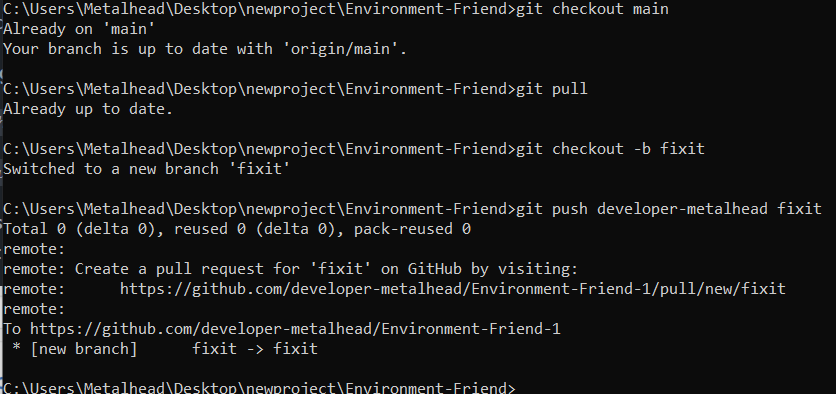\n\n"))),(0,i.kt)("li",{parentName:"ol"},(0,i.kt)("p",{parentName:"li"},(0,i.kt)("strong",{parentName:"p"},"Make a pull request.")," If you then go to your fork on GitHub, you should\nsee a button to create a pull request from your branch. It will look\nsomething like this. Click compare & pull request button"),(0,i.kt)("p",{parentName:"li"}," ",(0,i.kt)("img",{parentName:"p",src:"https://user-images.githubusercontent.com/85233682/133379244-21207e4e-28a0-40d6-a843-05ce5f800d73.png",alt:"image"})),(0,i.kt)("p",{parentName:"li"},"Enter a descriptive title in the title field ",(0,i.kt)("font",{color:"blue"},"\u2462"),".\nThis is very important, as it is what will show up in the pull request\nlisting and in email notifications to the people in the repo. Pull requests\nwith undescriptive titles are more likely to be passed by. If the pull\nrequest fixes an issue, I recommend putting the issue number in the pull\nrequest description ",(0,i.kt)("font",{color:"blue"}
1,"\u2463"),", not the title"),(0,i.kt)("p",{parentName:"li"}," ",(0,i.kt)("img",{parentName:"p",src:"https://user-images.githubusercontent.com/85233682/133379414-68fac6b6-64cb-4785-bb37-7eea2dfe39e7.png",alt:"image"}),"\n"))),(0,i.kt)("h3",{id:"important-points"},"Important points"),(0,i.kt)("ol",null,(0,i.kt)("li",{parentName:"ol"},(0,i.kt)("p",{parentName:"li"},"You only need to clone and fork once per repository.")),(0,i.kt)("li",{parentName:"ol"},(0,i.kt)("p",{parentName:"li"},"Always clone from the main repository and add your fork as a remote.")),(0,i.kt)("li",{parentName:"ol"},(0,i.kt)("p",{parentName:"li"},"Never commit to master. Create a branch and commit to it.")),(0,i.kt)("li",{parentName:"ol"},(0,i.kt)("p",{parentName:"li"},"Use ",(0,i.kt)("inlineCode",{parentName:"p"},"git status")," often to check what branch you are on and see if you have\nany uncommitted changes.")),(0,i.kt)("li",{parentName:"ol"},(0,i.kt)("p",{parentName:"li"},"Be descriptive in your branch names, commit messages, and pull request\ntitle and descriptions.")),(0,i.kt)("li",{parentName:"ol"},(0,i.kt)("p",{parentName:"li"},"Once you have a pull request for a branch, you can push additional changes\nto the same branch and they will be added to the pull request\nautomatically. You should never create a new pull request for the same\nbranch.")),(0,i.kt)("li",{parentName:"ol"},(0,i.kt)("p",{parentName:"li"},"Comment on the pull request when you want people to know that you have\npushed new changes. Although GitHub does notify people of commit pushes,\npeople are more likely notice your changes if you leave a comment."))),(0,i.kt)("h2",{id:"github-actions"},"Github actions"),(0,i.kt)("p",null,"Github action is a platform to automate developer workflows."),(0,i.kt)("p",null,"When something happens ",(0,i.kt)("strong",{parentName:"p"},"IN or TO your repository")," --\x3e ",(0,i.kt)("strong",{parentName:"p"},"automatic ACTIONS")," are executed in response"),(0,i.kt)("table",null,(0,i.kt)("thead",{parentName:"table"},(0,i.kt)("tr",{parentName:"thead"},(0,i.kt)("th",{parentName:"tr",align:"left"},(0,i.kt)("strong",{parentName:"th"},"Listen to event")),(0,i.kt)("th",{parentName:"tr",align:"center"},(0,i.kt)("strong",{parentName:"th"},"Trigger Workflow")))),(0,i.kt)("tbody",{parentName:"table"},(0,i.kt)("tr",{parentName:"tbody"},(0,i.kt)("td",{parentName:"tr",align:"left"},"Issue Created"),(0,i.kt)("td",{parentName:"tr",align:"center"},"Sort/Label/Assign")),(0,i.kt)("tr",{parentName:"tbody"},(0,i.kt)("td",{parentName:"tr",align:"left"},"Contributor joined"),(0,i.kt)("td",{parentName:"tr",align:"center"},"Direct them to a good first issue")))),(0,i.kt)("p",null,"Other events: PR Created, PR merged"),(0,i.kt)("p",null,"Some template Workflows:"),(0,i.kt)("p",null,(0,i.kt)("img",{parentName:"p",src:"https://user-images.githubusercontent.com/85233682/133416528-c5f50104-24ff-4849-8c71-44650bbf0444.png",alt:"image"})),(0,i.kt)("p",null,(0,i.kt)("img",{parentName:"p",src:"https://user-images.githubusercontent.com/85233682/133416716-735156ea-c7e4-4bfe-b110-9bc782428f42.png",alt:"image"})),(0,i.kt)("p",null,(0,i.kt)("img",{parentName:"p",src:"https://user-images.githubusercontent.com/85233682/133416765-5e33f9e0-d24f-4e29-8360-b5e17ab06dae.png",alt:"image"})))}m.isMDXComponent=!0}}]);
Line numbers count LF bytes from the start of the resource, as the search results do. Vendor segments are library code the classifier recognised; they are stored but not indexed. Bytes are shown as Latin1 characters, one per byte.